.avif)
TL;DR
- Salesloft offers solid sales engagement features but has pricing and usability limitations
- Top alternatives include Cognism, Outreach, Apollo, ZoomInfo, and SalesRobot for different needs
- Cognism excels at data quality with phone-verified contacts, while Outreach leads in enterprise sales engagement
- Apollo and ZoomInfo offer all-in-one solutions at different price points
- SalesRobot focuses on LinkedIn automation with AI-powered personalization and appointment setting
Important 2026 update: Salesloft merged with Clari on December 3, 2025. The combined company now operates as Clari + Salesloft under CEO Steve Cox, positioning itself as a 'Predictive Revenue System.' This merger may affect pricing, and product roadmap for new and renewing customers in 2026.
Are You Drowning in Salesloft's Monthly Bills While Your Reply Rates Stay Stubbornly Low?
Nothing stings quite like watching your sales engagement platform eat up thousands of dollars each month while your outbound campaigns perform like a soggy paper airplane. ✈️
If you're nodding along, you're not alone. Salesloft has become the default choice for many sales teams, but let's be honest: default doesn't always mean best.
Maybe you're tired of paying premium prices for features you barely use. Or perhaps your team is outgrowing Salesloft's capabilities faster than your budget can keep up. The dialer costs extra (surprise! 💸), the platform feels buggy, and that monthly bill keeps climbing.
This post takes an honest look at what Salesloft actually delivers in 2026, then dives deep into five solid alternatives that might just save your sanity (and your wallet):
→ Cognism
→ Outreach
→ Apollo
→ ZoomInfo
→ And, SalesRobot.
Salesloft: What You Need to Know

The Good, The Bad, and The Expensive
✅ Comprehensive sales engagement platform
Salesloft brings together email sequencing, call management, and pipeline tracking in one unified system. This means your sales team can execute multi-touch campaigns without juggling between different tools all day.
⚠️ Steep learning curve for new users
The platform packs so many features that it can feel overwhelming when you first dive in. Expect to invest serious time in training your team, especially if they're coming from simpler tools.
✅ Powerful automation and sequencing
You can set up sophisticated email and call sequences that automatically adjust based on prospect behavior. The system tracks opens, clicks, and responses to intelligently pause or continue sequences without manual intervention.
✅ Excellent CRM integrations
Salesloft plays nicely with Salesforce, HubSpot, and other major CRMs, syncing data seamlessly. Your reps won't have to deal with the headache of manually updating records across multiple platforms.
⚠️ Price can be prohibitive for smaller teams
The platform comes with enterprise-level pricing that might make smaller companies think twice. You'll need to weigh the ROI carefully if you're working with a tight budget—especially since the dialer is an expensive add-on.
✅ Robust analytics and reporting
The dashboard gives you deep insights into:
- Team performance metrics
- Email engagement rates
- Pipeline velocity
- Rep activity tracking
- Conversion rates by stage
You can spot bottlenecks and optimize your sales process based on real data instead of guesswork.
⚠️ Limited customization options
While Salesloft offers plenty of features out of the box, customizing workflows to match your specific sales process can be challenging. Some teams find themselves adapting their process to fit the tool rather than the other way around.
✅ Strong customer support and training resources
Salesloft provides comprehensive onboarding, regular training sessions, and responsive support when issues arise. Their customer success team actually helps you optimize your sales processes, not just troubleshoot technical problems.
⚠️ Platform can be buggy
Multiple users report workflow disruptions, occasional crashes, and integration glitches. The focus on releasing new features sometimes impacts the stability of existing ones.
Salesloft's Key Features, Broken Down
Cadence Builder
Create automated sequences that combine emails, calls, and social touches to nurture prospects systematically.
Example: Set up a 10-step cadence that starts with a LinkedIn connection request, follows with three emails spaced over two weeks, and includes reminder tasks for phone calls. If someone opens your email but doesn't reply, the system can automatically trigger a different follow-up sequence.
Conversation Intelligence
Record, transcribe, and analyze your sales calls to identify what messaging resonates with prospects:
- AI highlights talk-time ratios
- Flags competitor mentions
- Identifies key phrases correlating with closed deals
- Tracks buying signals and objections
Managers can review call recordings to coach reps on objection handling. The system flags moments when prospects express buying signals or concerns.
Email Tracking and Templates
Track engagement across all your email outreach:
- Open rates and click-through rates
- Reply rates by campaign
- Built-in templates for consistent messaging
- A/B test subject lines and content
- Prevents duplicate emails to the same prospect
Dialer and Local Presence 💰 (Add-On Required)
Important: The dialer is NOT included in base pricing—it costs an additional $300-400/user/year.
Make calls directly from the platform with:
- Local area codes to increase answer rates
- Automatic call logging
- One-click pre-recorded voicemails
- Call recording
When calling prospects in Chicago, the system displays a Chicago number on their caller ID, typically improving connection rates by 20-30%.
Analytics and Forecasting
Get detailed reports on:
- Activity metrics and conversion rates
- Pipeline health across your entire sales team
- Rep performance against goals
- Deal stall identification
- AI-driven sales forecasting that identifies pipeline risks and tracks weekly trends
CRM Integration and Data Sync
Seamlessly sync with:
- Salesforce
- HubSpot
- Microsoft Dynamics
- Other major CRMs
Activities logged in Salesloft appear in your CRM automatically. When a prospect replies to your email or answers a call, the interaction details flow directly into their CRM record—no manual data entry needed.
Salesloft Pricing: How Much Will It Cost?
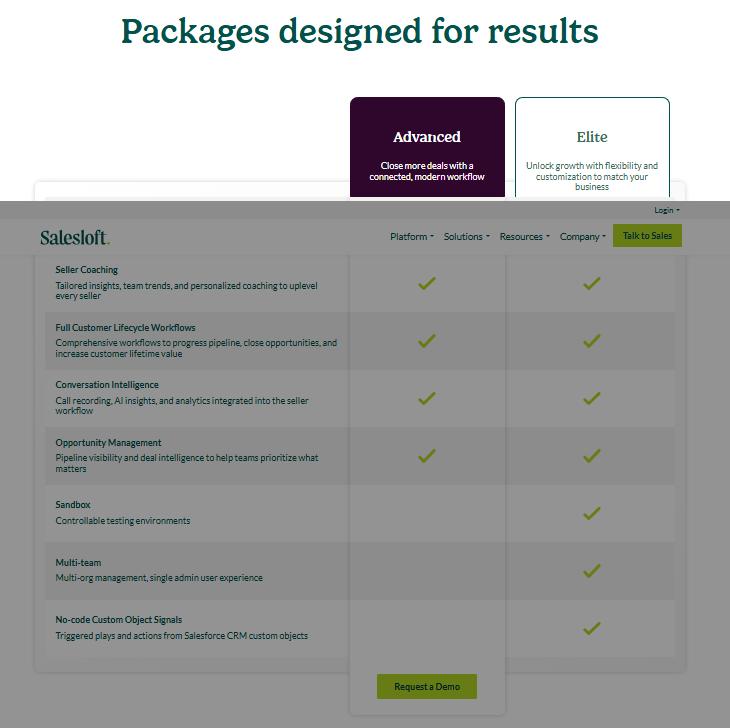
Salesloft doesn't publish transparent pricing on their website, requiring prospects to contact sales for custom quotes. Based on extensive industry reports and verified user feedback from 2026, here's what you can expect to pay.
The Real Pricing Structure
Here is the full updated Salesloft pricing section, ready to drop straight into the blog:
Salesloft Pricing: How Much Will It Cost?
Salesloft does not publish pricing on their website. To get a quote, you need to contact their sales team directly for custom pricing based on your team size, contract length, and selected add-ons.
Important 2026 update: Salesloft merged with Clari on December 3, 2025. The combined company now operates as Clari + Salesloft under CEO Steve Cox. This merger may affect packaging, pricing, and product roadmap for new and renewing customers.
The Real Pricing Structure
Salesloft currently offers two packages:
Advanced Plan
Designed for revenue teams that need to build pipeline, increase revenue, convert deals, and win customers.
Includes
- Pipeline generation tools that automate outreach sequences and provide engagement analytics
- Seller coaching with team insights and personalized performance recommendations
- Full customer lifecycle workflows, helping teams progress deals and improve retention
- Conversation intelligence for call recording, transcription, and AI-driven coaching
- Opportunity management to visualize pipelines, identify risks, and forecast more accurately
- CRM sync and engagement analytics built into the platform
Elite Plan
Everything in Advanced, plus:
- Orchestration of sales activity across multiple teams and regions
- Advanced Salesforce integration and admin flexibility
- Advanced controls and highly customizable automation
- Deeper analytics and broader workflow customization for larger, process-mature organizations
Bottom line: While Salesloft doesn't publish official pricing. For exact pricing, you'll need to contact Salesloft's sales team and be prepared to negotiate hard.
5 Alternatives to Salesloft: Which One Actually Fits?
Now that you've seen what Salesloft brings to the table (and what it'll cost you 💰), let's look at five other options that might better match your specific needs.
1. Cognism 🎯
Cognism is a B2B data provider with phone-verified mobile numbers and real-time buying signals.
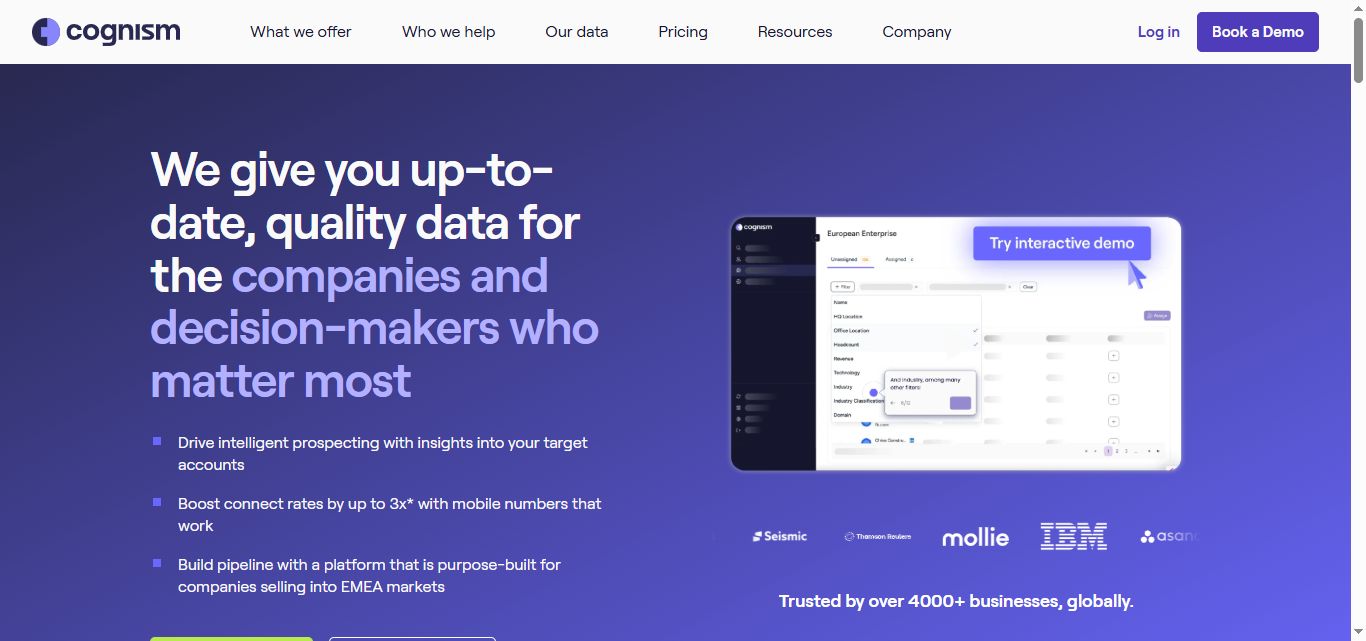
What it does: Cognism focuses heavily on premium B2B data with their Diamond Data® verification system. They're built for teams that need verified mobile numbers and buying signals more than automation workflows.
Stands Out For
Phone-Verified Mobile Numbers (Diamond Data®)
- 10M+ phone-verified contacts globally
- 98% accuracy rate on verified numbers
- 3x connection rate vs. unverified data
- Each number manually verified by Cognism's team
- Connect with decision-makers every 8 dials on average
Diamonds-on-Demand® Service
- Submit high-priority prospects for verification
- Get verified mobile numbers in less than 48 hours
- Perfect for must-reach targets
Real-Time Buying Signals
- Hiring trends and job changes
- Funding alerts and acquisitions
- Technology adoption signals
- Executive appointments
- Company expansions
Compliance-First Approach
- GDPR & CCPA compliant
- Do-not-call list checking in 15+ countries
- Industry-leading compliance engine
- Strongest European data coverage (2-3x more EMEA contacts than US competitors)
Technographic Data
- Database of 20,000+ technologies
- Identify what products prospects use
- See how long technologies have been in use
- Pitch complementary or competitive solutions at the right time
Intent Data Integration
- Bombora Company Surge® data included
- Select up to 12 intent topics from 11,000+ options
- Identify accounts actively researching your solutions
Pricing Structure
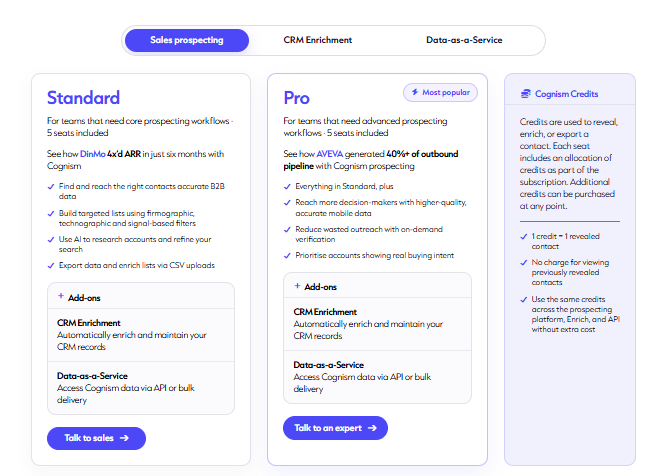
Cognism does not publish pricing on their website. All quotes are custom and require a sales conversation.
Cognism structures its Sales Prospecting product into two packages:
Standard Plan
For teams that need core prospecting workflows. Includes 5 seat
- Access to Cognism's core B2B contact database, email addresses, and basic mobile numbers
- The Chrome extension and standard CRM integrations with Salesforce and HubSpot
- Core prospecting and company data
- Does not include phone-verified mobile numbers or intent data
Pro Plan
For teams that need advanced prospecting workflows. Includes 5 seats. Most popular.
Everything in Standard, plus:
- Intent data, on-demand mobile verification, and enhanced dashboards
- Diamond Data, the phone-verified mobile numbers with a claimed 98% accuracy rate
- Bombora-powered intent data and Diamonds-on-Demand, a concierge research service
Both plans use Cognism Credits. One credit equals one revealed contact. No charge for viewing previously revealed contacts. Credits can be used across the prospecting platform, Enrich, and API without extra cost.
Best If You:
✅ Prioritizing data quality over automation features
✅ Need verified mobile numbers for cold calling
✅ Operating in EMEA markets (strongest coverage)
✅ Require strict GDPR/CCPA compliance
✅ Budget allows for premium data investment
Watch Out For:
⚠️ No public pricing—requires sales conversation
⚠️ High entry cost (requires a sales conversation to get a quote; no self-serve pricing available)
⚠️ Annual commitment required
⚠️ Fair use policy limits not contractually specified
⚠️ Less automation compared to Salesloft/Outreach
2. Outreach ⚡
Outreach is an enterprise sales execution platform with AI-powered workflows and conversation intelligence.
What it does: The enterprise-grade sales execution platform that powers large sales teams. Outreach handles everything from sequences to deal management, but it's built for organizations with complex needs and dedicated sales ops teams.
Stands Out For
AI Revenue Agent Platform
- AI agents power hundreds of revenue use cases
- Workflow-first approach to sales execution
- By the end of 2026, 40% of enterprise applications will feature these agents, up from less than 5% in 2025
- Account and prospect enrichment and targeting
- AI personalization and engagement
- Orchestrates every stage of the sales process
60% Increase in Seller Productivity (user-reported)
- Automates repetitive tasks so reps focus on selling
- Surfaces best-fit prospects automatically
- Recommends next best actions
- Reduces prep time and admin work significantly
Strongest Deal Inspection Features in Market
- Unified view of all deals with AI risk scoring
- Deal health scores based on engagement patterns
- Identify at-risk opportunities before they die
- Mutual action plans shared with buyers
- Account and relationship mapping
- Proactive risk alerts with recommended actions
Sales Engagement & Execution
- Multi-channel sequences (email, calls, SMS, LinkedIn tasks)
- Smart Email Assist with AI personalization
- AI sentiment analysis on email replies (Positive, Objection, Referral, etc.)
- Automatic follow-ups and out-of-office detection
- Bi-directional CRM sync (Salesforce, HubSpot)
- Automated calendar scheduling
Conversation Intelligence (Meet/Kaia)
- Real-time call transcription and recording
- AI-powered meeting insights and summaries
- Spot coaching opportunities in real-time
- Voice analytics and buyer sentiment tracking
- Post-meeting action items auto-generated
Revenue Forecasting & Analytics
- AI-driven predictive forecasting
- Scenario modeling for planning
- Deal velocity tracking by stage
- Comprehensive analytics dashboards
Pricing Structure
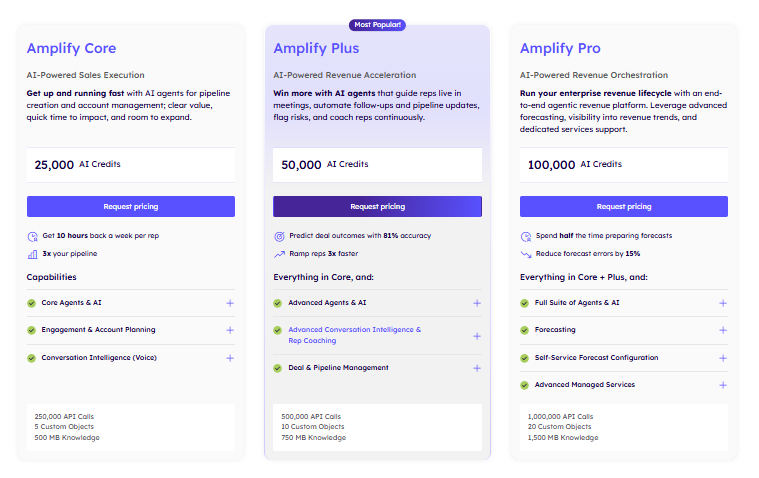
Outreach does not publish pricing on their website. All packages require requesting a custom quote.
Outreach currently offers three packages under the Amplify suite:
Amplify Core
AI-Powered Sales Execution. Get up and running fast with AI agents for pipeline creation and account management
Amplify Plus (Most Popular)
AI-Powered Revenue Acceleration. Win more with AI agents that guide reps live in meetings, automate follow-ups and pipeline updates, flag risks, and coach reps continuously.
Everything in Core, plus:
Amplify Pro
AI-Powered Revenue Orchestration. Run your enterprise revenue lifecycle with an end-to-end agentic revenue platform.
Everything in Core and Plus, plus
Request pricing for any plan
Best If You:
✅ Running large sales organization (50+ reps)
✅ Need enterprise features and governance
✅ Workflow automation is top priority
✅ Already using Salesforce or HubSpot heavily
✅ Complex, multi-stage sales processes
Watch Out For:
⚠️ Steep learning curve for new users
⚠️ Frequent bugs and glitches reported
⚠️ Slow customer support response times
⚠️ Expensive implementation for complex setups
⚠️ Sequences stop after conversations—requires manual next steps
⚠️ No built-in prospect database (need separate data tool)
3. Apollo 🌟
Apollo is an all-in-one sales intelligence platform with a 275M+ contact database and built-in email automation.

What it does: Apollo combines prospecting, engagement, and deal management in one platform. It's the Swiss Army knife approach—giving you a massive B2B database plus automation tools without the enterprise complexity or price tag.
Stands Out For
275M+ Contact Database
- 275 million contacts, 73 million companies
- 200+ advanced filters:
- — Job title, seniority, department
- — Company size, revenue, funding stage
- — Industry, location, technologies used
- — Hiring signals and intent data
- Buying intent signals (Bombora integration on higher tiers)
- Technographic data
All-in-One Platform Saves Money
- Replaces data provider, email tool, dialer, and parts of CRM
- Saves $500-2,000+/month vs. buying separate solutions
- Apollo offers affordable plans and price points for one-person startups to Fortune 500 companies and everyone in between
- Especially valuable for startups and small teams
Free Plan That's Actually Useful
- 75 credits per seat per month
- 2 sequences
- Prospecting,
- Gmail and Salesforce Extensions
- Basic Filters
- AI Assistant (5 chat limit)
- AI Research
- No credit card required
Sales Engagement Features
- Multi-step email sequences with A/B testing
- Auto follow-ups and reply detection
- Click-to-call with local presence
- Call recording and transcription (higher tiers)
- Task automation
- Meeting scheduling
Data Enrichment
- Waterfall enrichment from 18 providers
- CSV upload for list enrichment
- Real-time CRM enrichment
- Job change alerts
CRM Integration
- Bi-directional sync with Salesforce and HubSpot
- Enrich existing CRM records
- Push prospecting activity to CRM automatically
Pricing Structure
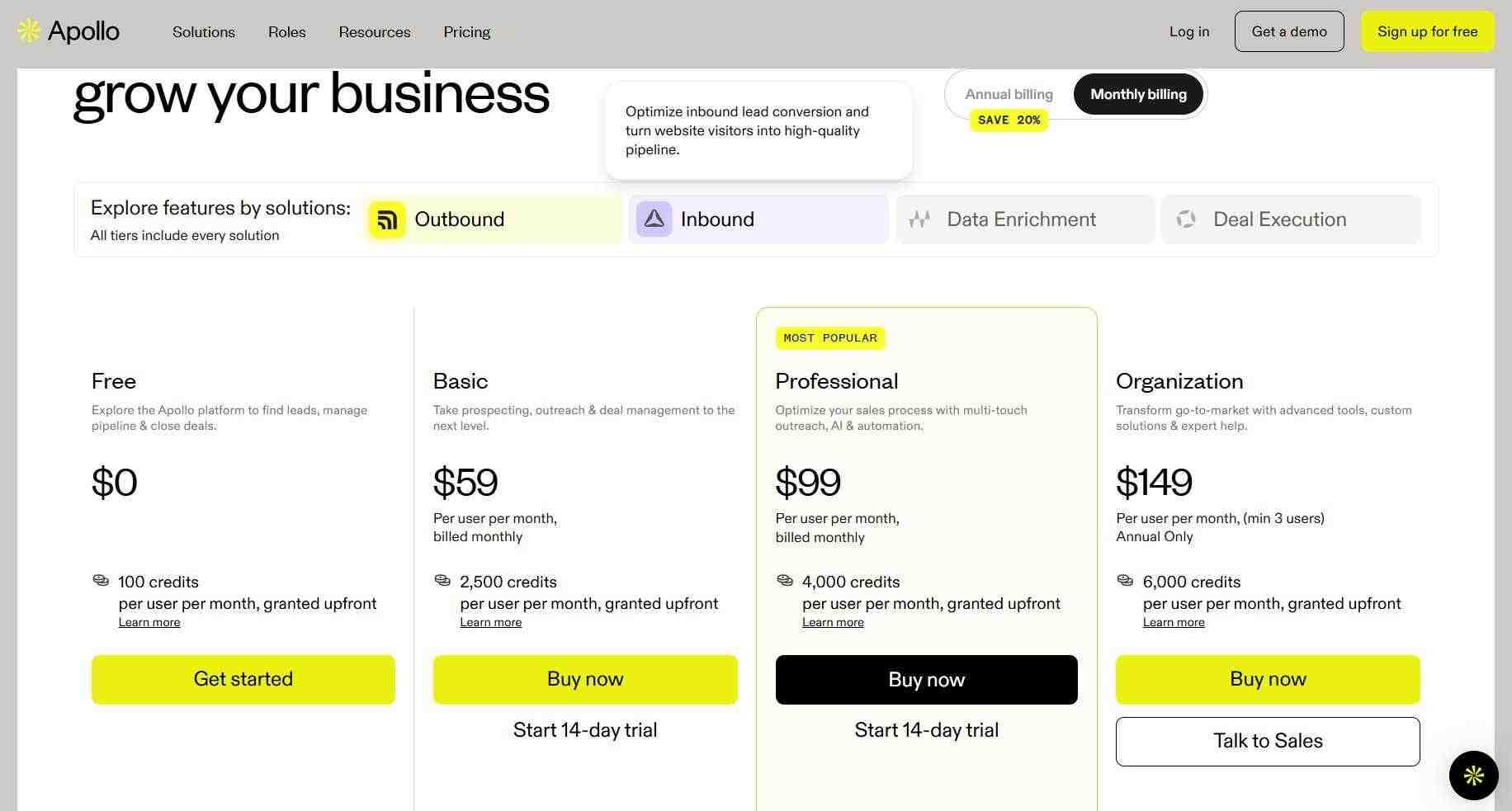
Free Trial Plans: $0/month
- 75 credits per seat per month,
- granted upfront
AI Assistant (5 chat limit) - AI Research
- 2 Sequences
Prospecting, - Gmail and Salesforce
- Extensions
Basic Filters
Basic Plan: $49/user/month (annual) or $59/month (monthly)
- 2,500 credits per seat per month, granted upfront"
- Unlimited email credits
- Unlimited sequences
- Advanced filters
- CRM integrations
- 3 meeting scheduler events
- 6 intent topics
- US dialer access
- Data enrichment
Professional Plan: $79/user/month (annual) or $99/month (monthly) ⭐ Most Popular
- 4,000 credits per seat per month, granted upfront
- Everything in Basic, plus:
- A/B testing for emails
- 6 meeting scheduler events
- Unlimited mailboxes
- Automated workflows
- 4,000 minutes call recording with AI insights
- Analytics dashboards
- Projects feature
Organization Plan: $119/user/month (annual) or $149/month (monthly)
- 8,000 credits per seat per month, granted upfront
- Everything in Professional, plus:
- International dialer
- 8,000 minutes call recording with AI insights
- Unlimited customizable reports & dashboards
- Advanced security configurations
- Single Sign-On (SSO)
- Team management features
Additional Notes:
- Credits expire at end of billing cycle
- Mobile numbers cost 8 credits each
- Annual billing saves 20%
Best If You:
✅ Want all-in-one solution without enterprise price tag
✅ Small to mid-sized team (5-50 reps)
✅ Email-first prospecting strategy
✅ Target US markets primarily
✅ Budget under $150/user/month
✅ Need to test with free plan first
Watch Out For:
⚠️ Data accuracy varies (75-85% email accuracy)
⚠️ Phone numbers less reliable than email data
⚠️ Confusing credit system—credits expire monthly
⚠️ LinkedIn tasks require manual execution (not true automation)
⚠️ Weaker European data coverage
⚠️ Not ideal for heavy cold calling
4. ZoomInfo 📊
ZoomInfo is a comprehensive B2B intelligence platform providing extensive contact data, intent signals, and technographics.

What it does: The data giant that most large enterprises rely on for contact and company intelligence. ZoomInfo is less about automation and more about powering your existing tools with comprehensive B2B data.
Stands Out For
Massive Database Coverage
- Most comprehensive B2B database available
- Extensive company profiles with detailed firmographics
- Direct dial phone numbers and verified emails
- Organizational charts and reporting structures
- Contacts at all seniority levels
Intent Data & Buying Signals
- Track companies actively researching solutions
- Website visitor identification
- Content consumption tracking
- Search behavior signals
- Prioritize accounts showing buying intent
Technographic Intelligence
- 20,000+ technologies tracked
- See full tech stack of target companies
- Identify technology adoption timing
- Find companies using competitor products
Market Intelligence
- Funding and M&A data
- Growth indicators and hiring trends
- Company news and announcements
- Industry insights
Data Accuracy & Quality
- Confidence scores on contact profiles
- Regular verification processes
- ZoomInfo Community Edition for crowdsourced updates
- Multiple data sources combined
Sales Engagement Platform Integration
- Native integrations with major sales engagement platforms
- ZoomInfo Engage for sales outreach automation
- Combined data and engagement capabilities
Pricing Structure

Important: ZoomInfo doesn't publish pricing. All prices are custom quotes based on:
- Number of licensed users
- Estimated monthly export volumes
- Global Data Passports (if needed)
- Add-on products selected
- Contract length
Typical Costs (based on user reports):
- Entry-level: Starts around $15,000+/year minimum
- Mid-market: $30,000-100,000+/year
- Enterprise: $100,000-500,000+/year
Pricing Factors:
- Requires longer-term contractual commitment (typically annual minimum)
- No rolling monthly subscriptions
- Volume significantly impacts per-user costs
- Global data access requires additional "passports"
- Integration with conversation intelligence priced separately
Add-On Products:
- ZoomInfo Engage (sales engagement platform)
- ZoomInfo Chat (website chat)
- Conversation intelligence solutions
- Various data packages and integrations
Best If You:
✅ Large enterprise organization (100+ users)
✅ Need comprehensive data to feed existing sales/marketing tools
✅ Budget allows for significant data investment
✅ Require deep technographic and intent data
✅ Multiple departments need access (sales, marketing, recruiting)
✅ Global coverage requirements
Watch Out For:
⚠️ Extremely high cost—not for small teams
⚠️ Minimum commitments and long contracts
⚠️ No transparent pricing
⚠️ Complex contract negotiations required
⚠️ Overkill for teams that just need basic prospecting
⚠️ US-centric data (weaker international coverage)
5. SalesRobot 🤖
What it does: SalesRobot is built specifically for LinkedIn outreach, which is where most B2B conversations actually start these days. Instead of trying to be everything to everyone, they focus on making LinkedIn automation feel human and effective.

While other tools treat LinkedIn as an afterthought (or require manual execution), SalesRobot makes it the centerpiece with features no one else offers.
Stands Out For
AI Variables for Hyper-Personalization 🎯 Unlike basic "Hi {FirstName}" personalization, SalesRobot's AI Variables automatically reference:
- Recent company news and announcements
- Mutual connections
- Professional achievements
- Shared interests
- Recent posts and activity
AI Smart Comment Variables scan your prospect's profile and generate personalized comments that sound completely human—not like a bot wrote them.
Voice & Video Messages 🎥 (Game-Changer!) This is huge. You can now skip boring text-only LinkedIn DMs that get ignored:
- Record ONE voice message, it sends to all prospects automatically
- Record ONE video message, same thing—automated to hundreds
- Get 3x more responses because prospects hear your personality
- Stand out from the 99% sending generic text
- Clone your voice for authentic-sounding personalized messages
AI Appointment Setter 🗓️ (24/7 SDR) This feature is like having a full-time SDR that never sleeps:
Two Modes:
- Copilot Mode: AI generates replies based on your goals, but you edit before sending (you stay in control)
- Autopilot Mode: AI generates AND sends replies automatically based on goals you set (perfect for high-volume)
What It Does:
- Auto-responds when prospects reply to your campaigns
- Asks discovery questions
- Handles objections
- Books meetings directly on your calendar
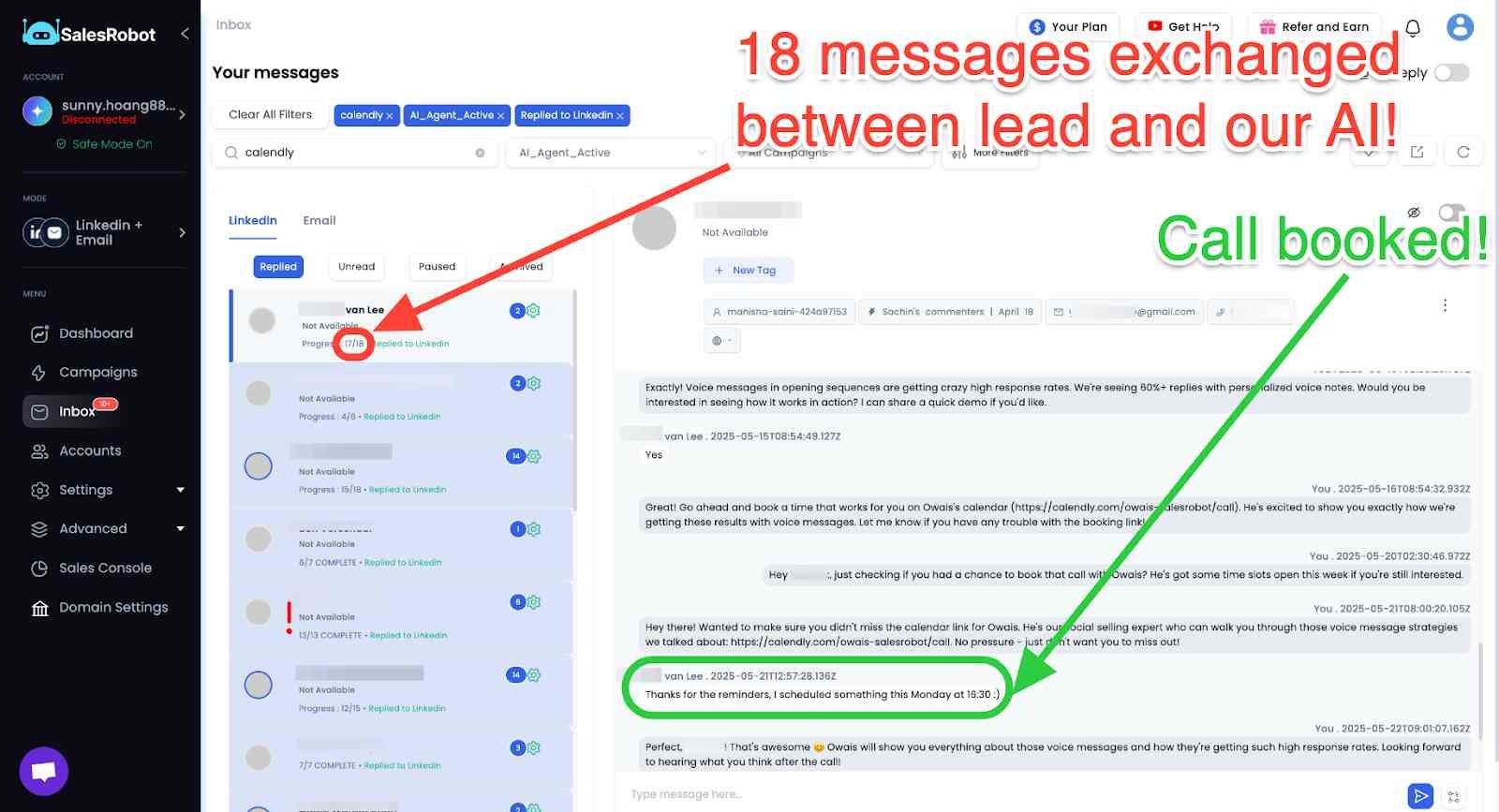
- Follows up automatically at the right times
- Mimics your conversation tone
- Has time awareness—schedules follow-ups based on conversation context
Real user (Jason from Nexa Mortgage) uses it to handle conversations when he's unavailable, ensuring "engagement is happening in real time even when he's focused on his primary business."
Walk into calls where prospects have already had a discovery chat. No more cold leads who barely remember you.
Double-Channel Outreach (LinkedIn + Email)
- Run campaigns on both LinkedIn and email simultaneously
- Coordinate timing across channels intelligently
- Unified inbox combines all conversations
- Higher engagement through multiple touchpoints
Native LinkedIn Automation with Safety Features
- Cloud-based operation (no browser extensions that break)
- Built-in safe mode and smart throttling
- Dedicated IPs for account protection
- Adaptive limits to mimic human behavior
- One of the safest LinkedIn automation tools available
Campaign Features
- Unlimited campaigns on all plans
- AI campaign creator helps build sequences
- Pre-built templates that feel personal without the effort
- A/B testing capabilities
- GIF and image support in messages
- CSV export of results
Unified Inbox Management
- All LinkedIn and email conversations in one place
- Team collaboration features
- Activity tracking and analytics
- Never miss a reply
The AI Variables feature makes sure that you'll never waste time researching on a prospect, or drafting a message for them because it's got all that covered. Just click on one of our pre-made templates, and let the AI do it's job.

Analytics & Reporting
- Detailed campaign performance tracking
- Connection acceptance rates
- Reply rates and engagement metrics
- Lead generation metrics
- ROI measurement
Pricing Structure
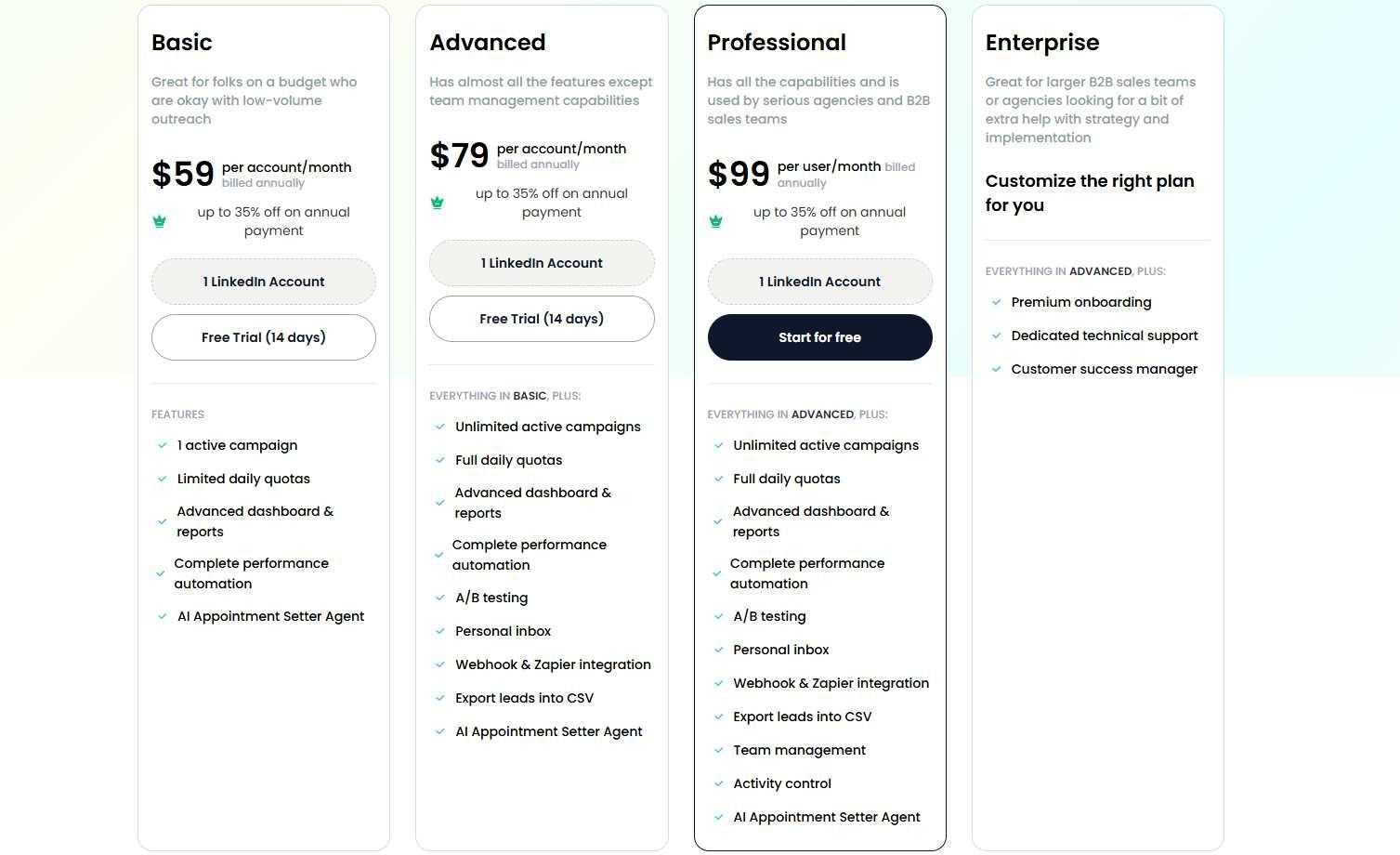
Basic Plan: $59/month (monthly)
- 1 LinkedIn account
- Unlimited campaigns
- AI Variables
- AI Smart Comments
- Voice & Video messages
- AI Appointment Setter included
- Basic email integration
- Campaign templates
- Analytics dashboard
- Email support
Advanced Plan: $79/month (monthly) ⭐ Most Popular
- 1 LinkedIn account
- Everything in Basic, plus:
- Unlimited campaigns
- Full daily quotas
- A/B testing
- Personal inbox
- Zapier/webhook integration
- CSV export
- Priority support
Professional Plan: $99/month (monthly)
- 1 LinkedIn account
- Everything in Advanced, plus:
- Team management
- Activity control
- Advanced analytics
- Dedicated support
Email Outreach Add-On:
- $15/email account/month
- Lets you add email to contact lists
- Same automation features for cold email
Key Advantages:
- No setup fees or hidden costs
- 14-day free trial (no credit card required)
- Month-to-month billing available
- Immediate activation start prospecting today
- AI Appointment Setter included in all plans
- Voice & Video features included
- Cancel anytime (no annual lock-in required)
Best If You:
✅ Main challenge is filling top of funnel with qualified prospects
✅ Target B2B decision-makers active on LinkedIn (spoiler: they all are)
✅ Want LinkedIn automation that feels human, not robotic
✅ Need AI to handle conversations and book meetings automatically
✅ Want voice/video personalization competitors can't match
✅ Small to mid-sized team with tight budget
✅ Want to test before committing (14-day free trial)
✅ Need quick wins and fast time-to-value
Watch Out For:
⚠️ Focused on prospecting stage (not full sales cycle management)
⚠️ No conversation intelligence or call analysis like Salesloft
⚠️ LinkedIn automation carries platform risk (though built-in safeguards help)
⚠️ Not a replacement for full sales engagement platforms
⚠️ Limited to LinkedIn + email (no phone/SMS dialing)
The Reality: If your team does serious LinkedIn prospecting (and let's be honest, every B2B team should), SalesRobot's focused approach often delivers better results than jack-of-all-trades alternatives.
The AI Appointment Setter alone can replace a full-time SDR, and the voice/video features are something Salesloft, Outreach, and Apollo simply don't offer.
The Verdict
Here's the truth: there's no perfect sales engagement platform. Each tool excels in different areas, and your choice should match your team's specific needs and budget. 🎯
Salesloft remains the gold standard for enterprise teams who need every bell and whistle and can afford the premium price tag (plus add-ons). But for most growing businesses, you can get 80-90% of the results at a fraction of the cost with the right alternative.
The sweet spot? Start with what solves your biggest pain point right now, then expand as you scale. Most teams waste months evaluating features they'll never use instead of just getting started and generating revenue.
Bottom Line
Enterprise teams with big budgets ($150K-300K+/year):
Stick with Salesloft or Outreach. You need the advanced features, can handle complex implementation, and can afford them. Just remember to negotiate hard and bundle the dialer upfront.
Data-hungry teams needing verified contacts:
Cognism offers Diamond Data® phone-verified mobile numbers with 98% accuracy. If cold calling is your primary channel and you need European coverage, they're worth the premium price ($15K-25K platform fee + per-user costs).
Budget-conscious teams wanting all-in-one:
Apollo gives you prospecting data + automation for $59-149/user/month. The trial plan is actually useful for testing. Perfect for small to mid-sized teams targeting US markets with email-first strategies.
Large enterprises needing comprehensive data:
ZoomInfo provides the deepest database coverage, intent data, and technographics. Expect $50K-500K+/year depending on size. Overkill for small teams, essential for enterprise go-to-market motions.
LinkedIn-focused teams wanting fast results:
SalesRobot automates your LinkedIn outreach better than anyone else, at a price that won't make your CFO cry ($59-99/month).
Why SalesRobot is different:
- AI Variables personalize at scale (beyond basic merge tags)
- Voice & Video messages get 3x more responses
- AI Appointment Setter books meetings automatically while you sleep
- Works in the cloud (no sketchy browser extensions)
- 14-day free trial, no credit card required
If you're still unsure, start with SalesRobot's free trial. It takes 5 minutes to set up, costs nothing to test, and you'll quickly see if LinkedIn automation with AI fits your sales process.
The best tool is simply the one you'll actually usean, d the one that starts generating pipeline this week, not next quarter. 🚀
Ready to automate your LinkedIn outreach with AI?

Wow your leads by cloning yourself and sending personalized videos and voice notes to each lead on LinkedIn.
If you don't reply to leads within 5 mins, your chances of converting them fall by 50%. Our AI replies on your behalf instantly! (and yes, you can train it)

Don't shoot in the dark. Get detailed analytics on what's working

SalesRobot allows you to invite other team members, so that they can add their LinkedIn Account, run outreach campaigns and get amazing results just like you.
.avif)


Trusted by 4100+ innovative B2B sales teams and lead gen agencies

.avif)

.avif)




.avif)


Heading 1
Heading 2
Heading 3
Heading 4
Heading 5
Heading 6
Lorem ipsum dolor sit amet, consectetur adipiscing elit, sed do eiusmod tempor incididunt ut labore et dolore magna aliqua. Ut enim ad minim veniam, quis nostrud exercitation ullamco laboris nisi ut aliquip ex ea commodo consequat. Duis aute irure dolor in reprehenderit in voluptate velit esse cillum dolore eu fugiat nulla pariatur.
Block quote
Ordered list
- Item 1
- Item 2
- Item 3
Unordered list
- Item A
- Item B
- Item C
Bold text
Emphasis

Superscript
Subscript