.avif)
Scale client outreach without scaling your team
Run safe LinkedIn and multichannel campaigns for multiple clients, fully white labeled under your agency brand
.avif)


Why agencies choose SalesRobot
Everything agencies need to run, scale, and white label outreach for multiple clients
Run outreach for multiple clients from one platform
Manage campaigns, inboxes, and analytics for all your clients in one dashboard
White label SalesRobot as your own product
Add your logo, domain, and branding to deliver outreach as a premium agency service
Proven outreach without LinkedIn risk
Smart reply detection and human like automation protect every client account
Deliver results without manual work
Automated LinkedIn, email, videos, and voice notes reduce execution time per client
Agency pain points vs SalesRobot solution
Common agency challenges and how SalesRobot solves them at scale
Problem
Managing multiple client LinkedIn accounts is chaotic
Solution
SalesRobot lets you manage campaigns and conversations for all clients from one place
Problem
Clients worry about LinkedIn bans
Solution
Smart reply detection and safety limits keep client accounts secure long term
Problem
Generic outreach doesn’t justify agency retainers
Solution
Send personalized videos and voice notes at scale to deliver visible value to clients
Problem
Too much manual work per client
Solution
Automated drip campaigns and unified inbox reduce daily agency workload
whitelabel
Deliver outreach under your own agency brand
White label SalesRobot with your logo, brand colors, and custom domain. Deliver LinkedIn and multichannel outreach under your own brand without building software.
Your branding and domain
Complete customization with your logo and colors
Your client facing product
Present it as your own proprietary solution
No SalesRobot branding visible
Zero trace of our platform anywhere
Premium positioning for higher retainers
Command premium prices with your own tech
How it works
How SalesRobot works for agencies
Set up and manage client campaigns in minutes, not hours
Import leads from LinkedIn search, Sales Navigator, or CSV
Quickly bring in your prospect lists from multiple sources
Build LinkedIn and email drip campaigns
Create automated sequences with perfectly timed follow-ups
Add personalized videos and voice notes
Stand out with customized video and audio messages at scale
Launch with smart reply detection
Automatically pause campaigns when prospects respond
Respond from unified inbox and track analytics
Manage conversations and measure performance in one place
Agency specific features
Everything you need to deliver exceptional results for all your clients
.avif)
Campaigns
.avif)
.avif)
.avif)
APIs and Webhooks
Stand Out Feature
Help your clients stand out instantly
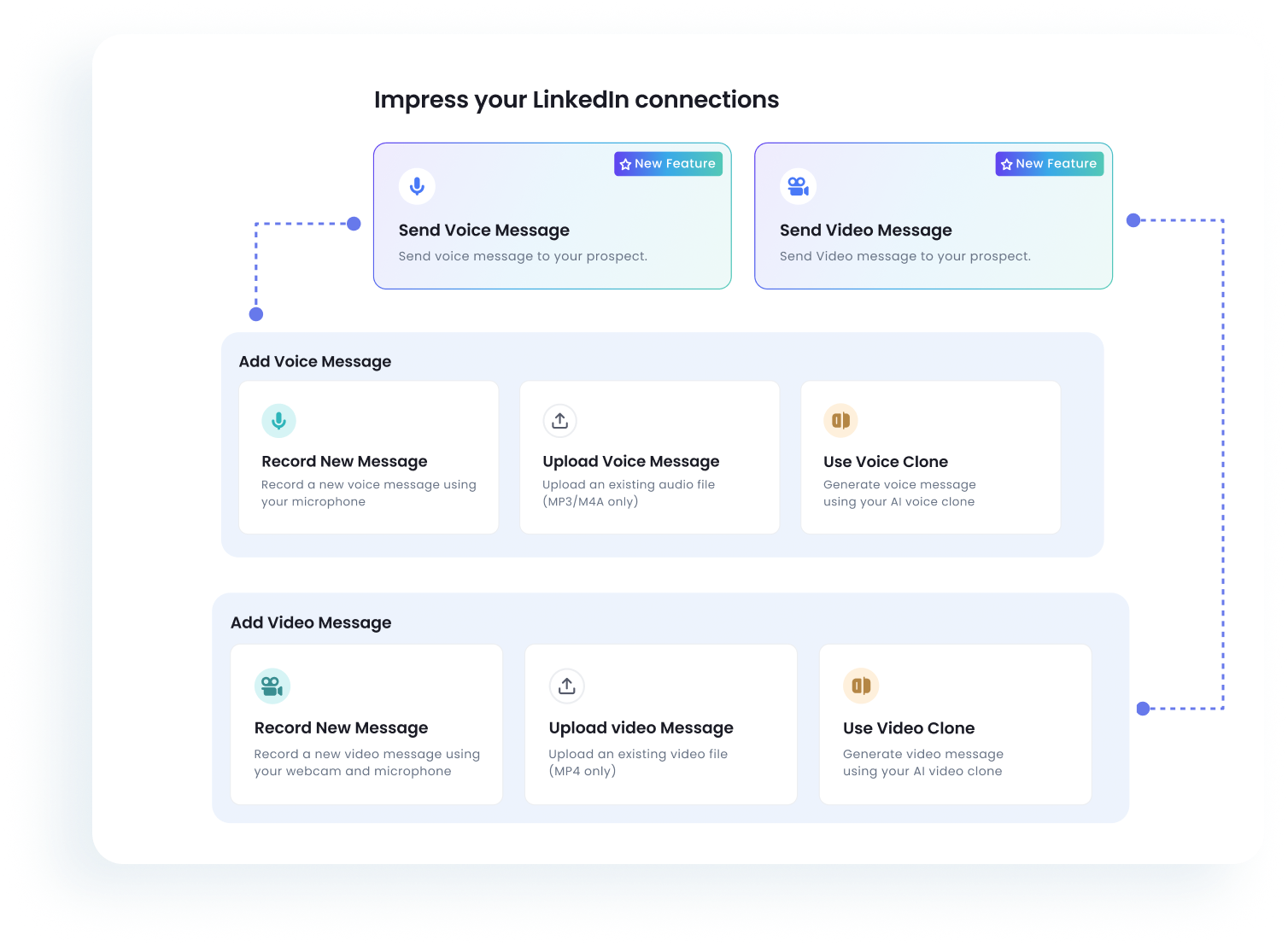
Send personalized videos and voice notes at scale using your clients’ voice or face to improve reply rates and client results.
Personalized Videos
At Scale
Voice Notes
Human Touch
Meetings Booked
+2.4x
Reply Rate Increase
+73%
Real results agencies deliver with SalesRobot
Measured improvements across outreach performance, efficiency, and client retention
+127%
More replies per client
80%
Reduced campaign setup time
92%
Higher client retention
Trusted by 4100+ innovative Lead gen agencies and B2B sales teams
Migrated off HeyReach

Reply Rate:
66%
Acceptance Rate:
51%
"HeyReach's tech stack was very limited. With SalesRobot, we’ve migrated to a platform that actually innovates with voice and video AI, allowing us to manage 50 clients with total automation and zero robotic friction."

James Craven
Founder @
The Growth Agency
Read Story
Read Story
Reply Rate:
34%
Cost Efficiency:
$2k+/mo
"We’ve tried everything— Including HeyReach, Instantly. The tech stack was always too limited. SalesRobot’s AI Inbox Manager and native video are the differentiators that finally let us scale our agency to 50+ accounts and beyond"

Hardik Hindocha
Founder @
GrowRevenue Media

Read Story
Reply Rate:
28%
Acceptance Rate
34%
"Moving off HeyReach's price hikes, SalesRobot finally offers the bulk pricing we need. We're now leveraging native video and voice notes to scale our outreach with way more impact."

Nikhil Mhatre
Founder @
AI Overlords

Read Story
Reply Rate:
28%
Acceptance Rate
26%
"SalesRobot won us over after our HeyReach demo. We migrated to leverage its native video, voice notes, and AI reply management—features essential for scaling our agency's outreach."

Nicolas Stocchero
Director General @
Desorbitante
Others

Read Story
Reply Rate:
42%
Acceptance Rate:
35%
"SalesRobot has completely transformed our outreach. We’ve replaced manual, low-quality prospecting with high-value, automated sequences that land us directly in front of the right decision-makers."

Richard Toral
Founder @
IncentAdvisors

Read Story
Reply Rate:
65%
Acceptance Rate:
45%
"Probably my favourite thing about SalesRobot is that it does all the things I wouldn't naturally do - and it forces me to do them."
.png)
Anton Titov
Founder @
Archway.Finance

Reply Rate:
87.5%
Acceptance Rate:
50%
"This tool was really great for that initial conversation point. It gave me insights about competitors, additional challenges people were facing that we weren't aware of, and valuable connections."

Joanna Hansford
Regional Manager @
ROGII
Read Story

Reply Rate:
75%
Sales Calls:
25/mo
"SalesRobot created an AI agent that you can train and tweak for your company... you actually don't need to do anything anymore. I think that's a super great tool."

Flora Rubingh
Founder @
LUNAI
Read Story
Safety First
Your clients' LinkedIn accounts are safe
Protect every client account with proven automation that mimics human behavior
Smart reply detection
Automatically stops campaigns when prospects respond, preventing awkward double-messaging
Human-like automation
Random delays and natural behavior patterns that mimic real human activity
Long-term LinkedIn safety
Built with LinkedIn safety in mind. Thousands of accounts trust us daily
99.9% Account Safety Rate
Over 4000 accounts using SalesRobot daily with zero bans






.svg)