.avif)
How Astute Group Achieved a 47% Reply Rate Using SalesRobot
As a headhunting firm specializing in Microsoft stack technologies (.NET, SQL Server, Azure), Astute Group uses SalesRobot for ongoing network building - not urgent hiring.
47%
Reply Rate
25%
Acceptance Rate
19
Tested Responses
The Challenge: Before SalesRobot
Cody recruits for a highly specialized niche - Microsoft stack engineers. His goal wasn’t immediate placements but keeping a steady flow of warm leads ready for when opportunities appeared.
Can't Wait Until You Need Someone
In recruiting, by the time you have an open position, its too late to build warm relationships.
Self-Centered Messaging
Early messages focused too much on his own company and services rather than the specific problems he could solve for his candidates.
Poor or Missing CTAs
My call to actions were poor, meaning that either my ask was just way too big or it was an over-ambitious message that didn't have any call to action at all.
Limited Mobile Real Estate
Prospects often ignored messages because they lost interest within the first two lines of text on their mobile screens.
The Solution:
Patient, Relevance-Focused Outreach with SalesRobot
Cody recruits for a highly specialized niche - Microsoft stack engineers. His goal wasn’t immediate placements but keeping a steady flow of warm leads ready for when opportunities appeared.
Key Tactics Used:
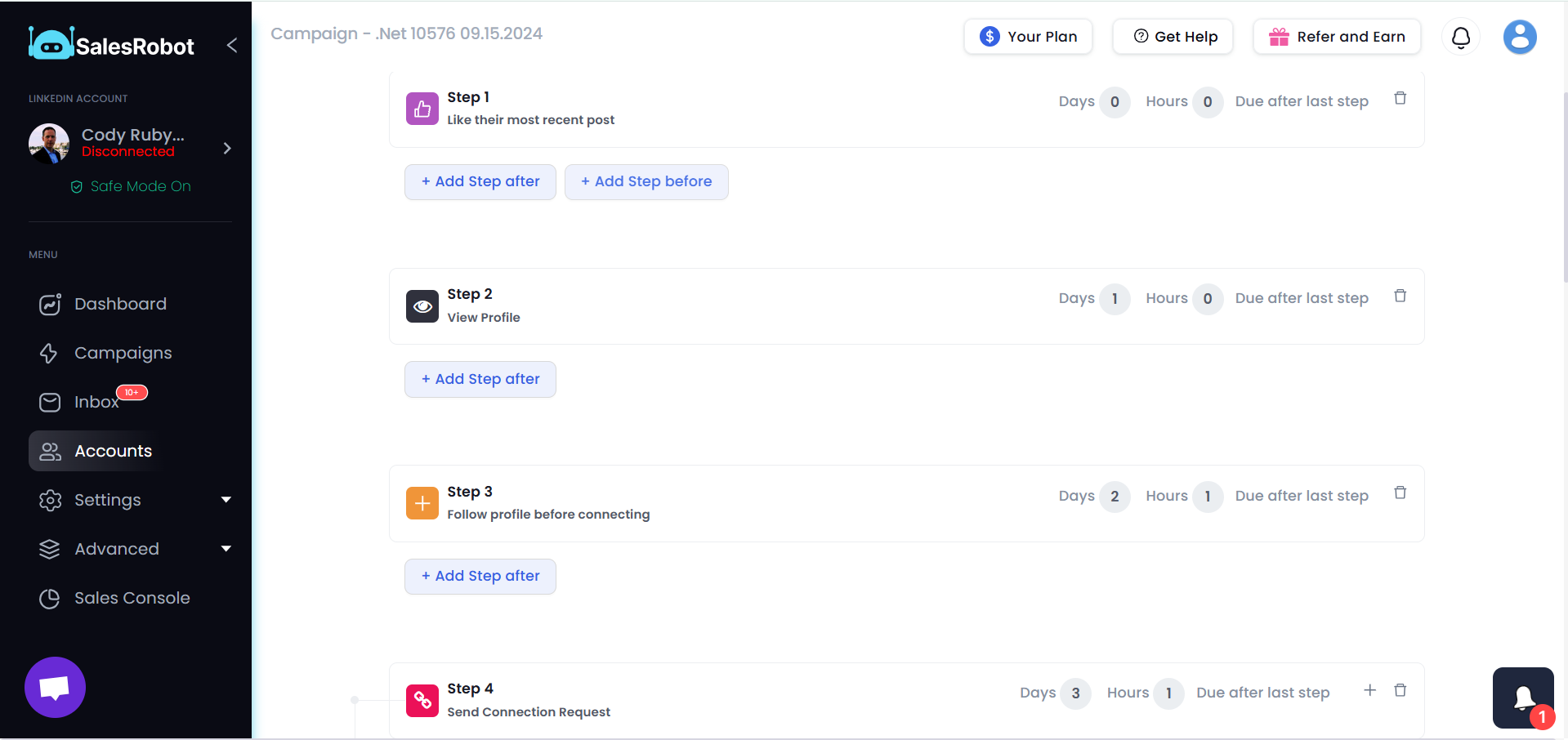
3-Touchpoint Pre-Connection Warm-Up
Before sending a connection request, he engaged with prospects’ LinkedIn activity before sending a connection request using SalesRobot's advanced features:
- Like their post (Day 1)
- View their profile (Day 2)
- Follow their profile (Day 4)
Then send a connection request.This built familiarity before outreach, while keeping his targeting focused and intentional.
Heading 1
Heading 2
Heading 3
Heading 4
Heading 5
Heading 6
Lorem ipsum dolor sit amet, consectetur adipiscing elit, sed do eiusmod tempor incididunt ut labore et dolore magna aliqua. Ut enim ad minim veniam, quis nostrud exercitation ullamco laboris nisi ut aliquip ex ea commodo consequat. Duis aute irure dolor in reprehenderit in voluptate velit esse cillum dolore eu fugiat nulla pariatur.
Block quote
Ordered list
- Item 1
- Item 2
- Item 3
Unordered list
- Item A
- Item B
- Item C
Bold text
Emphasis
Superscript
Subscript
Relevance Over Personalization
Instead of fake personal connections, Cody focused on professional overlap.
“I work in the Microsoft stack engineering space. Looks like we operate in the same world. Mind if we connect?”
Video Introduction (No Hard Sell)
After the connection was accepted, Cody shared a short video introducing himself.
- Duration: 45-60 seconds
- Purpose: Build trust, not sell
- Results: 74% of total replies came from this message
After connection acceptance, Cody sends a link to his LinkedIn video post - not a sales pitch.
Extreme Patience (15-Day Gap)
He allowed 15 days between connecting and sending the follow-up video in non-urgent campaigns.
“That slow burn separates you from those who connect and pitch immediately.”
Qualification Question
Later, he used a short check-in message:
Still coding first thing?
This helped identify management-level professionals versus hands-on engineers.
8-10 Step Sequences
His campaigns ran 8–10 messages over 2–3 weeks. SalesRobot’s scheduling naturally spaced messages by being patient to avoid spam-like behaviour.
The Results:
Industry-Defying Engagement
By using patient, relevance-focused sequences through SalesRobot, Cody achieved:
47%
Reply Rate
25%
Acceptance Rate
19
Tested Responses
10-12 Words
Real Estate Impact
15 Days
Follow-up Patience
100%
Constant Pipeline

"A short video tells them everything they need to know about my face, my energy, and my intent. It cuts through the noise of text in a way that creates an immediate, authentic connection that text alone simply cannot match."
.png)
Ready to see a
47%
reply rate?
See the Strategy in Action
Watch Cody explain how he achieved a 47% reply rate with patient, video-based sequences.
Key Insights for Salesrobot Users

Set Profile to Public
Mobile Real Estate = 9-12 Words
Always-On Campaigns = Never Dry Pipeline
What Salesrobot Does for Your Business
Based on these proven results, here is how Salesrobot can transform your outreach:
Safe Multi-Channel Outreach
Reach prospects on LinkedIn and Email simultaneously using residential IPs and mobile API integration to keep your accounts 100% safe.
AI-Powered Personalization
Use AI to draft human-like messages, voice notes, and even personalized videos that stand out in a crowded inbox.
Unified Inbox & CRM Sync
Manage all your conversations in one place and sync them directly to HubSpot, Salesforce, or Pipedrive.
AI Inbox Manager
Let our AI handle the initial replies and book meetings for you 24/7.
Don't just take our word for it





Frequently asked questions

Just add your LinkedIn account to SalesRobot!
You'll be up and running in 2 mins.
Yes. SalesRobot uses residential IPs and mobile APIs, so your actions look completely natural. This makes it safer than tools like Expandi or Waalaxy, and our users have reported zero bans for months.
No. SalesRobot works smoothly with a free LinkedIn account. Premium can give extra limits, but it is not required.
SalesRobot is safer, has stronger AI, and supports more channels. You get LinkedIn, email, voice notes, and a unified inbox, all in one place.
Very unlikely. SalesRobot uses mobile API behavior and real-time throttling to keep your activity natural and within safe limits.
Trials are meant to see the proof of functionality, which in our case means running a campaign. To get the best results, we recommend you spend 5 minutes to set up a campaign after you sign up. You'd be surprised how many people don't do this.
You can like their most recent post, comment on it automatically, follow them, send them a connection request, automatically follow up with them and yeah, endorse their skills!
You can import people from LinkedIn Sales Nav search, a normal LinkedIn Search, or upload with a CSV, or you can DM LinkedIn group members or event attendees if you want!
Did I mention that you can fetch all the people who commented on a particular LinkedIn post and request to connect with them?
We fully comply with LinkedIn limits and you can send up to 75 connection requests a day. Additionally you can send up to 40 InMails a day to open profiles without using any InMail credits.
If you've got multiple LinkedIn accounts you want to manage (client accounts for example), you can do that by just adding them like you added the first one.
Yes! SalesRobot will populate your CRM automatically with leads interested in buying, directly from LinkedIn!
Yes, of course.
Yes, you can send any type of attachment like PDFs etc.









