.avif)
How Bas Heijnens Achieved a 61% Reply Rate Using SalesRobot
As a provider of alcohol interlock devices for transport companies and individuals in the Netherlands, Bas Heijnens uses SalesRobot to connect with fleet managers and company owners who need solutions to prevent drunk driving incidents.
61%
Reply Rate
19%
Acceptance Rate
100%
Organic Trust
The Challenge: Before SalesRobot
Bas wanted to connect with transport companies and fleet managers who could benefit from alcohol interlock systems, but faced the common challenge of appearing too sales-focused in cold outreach.
Direct Selling Doesn't Work
Nobody appreciates messages like 'purchase from me' or 'hop into a call for 15 minutes' when I do not know you.
Spam Messages Get Ignored
When someone bombards me with five or six unwanted sales pitches, I just don't read them
Need to Qualify Prospects
Time gets wasted on irrelevant leads that are not doing this business anymore if they switched jobs but didn't update LinkedIn yet.
Lack of Familiarity
Reaching out to completely cold third-degree connections made it difficult to establish any initial common ground.
The Solution:
Referral-Based, Non-Pushy Outreach with SalesRobot
Bas wanted to connect with transport companies and fleet managers who could benefit from alcohol interlock systems, but faced the common challenge of appearing too sales-focused in cold outreach.
Key Tactics Used:
Qualifying Question First
Connection Request Message: I saw your work in this sector - is it true that you currently work there?
- Easy yes/no question
- Establishes shared ground
- Eliminates people who have changed jobs
Heading 1
Heading 2
Heading 3
Heading 4
Heading 5
Heading 6
Lorem ipsum dolor sit amet, consectetur adipiscing elit, sed do eiusmod tempor incididunt ut labore et dolore magna aliqua. Ut enim ad minim veniam, quis nostrud exercitation ullamco laboris nisi ut aliquip ex ea commodo consequat. Duis aute irure dolor in reprehenderit in voluptate velit esse cillum dolore eu fugiat nulla pariatur.
Block quote
Ordered list
- Item 1
- Item 2
- Item 3
Unordered list
- Item A
- Item B
- Item C
Bold text
Emphasis
Superscript
Subscript
Ask for Referrals, Not Sales
First Follow-Up: I want some feedback on my product. Do you know anybody who might find value in this?
Strategy benefits:
- 10% higher reply rate versus direct asks (proven study)
- Removes pressure on the prospect
- Often leads to referrals or self-interest ("Maybe no, but I do know this company...")
Strategic Follow-Up Timing
- Message 1: Day 0 (after connection)
- Message 2: Day 2 (similar question, condensed one)
- Message 3: Day 5 (adds urgency: "numerous fleets are unnecessarily at risk")
- Message 4: Day 12 (breakup message)
Make It Feel Personal, Not Automated
"You came to my mind because you work in the transport sector..."
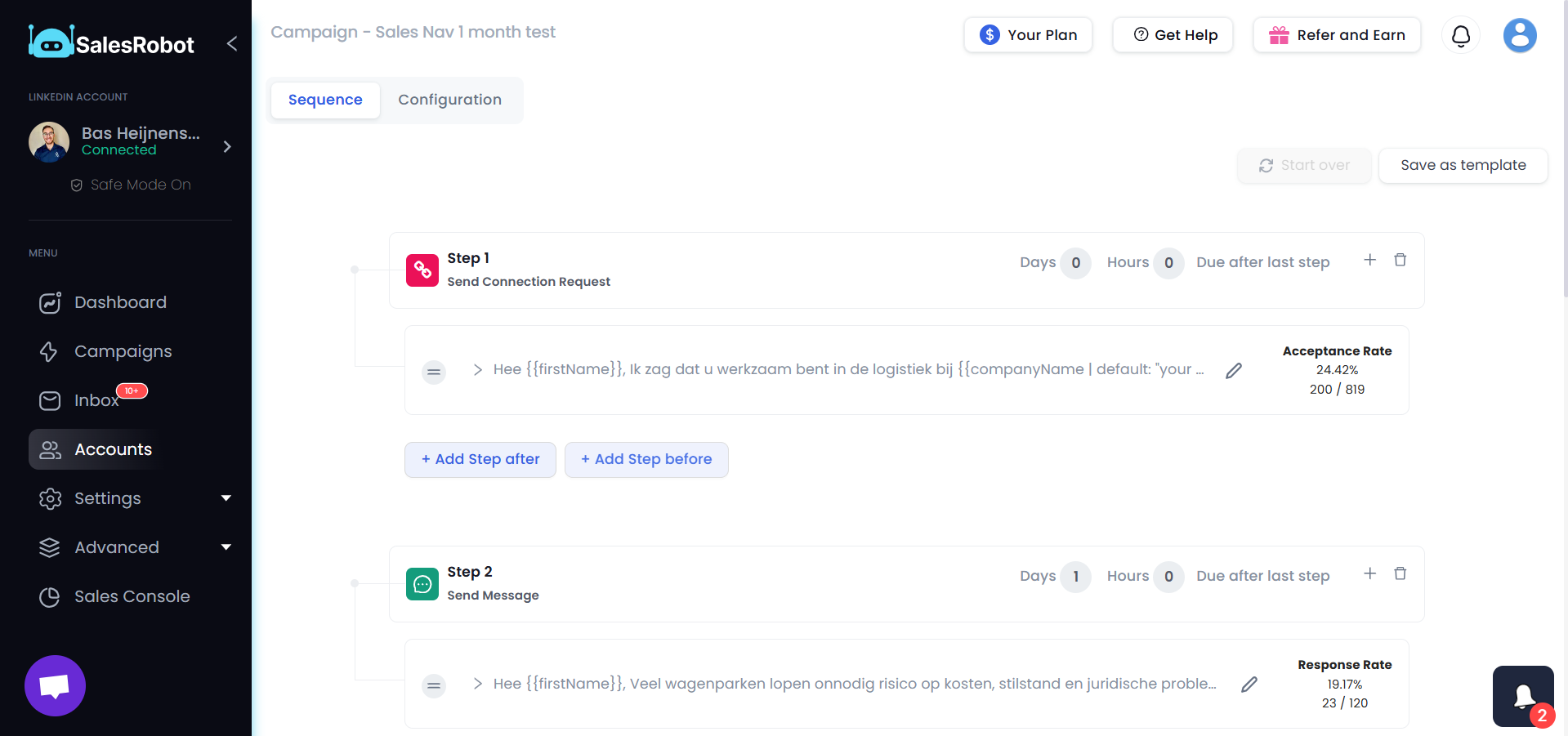
The Results:
Industry-Defying Engagement
By asking for referrals instead of direct selling, Bas achieved engagement rates that far exceeded typical cold outreach benchmarks while maintaining authenticity with busy fleet managers.
61%
Reply Rate
19%
Acceptance Rate
100%
Organic Trust
3 Days
Follow-up Timing
4-Step
Optimized Sequence
10%
Absolute Reply Lift

"I think that you need to think about what do I like to receive in my message box. That's the most important one. Just don't try to push your message."
.png)
Ready to see a
61%
reply rate?
See the Strategy in Action
Watch Bas explain how he achieved a 61% reply rate by not trying to sell.
Key Insights for Salesrobot Users

Ask for Referrals, Not Sales
Think Like Your Prospect
Space Out Follow-Ups
What Salesrobot Does for Your Business
Based on these proven results, here is how Salesrobot can transform your outreach:
Safe Multi-Channel Outreach
Reach prospects on LinkedIn and Email simultaneously using residential IPs and mobile API integration to keep your accounts 100% safe.
AI-Powered Personalization
Use AI to draft human-like messages, voice notes, and even personalized videos that stand out in a crowded inbox.
Unified Inbox & CRM Sync
Manage all your conversations in one place and sync them directly to HubSpot, Salesforce, or Pipedrive.
AI Inbox Manager
Let our AI handle the initial replies and book meetings for you 24/7.
Don't just take our word for it





Frequently asked questions

Just add your LinkedIn account to SalesRobot!
You'll be up and running in 2 mins.
Yes. SalesRobot uses residential IPs and mobile APIs, so your actions look completely natural. This makes it safer than tools like Expandi or Waalaxy, and our users have reported zero bans for months.
No. SalesRobot works smoothly with a free LinkedIn account. Premium can give extra limits, but it is not required.
SalesRobot is safer, has stronger AI, and supports more channels. You get LinkedIn, email, voice notes, and a unified inbox, all in one place.
Very unlikely. SalesRobot uses mobile API behavior and real-time throttling to keep your activity natural and within safe limits.
Trials are meant to see the proof of functionality, which in our case means running a campaign. To get the best results, we recommend you spend 5 minutes to set up a campaign after you sign up. You'd be surprised how many people don't do this.
You can like their most recent post, comment on it automatically, follow them, send them a connection request, automatically follow up with them and yeah, endorse their skills!
You can import people from LinkedIn Sales Nav search, a normal LinkedIn Search, or upload with a CSV, or you can DM LinkedIn group members or event attendees if you want!
Did I mention that you can fetch all the people who commented on a particular LinkedIn post and request to connect with them?
We fully comply with LinkedIn limits and you can send up to 75 connection requests a day. Additionally you can send up to 40 InMails a day to open profiles without using any InMail credits.
If you've got multiple LinkedIn accounts you want to manage (client accounts for example), you can do that by just adding them like you added the first one.
Yes! SalesRobot will populate your CRM automatically with leads interested in buying, directly from LinkedIn!
Yes, of course.
Yes, you can send any type of attachment like PDFs etc.









