.avif)
TL;DR
LinkedHelper ($15–$45/mo): Best for power users seeking granular control. LinkedIn-focused, with built-in Email Finder and CRM integrations available.
Waalaxy ($43-$131/mo): Most beginner-friendly with its visual drag-and-drop workflow builder. Ideal for solopreneurs and teams combining LinkedIn with email outreach. Higher price ceiling and browser-based architecture carries some account risk. Elite tier ($538/mo) includes coaching and Sales Navigator.
SalesRobot ($59-$99/mo): Built specifically for account safety using mobile APIs and dedicated residential IPs. Includes AI Appointment Setter even at the basic tier. Best balance of features, safety, and ease of use for serious B2B prospectors.
Bottom line: If budget is your primary concern, LinkedHelper wins at $15/month. If you prioritize ease of use and multichannel outreach, Waalaxy's visual builder is unmatched. If LinkedIn account safety and AI-powered features are critical, SalesRobot provides the strongest protection with its mobile API approach.
After spending months testing LinkedHelper, Waalaxy, and SalesRobot for my lead generation campaigns, I've discovered crucial differences that impact both safety and results:
LinkedHelper works well for power users seeking granular control over their LinkedIn activities. It offers extensive customization but requires technical know-how and careful configuration to avoid triggering LinkedIn's safety mechanisms.
Waalaxy provides an intuitive experience with its visual workflow builder, making it ideal for beginners and teams looking to combine LinkedIn with email outreach. However, its higher price point and cloud-based architecture come with certain limitations for advanced users.
While both tools have their strengths, neither fully addresses the biggest challenge facing LinkedIn automation users today: avoiding account restrictions or bans. This is precisely why I've included SalesRobot in this comparison. Unlike its competitors, SalesRobot was specifically built from the ground up with LinkedIn account safety as its primary focus, using mobile APIs and dedicated residential IPs to provide unparalleled protection.
In today's B2B sales environment, LinkedIn automation has become essential. While traditional email outreach typically yields only 1-2% positive response rates even with optimization, LinkedIn campaigns consistently deliver 10%+ response rates. This dramatic difference explains why forward-thinking sales teams are pivoting to LinkedIn as their primary prospecting channel.
In this guide, I'll compare these three leading LinkedIn automation tools across five critical areas:
- Safety and compliance features
- Core functionality and ease of use
- Workflow customization
- Pricing and value
- Pros & Cons
I've put each platform through real-world testing with actual outreach campaigns to give you an honest assessment based on hands-on experience rather than marketing claims.
At a Glance: LinkedHelper vs Waalaxy vs SalesRobot
What is LinkedHelper?
"Your LinkedIn Swiss Army Knife" 🔧🔩
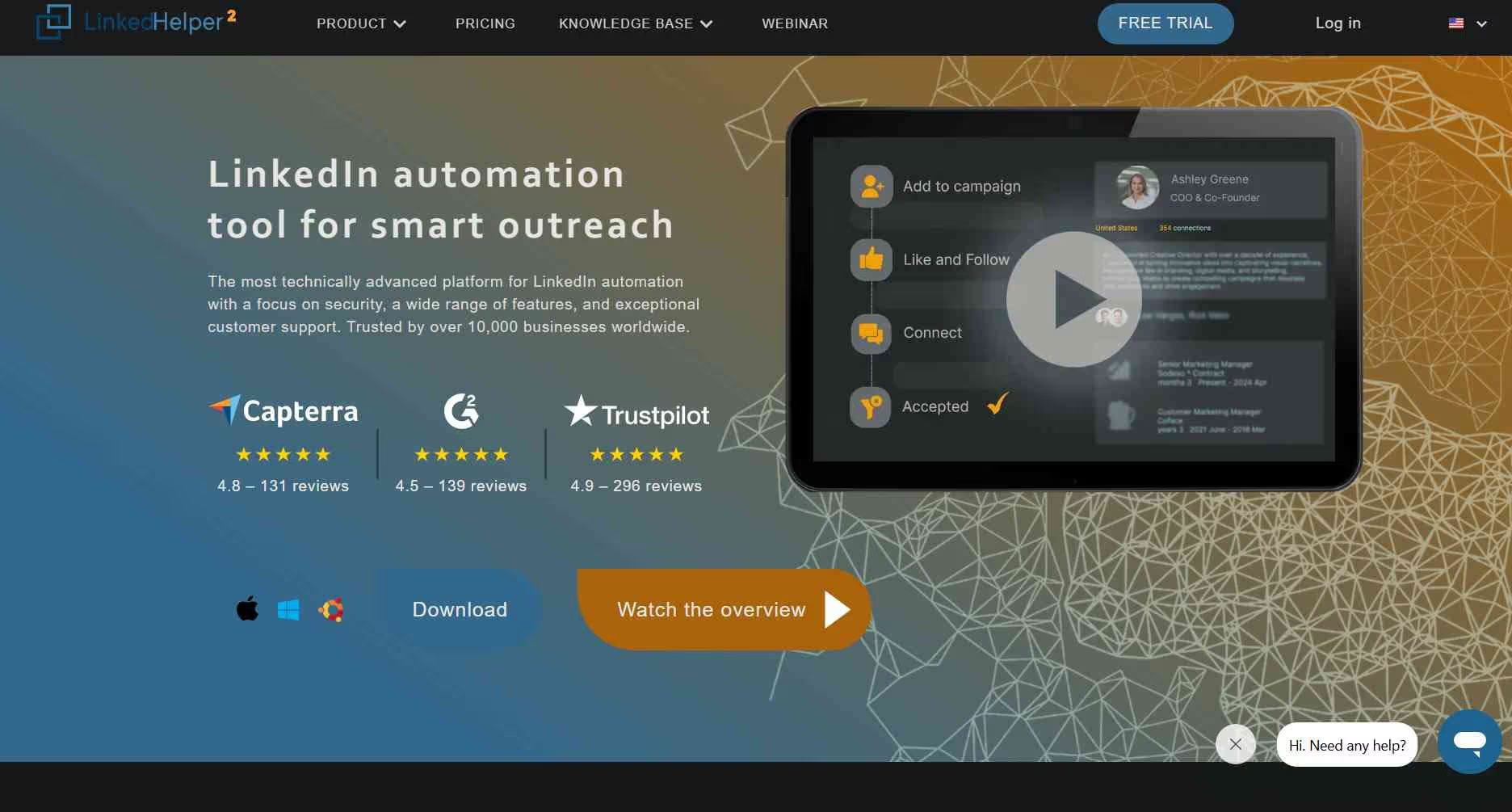
Founded in 2016 by Alexander Erin, LinkedHelper (now LinkedInHelper2) was created to give power users maximum control over their LinkedIn activities. The company saw a market need for a tool that could automate repetitive LinkedIn tasks while offering granular control over every aspect of the automation process.
At its core, LinkedHelper is a desktop-based automation tool (available for Windows, Mac, and Linux) that provides detailed control over LinkedIn workflows. It's designed for users who want full command over their LinkedIn automation, with an emphasis on customization rather than simplicity.
What makes LinkedHelper unique is its approach to LinkedIn automation as a technical operator's tool. It offers numerous configuration options, allowing users to fine-tune various parameters for account safety. However, this power comes with complexity, as LinkedHelper requires a higher level of technical knowledge to use effectively and safely.
What is Waalaxy?
"Visual Automation for LinkedIn & Beyond" 🚀🌌
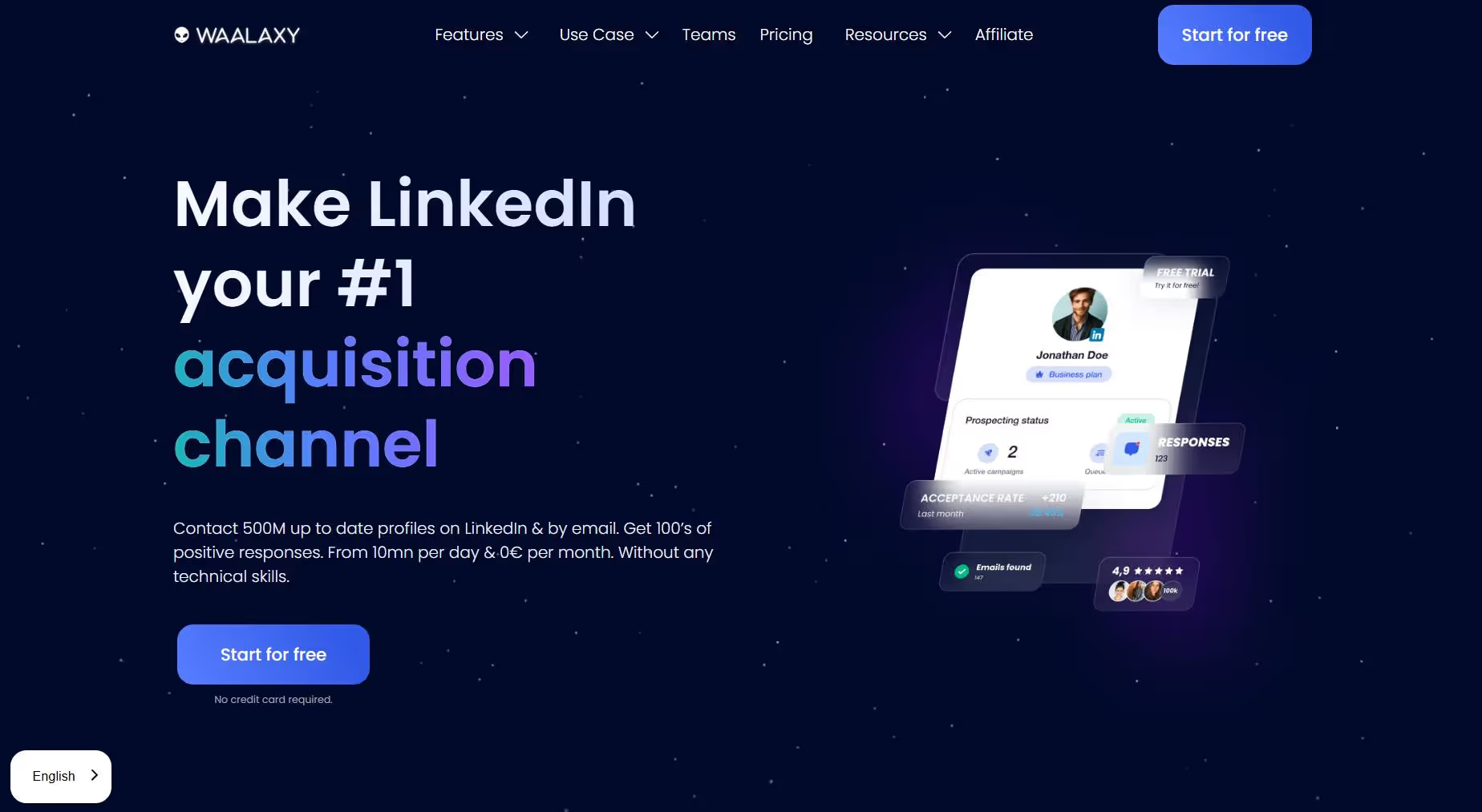
Waalaxy began its journey in 2017 as "Prospectin," focusing exclusively on LinkedIn automation as a Chrome extension. In 2020, the company rebranded to Waalaxy and expanded its feature set to include email outreach capabilities, transforming it into a multichannel prospecting tool.
Unlike LinkedHelper's desktop approach, Waalaxy operates as a Chrome extension with cloud-based workflow automation. Its standout feature is the visually intuitive campaign builder that allows users to create complex outreach sequences through a simple drag-and-drop interface, connecting actions like profile visits, connection requests, follow-up messages, and email sequences in a visual flow.
Waalaxy has positioned itself as a more accessible alternative to technical tools like LinkedHelper, focusing on user-friendly design and multichannel capabilities rather than deep customization. This makes it particularly appealing to solopreneurs, startups, and sales teams who want simplicity without sacrificing functionality.
What is SalesRobot?
"LinkedIn Automation That Won't Get You Banned" 🛡️🤖
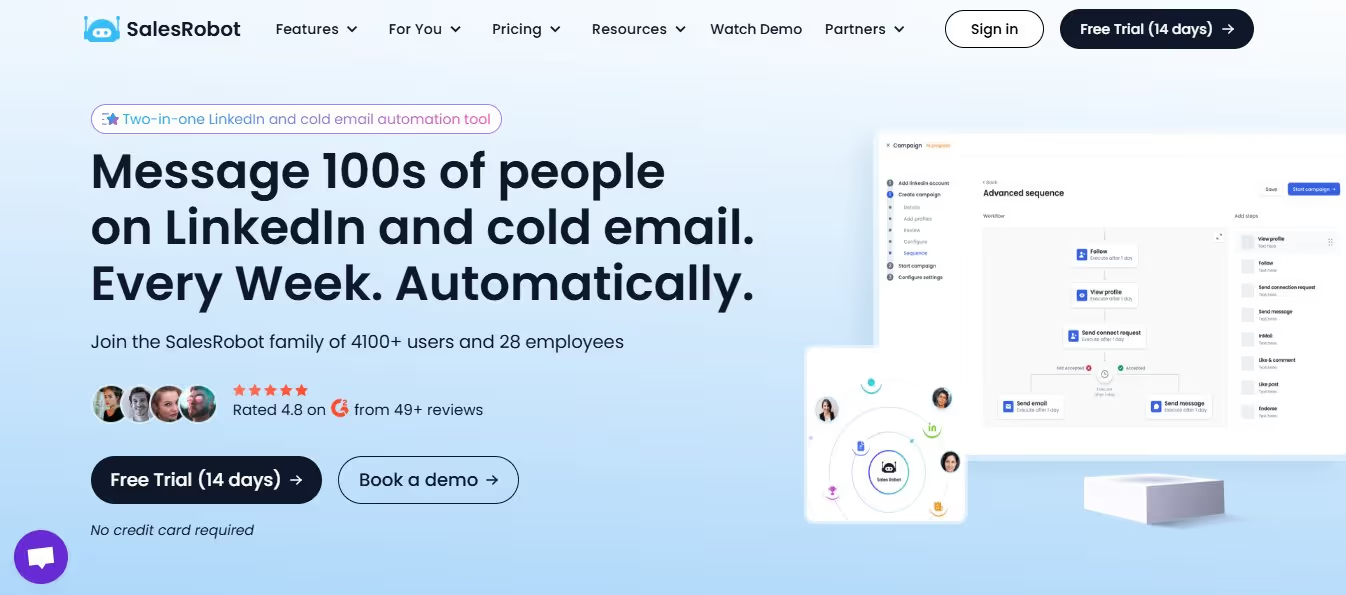
SalesRobot entered the market in May 2020 with a singular focus: solving the account safety problem that has plagued LinkedIn automation tools since their inception. Founded by a team of engineers who recognized that existing tools were frequently getting users' LinkedIn accounts restricted or banned, SalesRobot was built from the ground up with safety as its primary concern.
What truly sets SalesRobot apart is its technical approach to LinkedIn automation. Unlike browser-based tools or desktop applications that interact with LinkedIn's web interface, SalesRobot utilizes LinkedIn's mobile APIs and dedicated residential IP addresses to communicate with LinkedIn in the same way the official mobile app does. This approach dramatically reduces the risk of detection and account restrictions.
With over 4,200 users in just five years, SalesRobot has gained traction among safety-conscious professionals who can't afford to have their LinkedIn accounts compromised. The platform balances powerful automation capabilities with enterprise-grade safety features, making it the go-to choice for serious business users who rely on LinkedIn as a critical part of their sales and networking strategy.
SalesRobot integrates with LinkedIn Sales Navigator, providing access to the most up-to-date B2B data available. The platform also features AI-powered personalization, automated InMails to open profiles, and the ability to send connection requests using emails and message LinkedIn Group members at scale.
LinkedHelper vs Waalaxy vs SalesRobot: Safety & Compliance
SalesRobot's mobile API approach provides unmatched security, while Waalaxy offers decent protection and LinkedHelper requires careful manual configuration.
When it comes to LinkedIn automation, account safety should be your top priority. LinkedIn actively monitors for automation tools and can restrict or ban accounts that violate their terms of service. During my testing, I paid close attention to how each tool approaches this critical challenge.
LinkedHelper's Approach to Safety
LinkedHelper gives you manual control over your automation limits, which can be both a strength and a weakness. Veteran users who understand LinkedIn's limitations can configure the tool to operate within safe parameters.
The desktop application allows for proxy integration, which helps mask your automation activities. However, this requires technical knowledge to set up correctly. During my testing, I found that LinkedHelper lacks automated safety mechanisms, so it won't automatically adjust if LinkedIn starts showing warning signs.
For users willing to invest time in learning the platform and carefully configuring their settings, LinkedHelper can be operated relatively safely. However, the lack of built-in guardrails means there's always a risk of crossing LinkedIn's invisible thresholds.
Waalaxy's Safety Features
Waalaxy takes a more managed approach to safety with its cloud-based infrastructure. The platform automatically throttles activities to mimic human behavior and implements daily limits to reduce the risk of triggering LinkedIn's automated detection systems.
During my testing, I appreciated Waalaxy's built-in safety features like auto-delay, inbox monitoring, and soft bounce detection. These mechanisms help prevent common automation red flags.
However, Waalaxy's browser-based approach is still more detectable than alternatives that don't rely on browser automation. While it offers better protection than LinkedHelper out of the box, it still carries inherent risks associated with browser-based tools.
SalesRobot's Security-First Design
SalesRobot takes an entirely different approach to LinkedIn automation security. Instead of automating the browser interface like most tools, SalesRobot communicates directly with LinkedIn through their mobile APIs, the same way the official LinkedIn mobile app does.
This fundamental difference in architecture provides significant security advantages:
- Mobile API Integration: By using LinkedIn's official mobile APIs rather than automating the web interface, SalesRobot's activities appear identical to legitimate mobile app usage.
- Dedicated Residential IPs: Each account operates through a dedicated residential IP address, eliminating the red flags that shared or data center IPs can trigger.
- Smart Throttling: During my testing, I was impressed by SalesRobot's ability to automatically adjust activity levels when LinkedIn's systems showed early warning signs, before any restrictions were applied.
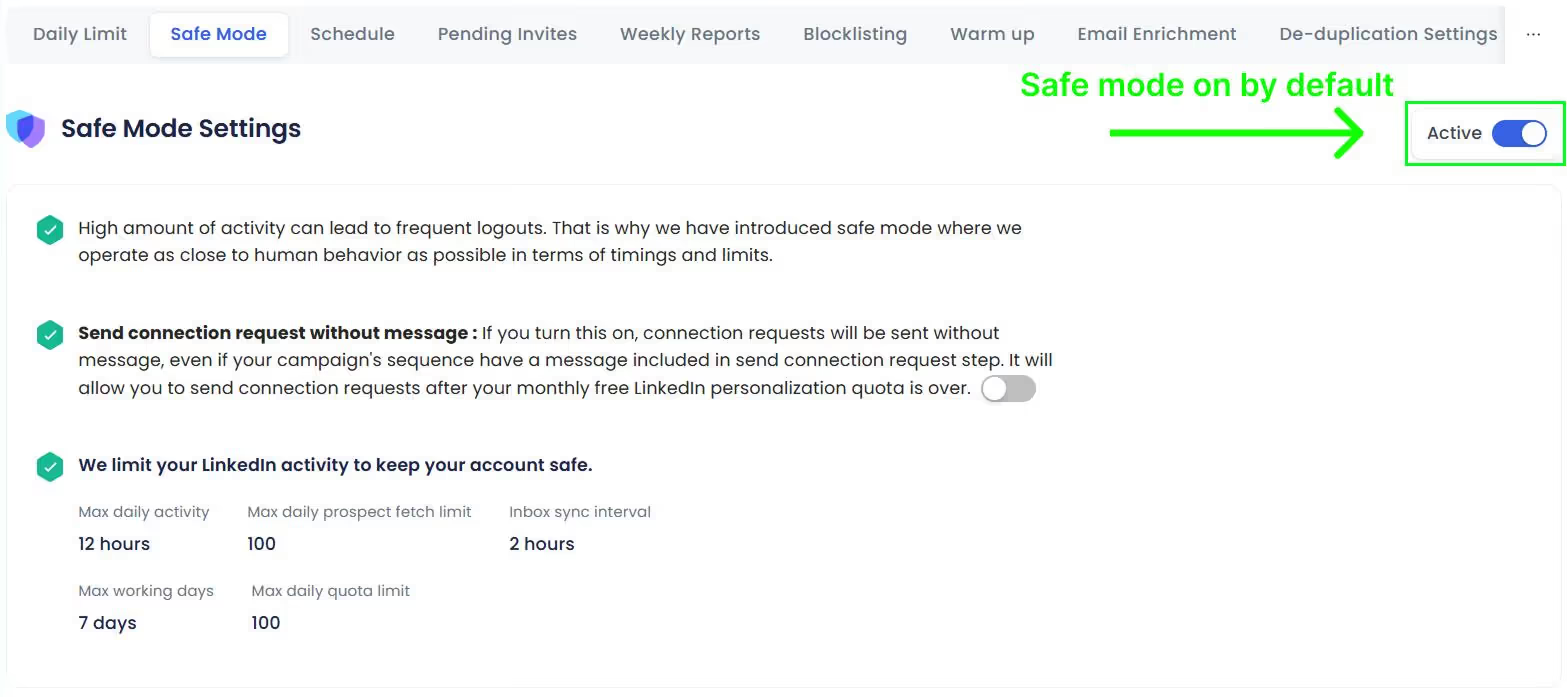
Its built-in safe mode ensures that your account stays well within limits and never pops up on LinkedIn's radar.
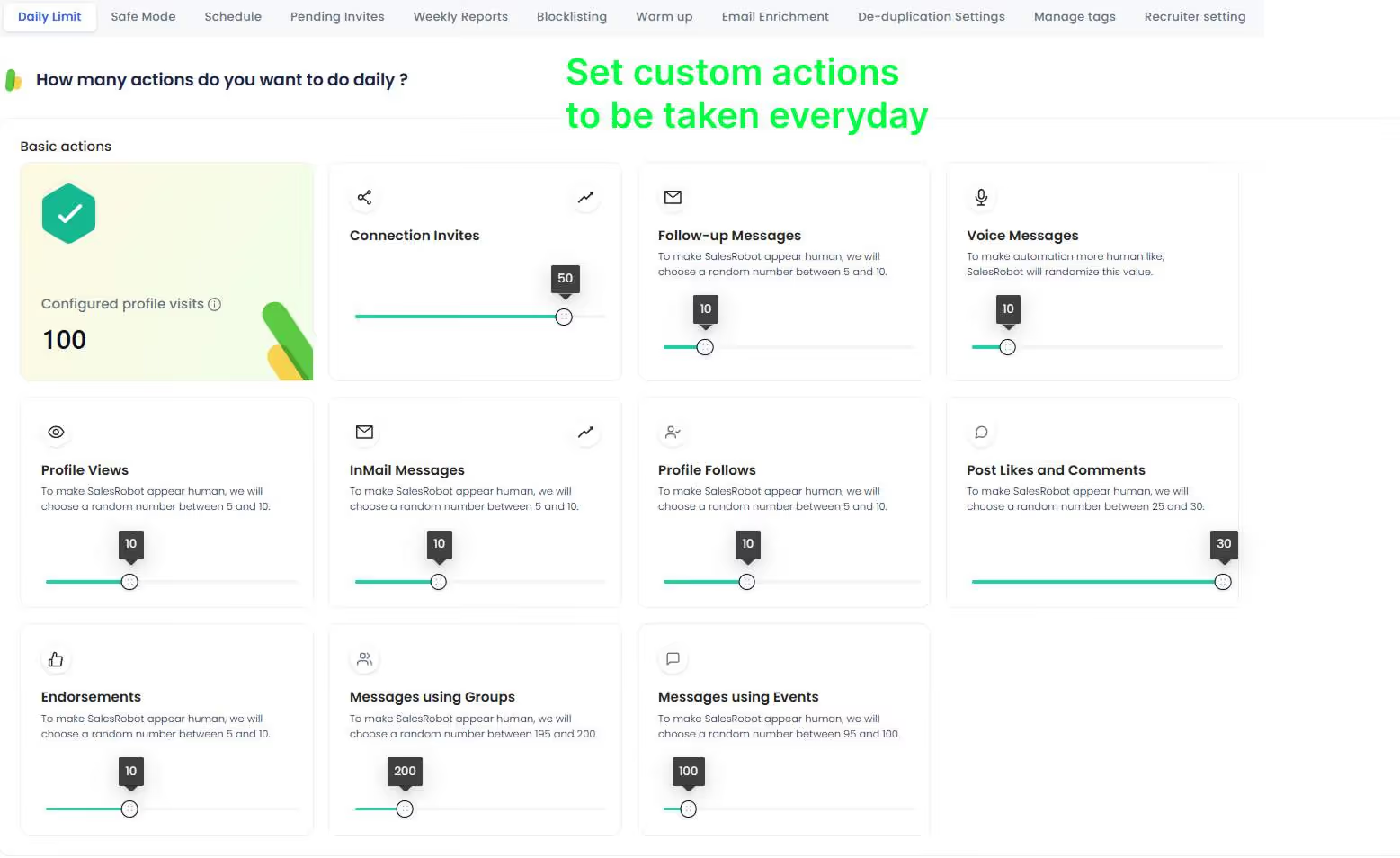
And yes, you also get the option to set custom limits on how many actions you want your campaign to take.
In my months of testing, SalesRobot was the only platform that didn't trigger any LinkedIn warnings or temporary restrictions, even when running at maximum capacity. This security-first approach makes it the clear winner for professionals who can't risk having their LinkedIn accounts compromised.
LinkedHelper vs Waalaxy vs SalesRobot: Core Functionality
LinkedHelper offers deep customization, Waalaxy excels at multichannel outreach, while SalesRobot balances powerful features with unmatched safety.
Profile Visits & Connection Requests
All three tools allow you to automatically visit profiles and send connection requests, but they differ in implementation.
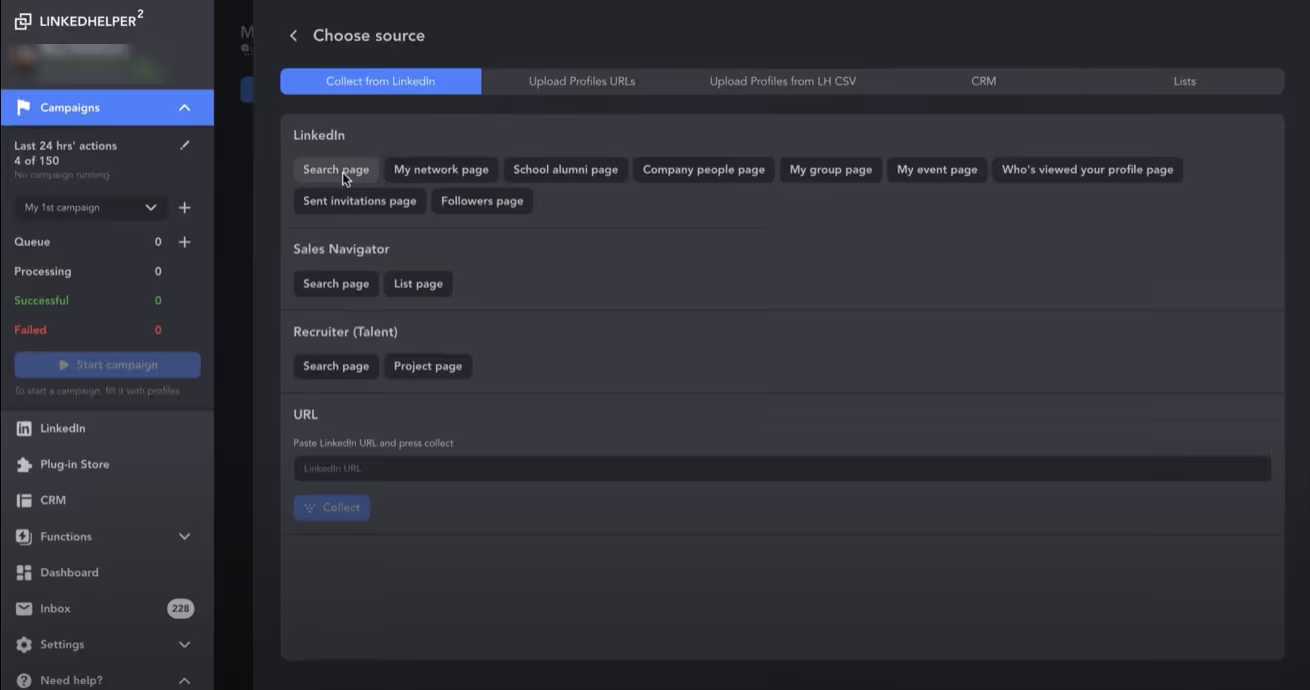
LinkedHelper offers the most granular control over profile visits, letting you configure detailed parameters like visit duration and actions per session. However, this level of control comes with complexity. You need to understand how to balance these settings for optimal results.
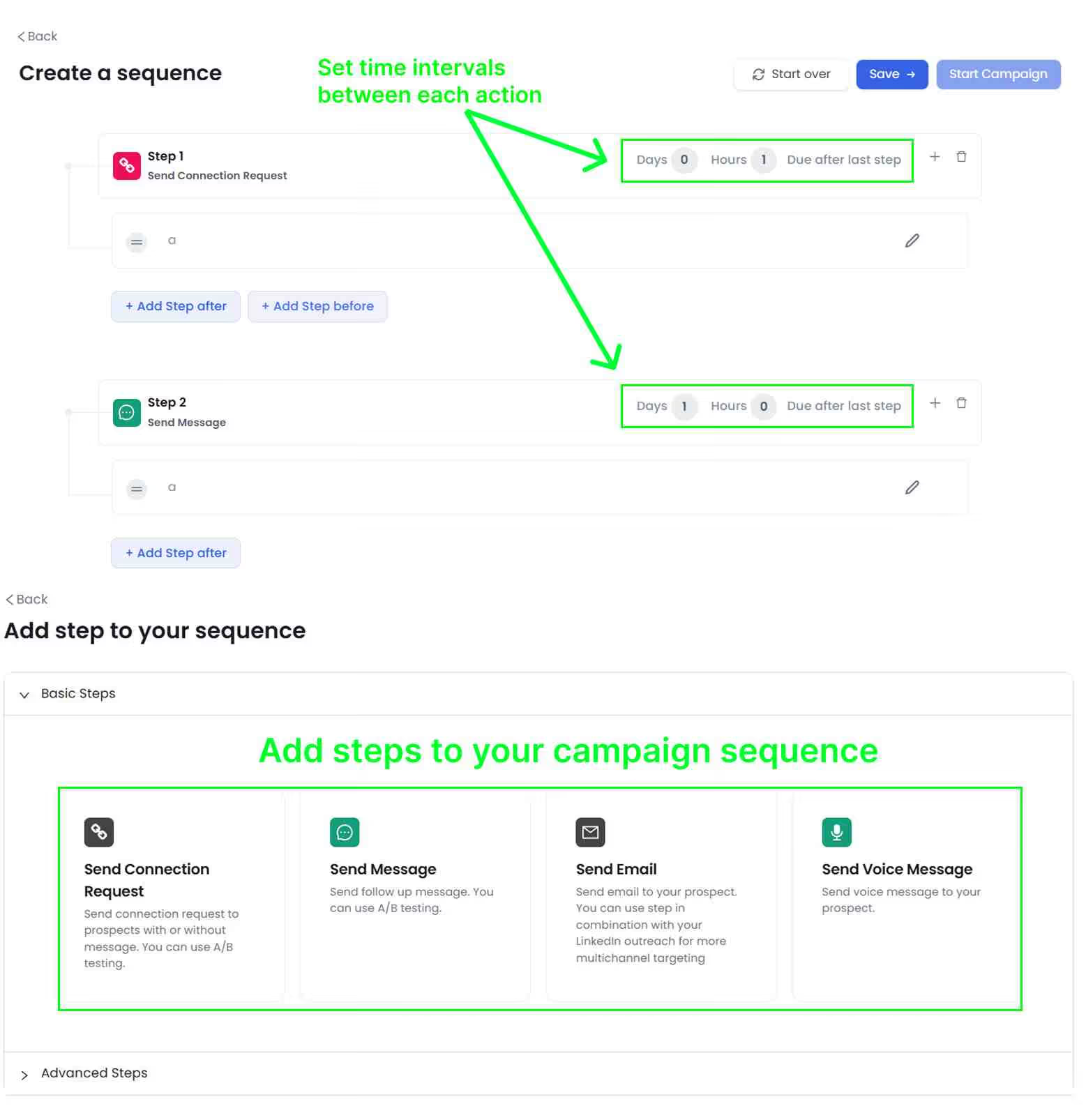
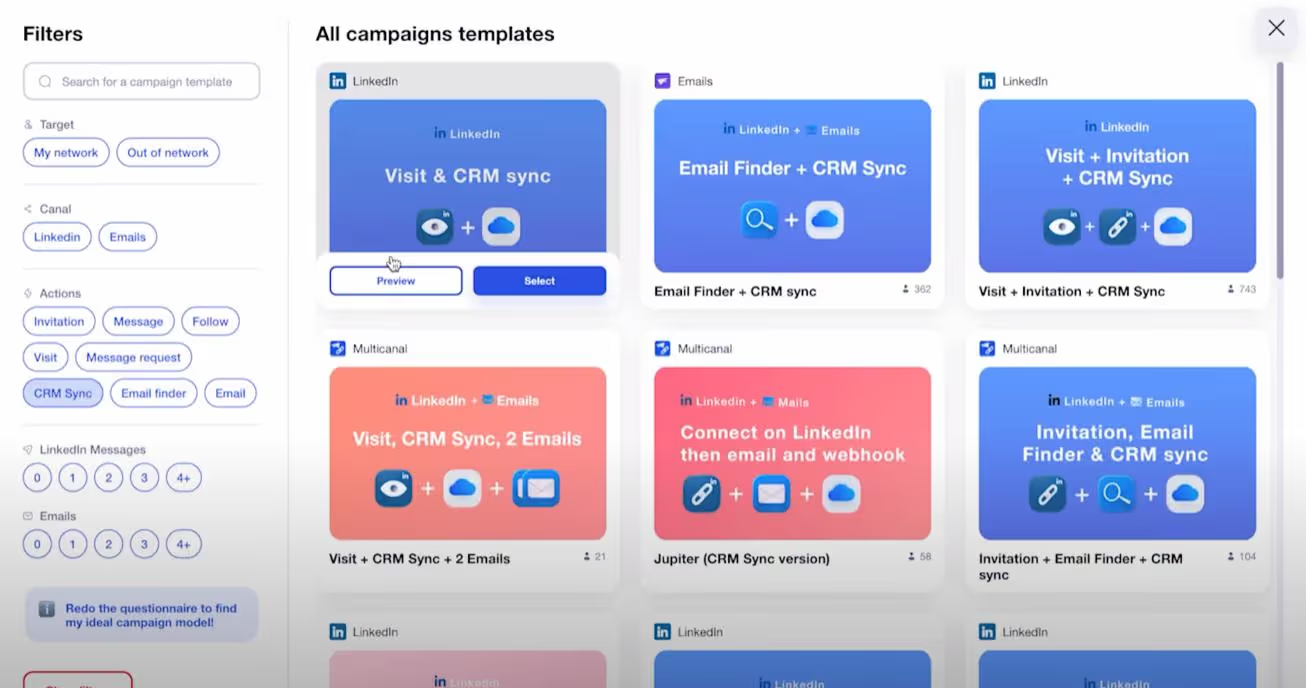
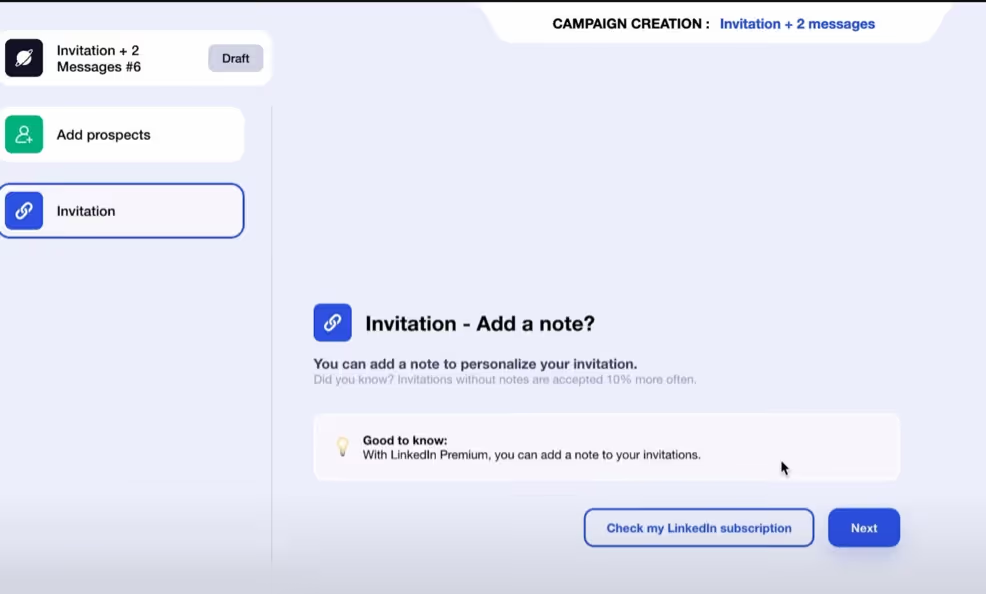
Waalaxy simplifies the process with its visual workflow builder. During my testing, I found creating visit and connect sequences extremely intuitive. You simply drag and drop actions into your workflow. While this approach is easier, it offers fewer customization options than LinkedHelper.
SalesRobot strikes a balance between power and simplicity. Its campaign builder provides advanced targeting options while maintaining an intuitive interface. The standout feature is its built-in safety limits that automatically adjust based on account history and LinkedIn's response patterns. This ensures you stay within safe parameters without manual monitoring.
Messaging & Follow-ups
Effective outreach requires strategic messaging and timely follow-ups. Here's how each platform handles this critical function:
LinkedHelper uses a list-based approach for messaging campaigns. You can create basic follow-up sequences, but the interface feels outdated compared to competitors. I found managing complex multi-touch sequences somewhat cumbersome during my testing.
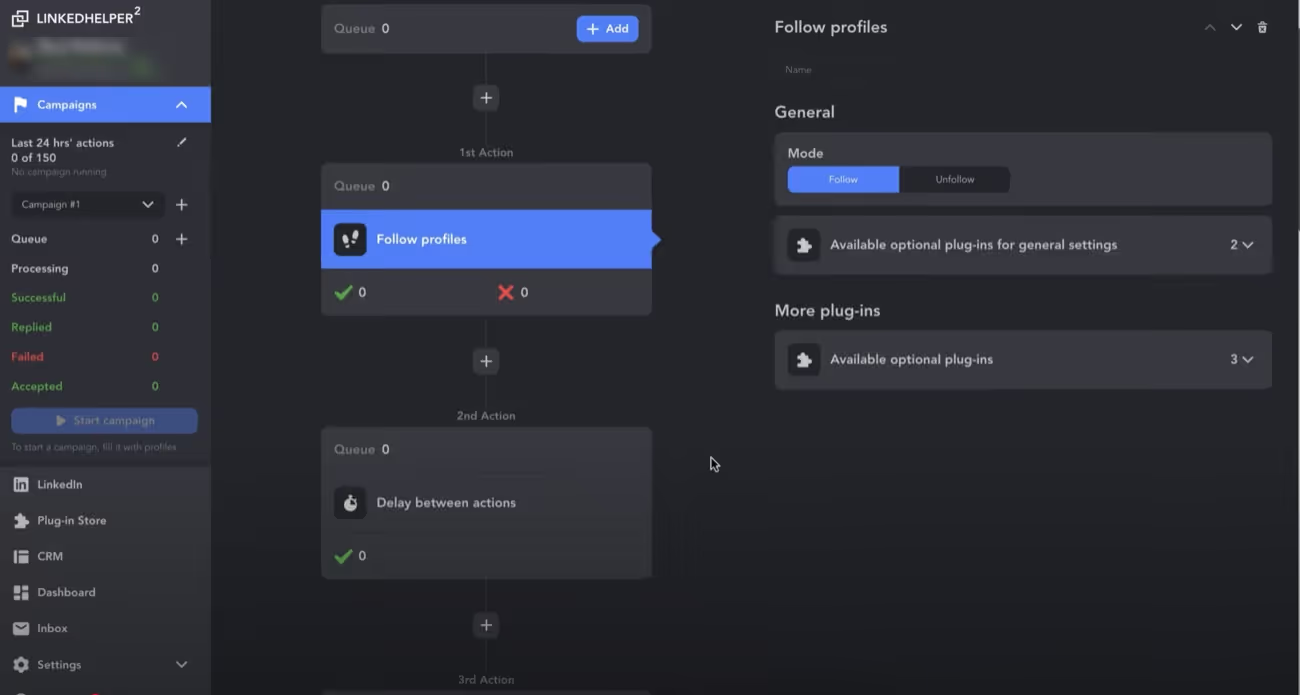
Waalaxy shines with its visual sequence builder, making it easy to create sophisticated multi-channel outreach campaigns. You can visually map out your entire outreach flow, including conditional branches based on prospect actions (like opening a message or responding).
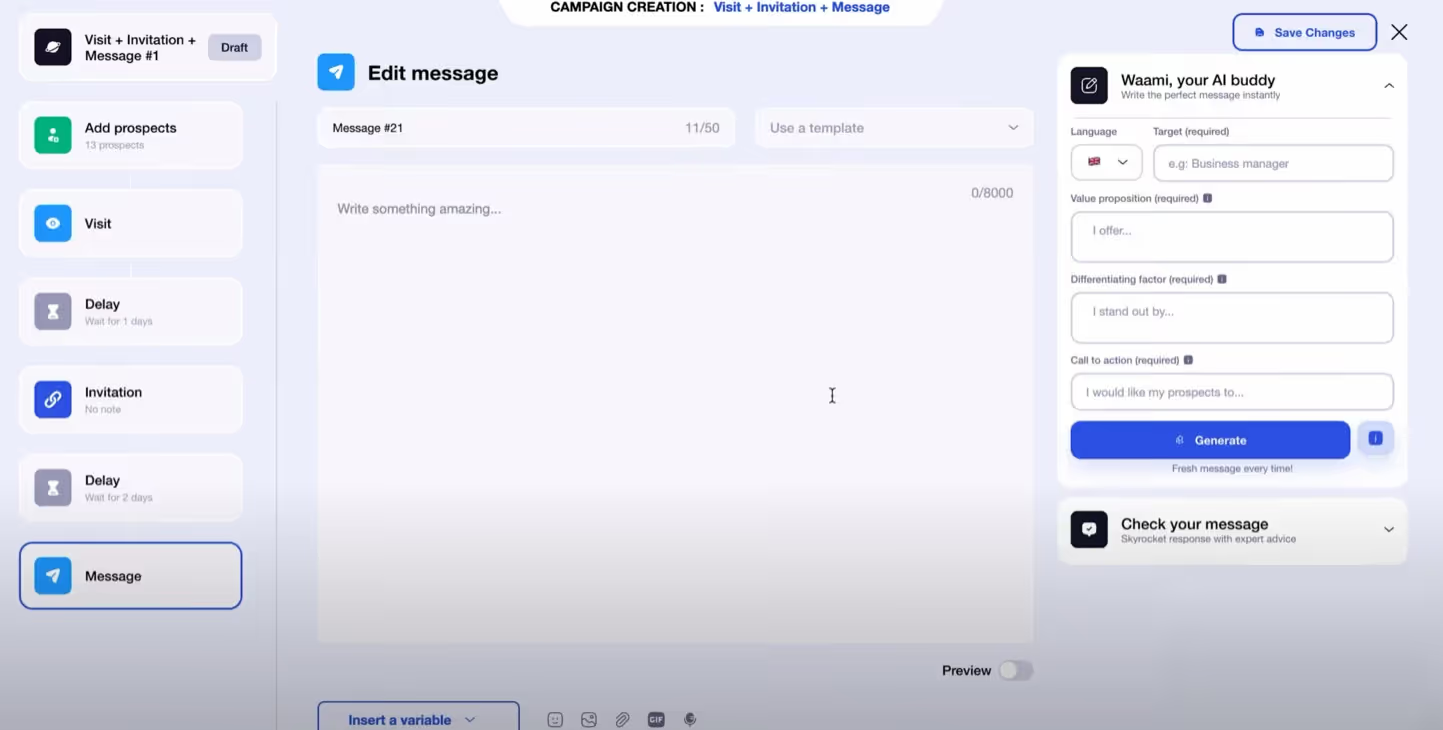
SalesRobot offers powerful messaging capabilities with smart personalization features. Its dynamic sequence builder allows for complex follow-up paths while maintaining an intuitive interface. I was particularly impressed by its ability to automatically adjust message sending times based on prospect engagement patterns. It sends follow-ups when prospects are most likely to respond.
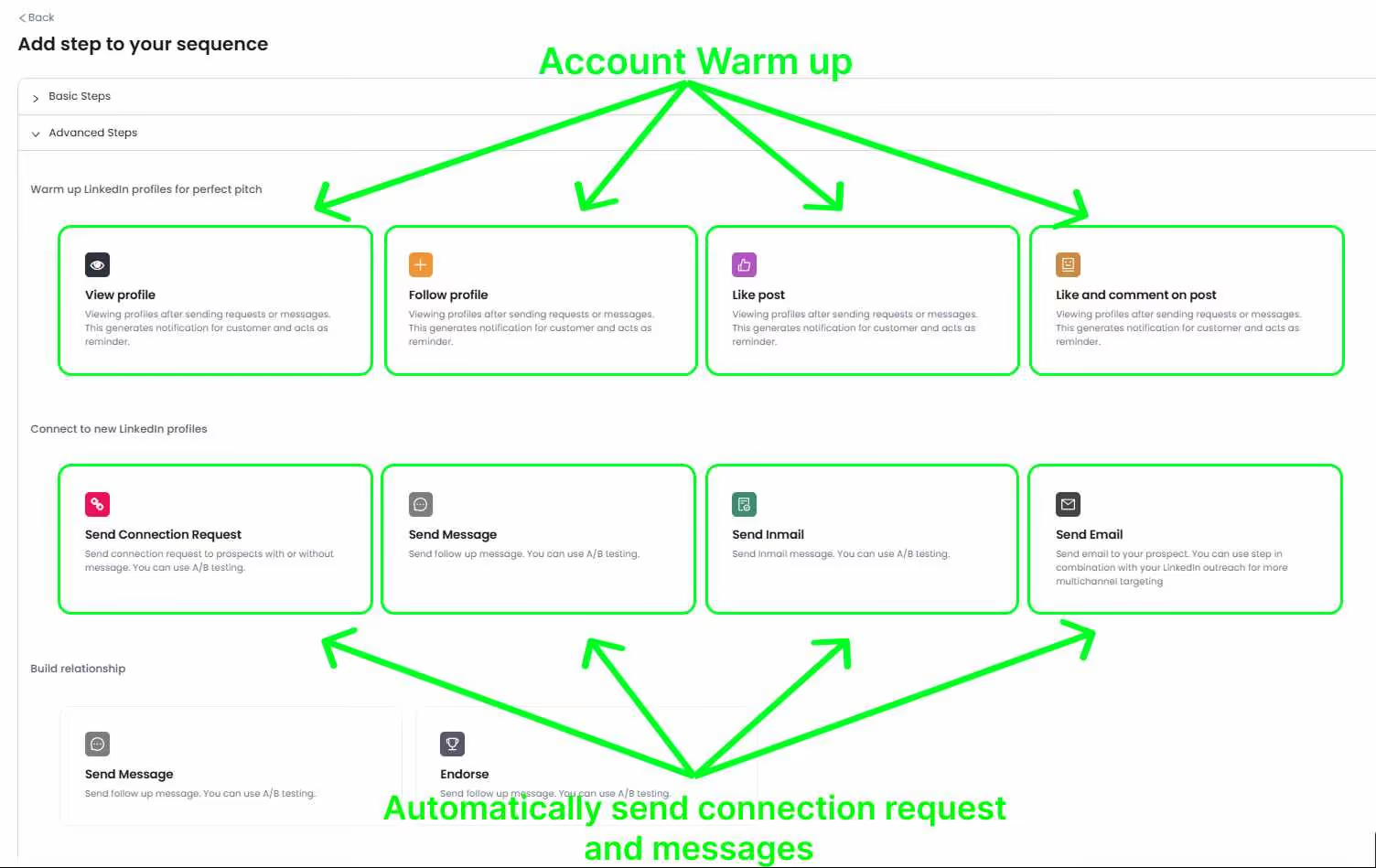
SalesRobot also packs in several AI-powered features like:
- AI Variables for profile-based personalization on auto-pilot.
- AI Appointment Setter to automate lead nurturing from cold outreach to a booked meeting.
- AI Voice Clone and AI Video Messages to scale personalized voice/video notes without manually recording each one.
- AI Commenting to add another touchpoint in your outreach to warm up prospects.
Email Integration
For comprehensive outreach, the ability to combine LinkedIn and email communication is valuable.
LinkedHelper is limited to LinkedIn-only communication, which restricts your outreach capabilities. If email integration is important for your workflow, you'll need to use a separate tool alongside LinkedHelper.
Waalaxy excels in this category with seamless email integration. You can easily incorporate email steps into your outreach sequences, creating true multi-channel campaigns. This functionality is available on their higher-tier plans.
SalesRobot includes email integration with smart follow-up capabilities. What sets it apart is how it synchronizes LinkedIn and email communication, automatically adjusting follow-ups based on engagement across both channels. This creates more natural, coordinated outreach that doesn't feel automated to prospects.
CRM & Lead Management
Keeping track of prospects and conversations is essential for effective sales processes.
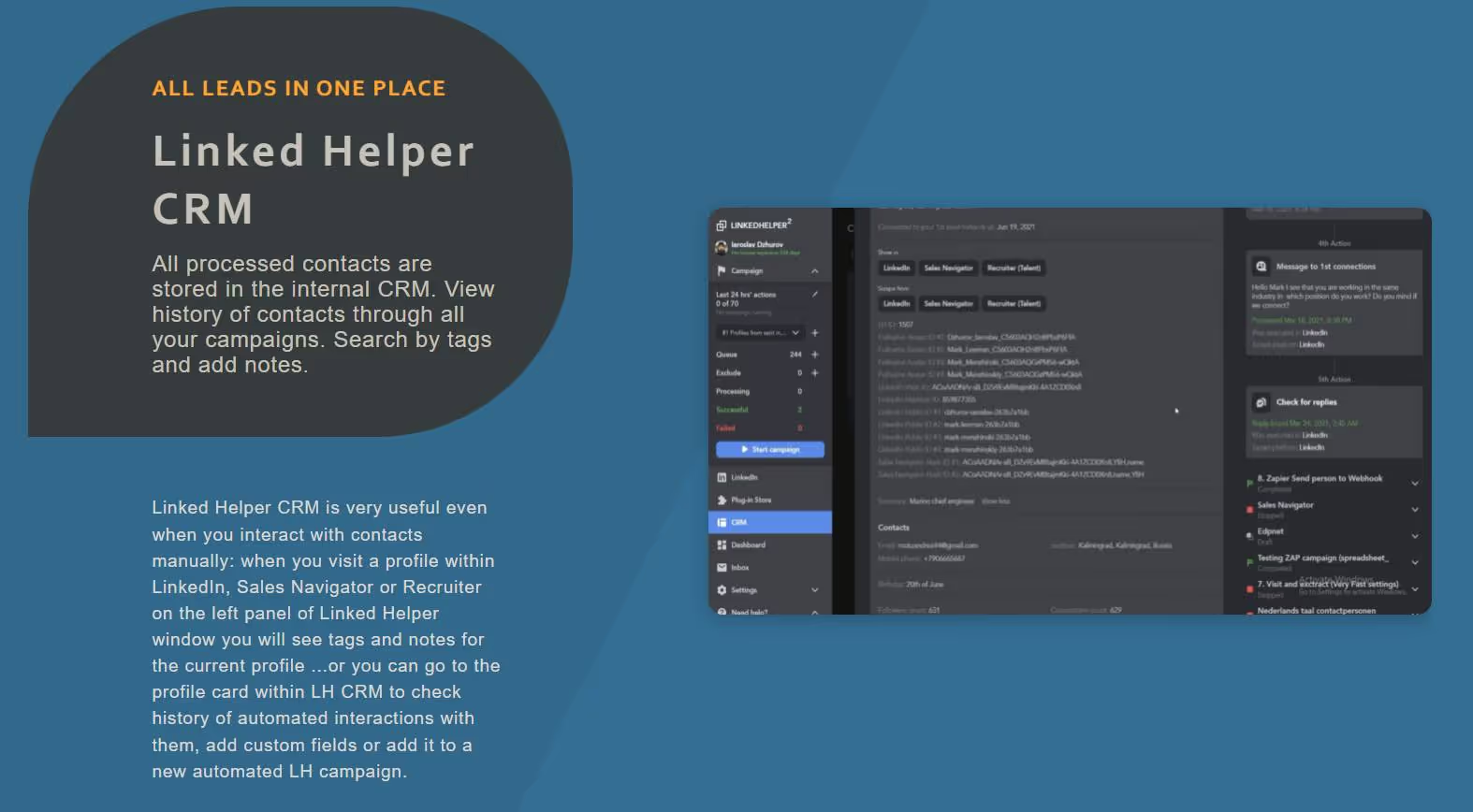
LinkedHelper offers basic lead organization with a simple tag-based system. While functional, it lacks the sophistication of a true CRM.
Waalaxy provides a more comprehensive approach with its integrated inbox and conversation tracking. The interface makes it easy to manage ongoing conversations and track relationship status.
SalesRobot stands out with full pipeline management capabilities that resemble a dedicated CRM. During my testing, I found its lead organization, conversation tracking, and deal pipeline features particularly useful for teams managing larger prospect volumes.

LinkedHelper vs Waalaxy vs SalesRobot: Workflow Customization
Waalaxy offers the most intuitive workflow builder, SalesRobot provides powerful customization with safety guardrails, while LinkedHelper requires technical expertise.
Campaign Creation & Management
How easily you can set up and manage outreach campaigns significantly impacts your productivity and results.
LinkedHelper uses a list-based task system that can feel overwhelming for new users. Creating campaigns requires navigating through multiple screens and understanding technical parameters. While powerful for experienced users, the learning curve is steep. I spent several days fully grasping the campaign setup process during my testing.
Waalaxy offers the most intuitive campaign creation experience with its visual drag-and-drop workflow builder. You can literally draw your outreach sequence, connecting different actions (visit, connect, message, email) with simple lines and condition branches. This visual approach makes complex campaign creation accessible even to non-technical users.
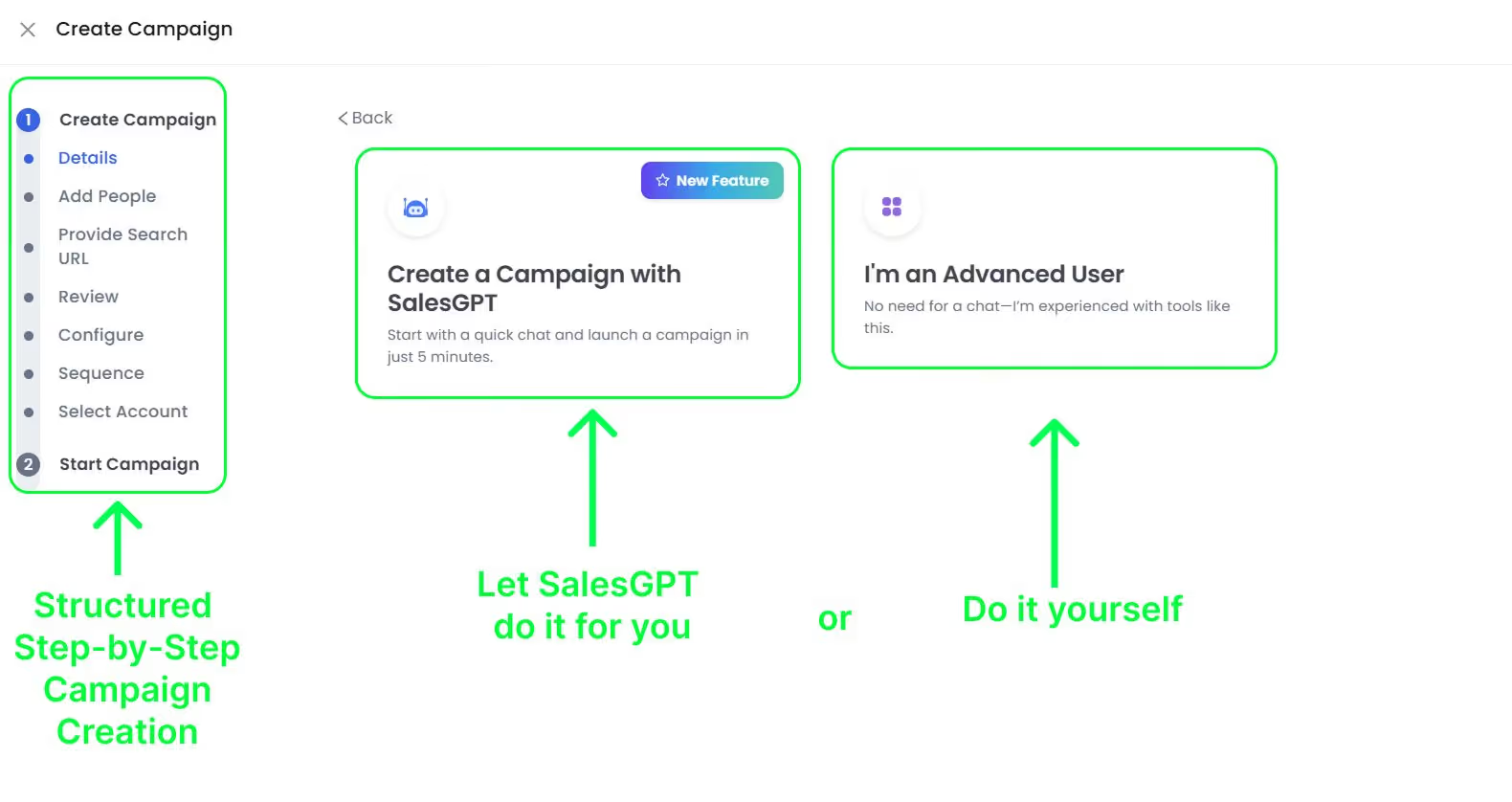
SalesRobot uses a structured campaign builder that guides you through the process step by step. While not as visually oriented as Waalaxy, its approach strikes a good balance between simplicity and power. The platform offers helpful suggestions throughout the setup process, making it easier to create effective campaigns without extensive training.
Personalization Capabilities
Personalizing your outreach dramatically improves response rates. Each platform offers different levels of message personalization.
LinkedHelper provides basic spintax capabilities for message personalization. While functional, creating and managing personalized templates feels more technical than with the other tools.
Waalaxy offers advanced variable insertion with fallback options, making it easy to create naturally personalized messages. Its template builder is intuitive and provides helpful suggestions for personalization points
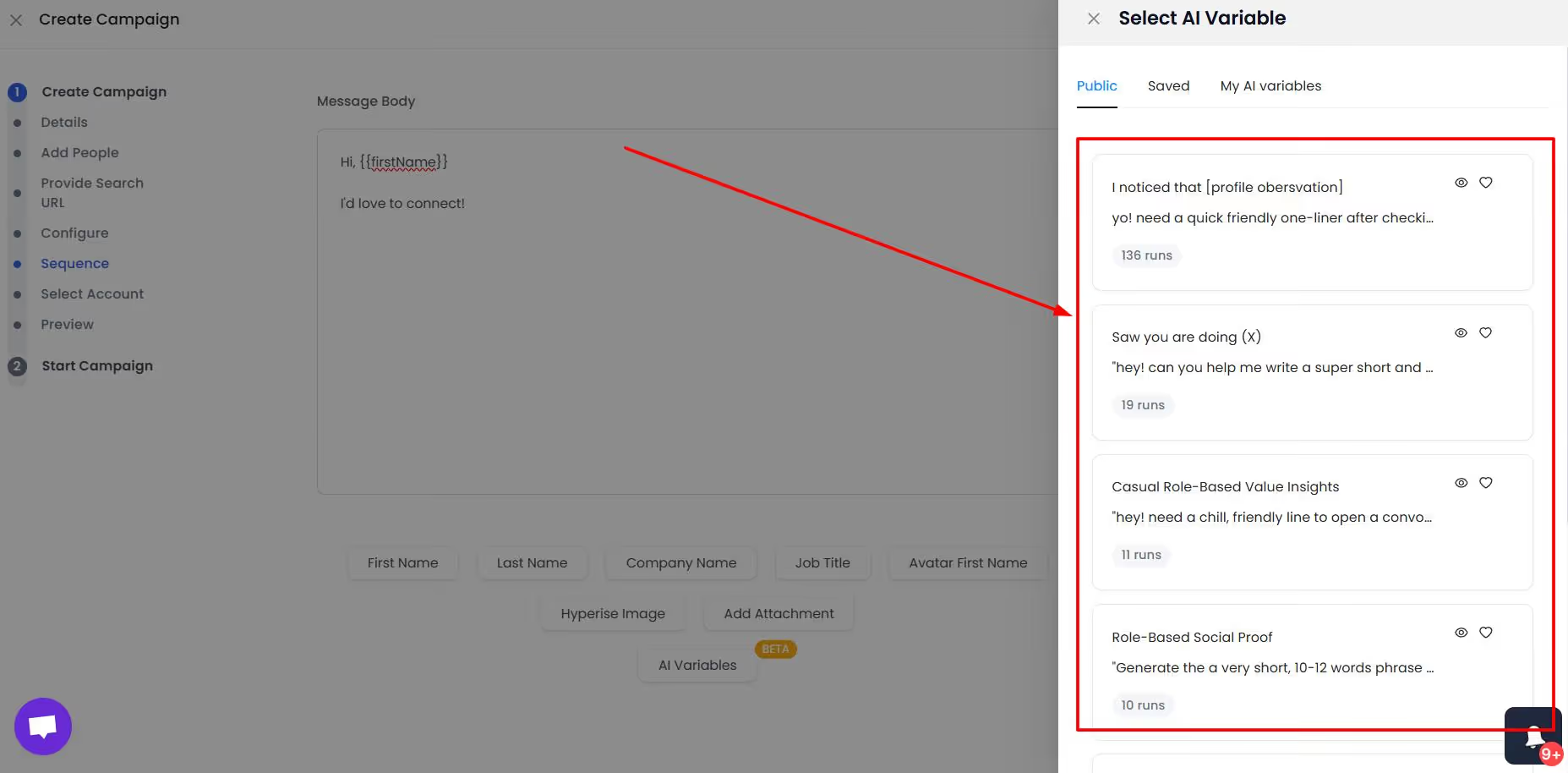
SalesRobot stands out with its smart personalization system. Beyond basic variables, it offers AI-powered personalization suggestions based on prompts that identify relevant prospect information from their LinkedIn profiles to use in our outreach messages. During my testing, campaigns using SalesRobot's smart personalization consistently achieved higher response rates.
Campaign Targeting
The ability to precisely target the right prospects is crucial for successful outreach.
LinkedHelper offers extensive targeting options but requires technical knowledge to utilize effectively. Its advanced search query capabilities give power users significant control, but the interface isn't intuitive for casual users.
Waalaxy provides simplified targeting with a user-friendly interface. While it offers fewer advanced options than LinkedHelper, its approach makes targeting accessible to users of all technical levels.
SalesRobot balances power and accessibility with its targeting system. It provides advanced filtering options within an intuitive interface, along with AI-powered targeting suggestions based on historical campaign performance.
LinkedHelper vs Waalaxy vs SalesRobot: Pricing & Value
LinkedHelper offers the lowest entry price, SalesRobot provides the best value for serious users, while Waalaxy falls in the middle.
Cost Structure Analysis
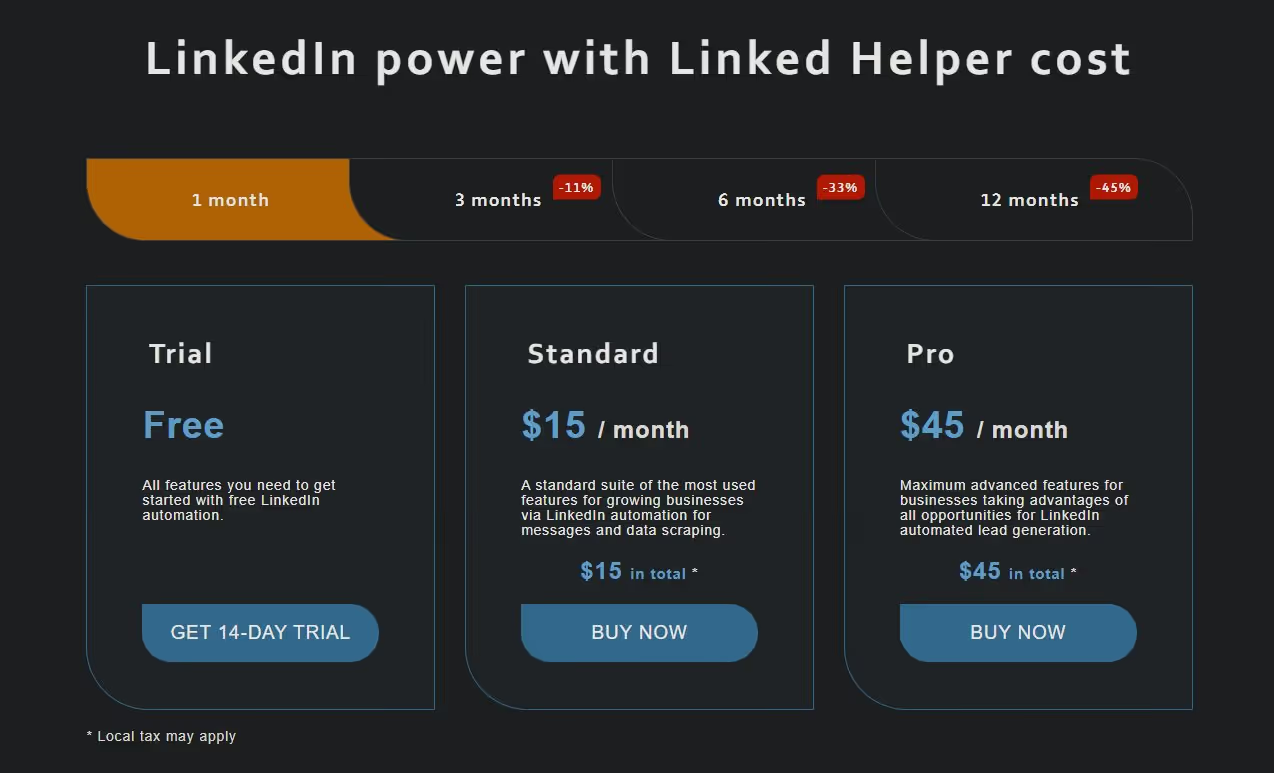
LinkedHelper offers the lowest entry price at $15/month, making it accessible for individual users on a tight budget. However, many essential features are locked behind higher tiers, and the true cost of ownership includes the time investment required to learn and properly configure the system.
Waalaxy's pricing begins at $43/month but quickly increases for access to multichannel capabilities. Their higher-tier plans at $88-538/month provide the full range of features including email integration and team management. While more expensive than LinkedHelper, the intuitive interface reduces the learning curve cost.
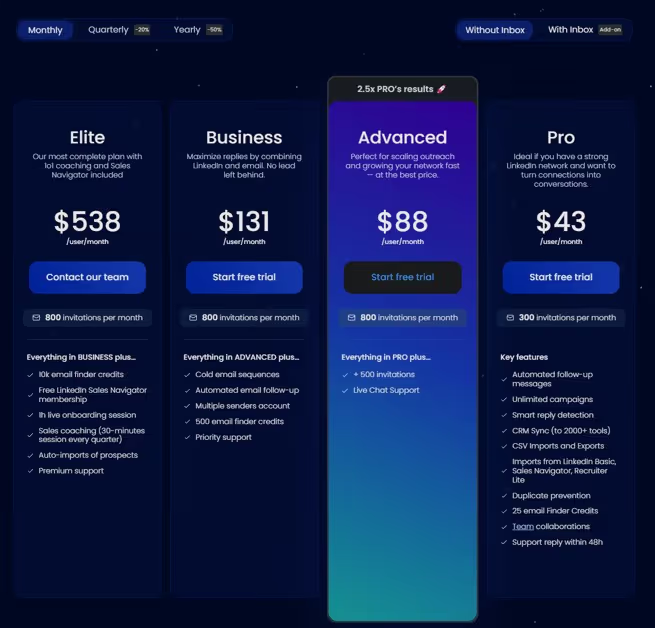
You do get a 50% off on all plans if you choose to pay yearly. However, I suggest you try out various other tools before you choose to commit to one tool.
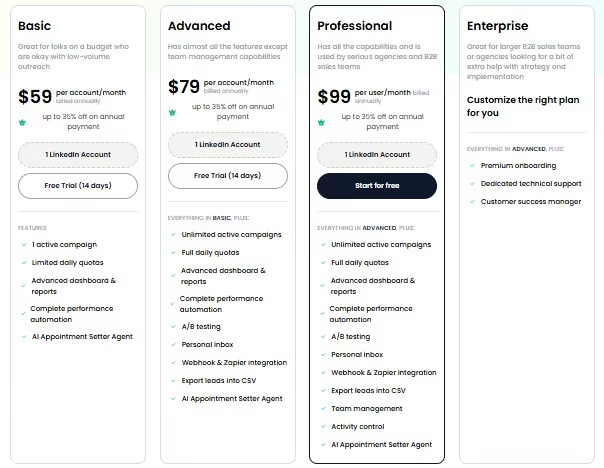
SalesRobot's pricing has become more competitive with their basic plan starting at just $59 per month.
Feature-to-Price Ratio
When evaluating pure feature count per dollar, LinkedHelper appears to offer the most value on paper. However, this calculation doesn't account for ease of use, safety, or effectiveness.
Waalaxy provides a good balance of features and usability at its price point, with the visual workflow builder justifying the higher cost for many users. However, its higher tiers become expensive without offering proportionally more value.
SalesRobot's pricing becomes even more attractive when you consider the cost of a LinkedIn account suspension (lost opportunities, rebuilding connections). The platform's unique security approach and mobile API integration offer features not available on any other platform, representing significant value for professionals who rely on LinkedIn for business development.
Return on Investment Considerations
During my testing, I tracked not just features and usability, but actual campaign performance and time investment.
LinkedHelper required the most time to set up and maintain, with approximately 2-3 hours of learning and configuration time before launching effective campaigns. This hidden time cost should be factored into the platform's value equation.

Waalaxy reduced setup time to about 30-45 minutes for comparable campaigns, representing significant time savings. However, its campaign performance was roughly on par with LinkedHelper once both were properly configured.

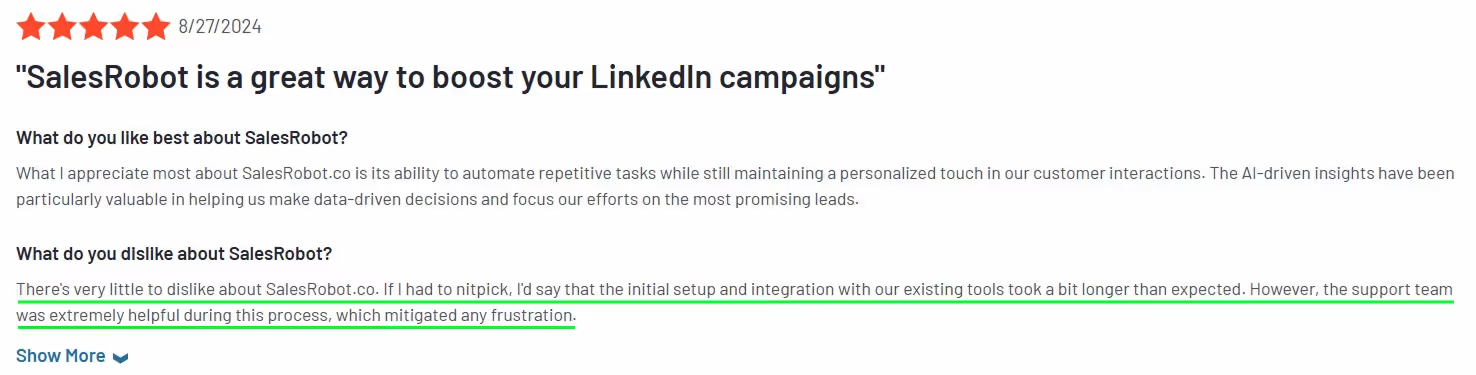
SalesRobot required about 1 hour of initial setup but delivered consistently higher connection acceptance and response rates than both competitors (approximately 15-20% higher in my tests). This performance advantage, combined with the elimination of account security concerns, provides the strongest overall ROI despite the higher subscription cost.
LinkedHelper vs Waalaxy vs SalesRobot: Pros & Cons
LinkedHelper
Waalaxy
SalesRobot
Final Verdict: Which LinkedIn Automation Tool Is Best For You?
After extensive testing of all three platforms with real-world campaigns, here's my final assessment to help you choose the right tool for your specific needs:
Use LinkedHelper if:
- You're a highly technical user who values complete control
- Budget is your primary concern
- You're comfortable managing your own security parameters
- You only need LinkedIn automation (no email integration)
- You plan to use proxy services for additional security
LinkedHelper remains the choice for power users who want granular control and don't mind the technical learning curve. Its lower price point makes it accessible for individual users on tight budgets.
Use Waalaxy if:
- You value visual workflow creation above all else
- You need combined LinkedIn and email campaigns
- Ease of use is more important than advanced customization
- You're a solo entrepreneur or small team
- You want a plug-and-play solution with minimal setup
Waalaxy offers the most intuitive user experience with its visual campaign builder. It's ideal for users who prioritize ease of use and need multichannel outreach capabilities.
Use SalesRobot if:
- Account safety is your top priority
- You're a serious business user who can't risk restrictions
- You want the highest connection and response rates
- You need powerful features without technical complexity
- You want AI-powered personalization and LinkedIn Sales Navigator integration
SalesRobot represents the evolution of LinkedIn automation, focusing on account safety without sacrificing power or usability. Its unique mobile API approach and dedicated IP addresses provide unmatched security, while its intuitive interface and smart features deliver superior campaign performance.

Wow your leads by cloning yourself and sending personalized videos and voice notes to each lead on LinkedIn.
If you don't reply to leads within 5 mins, your chances of converting them fall by 50%. Our AI replies on your behalf instantly! (and yes, you can train it)

Don't shoot in the dark. Get detailed analytics on what's working

SalesRobot allows you to invite other team members, so that they can add their LinkedIn Account, run outreach campaigns and get amazing results just like you.
.avif)


Trusted by 4100+ innovative B2B sales teams and lead gen agencies

.avif)

.avif)




.avif)


Heading 1
Heading 2
Heading 3
Heading 4
Heading 5
Heading 6
Lorem ipsum dolor sit amet, consectetur adipiscing elit, sed do eiusmod tempor incididunt ut labore et dolore magna aliqua. Ut enim ad minim veniam, quis nostrud exercitation ullamco laboris nisi ut aliquip ex ea commodo consequat. Duis aute irure dolor in reprehenderit in voluptate velit esse cillum dolore eu fugiat nulla pariatur.
Block quote
Ordered list
- Item 1
- Item 2
- Item 3
Unordered list
- Item A
- Item B
- Item C
Bold text
Emphasis

Superscript
Subscript