.avif)
TL;DR:
LinkedIn message automation helps you scale cold outreach, save time, and generate more leads, if done right.
This guide covers what it is, why it works, best practices to avoid spam, and the top tools in 2026 to automate your outreach safely and effectively.
There comes a time in every B2B industry veteran's life where they go:
God, I feel like I've been doing my cold LinkedIn outreach for ages now.
Trust me, manual prospecting and reaching out to your leads will do that to you.
But what if I told you, that's a thing of the past?
Because with LinkedIn message automation, you get more time to sit back, relax, and do what you do best: Close. More. Deals
First time hearing about it? Don't worry, I'll tell you everything you need to know in just 10 minutes.
On the way, you'll also learn about:
- Why you should consider LinkedIn message automation.
- The best practices for LinkedIn automation.
- And finally, the #1 LinkedIn automation tools you should be using in 2026.

What is LinkedIn message automation?
LinkedIn message automation is all about sending messages automatically, no manual intervention.
Specialized automated outreach tools like SalesRobot is what really makes the magic happen.
It's as simple as that.
But what is the point of automating messages?
Easy, it saves you a ton of time and money.
Of course, that is if you do it in moderation.
If you're using an automation tool without a solid strategy, you get dangerously close to spamming your prospects.
And there's a pretty good reason as to why you wouldn't want to do that…
TL;DR, SDRs, marketers, sales reps, and pretty much anyone in between can use LinkedIn message automation to speed up their cold outreach and cut down on tedious busy-work.
While these tools primarily offer to automate messages, you can do A LOT more when you're using the best option in the market. 😉
What can you automate on LinkedIn?
Aside from messages, LinkedIn automation tools like SalesRobot can automate several LinkedIn actions:
- InMails.
- Connection requests and invitation messages.
- Follow-ups.
- Message personalization.
- Prospect pull (search URLs, groups, events, posts).
- Emails (for multichannel outreach).
- Viewing and following LinkedIn profiles.
- Liking and commenting on posts.
Is LinkedIn message automation legal?
Now, based on what I said about the risk of spamming, you probably have a burning question right about now:
Is LinkedIn automation even legal?

The short answer is, YES, it's legal, but violates LinkedIn's Terms of Service! (Otherwise this would be a really awkward moment 😬).
LinkedIn automation isn't illegal but it does violate LinkedIn's Terms of Service, which explicitly prohibits "automated software, devices, scripts, robots, or other means or processes to access, 'scrape,' 'crawl' or 'spider' the Services" and "use bots or other automated methods to access the Services, add or download contacts, send or redirect messages." It's a contractual breach, not a criminal offense.
Of course, you'll have to automate the smart way.
Spamming is a big NO, and sending your prospects seven messages an hour will definitely get your account flagged and suspended.
That's why, make sure there are delays between your follow-up messages (let's say, 1 message to 3 unique profiles every 20 minutes).
And ALWAYS personalize your messages.
Why consider LinkedIn message automation?
You already know that you save time and money with LinkedIn message automation (because seriously, who's going to sit and personalize messages for 100+ prospects?!).
But honestly, that's just the start.
Here are the other reasons why you really need to consider LinkedIn message automation:
- Saves time & increases efficiency:
You've been here, you've heard me talk about this already.
Using LinkedIn message automation tools cut down a bunch of time that it would've taken to do your cold outreach manually.
But wait, there's more.

Automating your LinkedIn + email strategies with SalesRobot outright increases your overall efficiency too!
That's less time spent on boring tasks, and more time engaging with sales-ready leads till they convert into long-term customers.
- Better reach & scalability:
LinkedIn message automation helps you reach out to more prospects that fit your ICP and introduce them to your brand.
For example, if you're a LinkedIn Sales Navigator user, you can target your ICP by configuring the search filters, copy and paste it onto SalesRobot, and voila!
The tool will fetch the prospects and the relevant data in 24 hours. 😇
After that, you can reach out to them and engage all you want.
That way, automating your messages lets you scale your brand consistently without losing touch with your existing prospects.
If you find your ICP from a common LinkedIn group, you can send them a personalized message based on this template:
- Proven response rates with automated outreach:
The data speaks for itself - LinkedIn DMs driven by automation achieve an average 10.3% response rate, nearly double that of traditional email outreach. Teams using smart segmentation and signal-based personalization are seeing 20-30% response rates in 2026, while 62% of B2B marketers say LinkedIn successfully generates leads.
- Engage prospects when it really matters:
This won't come as a shocker:
But your prospects won't respond to your messages at random times of the day.
The truth is, you probably need to experiment and find out what time your prospects are the most receptive throughout the day.
Using a LinkedIn message automation tool like SalesRobot lets you run A/B testing on your campaigns to find out what works and what doesn't. 😇
- Consistent content strategy:
Posting on LinkedIn consistently is important when you're trying to stay memorable to your prospects and assert yourself as an influential member of the community.
With that said, brainstorming new content ideas and posting them exactly when your prospects are the most active is an absolute chore.
LinkedIn automation tools also let you schedule your LinkedIn posts, so you can sit back and focus on converting more leads while your posts go live at the perfect time.
- Detailed analytics and insights:
Everything I've talked about here would be pretty difficult to pull off if you have no idea of where you should be tweaking your strategy.
With LinkedIn message automation tools, you're getting real-time insights into your cold outreach strategy, letting you make changes on the fly for optimal results.
Best practices for LinkedIn message automation
That is everything you get when you automate your LinkedIn actions.
But can I be real with you for a second? You won't be reaping any of the benefits of LinkedIn message automation if you aren't going about it the right way.
Remember what I said about spamming your prospects? Exactly.
So before you go any further, here are some best principles to follow when you're automating your LinkedIn cold outreach:
1. Optimize your LinkedIn profile
Putting on a good first impression for your prospects is a huge win.
Because if things start off on the wrong foot from the very beginning, you're going to have a tough time trying to convert them in the long run.
The point is, your LinkedIn profile is basically your virtual business card.

And to help you optimize your LinkedIn profile, take a look at this checklist of must-have profile elements to get you started:
- Profile picture.
- Banner.
- Headline.
- Summary.
- Skills & endorsements.
- Pinned posts.
2. Personalize your cold outreach
Not every LinkedIn user is going to be your prospect, and not every cold outreach message template you use is going to be correct.
Trying to sell to your prospects or sending generic messages right out of the gates pretty much doubles your chances of getting reported as spam.

My advice? Your prospects love cold outreach messages that are more about them, instead of it being all about you and your business solutions (for now 😉).
Personalizing your messages helps you achieve that, especially when you're talking about their industry, recent accomplishments, education, and so on.
Also, the best send windows tend to be 9-11 AM and 1-2 PM in your prospect's local time zone, Tuesday through Thursday - weekends and late evenings get noticeably lower reply rates.
With SalesRobot, you can personalize your cold outreach messages in bulk, cutting down on the time it would have taken you to scan profiles and do them all manually.
3. Analyze metrics and campaign performance
You heard me talk about the upsides of analytics and campaign insights in your LinkedIn message automation tools, and there's a good reason for that!
As you keep adding more prospects to your active campaigns, you will have to adapt and change elements on the fly.
If you aren't viewing important KPIs that signal the overall health of your cold outreach regularly, you're pretty much wasting your money and resources sustaining an inefficient strategy.
SalesRobot tracks metrics like number of follow-up messages, InMails, connection requests, emails, and more, on one easy-to-read dashboard.

4. Set daily LinkedIn limits
LinkedIn doesn't appreciate spamming.
That part is clear to us by now. But it goes beyond just sending messages.
LinkedIn has tightened its limits in 2026: standard accounts are capped around 100 connection requests per week, Sales Navigator users get 150-250 per week plus 50 InMails monthly, and free accounts are limited to just 5-10 personalized connection notes per month.
So, to stay under the LinkedIn algorithm radar, you would have to send not more than 100 connection requests a week with some delay in-between to not raise alarms.
But let's be honest here, 100 connection requests per week? You're barely reaching out to 15 prospects a day!
SalesRobot lets you safely bypass this weekly limit and allows you to send over 200 connection requests a week by using free InMails, emails, and human-like delays that you can configure.
5. Warm up your LinkedIn account
Similar to the last point, LinkedIn gets the ban hammer down on you if you start sending out connection requests by the dozen every day from a fresh account.
So for the first two weeks, instead of running to automate your LinkedIn messages, focus on engaging with your network with targeted cold outreach and post interaction.
And if you're in the mood to add LinkedIn connections that aren't just prospects that fit your ICP, you can always add LinkedIn LIONs!

With the extensive network of a LinkedIn LION, you can warm up your LinkedIn profile to 500+ in no time.
How to choose a LinkedIn message automation tool
You've heard me talk a lot about LinkedIn message automation tools, but how does one get their hands on it exactly?
Looking it up with a simple Google search isn't going to do you any good. Because it's not a one-size-fits-all solution!

Are you trying to focus on multichannel strategies? Is cold calling a part of your strategy? What is your budget for lead generation? What third-party apps are you using with your cold outreach?
Is the automation tool you're using safe?
The questions are endless, I'm afraid.
But as you might have noticed, I've been recommending you SalesRobot for automating your cold LinkedIn strategies.
To understand why, lets look at the different types of LinkedIn message automation tools available in the market:
Chrome extensions
Chrome extension LinkedIn message automation tools are basically plugins or add-ons that fit into your browser to enhance your LinkedIn cold outreach.
You can buy or download them from your preferred browser marketplace, and are generally easy to set-up.

However, there are a few problems with that.
Chrome extension tools integrate with LinkedIn through your browser. So as long as your browser is running, your automated cold outreach campaigns will stay active.
Close your browser or system, and your campaigns come to a grinding halt.
If you want to keep reaching out to your prospects, you better hope your browser doesn't crash or close in the middle of your campaigns.
But that's not even close to the worst part.
Chrome extension tools can get your LinkedIn account banned.
That's because they work on the front-end, i.e., directly through your browser. LinkedIn's algorithm can catch you using an automation tool in no time.
Additionally, these tools also use your IP address and store cookies in your browser, making it much easier for LinkedIn to block or restrict your account.
Beyond that, most browser-based automation tools have very limited capabilities, and cannot run complex LinkedIn actions on auto-pilot.
Cloud-based solutions
On the flipside, cloud-based LinkedIn message automation tools are much safer, and can offer advanced automation capabilities for LinkedIn (and multichannel) cold outreach.
Cloud-based tools work on the web through dedicated servers.
They don't integrate with LinkedIn through your browser, making it much harder for the LinkedIn algorithm to detect you.
And since cloud-based tools don't run your browser or system, you can run cold outreach campaigns 24/7, even when you aren't online.
Cloud-based tools like SalesRobot also add a layer of security to your automated LinkedIn cold outreach.
Features like the Safe Mode settings lets you choose your daily automation limits and delays to humanize your cold outreach.

Top 5 LinkedIn message automation tools of 2026
That was all you had to know about LinkedIn message automation, why you need it, the best way to go about it, and the best kind of tools for the job.
But, I have another surprise for you. 😇
I have listed the top 5 LinkedIn message automation tools in the market!
These tools have been ranked based on their automation capabilities, the impact they can have on your cold outreach, and if they can keep your account safe as you automate.
Enough talk, let's take a look at what my #1 recommendation has to offer…
1. SalesRobot: 4 year old tool with 4,000+ users and a 0.001% ban rate
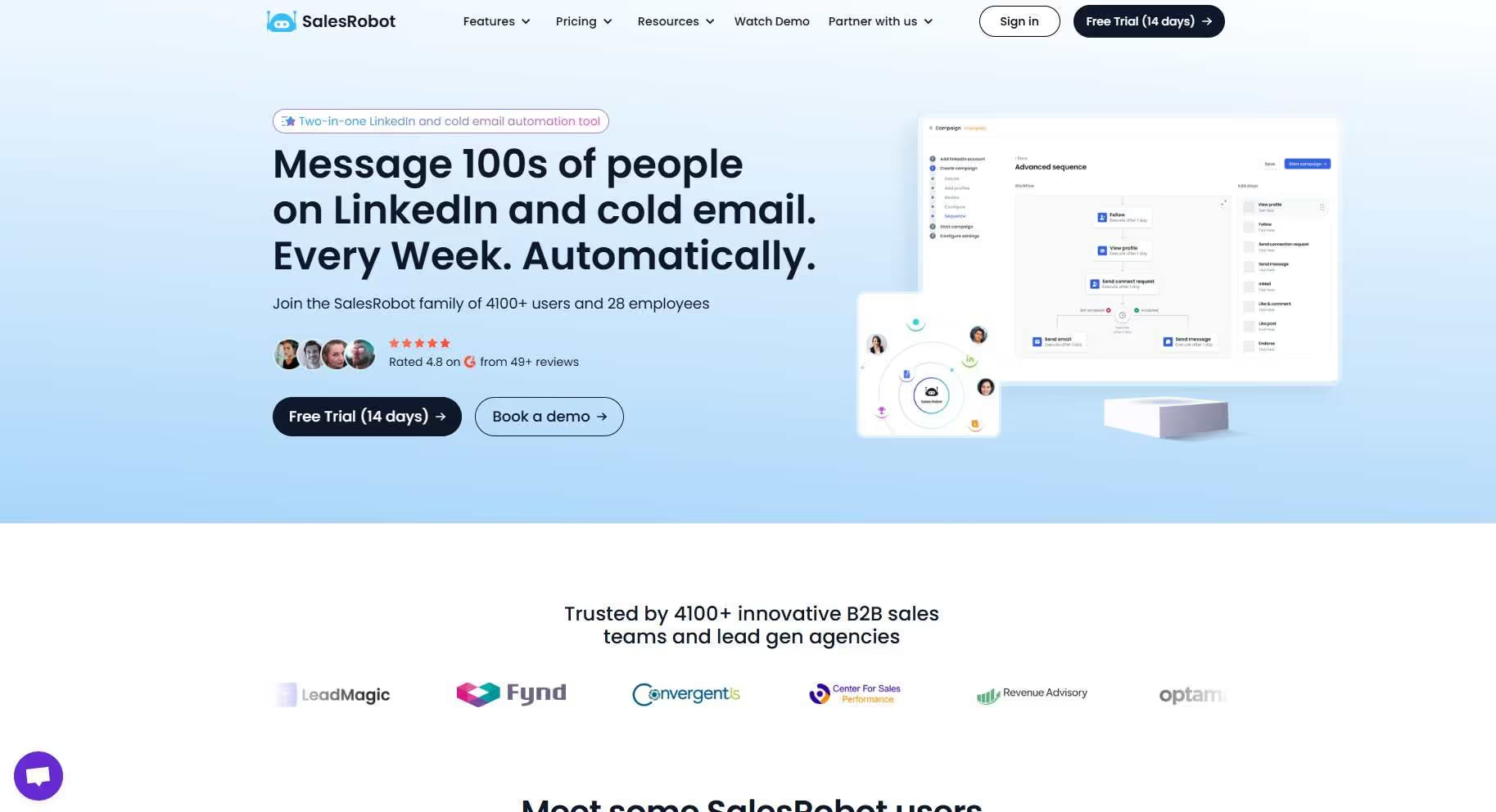
SalesRobot is a cloud-based sales automation tool that automates the boring, repetitive tasks that come with multichannel (LinkedIn + email) cold outreach.
You can pull prospects from virtually anywhere with SalesRobot, be it from LinkedIn/Sales Nav search URLs, groups, events, or even custom CSV imports.
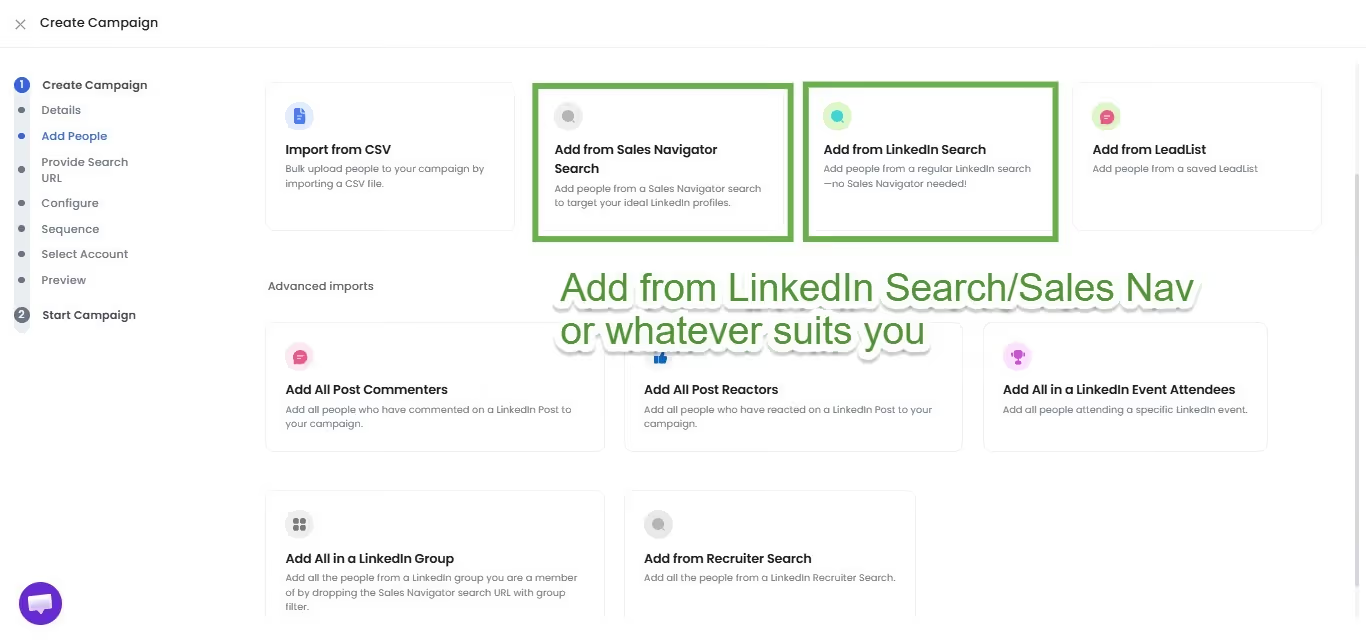
After you have gathered your prospects, you can add them to automated cold outreach campaigns on SalesRobot, where the tool will reach out and follow-up with them on auto-pilot.
SalesRobot's LinkedIn message automation capabilities don't just stop there.
Because you can automate complex LinkedIn actions like viewing and following LinkedIn profiles, liking and commenting on relevant posts, leaving endorsements, and so much more.

As for the messages themselves, SalesRobot has an "AI brain" that calculates the possibility of a positive response based on your message draft.

Personalizing your cold outreach messages can drive you insane if you have to do it for every prospect.
That's why SalesRobot's Hyperise integration personalizes your messages for you in bulk, all on auto-pilot.
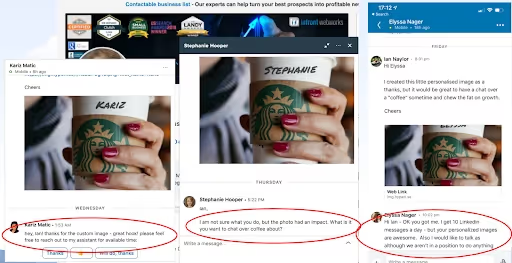
The comprehensive dashboard, safety settings to keep you away from LinkedIn's radar and 200 connection requests per week, A/B testing campaigns, you've heard what SalesRobot can do.
Your job? Define your ICP by answering 5 questions, and leave the rest to SalesRobot.
One last thing!
I know engaging with each prospect can get tiring.
And frankly, sometimes you just don't have the time to sit and wait for your prospects to reply to your cold outreach, so you can move them through the sales funnel.
That's why we have built the SalesRobot AI Appointment Setter that mimics your communication style.
Our AI will converse with your prospects, just like you would, until they book a meeting with you.
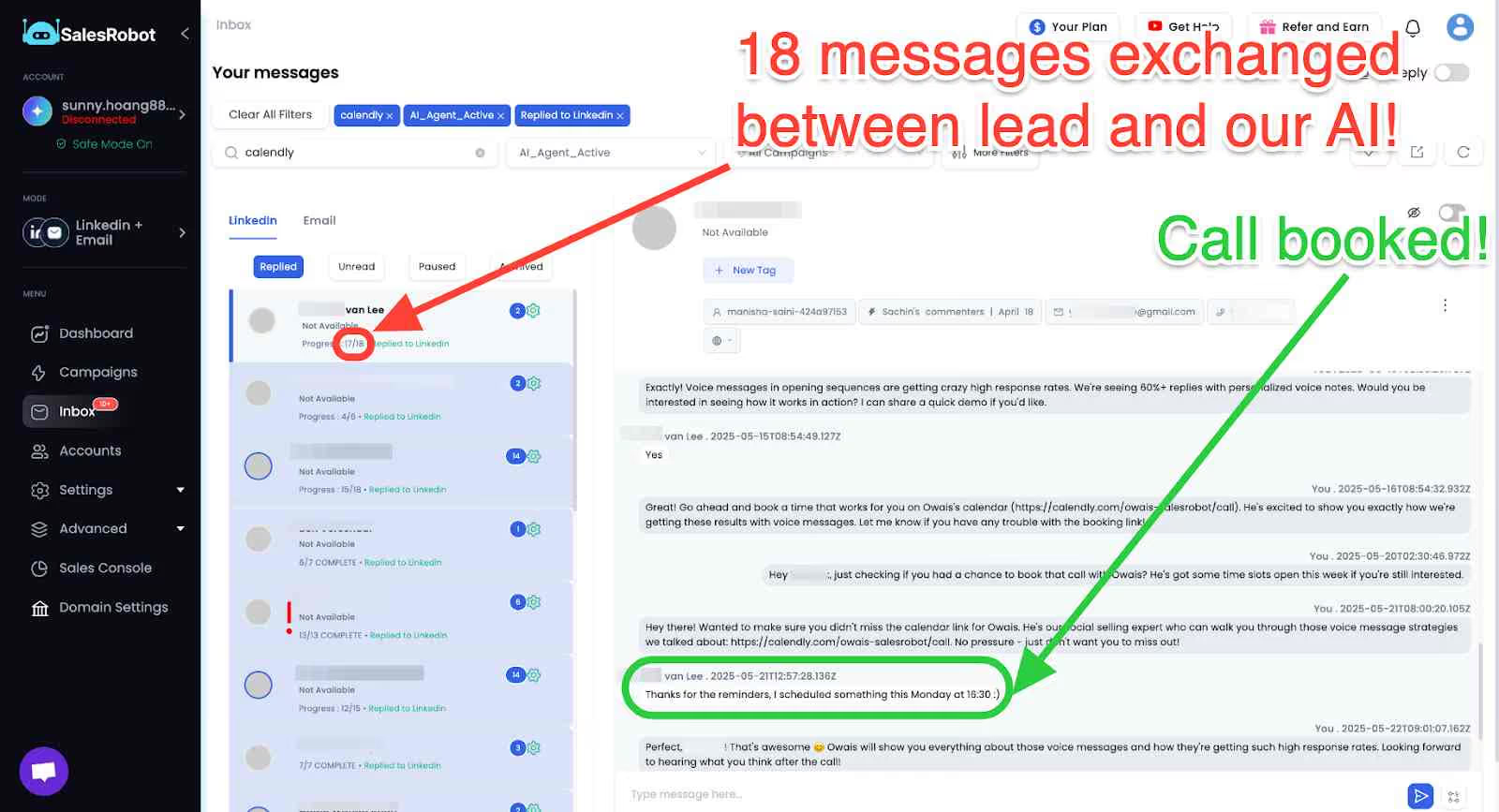
Pretty neat, right? 😉
Also, SalesRobot prices per LinkedIn account: Basic is $59/month, Advanced is $79/month, Professional is $99/month, and Enterprise is custom-priced for larger teams.
After everything I've said, it might be a little hard to believe that SalesRobot can actually deliver on the promises we make.
That's why you can test-drive our features with a 14-day risk-free trial 😇. No credit card required!
2. Expandi.io: Flexible campaign builder with A/B testing

Expandi.io is a cloud-based automation tool used by B2B professionals for its customizable LinkedIn workflows, packaged in a competitive pricing structure.
Like SalesRobot, Expandi can pull prospects from LinkedIn/Sales Nav searches, comments and likes on posts, custom CSV files, etc.
Expandi's A/B testing feature lets you experiment with message drafts, subject lines, call-to-action buttons, and so on, till you end up with the cold outreach message that works.
And the campaign builder feature is what makes Expandi a viable LinkedIn message automation tool.
The biggest drawback with Expandi is the poor customer support and its lack of safety features.
Weak safety features = More chances of losing your LinkedIn account
3. TexAu: Multiplatform automation and data extraction

TexAu is a LinkedIn message automation tool that also reduces the manual tasks needed for social media platforms like Twitter.
TexAu's workflows lets you combine different tools in the same sequence to increase the productivity of your cold outreach capabilities.
What users love about TexAu is its data extraction capabilities. You can automate data extraction and other data-related tasks.
What users hate about TexAu is that it's difficult to get into. Not to mention the outdated UI and bugs, the product proves to be difficult to get into for both industry veterans and beginners.
4. Salesflow: Manage prospects from different accounts

Salesflow is a multichannel automation tool that makes it easy for sales teams to create and maintain multiple campaigns at once.
Salesflow saves you a ton of time and mental energy with its Lead Management Inbox feature.
You can view and engage with prospects from different accounts from a centralized and customizable location.
The Salesflow dashboard also gives you access to Team Management features, where you can view the metrics of every sales rep and work on areas of weakness.
But honestly, Salesflow lacks some significant features that are a core part of LinkedIn message automation tools.
Not to mention, users have reported several bugs on the platform that causes campaign interruptions, and is severely lacking in its safety features for LinkedIn.
5. Dux-Soup: Tag prospects and personalize messages

Dux-Soup is a LinkedIn automation tool that takes away a lot of the stress behind prospecting and lead generation, with a few features that automate advanced LinkedIn actions.
Dux-Soup offers features like tagging and note-taking to help you personalize your cold outreach messages for specific sales-ready leads.
Additionally, Dux-Soup also integrates with popular CRMs like Hubspot and Pipedrive.
The reason why Dux-Soup isn't too high on the list for LinkedIn message automation tools is because it can get your LinkedIn account banned.
A lot of its functionality depends on its Chrome extension, so that's already a red flag 🚩.
Besides, its cloud-based option doesn't have much in its arsenal to safeguard your account anyway.
For those looking for free LinkedIn connection automation tools, remember that most free options carry higher risks and limited features compared to premium solutions.
LinkedIn message automation: What now?
Congratulations on making it this far!
You now know everything to forget the days of losing your mind over manually reaching out to prospects with highly personalized messages.
Because with LinkedIn message automation, you can do it all on auto-pilot.
Not to mention, you have the #1 automation tool backing you to gather sales-ready leads and convert them into long-term customers: SalesRobot.
But what do you think? Feel like SalesRobot is on to something cool?
Then try out our features to see everything I didn't talk about with a 14-day risk-free trial 😇.
And hey, if you want to talk about getting your dream LinkedIn cold outreach up on its feet, then stop by for a quick chat! Coffee's on me. 😄
Frequently Asked Questions
Is it unprofessional to message on LinkedIn at night?
Not necessarily! LinkedIn is a global platform where professionals work across different time zones.
However, it's best to consider your prospect's location and schedule your messages during their business hours for better response rates. Most LinkedIn automation tools let you set optimal sending times.
What is LinkedIn auto connector?
LinkedIn auto connector refers to automation tools that automatically send connection requests to targeted prospects based on your specified criteria. These tools help scale your networking efforts by finding and connecting with potential leads without manual intervention.
Are there free LinkedIn connection automation tools available?
Yes, there are some free LinkedIn connection automation tools available, but they typically come with significant limitations and higher risks of account restrictions. Free tools often lack the safety features and advanced capabilities of premium solutions like SalesRobot.
Until next time,
Good luck!

Wow your leads by cloning yourself and sending personalized videos and voice notes to each lead on LinkedIn.
If you don't reply to leads within 5 mins, your chances of converting them fall by 50%. Our AI replies on your behalf instantly! (and yes, you can train it)

Don't shoot in the dark. Get detailed analytics on what's working

SalesRobot allows you to invite other team members, so that they can add their LinkedIn Account, run outreach campaigns and get amazing results just like you.
.avif)


Trusted by 4100+ innovative B2B sales teams and lead gen agencies

.avif)

.avif)




.avif)


Heading 1
Heading 2
Heading 3
Heading 4
Heading 5
Heading 6
Lorem ipsum dolor sit amet, consectetur adipiscing elit, sed do eiusmod tempor incididunt ut labore et dolore magna aliqua. Ut enim ad minim veniam, quis nostrud exercitation ullamco laboris nisi ut aliquip ex ea commodo consequat. Duis aute irure dolor in reprehenderit in voluptate velit esse cillum dolore eu fugiat nulla pariatur.
Block quote
Ordered list
- Item 1
- Item 2
- Item 3
Unordered list
- Item A
- Item B
- Item C
Bold text
Emphasis

Superscript
Subscript