.avif)
TL;DR
Cold messaging on LinkedIn is more effective for lead generation than traditional cold email, with InMail boasting response rates of 18–25%. To win in 2026, keep your messages under 100 words, personalize your approach based on "trigger events" or mutual connections, and focus on starting a dialogue rather than closing a sale.
Key Success Factors:
- Personalization is King: Customizing messages boosts reply rates by 27%.
- Keep it Short: Messages under 300 characters see a 19% increase in responses.
- Timing & Persistence: Follow-ups are critical, as 60% of users aren't on LinkedIn daily.
- Leverage Automation: Tools like SalesRobot can scale your outreach while maintaining a human, personalized touch.
Sending a message to a qualified lead by cold emailing on LinkedIn is an efficient technique to initiate dialogues with highly targeted prospects.
However, creating a compelling LinkedIn cold message template isn't child's play.
It ought to be quick, helpful, and motivating for your sales leads to act on.
Regardless of the medium, the LinkedIn cold message is a highly effective strategy for expanding your client base.
Sending messages using LinkedIn InMail is an excellent addition to email and cold calling to attract potential clients. Recent research shows that LinkedIn InMail messages achieve response rates between 18-25%, significantly outperforming cold emails which typically see only 3% response rates.
Sending an InMail to a potential client without prior contact is called a "cold message" on LinkedIn.
The only catch is that the contact is impersonal; they won't know who you are unless you introduce yourself. As a result, it's tough to craft an engaging LinkedIn cold message. Constructing a message that prompts a response requires careful consideration of word choice and punctuation.
Finding a method that works for sending the LinkedIn cold message and getting responses regularly can allow you to expand your reach and ultimately build your business. Including a personalized message in connection requests significantly boosts reply rates to 9.36% compared to just 5.44% for generic requests.
Top 10 LinkedIn Cold Message Templates in 2026
Make use of current events in your B2B sales communications.
LinkedIn cold message strategy is effective since it demonstrates that you're not sending out an email blast to every potential client. Instead, you've zeroed in on a unique success story of your target consumer and linked it to your product.
Hi (name),
I recently discovered (trigger event). Congrats!
Focusing on (the value proposition) is usually a high priority. I felt you would be interested in hearing about how we helped a company like (similar firm) (benefit).
You probably have a lot on your plate right now, but if you have a few minutes, we should chat since I have some interesting news about (business name).
How does (that day and time) look on your schedule? Alternatively, you may give me your calendar or check out mine here.
The "Friend" in Common
Pointing up a shared link may be a great icebreaker since it gives you context and builds authority.
Good Day [name],
It's good to "e-meet" you! I realized that we're both connected with [mutual connection's name] and wanted to reach out. Seeing as you [are in the same industry as / went to the same school as / have the same field of interest as], I thought it would be wonderful to connect. I believe you would be interested in my work with [business whose product you're promoting].
Hope to hear from you!
[Your name]
The Group Connection
You may still connect without a mutual buddy. Joining the same LinkedIn group counts through a LinkedIn cold message, which will help you boost your network
Hi [name],
[Your name] works at [your firm]. We're both in [LinkedIn Group], and I saw your intelligent remarks on [topic they discussed]. [Their statement] intrigued me.
If you're interested, I'd like to talk further. I can also help with the business. A 15-minute call this week?
Thanks!
[Your name]
Expressive of a lot in a little
When reaching out to strangers online, shorter is usually better. LinkedIn's research shows that messages under 100 words tend to get the best response rates. Your opening statement in a LinkedIn cold message shouldn't focus on closing the deal but on establishing a rapport that can help you complete the deal later.
Hello, [First Name] - How are you doing? I was looking for someone with experience in [their sector] and came across your profile through a [typical connection/group/school]. Do you have time to talk on the phone or via video chat? – Name Here
The Forward Slant
Again, it's unlikely that this initial message will result in a sale. Nonetheless, there are times when a direct approach is warranted in a LinkedIn cold message.
Hi [name],
I'm with [business name], and we've developed [brief description of product/service] that I think would be a great fit for what you're doing at [company name of lead].
Do you want to talk about this?
Best,
[Your name]
Just a Touch of Flattery
It's a well-known adage that flattery may be quite effective. If you acknowledge someone's efforts, they are more likely to reward you with a positive response. (Only single out those who have earned it, lest you come off as insincere.)
Hello [name],
To "meet" you is to experience joy! I've been keeping up with [business name of lead] for a while now, and I must say that I was impressed to learn about [recent and noteworthy accomplishments].
If you are interested, I have experience helping organizations like [business name of lead] bring comparable ideas to fruition. If you have a moment later this week, would you be open to a short phone call?
Thank you!
[Your name]
LinkedIn Referral Message Template
Leveraging referrals through LinkedIn can dramatically improve your success rates. When reaching out through a mutual connection, be specific about the relationship and value proposition.
Hi [name],
[Mutual connection] suggested I reach out to you regarding [specific topic/challenge]. They mentioned you're working on [relevant project/initiative] at [company].
I've helped similar companies in [industry] achieve [specific result]. Would you be open to a brief 15-minute conversation to explore how this might apply to your situation?
Best regards,
[Your name]
Trial Version Template
One effective method of attracting new customers is providing them with a free service trial via LinkedIn cold message. Don't try to oversell yourself; let your products do the talking.
Hello [NAME], and welcome to the network!
What are the prospects for [BUSINESS SOLUTION] at your company? If so, I'd be happy to lend a hand, and I'm even willing to give you a free trial at [WEBSITE LINK].
As always, I welcome your feedback.
Complementing the Content Template
Some of your prospects will write thought-leadership pieces that can serve as excellent springboards for healthy discussions. You may impress them with your knowledge of their field and show gratitude for them by showing an interest in their thoughts with this LinkedIn cold message.
Specificity and care are essential with this one. You must read their content and be ready to address particular issues they made. This message template is meant to spark a dialogue, but be prepared for some in-depth back and forth if they answer.
Hey [Prospect],
I wanted to let you know that I read your [content] on [topic] and was impressed by how insightful, sharp, and well-written it was. You're doing an excellent job of establishing yourself as a thought leader in [their industry]!
You mentioned [a particular point addressed in the material]. I was wondering if you had any views on [an open-ended, forward-thinking content-related question].
Regards,
[Your Name]
Follow-Up Message
"Hello [person name].
I recognize that you have a hectic schedule. But I'd love to meet new people and talk about [insert topic here]. I already stated [insert a sentence worth responding to]. Please respond whenever you are able."
Re-establishing an old link
Hey [name],
It's been a while, so I just wanted to say hey. I hope everything is going well for you!
By the way, congratulations on your promotion! I noticed your LinkedIn post - incredibly fantastic! How are you finding it after such a long wait?
All the best
How can you improve the responsiveness of your LinkedIn cold message?
Keep it brief.
LinkedIn says mobile devices account for more than half of all InMails read. LinkedIn communications should be treated more like text messages than emails. Write concisely - 150 words or fewer - and to the point. Research shows that personalizing your LinkedIn messages boosts reply rates by 27%, while keeping them under 300 characters increases responses by another 19%.
Don't sell
Your aim is not to market your product or service but to build a connection and start a dialogue with your possible client. If you discover throughout the first phases of getting to know your prospect that they are a good fit for you, you can offer a call, but only in the later stages of the conversation in the LinkedIn cold message.
Pique their interest
Decision makers will give you their time if you catch their attention with an interesting issue in the LinkedIn cold message. Connect your knowledge to their work and offer probing questions. You may concentrate on their challenges and objectives, which you are aware your solution or service has the ability to answer. Legal and professional services lead with the highest reply rate at 10.42%, likely due to the consultative, relationship-driven nature of the work.
Follow up
60% of LinkedIn users may not log in on a daily basis, and those that do may not have enough time to respond. So, if you see that your message has been viewed but not responded to, sending a follow-up message is critical to ensure that your request doesn't slip through the cracks. Research shows 63% of active LinkedIn users ignore unknown DMs, making follow-up even more crucial.
LinkedIn Sales navigator for LinkedIn Cold message
LinkedIn Sales Navigator is an excellent tool for generating B2B leads.
LinkedIn Sales Navigator is a social selling tool that offers a variety of features aimed at assisting you in finding suitable prospects with whom to create trusting connections.
You can reach the correct type of prospects using the search and filter options in LinkedIn Sales Navigator. Sales Navigator also delivers actionable data and insights that may help you gain a better knowledge of your leads and prospects.
This allows you to interact with your prospects more intimately by providing a customized touch.
LinkedIn Sales Navigator is designed for B2B salespeople. Sales Navigator sellers with at least four LinkedIn connections at a target account are 16% more likely to close a deal with their target company.
The good news is that you don't have to be a part of the vast, cutthroat, and the potentially demoralizing world of business-to-business communication.
Automating your LinkedIn cold message outreach might help you save time, money, and energy. Get started right now if you haven't already. This can help you see things in a fresh light and better assess your possibilities.
73% of salespeople use technology to close more deals, with CRM adoption growing by 113% since 2016.
The effectiveness of your link-building strategy depends on your LinkedIn marketing strategy.
Salespeople enjoy LinkedIn for its networking advantages, but many overlook the opportunity to establish relationships with this social network. Of B2B marketers using LinkedIn, 43% reported that LinkedIn directly generated revenue for their company.
SalesRobot is a cloud-based automated program designed specifically to write cold DMs on LinkedIn.
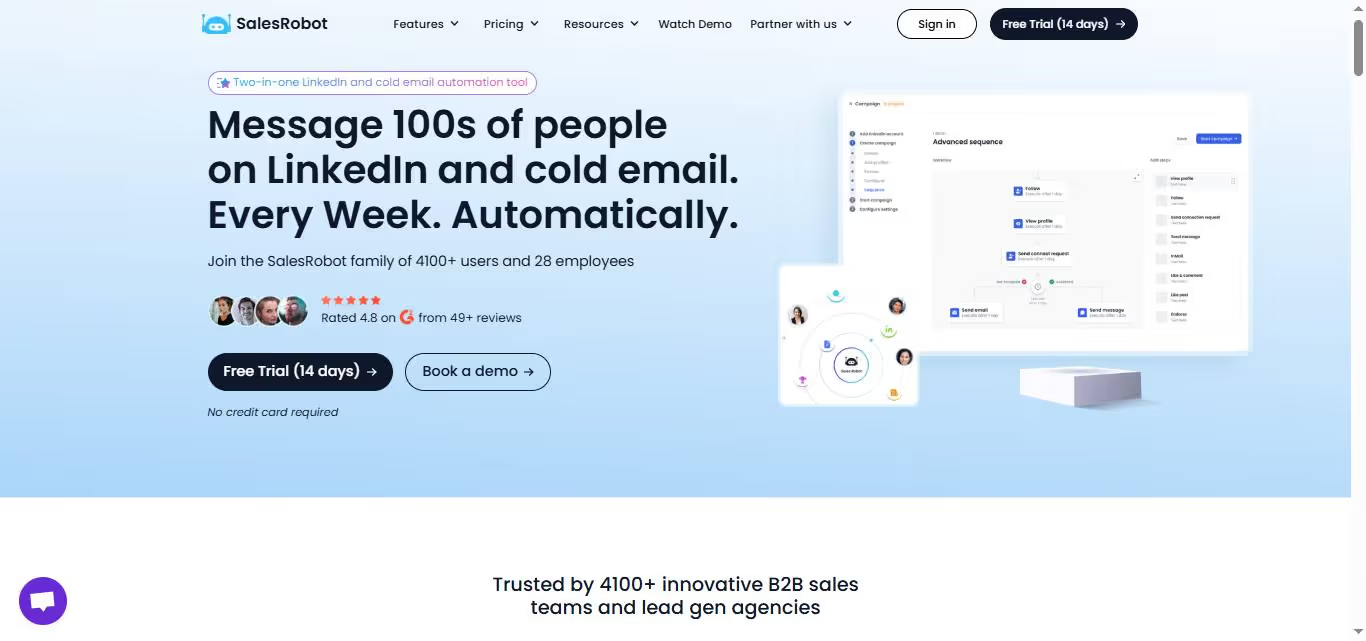
For most B2B buyers in 2026, LinkedIn is not just a data source. It is an outreach channel. Connection requests, personalized follow-up sequences, voice notes, and inbox conversations on LinkedIn drive a meaningful pipeline for teams that do it well.
Baseloop captures LinkedIn data and exits. SalesRobot picks up where Baseloop leaves off.
SalesRobot is a cloud-based LinkedIn and email automation platform built specifically for B2B outreach.
It connects through LinkedIn's mobile app APIs rather than browser-based automation, which keeps outreach activity looking natural and makes account restrictions far less likely than cookie-based tools.
Connection requests, follow-up sequences, and inbox management run automatically while your team focuses on the conversations themselves.
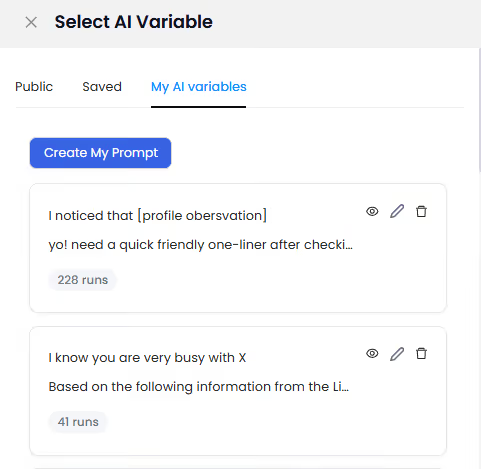
AI Variables pull data directly from each prospect's LinkedIn profile to write personalized message sequences automatically, so the outreach reads as individual rather than templated.
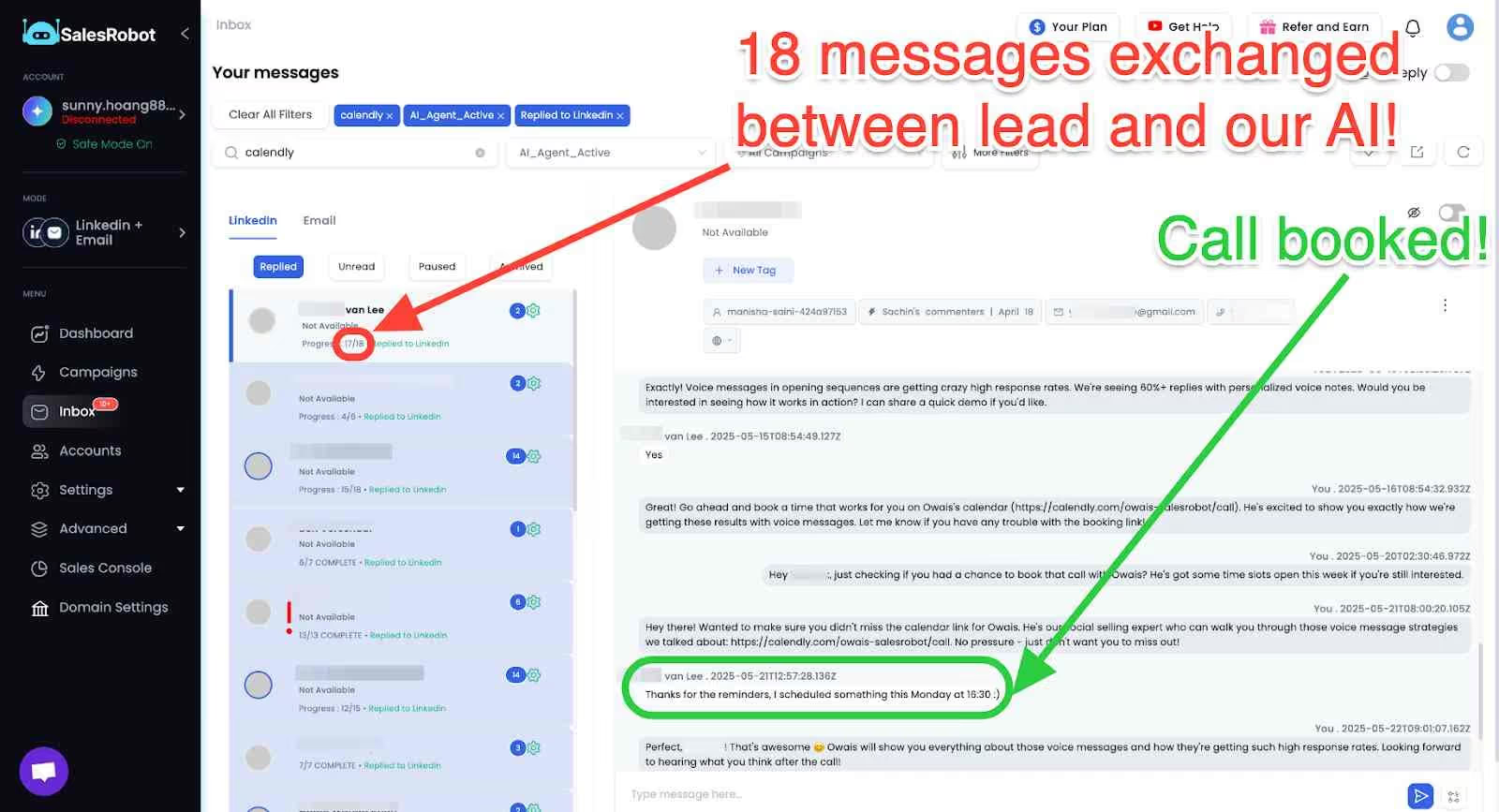
The AI Appointment Setter takes over after a prospect replies, handles qualification questions, and books meetings automatically without manual involvement.
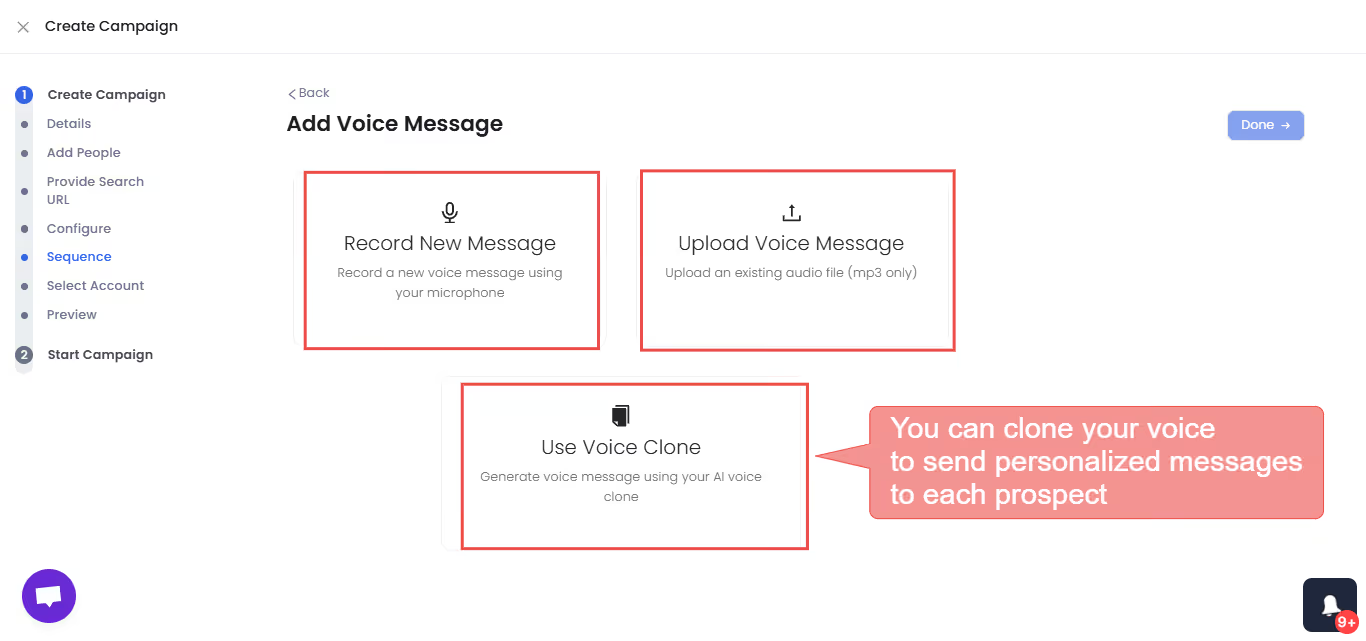
The AI Voice Clone feature generates individualized voice notes that sound like you and consistently drives higher reply rates than text-only outreach in relationship-driven B2B sales.
Using automation tools, how can you speed up LinkedIn outreach?
Using LinkedIn's outreach automation tools, sales teams may speed up processes like:
- Quickly examine many profiles at once and send connection requests or inbox messages with just a click. Ensure that every lead is followed up on beyond the "view profile" step of the sales process.
- The Smart Inbox in Salesrobot is where you can keep track of all your correspondence in one convenient location. You may modify and filter your leads in one central location. Additionally, similar errors may often be fixed with a simple mouse click. Using this feature, your emails will be processed quickly and effectively.
- What happens when you use exact metrics to evaluate the success of a campaign? A marketing strategy can only succeed if judgments are made based on accurate information. There is a way to count how many times a connection has been requested, accepted, answered, etc.
- Salesrobot's superior personalization features make it easy to quickly and effortlessly compose and send personalized messages and connection requests with only a few clicks of the mouse. The newest version of Salesrobot's AI can quickly identify the most salient aspects of a profile, such as applicable work history, charitable work, and essential certifications. Put some effort into making your emails and other forms of communication interesting by using images and GIFs.
- To tailor the sequence of your campaign's messages to your specific needs, you can either begin with a blank slate and add follow-up message capabilities and advanced campaign management, or you may import an existing series of messages. The lead's actions are used as triggers to set off the sequences, preventing embarrassing blunders like sending a follow-up message before the lead has responded to the first. In addition, everything may be accessed through a unified user interface.
LinkedIn Message Templates for Job Seekers
Job seekers can leverage LinkedIn messaging to connect with recruiters, hiring managers, and industry professionals. Here are effective templates for different job search scenarios:
Reaching out to recruiters: "Hi [Name], I noticed you specialize in placing candidates in [industry/role]. I'm actively seeking opportunities in [specific role] and would love to connect to discuss how my background in [relevant experience] might align with your current openings."
Following up after applying: "Hi [Hiring Manager], I recently applied for the [position title] role at [company]. I'm particularly excited about [specific aspect of role/company] and believe my experience in [relevant skill] would add value to your team. I'd welcome the chance to discuss my application further."
Key takeaways
We can now say that using LinkedIn cold message outreach automation is an excellent strategy for saving time. Additionally, it enables you to get entry to previously inaccessible establishments.
Also, it employs an innovative lead scoring methodology to zero in on the most promising leads.
This implies you may quickly and simply get in touch with potential customers without squandering your time. To further boost the efficacy of your sales cold message outreach, try using Salesrobot's image customization features in your email messages.
With an average response rate of 15-25% for well-crafted messages, LinkedIn outperforms cold email by 277% in lead generation effectiveness.
Frequently Asked Questions
Is it unprofessional to message on LinkedIn at night?
Messaging on LinkedIn at night isn't necessarily unprofessional, but timing can affect response rates.
LinkedIn data shows that messages sent during business hours typically get better engagement. However, since LinkedIn messages don't require immediate responses like phone calls, sending at night is generally acceptable.
When you delete a message on LinkedIn does the other person know?
No, when you delete a LinkedIn message, the other person doesn't receive a notification about the deletion. However, if they've already seen or read the message before you deleted it, they'll still remember the content.
How to delete LinkedIn message after 60 minutes?
LinkedIn allows you to delete messages you've sent within a certain timeframe.
Go to your conversation, hover over the message you want to delete, click the three dots menu, and select "Delete message." Note that this only removes it from your view - the recipient may still see it.
What should I include in a LinkedIn message subject line?
For LinkedIn InMail, craft subject lines that are specific and benefit-focused. Examples include "Quick question about [their company's initiative]" or "Thought you'd find this [industry trend] interesting." Keep subject lines under 50 characters for mobile optimization.

Wow your leads by cloning yourself and sending personalized videos and voice notes to each lead on LinkedIn.
If you don't reply to leads within 5 mins, your chances of converting them fall by 50%. Our AI replies on your behalf instantly! (and yes, you can train it)

Don't shoot in the dark. Get detailed analytics on what's working

SalesRobot allows you to invite other team members, so that they can add their LinkedIn Account, run outreach campaigns and get amazing results just like you.
.avif)


Trusted by 4100+ innovative B2B sales teams and lead gen agencies

.avif)

.avif)




.avif)