Why choose SalesRobot over

 Expandi?

We tried Expandi and SalesRobot across LinkedIn/email outreach. Compare features, reliability & pricing to find the best tool for your sales team.
SalesRobot vs Expandi

Smarter automation, deeper personalization, built for long-term growth
most crucial feature
Cloud-based infrastructure (no browser needed)
Primary focus on LinkedIn automation
Dedicated IPs for enhanced account safety
Email warmup + credits included
Not Specified
Voice & video message personalization
Via paid add-on
Multi-account management with seamless switching
Dedicated account managers (Professional plan)
Agency plan
pricing & reviews
Free trial
14 days
7 days
Starting price per user
$39/month
$79/month
Average G2 Reviews
4.8/5
4.2/5
LinkedIn Outreach
Auto connection requests
Multi step LinkedIn sequences
Dynamic AI follow ups
Unlimited actions per sequence
Not specified
AI Video Message Personalization
Paid add-on
AI voice personalization
Dedicated IP rotation for LinkedIn
Country-based IP
Email Outreach
Email sequence automation
Follow-up automation
CRM and export capabilities
Monthly sending limits
Very high (up to 500k+)
Not Specified
Unlimited email accounts support
Included in all plans
Not Specified
Warmup + credits
Not Specified
Advanced email campaign credits + finder system
Drip campaigns
Multi-step drip sequences
Automated follow-ups after replies/no replies
Smart delays between steps
Not Specified
A/B testing of drip messages
Not Specified
Drip performance reporting
Advanced analytics
Not Specified
Unlimited drip actions per campaign
Not clearly specified
Team Management
Multi-user workspace
Assign roles & permissions
On Agency Plan
Share sequences & templates
Team performance tracking
Detailed
Not Specified
Prevent duplicate outreach
Not emphasized
White-label branding
On Agency Plan
PERSONALIZATION
AI-powered personalization
Limited
Dynamic placeholders
Image personalization
paid add-on
GIF personalization
Paid add-on
Video personalization
Via Senspark(paid)
Conditional messaging logic
(If/Action)
Safety & Security
Cloud-based automation (no browser required)
Dedicated IP rotation
Human-like behavior simulation
Not specified
Anti-duplicate outreach control
Not specified
Daily activity limits control
Compliance with platform sending limits

Now You Know Why SalesRobot Is the Smarter Choice

Whether you are scaling outbound, booking more demos, or building consistent pipeline, SalesRobot gives you the automation, deliverability, and control you need to grow faster without limits.

SalesRobot's Edge: Dedicated IPs

Unlike Expandi's country-based IP model, SalesRobot provides truly dedicated IPs for each individual LinkedIn account.

Why it matters

Campaigns run 24/7 (no browser needed) - Both are cloud-based, but SalesRobot's IP dedication is superior
Each account gets its own IP = safer from LinkedIn detection
Perfect for agencies managing multiple client accounts
No IP conflicts between accounts - Unlike country-based systems where multiple users may share IP ranges

Bottom line

If you're doing LinkedIn automation at scale, truly dedicated IPs for each account (not just country-based pooling) are non-negotiable for account safety. That's why SalesRobot wins for agencies and sales teams who need maximum account isolation. While Expandi offers cloud-based performance, their country-based IP approach means you're still sharing IP ranges with other users from your region.

Still in doubt? SalesRobot is more

Unlike browser-based tools like Lemlist, SalesRobot runs entirely in the cloud with dedicated IPs for each LinkedIn account.

AI Appointment Setter

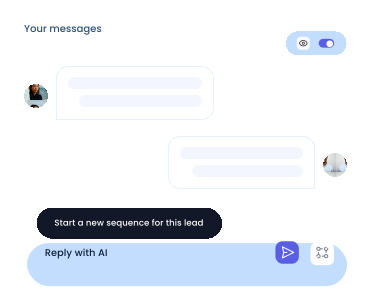
If you don't reply to leads within 5 mins, your chances of converting them fall by 50%. Our AI replies on your behalf instantly!

Videos and Voice Notes

Wow your leads by cloning yourself and sending personalized videos and voice notes to each lead on LinkedIn.

Team management
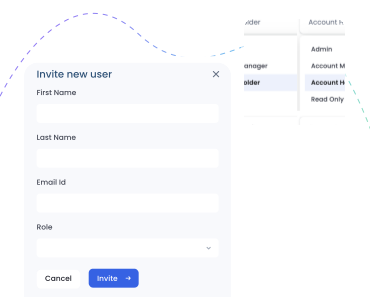
SalesRobot allows you to invite other team members, so that they can add their LinkedIn Account, run outreach campaigns.

Analytics
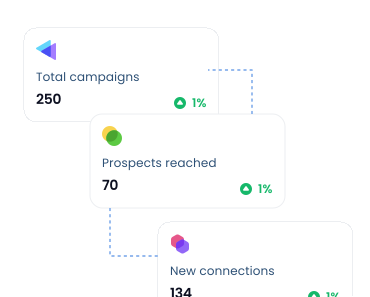
Don't shoot in the dark. Get detailed analytics on what's working

Don't just take our word for it

"I am getting leads from LinkedIn with very little involvement from my side. It's like having few assistants/robots doing the admin work."
Connor Hevingham profile pic
Connor Hevingham
"Their customer support is the best I've ever experienced. They also extended my trial so that I can fully test their platform, which I really appreciate."
Patricia C. profile pic
Patricia C.
Love the software! Easy to use and helps my led gen for my marketing agency a ton. Pratiksha did a great job in helping me navigate the product.
Yoel Orue
I've worked with multiple LinkedIn automation tools but by far, SalesRobot has been the most convenient. It is truly the smartest tool out there in the market. The UI is so beautiful and the software is so powerful that you will fall in love with it
Rishabh Bhandari
A very robust automation layer has been set up on top of LI. Excellent service & support team. They have been proactive in figuring solutions to LI's problems & for us.
Shrey Arora
"I am getting leads from LinkedIn with very little involvement from my side. It's like having few assistants/robots doing the admin work."
Connor Hevingham profile pic
Connor Hevingham
"Their customer support is the best I've ever experienced. They also extended my trial so that I can fully test their platform, which I really appreciate."
Patricia C. profile pic
Patricia C.
Love the software! Easy to use and helps my led gen for my marketing agency a ton. Pratiksha did a great job in helping me navigate the product.
Yoel Orue
I've worked with multiple LinkedIn automation tools but by far, SalesRobot has been the most convenient. It is truly the smartest tool out there in the market. The UI is so beautiful and the software is so powerful that you will fall in love with it
Rishabh Bhandari
A very robust automation layer has been set up on top of LI. Excellent service & support team. They have been proactive in figuring solutions to LI's problems & for us.
Shrey Arora

Frequently asked questions

How do I get started ?

Just add your LinkedIn account to SalesRobot!
You'll be up and running in 2 mins.

Is it safe to use SalesRobot?

Yes. SalesRobot uses residential IPs and mobile APIs, so your actions look completely natural. This makes it safer than tools like Expandi or Waalaxy, and our users have reported zero bans for months.

Do I need LinkedIn Premium?

No. SalesRobot works smoothly with a free LinkedIn account. Premium can give extra limits, but it is not required.

What makes SalesRobot better than Expandi, Waalaxy, or Dripify?

SalesRobot is safer, has stronger AI, and supports more channels. You get LinkedIn, email, voice notes, and a unified inbox, all in one place.

Will my LinkedIn account get banned?

Very unlikely. SalesRobot uses mobile API behavior and real-time throttling to keep your activity natural and within safe limits.

What can I expect from my trial?

Trials are meant to see the proof of functionality, which in our case means running a campaign. To get the best results, we recommend you spend 5 minutes to set up a campaign after you sign up. You'd be surprised how many people don't do this.

What actions can I do using SalesRobot?

You can like their most recent post, comment on it automatically, follow them, send them a connection request, automatically follow up with them and yeah, endorse their skills!

How do I import prospects to SalesRobot?

You can import people from LinkedIn Sales Nav search, a normal LinkedIn Search, or upload with a CSV, or you can DM LinkedIn group members or event attendees if you want!

Did I mention  that you can fetch all the people who commented on a particular LinkedIn post and request to connect with them?

How does it work with LinkedIn limits?

We fully comply with LinkedIn limits and you can send up to 75 connection requests a day. Additionally you can send up to 40 InMails a day to open profiles without using any InMail credits.

How many LinkedIn accounts can I use ?

If you've got multiple LinkedIn accounts you want to manage (client accounts  for example), you can do that by just adding them like you added the first one.

Can I use it with my CRM?

Yes! SalesRobot will populate your CRM automatically with leads interested in buying,  directly from LinkedIn!

Can I send GIFs, documents in messages ?

Yes, you can send any type of attachment like PDFs etc.

What are you waiting for?
Start reaching out to your dream customers today

Free Trial (14 days)

infographics of team photo