.avif)
TL;DR:
Send your first follow-up email within 24-48 hours after an interview, including specific conversation details and genuine enthusiasm.
Limit yourself to 3 total emails maximum (at 24-48 hours, 7 days, and 14 days) to avoid appearing desperate or spammy.

This blog is for you…
If you've just wrapped up an interview and are thinking:
🙁Will I get a response?
🙁When will I get a response?
🙁What if they don't reply to me?
🙁How do I get their attention now?
🙁What if they've already moved on to another candidate?
I know that the waiting game is nerve-wracking.
You replay every answer in your head, wondering if you said the right things. You refresh your inbox a hundred times a day, hoping for that one email.
With every passing hour, the silence feels louder.
I know you want to follow up but don't want to come off as too pushy, but the fear of being forgotten eats away at you.
Here's the thing :
Follow ups ACTUALLY work.
Recent data shows that candidates who send thoughtful follow-up emails receive 68% more job offers than those who don't follow up.
But not every follow up email gets a response.
That's why I've put together this guide to help you nail the perfect follow up email:
🤖What to say in a follow up email after interview
🤖When to send a follow up email after interview(+15 follow up templates)
🤖How many follow up emails should you send
🤖3 Common mistakes to avoid while writing a follow up email
By the end of this blog, you'll know exactly how to craft follow up emails that get recruiters to respond.
Let's start.
What to Say in a Follow-Up Email After Interview
I will share 15 follow up email templates, but first, lets understand what makes a follow up email get a reply.
[1] Start by thanking the interviewer for their time.
[2] Reference a specific detail from your conversation. Move beyond a generic "thanks for your time." Mention something specific you enjoyed discussing, whether it was a project detail or a shared professional interest. Research shows that personalized messages get 20% higher response rates than generic templates.
[3] Express your continued interest in the role. Let them know you're still excited about the opportunity.
[4] Close with a gentle prompt. Something like, "I'm looking forward to hearing from you" or "Please let me know if there's any additional information you need from my side."
No need to overthink it.
Just keep it genuine and confident.
When to Send a Follow Up Email After Interview
Timing is everything.
It can make or break your career.
Here are the sweet spots:
1️⃣ 24-48 Hours
The perfect window to send your first follow up email. This shows you're genuinely interested without being too pushy. Send your follow-up email within 24 hours of the interview for maximum impact. Keep it simple. Thank them for their time and quickly express your enthusiasm.
2️⃣ 7 Days
If you haven't heard back, it's time for a gentle nudge. Wait a week while there could be a lot going on that you don't know about — urgent priorities elsewhere in the business, disagreement over which candidates will proceed, someone on vacation, or the recruiter being buried in email. Follow up within about a week to stay top of mind without being pushy.
3️⃣ 14 Days
If no response the one final follow up won't hurt. This email can be more upfront, asking if they've made a decision while showing you're still keen on the role.
If they haven't responded by now, it's best to move on.
My team has created templates for each time period. Get them here:
5 Templates For The Email You Need To Send Within 24-48 Hours In A Follow Up Email After Interview
Template #1
Template #2
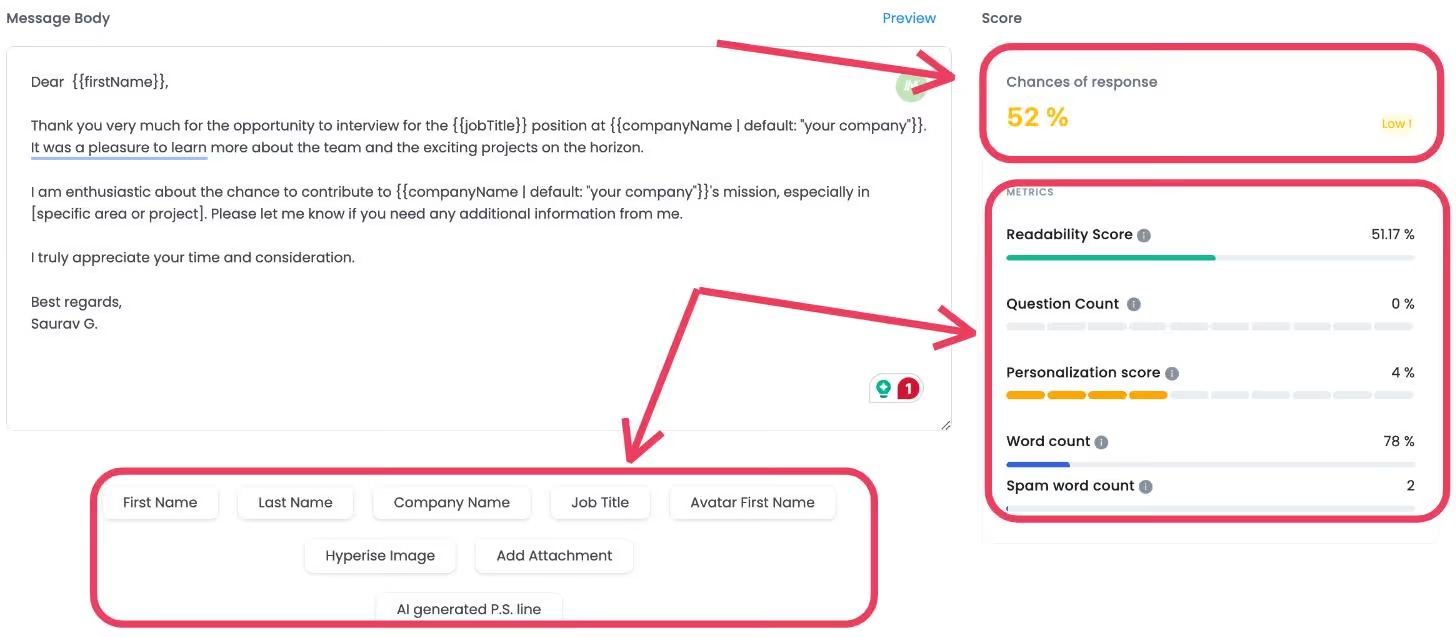
Template #3
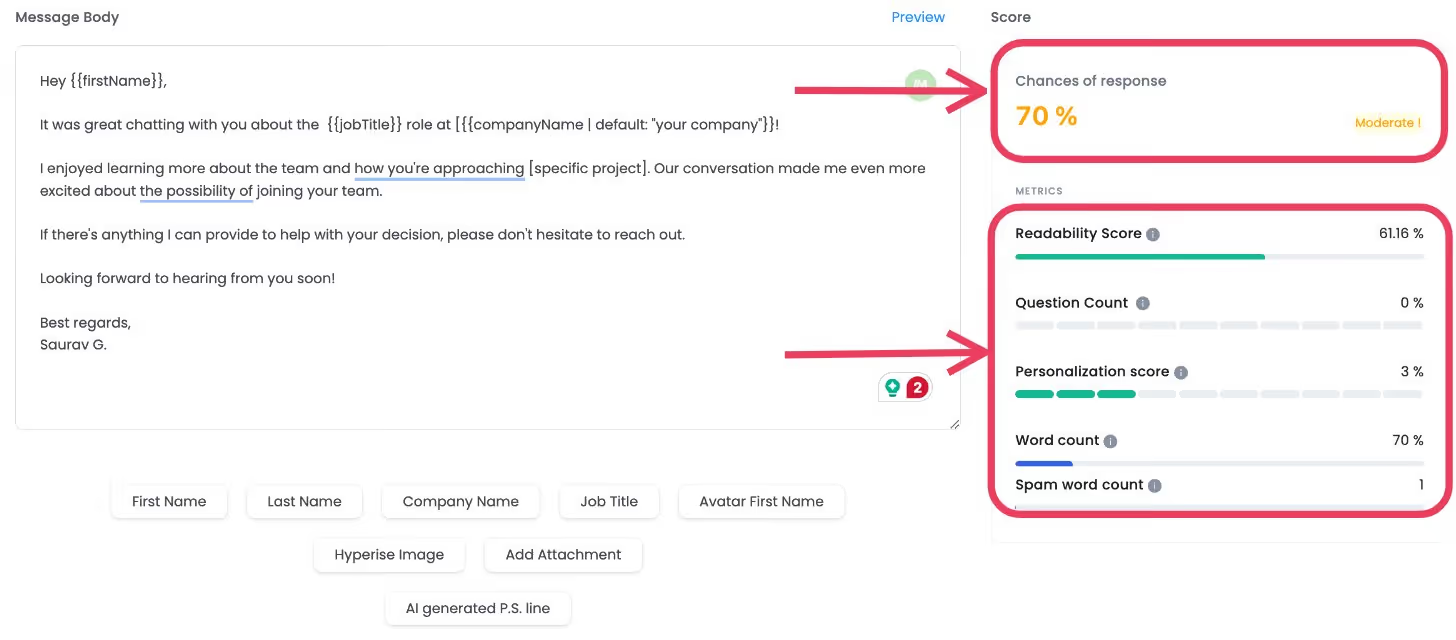
Template #4

Template #5
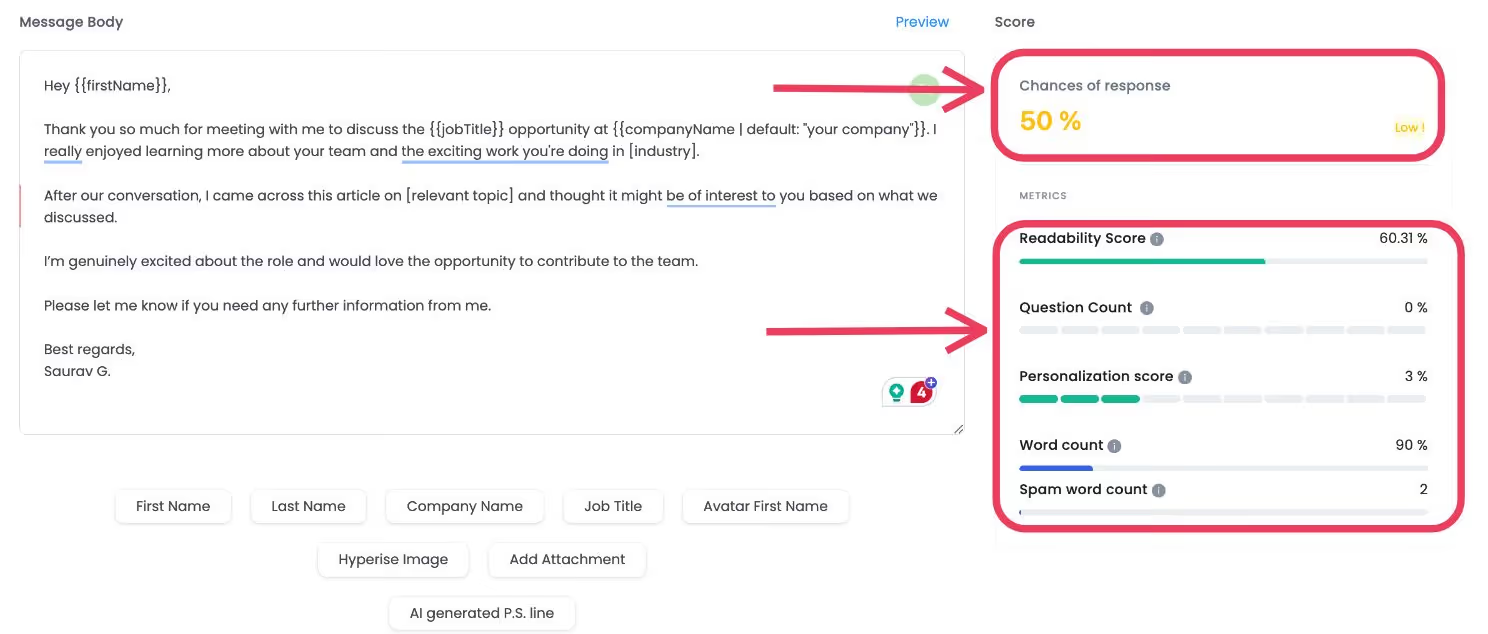
5 Templates For The Email You Need To Send Within 7 Days In A Follow Up Email After Interview
Template #1
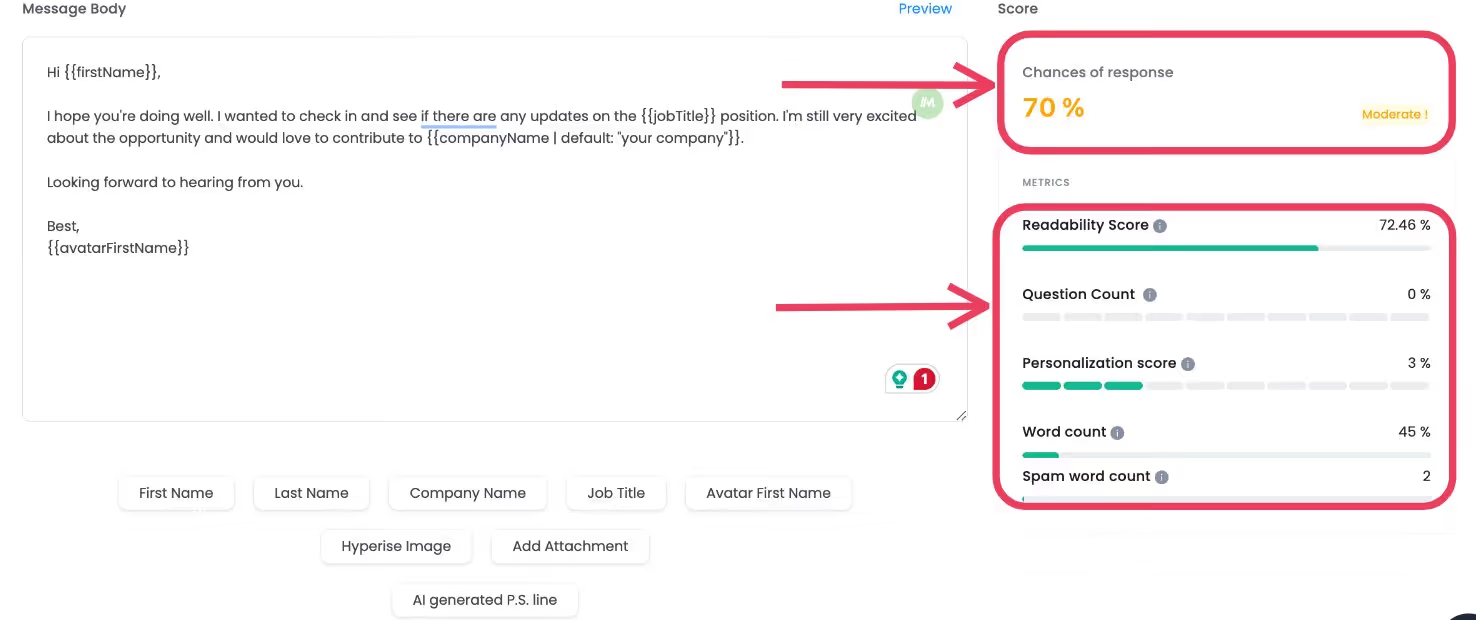
Template #2
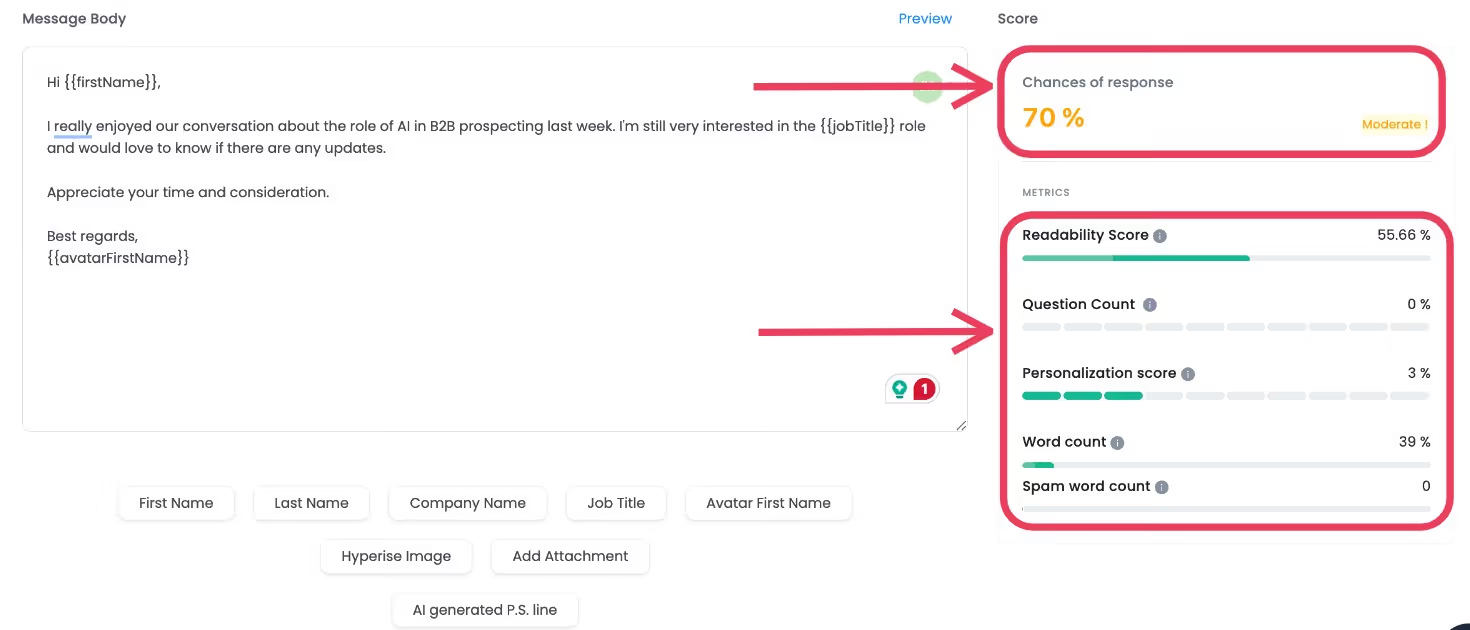
Template #3
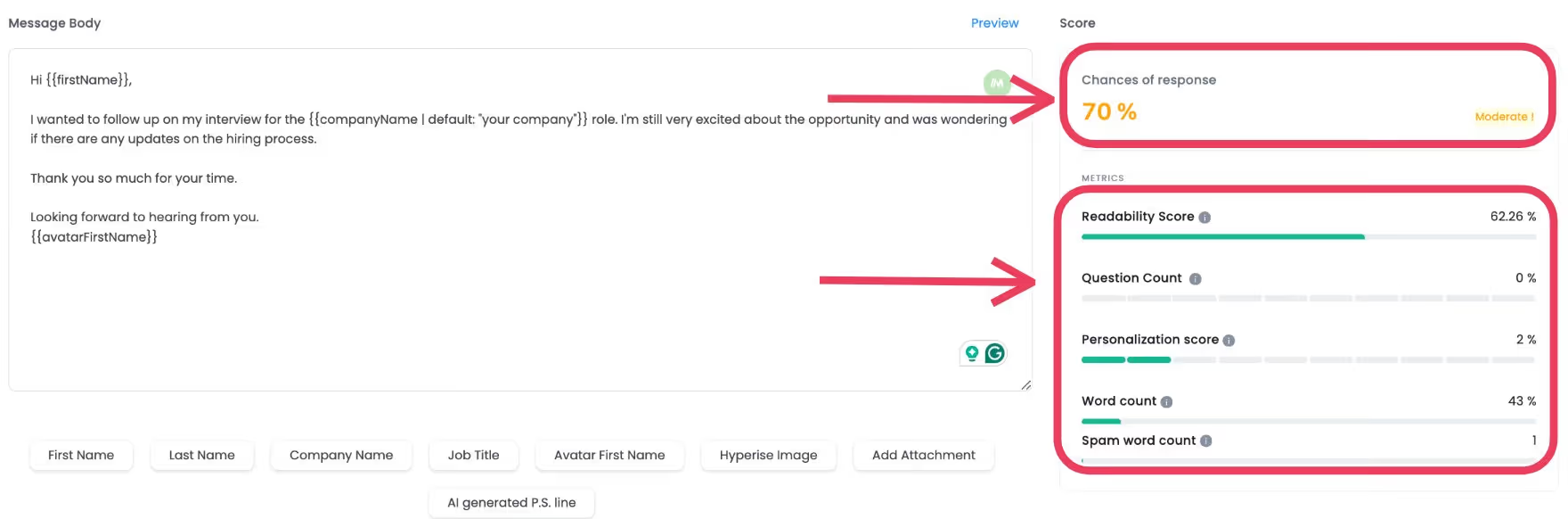
Template #4

Template #5

5 Templates For The Email You Need To Send Within 14 Days In A Follow Up Email After Interview
Template #1
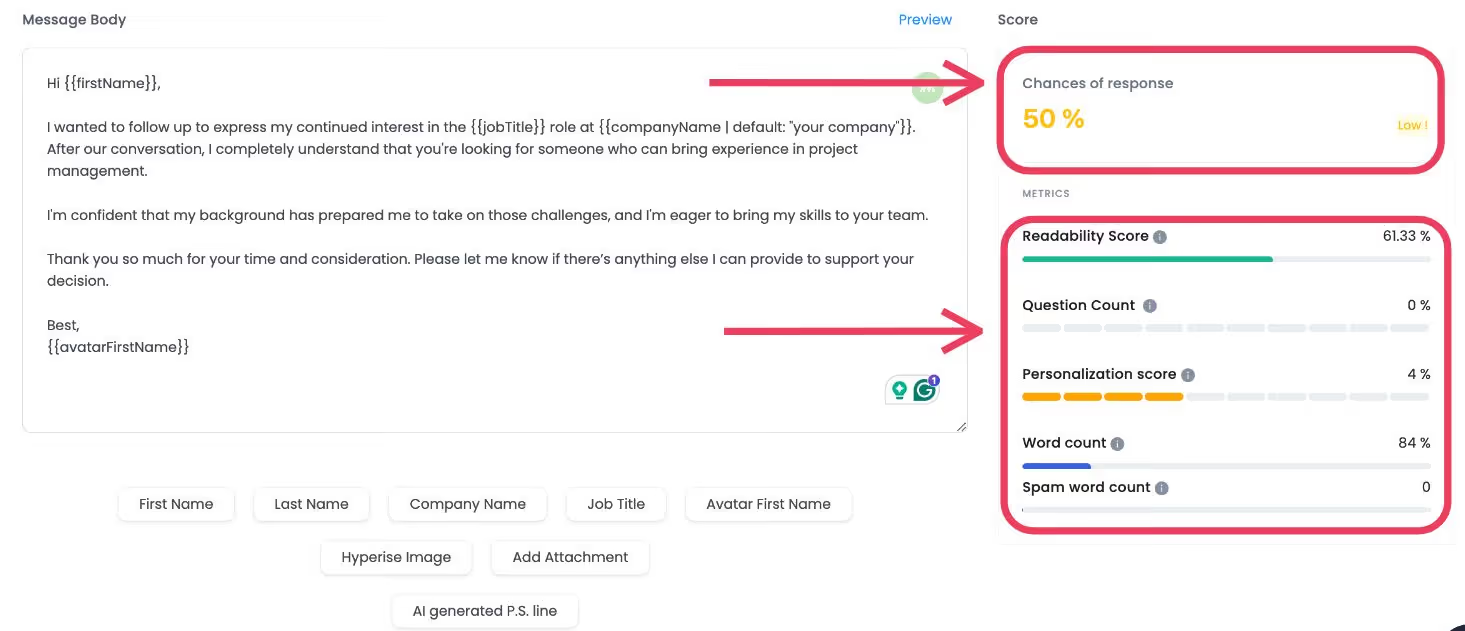
Template #2

Template #3

Template #4
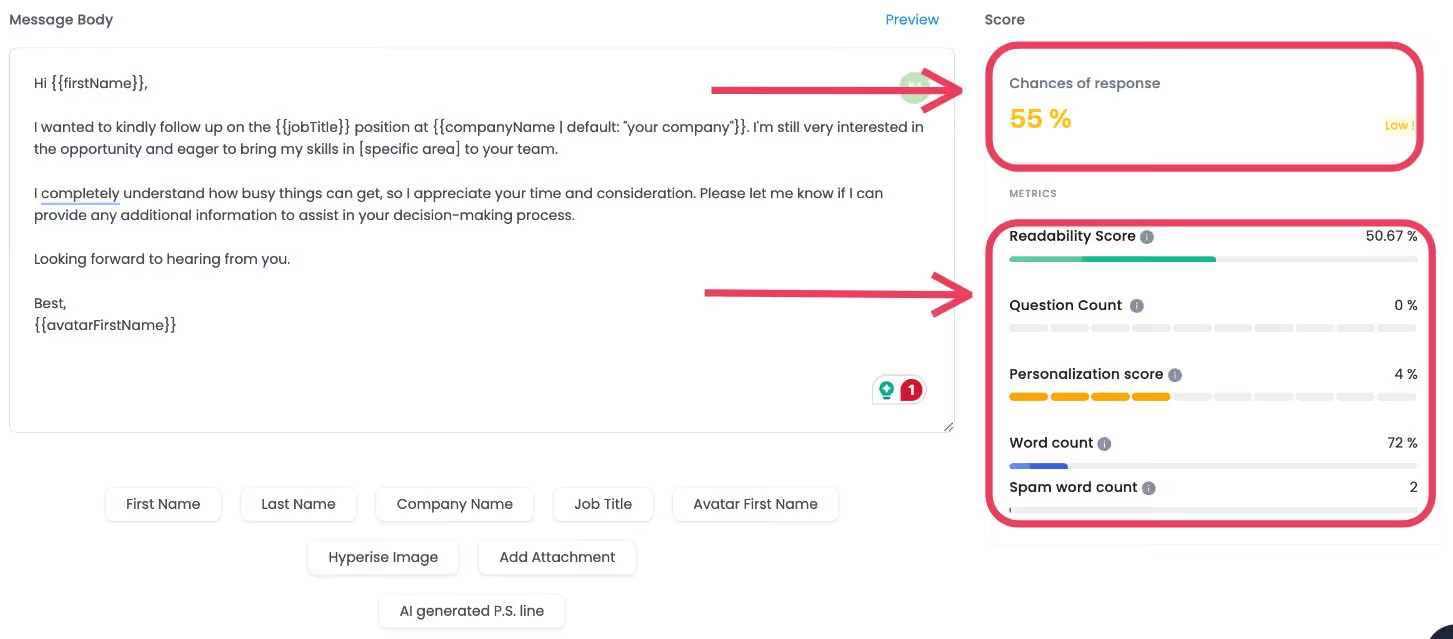
Template #5
How Many Follow-Up Emails Should You Send?
Some "gurus" recommend sending a ton of follow-up emails, anywhere from 24 hours to a month later, sometimes suggesting 6-7 emails in total.
If you are doing this, then I want you to ask yourself, "What's the difference between you and a spammer in their inbox?"
Here's what I think works better:
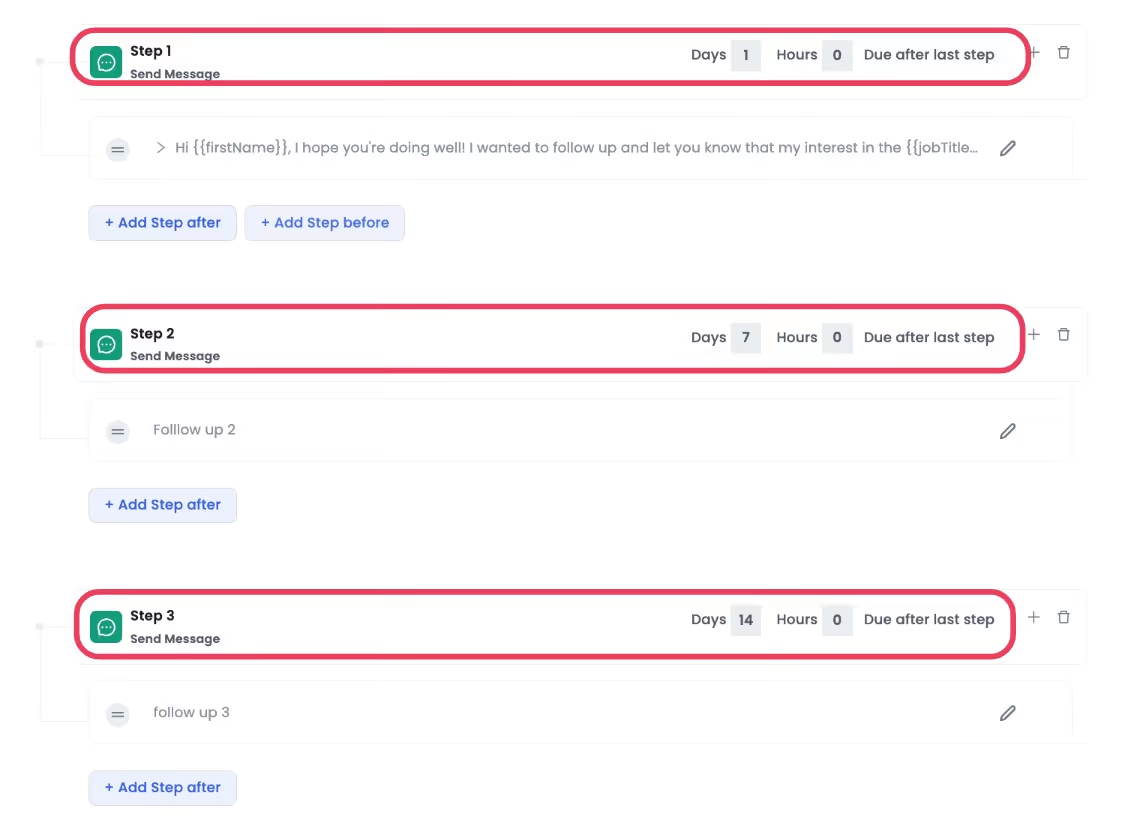
Stick to a maximum of 3 emails:
- Send your first follow up within 24-48 hours after the interview.
- If you don't hear back, wait about a week (7 days) before sending a second follow up.
- Still nothing? One final attempt after two weeks (14 days) from the interview.
After that third email, if you're still getting radio silence... It's probably that you are making a mistake while writing the follow-up email.
But here's the thing, following up manually is boring.
You've got to track:
- Who you've emailed,
- Who needs a nudge,
- Who still hasn't replied.
And if life gets busy, that perfect opportunity could slip right through your fingers.
So, we suggest using SalesRobot.
With SalesRobot, you can automate follow-ups without lifting a finger. Just set your campaign once, and it will handle the rest — no spreadsheets, no stress.
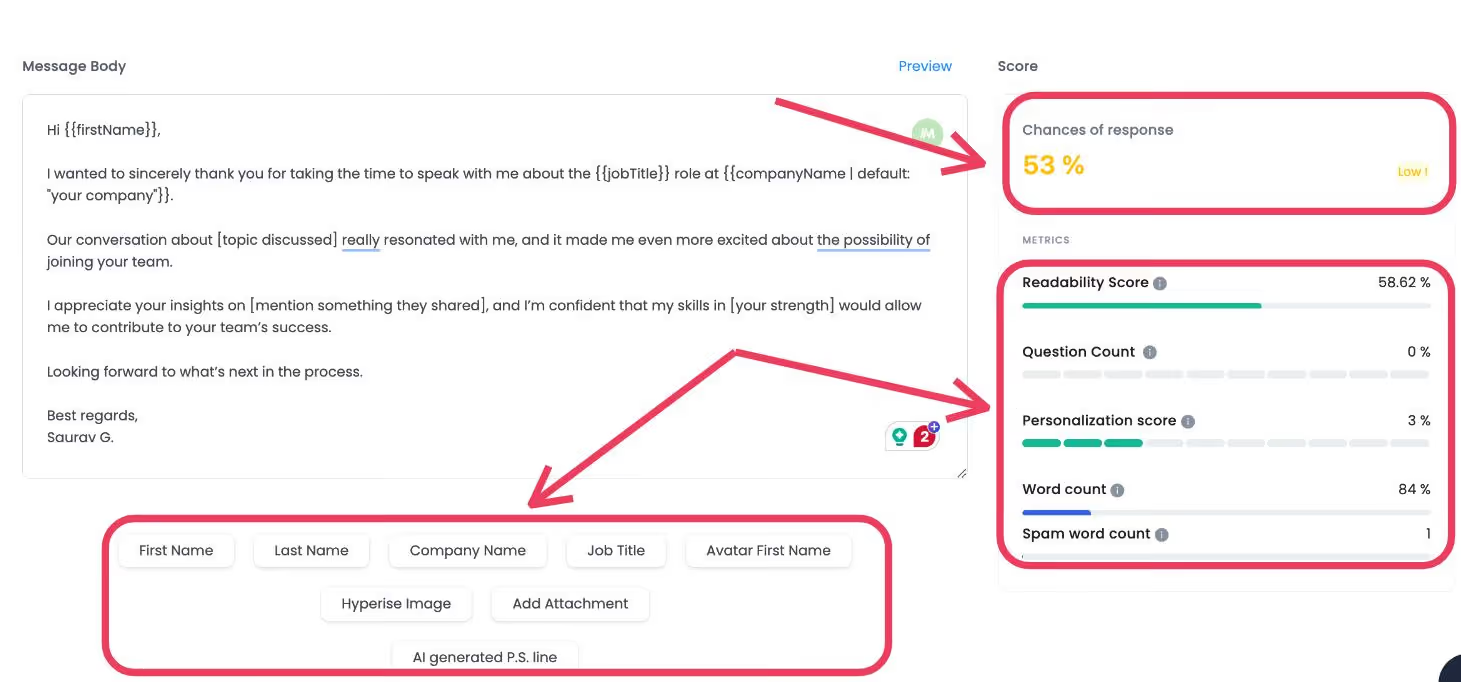
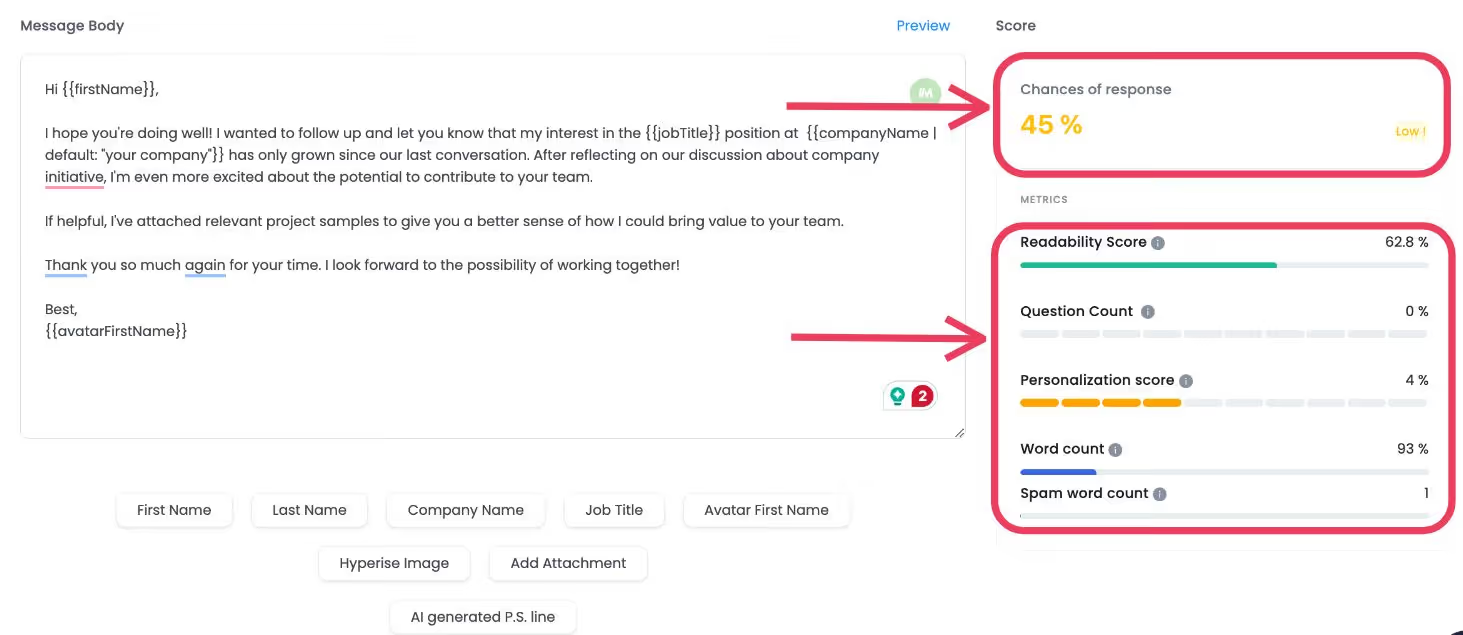
Plus, thanks to the Message Score feature, you'll know exactly which messages are more likely to get a response. And you can use the AI Variables feature in case you want to send something even more personalized.
Want to give SalesRobot a try? Take a free trial today and see how it works!
Short and Sweet Follow Up Email After Interview
Sometimes, the best approach is keeping things brief and to the point. A short and sweet follow up email after interview can be just as effective as longer messages.
Keep your follow-up email to one paragraph, indicating you're still interested in the job and are looking for an update.
Focus on three key elements: gratitude, a specific detail from your conversation, and your continued interest.
This approach shows respect for the interviewer's time while making a memorable impression.
3 Common Mistakes to Avoid While Writing A Follow Up Email
If you are getting a radio silence, you are making a mistake.
Here are 3 common mistakes to avoid:
1. Sending Follow Up Email Too Soon
Patience is key.
Sending follow ups too soon can make you seem desperate.
Give it at least 24-48 hours before hitting send.
Example: Sending a follow up email the same day as your interview, that's a little too eager.
2. Writing a Follow Up Email Without Personalization
A generic follow up is as good as no follow up.
Mention something specific from your interview to stand out.
Example: Instead of saying, "I'm following up on my application," try "I really enjoyed our conversation about [specific topic]."
Connect with the other person.
3. Making Typos In The Follow Up Email
Typos scream carelessness.
Proofread your email at least twice before sending. Attention to detail matters.
Example: Writing "Thank you for you're time" instead of "Thank you for your time" can cost you big.
Fix these mistakes, and your follow ups will instantly have a better chance of getting a response.
Conclusion
And that's a wrap up!
Let's quickly recap what we covered in this blog.
We talked about what to say in a follow up email after interview.
- Keep it personal, show genuine interest, and add that specific detail from your conversation to stand out.
Then we discussed when to send a follow up email after interview(+ 15 templates)
- The sweet spot for timing is: first email within 24-48 hours, second email after 7 days, and a final one after 14 days if needed.
We also covered how many follow up emails you should send (don't be a spammer!)
- Stick to a maximum of 3 emails.
- Remember, there's a fine line between being persistent and being annoying. Once you cross that third email with no response, it's probably time to focus your energy elsewhere.
Finally, we highlighted those 3 common mistakes to avoid.
- Sending follow ups too soon, writing generic messages without personalization, and making careless typos that can cost you big.
The post-interview waiting game is tough, but with these templates, you're now equipped to navigate it like a pro.
And don't forget to use SalesRobot.
Best of luck out there!
Sometimes, between a mediocre job and dream job is just one well crafted follow up email.

Wow your leads by cloning yourself and sending personalized videos and voice notes to each lead on LinkedIn.
If you don't reply to leads within 5 mins, your chances of converting them fall by 50%. Our AI replies on your behalf instantly! (and yes, you can train it)

Don't shoot in the dark. Get detailed analytics on what's working

SalesRobot allows you to invite other team members, so that they can add their LinkedIn Account, run outreach campaigns and get amazing results just like you.
.avif)


Trusted by 4100+ innovative B2B sales teams and lead gen agencies

.avif)

.avif)




.avif)


Heading 1
Heading 2
Heading 3
Heading 4
Heading 5
Heading 6
Lorem ipsum dolor sit amet, consectetur adipiscing elit, sed do eiusmod tempor incididunt ut labore et dolore magna aliqua. Ut enim ad minim veniam, quis nostrud exercitation ullamco laboris nisi ut aliquip ex ea commodo consequat. Duis aute irure dolor in reprehenderit in voluptate velit esse cillum dolore eu fugiat nulla pariatur.
Block quote
Ordered list
- Item 1
- Item 2
- Item 3
Unordered list
- Item A
- Item B
- Item C
Bold text
Emphasis

Superscript
Subscript