.avif)
TL;DR:
The top 15 in-demand LinkedIn skills for 2026 on the Rise report shows AI engineering, operational efficiency, and AI business strategy topping the list of fastest-growing skills, with AI Literacy, Conflict Mitigation, and Public Speaking leading the most in-demand list.
Professionals with optimized LinkedIn profiles receive 2.2x more interviews within 90 days, making the skills section crucial for career advancement.
The global user base of LinkedIn stands at 1 billion today.
It's undoubtedly the best platform for professional networking and relationship building.
But there's something you need to know:
If your LinkedIn profile is not up-to-date, you're leaving money on the table.
And the simple solution is to update your profile on a regular basis.
But what do you need to update on your LinkedIn profile?
Well, you should at least keep these updated:
💥Your education,
💥Profile picture and banner,
💥Place of work, and
💥Skills.
And can you guess which one is the most important?
Answer coming in…
.gif)
LinkedIn Skills!
Did you get it right?
But what skills to put on LinkedIn, and why?
Worry not, today we'll talk all about:
👉🏼The top 15 in-demand LinkedIn skills you can add to your profile,
👉🏼What is the LinkedIn skills section, and why is it important?
👉🏼How many skills should you have on your LinkedIn profile,
👉🏼How can you add, remove, and update new skills on your LinkedIn profile, and
👉🏼3 tips to make your LinkedIn skills section stand out!
Are you ready? Let's dive right in!
15 In-Demand LinkedIn Skills you can add to your LinkedIn Profile in 2026
Here are the top 15 in-demand skills you must master and add to your LinkedIn profile this year:
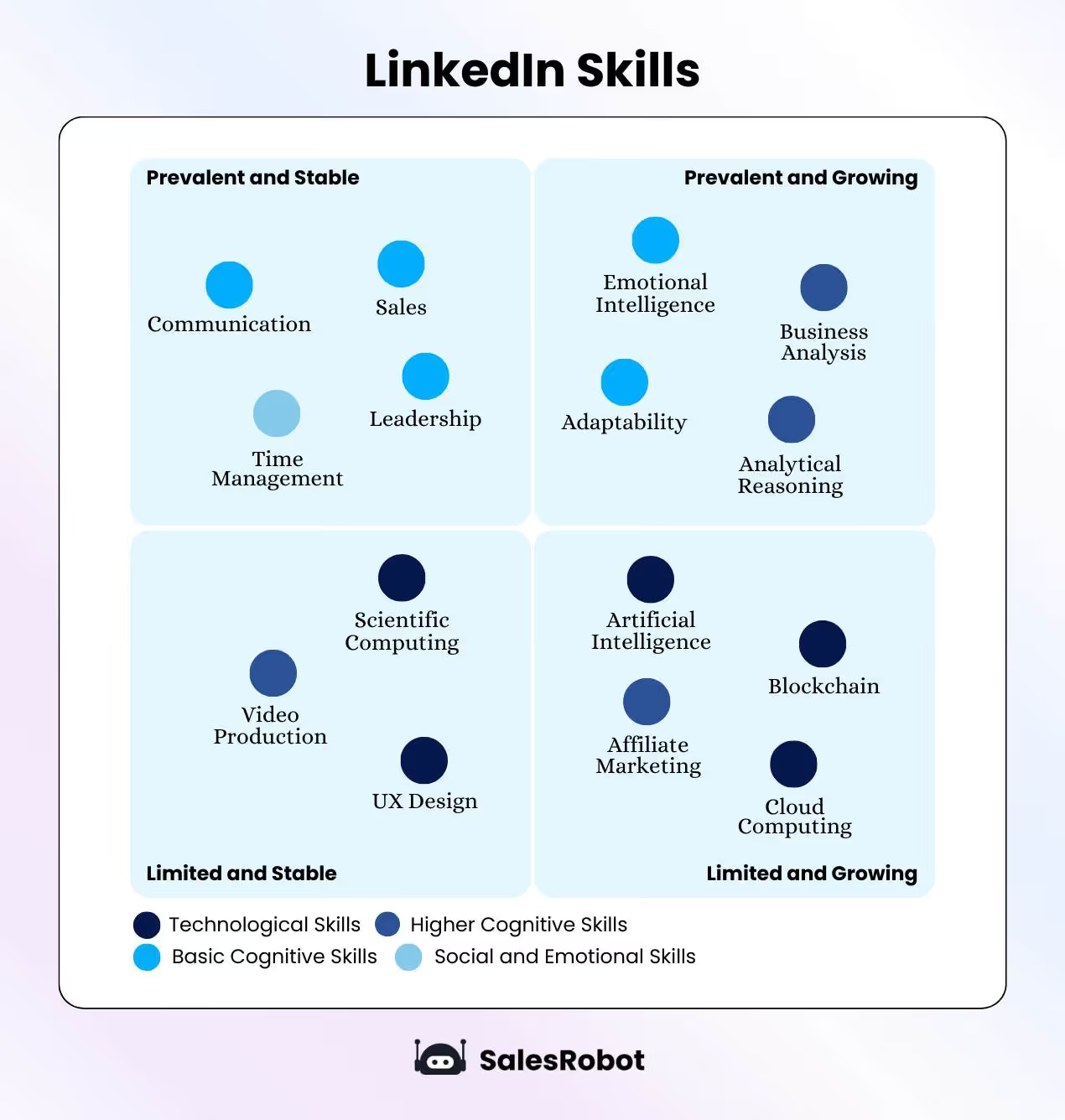
15 In-Demand Skills You Can Add to Your LinkedIn Profile In 2026
1. AI Literacy
AI is no longer just a technical skill. It is a baseline expectation. Employers want professionals who can work alongside AI tools, automate repetitive tasks, and make data-driven decisions. You do not need to code; you need to know how to apply it.
Skills to list: Prompt engineering, AI-assisted workflows, ChatGPT, GitHub Copilot, data annotation
2. AI Business Strategy
Knowing how to use AI is one thing. Knowing how to build a business strategy around it is what sets senior professionals apart.
Skills to list: Data governance, responsible AI, AI implementation planning, process automation strategy
3. Operational Efficiency
As AI handles more routine tasks, professionals who can design efficient workflows are in high demand.
Skills to list: Process optimization, logistics management, workflow automation, resource planning
4. Communication
Complex ideas need clear communicators. This goes beyond talking. It means aligning teams, influencing decisions, and keeping leadership informed.
Skills to list: Public speaking, relationship development, executive reporting, cross-functional collaboration
5. Leadership
Strong leaders who can develop teams and drive performance are consistently in demand, and 2026 is no different.
Skills to list: Cross-functional team management, talent development, performance optimization, team management
6. Emotional Intelligence
Despite the rise of automation, human interaction remains essential. Recognizing and managing emotions, yours and others', is fundamental to strong workplace relationships.
Skills to list: Empathy, active listening, conflict resolution, resilience
7. Financial Acumen
Companies want professionals who can turn financial data into decisions.
Skills to list: Financial data analysis, cash reporting, budget management, expense reconciliation
8. Risk Management
In an unpredictable regulatory and technological landscape, organizations need people who can identify and prepare for threats.
Skills to list: Policy compliance, safety monitoring, risk assessment, regulatory reporting
9. Sales
Professional salespeople remain essential to every business. Great sales skills help you communicate effectively and build lasting connections.
But if you have to do sales manually, it becomes a headache fast. That is where a LinkedIn automation tool like SalesRobot comes in. It sets up automated campaigns, follows up with clients, scans prospects' profiles, and sends highly personalized messages, all without you maintaining a spreadsheet.
Skills to list: Client relationship management, CRM software, lead prospecting, lead qualification, rapport building, relationship building
10. Verbal and Written Communication
To build meaningful relationships, you need to communicate exactly what you mean. Communication starts with listening and understanding your audience.
When you communicate well, you solve problems faster, make better decisions, and build stronger business relationships.
And if you're trying to generate some leads from LinkedIn and haven't mastered this skill (yet), you can trust SalesRobot!
SalesRobot is an AI-powered LinkedIn automation tool that can send highly personalized messages and follow-ups to your prospects on autopilot.
You can even add cool images and GIFs to make your messages stand out!
Don't believe me?
See this one:

But here's where it gets even better.
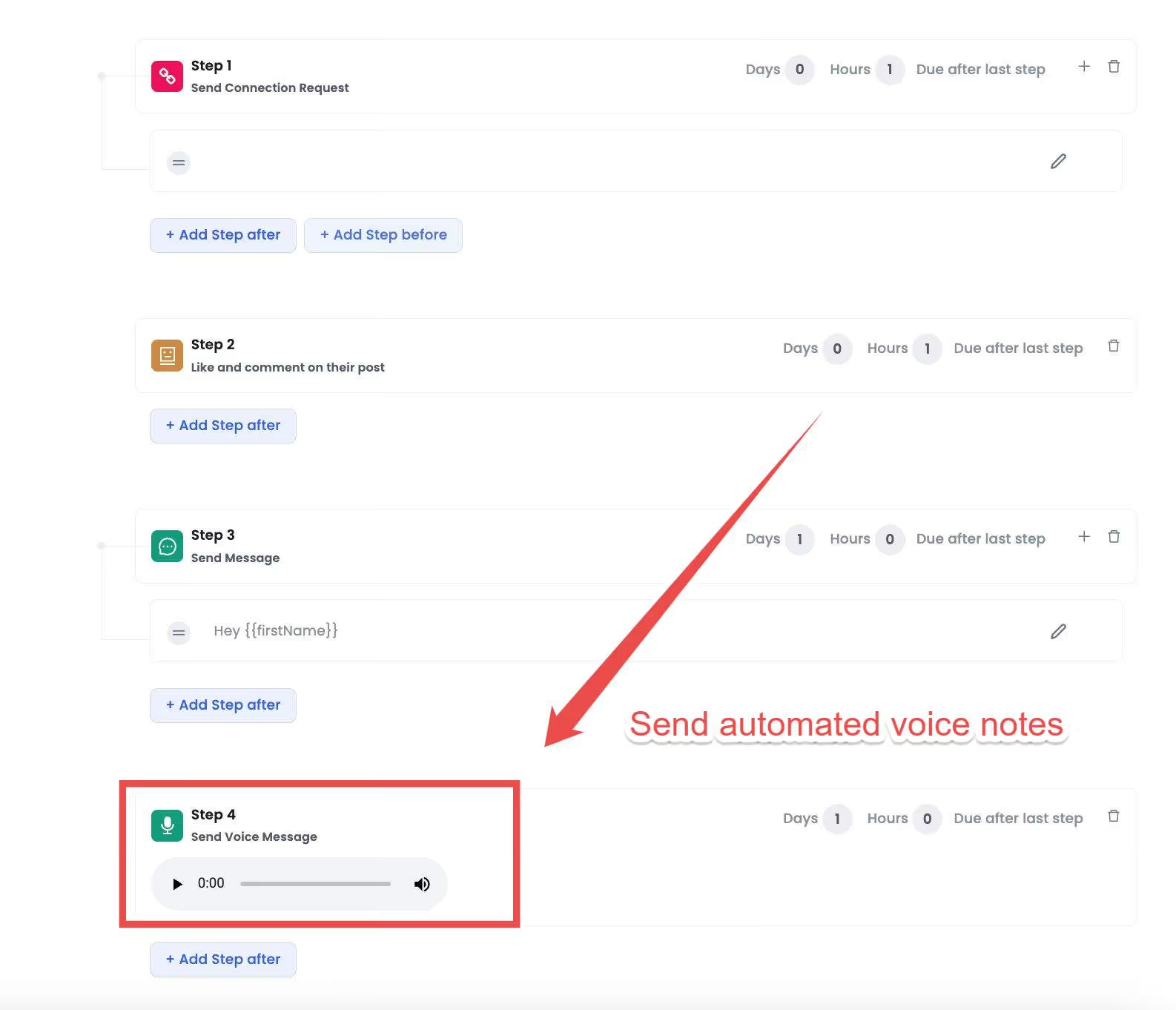
While everyone sends text messages, SalesRobot lets you send voice notes that get 3x more responses.
11. Cloud Computing
More companies are moving their operations to the cloud, and demand for cloud-proficient professionals keeps growing.
Skills to list: Amazon Web Services (AWS), Microsoft Azure, Google Cloud, DevOps, cloud deployment and migration, serverless architecture
12. Business Development
Professionals who can grow revenue through account development and go-to-market strategy are increasingly valued.
Skills to list: Account development, go-to-market strategy, pipeline management, business development
13. Analytical Thinking
Analyzing information to identify opportunities, mitigate risks, and reach sensible conclusions is critical in any field.
Skills to list: Data analysis, forecasting, problem-solving, data mining, reporting, diagnostics
14. Time Management
You might be great at what you do, but without solid time management, results suffer. Set daily goals, prioritize by urgency, minimize distractions, and take regular breaks.
Now, if you've been on LinkedIn for a while and are trying to generate leads from it, you know how difficult it can be.
Time management becomes your biggest challenge whilst doing so!
So what can you do to help it?
Use SalesRobot!
SalesRobot will help you message 100s of people on LinkedIn every week automatically.
Simply add your LinkedIn account and set up your campaign!
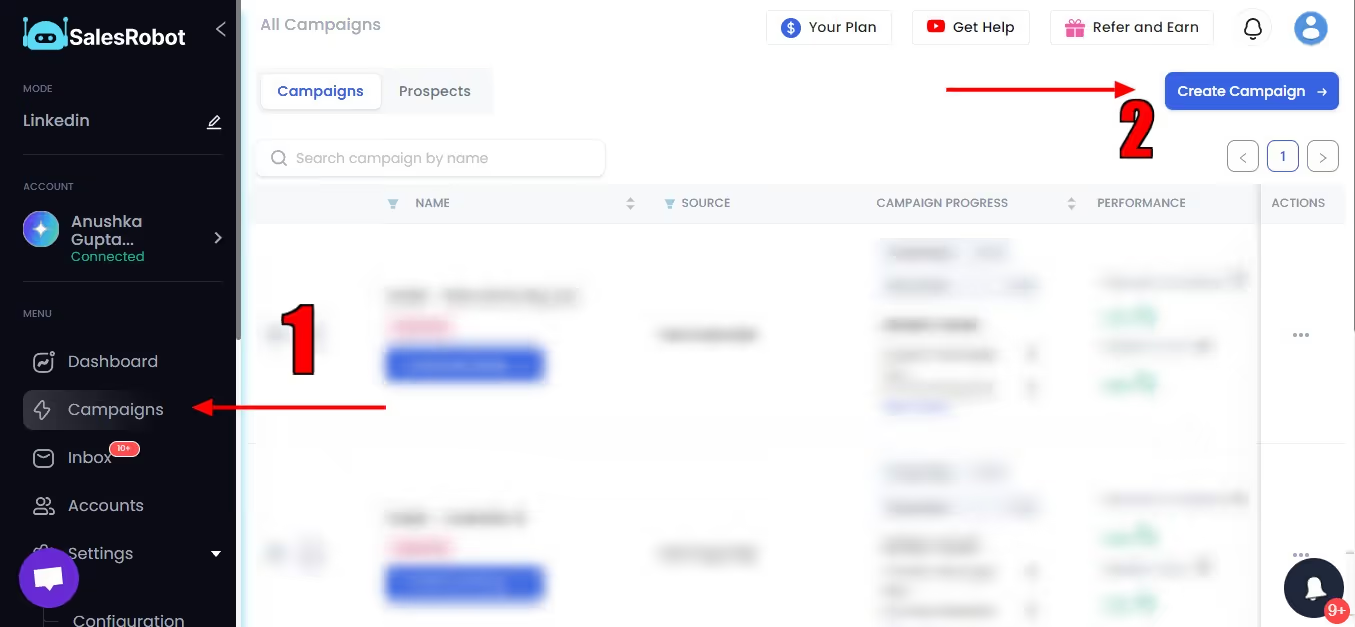
You can personalize them or use our templates to design your campaigns as you like with personalized messages.
You can also skip it, as SalesRobot can scan your prospect's profile quickly and write super personalized messages.
And when prospects start engaging, our AI Appointment Setter takes over the conversation.

It nurtures them toward meetings while you focus on building those valuable skills.
And it even auto tags conversations for you.

Cool, isn't it?
The ability to thrive in an ever-evolving work setting rounds out the list. Adaptability means making the most of new circumstances and overcoming obstacles without disrupting your day-to-day work, and in 2026, it has never mattered more.
Now that you know about some of the best skills to add on LinkedIn in 2026, let's talk about some FAQs about the LinkedIn skills section:
What is the LinkedIn Skills section?
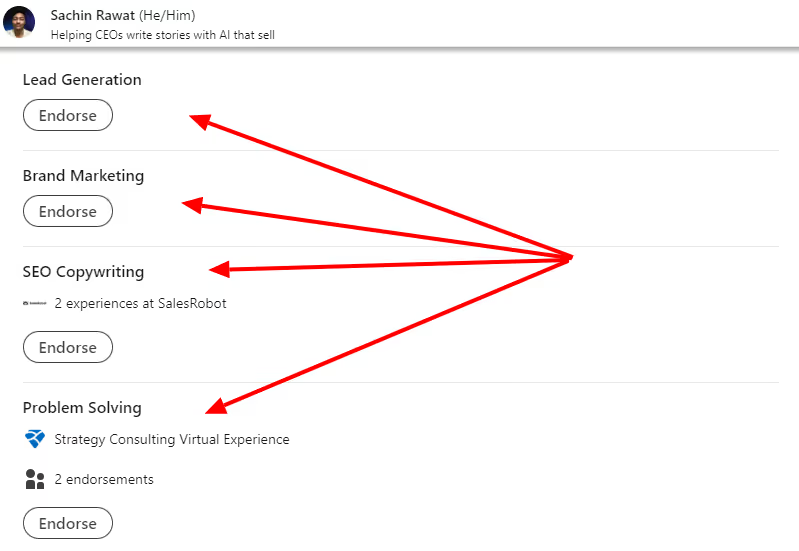
Your LinkedIn profile has a dedicated skills section that displays the skills you've added.
It looks something like this:
Why is it important?
Why even consider adding skills to your LinkedIn profile?
👉🏼It helps your profile visitors quickly identify your areas of expertise.
👉🏼Endorsements can help validate these skills further.
👉🏼Using the right keywords (for skills) ensures your profile will pop up when someone's looking for that expertise.
👉🏼Skills help you connect with others related to your field.
A relevant and up-to-date skills section ensures you're networking with the right people and boosting your presence on LinkedIn. Recent data shows that professionals with optimized LinkedIn profiles receive 2.2x more interviews within 90 days.
How many skills should you have on LinkedIn?
A good rule of thumb is to limit it to 10-12, and I'll tell you why.
Adding more than 15 skills to your profile, ranging from creative writing to Python and C++, will confuse anyone.
It'll make it hard for others to understand what your actual talents (and interests) are.
And it'll also make your profile hard to discover when someone's looking up for you!
Now, let's see how you can add skills to your LinkedIn profile!
How to add skills on LinkedIn profile?
You can confidently move forward with this newfound knowledge of what to include on your resume.
Follow these guidelines to emphasize these skills on your LinkedIn profile:
- Log in to your LinkedIn account to access your profile
- Keep going down the page until you reach the section on skills and endorsements
- Select "Add New Skill" from the section's menu in the top right corner to add a new skill.
- Add the skill you wish to add (you can all at once if you choose).
- Confirm by selecting the "Add" button.
Boom!
Your updated profile now includes all of your skills.
But that's not the end of the road just yet.
For you to get the most out of the skills area of your profile, there are still three more things that you can accomplish.
How can you Update Your Skills Section?
If you are currently looking for a new job, it is of the utmost importance to keep your profile current at all times and to do so properly and frequently.
How to add skills on LinkedIn?
- On the homepage of LinkedIn, click the "Me" icon.
- Choose "View profile" from the menu drop-down.
- Scroll to the bottom of your Skills and Endorsements section and click the link to "Add a new skill."

- Enter the name of the skill into the text box in the popup window and then select it from the list of available skills. If it does not display, you must type it entirely and then click on it to add it.

- Then, to finish, click the "Add" button.

How to remove skills from LinkedIn?
- Click the "Me" tab on the LinkedIn homepage.
- In the menu bar, click the Profile View option.
- To make any changes to your "Skills and Endorsements," scroll down until you reach that part, and then click the edit button associated with that section (it looks like a pencil).

- Scroll to the skill you want to delete in the popup and click the delete button; it's a trash can icon.

- Click the Save button at the bottom of the popup.

3 Tips To Help You Make The Most of Your LinkedIn Skills:
When it comes to getting the most out of the opportunities presented by LinkedIn, making the most by adding skills to your profile is only the beginning of the process.
The following are three pieces of advice that will help you in making the most out of everything:
#1 Highlight your top skills (and make sure they're in demand!)
You know yourself best.
Make sure you list your best skills and put them on top, but also make sure they're in demand.
This will highly increase your profile's visibility and build credibility among your LinkedIn community.
This also brings me to my second point…
#2 Make sure they are endorsed by someone
This is just the beginning, though…

LinkedIn uses endorsements to rank users in search results.
If you want to appear at the top of searches for people with particular expertise, get as many endorsements as possible for those skills.
Asking for recommendations from others is a simple method to improve your outcomes.
If you can find an expert in the field to vouch for you, that's even better.
Get started quickly by getting endorsements for just a handful of your most valuable skills.
Keep in mind that by default, LinkedIn will only highlight the top three competencies that you possess.
And here's the cool thing:
Did you know SalesRobot's auto endorsement feature lets you automatically endorse your LinkedIn connections' skills in bulk? You can ask for an endorsement after that.

If you ask 10 people, at least 1 will respond (since you have already endorsed their skills?)
Make sure you try it out yourself!
#3 Oh, and keep updating your skills too!
As you progress further in your career, both the skills necessary to accomplish your professional goals and the goals themselves will shift.
If you want to grow professionally, it is absolutely necessary for your LinkedIn profile to appropriately reflect both the skill set you possess as well as the professional goals you wish to achieve.
Conclusion: Is Adding Skills the only way to Boost your LinkedIn Game?
I wouldn't say so, as there are different ways to do so and a combination of those works better together, tbh.
That being said, you cannot ignore the skills section on your LinkedIn profile.
Adding relevant skills will increase your profile views and discoverability, and help you find prospects (and jobs) easily.
Like I said in the beginning, LinkedIn's potential is not to be taken lightly.
Your skills section is your gateway to uncover incredible career opportunities.
Here, we've discussed the top 15 in-demand skills of 2026 you can add to your resume, but remember to check out some to find the most relevant ones from your industry.
Thanks for staying till the end,
That's all from my end,
See ya!

Wow your leads by cloning yourself and sending personalized videos and voice notes to each lead on LinkedIn.
If you don't reply to leads within 5 mins, your chances of converting them fall by 50%. Our AI replies on your behalf instantly! (and yes, you can train it)

Don't shoot in the dark. Get detailed analytics on what's working

SalesRobot allows you to invite other team members, so that they can add their LinkedIn Account, run outreach campaigns and get amazing results just like you.
.avif)


Trusted by 4100+ innovative B2B sales teams and lead gen agencies

.avif)

.avif)




.avif)


Heading 1
Heading 2
Heading 3
Heading 4
Heading 5
Heading 6
Lorem ipsum dolor sit amet, consectetur adipiscing elit, sed do eiusmod tempor incididunt ut labore et dolore magna aliqua. Ut enim ad minim veniam, quis nostrud exercitation ullamco laboris nisi ut aliquip ex ea commodo consequat. Duis aute irure dolor in reprehenderit in voluptate velit esse cillum dolore eu fugiat nulla pariatur.
Block quote
Ordered list
- Item 1
- Item 2
- Item 3
Unordered list
- Item A
- Item B
- Item C
Bold text
Emphasis

Superscript
Subscript