.avif)
TL;DR
- Bardeen excels at web scraping and lead discovery but lacks dedicated sales outreach features.
- Best suited for research-heavy sales teams that need to find hard-to-reach prospects.
- Pricing starts at $10/month with unlimited team members on all plans.
- SalesRobot offers better value for teams prioritizing LinkedIn outreach and email automation.
Picture this:
It's 2 PM on a Tuesday, and you're still manually copying lead information from LinkedIn into your CRM, one contact at a time.
Your coffee's gone cold, your eyes are burning, and you're wondering if there's a better way to spend your precious selling hours than playing data entry clerk.
If this sounds painfully familiar, you're not alone.
According to Salesforce's State of Sales report, sales reps spend just 28% of their week actually selling, with the rest swallowed by data entry, CRM updates, and admin work that has nothing to do with closing deals.
Enter Bardeen, the web scraping and automation tool that promises to free you from the copy-paste prison forever.
In this review, we'll dive deep into whether Bardeen actually delivers on its bold claims for sales teams in 2026.
We'll cover pricing, features, real-world performance, and honest pros and cons.
We'll also compare it against SalesRobot, a LinkedIn-first outreach tool, because Bardeen's scraping-heavy approach leaves a noticeable gap for teams whose main goal is running outreach sequences, not just finding leads.
If you've ever felt like your prospecting tool does a great job filling the top of your funnel but falls flat once it's time to actually reach out, that comparison will be worth your attention.
We want to make sure you leave with a clear picture of which tool fits your workflow, not just a generic verdict.

Bardeen: What You Need to Know

✅ Incredibly powerful web scraping:
Bardeen can extract data from virtually any website, making it easy to build custom lead lists that your competitors can't replicate.

Their scraper handles complex sites that traditional tools struggle with, giving you access to hidden opportunities.
⚠️ Chrome-dependent by design:
Bardeen runs as a Chrome extension, meaning it requires an active browser session for most workflows.
If you're looking for a fully cloud-based tool that runs in the background without your browser open, this is a limitation worth knowing upfront.
⚠️ Learning curve can be steep:
While Bardeen offers templates, building custom workflows requires time to understand their system.
New users often feel overwhelmed by the extensive feature set and may struggle to set up their first automation properly.
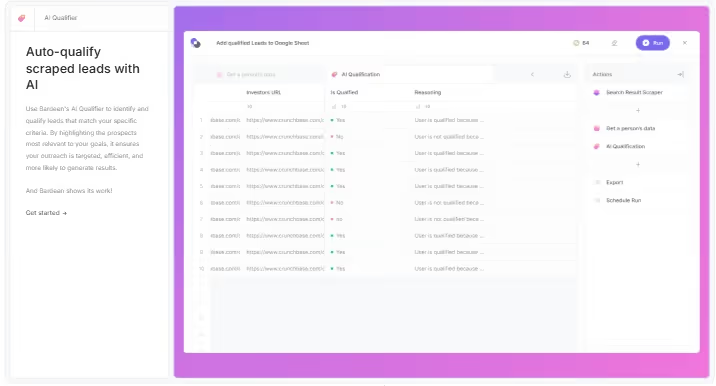
✅ AI-powered lead qualification:
The platform uses AI to automatically score and prioritize leads based on your ideal customer profile. This saves hours of manual research and helps you focus on prospects most likely to convert.
✅ Validated contact enrichment:
Unlike other tools that give you outdated contact info, Bardeen provides verified phone numbers and email addresses.

This significantly improves your outreach success rates and reduces bounced emails.
⚠️ Credits can add up quickly:
Bardeen uses a credit-based model where enrichment actions cost 3x more credits than standard scraping rows. High-volume prospecting teams should map out their expected monthly usage before committing to a plan.
✅ Seamless integrations:
Bardeen syncs with Google Sheets, Airtable, Notion, Salesforce, Slack, Gmail, and other popular tools.

You can set up automated workflows that feed qualified leads directly into your existing sales pipeline without manual exports.
⚠️Occasional data accuracy issues:
While generally reliable, some users report inconsistencies in contact information quality, particularly for smaller companies or newer businesses.
Always verify critical contact details before important outreach.
✅ Industry-specific solutions:
Whether you're in real estate, recruiting, or music discovery, Bardeen offers pre-built templates and workflows for your niche.
This specialization means you get relevant features instead of generic automation tools.
Bardeen's Key Features, Broken Down
Web Scraper
Extract data from any website with Bardeen's powerful scraping engine. You can build custom scrapers or use premium templates to gather leads from social media, directories, or industry-specific sites.
Real estate agents use it to scrape property listings automatically. Recruiters pull candidate profiles from job boards without copying and pasting manually.
AI-Powered Web Search
Research and generate leads at scale using AI search instead of manual Googling. The system leverages leading AI providers to find prospects and instantly answer questions about websites.
Instead of spending hours researching potential clients, you describe your ideal customer. The AI searches across the web and returns qualified leads that match your criteria.
Contact Enrichment
Turn basic lead information into verified contact details with phone numbers and email addresses. This feature validates the data so you're reaching real people, not dead ends.
You find a promising prospect on LinkedIn but only have their name and company. Bardeen enriches that data with their work email and direct phone number for outreach.
AI Lead Qualification
Describe your ideal lead profile and let AI prioritize which prospects to pursue first. This saves time by focusing your efforts on the highest-potential opportunities.
A software company targeting mid-size retailers can set criteria like "50-200 employees, uses Shopify, growing revenue." AI ranks incoming leads based on how well they match.
Seamless Integrations
Export your lead data directly to Google Sheets, Airtable, Notion, Salesforce, Slack, Gmail, or CSV files. No manual data entry or switching between multiple platforms.
Your scraped leads automatically populate in your CRM or spreadsheet. Your sales team gets fresh, organized prospect lists without any copy-paste work.
Industry-Specific Templates
Access pre-built automation templates designed for specific industries and use cases. These templates handle common workflows so you don't start from scratch.
Music industry professionals can use templates that scrape emerging artists from blogs and charts. Private equity teams have templates for finding companies before they raise funding.
Bardeen Pricing: How Much Will It Cost?

Bardeen uses a credit-based pricing model with three publicly listed tiers. All plans include unlimited team members and come with free credits to start.
Credits are consumed per action: each row a scraping action creates costs 1 credit, while enrichment rows cost 3 credits.
Importing data and downloading CSV files are always free.
Basic: $10/month (billed monthly)
- 100+ credits per month
- Build your own scrapers
- Download results as CSV at no cost
- Unlimited team members
- Best for individuals or small teams doing light research
Premium: $50/month (billed monthly)
- 1,000+ credits per month
- Everything in Basic
- Premium scraper templates
- Contact enrichment
- Unlimited team members
- Best for growing teams that need higher volume and access to premium scrapers
Enterprise: Custom pricing (billed annually)
- Custom bulk credits
- Everything in Premium
- Bardeen builds and maintains custom scrapers for your team
- Premium support
- Unlimited team members
- Best for larger organizations with specific or complex automation needs
This pricing model is best for businesses that need scalable automation and are comfortable estimating their monthly credit usage upfront.
Bardeen positions itself as a more affordable alternative to tools like Clay while offering enterprise-level AI automation capabilities.
Bardeen vs SalesRobot: How Do They Compare?
Choose Bardeen if you need powerful web scraping capabilities and want to find leads from unconventional sources across the internet.
Pick SalesRobot if your focus is specifically on LinkedIn outreach and you want a specialized tool for social selling automation.
SalesRobot: The LinkedIn-First Alternative

While Bardeen excels at broad-spectrum lead generation, SalesRobot takes a laser-focused approach to LinkedIn outreach.
This is the tool for teams who know their best prospects live on LinkedIn and want to reach them with automated sequences that actually feel personal.
What SalesRobot Actually Does
SalesRobot is a LinkedIn-native automation platform designed specifically for B2B sales teams and agencies.
It automates connection requests, follow-up sequences, and even lets you send personalized voice notes and videos at scale, all while keeping your LinkedIn account protected.
Key Features
AI-Powered Voice and Video Messages:
Clone your voice and appearance to send personalized video messages and voice notes on LinkedIn.

Users who run this feature consistently report meaningfully higher reply rates compared to text-only outreach, though results vary based on targeting quality and message content.
Mobile API Safety:
Uses LinkedIn's mobile app APIs instead of browser automation, which significantly lowers the risk of account restrictions compared to browser-based tools.
This means you can run campaigns with considerably more confidence without worrying about losing your LinkedIn account.
Smart Reply Detection:
Automatically pauses sequences when prospects respond, preventing those awkward moments where your bot keeps messaging someone who's already engaged. Keeps conversations natural and human-feeling.
AI Appointment Setter:
An AI agent that manages your LinkedIn inbox, nurtures leads, and books meetings on your calendar.

Included across all plans, making it a strong value point for any team running campaigns.
Multi-Channel Sequences:
Combines LinkedIn outreach with email follow-ups in unified campaigns. You can start with a LinkedIn connection request, follow up with InMails, then transition to email, all automatically.
Advanced Targeting Options:
Import prospects from LinkedIn Search, Sales Navigator, or CSV uploads. You can even target people who commented on specific posts or attended particular events.
SalesRobot Pricing
SalesRobot offers three main tiers:
Basic: $59/month
- 1 active campaign
- Limited daily quotas (20 connection requests, 20 messages)
- Basic analytics and reporting
- AI Appointment Setter included
Perfect for solopreneurs or small teams just getting started with LinkedIn automation.
Advanced: $79/month
- Unlimited active campaigns
- Full daily quotas (75 connection requests, 75 messages)
- A/B testing and advanced analytics
- Webhook integrations and CSV export
- AI Appointment Setter included
The sweet spot for growing sales teams who need more volume and campaign flexibility.
Professional: $99/month
- Everything in Advanced
- Team management and role assignments
- Activity control and duplicate prevention
- Priority support
- AI Appointment Setter included
Built for agencies and larger sales teams managing multiple LinkedIn accounts.
SalesRobot offers a 14-day free trial with no credit card required, so you can test their voice messaging and safety features risk-free before committing.
The Verdict
Bardeen is a solid automation tool that delivers on its promise of simplifying repetitive tasks.
It's genuinely useful for people who spend their days copying data between apps, managing spreadsheets, and doing the same workflows over and over.
The learning curve is real though.
If you're not comfortable with basic automation concepts, you'll spend weeks figuring out how to build workflows that actually save you time.
The biggest limitation is that Bardeen is built for broad-spectrum research and lead discovery.
That focus makes it genuinely useful for research-heavy prospecting, but it means it lacks the depth that purpose-built outreach tools bring to sequencing, follow-ups, and inbox management.
Bottom Line
Buy Bardeen if you're a small business owner, freelancer, or operations person who needs to automate various tasks across different apps.
Skip it if you're looking for advanced sales automation or if you prefer tools that work out of the box without setup.
If LinkedIn outreach is your main focus, consider checking out SalesRobot instead. It's built specifically for sales teams who need reliable LinkedIn automation without the complexity of building custom workflows.


Wow your leads by cloning yourself and sending personalized videos and voice notes to each lead on LinkedIn.
If you don't reply to leads within 5 mins, your chances of converting them fall by 50%. Our AI replies on your behalf instantly! (and yes, you can train it)

Don't shoot in the dark. Get detailed analytics on what's working

SalesRobot allows you to invite other team members, so that they can add their LinkedIn Account, run outreach campaigns and get amazing results just like you.
.avif)


Trusted by 4100+ innovative B2B sales teams and lead gen agencies

.avif)

.avif)




.avif)


Heading 1
Heading 2
Heading 3
Heading 4
Heading 5
Heading 6
Lorem ipsum dolor sit amet, consectetur adipiscing elit, sed do eiusmod tempor incididunt ut labore et dolore magna aliqua. Ut enim ad minim veniam, quis nostrud exercitation ullamco laboris nisi ut aliquip ex ea commodo consequat. Duis aute irure dolor in reprehenderit in voluptate velit esse cillum dolore eu fugiat nulla pariatur.
Block quote
Ordered list
- Item 1
- Item 2
- Item 3
Unordered list
- Item A
- Item B
- Item C
Bold text
Emphasis

Superscript
Subscript