.avif)
TL;DR
This article reviews LinkedIn Sales Navigator based on years of real-world use, covering its advanced prospecting features, major drawbacks, pricing tiers, and whether it's worth the investment in 2026.
Quick takeaway:
Rating: 4.3 ⭐ on G2 (2,171 reviews)
If you're using LinkedIn for sales, you and I need to chat about LinkedIn Sales Navigator.
Here's the thing: I've been using this premium tool for years.
Some months I absolutely loved it. Other times I thought I'd had enough and wanted a quick exit strategy.

I'll admit it: I've messed up while figuring out how this tool works.
Yes, I've made all the rookie mistakes you could possibly make while using it.
Those mistakes taught me something important.
Sales Navigator isn't perfect. It's got flaws. Some pretty big ones, actually.
But it's also hiding some absolute gems.
Gems that completely flipped how I approach prospecting.
Like how the search filters can sometimes work backward?
Or how to use it to score at least 10 leads monthly?
Today I'm sharing everything about LinkedIn Sales Navigator: the pros, the cons, and the "Why didn't anyone tell me this before?"
You can just scroll through and decide if LinkedIn Sales Navigator is worth it for you.
Grab a coffee and come with me.
Let's start with
What is LinkedIn Sales Navigator?
Sales Navigator is prospecting software that lets you connect with your dream customers at scale.
It helps you find and connect with exactly the customers you want to work with.
It's perfect for businesses selling to other businesses. It works well with your existing customer management tools. It gives you up-to-the-minute information about potential clients.
How Does LinkedIn Sales Navigator Work?
Sales Navigator has scores of features that help you build relationships and close deals quickly.
Here's how it'll help you get there faster:
Basically, Sales Navigator puts everything you need to know about a lead in one place.
Now, let's talk about why you might want this tool in your life.
Why Use LinkedIn Sales Navigator?
I keep renewing my subscription monthly because of these game-changing features:
With LinkedIn Sales Navigator you can
Find Your Perfect Match
Use handy filters like Changed Jobs (Past 90 days), Posted on LinkedIn (Past 30 days), Connections of connections, LinkedIn groups, Viewed my profile, and Years in current position to zero in on the right people fast.
Search Like a Pro
Want to find CEOs in Chicago who head a company of about 50 to 200 employees and follow Elon Musk and Donald Trump?
Boolean Search
Sometimes knowing who you don't want to talk to is just as important as knowing who you do. You can easily skip past folks who aren't a good fit. This saves you tons of time.
InMail Integration
No more waiting around to get connected. You can reach out directly through InMail, even to people you haven't met yet.
Years of Experience Filter
Looking for seasoned professionals? Or maybe up-and-coming talent? You can filter by years of experience to find people at exactly the right point in their careers.
Who Should Use LinkedIn Sales Navigator?
LinkedIn Sales Navigator is basically meant for anyone in sales. Whether you're a
What Are the Benefits of LinkedIn Sales Navigator?
Let's talk about all the good stuff you get when you sign up:
Break free from just talking to people you already know. Sales Navigator lets you connect with potential customers way beyond your current network.
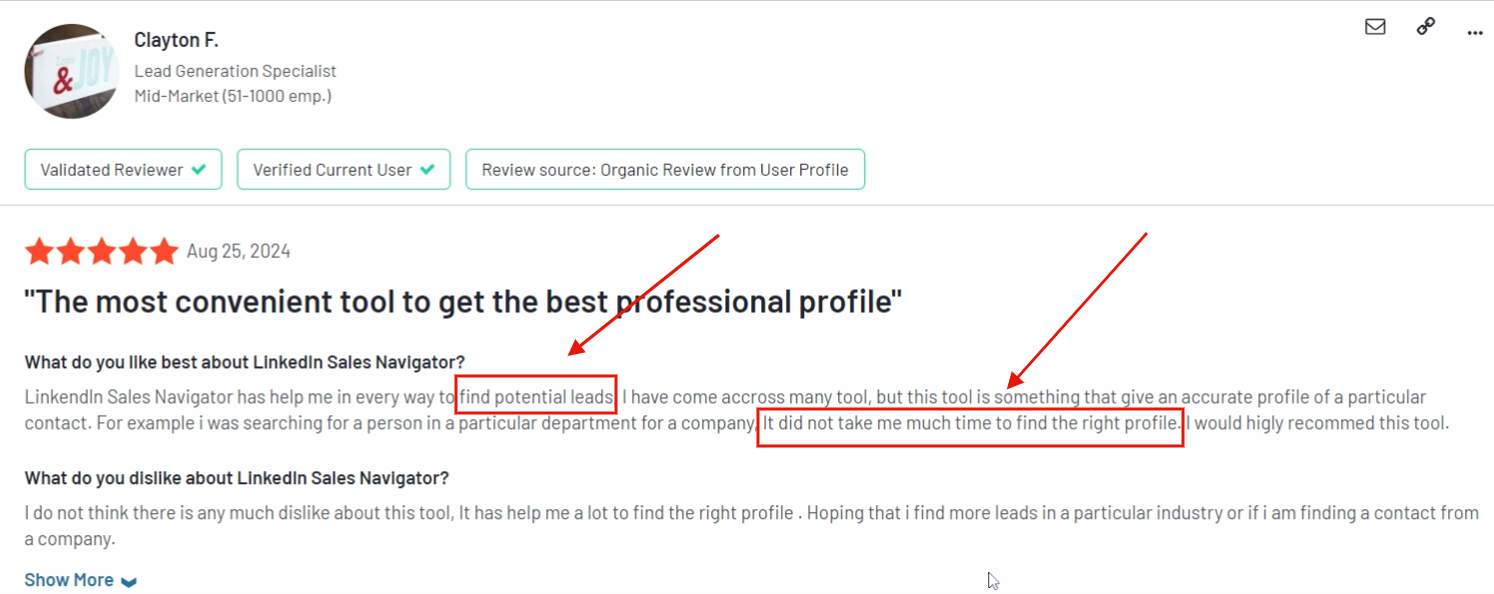
Find perfect potential customers and connect with them naturally.
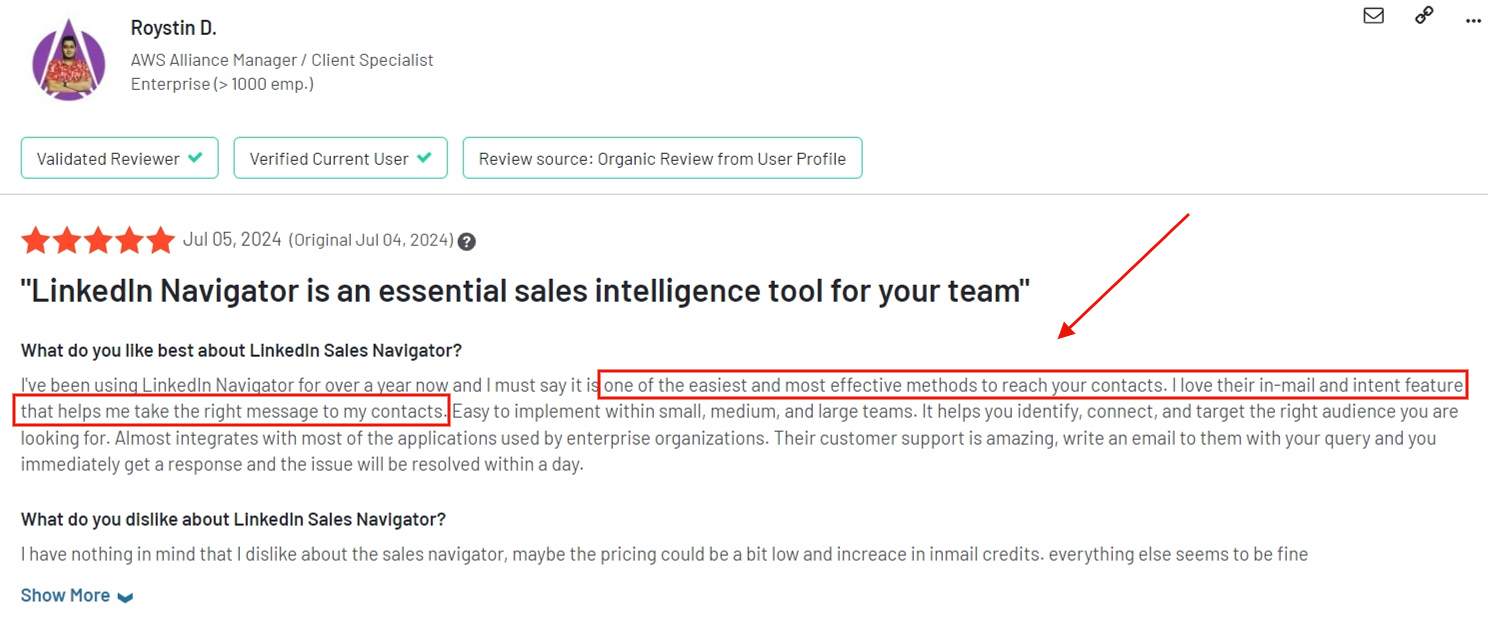
Get friendly nudges when your leads are up to something interesting. Never miss a chance to stay in the loop and reach out at just the right moment.
With the team edition, you can share promising leads with your colleagues.
Hook it up with Microsoft Dynamics or Salesforce to keep everything organized.
Use Lead Builder to bookmark interesting people and companies.
Use Smart Links to share your presentations and demo videos. Make your pitch stand out from the crowd.
Search as much as you want, with advanced filters, and Boolean search. Reach out in a way that feels personal. It's the whole package.
What Are the Drawbacks of Using LinkedIn Sales Navigator?
Here's why you might want your money back after using it for a while
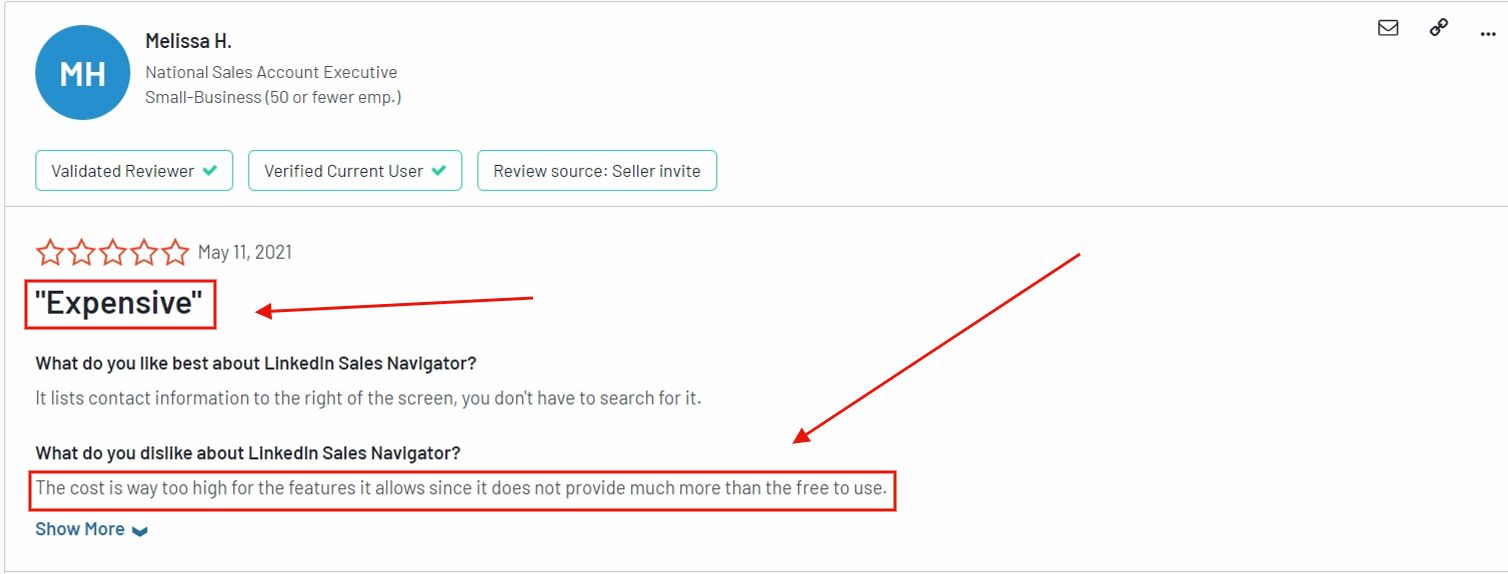
Starting at $99/month, it's not exactly pocket change, especially if you're just starting out. Want all the fancy features? Be ready to open your wallet wider.
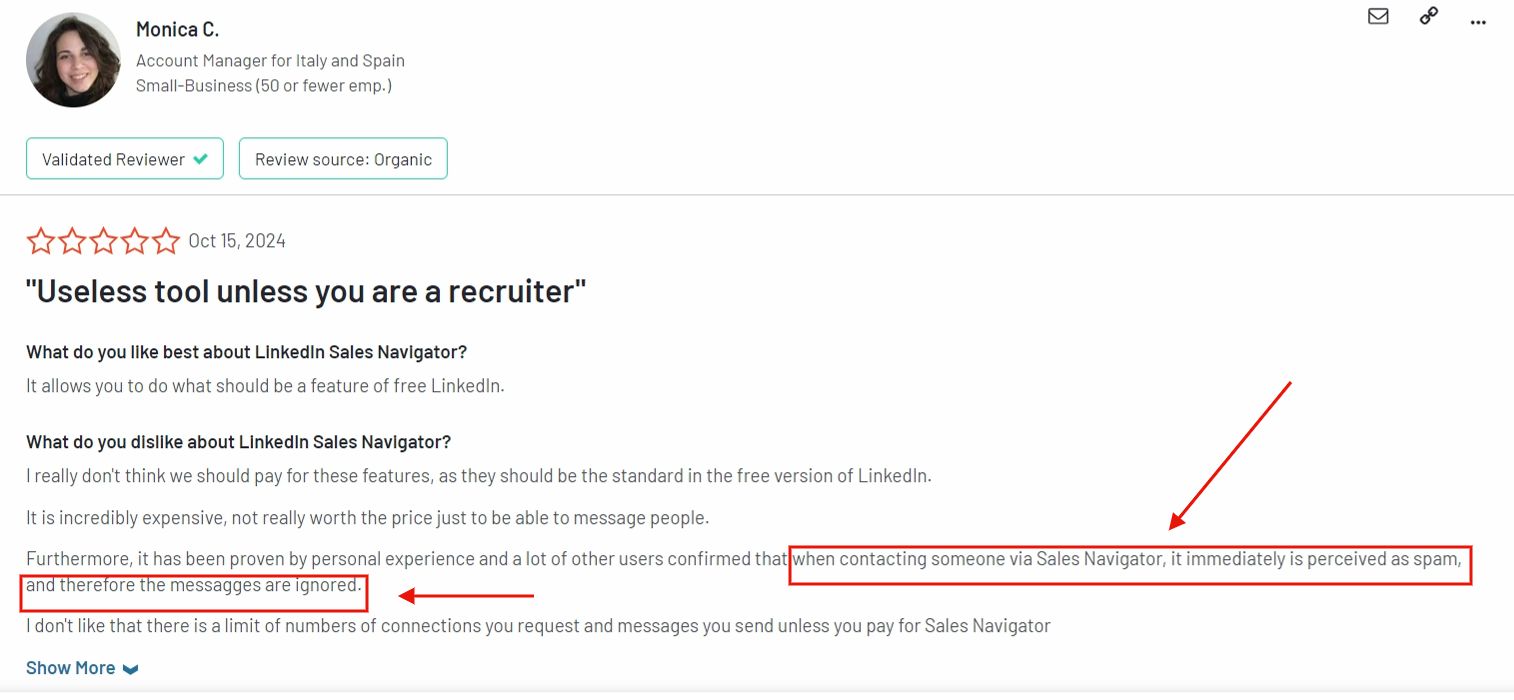
Sometimes your messages can get marked as spam, which means they won't get delivered. Frustrating. Totally. 😣
The dashboard can feel overwhelming. There are so many buttons and filters. It takes a while to feel at home.
4. Not Automated:
This isn't a "set it and forget it" tool. You'll need to roll up your sleeves and put in the work.
Getting the most out of it requires consistent effort or an extension.
5. Limited CRM Integration:
Syncing data with your CRM isn't seamless. Plus, you'll need to pay extra for that privilege. This makes it even pricier.
6. Time-Consuming:
Building lists, fine-tuning searches, reaching out to people. It all adds up. If you're looking for quick wins, you might be disappointed.
Now that we've seen both sides, let's talk about
How Much Does LinkedIn Sales Navigator Cost
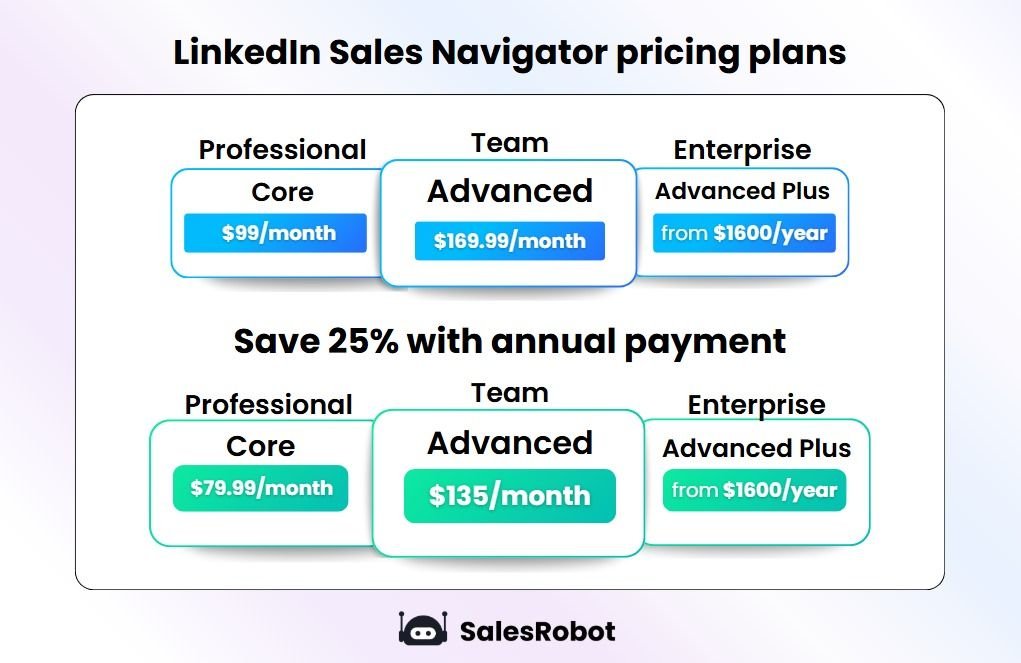
I'm sure by now you know LinkedIn Sales Navigator isn't free.
There are 3 different plans and this is what each will cost you:
LinkedIn Sales Navigator plans:
If you pay annually, you can save up to 25% on Core (Advanced saves only about 6%):
Sales Navigator Core vs Advanced: Key Differences
The Core plan gives you basic lead search and InMail credits. The Advanced plan includes TeamLink connections, lead recommendations, and advanced CRM integration. Enterprise features add bulk actions and analytics.
Conclusion: Is LinkedIn Sales Navigator Worth it?
If I have to sum it up in one line, it's this:
Sales Navigator can be every sales rep's frenemy.

Here's where it gets tricky:
⛔ No CSV export. You're stuck copying and pasting profiles one by one.
⛔ Work emails? Forget it. Most of the time, it's their personal inbox you'll see.
⛔ Phone numbers? Good luck with that.
⛔ No "Select All." Want to grab everyone from a search? Won't happen. Be ready to go page by page.
⛔ No built-in automation. If you're connecting with 30+ prospects daily, you're burning two hours just typing personalized messages and hitting "Connect." No fun, right?
To make the most of Sales Navigator, you need a LinkedIn automation tool like SalesRobot.
Before you roll your eyes thinking, "Oh no, here comes another SalesRobot pitch," just hear me out:
It visits your leads' profiles, picks out interesting details, and crafts hyper-personalized messages. This makes your reply rates shoot up to 32%+.
If that's not enough, it even syncs with Hyperise to create personalized images like this:

Here's how SalesRobot works with Sales Navigator. SalesRobot integrates with LinkedIn Sales Navigator, which has the most up-to-date B2B data on this planet.
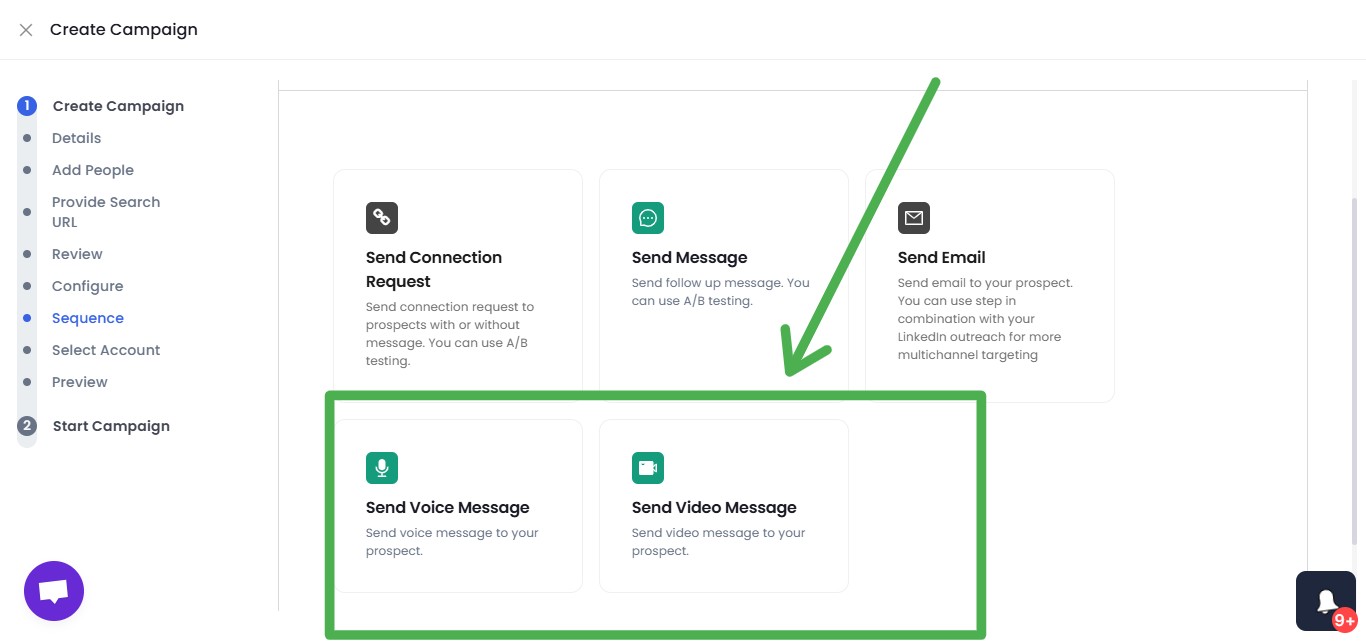
It can send InMails to open profiles automatically (up to 50/day, no InMail credits consumed), send AI-personalized voice notes and video messages at scale, DM LinkedIn Group members and event attendees, and even import everyone who commented on a specific post. Because it runs on LinkedIn's mobile-app APIs in the cloud (no Chrome extension), ban risk stays near zero.
The best part?
SalesRobot's Basic plan starts at $39 per account/month billed annually ($59 on monthly billing), and every plan includes the AI Appointment Setter. After the first 10 accounts, you get a 33% discount. After the first 20, the price drops by 45%.
1. Go to SalesRobot and click Create Campaign:
.jpeg)
Next, pick any 1:

Now select "I'm an advanced user":
.jpeg)
Click on "Add from Sales Nav Search":
.jpeg)
Now go to the Sales Nav search result and copy the URL
.jpeg)
Paste the URL on SalesRobot and click "Save"
.png)
Then go to configure setting and enable the data enrichment feature. This way, SalesRobot can add your leads' contact details from its database.

Just like that, you've got your refined list of prospects complete with their email addresses and LinkedIn profiles.
Nice.
But what's next?
What's your plan for this shiny new lead list?
Spend hours writing personalized messages and sending them manually? One by one?
Who's got time for that?
Instead, you're going to use one of our proven templates or write your own message sequence on SalesRobot

Let the bot take over from there.
Simple! Isn't it?
Now coming back to: is LinkedIn Sales Navigator worth it?
Look. If you're just starting out with LinkedIn outreach, stick to the free account. For now, it's all you really need.
But if you've been at this for a while and know the ins and outs of prospecting, Sales Navigator can be a total game-changer.
With a catch.
You've got to pair it with something like SalesRobot. Otherwise, you're leaving so much on the table like
✅ Connection requests and follow-ups on autopilot.
✅ Personalized messages that don't sound copy-pasted.
✅ Profile-based AI variables to hyper-personalize your DMs.
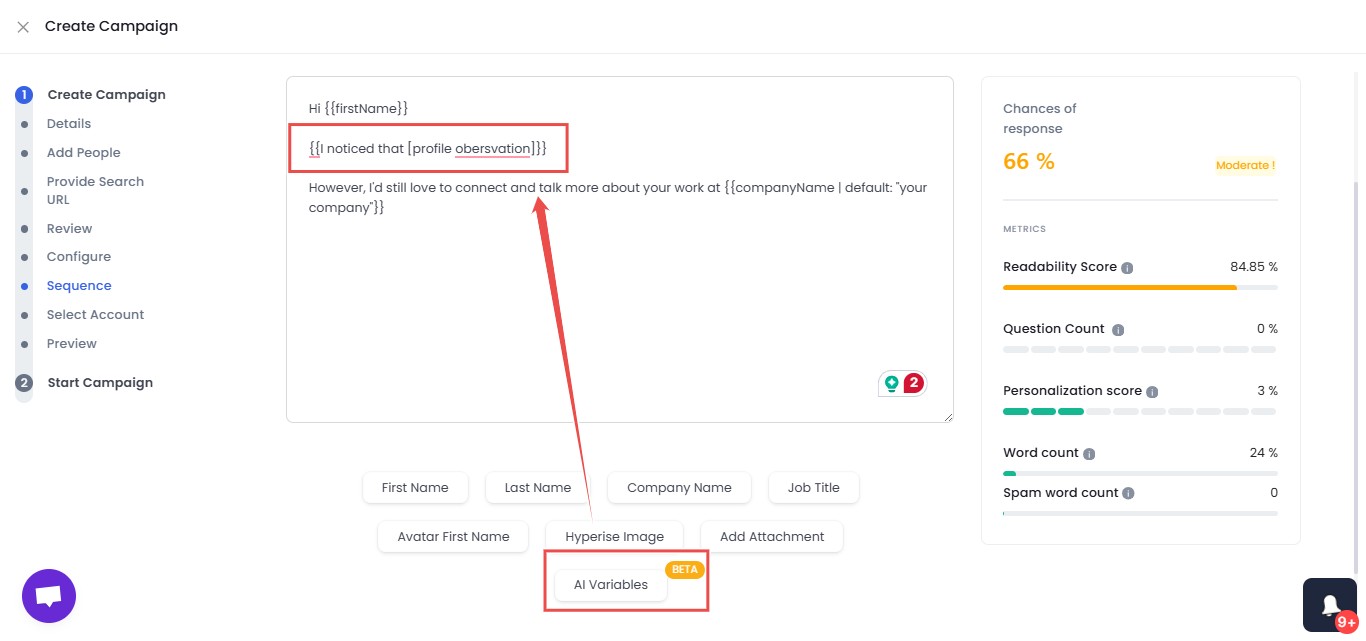
✅ Video messages and personalized Voice messages that can double your response rates.
✅ Smart commenting on your prospects' posts.
✅ AI Appointment Setter to handle prospect replies.
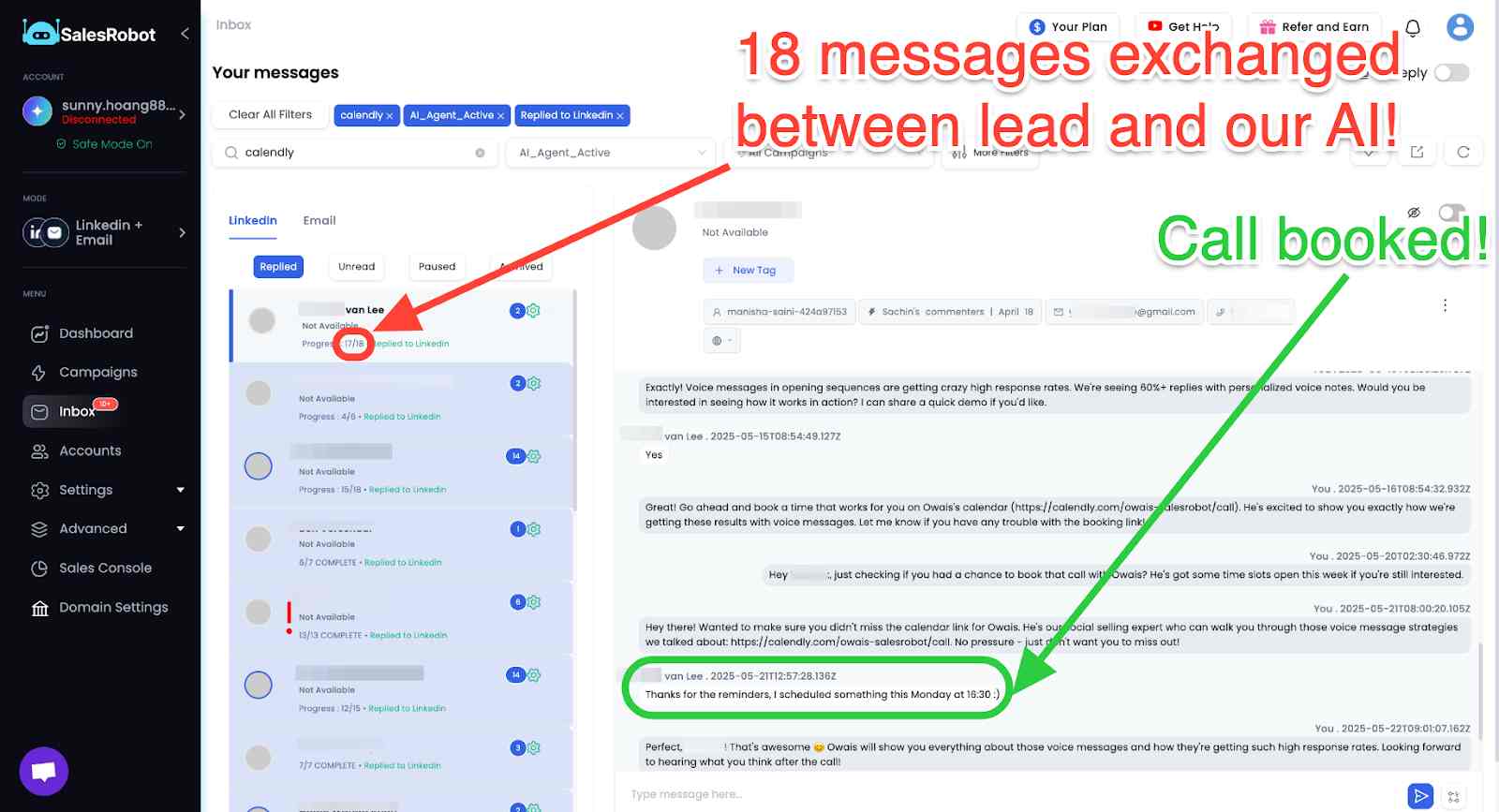
✅ Reaching leads in their time zones.
Need more convincing to take SalesRobot for a spin?
Our 14-day free trial is waiting. No strings attached (seriously, we won't ask for your credit card or phone number).
Give it a shot, and let me know what you think :)
Frequently Asked Questions
How many InMail credits does Sales Navigator include?
Every Sales Navigator tier—Core, Advanced, and Advanced Plus—includes 50 InMail credits per month. Unused credits roll over for up to 90 days, capping at 150 accumulated credits. InMails let you message members outside your network without a pending connection request.
What is the difference between Sales Navigator Core and Advanced?
Core ($119.99/mo) is the individual plan with advanced search, 50 InMails, lead lists, and alerts. Advanced ($159.99/mo) adds team features—TeamLink warm-intro paths, Smart Links, buyer intent signals, shared lists, and team reporting. The database and search filters are identical; you pay Advanced for collaboration, not better data.
Does LinkedIn Sales Navigator work?
Yes, LinkedIn Sales Navigator works effectively for B2B prospecting. With a 4.3-star rating on G2 from over 2,100 reviews, it helps sales professionals find qualified leads through advanced search filters and InMail capabilities. However, it requires consistent effort and works best when paired with automation tools.
How do I upload a lead list to Sales Navigator?
You can import lead lists to Sales Navigator through CSV upload in your account settings. Navigate to "Import Leads," select your CSV file with LinkedIn profile URLs or contact information, and Sales Navigator will match the data to create your target list.
What are the best Sales Navigator filters?
The most effective Sales Navigator filters include job changes (past 90 days), company size, seniority level, geographic location, industry, and years in current position. These filters help you target prospects who are most likely to be interested in your solution.
Can I use LinkedIn Sales Navigator without a LinkedIn Premium account?
Yes. Sales Navigator functions as a standalone subscription, so you do not need a separate LinkedIn Premium plan (like Business Plus or Career). Upgrading to Sales Navigator automatically replaces or includes the benefits of basic Premium subscriptions.
Q: What happens to my leads and saved lists if I cancel Sales Navigator?
If you cancel your Sales Navigator subscription, you will lose access to your saved lead lists, account lists, and lead notes immediately at the end of your billing cycle. However, any standard 1st-degree connections you made while using the platform will remain in your basic LinkedIn network.

Wow your leads by cloning yourself and sending personalized videos and voice notes to each lead on LinkedIn.
If you don't reply to leads within 5 mins, your chances of converting them fall by 50%. Our AI replies on your behalf instantly! (and yes, you can train it)

Don't shoot in the dark. Get detailed analytics on what's working

SalesRobot allows you to invite other team members, so that they can add their LinkedIn Account, run outreach campaigns and get amazing results just like you.
.avif)


Trusted by 4100+ innovative B2B sales teams and lead gen agencies

.avif)

.avif)




.avif)


Heading 1
Heading 2
Heading 3
Heading 4
Heading 5
Heading 6
Lorem ipsum dolor sit amet, consectetur adipiscing elit, sed do eiusmod tempor incididunt ut labore et dolore magna aliqua. Ut enim ad minim veniam, quis nostrud exercitation ullamco laboris nisi ut aliquip ex ea commodo consequat. Duis aute irure dolor in reprehenderit in voluptate velit esse cillum dolore eu fugiat nulla pariatur.
Block quote
Ordered list
- Item 1
- Item 2
- Item 3
Unordered list
- Item A
- Item B
- Item C
Bold text
Emphasis

Superscript
Subscript