.avif)
TL;DR:
LinkedIn messages are private between sender and recipient only, protected by TLS encryption, though LinkedIn itself can access them for platform purposes.
With 1.3 billion registered users and 310 million monthly active users, LinkedIn offers 6 message types including connection requests, InMails, and group messages to help professionals network effectively.
LinkedIn is an excellent platform for reaching out to people for individuals, business owners, and sales teams.
With more than 1.3 billion registered users and 310 million monthly active users, it's the one channel that promises something for everyone.
But reaching out on LinkedIn can be pretty daunting for the same reason. Questions like,
❓ How to find the right people to message?
❓ What kind of messages should you send?
And most importantly, are LinkedIn messages private?

In this day and age, security and privacy are significant concerns. Does LinkedIn ensure you're digitally safe?
Trust me when I say this - if you're worrying about
🤔 accidentally sending a message to the wrong person
🤔 if a third party can read your LinkedIn messages
🤔 if LinkedIn can read your messages
..then you're not alone. These are a few common questions that people have.
I'll give you the answer right away:
Only the sender and the recipient of the message can see the messages. No one else.
But there are a few ifs and buts that you need to consider.
LinkedIn guarantees the confidentiality of your private messages, and they can only be seen by you and the recipient.
In this blog,
🤨 We'll see if LinkedIn messages are private
🔐 How to make sure your privacy is protected
📨 Next, we'll look at the 6 types of messages you can send on LinkedIn to build relationships with other people/businesses.
🤯Then we will debunk 5 popular myths about messaging on LinkedIn
So grab some snacks, sit tight, and let's answer the elephant in the room.
Are LinkedIn Messages Private?
LinkedIn's private messages are confidential and can only be accessed by the sender and recipient. Now that's reassuring.
Additionally, LinkedIn offers a direct messaging feature that enables connected members to send each other personalized messages.
LinkedIn private messages are only accessible and visible to the sender and receiver.
Not yet convinced? I get it.
If you need more convincing, let's understand HOW secure and private those messages genuinely are.
How secure are LinkedIn private messages?
LinkedIn uses TLS (Transport Layer Security) encryption to protect all messages sent between members.
TLS is the modern successor to SSL and is the current industry standard.
However, while third parties cannot access your messages, LinkedIn itself does have access to message data for various purposes including improving user experience, spam detection, and compliance with legal requirements.
According to LinkedIn's privacy policy, they do not share the content of your messages with third parties for advertising purposes. LinkedIn also does not share sensitive activities like personal messages with your employer unless you specifically choose to share them.
LinkedIn also offers the ability to report any messages that are inappropriate or that violate LinkedIn's terms of service.
If you receive a spam message, you can notify it by clicking the "Report" button in the top right corner of the message.
Select the appropriate cause from the list and the action you want to take.

LinkedIn will then review the message and take appropriate action.
Overall, LinkedIn messages are a great way to connect with other professionals on the site. LinkedIn offers a variety of features that make it an excellent resource for networking and building relationships.
P.S. There is more than 1 way to send messages on LinkedIn.
What are the types of LinkedIn messages?
Don't worry, new users. I am not here to judge you.
When I started on LinkedIn 8 years ago, I relied on basic messaging. Over time, I figured out the 6 types of LinkedIn messages and how to use them effectively.
Couple this with 15+ easy LinkedIn Profile optimisations, and you'd be ready for your LinkedIn journey.
Now, it's time to dive into those 6 types:
- Direct Message
Direct Messages are LinkedIn's version of a private message or chat.
Direct messages are a great way to converse with other people or businesses one-on-one.
However, there are several different types of Direct Messages, and each serves a different purpose.
- Connection Request. As the name suggests, this type of message is used to request a connection with another LinkedIn member.
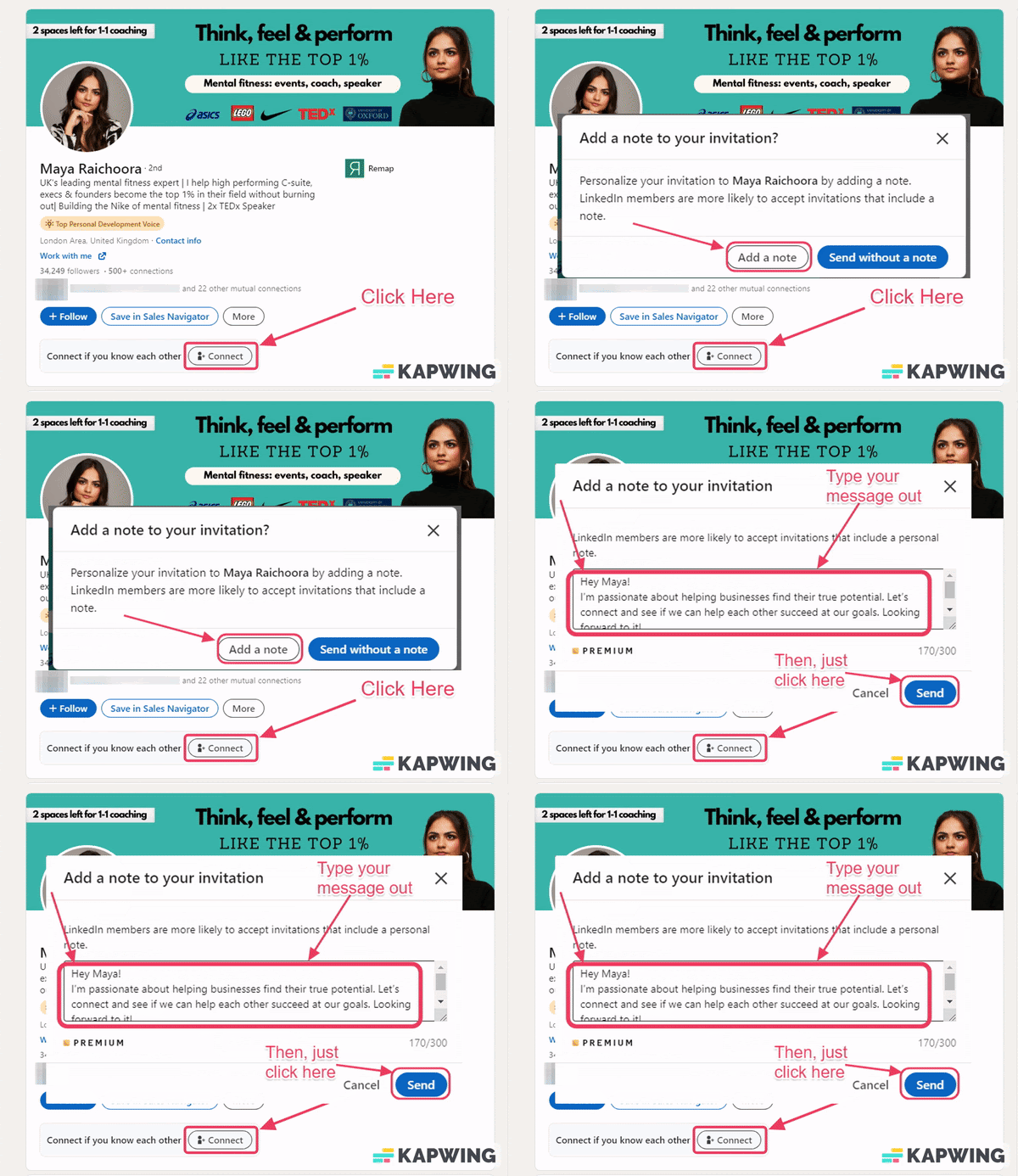
Are we done already? Yep, it's that easy.
Connection Requests typically include a personal message along with the request.
These connection requests have a character limit of 200 for free accounts and 300 for Premium and Sales Navigator accounts and need to be carefully crafted in order to be effective.
2. Open Profile Messages:
Open profile messages are private messages sent to LinkedIn Premium users who have enabled the Open Profile feature, allowing non-connections to message them directly without using an InMail credit.

So, if you're trying to reach out to someone you're not connected with, your best bet is to send an open profile message.
In short, open messages are messages sent to Premium users who have enabled the Open Profile setting on their profile, which allows anyone, including free users, to message them without using an InMail credit..
But what should you say? Here are some tips:
- First, keep it professional. Remember, this is a business networking site, so your message should reflect that.
- Keep it short and sweet - no one wants to read a novel.
- Ensure it's relevant to the person you're contacting.
- Finally, proofread your message before you hit send - nothing says unprofessional like a typo-ridden message!
3. LinkedIn InMail:
LinkedIn InMails are one of the most effective outreach tools on the platform, with InMail messages delivering a 300% higher response rate than traditional cold email.
But what exactly is a LinkedIn InMail? Let's take a closer look.
A LinkedIn InMail is a message that LinkedIn members can send to one another, regardless of whether they are connected to each other on LinkedIn.
Keep in mind LinkedIn InMails are a premium-only feature.
However, I'll let you in on one secret.
There's a way to send InMails to Premium users for free, if someone has enabled Open Profile on their account, you can message them directly without spending any InMail credits, regardless of your own account type.
LinkedIn InMails can be sent to any LinkedIn member directly through their LinkedIn profile, regardless of whether you're connected.
4. LinkedIn Group Messages:
When it comes to posting inside LinkedIn Groups, messages generally fall into 3 main types:
The generic post,
The self-promotional post,
and The spammy post.
Note: LinkedIn Groups are spaces for public discussion among members, not private messaging. LinkedIn limits direct messaging to group members you're not connected with to 10 free messages per week, after which InMail credits are required.
- The Generic Message: The generic message is the most common type of LinkedIn group message.
It's usually something like, "Hi, I've been working at XYZ for M years and am looking to connect."
It's very generic and very dull. Does not display intent.
I'm not judging anyone, but this is not GREAT.
These messages are fine, and there's nothing wrong with sending them.
However, to stand out and make a good impression, you must do more than just send a generic message.
To make it easier for you, I have compiled 35 helpful connection templates for connection requests, direct messages, InMails, and other types of communications.
- The Self-Promotional Message: The self-promotional message is the second most common type of LinkedIn group message.
These messages usually try to sell something or promote a service.
For example, "If you're looking for a new job, check out my company's website! We're hiring!" or "I just released a new book/course/product that I think you all would love. Check it out!"
Self-promotional messages can be effective if they're done right, but they can also be seen as spammy and annoying if they're not.
If you decide to send a self-promotional message, make sure it adds value to the group and isn't just a blatant sales pitch.
- The Spammy Message: The spammy message is the third and final type of LinkedIn group message.
These messages are spam, like "Buy my product! It's the best!" or "Follow me on social media! I follow back!"
These messages serve no purpose other than to promote someone's business or product and offer no value to the group.
Don't send these types of messages if you want to stay in good standing with LinkedIn and avoid being labeled a spammer.
5. Sponsored LinkedIn Message:

I'm pretty sure you've seen messages that say "Sponsored."
Most people are familiar with the standard LinkedIn messages that allow users to connect.
However, another type of message is available on the platform: Sponsored Messaging, which comes in two formats: Message Ads (single CTA) and Conversation Ads (multiple CTAs and branching paths)..
Sponsored messages are advertisements sent directly to a user's inbox. Companies can pay to have their message appear in a user's inbox and even target specific users based on criteria like job title or location.
While some users may find sponsored messages to be annoying, others see them as a valuable way to learn about new products and services.
Moreover, LinkedIn has strict guidelines for how companies can use LinkedIn-sponsored messages so users can be sure they only see relevant and trustworthy information. Note: Sponsored Messaging campaigns cannot target members based in the European Union (EU). If a campaign includes both EU and non-EU targeting, delivery will continue only to non-EU audiences.
So whether you love or hate them, sponsored messages are here to stay.
6. Multiple recipient messages:
As the name suggests, multiple recipient messages are sent to more than one person.
These types of messages are great for networking or marketing purposes.
So, now that you know what are the different types of LinkedIn messages, let's answer the big question.
Which type of LinkedIn message is right for you?
Well, it depends on your goals and objectives.
👨👩👧👦If you're simply looking to connect with as many people as possible, multiple recipient messages should be your go-to.
🌟If you want to forge personal connections, single-recipient messages are your best bet.
📧InMails are the best option if your message is long and you're not connected to the person. Make a solid first impression.
👨👩👦Group messages are ideal if there's a shared interest in the group and you want to build relations with new people.
But they have certain downsides as well.
😟Multiple recipient messages might lack personalization. Yet another robotic mail in someone's inbox.
😟It takes time to craft messages manually and get the hang of what to say, as well as personalize the messages. (Pssst… I got you; click here to get 35 expertly crafted templates).
👨👩👦With so many people messaging in the group, it might be difficult for you to keep track of it all. Ideas could get buried in the buzz of the group.
📧Often longer in format, InMails could end up sounding spammy if you're sending them too frequently. Or it might not work if you don't do it right.
So many variables, so little time.

It takes time to master all these ways of reaching out to people, to see what works best for you or your business.
To make your life easier, our trusty little friend, Salesrobot, is here to help.
Salesrobot can help you with:
📝 Personalizing messages on LinkedIn, via personalized voice or video notes and AI Variables!
👨👩👧👦Import contacts just by copying link from Sales Navigator

📧Email automation tools with metrics ranking your cold-email template

⛰ Hyper-personalised GIFs and images

🤩 Reach out in volume on LinkedIn and email without getting your account banned.
Salesrobot reaches out in volume because it's a cloud-based tool, unlike some Chrome-based tools, and it does not get you banned.
📨Utilises LinkedIn's InMails feature to reach out whenever it encounters a Premium account with an open profile. This ensures that your limited connection request quota does not get eaten into.
😲Smart reply, auto-pausing, sequencing, and much, much more.

And all of that for the low price of $59 per month.
Setting up your first campaign with our trusted SalesGPT would take less than ten minutes. If you prefer to set it up manually, here's how.
If you are not yet ready to commit, take our 14-day free trial—no credit card required—during which you can test-drive Salesrobot to see if it's a good fit for you and your business.
{{mobile-cta}}

Truly, it's the jack of all trades.
5 Myths about LinkedIn Messages!
You've probably seen those articles entitled "5 Types of LinkedIn Messages that Get Results" or something similar.
While those articles have some truth, there are also many myths about what types of LinkedIn messages work and which ones don't.
Let's debunk the 5 of the biggest myths when it comes to LinkedIn Messages.
Myth #1: Recruiters only want to hear from you if you're actively looking for a job.

Many recruiters are always looking for top talent, even if that talent isn't currently looking for a new opportunity.
So whether you're actively job-hunting or not, messaging or actively engaging with your network of recruiters is always a good idea.
Myth #2: LinkedIn messages should be formal and professional.
While it's true that you should always use a professional tone in your LinkedIn messages, that doesn't mean they have to be stiff or formal.
Being too formal could make you sound like you lack personality. Try hitting that sweet spot.
Sound professional without sounding like a robot to impress your prospects. 😎
Myth #3: The longer your message, the better
And the verdict is…..

Yes include the details, and give enough information in your messages.
But don't drag it out beyond 400-500 characters, that's roughly 100 words, which is enough to make your point without losing the reader..
After all, no one wants another novel to read in their inboxes.
Myth #4: You should only message people you know.
This is another surprisingly widespread myth. Sure, it's always lovely to hear from someone you know on LinkedIn, but you shouldn't limit yourself to messaging people you already have a connection with.
If you see something in someone's profile that makes you think they'd be a great prospect, bite the bullet and send them the message. Because you miss 100% of the chances you don't take.
Myth #5: You need to have something big and newsworthy to say for your message to be successful.
A common belief is that your message isn't good enough.
But that is never true.
The rule of thumb is to keep messaging until you make it big.
That message about the blog you just read could spark a conversation with a new connection - and maybe even a new recruiter; who knows?
Keep it sweet and simple.
And, if that blank, empty, and white text message box is intimidating, I have 3 message templates for you that have worked great for my customers, along with key insights.
LinkedIn Message Etiquette and Best Practices
When crafting your LinkedIn message templates for job seekers or business networking, timing and etiquette matter. Here are key considerations:
Crafting Effective LinkedIn Message Subject Lines: Keep your subject lines clear and compelling. A well-crafted LinkedIn message subject line increases your message open rates significantly. Focus on personalization and value proposition rather than generic greetings.
Professional Timing Considerations: Wondering if it's unprofessional to message on LinkedIn at night? Generally, business hours are preferred, but LinkedIn is a global platform. As long as your message is professional and thoughtful, the timing is less critical than the content quality.
LinkedIn Message Features and Functionality
Understanding the LinkedIn Message Read Symbol: LinkedIn shows read receipts with a small checkmark or "Seen" indicator, helping you track engagement with your messages. This LinkedIn message read symbol appears when the recipient has opened your message.
Link Preview Issues: If your LinkedIn link preview not working properly, try refreshing the page or checking your internet connection. Clear your browser cache if the problem persists. This feature helps make your shared content more engaging by displaying rich previews of linked content.
Message Deletion: When you delete a message on LinkedIn, the other person typically won't receive a notification that it was deleted, but they may notice if they had already seen it.
Conclusion
Messaging on LinkedIn is a great way to connect with potential clients and business partners worldwide. Understandably, privacy is a concern for all.
According to LinkedIn's Help Center, all messages exchanged in LinkedIn Messenger are private.
However, some circumstances in which your messages may not be completely confidential.
If you have any concerns about the privacy of your messenger conversations, you should contact LinkedIn directly.
That being said, if
📝 sending out personalized messages to a lot of prospects in volume on LinkedIn is giving you a throbbing headache
Or,
🤔 your cold emails are ending up cold and lonely in the spam of your prospects
Or,
😅 you can't find accurate contact information about your prospects
…then try out Salesrobot free for 14-days without a credit card that will make LinkedIn+email automation a breeze for you and your business.
{{mobile-cta}}
Thanks for reading!
Frequently Asked Questions
Are LinkedIn messages private?
Yes, LinkedIn messages are private between the sender and recipient. However, LinkedIn itself can access message data for platform purposes like spam detection and user experience improvement.
Are messages on LinkedIn private from third parties?
LinkedIn states that third parties cannot access your messages, and they do not share message content with third parties for advertising purposes. LinkedIn also does not share sensitive activities like personal messages with your employer unless you choose to share them.
When you delete a message on LinkedIn does the other person know?
No, LinkedIn doesn't send a notification when you delete a message, though the recipient may notice if they had already seen it.
Is it unprofessional to message on LinkedIn at night?
Not necessarily. While business hours are generally preferred, LinkedIn is a global platform. Focus on professional, thoughtful content rather than timing.

Wow your leads by cloning yourself and sending personalized videos and voice notes to each lead on LinkedIn.
If you don't reply to leads within 5 mins, your chances of converting them fall by 50%. Our AI replies on your behalf instantly! (and yes, you can train it)

Don't shoot in the dark. Get detailed analytics on what's working

SalesRobot allows you to invite other team members, so that they can add their LinkedIn Account, run outreach campaigns and get amazing results just like you.
.avif)


Trusted by 4100+ innovative B2B sales teams and lead gen agencies

.avif)

.avif)




.avif)