.avif)
TL;DR
- RB2B is a person-level website visitor identification tool that matches US-based visitors to LinkedIn profiles and pushes real-time alerts to Slack, telling you exactly who visited your site and which pages they viewed.
- Founded in November 2023 by Adam Robinson, the platform reached $7M ARR by February 2026 and holds a 4.5 out of 5 rating on G2 from 283 verified reviews.
- Pricing runs from a free plan with 150 monthly resolutions to Starter at $79/month, Pro at $149/month, and Pro+ at $199/month.
- Business email addresses and CRM integrations only unlock on the Pro plan. The platform identifies 5 to 20 percent of US-based website traffic at the person level.
- It does not identify EU visitors, does not enrich contacts beyond LinkedIn data, and does not automate outreach.
- RB2B tells you who visited your site. SalesRobot reaches those visitors on LinkedIn. Together they complete the intent-to-outreach loop that neither tool covers alone.
Most website analytics tools tell you how many people visited your pricing page. RB2B tells you which people.
There is a meaningful difference between seeing that 47 visitors landed on your pricing page last week and knowing that the VP of Sales at a company in your ICP spent four minutes on it yesterday.

RB2B was built to close the gap between inbound intent signals and outbound action. Install a JavaScript pixel on your website, and RB2B begins matching visitor sessions to LinkedIn profiles in real time.
When someone in your ICP visits your pricing, product, or demo page, a Slack notification fires within minutes with their name, job title, company, LinkedIn URL, and the full list of pages they viewed in that session.

Your sales team has a warm lead before the prospect has left the building.
The concept is straightforward, and the execution is fast.
But understanding where RB2B adds the most value, and where its structural limitations matter, is essential before deciding whether the pricing makes sense for your traffic volume and ICP. This review covers both.
One important distinction upfront: RB2B identifies website visitors. It does not enrich their contact data beyond what it surfaces from LinkedIn, does not send outreach, and does not run automated follow-up sequences.
If your outbound motion includes LinkedIn automation after identification, SalesRobot covers that execution layer directly, and we address how the two tools sit naturally alongside each other toward the end.
RB2B: What You Need to Know
✅ Person-level visitor identification is genuinely more useful than company-level: Most website intelligence tools identify the company whose IP address visited your site. RB2B identifies the specific person. Knowing that someone from Acme Corp visited your pricing page is useful context. Knowing that the VP of Sales at Acme Corp spent eight minutes on it and also visited your case studies page is an actionable sales signal. That distinction is the core value proposition and it holds up under real use.

⚠️ US-only coverage by design: RB2B limits person-level identification to US IP addresses. EU visitors are not identified at the person level. This is a deliberate compliance decision to avoid GDPR obligations that would arise from identifying European individuals without consent. For teams whose ICP is primarily US-based, this is a non-issue. For teams with significant European or international pipeline, it is a meaningful gap in coverage.

✅ Setup takes minutes and value appears immediately: The pixel is a single JavaScript snippet copied into your website's header. Slack integration connects in a few clicks. From installation to first Slack notification typically takes under 30 minutes. There is no complex onboarding, no data mapping session, and no implementation project.
⚠️ Match rates are 5 to 20 percent of total US traffic: RB2B identifies only a fraction of your visitors because identification requires matching a session to a LinkedIn profile. Visitors who are not active on LinkedIn, who use VPNs, who clear cookies frequently, or whose IP addresses are not in RB2B's identity graph will not be identified. On a site receiving 10,000 US visitors per month, RB2B will typically identify 500 to 2,000 people, not all 10,000.

✅ ICP filtering prevents credit waste on irrelevant visitors: RB2B allows you to set filters by industry, company size, job title, and seniority level. When a visitor does not match your ICP criteria, no resolution credit is consumed. This is a meaningful feature for teams whose websites attract a broad mix of traffic including students, competitors, and job seekers alongside genuine prospects.
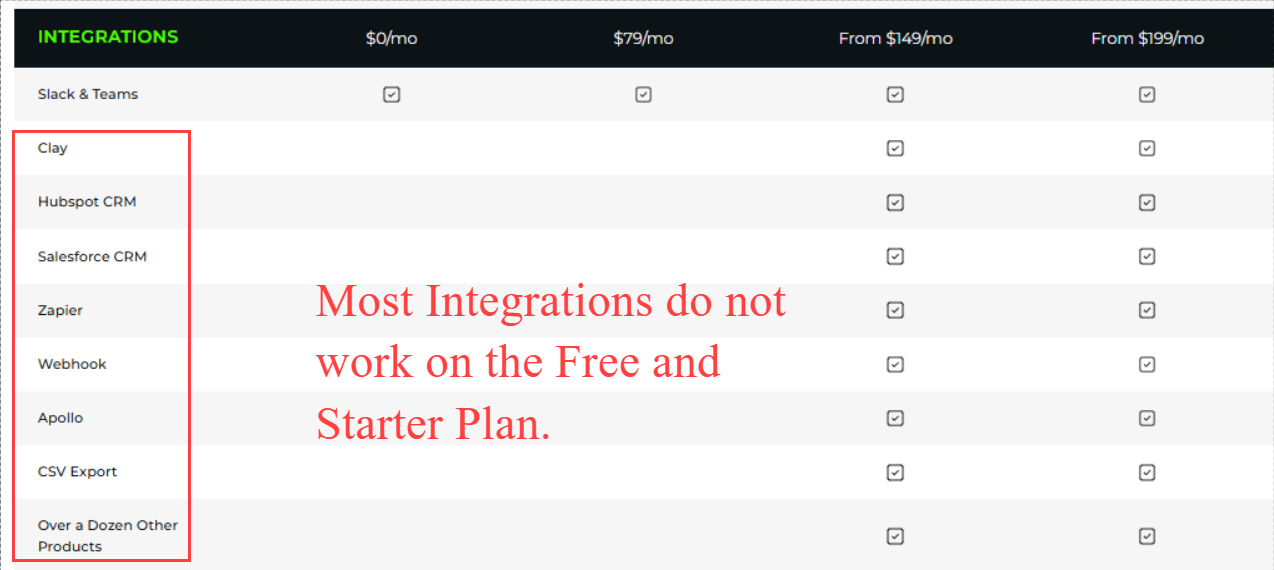
⚠️ Business email addresses and CRM integrations require Pro at $149/month: The free plan and Starter plan at $79/month provide LinkedIn URLs but no email addresses. To get business email addresses alongside LinkedIn profiles and to push identified visitors directly into HubSpot, Salesforce, or other CRM systems, you need the Pro plan or above. Teams that want to go directly from identification to email outreach without manual lookup need to budget for Pro at a minimum.
Key Features
Person-Level Visitor Identification

The core product. When a visitor lands on your website, RB2B's pixel captures session data and runs it against an identity graph to match the session to a specific LinkedIn profile.
Matches are filtered against your ICP criteria before a resolution credit is consumed. Matched visitors are pushed to Slack or your connected workflow with their name, job title, company, LinkedIn URL, and the full list of pages viewed in the session.
The identification relies primarily on LinkedIn data, which means visitors without active LinkedIn profiles, particularly in manufacturing, healthcare, trades, and other industries where LinkedIn adoption is lower, may not be identified even if they are otherwise reachable. This is a structural characteristic of the approach, not a fixable limitation.
Real-Time Slack Notifications
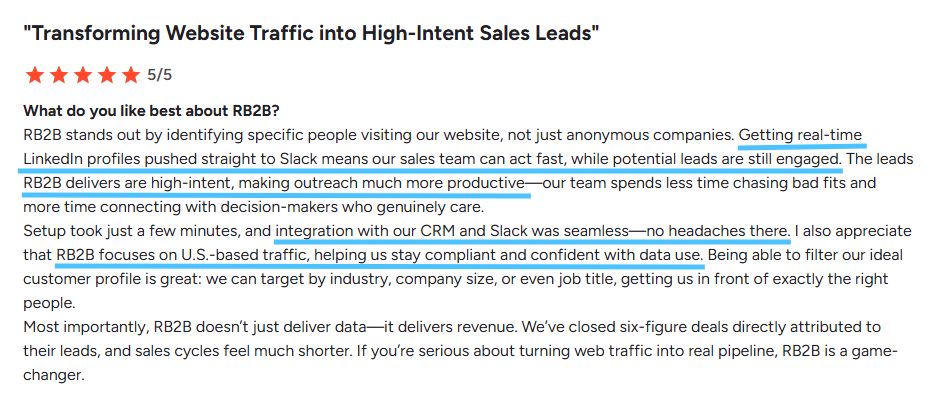
Every identified visitor triggers a Slack notification containing the visitor's LinkedIn profile details, their company information, and their session activity. The notification fires while the prospect is still on-site or recently active, when outreach timing is at its most effective.
Microsoft Teams integration is also available for teams that do not use Slack.
ICP Filtering and Page-Level Controls
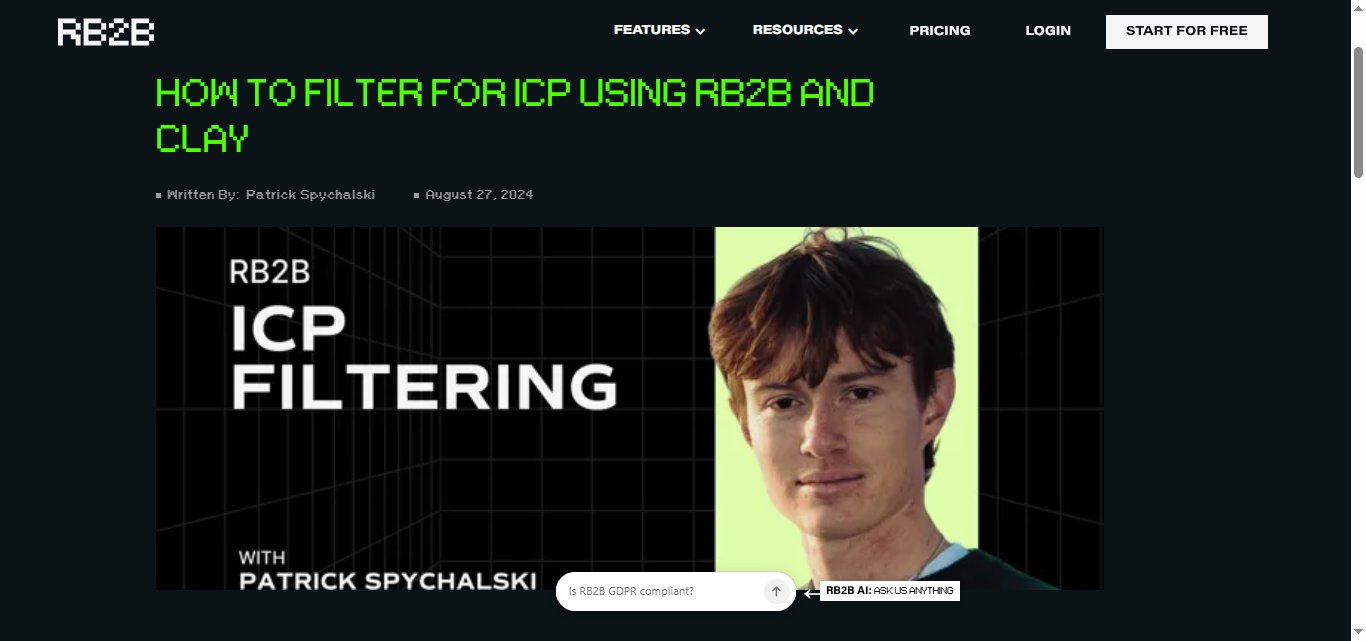
Two filtering layers work together to control where resolutions are spent. ICP filters define the visitor profile you want to identify: industry, company size, geographic region, and job title. Page-level filters define which website sections trigger identification.
Combined, these filters allow teams to identify only the visitors they actually care about on the pages that signal genuine intent, such as pricing, demo, or product pages, rather than burning credits on blog readers or career page visitors.
Session Data and Behavioral Context
Each identified visitor notification includes the full session path: which pages they visited, in what order, and how long they spent on each page. A VP of Sales who visits your pricing page and then your customer stories page is a different signal from someone who bounced from the homepage. The session context lets sales reps prioritize and personalize follow-up based on what the prospect actually engaged with.
CRM Integrations (Pro and Above)
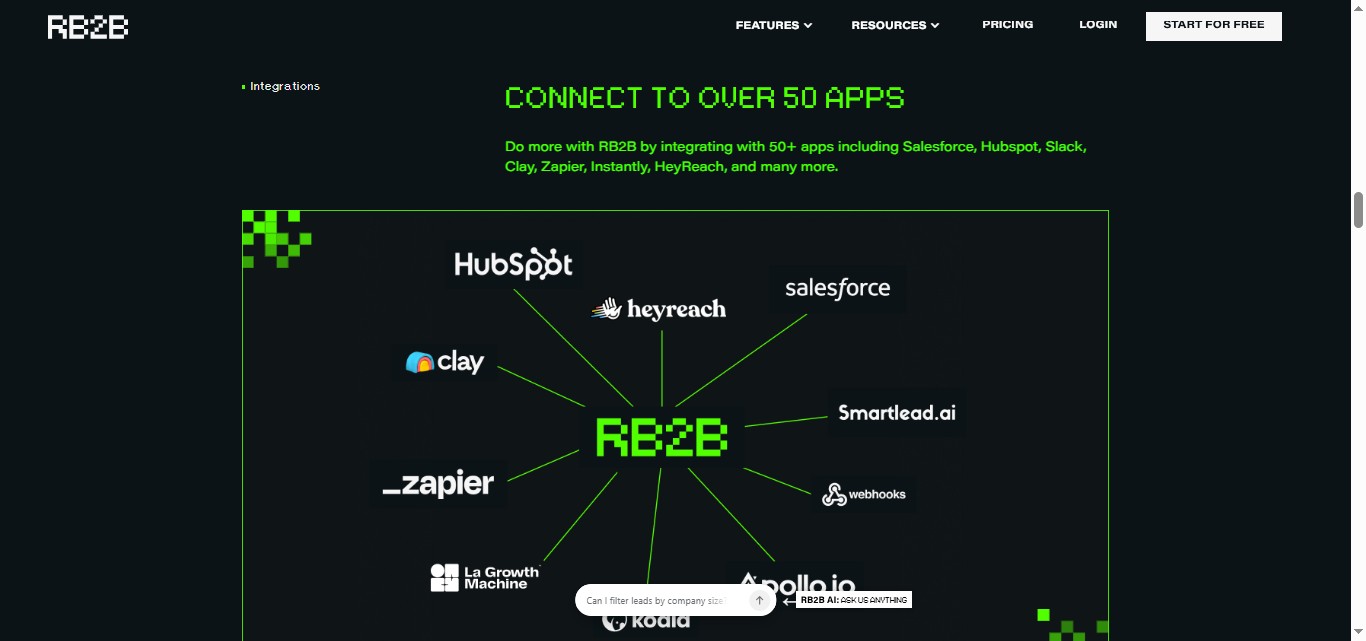
The Pro plan unlocks native integrations with HubSpot, Salesforce, Clay, Apollo, and Zapier. Identified visitors can be pushed automatically into CRM records with full session and profile data, routed to specific owners based on territory or account assignment, and triggered into outreach sequences in connected tools. CSV export is also available on Pro and above.
Business Email Addresses (Pro and Above)
On the Pro plan, RB2B surfaces a business email address alongside the LinkedIn profile for identified visitors. The email is sourced from RB2B's data partnerships rather than enrichment tools, and independent reviewers note that email accuracy varies. Some teams choose to use RB2B for identification and push identified visitors to tools like BetterContact or FullEnrich for higher-confidence email enrichment rather than relying solely on RB2B's email data.
API Access
API access is available on Pro and above. This allows GTM engineers to build custom workflows that pull identified visitor data into proprietary systems, trigger enrichment in parallel tools, or integrate with outreach platforms beyond RB2B's native connector list.
RB2B Pricing
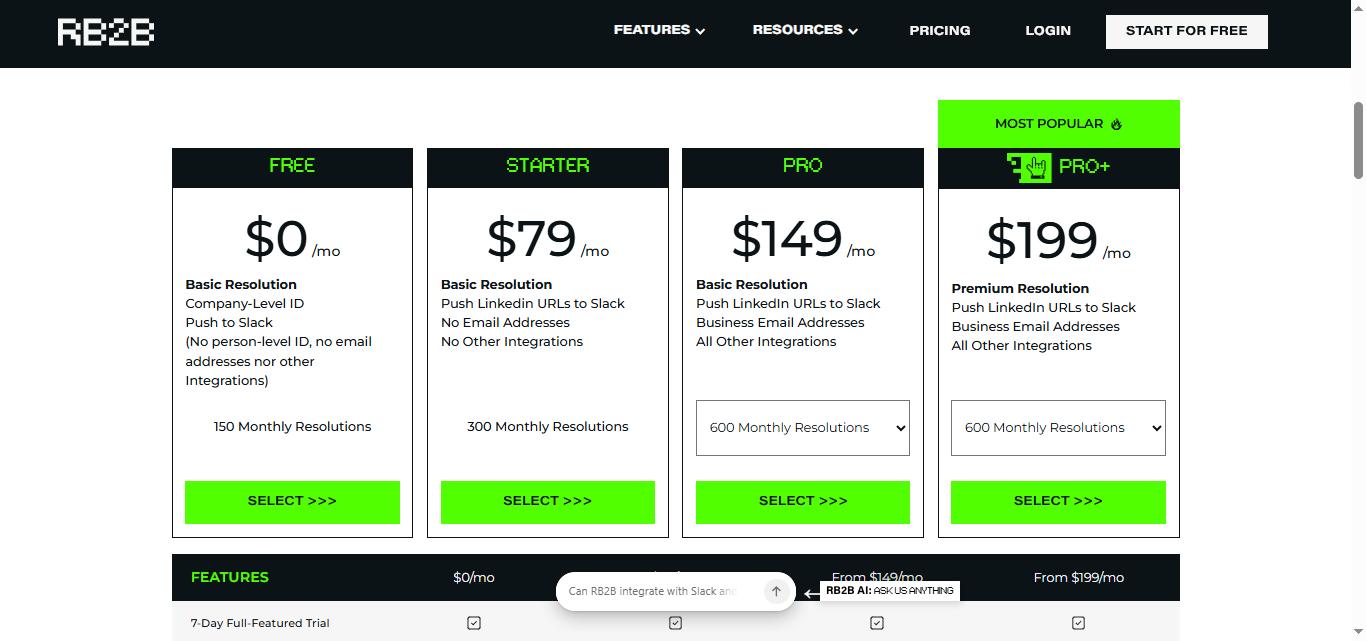
RB2B uses a resolution-based credit system. One resolution equals one identified visitor. Credits are consumed only when a visitor matches your ICP filters and is successfully identified. Overage credits are charged per resolution beyond the plan allocation. All plans support unlimited users.
Free: $0/month
- 150 resolutions per month
- Company-level identification
- Slack alerts
- LinkedIn URLs not included
- No email addresses
- No CRM integrations
- Best for testing whether person-level identification works on your traffic before committing budget
Starter: $79/month
- 300 resolutions per month
- LinkedIn URLs pushed to Slack
- ICP filtering
- No business email addresses
- No CRM integrations
- Overage rate: approximately $0.45 per extra resolution
- Best for small teams validating the concept with modest traffic
Pro: $149/month (600 resolutions)
- 600 resolutions per month
- Business email addresses included
- Full CRM integrations: HubSpot, Salesforce, Clay, Apollo, Zapier
- API access
- CSV export
- ICP filtering and page-level controls
- Microsoft Teams integration
- Overage rate: $0.25 per extra resolution
- Higher resolution bundles: 1,250 resolutions at $299/month, 2,500 resolutions at $399/month, up to 12,500 resolutions at $849/month
- Best for teams actively using identified visitors in outreach workflows
Pro+: $199/month (600 resolutions)
- 600 resolutions per month
- Everything in Pro plus:
- Enhanced and premium resolution coverage for both contact-level and company-level identification
- Higher identification rates for hard-to-match visitor segments
- Overage rate: $0.25 per extra resolution
- Best for teams with high-traffic sites where maximizing identification rate matters more than reducing base cost
Additional domains: $99/month per domain (up to 5 domains)

Pricing note: Resolution bundles scale significantly above the base plan allocations. The most common paid plan based on RB2B's own ARPU data ($216 average) is Pro+ at $199/month or the 1,250-resolution Pro bundle at $299/month.
What Works Well
✅The person-level identification is genuinely differentiated. Before RB2B existed in 2023, tools could tell you which company's IP visited your site but not which person. The ability to match a website session to a specific LinkedIn profile and fire that information to Slack in real time was a new capability in this market. G2 reviewers consistently describe closing deals from pipeline that would not have existed without RB2B, particularly from visitors to pricing and demo pages who never filled out a form.
✅Real-time Slack delivery creates actionable timing. The moment a prospect in your ICP visits your pricing page is one of the highest-intent moments in a B2B buying cycle. Getting that notification within minutes, while the prospect is still actively engaged, enables the kind of timely follow-up that form-fill workflows never could. Reviewers specifically cite the immediacy as a key difference from weekly or daily digest-style tools.
✅ICP filtering makes the platform financially practical. Without filtering, credits would evaporate on blog visitors, students, competitors, and job seekers. The ability to define which visitor profiles and which page categories consume resolutions means teams can focus resolution spend on the visitors that are genuinely worth following up with.
✅Setup is the fastest in the series. No tool reviewed in this series is as fast to go from zero to first meaningful output. A JavaScript snippet and a Slack connection is genuinely all it takes. The free plan lets teams see real identified visitors on their actual traffic before spending a dollar, which is a more honest evaluation path than most tools offer.
✅The session path data improves outreach relevance. Knowing that a prospect visited pricing, then case studies, then the integration page in a single session provides context that makes follow-up messages more specific and credible. Rather than cold outreach, a rep can reference what the prospect actually looked at: an opening that is relevant by definition.
Potential Drawbacks
⚠️US-only coverage excludes a significant share of B2B traffic. RB2B's person-level identification is deliberately limited to US IP addresses. EU and international visitors are not identified at the person level. For B2B companies with significant pipeline in Europe, APAC, or LATAM, a meaningful portion of their high-intent website traffic generates no data from RB2B. This is a structural limitation of the compliance-driven design decision to avoid GDPR obligations, not a bug that will be fixed. Teams with global ICP coverage need a supplementary or alternative solution for non-US traffic.

⚠️Match rates of 5 to 20 percent mean most visitors remain anonymous. On a site with 10,000 US visitors per month, RB2B will identify between 500 and 2,000 people at the person level. The remaining 8,000 to 9,500 remain anonymous. The identification gap exists because many visitors lack the LinkedIn profile depth, cookie presence, or IP-to-identity match that RB2B's graph requires. Teams who budget resolutions expecting to identify the majority of their traffic will be disappointed. The realistic value question is whether the identified minority, specifically the highest-intent visitors, is worth the plan cost.
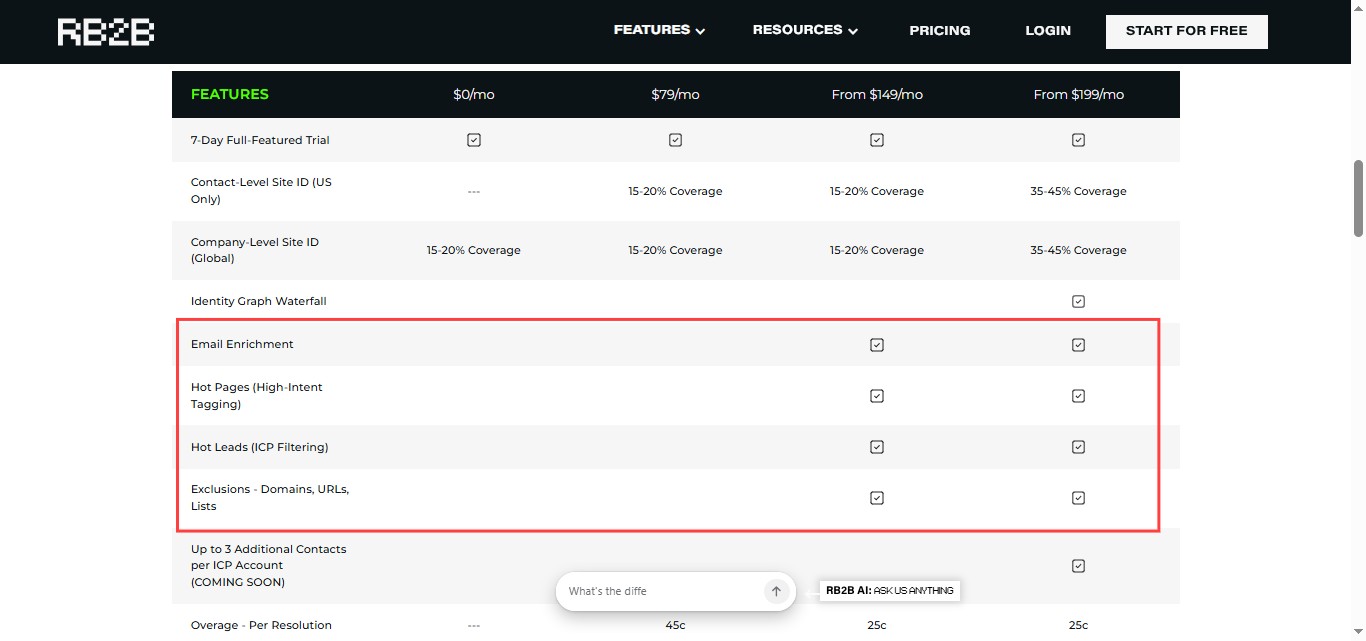
⚠️Business emails and CRM integrations require upgrading past Starter. The free plan and Starter at $79/month both provide LinkedIn URLs but no email addresses and no CRM integrations. Starter effectively delivers Slack notifications with LinkedIn profiles but cannot push identified visitors into HubSpot, Salesforce, or outreach tools automatically. Teams that want to act on identified visitors at scale without manual copy-pasting need the Pro plan at $149/month as their real entry point, not the $79/month plan.

⚠️Overages accumulate fast on higher-traffic sites. The base Pro plan at $149/month includes 600 resolutions. On a site identifying 900 visitors in a month without ICP filters doing their job, those 300 overages cost $75 at the $0.25 rate, pushing the true monthly cost to $224 rather than $149. Teams consistently running above their resolution allocation would be better served by a higher bundle tier, but the overage discovery often happens after the bill arrives.

⚠️LinkedIn dependency limits coverage for certain industries. RB2B's identification relies on matching visitors to LinkedIn profiles. Buyers in manufacturing, healthcare, skilled trades, logistics, and other industries with lower LinkedIn adoption rates are consistently underrepresented in identification results. A company selling into the industrial mid-market may find RB2B's match rates materially lower than a company selling into SaaS or technology, because their buyers are less likely to have active, current LinkedIn profiles that match cleanly to RB2B's identity graph.
⚠️RB2B identifies visitors. It does not reach them. This is the most important structural limitation for teams evaluating RB2B as a pipeline tool. Knowing who visited your site creates a list of high-intent prospects. Acting on that list requires outreach: LinkedIn connection requests, email sequences, or calls. RB2B does not automate any of that. The tool creates the signal. Converting the signal into a conversation requires separate tools and separate effort.
Who Should Use RB2B
RB2B is the right tool for B2B companies with meaningful US-based inbound traffic, typically 5,000 or more monthly US visitors, whose buyers are active on LinkedIn and who have a sales team capable of acting on real-time intent signals. It is most effective when combined with ICP filtering, CRM integration, and a clear outreach workflow that fires when a high-intent visitor is identified.
It is a harder sell for companies with fewer than 5,000 monthly US visitors where the absolute number of identifiable prospects will be too small to justify the cost, companies with significant EU or international pipeline where the US-only limitation creates a meaningful blind spot, companies selling into industries with low LinkedIn adoption where match rates will be at the lower end of the 5 to 20 percent range, and teams that do not have a defined outreach motion to activate identified visitors.
RB2B vs SalesRobot: A Direct Comparison
SalesRobot: The Natural Complement for LinkedIn Outreach

RB2B tells you who visited your site. SalesRobot reaches them on LinkedIn.
This is one of the cleanest workflow pairings you will come across.
RB2B produces a stream of high-intent, named prospects who have already signaled interest by visiting your pricing, product, or demo pages.
The bottleneck is what happens next.

RB2B does not send connection requests, run follow-up sequences, or manage inbox conversations.
The identification signal exists. Acting on it is a separate problem.
SalesRobot fills that execution gap directly.
When RB2B identifies a visitor, their LinkedIn URL is already available in the Slack notification or CRM record.
That URL is the starting point for a SalesRobot campaign.
Import identified visitors via CSV or through a connected CRM workflow, and SalesRobot runs automated LinkedIn connection requests and personalized follow-up sequences to those exact prospects, in priority order based on their intent behavior.
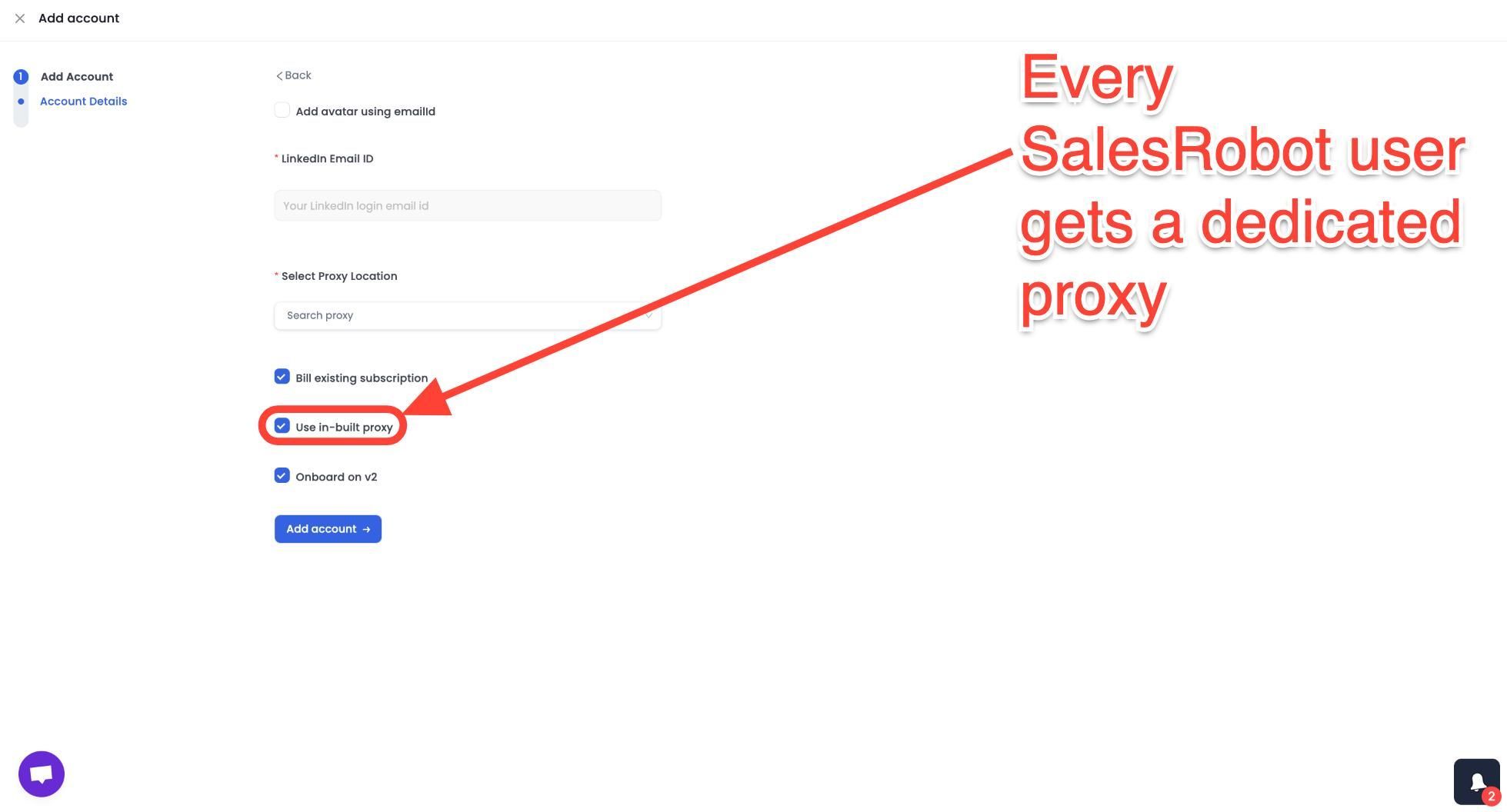
Mobile API Safety: Because SalesRobot connects through LinkedIn's mobile APIs, your outreach activity mimics natural human behavior.
Users consistently report running sustained, high-volume campaigns without account flags or restrictions, which is the single biggest operational concern with any LinkedIn automation tool.
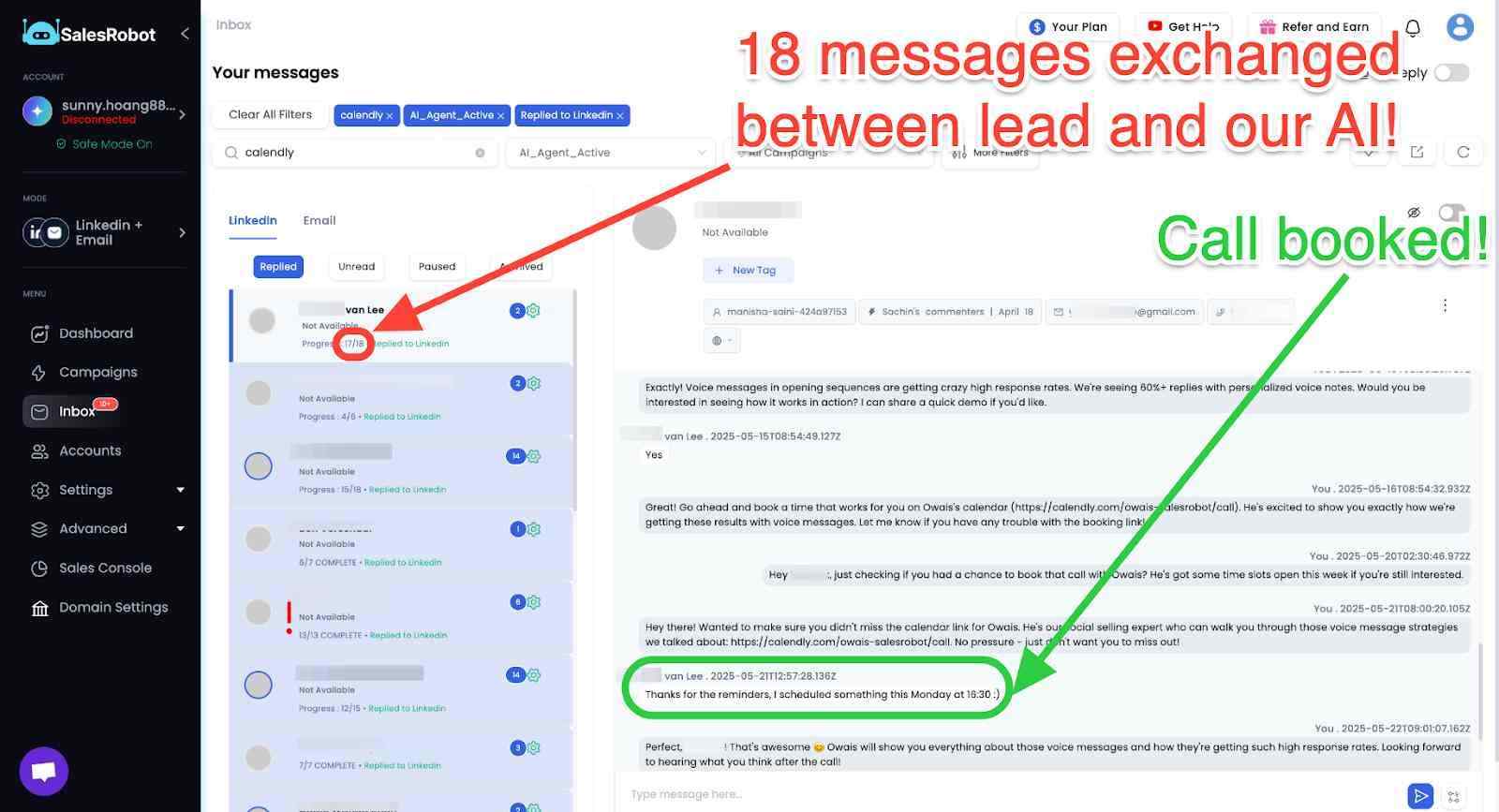
AI Appointment Setter: After a prospect replies, SalesRobot's AI takes over the conversation, handles qualification questions, and books meetings automatically.
You can train it on your specific criteria and ideal responses, which means the early-stage pipeline management largely runs without manual involvement. For smaller teams without a dedicated SDR, this is a meaningful capability.
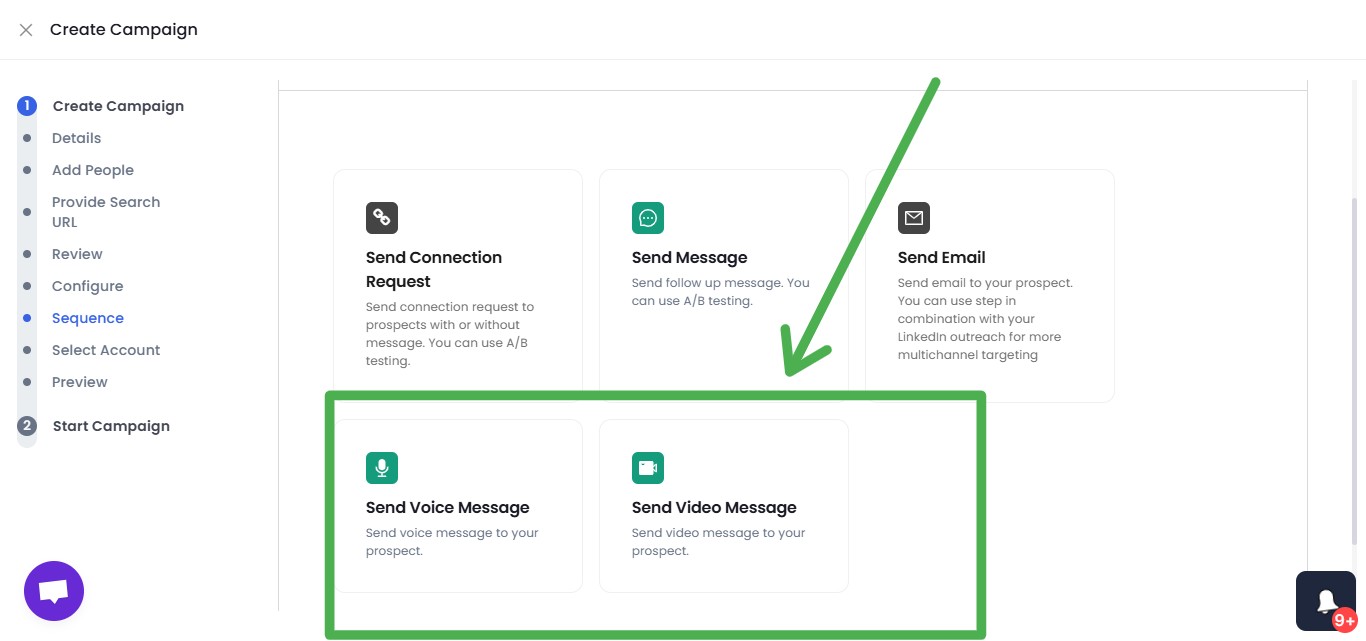
AI Voice Clone and Video Messages: SalesRobot lets you send personalized voice notes and video messages through LinkedIn as part of automated sequences.
The AI Voice Clone feature lets you record a short voice sample once, then generates individualized voice notes for each prospect that sound like you, without recording each one manually.
In sectors where relationships and trust matter, this kind of personal touch at scale tends to drive significantly higher reply rates than text-only outreach.
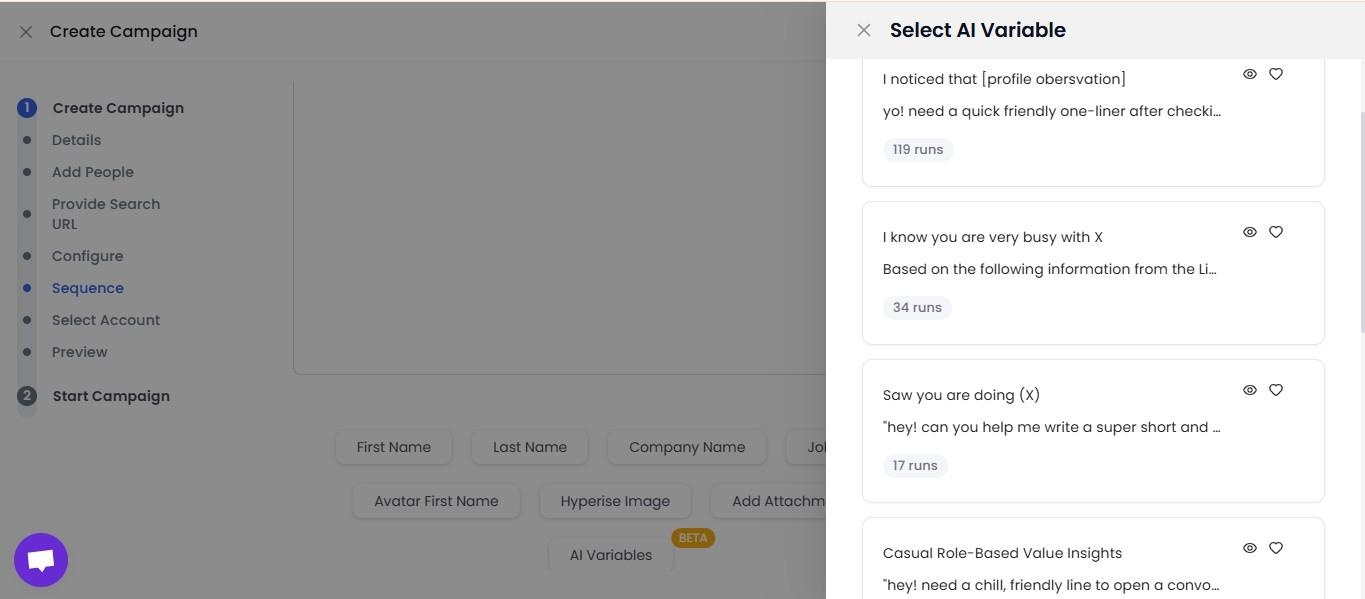
AI Variables and Hyper-Personalization: SalesRobot pulls data directly from a prospect's LinkedIn profile to write personalized message sequences automatically. You are not working from a static template that gets blasted to everyone.
Each message is adapted to the individual, which matters when you are reaching decision makers who see generic outreach constantly.
Multi-Step Sequences: You can build complex LinkedIn and email campaigns with smart delays and behavioral conditions. Leads can be imported from Sales Navigator, standard LinkedIn search, LinkedIn groups, event attendees, or CSV uploads, giving you flexibility in how you build and target your prospect lists.
Unified Inbox and Mini CRM: All LinkedIn and email conversations consolidate in one place with automatic reply detection. SalesRobot stops messaging automatically when a prospect responds, preventing the over-automation feel that kills conversations. You can tag leads, filter by interest level, and track where every prospect sits without switching between platforms.
Team Management and Analytics: For agencies or sales teams managing multiple LinkedIn accounts, SalesRobot tracks performance across accounts, prevents duplicate outreach between team members, and surfaces detailed analytics on what sequences and approaches are actually working.
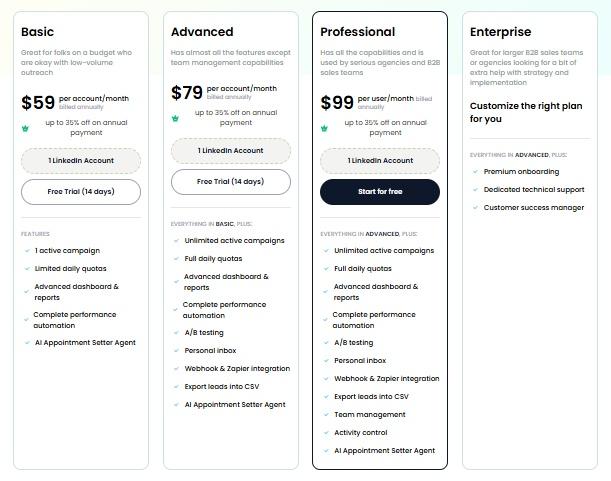
SalesRobot pricing (per LinkedIn account, 14-day free trial, no credit card required):
- Basic: $59/month ($39/month billed annually).
- Advanced: $79/month ($59/month billed annually).
- Professional: $99/month ($79/month billed annually).
- Enterprise: Custom.
It also has a 4.8 rating on G2, with 50+ independent user reviews.
The Bottom Line
RB2B delivers on its core promise for the right team.
The person-level identification is genuinely better than company-level tools, the Slack delivery creates timing advantages that form-fill workflows cannot match, and the ICP filtering makes the credit system practically manageable. The G2 rating of 4.5 from 284 reviews reflects real value delivered to teams with the right traffic profile and sales motion.
The limitations are real.
US-only coverage excludes international pipeline.
Match rates of 5 to 20 percent mean most visitors remain anonymous. Business emails and CRM integration require the Pro plan at $149/month.
Overage charges accumulate on high-traffic sites.
And RB2B does not automate outreach. The identification is the output. The follow-up is a separate workflow.
If LinkedIn outreach is how your team acts on identified visitors, SalesRobot fills the execution layer directly.
RB2B identifies who visited and provides their LinkedIn profile. SalesRobot reaches them through automated, personalized LinkedIn sequences. Both are independently testable before committing to either, with SalesRobot offering a 14-day free trial and RB2B offering a free plan on real traffic.
Frequently Asked Questions
Does the RB2B free plan include person-level identification?
No. As of January 2026, RB2B's free plan provides company-level identification only with 150 monthly resolutions and Slack alerts — no individual names, emails, or LinkedIn URLs. To unlock person-level identification you need at least the Starter plan at $79/month; business emails and CRM integrations require Pro at $149/month.
Does RB2B work in Europe or only the US?
RB2B's person-level identification is US-only by design. EU, UK, APAC, and LATAM visitors return no named-contact data because the identity graph is legally structured for US data subjects, avoiding GDPR obligations. Paid plans do provide global company-level identification, but individual contacts outside the US remain invisible.
Does RB2B automatically send outreach to identified website visitors?
No. RB2B strictly handles visitor identification and surfaces LinkedIn profiles or business email addresses. It does not automate cold email sequences or LinkedIn outreach. Teams typically pair RB2B with tools like SalesRobot to automatically reach out to identified prospects.
What happens if a website visitor does not match my ICP filters?
When a visitor falls outside your defined Ideal Customer Profile (ICP) criteria—such as filtered job titles, industries, or geographic regions—RB2B ignores the session and does not burn any of your monthly resolution credits.
What is the average match rate for person-level visitor identification?
RB2B typically identifies between 5% and 20% of total US-based website traffic at the person level. Match rates depend heavily on how active your site visitors are on LinkedIn and whether they browse without heavy privacy blocking or VPNs.

Wow your leads by cloning yourself and sending personalized videos and voice notes to each lead on LinkedIn.
If you don't reply to leads within 5 mins, your chances of converting them fall by 50%. Our AI replies on your behalf instantly! (and yes, you can train it)

Don't shoot in the dark. Get detailed analytics on what's working

SalesRobot allows you to invite other team members, so that they can add their LinkedIn Account, run outreach campaigns and get amazing results just like you.
.avif)


Trusted by 4100+ innovative B2B sales teams and lead gen agencies

.avif)

.avif)




.avif)


Heading 1
Heading 2
Heading 3
Heading 4
Heading 5
Heading 6
Lorem ipsum dolor sit amet, consectetur adipiscing elit, sed do eiusmod tempor incididunt ut labore et dolore magna aliqua. Ut enim ad minim veniam, quis nostrud exercitation ullamco laboris nisi ut aliquip ex ea commodo consequat. Duis aute irure dolor in reprehenderit in voluptate velit esse cillum dolore eu fugiat nulla pariatur.
Block quote
Ordered list
- Item 1
- Item 2
- Item 3
Unordered list
- Item A
- Item B
- Item C
Bold text
Emphasis

Superscript
Subscript