.avif)
TL;DR
- Salesforce Sales Cloud was officially rebranded to "Agentforce Sales" at Dreamforce 2025. The product is the same CRM you know, now with autonomous AI agents built into the core.
- Pricing starts at $25/user/month (Starter Suite) and runs all the way to $550/user/month for the top-tier Agentforce 1 Sales plan, all billed annually. The sticker price is just the beginning once you factor in add-ons and implementation.
- The platform handles everything from lead capture to deal closing in one place, but the learning curve is steep and smaller teams often find themselves overwhelmed by features they don't need.
- AI features like lead scoring, pipeline coaching, and autonomous agents aren't available on every plan. You'll need Enterprise ($175/user/month) or above to access most of them.
- Salesforce is genuinely built for enterprise. If you're a small team looking to get started fast, the setup cost and complexity may outweigh the benefits.
- SalesRobot is a focused LinkedIn outreach alternative for B2B teams who need to start prospecting quickly without months of implementation. Starts at $39/month per LinkedIn account.
Salesforce Sales Cloud: What You Need to Know
Your sales team is spending roughly 70% of their time on data entry, research, and admin work instead of actually selling.
That's not a guess. It's a stat Salesforce itself leans on to make the case for automation.
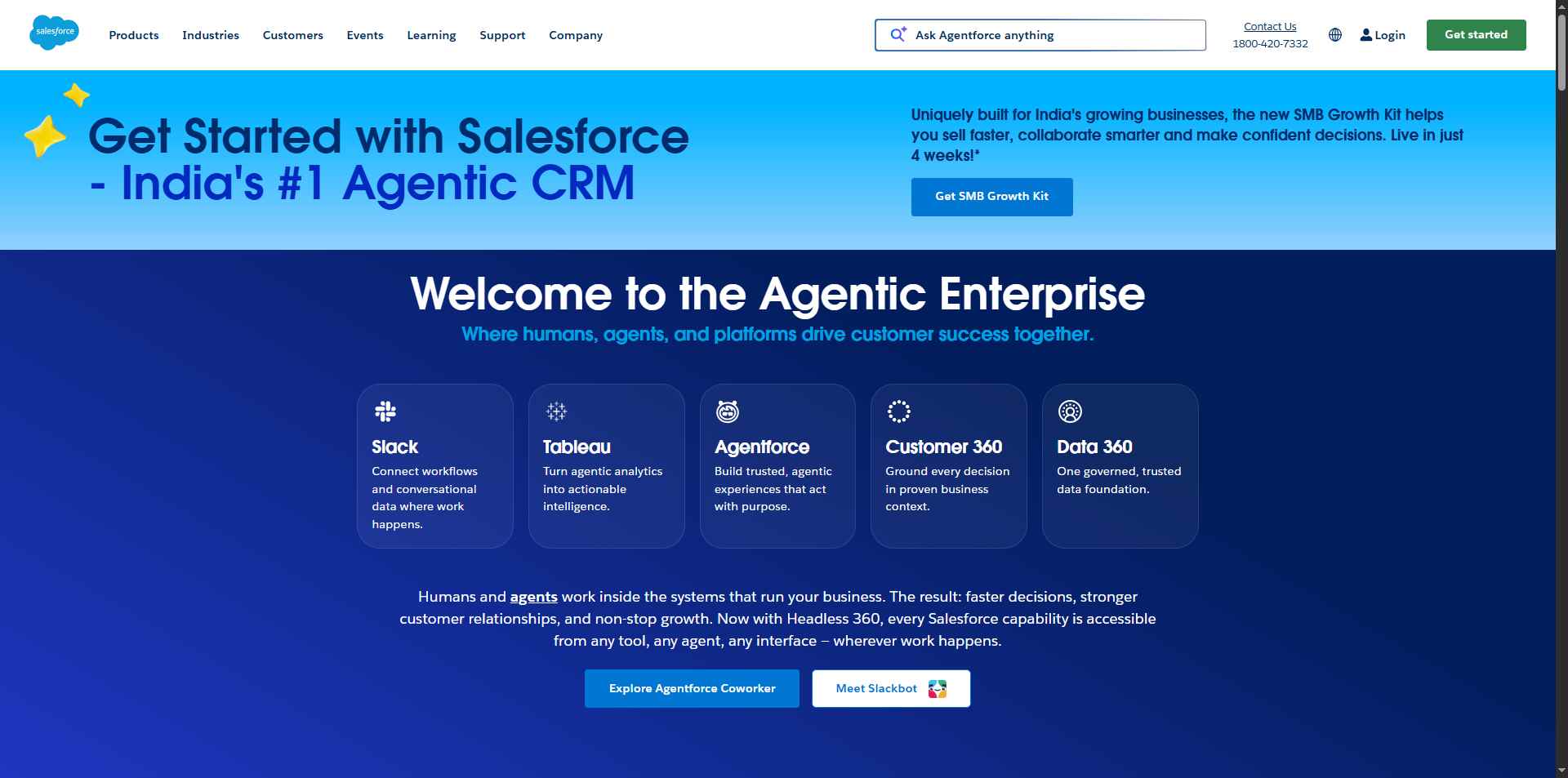
If that sounds like your team, Salesforce Sales Cloud (now officially rebranded as Agentforce Sales) has been promising to fix this problem for over two decades. The pitch is simple: let AI handle the grunt work, and let your reps focus on relationships and closing.
But the real question in 2026 is whether the platform still justifies its price tag, especially when it's up against leaner alternatives that do specific things very well.
This review goes through the features, the real pricing pulled straight from Salesforce's official pricing page, and who this platform actually makes sense for.
A Quick Note on the Rebrand
You might've seen "Agentforce Sales" popping up and wondered what happened to Sales Cloud. 🤔
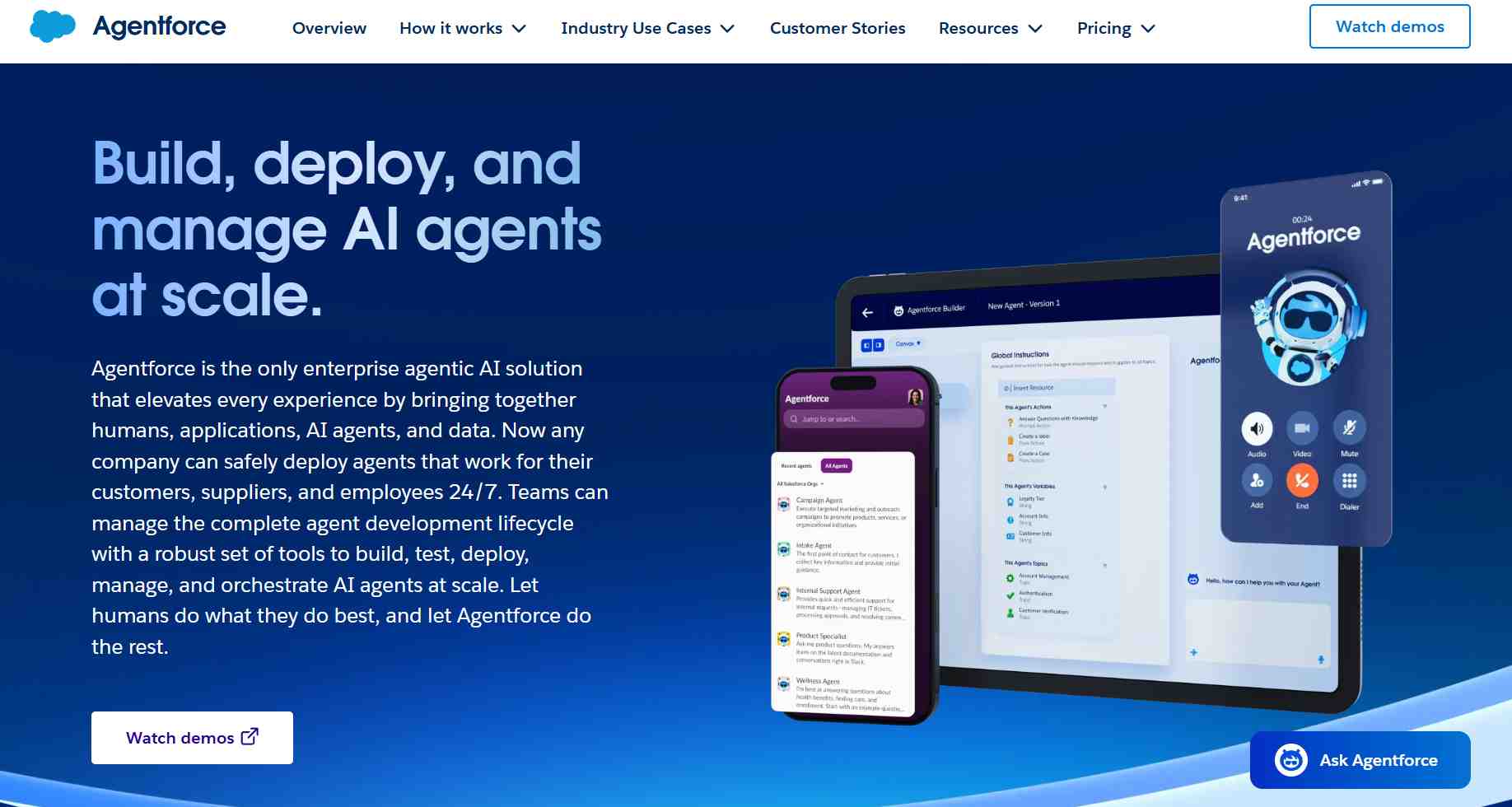
At Dreamforce 2025, Salesforce officially renamed Sales Cloud to Agentforce Sales, formalized in the Spring '26 release, as part of a broader shift across their entire product suite. Service Cloud became Agentforce Service, Marketing Cloud became Agentforce Marketing, and so on.
It's the same CRM underneath. The rebrand signals Salesforce's push toward AI agents handling work autonomously, rather than just assisting humans.
For the purposes of this review, we'll use both names interchangeably since most buyers still search for "Sales Cloud."
Salesforce Sales Cloud: Quick Pros and Cons
✅ Covers the entire sales cycle in one platform. Lead capture, pipeline management, forecasting, and analytics all connect without switching tools.
⚠️ The learning curve is real. New users, especially at smaller companies without a dedicated Salesforce admin, can find the sheer volume of features genuinely overwhelming.
✅ AI agents handle data entry, follow-up emails, and meeting scheduling automatically. Your reps get time back for actual selling.
✅ Built to scale. Whether you're managing 100 leads or 100,000 accounts, the platform handles it without breaking down.
⚠️ Pricing escalates fast. The listed price per user is just where the spending starts. Add-ons, integrations, implementation, and support packages stack up quickly.
✅ AppExchange offers 7,000+ integrations. If you use it, there's probably a Salesforce connector for it.
⚠️ Over-customization is a real trap. Many organizations end up with setups so complex that even routine updates require consultant help.
Salesforce Sales Cloud's Key Features, Broken Down
Lead Management and Prospecting
Sales Cloud pulls leads automatically from your website, social channels, and email campaigns, then scores each one based on their likelihood to convert.
Your reps see the hottest prospects first instead of manually sorting through a list. When someone downloads your pricing guide and then visits your demo page, the system scores that activity and can trigger an automatic alert for follow-up.
That kind of behavioral scoring used to require a separate marketing automation tool. Here it's built in.
Opportunity Management
Every deal gets tracked through a visual pipeline that shows exactly where it stands and what needs to happen next.
A sales manager can spot that a deal has been sitting in "proposal sent" for three weeks and the platform will suggest concrete next steps, like scheduling a call or sending a case study. It takes some of the guesswork out of pipeline reviews.
Contact and Account Management
Every customer interaction, purchase history, support ticket, and email exchange lives in one place.
Any rep can pick up a conversation where another left off without needing a briefing. For larger teams dealing with account transitions or complex enterprise relationships, that continuity matters a lot.
Sales Automation and AI
This is the core of the Agentforce pitch. After a discovery call, the AI can update the opportunity record, schedule a follow-up, and send a personalized email automatically. 🤖
Worth noting: the most capable AI features, like lead scoring, pipeline coaching agents, and autonomous follow-up, require Enterprise tier or above. If you're on Starter or Pro Suite, you're not getting the full AI picture.
Sales Forecasting and Analytics
Einstein AI analyzes your pipeline data and predicts which deals will close and when.
It can flag patterns like "software deals tend to close 20% slower in Q4" and surface that information before your team hits a target miss. For enterprise sales leaders managing large teams across territories, accurate forecasting is worth a lot.
Mobile Sales App
Field reps get full CRM access on their phones. They can pull up account history before walking into a meeting and log notes before leaving the parking lot.
It's a small detail but one that matters for teams that spend most of their time in front of clients rather than at desks.
Salesforce Sales Cloud Pricing: What It Actually Costs
All prices are per user, per month, billed annually unless otherwise noted.
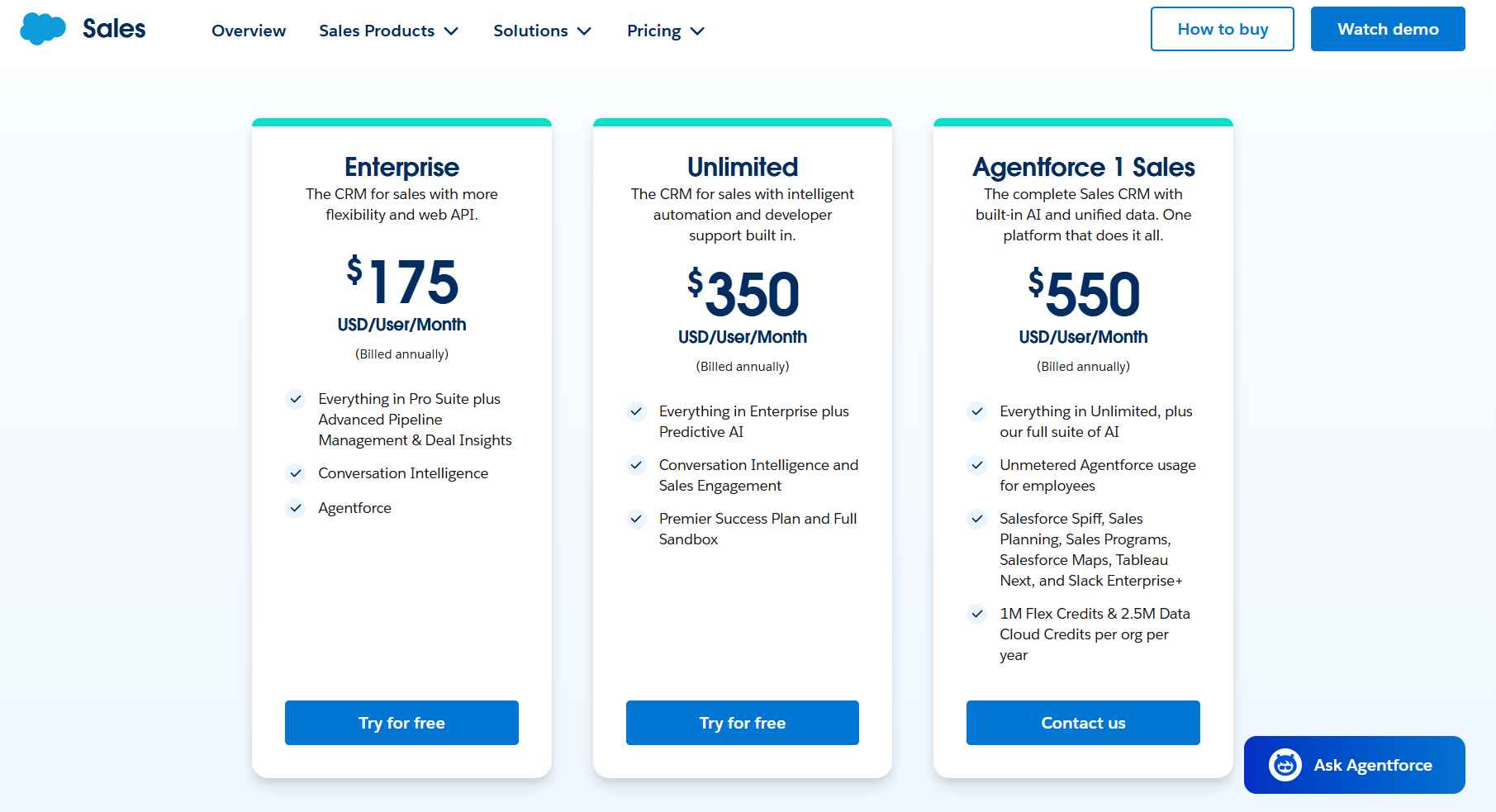
Free Suite: $0/user/month Basic lead, account, contact, and opportunity management for up to 2 users. Includes connected Slack conversations and simple email marketing. Good for testing the waters, not for running a real sales operation.
Starter Suite: $25/user/month The entry-level paid plan. Adds unlimited users, built-in sales flows, lead routing, AI email sync, and dynamic email marketing. Can be billed monthly or annually, which is rare for Salesforce.
Pro Suite: $100/user/month Adds greater customization and automation, sales quoting and forecasting, AppExchange access, and Premier Support as an add-on. The first plan where things start feeling like a real CRM.
Enterprise: $175/user/month Advanced pipeline management, deal insights, conversation intelligence, full API access, and Agentforce AI (available for purchase as an add-on). This is where most mid-to-large businesses land.
Unlimited: $350/user/month Adds predictive AI, sales engagement, the Premier Success Plan, and a full sandbox environment. Best for organizations that need maximum automation and premium support included.
Agentforce 1 Sales: $550/user/month The top tier. Includes everything in Unlimited plus unmetered Agentforce usage, Salesforce Spiff, Sales Planning, Tableau Next, Slack Enterprise+, and 1M Flex Credits per org per year. Designed for large enterprises going all-in on AI agents.
A 30-day free trial is available for all plans. No credit card required. 🙌
One thing to factor in before you budget: implementation costs, admin salaries, add-ons, and support packages are not included in these prices. A 5-person team on the Enterprise plan could realistically spend far more than $175 per user once the full picture comes together.
Salesforce Sales Cloud vs SalesRobot: How Do They Compare?
Salesforce is for teams that need to manage a complex, multi-stage sales operation in one place. SalesRobot is for teams who need to get in front of B2B prospects on LinkedIn fast, without months of setup.
SalesRobot: The LinkedIn-First Alternative

Salesforce is a CRM built to manage relationships you've already started. SalesRobot is built to help you start them.
If your buyers are on LinkedIn, and most B2B decision-makers are, SalesRobot gives you a dedicated tool to reach them at scale without the overhead of a full CRM implementation.
What SalesRobot Actually Does
SalesRobot is a cloud-based LinkedIn automation platform that runs multi-step outreach sequences across LinkedIn and email from a single dashboard.
It's built specifically for B2B sales teams and agencies who want to generate pipeline without doing everything manually. No browser extension needed, no computer left running. It operates in the background while simulating natural human behavior.
LinkedIn Mobile API Integration
Rather than using browser-based automation, SalesRobot connects through LinkedIn's mobile app API layer.
This means your outreach looks like it's coming from someone using the LinkedIn app on their phone, which dramatically reduces account restriction risk. The platform reports a near-zero ban rate across 4,100+ active accounts as of Q1 2026.
AI Personalized Voice and Video Messages
Record your message once, and SalesRobot clones your voice or video to send personalized versions at scale, with each recipient's name and company inserted automatically. 🎙️

Users report reply rates exceeding 40% from this feature. That's a meaningful number when most cold outreach gets ignored entirely.
Smart Reply Detection
The moment a prospect responds, the automated sequence pauses.
No awkward follow-ups going out after someone's already replied. It's one of those features that seems small until you see what happens without it.
Unified LinkedIn and Email Campaigns
SalesRobot lets you combine LinkedIn touchpoints, including connection requests, messages, voice notes, and InMails, with email follow-ups, all in one coordinated sequence.
You're following prospects across channels without managing separate tools for each one.
Advanced Targeting Options
Import from LinkedIn Search, Sales Navigator, or CSV. You can also target people who commented on a specific post or attended a LinkedIn event.
That last one is particularly useful for reaching warm audiences who've already shown interest in your space.
AI Appointment Setter Add-on
This is an optional AI agent that monitors your inbox, responds to leads in your brand voice, handles objections, and books meetings directly into your calendar.
[Image: SalesRobot inbox showing messages exchanged between lead and AI agent, and a "Call booked!" confirmation — upload failed]
It kicks in within minutes of a reply, so leads don't go cold while you're heads-down on other things.
SalesRobot Pricing
Pricing is per LinkedIn account. Annual billing saves up to 35%.
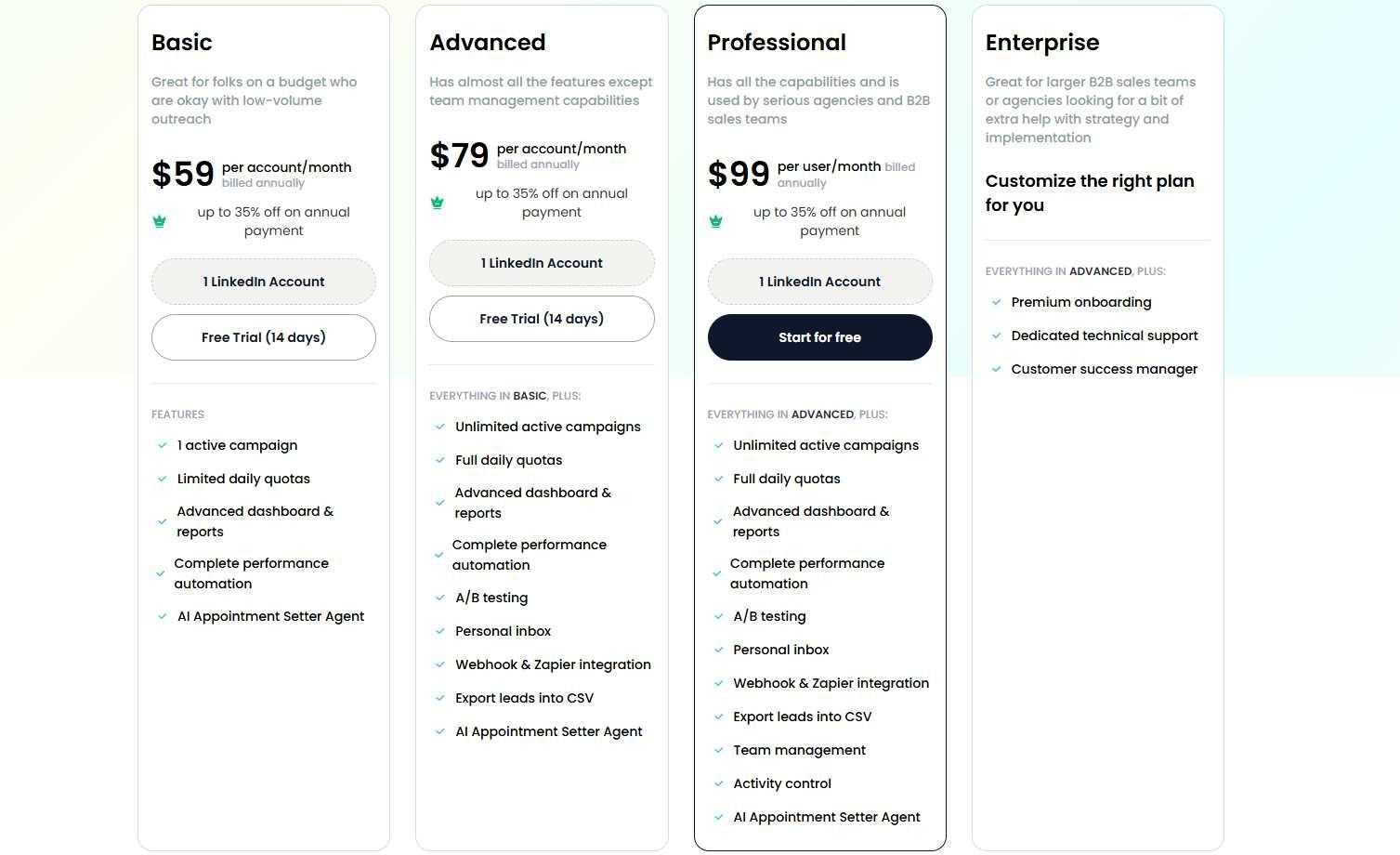
Basic: $39/month (annual) / $59/month (monthly) One active campaign, limited daily quotas: 20 connection requests and 20 messages per day. A solid starting point for solo users or those testing LinkedIn outreach for the first time.
Advanced: $59/month (annual) / $79/month (monthly) Unlimited active campaigns, full daily quotas (75 connection requests, 75 messages per day), A/B testing, unified inbox, and Zapier/webhook integrations. Everything except team management.
Professional: $79/month (annual) / $99/month (monthly) All of Advanced, plus full team management, role assignments, activity controls, duplicate prevention across your team, and priority support. The standard choice for agencies and larger B2B sales teams.
Enterprise: Custom pricing Includes premium onboarding, a dedicated technical support contact, and a customer success manager. Built for larger organizations that want hands-on help from day one.
Email automation is available as a separate add-on at $15/month per email account. Note that unlimited cold email automation and email warmup are included with the add-on, and every SalesRobot plan already bundles the AI Appointment Setter at no extra cost.
SalesRobot offers a 14-day free trial with no credit card required.
The Verdict
Salesforce Sales Cloud is genuinely one of the most capable CRM platforms on the market. For larger enterprises with complex sales processes, dedicated admins, and the budget to implement it properly, it earns its price tag.
But for smaller teams, or anyone who needs to start prospecting fast, it's a significant investment of time and money before you see any return. The learning curve is steep, the add-ons stack up, and the complexity can slow down adoption more than it speeds up sales.
SalesRobot is a fundamentally different kind of tool. It doesn't manage your entire sales cycle. What it does, it does well: getting B2B reps in front of decision-makers on LinkedIn without months of setup or a dedicated admin.
If you're evaluating both, the starting point is simple. If you need a CRM to manage deals you're already working, look at Salesforce. If you need to fill the top of your funnel quickly, start with SalesRobot's free trial and see what your reply rates look like in two weeks.
Frequently Asked Questions
Does Agentforce cost extra on Salesforce Sales Cloud?
Yes, in most cases. Agentforce is bundled into the top Agentforce 1 Sales tier ($550/user/month), but on lower editions like Enterprise it's a paid add-on at roughly $125/user/month. Only the free Salesforce Foundations layer of Agentforce is included at no extra cost.
Is Sales Cloud still called Sales Cloud, or is it Agentforce Sales now?
Both. At Dreamforce 2025 Salesforce rebranded Sales Cloud to Agentforce Sales, formalized in the Spring '26 release. It's the same CRM with AI agents built in. Most buyers still search 'Sales Cloud,' and Salesforce still uses that name across its pricing and trial pages.
What are the main differences between Sales Cloud and SalesRobot?
Sales Cloud is a comprehensive, full-funnel CRM built to manage existing opportunities, complex sales pipelines, and long-term customer accounts. SalesRobot is an outbound automation tool designed specifically for cold LinkedIn and email prospecting to generate new leads and book meetings.
How does SalesRobot prevent LinkedIn accounts from getting banned?
SalesRobot interacts through LinkedIn's mobile application API layer rather than standard browser-extension DOM manipulation. This mimics organic, on-the-go mobile app activity, maintaining a near-zero ban rate across thousands of connected accounts.
Can I run SalesRobot alongside Salesforce?
Yes. SalesRobot integrates with CRMs like Salesforce via direct webhooks and Zapier, allowing cold LinkedIn prospects and scheduled meetings to sync directly into your Salesforce pipeline once qualified.

Wow your leads by cloning yourself and sending personalized videos and voice notes to each lead on LinkedIn.
If you don't reply to leads within 5 mins, your chances of converting them fall by 50%. Our AI replies on your behalf instantly! (and yes, you can train it)

Don't shoot in the dark. Get detailed analytics on what's working

SalesRobot allows you to invite other team members, so that they can add their LinkedIn Account, run outreach campaigns and get amazing results just like you.
.avif)


Trusted by 4100+ innovative B2B sales teams and lead gen agencies

.avif)

.avif)




.avif)


Heading 1
Heading 2
Heading 3
Heading 4
Heading 5
Heading 6
Lorem ipsum dolor sit amet, consectetur adipiscing elit, sed do eiusmod tempor incididunt ut labore et dolore magna aliqua. Ut enim ad minim veniam, quis nostrud exercitation ullamco laboris nisi ut aliquip ex ea commodo consequat. Duis aute irure dolor in reprehenderit in voluptate velit esse cillum dolore eu fugiat nulla pariatur.
Block quote
Ordered list
- Item 1
- Item 2
- Item 3
Unordered list
- Item A
- Item B
- Item C
Bold text
Emphasis

Superscript
Subscript