.avif)
TL;DR
- Lindy AI is a no-code AI agent platform that automates sales outreach, email management, scheduling, and workflow coordination for professionals and teams.
- The proactive features work well, but the credit-based model means costs can become unpredictable as usage scales.
- Pricing starts at $49.99/month for the Plus plan, making it accessible for individuals but worth evaluating carefully for larger teams.
- SalesRobot offers better value for LinkedIn-focused outreach automation if that's your primary need.
Ever find yourself drowning in emails at 11 PM?
Wondering how successful people seem to have their lives together while you're still playing inbox whack-a-mole?
You're not alone. The average knowledge worker spends 2.5 hours daily just managing emails and calendar chaos.
Enter Lindy AI, the assistant that promises to give you "two hours back every day" by handling your emails, scheduling, and busywork before you even wake up.
Sounds too good to be true, right?
After months of testing Lindy's proactive features and AI-powered automation, I'm ready to give you the real story.
We'll cover what actually works, what doesn't, and whether it's worth your monthly subscription fee.
For those focused specifically on sales outreach and lead generation, SalesRobot offers more specialized automation tools that might better fit your workflow.

Lindy: What You Need to Know
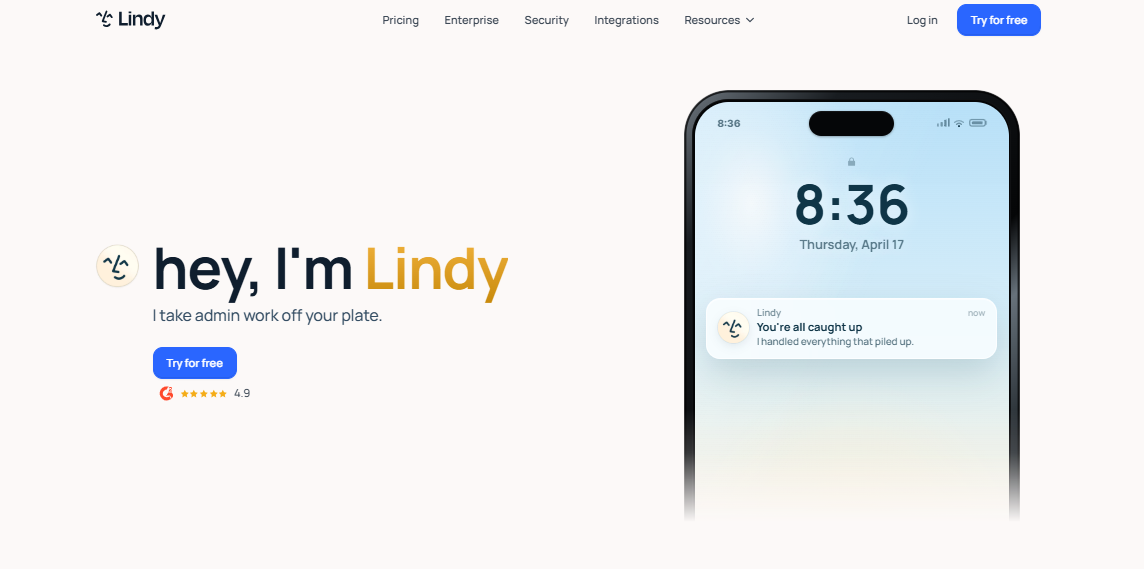
✅ Incredibly proactive approach: Unlike most AI assistants that wait for commands, Lindy actually anticipates your needs and handles tasks before you even think to ask. It'll prep your meetings, draft emails, and send you important context without you lifting a finger.
⚠️ Learning curve can be steep: Getting Lindy to understand your specific work style and preferences takes time and patience. You'll need to provide feedback consistently in the early weeks to train it properly.
✅ Works seamlessly across thousands of apps: Lindy connects with hundreds of your existing tools (100+ integrations) including Gmail, Slack, HubSpot, Salesforce, and your calendar creating a unified workflow. It can read your Slack messages, check your calendar, and draft responses all in one operation.
✅ Available 24/7 through simple texting: You can literally text Lindy like it's a colleague, whether you're in a meeting, on a walk, or at your kid's school event. If you can send a text, you can get work done.
⚠️ Privacy concerns with deep app access: Lindy needs extensive permissions to read your emails, calendar, and other sensitive business data. Some users worry about giving an AI assistant this level of access to their professional life.
✅ Actually learns and improves over time: The more you use Lindy, the better it gets at understanding your communication style, priorities, and preferences. It builds a memory of how you work and adjusts accordingly.
⚠️ Credits can add up: The platform runs on a credit-based model where every agent action consumes credits. Complex tasks like multi-step lead research or browser automation use significantly more credits than basic automations, so heavy users need to monitor usage carefully.
✅ Handles complex multi-step tasks: Instead of just answering questions, Lindy can prospect leads, book meetings, update your CRM, send files, and manage follow-ups. It's like having a virtual assistant that actually gets things done.
Lindy's Key Features, Broken Down
Proactive Email and Calendar Management
Lindy doesn't just respond to your requests. It actively monitors your inbox and calendar, handling routine tasks before you even realize they need doing.

For example, it can automatically reschedule conflicting meetings, draft responses to common inquiries, and prep briefing notes for upcoming calls while you sleep.
Universal App Integration
With hundreds of integrations (100+), Lindy connects all your work tools into one intelligent system. It can pull data from Slack, cross-reference your Google Calendar, and draft responses in Gmail seamlessly.

Imagine asking "What's my pipeline looking like?" and getting insights pulled from your CRM, email threads, and recent meeting notes in seconds.
Natural Language Commands
Just tell Lindy what you need in plain English, and it handles the execution. No complex setup or rigid command structures required.
Say "Book a demo with Sarah for next Tuesday afternoon" and Lindy will check both calendars, send the invite, and follow up with confirmation details automatically.
Continuous Learning and Memory
Lindy remembers your preferences, communication style, and priorities over time. It gets better at anticipating your needs with every interaction.
After a few weeks, it learns that you prefer morning meetings, always CC your manager on client updates, and like detailed prep notes for sales calls.
24/7 Text-Based Access
You can communicate with Lindy via text from anywhere, anytime. Whether you're in a meeting, on vacation, or at your kid's soccer game.

Send a quick text saying "Summarize today's board meeting for the team" and Lindy will create and distribute a polished summary before you get back to your desk.
Meeting Recording and Summarization
Lindy automatically records your meetings and creates actionable summaries with key decisions and next steps. No more frantic note-taking or missed follow-ups.
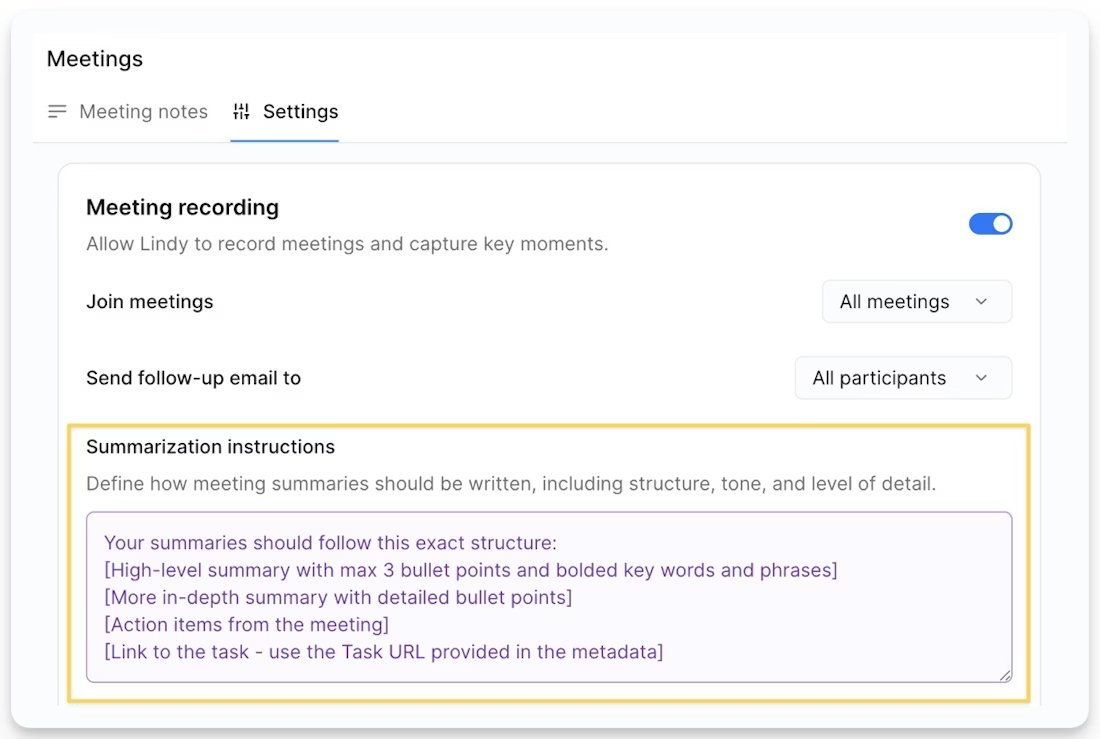
After your weekly team standup, everyone gets a clean summary with assigned tasks, deadlines, and relevant context within minutes of the meeting ending.
Lindy Pricing: How Much Will It Cost?
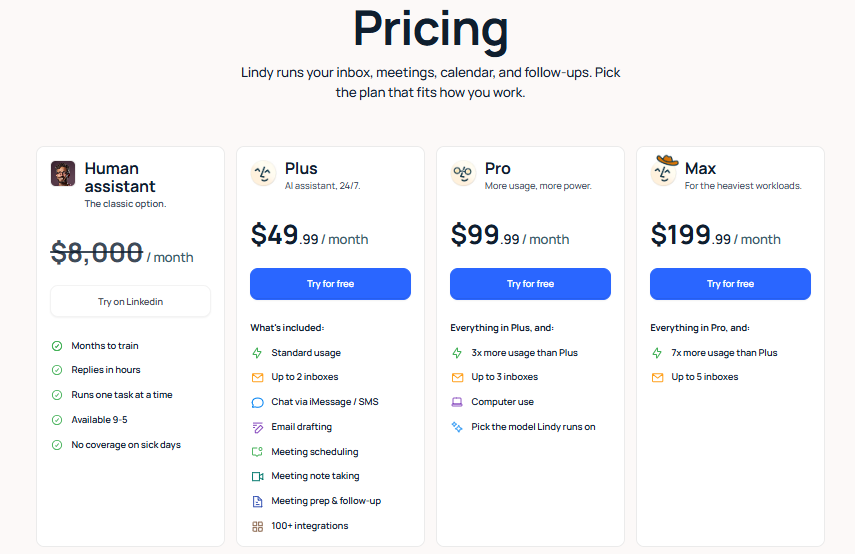
Lindy operates on a credit-based model every action an agent takes consumes credits. Simple automations use fewer credits; heavier tasks like web research, email parsing, or multi-step lead workflows use more.
It's worth monitoring usage from the start, as complex workflows can exhaust your monthly allotment faster than expected.
Free Plan: $0/month
- 400 credits/month
- Access to core Lindy features
- Email automation and inbox management
- Meeting scheduling and calendar coordination
- Integration with thousands of apps including Slack, Gmail, and CRM tools
- 24/7 availability via text or other communication methods
A solid starting point for professionals who want to test Lindy's capabilities before committing to a paid plan.
Plus Plan: $49.99/month
- 5,000 credits/month
- iMessage with your AI assistant 24/7
- Manages your inbox automatically
- Drafts replies in your voice
- Meeting scheduling, prep, and follow-up
- Meeting recording and note taking
- Learns your style over time
- Access to thousands of integrations
A 7-day free trial with full access to Plus features is available no strings attached.
Enterprise Plan: Contact Sales
- Everything in Plus
- Expanded usage
- Team settings
- SSO, SCIM, and Audit logs
- HIPAA compliant with signed BAA
- Dedicated support
- Onboarding and enablement
Built for businesses and teams that need security controls, compliance coverage, and hands-on support.
Lindy vs SalesRobot: How Do They Compare?
Choose Lindy if you need a comprehensive AI agent platform that handles sales outreach alongside email management, CRM updates, and general productivity in one place.
Pick SalesRobot if you're focused specifically on LinkedIn prospecting and need a dedicated tool for social selling campaigns that gets you up and running fast.
SalesRobot: The LinkedIn-First Alternative
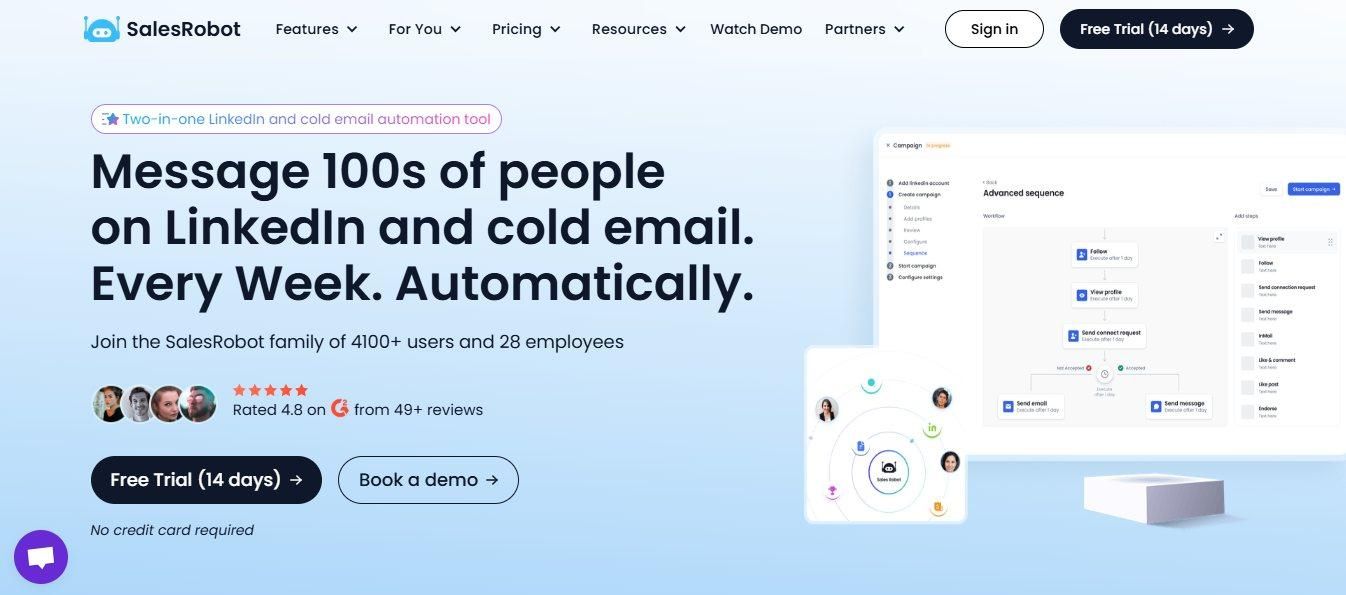
If you're considering Lindy but want something laser-focused on LinkedIn outreach, SalesRobot might be your answer.
While Lindy handles your entire work life through intelligent agents across multiple channels, SalesRobot lives and breathes LinkedIn automation where your actual prospects are scrolling and engaging daily.
What SalesRobot Actually Does
SalesRobot is a LinkedIn automation platform that handles connection requests, messages, and follow-ups at scale.
It's built specifically for B2B sales teams and agencies who need to reach hundreds of prospects weekly without getting their LinkedIn accounts flagged or banned.
Key Features
Mobile API Safety: Uses LinkedIn's mobile app APIs instead of browser automation, which dramatically reduces account ban risk while keeping your outreach looking completely natural.
AI Voice and Video Messages: Send AI-personalized voice notes and video messages directly through LinkedIn at scale (up to 50/day) — clone yourself so each lead gets a personalized video. It's a unique SalesRobot feature not offered by Expandi, Waalaxy, or Dripify, and users report 40%+ reply rates with voice note campaigns.
Smart Reply Detection: Automatically stops messaging sequences when prospects respond, preventing awkward follow-ups and keeping conversations human.
LinkedIn + Email Sequences: Combines LinkedIn outreach with cold email campaigns in unified sequences, so you can reach prospects across multiple channels without manual coordination.
Advanced Targeting Options: Import leads directly from LinkedIn Search, Sales Navigator, or CSV uploads, plus target people who commented on specific posts or attended LinkedIn events.
AI Appointment Setter: Included on all plans. Manages your inbox, nurtures leads through conversations, and books meetings automatically when prospects show interest.
SalesRobot Pricing
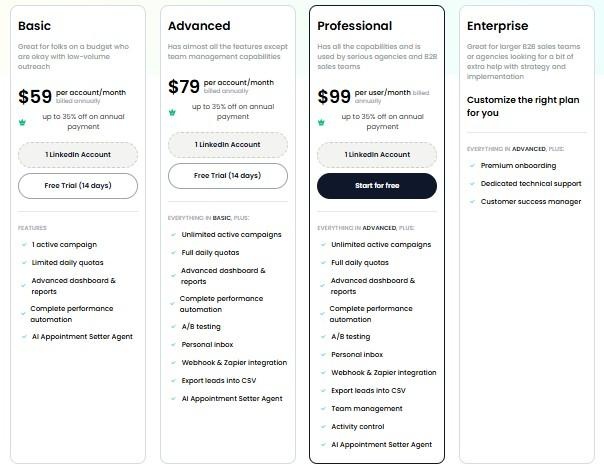
Pricing is per LinkedIn account. Annual billing saves up to 35% off monthly rates.
Basic: $59/month (or $39/month billed annually)
- 1 active campaign
- Limited daily quotas (20 connection requests, 20 messages)
- AI Appointment Setter Agent
- Advanced dashboard and reports
Perfect for solo professionals testing LinkedIn automation on a budget.
Advanced: $79/month (or $59/month billed annually)
- Unlimited active campaigns
- Full daily quotas (75 connection requests, 75 messages)
- A/B testing and personal inbox
- Webhook and Zapier integrations
- Export leads into CSV
- AI Appointment Setter Agent
Ideal for individual sales reps or small teams ready to scale their outreach.
Professional: $99/month (or $79/month billed annually)
- Everything in Advanced
- Team management and activity control
- Advanced analytics dashboard
- AI Appointment Setter Agent
Built for agencies and larger sales teams managing multiple accounts.
Enterprise: Custom Pricing
- Premium onboarding and training
- Dedicated technical support
- Customer success manager
For large organizations needing hands-on implementation support.
SalesRobot offers a 14-day free trial with no credit card required, giving you plenty of time to test their LinkedIn automation and see if reply rates improve for your specific audience.
The Verdict
Lindy is genuinely impressive for what it does. If you need a comprehensive AI agent platform that handles sales outreach, email management, meeting notes, and CRM updates all from one place, it's worth the investment.
But here's the reality: most sales teams don't need a Swiss Army knife. They need a scalpel for LinkedIn prospecting.
The setup complexity and learning curve make Lindy a bigger commitment if LinkedIn outreach is your only goal. You'll spend more time configuring than prospecting.
Bottom Line
Buy Lindy if you're a power user who wants one platform for email, scheduling, sales outreach, and workflow automation across your entire stack. Skip it if you just want to run LinkedIn prospecting campaigns without the setup overhead.
If LinkedIn is your main channel, consider SalesRobot instead. It's built specifically for LinkedIn automation and gets you prospecting faster without the configuration headaches.

Frequently Asked Questions
Why can Lindy's actual cost be higher than the sticker price?
Lindy uses usage-based metering, so heavy or complex workflows can trigger overage charges beyond your plan. Voice calling is billed separately (around $0.19/minute plus $10/month per phone number), and larger AI models cost more per step, making total spend hard to predict.
Does Lindy AI have a free plan?
No. Lindy discontinued its old 400-credit free plan during its early-2026 repricing. Today you get a 7-day free trial with full access to Plus features and no credit card required, after which paid plans start at $49.99/month for the Plus tier.

Wow your leads by cloning yourself and sending personalized videos and voice notes to each lead on LinkedIn.
If you don't reply to leads within 5 mins, your chances of converting them fall by 50%. Our AI replies on your behalf instantly! (and yes, you can train it)

Don't shoot in the dark. Get detailed analytics on what's working

SalesRobot allows you to invite other team members, so that they can add their LinkedIn Account, run outreach campaigns and get amazing results just like you.
.avif)


Trusted by 4100+ innovative B2B sales teams and lead gen agencies

.avif)

.avif)




.avif)


Heading 1
Heading 2
Heading 3
Heading 4
Heading 5
Heading 6
Lorem ipsum dolor sit amet, consectetur adipiscing elit, sed do eiusmod tempor incididunt ut labore et dolore magna aliqua. Ut enim ad minim veniam, quis nostrud exercitation ullamco laboris nisi ut aliquip ex ea commodo consequat. Duis aute irure dolor in reprehenderit in voluptate velit esse cillum dolore eu fugiat nulla pariatur.
Block quote
Ordered list
- Item 1
- Item 2
- Item 3
Unordered list
- Item A
- Item B
- Item C
Bold text
Emphasis

Superscript
Subscript