.avif)
TL;DR:
4 Ways ChatGPT Improves Your LinkedIn Profile:
- Headline: Keep it under 220 characters, add keywords, and clearly state what you do, who you help, and how
- Banner: Lead with a bold result, add social proof from a recognizable brand, and include a clear CTA
- About Section: Cover your top skills, notable achievements, and how you help clients or employers
- Content: Generate a topic first, then answer audience-specific questions to make posts feel personal
10-Minute Content Workflow:
- Create a Google Sheet and paste in a URL
- Make.com pulls key info via Perplexity, writes the post via ChatGPT, and schedules it on LinkedIn
- No manual research, no writing from scratch, done in under 10 minutes
Cold Outreach:
- Copy a prospect's LinkedIn summary and experience sections
- Run it through ChatGPT to generate a personalized, relevant message
- Skips the guesswork and makes outreach feel human
Free Alternatives (No prompting needed):
- Headline Generator: Fill in your details, get multiple headlines instantly
- Summary Generator: Choose your preferred length and get a ready-to-use About section
- Post Generator: One click to create a LinkedIn post worth sharing
Want leads faster?
Content is a long game. For short-term results, pair ChatGPT with SalesRobot - handles outreach, follow-ups, and email sequences automatically.
This blog is for you…
If you're staring at your LinkedIn profile, wondering how to make it stand out.
OR
If you know your profile needs work but can't find those precious hours to fix it.
If yes, then you're probably missing out on dream opportunities because your profile isn't working hard enough for you.
Here are 2 solutions for you:
[1] Hand over the work to a VA (and your wallet takes a hit)
[2] Use ChatGPT to transform your profile yourself
What's the most effective method? You ask.
I'd pick ChatGPT every time.
ChatGPT is the powerhouse among AI tools.
And while OpenAI created ChatGPT to simplify our digital lives, I'm here to make it even more actionable for you.
Today, I want to show you 4 ways to use ChatGPT for LinkedIn.
And share 8 proven ChatGPT prompts with a content creation automation workflow that will help create content on autopilot.
So, let's dive in.
What is ChatGPT?
If you already know what ChatGPT is, feel free to skip this section.
But if you are unfamiliar with it, let me catch you up quickly!
ChatGPT is an LLM (large language model).
You type in a prompt (basically, whatever you want it to do or help you with), and it gives you a response based on that.
Examples: Google Gemini, Claude, Microsoft Copilot, etc.
Now, without wasting more time, let's get into…
4 Ways You Can Improve LinkedIn Profile Using ChatGPT
Ever since social media took over, attention spans have been shrinking fast.
Your target audience doesn't have time to linger on your profile.
You've got 10 seconds—maybe less—to grab their attention.
If you don't? They scroll right past you.
Maybe they click on someone else.
Or worse—they forget you even exist.
So, how do you make sure they stop, notice, and remember you?
Here are 4 different ways to optimize your LinkedIn profile with ChatGPT.
1. LinkedIn Headline
LinkedIn headline is one of the 3 things your prospect looks at on your LinkedIn profile.
But don't just write boring, weak, generic headlines for your profile.
It's your one chance to make them stop and think, "This is exactly who I need!"
So, write a LinkedIn headline that works.
Here are 3 things you need to start with:
1️⃣ What do you do?
Ex: Sales strategist with a proven track record
2️⃣ Who do you help?
Ex: Tech startups scaling from Series A to Series B
3️⃣ How do you help?
Ex: Increase revenue by 20% within 12 months
Now use this AI prompt for LinkedIn:

Remember: Your headline should be under 220 characters, include relevant keywords for searchability, and clearly communicate the value you provide. LinkedIn profiles with strong headlines receive 30% more profile views.
Pro tip: Include specific keywords in your headline to help you rank higher on Google searches.
Here's a prompt to add your keywords:
Now, let's move to the second most important part of your profile…
2. LinkedIn Banner
LinkedIn banner is prime real estate to make an impact.
And to do that, you need 3 things:
1. A BOLD reason why you are the person to hire
Example: Increased team productivity by 40% in 6 months.
2. WHO can vouch for you?
Example: Highlight a recognizable brand or testimonial from a client.
3. Immediate CALL TO ACTION.
Example: Download my free productivity guide!
Use this prompt:
.jpeg)
If you want even better output, you can improve it by adding 1 LinkedIn banner image to ChatGPT and then using this prompt:
Now, here comes the 3rd most important section…
3. About section
About section, also known as "LinkedIn summary."
It's where you either win or lose your audience. If it's vague or forgettable, you're just another profile people scroll past.
This section helps you highlight your skills and experience.
You can also use it to agitate your prospects and share your solution.
Answer these 3 questions to write a LinkedIn Summary:
1️⃣ What are your top skills and areas of expertise?
2️⃣ What are your most notable achievements or experiences?
3️⃣ What are your career goals, and how do you help your clients or employer?
Then use this prompt:

If you want to improve the output generated, provide specific examples and use this prompt:

The last but non-negotiable use case of ChatGPT is content creation.
The creator economy is booming like crazy.
So, let's talk about how ChatGPT can help you create content.
4. Content Creation
ChatGPT-created content can often feel... well, generic. No one wants to read that.
If you really want to make your content stand out, start by generating a topic, then use this prompt:
Answer those questions, and just like that, you'll have content that stands out and actually speaks to your audience.
If you prefer templates, no worries—we've got 25 LinkedIn post templates to help you get started.

Here's the prompt:
Create LinkedIn content in less than 10 minutes with this Automation workflow
If you're creating content on the latest trendy topics, you know how overwhelming it can get.
Chasing down the latest news.
Doing all the research,
and
Then crafting a post...
It eats up your time and leaves you scrambling to keep up.
Without a streamlined system, you'll always rush to stay relevant. The result?
Content that feels rushed, shallow, and just blends in with everything else.
But what if you could cut that down to less than 10 minutes a day?
Here's a simple hack to get it done fast:
1. Create a Google Sheet and use the first column only.
2. Open Make.com and create a new automation:
- Select the Google Sheet
- Add Perplexity
- Add ChatGPT
- Add LinkedIn

Here's how it works:
This whole process takes less than 10 minutes a day.
Simple, right?
Creating content can bring in leads, but it's a long-term game.
In the short term, you'll need to focus on cold outreach, building connections, and doing the work to get in front of people while your content starts to pay off.
Cold Outreach and Networking
I don't have the time to dig through 100+ profiles daily, and I'm guessing you don't either.
But we still need to do it to craft personalized, relevant drip messages.
So, here's a ChatGPT hack I use to make this process easier:
1. Copy your target prospect's LinkedIn profile (Include the summary and experience sections only).
2. Use this prompt:
This way, you'll have personalized and authentic messages that are more likely to engage your prospects.
LinkedIn Link Preview
When sharing content on LinkedIn, you might notice issues with LinkedIn link preview not working properly.
This can hurt your post's engagement and professional appearance. LinkedIn's link preview feature automatically generates a preview card when you share a URL, showing the title, description, and image from the linked page.
If your LinkedIn link preview isn't displaying correctly, check that your content has proper meta tags, images are the right size (1200x627 pixels works best), and the URL is accessible to LinkedIn's crawler.
ChatGPT Alternatives to Try in 2026
Who has time to carefully make every part of a LinkedIn profile—like headlines, banners, summaries, and networking strategies?
If you're trying to grow quickly, spending hours on all that can hold you back.
It's frustrating. It feels like you're getting nowhere.
So, I have multiple solutions for you!
Check out these 3 free tools to help you do it more easily!
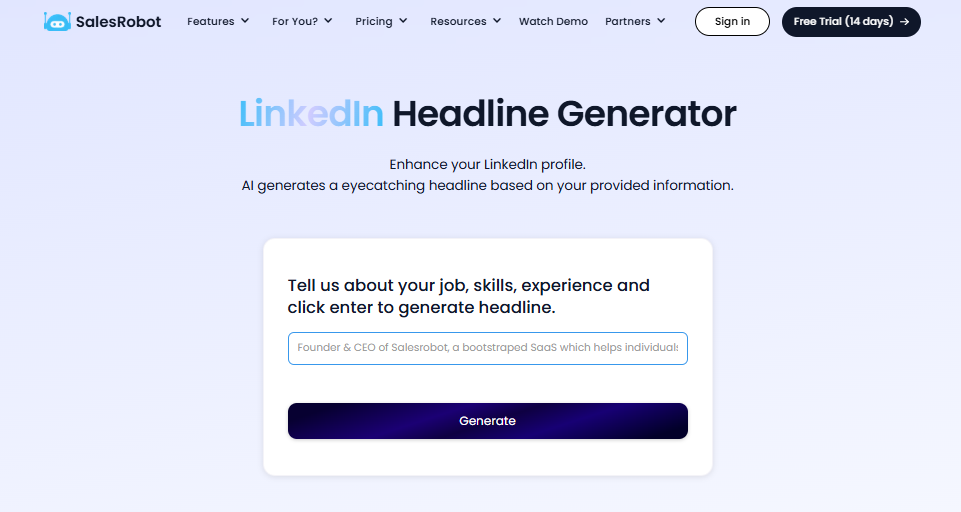
Fill in the data, click "generate," and within 1 second, you'll have multiple headlines ready to go.
No more wasting time brainstorming.
No more trying to come up with the perfect line.
It's done for you instantly.
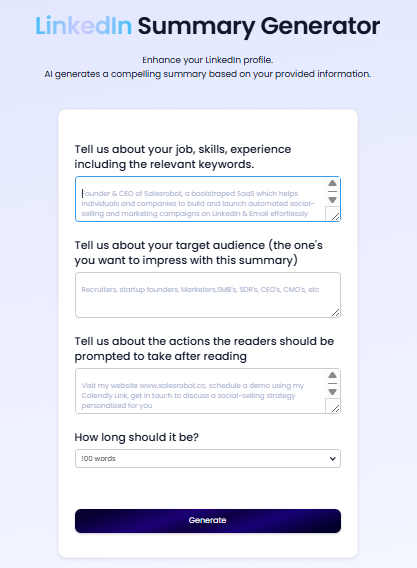
Just like we used the headline generator, you need to enter your data here.
Once you've done that, you'll be able to choose the length of your summary.
This saves you time and prevents the headache of having to rewrite or tweak it over and over.
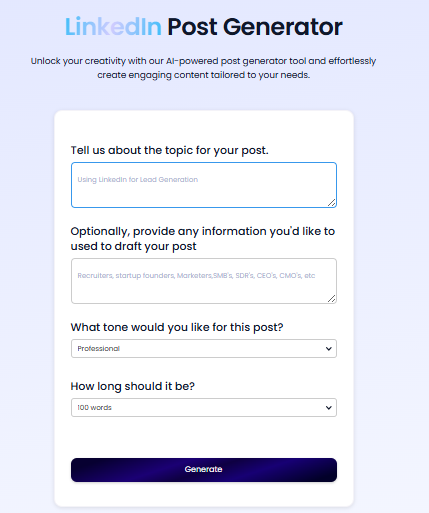
Creating content doesn't have to be hard.
Sure, you can spend time writing multiple prompts in ChatGPT to get something decent—but it's a lot of work for just an average result.
Instead, our tool makes it super easy.
With just one click, you can create a LinkedIn post that has the potential to go viral.
Should You Use AI Tools Like ChatGPT?
Yes, absolutely.
AI tools have some great benefits.
Think about it: without tools like ChatGPT, how much time would you waste writing posts, researching leads, and tweaking your profile? Hours? Days?
The real advantages of using ChatGPT are clear:
- You save time.
- You automate repetitive tasks.
- You can focus on more important activities.
- You build a strong and consistent online presence.
ChatGPT and other tools make your work easier.
But it is as good as that.
To get leads, you need to connect with potential leads and grow your network faster.
That's where SalesRobot comes in. It helps speed up the process and makes connecting with potential leads much easier. SalesRobot runs in the cloud using LinkedIn mobile-app APIs (no Chrome extension needed), keeping your account safe while it automates outreach 24/7. It even sends AI-personalized voice notes and video messages on LinkedIn at scale, and its built-in AI Appointment Setter replies to your leads within minutes to keep them warm until they book a meeting.
99 problems, one solution—SalesRobot.
Take the 14 day free trial today. No credit card required.
Frequently Asked Questions
Which ChatGPT model is best for writing LinkedIn content?
As of mid-2026, ChatGPT runs on the GPT-5.6 family (Sol, Terra, and Luna), which replaced the earlier GPT-5 Instant and Thinking tiers. Luna or Terra handle most LinkedIn headlines, summaries, and posts well and respond fastest. For longer, more nuanced content or strategy work, switch to Sol, OpenAI's flagship tier, which reasons more deeply before responding. Since OpenAI updates this lineup every few months, check the model picker in ChatGPT for the current fastest and most capable options if you're reading this later in the year.
Why is my LinkedIn link preview not working?
LinkedIn builds previews from your page's Open Graph tags. If the preview is broken, check that og:title, og:description, and og:image tags exist in the raw HTML, your image is 1200x627 pixels, and the URL is publicly accessible to LinkedIn's crawler. Then refresh the cache using the free LinkedIn Post Inspector.

Wow your leads by cloning yourself and sending personalized videos and voice notes to each lead on LinkedIn.
If you don't reply to leads within 5 mins, your chances of converting them fall by 50%. Our AI replies on your behalf instantly! (and yes, you can train it)

Don't shoot in the dark. Get detailed analytics on what's working

SalesRobot allows you to invite other team members, so that they can add their LinkedIn Account, run outreach campaigns and get amazing results just like you.
.avif)


Trusted by 4100+ innovative B2B sales teams and lead gen agencies

.avif)

.avif)




.avif)


Heading 1
Heading 2
Heading 3
Heading 4
Heading 5
Heading 6
Lorem ipsum dolor sit amet, consectetur adipiscing elit, sed do eiusmod tempor incididunt ut labore et dolore magna aliqua. Ut enim ad minim veniam, quis nostrud exercitation ullamco laboris nisi ut aliquip ex ea commodo consequat. Duis aute irure dolor in reprehenderit in voluptate velit esse cillum dolore eu fugiat nulla pariatur.
Block quote
Ordered list
- Item 1
- Item 2
- Item 3
Unordered list
- Item A
- Item B
- Item C
Bold text
Emphasis

Superscript
Subscript