.avif)
TL;DR
- HubSpot Sales Hub is one of the most comprehensive CRM and sales engagement platforms available, with a free plan and paid tiers starting at $20/month per seat.
- The platform excels at pipeline management, email tracking, deal automation, and cross-team alignment when marketing and sales data live in the same system.
- Key features like sequences, automation, and AI tools are gated behind Professional and Enterprise, making the lower tiers feel limited for serious sales teams.
- SalesRobot is worth considering alongside HubSpot if LinkedIn outreach is part of your pipeline, since Sales Hub has no native LinkedIn automation.

HubSpot Sales Hub is one of those tools that most B2B teams encounter eventually. It has become nearly synonymous with CRM, and for good reason: it is comprehensive, well-integrated, and backed by one of the most recognizable brands in business software.
But "comprehensive" and "right for your team" are not the same thing.
Sales Hub is built for teams that want their CRM, sales engagement, pipeline management, and reporting in one place, connected to marketing and service data from the same ecosystem.
The platform is genuinely powerful at that job. The trade-off is cost and complexity. Features that sales teams typically consider essential, like automated sequences and AI tools, are locked behind tiers that carry significant monthly fees and mandatory onboarding costs.
This review breaks down what Sales Hub actually does, what it costs at each tier, where it delivers real value, and where its limitations consistently frustrate users. If LinkedIn outreach is part of your pipeline, SalesRobot comes up naturally as a complement rather than a replacement, and we cover it toward the end.
HubSpot Sales Hub: What You Need to Know
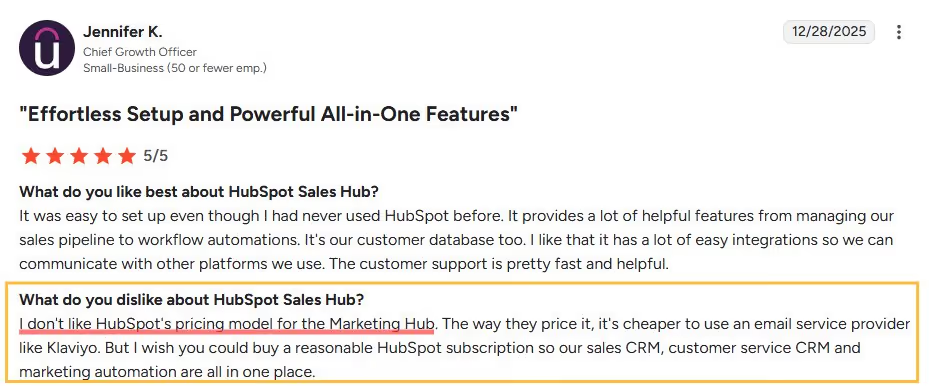
✅ All-in-one powerhouse: HubSpot combines CRM, marketing automation, sales tools, and customer service in one platform. This means you're not juggling five different tools and trying to make them talk to each other.
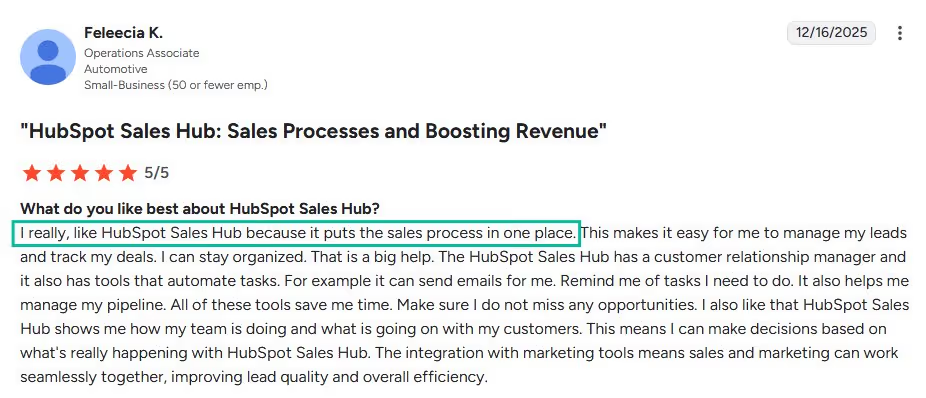
⚠️ Pricing gets steep fast: While the basic CRM is free, you'll hit paywalls quickly when you need advanced features. Most growing businesses end up paying $800+ monthly (if they're using marketing and other hubs) once they factor in multiple hubs and user seats.
✅ Incredible free CRM: You get contact management, deal tracking, and basic reporting without paying a dime. It's perfect for startups or small teams just getting their sales process organized.
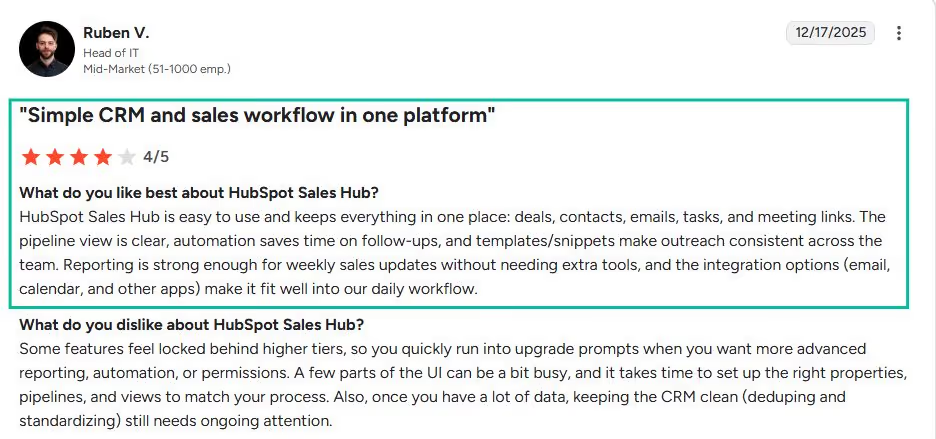
✅ User-friendly interface: Even non-technical team members can jump in and start using HubSpot effectively. The learning curve is gentle compared to more complex platforms like Salesforce.
⚠️ Customization limitations: Unlike enterprise platforms, HubSpot can feel restrictive when you need specific workflows or custom fields. You're often stuck working within their predefined structure.

✅ Outstanding educational resources: HubSpot Academy offers free certifications and training that actually teach valuable marketing and sales skills. Many users become better marketers just from using the platform.

⚠️ Integration headaches: While HubSpot connects to many tools, the integrations often feel clunky or limited. You might lose data fidelity when syncing with your existing tech stack.

✅ Robust reporting and analytics: The dashboard gives you clear visibility into your entire funnel, from first website visit to closed deal. You can finally answer "where are our best leads coming from?" with confidence.

What Is HubSpot Sales Hub?

HubSpot Sales Hub is the sales-focused component of HubSpot's broader Customer Platform, which also includes Marketing Hub, Service Hub, Content Hub, Data Hub, and Commerce Hub.
Sales Hub sits on top of HubSpot's Smart CRM, meaning all contact, company, and deal data is shared across whichever Hubs your team uses.
Founded in 2006, HubSpot pioneered the concept of inbound marketing and has since expanded into a comprehensive CRM suite.
Sales Hub specifically is designed for sales teams that want to manage their entire sales process, from prospecting and outreach to pipeline management and forecasting, without leaving the platform.
The platform uses a seat-based pricing model. Core seats give users full access to purchased Hubs. There are no minimum seat requirements on Sales Hub, meaning a single-person team can start without being forced into a bundle.
Key Features
Deal Pipeline Management

HubSpot's visual deal pipeline is one of its most praised features across thousands of independent reviews.
You can build multiple pipelines for different sales motions, customize deal stages to match your actual process, and drag deals through stages as they progress. Each deal record shows probability, expected close date, associated contacts, and activity history in one place.
On Professional and Enterprise, forecasting capabilities let you generate revenue predictions based on pipeline health, track team performance against targets, and identify where deals are getting stuck. AI-powered deal summaries on higher tiers give reps quick context without reading through lengthy activity logs.
Email Sequences
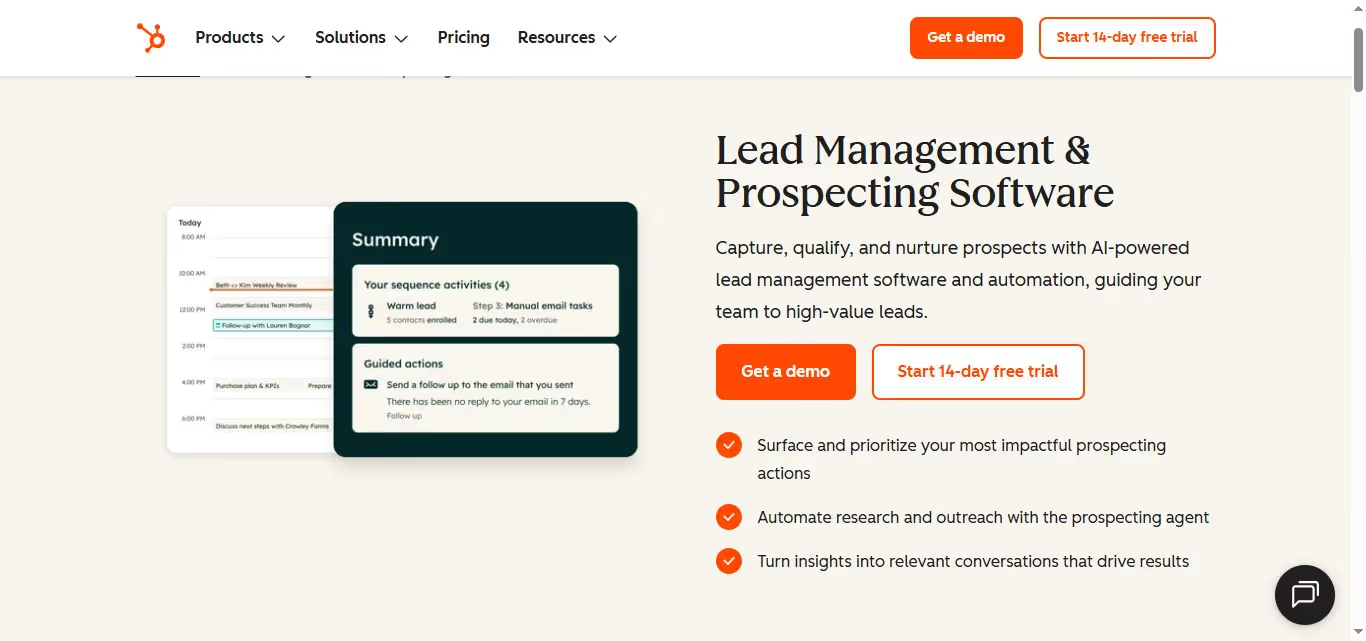
Sequences are automated, and one-to-one email follow-up cadences are available on Professional and Enterprise plans.
Unlike mass marketing emails, sequences pause automatically when a contact replies, making them feel more personal. You can mix automated emails with manual task reminders for calls or LinkedIn touchpoints within the same sequence.
One important limitation that users consistently flag: sequence enrollment is manual and capped at 50 contacts at a time, even on Enterprise.
For teams running high-volume outbound, this makes large-scale prospecting impractical without significant daily manual effort.
Email Tracking and Templates
Sales Hub tracks email opens, clicks, and engagement in real time, sending notifications to reps at the moment a prospect engages so follow-up timing can be optimized.
Email templates let teams save and reuse high-performing messages, and on paid plans, the HubSpot branding is removed from outgoing communications.
Meeting Scheduler

The built-in meeting scheduler lets prospects book time directly from a link embedded in emails or shared publicly. It syncs with Google and Outlook calendars and routes bookings based on team availability rules on higher tiers. Users consistently cite this as one of the most practically useful features in day-to-day selling.
Built-In Calling

HubSpot provides built-in calling with HubSpot phone numbers on all paid plans. Calls are automatically logged to contact records. On Professional and Enterprise, you get call recording and conversation intelligence that transcribes and analyzes calls for coaching purposes.
The calling minute limits are a notable constraint.
Starter provides 500 minutes per month across the entire account. Professional provides 2,000 minutes per month, pooled across the team.
For a five-person sales team on Professional, that is an average of under 14 minutes of talk time per rep per day, which is operationally insufficient for any team doing consistent outbound calling.
AI-Powered Features (Breeze AI)

HubSpot's Breeze AI suite is included across all paid plans and the free tier. It covers AI-assisted email writing, deal summary generation, prospect research, and next-step recommendations.
The more advanced AI tools, including the AI meeting notetaker and deeper automation capabilities, are reserved for Professional and Enterprise.
Reporting and Analytics

Sales Hub's reporting is one of its strongest areas. Pre-built dashboards cover pipeline health, deal velocity, email engagement, and rep performance.
On Professional and Enterprise, custom report building allows teams to track the specific metrics that matter to their business. Sales leaders can identify bottlenecks, forecast revenue, and coach reps based on data rather than intuition.
Integrations
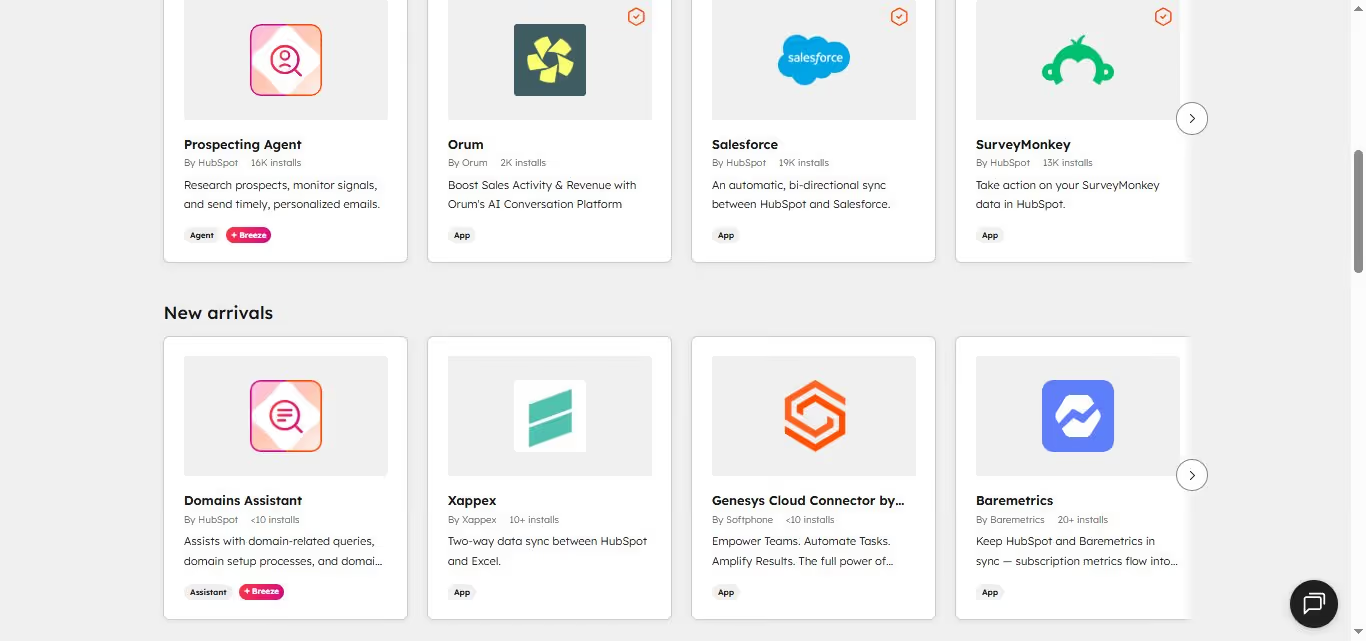
Sales Hub connects with over 1,500 applications.
Key integrations for sales teams include LinkedIn Sales Navigator for contact enrichment, Aircall and other dialers for calling infrastructure, PandaDoc for proposals and e-signatures, Stripe for payments, and Zapier for custom workflow connections.
Note that LinkedIn Sales Navigator provides data enrichment and buying intent signals within HubSpot, but does not enable automated LinkedIn outreach.
HubSpot Sales Hub Pricing
HubSpot Sales Hub uses seat-based pricing with monthly and annual billing options. The figures below are monthly billing rates. Annual billing reduces per-seat costs by roughly 10 to 20 percent, depending on tier.
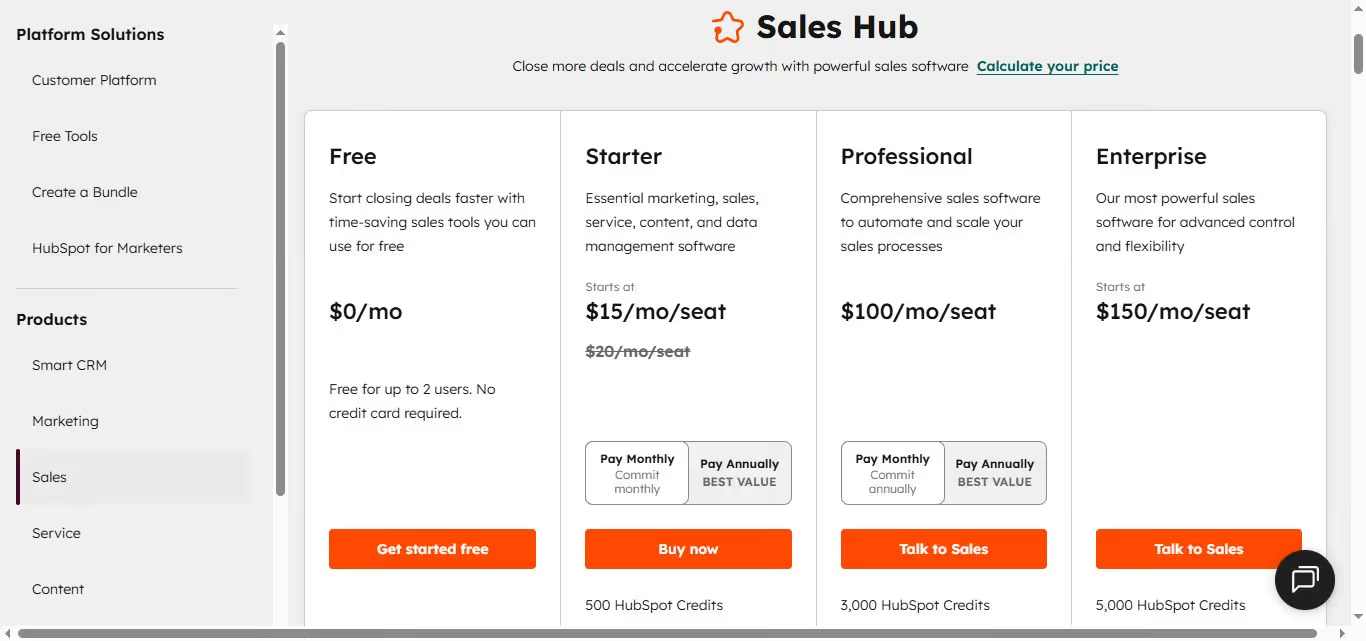
Free
- $0, unlimited users
- Contact and company management, deal pipeline (1 pipeline), basic email tracking, meeting scheduler, Gmail and Outlook integration, live chat
- HubSpot branding on outgoing communications
- Limited to 10 custom properties, 1 automated email per form
Starter: $20/seat/month (monthly billing)
- Removes HubSpot branding from sales communications
- 2 deal pipelines, task queues, conversation routing
- 1,000 custom properties, 5,000 email templates and snippets
- 500 calling minutes per month across the account
- Basic automation and sequences not included
- No onboarding fee required
Professional: $100/seat/month (monthly billing)
- One-time mandatory onboarding fee of $1,500
- Sales sequences, full automation workflows, A/B testing
- AI-powered features including conversation intelligence and deal summaries
- Advanced reporting and forecasting
- 2,000 pooled calling minutes per month
- LinkedIn Sales Navigator integration
- Sequence enrollment capped at 50 contacts at a time
Enterprise: $150/seat/month (monthly billing)
- One-time mandatory onboarding fee of $3,500
- Custom objects, advanced permissions and SSO
- Predictive lead scoring, conversation intelligence at scale
- 3,000 pooled calling minutes per month
- Dedicated customer success manager
- Annual commitment required, paid upfront
Costs add up quickly across a team. Five seats on Professional amount to $500/month in seat fees plus the $1,500 onboarding fee, totaling $7,500 in year one before considering any additional Hubs, add-ons, or implementation services.
What Works Well
✅Pipeline visibility is genuinely excellent. The visual deal board, combined with shared data from marketing activity, gives sales leaders a real-time picture of pipeline health that is difficult to replicate in less integrated tools. Teams that have marketing and sales in HubSpot simultaneously report meaningful improvements in deal context and follow-up timing.
✅The free plan is a real starting point. Unlike many competitors whose free plans are barely functional, HubSpot's free tier includes enough to run basic contact management, deal tracking, and email engagement for a very small team. The upgrade path from free to paid is gradual rather than a cliff.
✅The integration ecosystem is unmatched at this price point. Over 1,500 integrations means Sales Hub fits into almost any existing tech stack without friction. Teams rarely need to abandon tools they already use and trust.
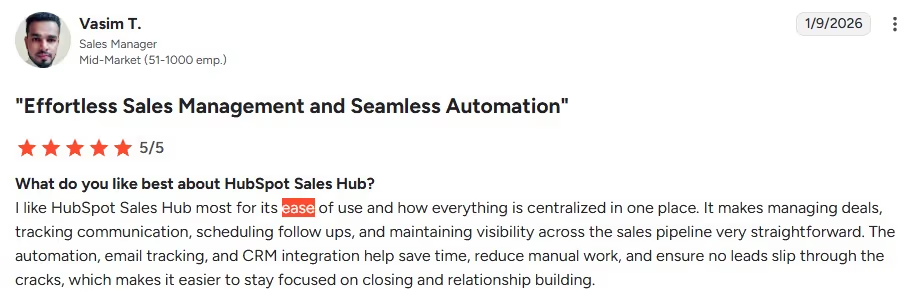
✅Ease of use is consistently praised. Across thousands of G2 reviews, HubSpot's interface is cited as one of its strongest attributes. New reps can typically navigate the platform within a day or two, and the learning curve for basic features is genuinely low.
✅Reporting and forecasting at Professional and Enterprise are strong. Sales leaders who need data-driven pipeline management and reliable revenue forecasting get a genuinely capable toolset at the Professional tier.
Potential Drawbacks
⚠️The jump from Starter to Professional is steep. Starter at $20/month per seat is accessible. Professional at $100/month per seat plus a mandatory $1,500 onboarding fee is a significant commitment, especially for small teams.
Many of the features that make Sales Hub genuinely useful for outbound sales, including sequences and automation, only appear at Professional.
⚠️Sequence enrollment limits are a real operational constraint. Being capped at 50 contacts per manual enrollment, even on Enterprise, makes high-volume outbound impractical.
Teams that need to run large prospecting sequences efficiently will find this limitation frustrating and may need a dedicated sales engagement tool alongside HubSpot.
⚠️Calling minutes are insufficient for outbound-heavy teams. The pooled minute limits across all tiers are low for teams doing consistent outbound calling.
Most teams running serious call volume end up integrating a third-party dialer like Aircall, adding cost on top of the existing seat fees.
⚠️LinkedIn outreach is not natively automated. HubSpot integrates with LinkedIn Sales Navigator for data and buying signals, but does not automate LinkedIn connection requests, message sequences, or inbox management.
Teams that prospect heavily on LinkedIn need an additional tool to handle that channel.
⚠️Annual commitment and auto-renewal create friction. Multiple independent reviews, including Trustpilot accounts, describe difficulty canceling contracts, automatic renewal surprises, and limited flexibility once locked into annual billing. Teams should read contract terms carefully before committing.
Who Should Use HubSpot Sales Hub
HubSpot Sales Hub is a strong fit for growing B2B sales teams that want a single platform connecting CRM, sales engagement, and marketing data, particularly if they are already using or considering other HubSpot Hubs.
The platform delivers genuine value when multiple Hubs are used together. A sales team that can see exactly which marketing emails a prospect engaged with, which pages they visited, and which campaigns converted them is meaningfully better equipped to have relevant conversations.
It is a harder sell for teams that primarily need outbound automation at volume, organizations running LinkedIn-heavy prospecting, very small teams that find the Professional pricing and onboarding fee hard to justify, or anyone looking for a lightweight tool with fast setup and low commitment.
HubSpot Sales Hub vs SalesRobot: A Direct Comparison
SalesRobot: Worth Considering If LinkedIn Is Part of Your Pipeline
HubSpot Sales Hub does not natively automate LinkedIn outreach.
LinkedIn Sales Navigator integrates with HubSpot for contact data and intent signals, but connection requests, personalized message sequences, and inbox management on LinkedIn all require either manual effort or a dedicated LinkedIn automation tool.
For teams whose prospecting happens significantly on LinkedIn, this is a real gap.
SalesRobot is a cloud-based LinkedIn and email automation platform built specifically for B2B outreach.
The two platforms complement each other cleanly.
HubSpot manages your CRM, pipeline, and deal data.
SalesRobot handles LinkedIn outreach that HubSpot cannot natively execute. Leads engaged through SalesRobot can be tracked in HubSpot via Zapier integration, keeping your CRM data complete without manual entry.
Mobile API Safety: Because SalesRobot connects through LinkedIn's mobile APIs, your outreach activity mimics natural human behavior.
Users consistently report running sustained, high-volume campaigns without account flags or restrictions, which is the single biggest operational concern with any LinkedIn automation tool.

AI Appointment Setter: After a prospect replies, SalesRobot's AI takes over the conversation, handles qualification questions, and books meetings automatically.
You can train it on your specific criteria and ideal responses, which means the early-stage pipeline management largely runs without manual involvement. For smaller teams without a dedicated SDR, this is a meaningful capability.
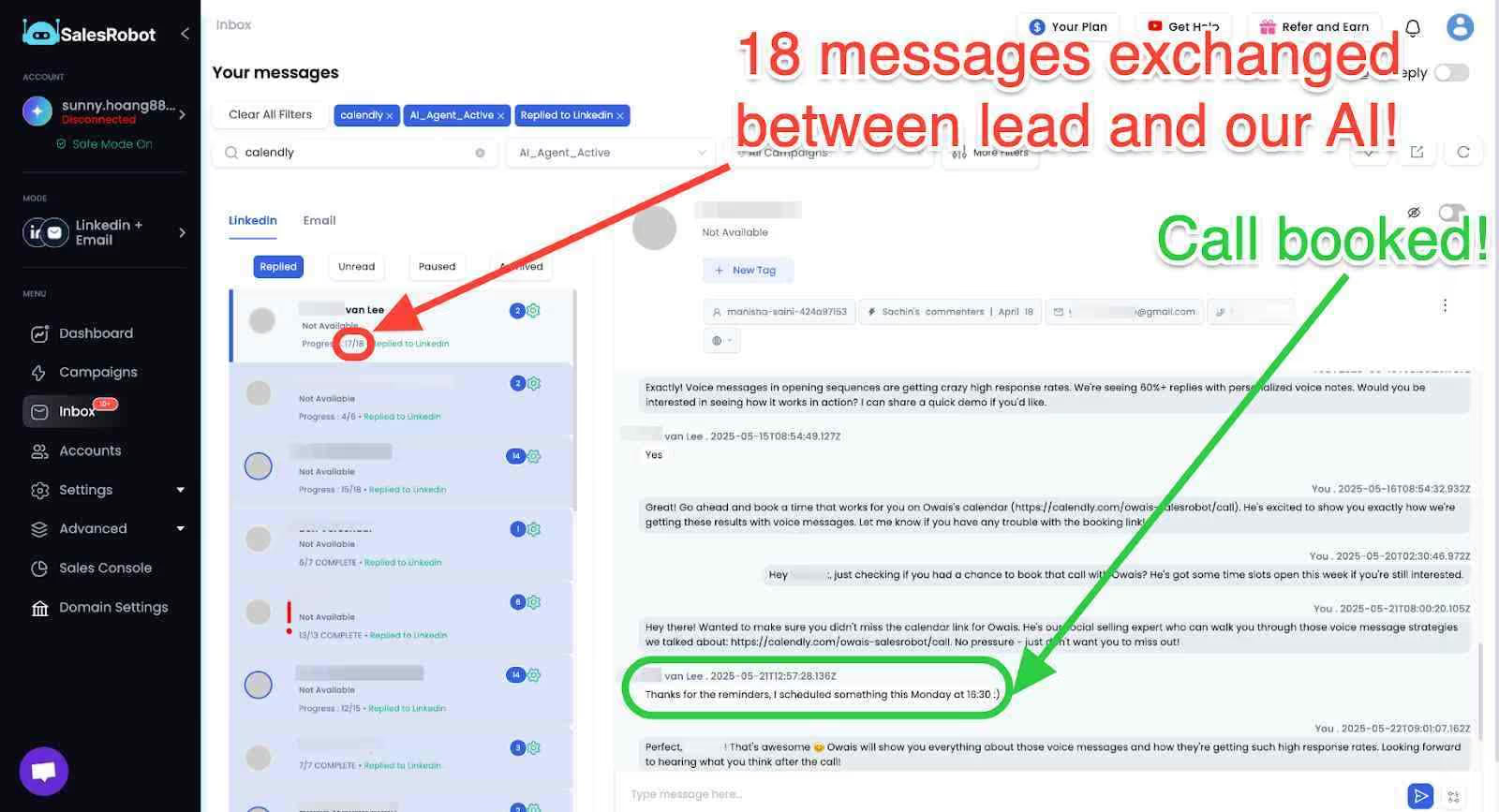
AI Voice Clone and Video Messages: SalesRobot lets you send personalized voice notes and video messages through LinkedIn as part of automated sequences.
The AI Voice Clone feature lets you record a short voice sample once, then generates individualized voice notes for each prospect that sound like you, without recording each one manually.
In sectors where relationships and trust matter, this kind of personal touch at scale tends to drive significantly higher reply rates than text-only outreach.

AI Variables and Hyper-Personalization: SalesRobot pulls data directly from a prospect's LinkedIn profile to write personalized message sequences automatically. You are not working from a static template that gets blasted to everyone.
Each message is adapted to the individual, which matters when you are reaching decision makers who see generic outreach constantly.

Multi-Step Sequences: You can build complex LinkedIn and email campaigns with smart delays and behavioral conditions. Leads can be imported from Sales Navigator, standard LinkedIn search, LinkedIn groups, event attendees, or CSV uploads, giving you flexibility in how you build and target your prospect lists.
Unified Inbox and Mini CRM: All LinkedIn and email conversations consolidate in one place with automatic reply detection. SalesRobot stops messaging automatically when a prospect responds, preventing the over-automation feel that kills conversations.
You can tag leads, filter by interest level, and track where every prospect sits without switching between platforms.
Team Management and Analytics: For agencies or sales teams managing multiple LinkedIn accounts, SalesRobot tracks performance across accounts, prevents duplicate outreach between team members, and surfaces detailed analytics on what sequences and approaches are actually working.
SalesRobot pricing (per LinkedIn account, 14-day free trial, no credit card required):
- Basic: $59/month ($39/month billed annually).
- Advanced: $79/month ($59/month billed annually).
- Professional: $99/month ($79/month billed annually).
- Enterprise: Custom.

SalesRobot starts at $59/month with a 14-day free trial, making it accessible to test before committing to anything.
It also has a 4.8 rating on G2, with 50+ independent user reviews.
The Bottom Line
HubSpot Sales Hub is one of the best CRM and sales engagement platforms available for growing B2B teams that want their pipeline, outreach, and marketing data in one place.
The free plan is genuinely useful, the integrations are extensive, and the reporting at Professional and Enterprise is strong.
When multiple Hubs are used together, the platform creates a level of cross-functional visibility that most point solutions cannot replicate.
However, the caveats are real.
The jump from Starter to Professional is expensive, the sequence enrollment cap frustrates teams running high-volume outbound, and LinkedIn outreach remains a gap the platform does not natively fill.
If your team is already committed to HubSpot as your CRM and you need LinkedIn prospecting automated alongside it, SalesRobot operates cleanly as a complement with a free trial that lets you validate results before committing.

Wow your leads by cloning yourself and sending personalized videos and voice notes to each lead on LinkedIn.
If you don't reply to leads within 5 mins, your chances of converting them fall by 50%. Our AI replies on your behalf instantly! (and yes, you can train it)

Don't shoot in the dark. Get detailed analytics on what's working

SalesRobot allows you to invite other team members, so that they can add their LinkedIn Account, run outreach campaigns and get amazing results just like you.
.avif)


Trusted by 4100+ innovative B2B sales teams and lead gen agencies

.avif)

.avif)




.avif)


Heading 1
Heading 2
Heading 3
Heading 4
Heading 5
Heading 6
Lorem ipsum dolor sit amet, consectetur adipiscing elit, sed do eiusmod tempor incididunt ut labore et dolore magna aliqua. Ut enim ad minim veniam, quis nostrud exercitation ullamco laboris nisi ut aliquip ex ea commodo consequat. Duis aute irure dolor in reprehenderit in voluptate velit esse cillum dolore eu fugiat nulla pariatur.
Block quote
Ordered list
- Item 1
- Item 2
- Item 3
Unordered list
- Item A
- Item B
- Item C
Bold text
Emphasis

Superscript
Subscript