.avif)
TL;DR
- Wistia is a business-focused video hosting platform with an ad-free player, meaning your prospects won't get distracted by competitor ads or random suggested content while watching your sales demos.
- Its standout marketing features include in-video lead capture forms, CTAs at specific timestamps, A/B testing, and deep viewer analytics like heatmaps that show exactly where people drop off or rewatch.
- Wistia has simplified its pricing to three tiers: Free ($0/mo, 25 GB storage, 1 user), Business ($79/mo billed annually, 250 GB storage, 3 users), and Enterprise (custom pricing, 1 TB+ storage). The Automation Suite for HubSpot/Marketo/Pardot integration is a separate $250/mo add-on.
- Webinar hosting is only available as a paid add-on on the Business plan or included with Enterprise, so budget accordingly if live events matter to you.
- Wistia is best for marketing teams running a video-first content strategy who need CRM integrations and detailed engagement data to prioritize sales follow-ups.
- It's overkill (and expensive) if you just need basic video hosting or occasional embeds on your website.
- The biggest gap for sales teams: Wistia lives entirely inside the video content bubble. It won't help you with outbound prospecting, LinkedIn outreach, or multi-channel follow-ups.
- SalesRobot fills that gap with automated LinkedIn and email outreach, AI-powered voice and video notes, and an AI appointment setter that books meetings for you while you sleep.
- SalesRobot pricing starts at $59/mo per account (or $39/mo billed annually), with volume discounts kicking in after 10 accounts. Free 14-day trial, no credit card needed.
Ever upload a killer sales video to YouTube, only to watch your prospect get sidetracked by cat compilations in the sidebar? 😬
Yeah, that one hurts.
Generic video platforms were not built for sales teams who need control, analytics, and zero distractions. The last thing you want is your carefully crafted product demo competing with someone else's content for attention.
That's where Wistia comes in. It positions itself as the business-focused solution to this exact problem, with ad-free players, viewer-level analytics, and built-in lead capture forms.
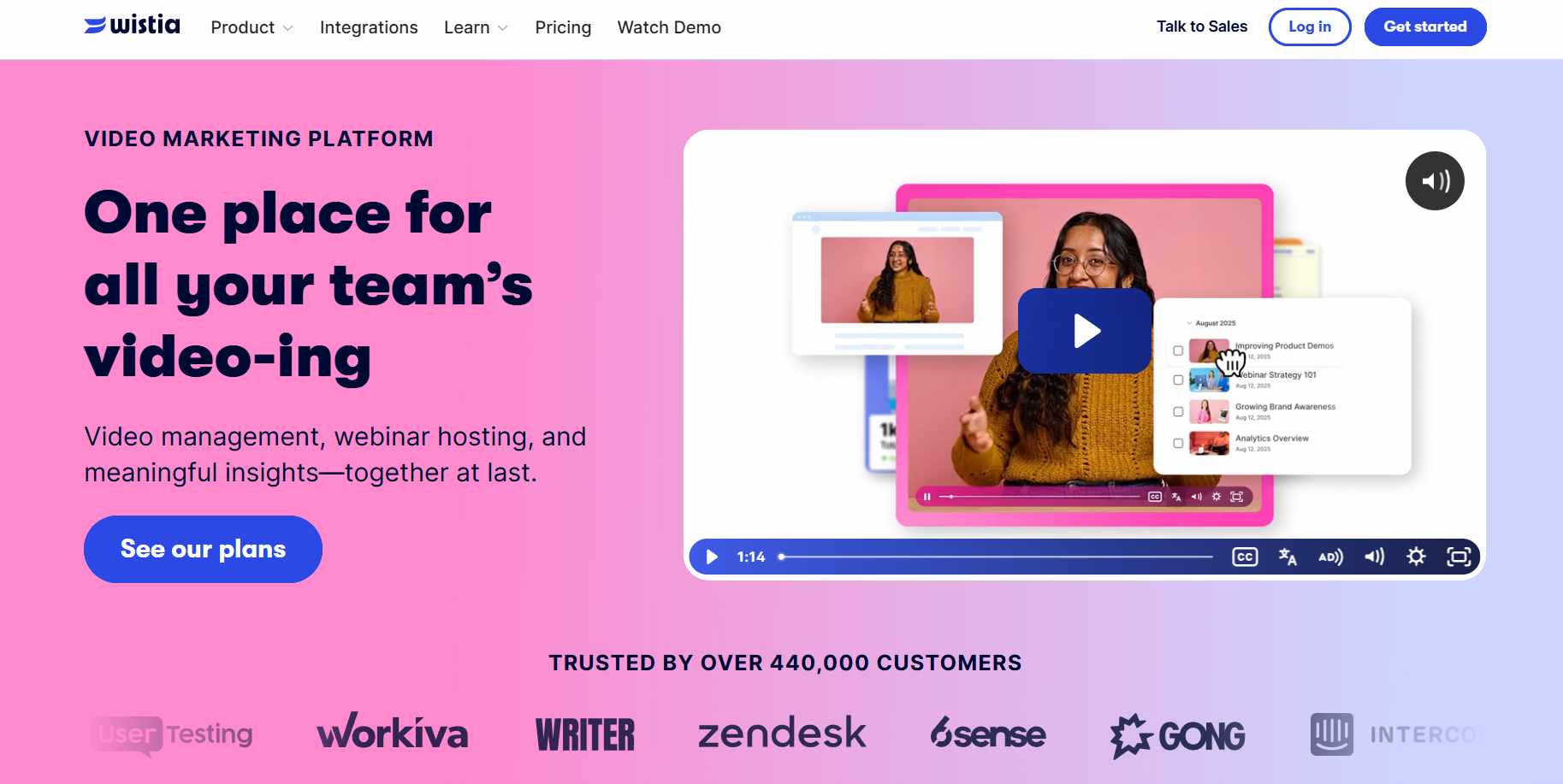
This review breaks down whether Wistia actually delivers on that promise, how much it costs, and where it shines or falls short for sales teams. We'll also cover how SalesRobot takes a completely different approach to video-powered sales outreach.
Wistia: What You Need to Know
✅ Professional ad-free experience: Your videos play clean. No YouTube ads. No competitor content popping up. Your prospects stay focused on your message, and your brand looks polished throughout.
⚠️ Pricing adds up fast: While there's a free plan, serious video marketing needs will push you into the Business tier at $79/mo. And if you want marketing automation integrations (HubSpot, Marketo, Pardot), that's an extra $250/mo for the Automation Suite add-on.
✅ Built-in lead generation tools: You can drop customizable forms, CTAs, and interactive elements directly into your videos at specific timestamps. Every video becomes a potential lead magnet without needing separate tools.
✅ Detailed video analytics: Wistia shows you exactly where viewers drop off, which parts they rewatch, and individual viewing behavior through heatmaps. Way more useful than basic view counts when you're trying to figure out what's working.
⚠️ Storage limits on lower plans: The Free plan caps you at 25 GB, and the Business plan starts at 250 GB. If you're producing a lot of high-quality video content, those limits fill up faster than you'd expect.
✅ Excellent customization: Match the video player to your brand colors, add custom thumbnails, remove Wistia branding on paid plans, and control exactly how your content appears on your site. It looks native, not like a third-party embed.
⚠️ Learning curve for advanced features: Basic video hosting is straightforward. But getting the most out of the marketing automation, lead scoring, and CRM integrations takes some time to learn.
Wistia's Key Features, Broken Down
Video Hosting and Management
Wistia gives you professional video hosting with a completely ad-free, customizable player you can embed anywhere.
Your video library stays organized with folders, sub-folders, and a centralized media library. No more worrying about a competitor's ad showing up on your product demo.
And if you ever need to swap out a video, their no-code replace feature lets you do it without breaking your existing embeds or losing your analytics data. Super handy 👌
Webinar Hosting
You can host branded webinars directly through Wistia without juggling separate tools.
Customize the interface, build registration pages, run live Q&A and polls, and automatically turn your live sessions into on-demand content afterward.
Worth noting though: webinar hosting is a paid add-on on the Business plan (Wistia's Webinars plans start at around $429/month and include the Automation Suite). It's included with Enterprise, but if you're on Business, plan to budget serious extra cash for it.
Recording and AI-Powered Editing
Record yourself, your screen, or both directly from your browser. No software downloads needed.
Wistia's AI editing tools (including Wistia Remix) help you repurpose long-form content into shorter clips automatically. So that 60-minute training session can become a handful of social media clips or pull quotes for marketing campaigns.
They've also added transcript-based editing, which lets you edit video like you'd edit a document. Delete text from the transcript, and the corresponding video gets cut. Pretty slick.
Lead Generation Tools
This is where Wistia really shines for sales teams.
You can add interactive lead capture forms, calls-to-action, and annotations directly to your videos at specific timestamps. These aren't random pop-ups. They appear when viewers are most engaged.
For example, drop a demo request form right when you're showcasing your product's best feature. Or include a download link while discussing a case study. It's contextual, which means higher conversion rates.
Advanced Video Analytics
Wistia's analytics go way deeper than "how many people watched this video."
You get heatmaps showing exactly where people drop off, which sections they rewatch, and individual viewer engagement data. This syncs automatically with your CRM and marketing automation tools.
So you'll know which sales prospects watched your entire pricing video versus those who bounced after 30 seconds. That kind of insight makes follow-up prioritization a lot easier.
Marketing Automation Integration
This is the Automation Suite add-on ($250/mo billed annually), and it connects video viewing behavior directly to your marketing workflows and lead scoring systems.
When someone watches 80% of your pricing video, it can trigger an automatic follow-up sequence or alert your sales team. Your reps can then reach out saying, "I noticed you were checking out our enterprise features" instead of sending a generic cold message.
It integrates with HubSpot, Marketo, Pardot, Klaviyo, ActiveCampaign, and Eloqua.
Wistia Pricing: How Much Will It Actually Cost?
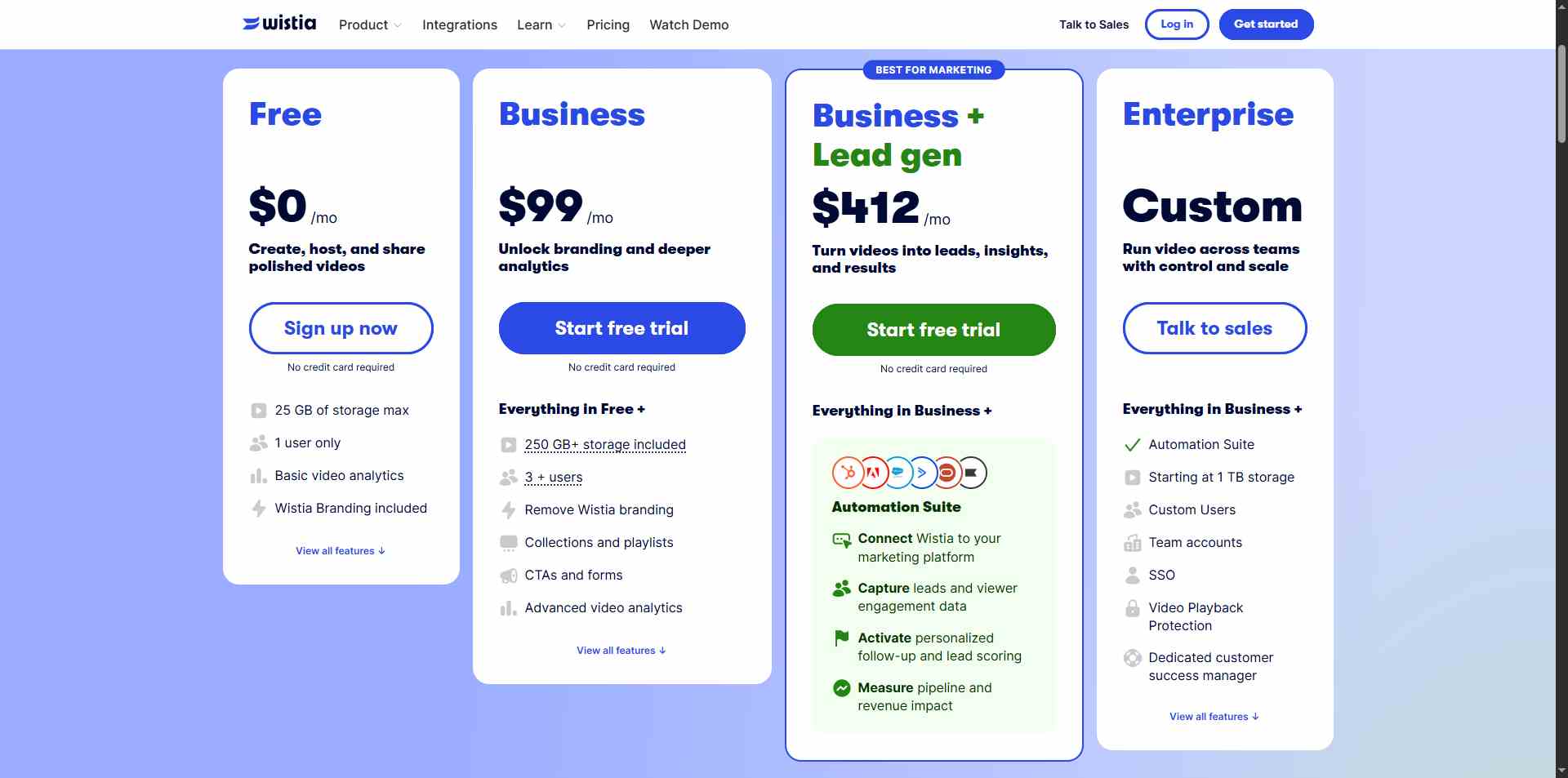
Important note: Wistia has recently simplified their pricing structure. The old Plus, Pro, and Advanced tiers are gone. Here's what they offer now:
Free: $0/month
- 25 GB storage
- 200 GB bandwidth
- 1 user only
- Basic video hosting and embedding
- Ad-free player
- Screen and webcam recording
- Basic analytics
- AI creation tools
Good for testing the platform or if you only need to host a handful of videos. No credit card required to get started.
Business: $99/month
- 250 GB+ storage
- 1 TB bandwidth
- 3 users included ($25 per additional user)
- Everything in Free, plus:
- Heatmaps and engagement graphs
- A/B testing
- In-video CTAs and lead capture forms
- Video SEO tools
- Remove Wistia branding
- Email and social media integrations
- Google Analytics integration
- Webinars available as a paid add-on
- Automation Suite available as a paid add-on ($250/mo)
This is Wistia's core plan. Most teams start here. You can also trial it with no credit card required.
Enterprise: Custom pricing
- 1 TB+ storage
- 2 TB bandwidth
- Custom number of users
- Everything in Business, plus:
- Webinars included (with Automation Suite)
- SSO and advanced security
- Video playback protection
- Dedicated customer success manager
- Custom integrations
Built for larger organizations with complex needs and procurement requirements.
A Few Pricing Gotchas to Watch Out For
Wistia charges based on video count and storage, not views. That makes costs predictable but means you need to plan around content volume.
Bandwidth overages on paid plans get billed automatically. Free accounts just hit a hard cap.
Cancellation policy is strict. They don't offer refunds or credits for cancellations, downgrades, or unused portions. So treat any paid commitment as non-refundable.
Wistia vs SalesRobot: How Do They Compare?
These two tools serve very different purposes, so this isn't really an apples-to-apples comparison. But if you're a sales team trying to decide where to spend your budget, this breakdown helps.
Choose Wistia if you're building a video-first marketing strategy and need professional hosting with detailed analytics.
Pick SalesRobot if you're focused on automating sales outreach through LinkedIn and email, and you want to actually start conversations with prospects instead of waiting for them to come to you.
SalesRobot: The LinkedIn-First Alternative
Look, Wistia is great at video marketing. No argument there.
But here's the thing. Your highest-converting leads are probably scrolling LinkedIn right now. We built SalesRobot to meet prospects exactly where they're already engaging with business content and decision-makers.
What SalesRobot Actually Does
SalesRobot is our cloud-based sales automation platform built specifically for LinkedIn outreach and cold email campaigns.

We built it for B2B sales teams and agencies who want to automate prospecting without risking account bans or sounding like a bot. And yeah, we've seen the "your account got restricted" horror stories with other tools. That's exactly why we built ours differently.
Multi-Step LinkedIn Sequences
You can automate connection requests, follow-ups, and InMails with smart reply detection that stops messaging the moment a prospect responds.
No more accidentally spamming people who already said yes. The sequences adjust automatically based on how your prospects engage.
AI-Powered Voice and Video Notes
This is where things get interesting. You can send personalized voice messages and videos at scale using AI cloning technology.

We've seen 40%+ reply rates with these because they feel personal. Not templated, not generic. They sound like you actually sat down and recorded something just for that person.
Mobile API Safety
Most LinkedIn automation tools use browser extensions, which is basically waving a red flag at LinkedIn's detection systems.

We use LinkedIn's mobile app APIs instead, which makes your activity look completely natural. Our infrastructure runs on residential IPs and cloud execution, so there's no browser automation to detect. We've seen near-zero ban rates across our user base.
Smart Daily Limits
Our system automatically throttles your outreach to stay within LinkedIn's comfort zone.
You can send up to 75 connection requests and 75 messages daily without triggering any red flags. The limits adjust in real time based on your account's activity patterns.
AI Appointment Setter
This one's a favorite among our users. It's an optional add-on that manages your inbox and books meetings automatically.

When a lead responds and you're not available, the AI jumps in within minutes.
It handles the back-and-forth, qualifies the lead, and books the meeting right into your calendar. Like having a sales clone that never takes a day off.
Unified LinkedIn + Email Campaigns
You can combine LinkedIn outreach with cold email sequences in one platform.
No need to juggle multiple tools or worry about message coordination across channels. Everything runs from a single dashboard.
SalesRobot Pricing
We charge per LinkedIn account, with solid discounts for annual billing and volume.
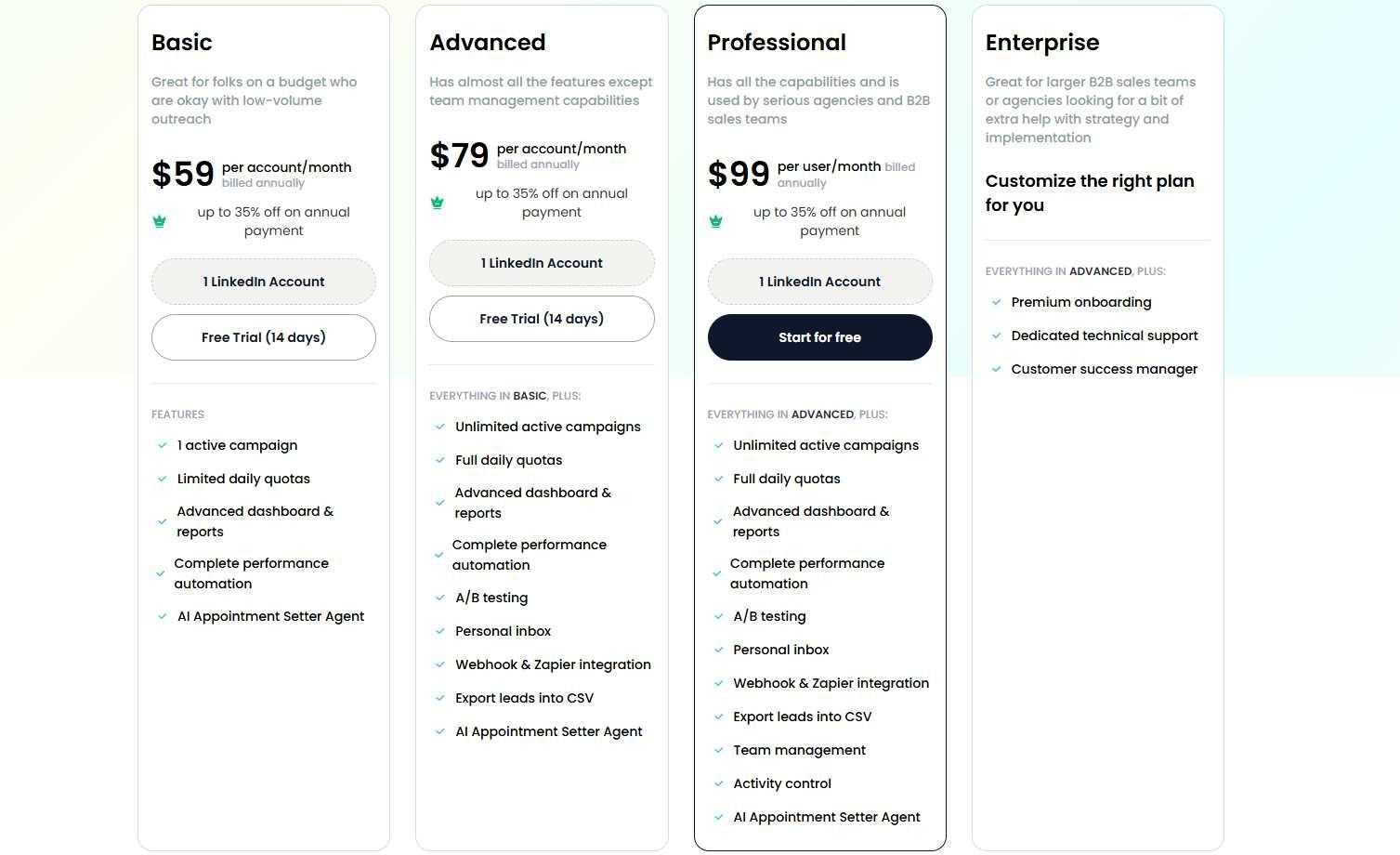
Basic: $59/month ($39/month billed annually)
- 1 active campaign
- Limited daily quotas (20 connections, 20 messages)
- Core automation features
- AI personalization included
Good for solopreneurs testing LinkedIn automation on a budget.
Advanced: $79/month ($59/month billed annually)
- Unlimited campaigns
- Full daily quotas (75 connections, 75 messages)
- A/B testing and webhooks
- Personal inbox management
The sweet spot for individual sales professionals and small teams.
Professional: $99/month ($79/month billed annually)
- Everything in Advanced
- Team management and collaboration
- Activity control across accounts
- Advanced analytics dashboard
Built for agencies and sales teams managing multiple accounts.
Enterprise: Custom
- Everything in Professional
- Premium onboarding and training
- Dedicated customer success manager
- Priority technical support
For larger organizations needing hands-on support and custom implementation.
Volume discounts kick in after 10 accounts (33% off) and again after 20 accounts (45% off).
Email automation is available as a separate add-on at $15/month per email account.
The Verdict
Wistia is a strong choice if video is central to your marketing strategy and you have the budget to match.
The platform does professional video hosting really well. The analytics are genuinely useful, the lead generation features justify the premium price for teams that use them consistently, and the ad-free player makes a real difference for brand perception.
But it's overkill for businesses that only occasionally embed videos or are just dipping their toes into video content. The cost adds up quickly once you factor in the Automation Suite and webinar add-ons.
And here's the bigger picture problem. Wistia lives entirely inside the video content world. But modern sales teams need multi-channel outreach to actually convert those engaged prospects into conversations and meetings.
You can have the best product demo video on the internet. But if you're not actively reaching out to prospects, nurturing those connections, and following up consistently, the video alone won't close deals.
That's where SalesRobot fits in. If LinkedIn prospecting and direct sales conversations drive your business more than content marketing, we're built for exactly that. You can try it out for free for 14 days, no credit card required, and see actual results before you commit to anything.
Buy Wistia if you're a marketing team with serious video ambitions and a $300+ monthly budget.
Skip it if you need basic video hosting or want to focus on direct prospect outreach instead of waiting for inbound traffic to come to you.
Frequently Asked Questions
Is Wistia good for sales outreach?
Wistia is built for video hosting, analytics, and in-video lead capture, not outbound prospecting. It won't run LinkedIn or email outreach, book meetings, or send personalized messages. For direct sales conversations, pair it with a tool like SalesRobot that automates multichannel outreach and follow-ups.
Does Wistia have webinar hosting built in?
Not on the base plans. Webinar hosting is a separate paid add-on that starts at around $429/month on top of the Business plan and includes the Automation Suite. It's only bundled in by default on Enterprise, so budget for it if live events matter to you.
How much does Wistia actually cost per month in 2026?
Wistia's Business plan is $79/month billed annually (or $99/month monthly) with 250 GB storage and 3 users. Extra seats are $25/month each. Add the $250/month Automation Suite for CRM integrations, and most real B2B teams end up paying roughly $379–$479/month once add-ons and webinars stack up.

Wow your leads by cloning yourself and sending personalized videos and voice notes to each lead on LinkedIn.
If you don't reply to leads within 5 mins, your chances of converting them fall by 50%. Our AI replies on your behalf instantly! (and yes, you can train it)

Don't shoot in the dark. Get detailed analytics on what's working

SalesRobot allows you to invite other team members, so that they can add their LinkedIn Account, run outreach campaigns and get amazing results just like you.
.avif)


Trusted by 4100+ innovative B2B sales teams and lead gen agencies

.avif)

.avif)




.avif)


Heading 1
Heading 2
Heading 3
Heading 4
Heading 5
Heading 6
Lorem ipsum dolor sit amet, consectetur adipiscing elit, sed do eiusmod tempor incididunt ut labore et dolore magna aliqua. Ut enim ad minim veniam, quis nostrud exercitation ullamco laboris nisi ut aliquip ex ea commodo consequat. Duis aute irure dolor in reprehenderit in voluptate velit esse cillum dolore eu fugiat nulla pariatur.
Block quote
Ordered list
- Item 1
- Item 2
- Item 3
Unordered list
- Item A
- Item B
- Item C
Bold text
Emphasis

Superscript
Subscript