.avif)
TL;DR
- Kaspr is a LinkedIn-based contact data finder that pulls verified phone numbers and email addresses directly from LinkedIn profiles using a Chrome extension. One click, instant data.
- It offers a database of 500M+ verified contacts sourced from 150+ providers, with particularly strong coverage in European markets. US and other regions can be spottier.
- Kaspr has three credit types you need to track: B2B emails (unlimited on paid plans), phone credits (100-200/mo on paid plans), and direct email credits (5-200/mo depending on tier). The credit math gets complicated fast.
- Pricing starts at $49/mo per user for the Starter plan (billed annually) and goes up to $79/mo per user for Business. There's a free plan with 5 phone credits, 5 direct email credits, and 15 B2B email credits per month.
- Kaspr is GDPR and CCPA aligned, so European prospecting is covered from a compliance standpoint.
- Biggest limitation: Kaspr only finds contact data. It does not send messages, automate outreach, or manage follow-ups. You'll need a separate tool for everything after the data pull.
- The Chrome extension only works on LinkedIn (including Sales Navigator on Starter+ and Recruiter Lite on Business+), so you can't scrape contacts from company websites or other platforms.
- SalesRobot takes a different approach by automating the entire outreach process on LinkedIn and email, including connection requests, follow-ups, AI voice/video notes, and an AI appointment setter that books meetings for you.
- SalesRobot pricing starts at $59/mo per account ($39/mo billed annually), with volume discounts after 10 accounts. 14-day free trial, no credit card needed.
Kaspr Review: LinkedIn Email and Phone Finder
You know that sinking feeling when you find the perfect prospect on LinkedIn, but they're basically a digital ghost? 👻
Great profile. Ideal company. Probably has the budget you need. But actually reaching them? Good luck with that.
LinkedIn's messaging feels like shouting into the void half the time. And cold emails to generic company addresses get buried faster than your motivation on a Monday morning.
What you really need are direct phone numbers and personal email addresses. The kind that actually get answered.
That's where contact finder tools like Kaspr come in, promising to turn LinkedIn profiles into real, reachable human beings.
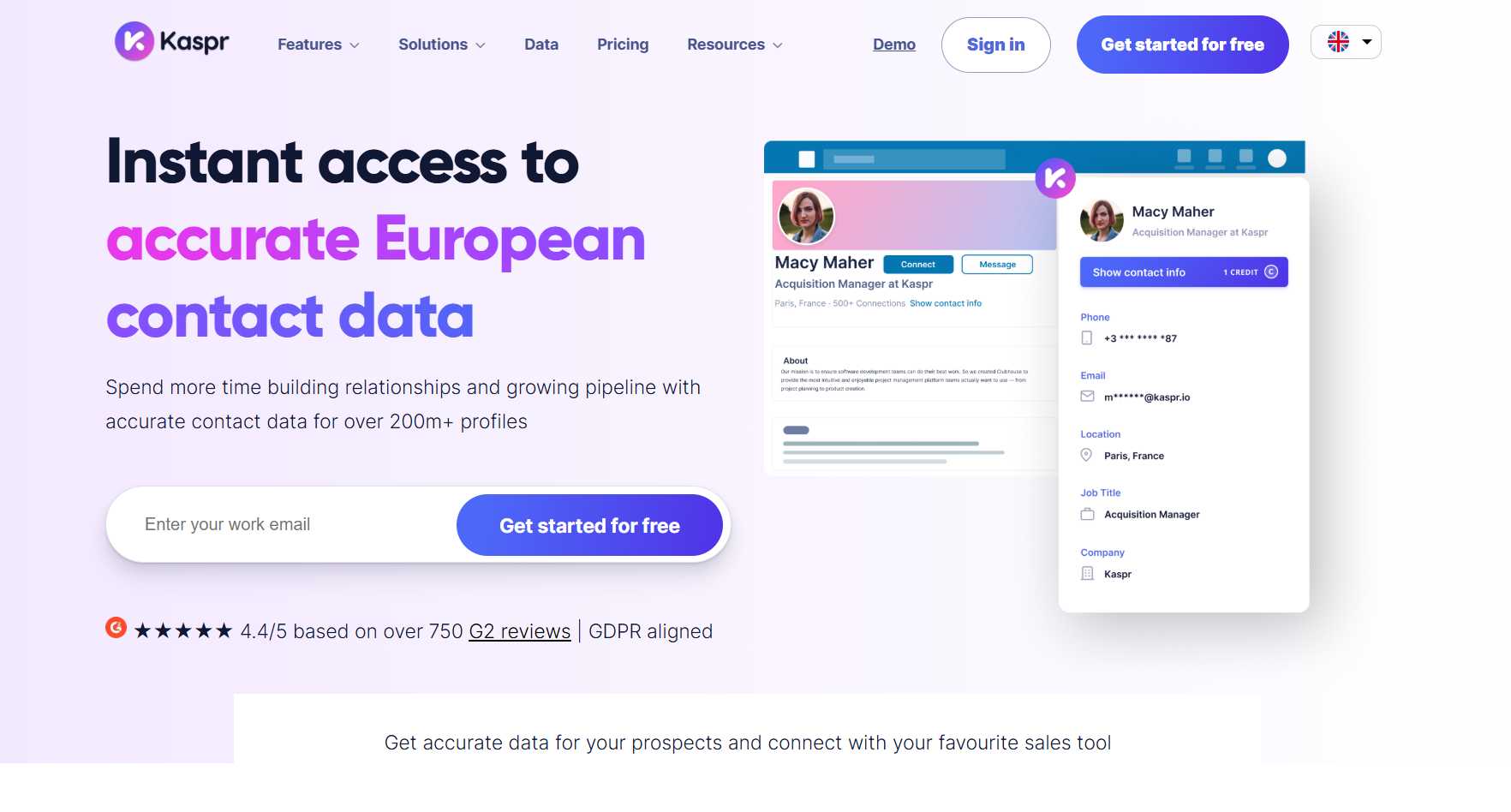
This review covers how Kaspr works, what it actually costs (with updated 2026 pricing from their official site), and whether it delivers on finding accurate contact data. We'll also look at how SalesRobot approaches LinkedIn outreach from a completely different angle.
Kaspr: What You Need to Know
✅ Strong data accuracy: Kaspr gives you access to over 500 million verified phone numbers and email addresses sourced from 120+ providers. Their real-time verification means you're spending less time on dead contacts and bounced emails.
⚠️ LinkedIn only: The Chrome extension only works on LinkedIn (and Sales Navigator/Recruiter Lite on higher plans). You can't pull contact data from company websites, industry directories, or other platforms. That limits your prospecting sources to one channel.
✅ Zero learning curve: You can start finding contacts within minutes of installing the Chrome extension. No complex onboarding, no training sessions, no waiting around. Install it and go.
✅ Built-in compliance: Kaspr is GDPR and CCPA aligned, handling data privacy requirements automatically. If you're prospecting in Europe, you don't have to worry about accidentally stepping on data protection laws.
⚠️ Phone number coverage varies by region: European data coverage is strong, but phone number availability in other markets can be inconsistent. You might find plenty of emails but struggle to get direct dial numbers for prospects outside Europe.
✅ CRM integrations out of the box: Kaspr connects with Salesforce, HubSpot, Pipedrive, Zoho, Lemlist, Brevo, and more. Your enriched contact data syncs automatically without any manual copy-paste work.
⚠️ Credit system gets complex: Kaspr uses three separate credit types (B2B emails, phone credits, direct email credits) plus export limits. The math adds up fast, and what looks like a simple pricing page hides some complexity once you start tracking usage.
Kaspr's Key Features, Broken Down
LinkedIn Chrome Extension
One click on any LinkedIn profile and you get verified phone numbers and email addresses right there. No tab switching, no hunting through separate databases.
Sales reps can build their contact list in real time while browsing prospects on LinkedIn. It works on regular LinkedIn profiles, and on higher-tier plans, it also works on Sales Navigator and Recruiter Lite.
The extension also pulls data from LinkedIn Groups and Events, which is great for grabbing contacts after attending industry webinars or joining niche professional groups.
Bulk Lead Enrichment
Got an existing lead list that's full of gaps? Upload it as a CSV with LinkedIn URLs, and Kaspr will fill in the missing contact data for hundreds or thousands of prospects at once.
This saves hours of manual research. Instead of starting from scratch, you can breathe new life into an old prospect list or clean up a database you inherited from a previous team member.
On the Starter plan, you can enrich up to 500 contacts per upload. Business bumps that to 1,000, and Enterprise goes up to 2,500.
Enrichment Automations
These are workflows that let you enrich and export contacts in bulk without doing everything manually.
You can set up automations that pull data from LinkedIn searches, Sales Navigator searches, LinkedIn Groups, or LinkedIn Events. On the Business plan, you get up to 10 launches per month with 1,000 contacts per launch.
It's not full outreach automation (Kaspr doesn't send messages), but it does speed up the data collection side of things significantly.
All-in-One Prospecting Dashboard
Manage all your leads, organize them into lists, leave notes, track activity, and manage tasks from one centralized hub.
It's not a full CRM replacement, but it's useful for keeping your prospecting organized before you push contacts into your main CRM. You can tag leads, set reminders, and keep your team aligned on who's being worked.
Native CRM Integrations
Kaspr integrates with the big players: Salesforce, HubSpot, Pipedrive, Zoho, Lemlist, and Brevo. There's also Zapier support on the Starter plan and above for custom workflows.
Your enriched data flows right into your existing setup without manual imports. If your team is already invested in a specific CRM, Kaspr plugs in without disrupting what you've got.
Dialer integrations with Aircall and Ringover are also available across all plans, which is a nice touch for teams doing phone-heavy outreach.
API Access
On the Starter plan, you get limited API access (20 requests/hour, 60/day). The Business plan opens that up to 250 requests/hour and 500/day. Enterprise gets unlimited.
This is useful for dev teams that want to build custom integrations or pull contact data programmatically into proprietary systems. API access is available upon request, so you'll need to reach out to Kaspr to get it activated.
Kaspr Pricing: How Much Will It Actually Cost?
Kaspr uses a credit-based system with three separate credit types, so it's worth understanding how each one works before committing. All prices below are in USD, billed annually. Monthly billing adds about 25% to each price.
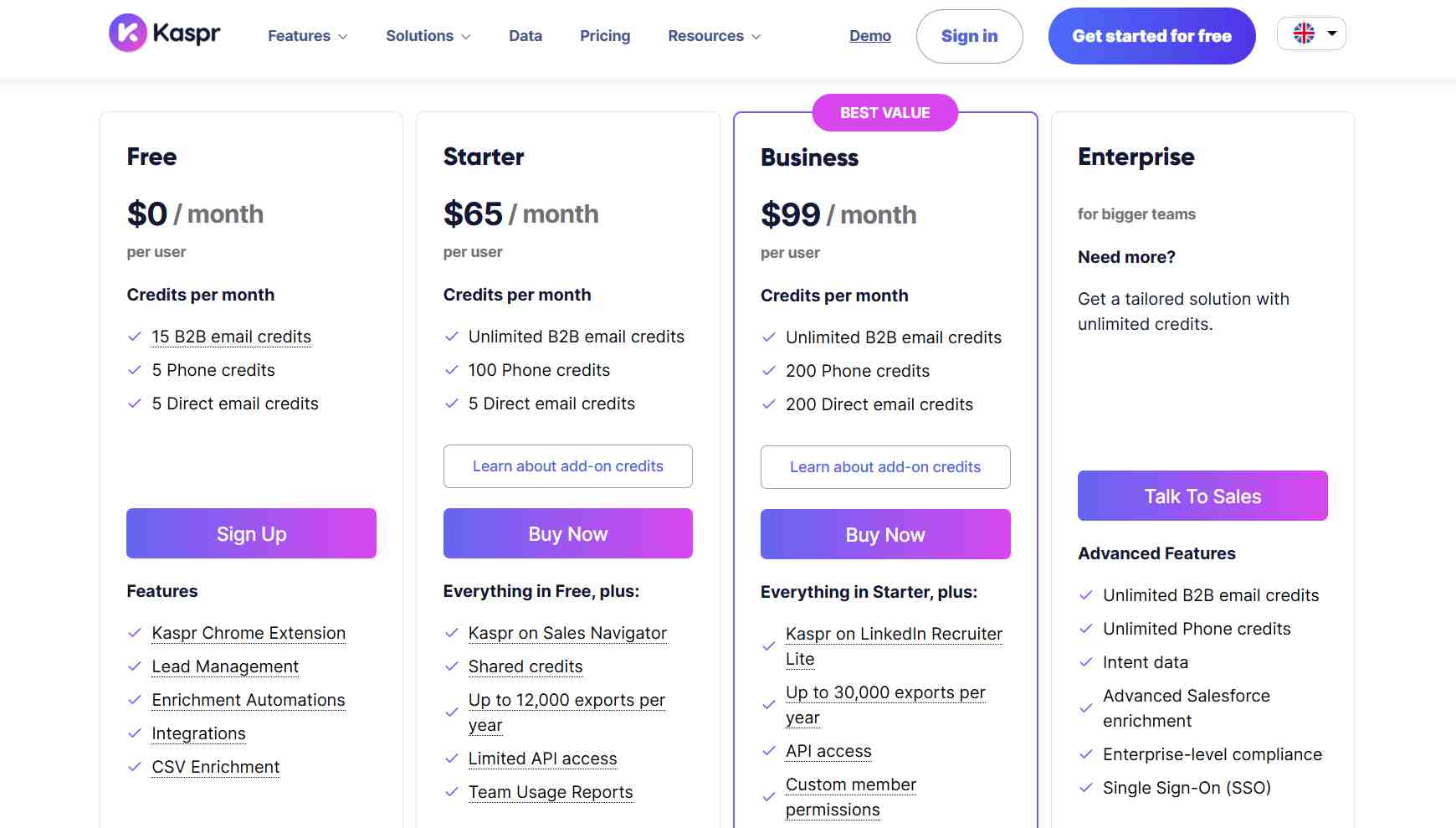
Free Plan: $0/month
- 15 B2B email credits per month
- 5 phone credits per month
- 5 direct email credits per month
- 100 export credits total
- LinkedIn Chrome extension
- Basic lead management dashboard
- CRM integrations (Salesforce, HubSpot, Pipedrive, Zoho)
- Up to 3 enrichment automation launches/month (25 contacts each)
- GDPR and CCPA aligned
Solid for testing the platform and seeing if the data quality matches what you need. But those 5 phone credits go fast. Really fast.
Starter Plan: $49/month per user (billed annually) | $65/month (monthly)
- Unlimited B2B email credits
- 1,200 phone credits per year (works out to ~100/month)
- 60 direct email credits per year (~5/month)
- 12,000 exports per year
- Everything in Free, plus:
- Sales Navigator support
- Shared team credits
- Up to 500 contacts per CSV enrichment
- Limited API access (upon request)
- Team usage reports
- Zapier integration
Good for solo sales pros or small teams doing moderate prospecting. The unlimited B2B emails are great, but note that direct email credits are still very limited at this tier.
Business Plan: $79/month per user (billed annually) | $99/month (monthly)
- Unlimited B2B email credits
- 2,400 phone credits per year (~200/month)
- 2,400 direct email credits per year (~200/month)
- 30,000 exports per year
- Everything in Starter, plus:
- Recruiter Lite support
- Up to 1,000 contacts per CSV enrichment
- Full API access (250 req/hour, 500/day)
- Custom member permissions
- Exportable usage reports
- Up to 10 automation launches per month
The sweet spot for growing sales teams that need consistent phone and email data. The jump in direct email credits from 60/year to 2,400/year is significant.
Enterprise Plan: Custom pricing
- Unlimited everything (B2B emails, phone credits, direct emails, exports)
- Intent data included
- Advanced Salesforce enrichment
- Enterprise-level compliance features
- Single Sign-On (SSO)
- Dedicated account manager
- Up to 2,500 contacts per enrichment launch
- Minimum 5 users, annual commitment only
For large organizations with high-volume prospecting needs. You'll need to talk to their sales team for pricing.
Watch Out For: Add-On Credit Costs
If you burn through your included credits, Kaspr lets you buy more. But they're not cheap.
Phone credit add-ons start at $0.36 per credit for 250 credits, dropping to $0.21 per credit if you buy 10,000. Direct email add-ons start at $0.16 per credit and drop to $0.11 at scale.
These can sneak up on you during busy months, so keep an eye on your usage.
Kaspr vs SalesRobot: How Do They Compare?
These are fundamentally different tools solving different parts of the sales process. Here's how they stack up:
Choose Kaspr if you already have outreach tools in your stack and just need a reliable data source for phone numbers and emails.
Pick SalesRobot if you want one platform that handles finding prospects, reaching out, following up, and booking meetings.
SalesRobot: The LinkedIn-First Alternative
Kaspr is great at answering the question "how do I find this person's phone number?"
But we built SalesRobot to answer a bigger question: "how do I actually start a conversation with this person and get them on a call?" 🤝
What SalesRobot Actually Does
SalesRobot is our cloud-based sales automation platform built for LinkedIn outreach and cold email campaigns.

We built it specifically for B2B sales teams and agencies who want to automate their prospecting without risking account bans or sounding like a bot. And we've spent a lot of time making sure the "not sounding like a bot" part actually works.
Multi-Step LinkedIn Sequences
You can set up automated flows that send connection requests, follow-up messages, and InMails (up to 50/day to open profiles, with no InMail credits consumed) based on how your prospect responds.
Smart reply detection stops the sequence the moment someone responds, so you never accidentally spam an interested lead. The whole thing runs on autopilot while you focus on actual conversations.
AI-Powered Voice and Video Notes
This is one of our biggest differentiators. You can send personalized voice messages and video clips at scale using AI cloning technology.

We've seen 40%+ reply rates with these because they feel personal. Not templated, not robotic. They sound like you sat down and recorded something specifically for that person.
Mobile API Safety
Most LinkedIn automation tools use browser extensions or browser automation, which is basically painting a target on your account for LinkedIn's detection systems.
Our infrastructure uses LinkedIn's mobile app APIs instead, running on residential IPs with cloud execution. Your activity looks completely natural. We've maintained near-zero ban rates across our entire user base, and that's not a number we throw around lightly.
Smart Daily Limits
Our system automatically throttles your outreach to stay within LinkedIn's safe zone.

You can send up to 75 connection requests and 75 messages daily without triggering restrictions. The limits adjust in real time based on your account's activity patterns, so there's no guesswork involved.
AI Appointment Setter
This is an optional add-on that manages your inbox and books meetings automatically.

When a lead responds and you're in another meeting (or asleep), the AI jumps in within minutes. It handles the back-and-forth, qualifies the lead, and books the meeting right into your calendar. It learns how you talk and uses your proven responses to handle objections.
Unified LinkedIn + Email Campaigns
You can combine LinkedIn outreach with cold email sequences in one platform.
No need to juggle multiple tools or worry about coordination between channels. Everything runs from a single dashboard with unified analytics.
SalesRobot Pricing
We charge per LinkedIn account, with annual billing discounts of up to 35%.
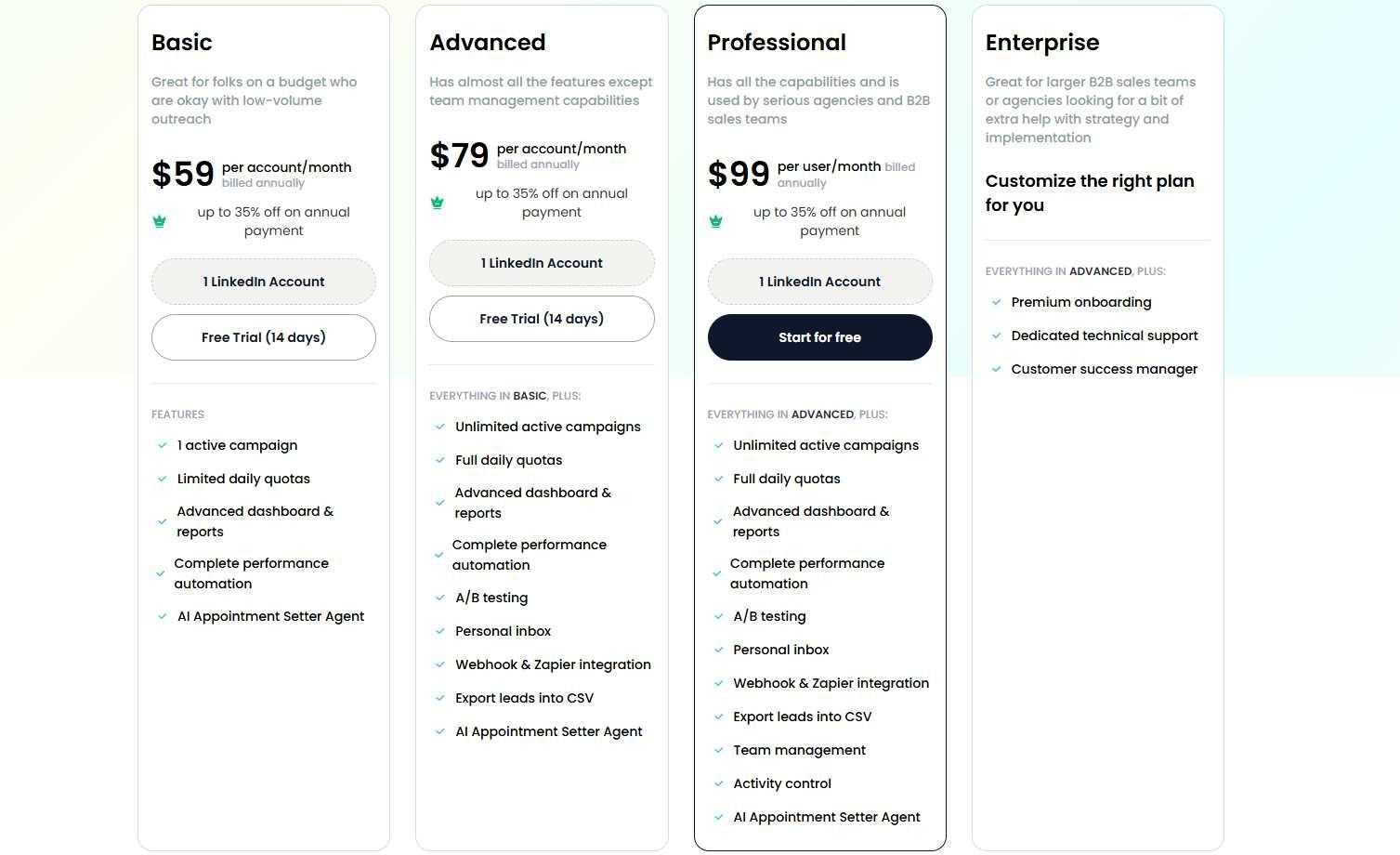
Basic: $59/month ($39/month billed annually)
- 1 active campaign
- Limited daily quotas (20 connections, 20 messages)
- Core automation features
- AI personalization included
Good for solopreneurs testing LinkedIn automation on a budget.
Advanced: $79/month ($59/month billed annually)
- Unlimited campaigns
- Full daily quotas (75 connections, 75 messages)
- A/B testing and webhooks
- Personal inbox management
- Zapier integration
The sweet spot for individual sales professionals and small teams.
Professional: $99/month ($79/month billed annually)
- Everything in Advanced
- Team management and collaboration
- Activity control across accounts
- Advanced analytics dashboard
- Lead CSV exports
Built for agencies and sales teams managing multiple accounts.
Enterprise: Custom
- Everything in Professional
- Premium onboarding and training
- Dedicated customer success manager
- Priority technical support
For larger organizations needing hands-on support and custom implementation.
Volume discounts kick in after 10 accounts (33% off) and again after 20 accounts (45% off). Email automation is available as a separate add-on at $15/month per email account.
The Verdict
Kaspr does one thing and does it well: finding contact data from LinkedIn profiles.
The Chrome extension is smooth, the data quality is solid (especially in Europe), and the unlimited B2B emails on paid plans are generous. If all you need is a reliable way to grab phone numbers and email addresses, Kaspr delivers.
But it stops at data collection. You're on your own for outreach, follow-ups, and relationship building. That means you'll need additional tools in your stack to actually do anything with the data you've collected.
The credit system is also something to watch. Three separate credit types, plus add-on pricing that can sneak up on you during busy months. Small teams will appreciate the simplicity of the free plan, but enterprise-level prospectors might find the credit math frustrating.
If your workflow is "find data, then use other tools to reach out," Kaspr is a solid choice.
But if you'd rather skip the multi-tool juggling act and automate the entire process from prospecting to booked meetings, that's exactly what we built SalesRobot to do. You can try it free for 14 days with no credit card required and see the difference for yourself.
Frequently Asked Questions
How accurate is Kaspr's data by region?
Kaspr is strongest in Europe, where it draws on 200M+ European B2B contacts and reports around 87% accuracy. Coverage weakens outside Europe — US mobile phone accuracy is notably lower, so US-focused teams may find fewer direct dials than European prospectors.
Is Kaspr owned by Cognism?
Yes. Cognism acquired Kaspr in 2022, and the two now operate as siblings inside the Cognism Group. They share the same underlying data infrastructure but stay separate products: Cognism targets mid-market and enterprise teams, while Kaspr serves individual reps and small teams prospecting on LinkedIn.
Does Kaspr integrate with SalesRobot directly?
No, there is no direct native integration between Kaspr and SalesRobot. To use them together, you can export your enriched prospect data from Kaspr as a CSV file and upload it into SalesRobot to launch your automated LinkedIn and email outreach campaigns.
Can I use Kaspr without a LinkedIn Sales Navigator account?
Yes. Kaspr’s Chrome extension works on free, basic LinkedIn profiles on all plans (including the Free plan). However, if you want to extract contact data while using LinkedIn Sales Navigator, you will need the Starter plan or higher. For Recruiter Lite, you’ll need the Business plan.
What happens if Kaspr cannot find a contact's email or phone number?
Kaspr only deducts credits when it successfully finds verified contact information. If no phone number or email address is retrieved for a specific profile, your credit balance remains unchanged.

Wow your leads by cloning yourself and sending personalized videos and voice notes to each lead on LinkedIn.
If you don't reply to leads within 5 mins, your chances of converting them fall by 50%. Our AI replies on your behalf instantly! (and yes, you can train it)

Don't shoot in the dark. Get detailed analytics on what's working

SalesRobot allows you to invite other team members, so that they can add their LinkedIn Account, run outreach campaigns and get amazing results just like you.
.avif)


Trusted by 4100+ innovative B2B sales teams and lead gen agencies

.avif)

.avif)




.avif)


Heading 1
Heading 2
Heading 3
Heading 4
Heading 5
Heading 6
Lorem ipsum dolor sit amet, consectetur adipiscing elit, sed do eiusmod tempor incididunt ut labore et dolore magna aliqua. Ut enim ad minim veniam, quis nostrud exercitation ullamco laboris nisi ut aliquip ex ea commodo consequat. Duis aute irure dolor in reprehenderit in voluptate velit esse cillum dolore eu fugiat nulla pariatur.
Block quote
Ordered list
- Item 1
- Item 2
- Item 3
Unordered list
- Item A
- Item B
- Item C
Bold text
Emphasis

Superscript
Subscript