.avif)
TL;DR
- Anchor every request to a specific trigger (a post, a job change, a mutual connection).
- Keep it to 120 to 180 characters.
- Use the CTR framework (our shorthand for Context, Tie, Request). No pitch, no link, no meeting ask in the note itself.
- Choose a personalized note (120 to 180 characters, no pitch) when you have a genuine trigger. Choose a clean blank request when you don't. A fake compliment hurts more than no note.
- Or skip the manual work entirely: you can use SalesRobot that personalizes each request with AI Variables and can increase your acceptance rates. Try free for 14 days.
Why Are Your Connection Requests Getting Ignored?
You're sending requests. And most of them are just getting ignored.
It's almost never a volume problem, it's a message problem.
People pitch in the first sentence, lead with "I came across your profile," or write something so generic it could be addressed to literally anyone with a pulse and a LinkedIn account.
Here's the truth top performers already know: the goal of a connection request is not to start a sales conversation.
The goal is simply to get accepted.
Personalized requests are reported to land meaningfully higher acceptance than generic outreach, with one dataset putting it at roughly 45% vs 15%, a clean 3x difference.
Yet the broader industry average still sits closer to 26 to 30%, because most people never bother with the trigger.
This guide gives you the framework, the current best estimates on 2026 character limits, five paste ready templates, and the mistakes that get you rejected before anyone even reads your note.
What LinkedIn's 2026 Rules Actually Allow Before You Write a Word
Before you write a single message, know the limits, because they decide how much room you actually have.
Here's what you're dealing with:
A few things that trip people up:
LinkedIn has limited noted invitations on free accounts to roughly 5 per month.
There is no single published weekly ceiling. A baseline of around 100 requests per week is most commonly reported for typical accounts, with high SSI, mature, or paid accounts sometimes reaching 150 to 200 per week.
Newer or free accounts are safer staying under 80 per week.
Safe pacing matters more than max volume. Stick to 10 to 15 requests per day, and never more than 10 in a single hour.
Even where the cap might be 300 characters, you almost never want to use them all.
Notes between 120 and 180 characters consistently win on acceptance across the trackers we reviewed. Short and specific beats long and rambling every time.
Step 1: Find Your Trigger Before You Write Anything
Every message that gets accepted is anchored to a specific reason for reaching out. "We're both in SaaS" is not a reason. A trigger is.
A trigger answers one question: what specific thing made you decide to message this person today?
- A post they published.
- A comment they left.
- A job change.
- A mutual connection.
- A funding announcement.
Why this matters: relevance >>> timing.
Perfect timing plus a generic message loses to average timing plus a relevant one. The trigger is what makes your note feel like it was written for one human, not blasted to a thousand.
Here are the five triggers that work most reliably:
- Mutual connection: "I noticed we're both connected to Priya."
- They published a post: "Your post on outbound attribution stuck with me."
- Shared group or event: "Saw you in the RevOps Collective group."
- Job change or promotion: "Congrats on the new Head of Growth role."
- Company news: "Saw the Series A announcement, exciting timing."
For example, you could spend 90 seconds scanning a prospect's activity tab, find the post they wrote last week, and open your note with one specific line about it.
That single sentence is reported to be the difference between roughly 45% and 15% acceptance in the dataset cited above.
Step 2: Build the Message Using the 3 Part Framework
Use the CTR framework, our shorthand for Context, Tie, Request. It's the structure behind nearly every connection request that actually gets accepted, and it fits comfortably inside the 120 to 180 character sweet spot.
Here's what each part does:
- Context: your trigger. Why you're reaching out now. (One sentence.)
- Tie: the relevance bridge. What you two have in common, or why this is worth their time.
- Request: a soft CTA, or none at all. "Would love to connect" is plenty. No pitch.
Why the order matters: leading with context proves you're not a bot. Adding a tie makes accepting feel natural. Keeping the request soft removes the pressure that makes people hit "Ignore." Notes built this way are commonly reported to lift acceptance by 20 to 30% over no structure.
Here's the framework in a real 160 character message:
"Hi Sam, really liked your post on cutting CAC without cutting headcount [Context]. We're tackling the same thing on the outbound side [Tie]. Would love to connect."
Notice there's no pitch, no link, no calendar ask. Just a reason, a bridge, and an invitation. That's the whole job.
Step 3: Apply the Framework to Your Scenario (5 Ready to Paste Templates)
Here are five CTR built templates for the most common scenarios, each under 180 characters, each annotated so you can adapt, not just copy. Swap the brackets for real details and you're done.
1. Mutual connection
"Hi [Name], we're both connected to [Mutual] and I keep seeing your name pop up in good company. Working in a similar space and would love to connect."
2. They published a post
"Hi [Name], your post on [topic] genuinely shifted how I think about it. We're working through the same problem on our side. Would love to connect."
3. Same group or event
"Hi [Name], saw you're also in [Group/Event]. Always trying to connect with people thinking seriously about [topic]. Would be glad to link up."
4. Job change or promotion
"Hi [Name], congrats on the [new role] move. Big step. I work with a lot of folks in [their function] and would love to follow your journey."
5. Cold, no obvious trigger
"Hi [Name], I help [audience] with [outcome] and your work in [field] caught my eye. No agenda, just like connecting with sharp people in the space."
One honest note on template 5: if you genuinely can't find a trigger and the best you can do is a fake compliment, send a blank request instead.
A forced "love your work!" is worse than no note at all. More on that next.
Step 4: The 4 Things That Kill Acceptance Before Anyone Reads Your Message
Some mistakes sink your request before the note even registers. Fix these four and you're already ahead of most people in the inbox.
1. A weak profile
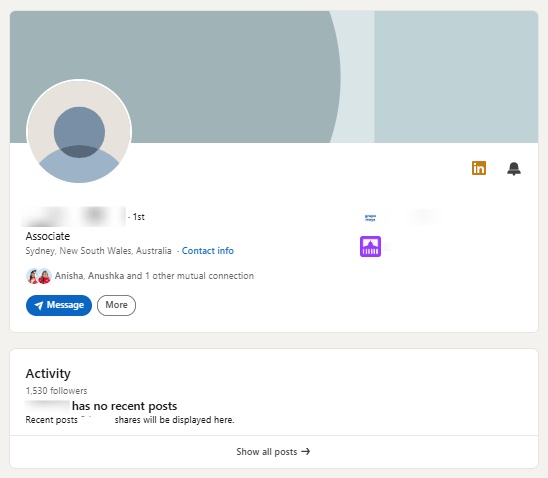
Before someone accepts, they click your profile to check you out. If it looks sparse or spammy, they reject you instantly, no matter how good your note is. Fill out your headline, photo, and about section first.
2. A link in the note
LinkedIn's algorithm treats links in connection notes as a spam signal. Never add a link.
3. A meeting ask
Asking for 30 minutes before someone knows who you are is the equivalent of proposing marriage on the first handshake. Save it for after they accept.
4. A fake compliment
Empty flattery reads as automated. Here's the part that surprises people: across several trackers, noted and blank requests often perform closer together than you'd expect, especially when the note isn't genuinely personalized.
A note's biggest payoff usually shows up after acceptance, in reply rate, not in the accept decision itself. So write one only when you have something real to say.
Here's the cheat sheet:
How To Send Personalized Openers At Scale?

Once you've got a CTR message that works, you hit a wall: how do you send a genuinely personalized version to hundreds of prospects without it reading like a template, or getting your account restricted?
That's the exact gap SalesRobot closes. Here's how, honestly.
It personalizes each request automatically with AI Variables.
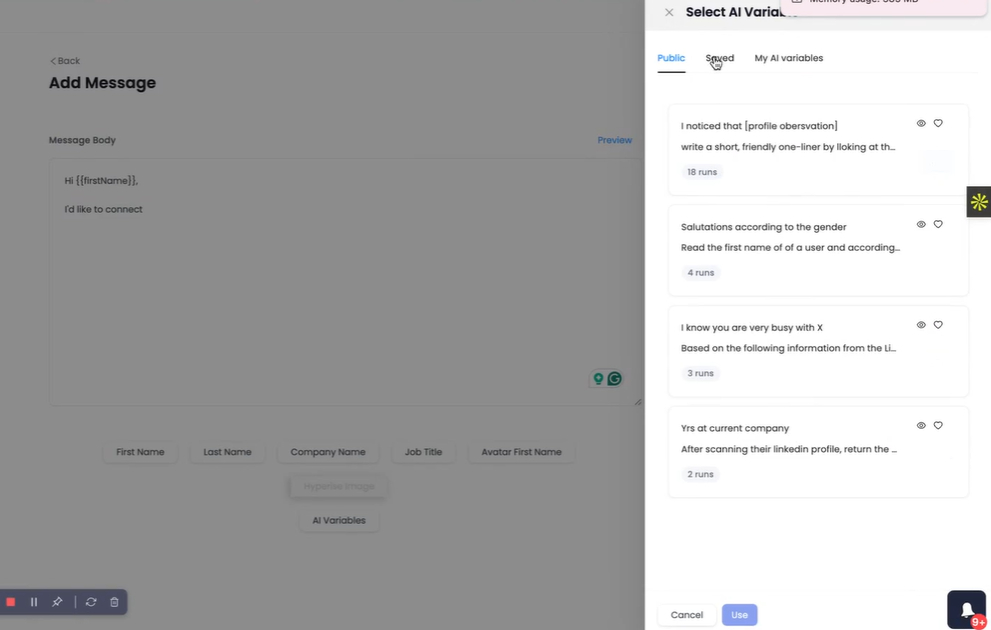
Instead of hand writing every trigger line, SalesRobot's AI Variables pull relevant details straight from each prospect's LinkedIn profile, recent job changes, company news, shared connections, even volunteer work, and weave them into your message.
Think of it as running Step 1 and Step 2 for every single prospect, automatically.
It warms prospects up before the request lands, with Smart Comments. SalesRobot can automatically leave AI generated comments on a prospect's LinkedIn posts before your connection request arrives.
By the time your note shows up, you're not a stranger, and that warming is associated with higher connection acceptance rates. Once someone accepts, you're not limited to text either: SalesRobot can send AI-personalized voice notes and video messages at scale (users report 40%+ reply rates on these), and its AI Appointment Setter replies to leads within minutes to nurture them toward a booked meeting on autopilot.
Pricing starts at $39/month (Basic, billed annually; $59 on monthly billing), with a 14 day free trial and no credit card required.
Frequently Asked Questions
How long should a LinkedIn introduction message be?
Aim for 120 to 180 characters: long enough to include a trigger and a soft request, short enough to read in a glance. Current trackers commonly report a cap of 300 characters on Premium and Sales Navigator and 200 characters on free accounts, though LinkedIn has not officially confirmed this split, so it's worth checking your own account. Shorter, specific notes consistently outperform long, rambling ones on acceptance.
Should I send a note with every connection request?
Send one when you have a genuine reason. Across the data we reviewed, a thoughtful note tends to matter most for what happens after acceptance, in your reply rate, rather than dramatically changing whether the request gets accepted in the first place. The catch: a forced or fake note reads worse than none. No real trigger? A clean blank request is the better call.
How do I introduce myself on LinkedIn without sounding salesy?
Lead with a trigger, not a pitch. Use the CTR framework: Context (why you're reaching out now), Tie (your shared relevance), Request (a soft "would love to connect"). Never include a link, a price, or a meeting ask in the note. The introduction's only job is getting accepted. Selling comes after.
Is a blank connection request ever okay?
Yes. When you have no genuine trigger and your only alternative is a generic or fake compliment, a blank request is the smarter move. Reported acceptance rates between thoughtful notes and blank requests vary across sources, but a forced note rarely outperforms a clean blank one, so it adds risk without reliable reward. Save your notes for prospects you can speak to specifically.
What's the best time to send LinkedIn messages?
Tuesday through Thursday, generally mid morning in the recipient's timezone, is commonly reported as the strongest window. Weekends and Monday mornings tend to underperform. That said, timing is secondary. A relevant message at an average time beats a generic message sent at the "perfect" moment.
What if someone doesn't respond to my LinkedIn message?
Acceptance is not a reply, so don't panic. Most accepted requests tend to be accepted within the first several days, though we don't have a single verified figure to cite for the exact percentage and timeframe. After they connect, start a short, value first follow up sequence, never a meeting ask out of the gate. Give it space, lead with relevance, and follow up once or twice before moving on.
Conclusion: One Good Message Is a Starting Point, Not a Strategy
The takeaway is simple: anchor every connection request to a real trigger, build it with the CTR framework (Context, Tie, Request), keep it to 120 to 180 characters, and never pitch in the note.
Here's the honest reality check, though. Even a strong message won't save a weak profile or break through a flooded inbox on its own.
The framework is the highest leverage input you have, but it's still just an input.
Once you've validated a message that gets accepted, the next problem is scale: doing it for hundreds of people without losing the personalization that made it work.
That's where SalesRobot earns its keep.
AI Variables personalize each request automatically, Smart Comments warm prospects up before you reach out, and because SalesRobot runs in the cloud on LinkedIn's mobile-app APIs (no Chrome extension) with dedicated residential IPs, it keeps you inside LinkedIn's limits with a ban risk of about 0.00001%.
SalesRobot reports a 51% acceptance rate and a 55% average reply rate among its customers, above the roughly 26 to 30% industry average.
Try free for 14 days, no credit card required.

Wow your leads by cloning yourself and sending personalized videos and voice notes to each lead on LinkedIn.
If you don't reply to leads within 5 mins, your chances of converting them fall by 50%. Our AI replies on your behalf instantly! (and yes, you can train it)

Don't shoot in the dark. Get detailed analytics on what's working

SalesRobot allows you to invite other team members, so that they can add their LinkedIn Account, run outreach campaigns and get amazing results just like you.
.avif)


Trusted by 4100+ innovative B2B sales teams and lead gen agencies

.avif)

.avif)




.avif)


Heading 1
Heading 2
Heading 3
Heading 4
Heading 5
Heading 6
Lorem ipsum dolor sit amet, consectetur adipiscing elit, sed do eiusmod tempor incididunt ut labore et dolore magna aliqua. Ut enim ad minim veniam, quis nostrud exercitation ullamco laboris nisi ut aliquip ex ea commodo consequat. Duis aute irure dolor in reprehenderit in voluptate velit esse cillum dolore eu fugiat nulla pariatur.
Block quote
Ordered list
- Item 1
- Item 2
- Item 3
Unordered list
- Item A
- Item B
- Item C
Bold text
Emphasis

Superscript
Subscript