.avif)
TL;DR
- LinkedIn outreach in 2026 runs on a dynamic Trust Score, not a fixed cap. Standard accounts get 100 connection requests/week, high-trust accounts reach 150 to 200, and flagged accounts drop to ~50.
- Your acceptance rate controls everything: stay above 40 to 60% or LinkedIn quietly throttles you. Drop below 30% and the algorithm tightens your reach.
- Personalization beats volume. 5 minutes of account research lifts reply rates 3 to 5x, and AI-driven first messages get 61% more responses (4.19% vs 2.60%).
- Keep messages under 100 words, follow up within 24 to 48 hours, and go multi-channel: LinkedIn reply rates (10.3%) double cold email (5.1%).
- The big 2026 mistakes: pitching in the connection note, browser-based automation that gets flagged, and zero personalization. 17% of sellers still send no personalization at all.
- Choose manual outreach if you're sending under 10 messages a day and have time to research each prospect; choose automation like SalesRobot when you need safe scale across 100+ prospects a week without babysitting your account.
- 👉 Skip the manual work: SalesRobot runs safe LinkedIn sequences on mobile API tech with zero account bans and a 55% average reply rate. Try free for 14 days.
Still Sending "Hi [First Name], I Came Across Your Profile…" in 2026?
If that opener still lives in your templates, your reply rate is about to tell on you.
Or well... tell you nothing, because there won't be a reply.
The playbook that worked in 2022, blast 200 generic connection requests and hope a few stick, now gets your account quietly suppressed.
Here's what changed: LinkedIn no longer enforces one flat sending limit. As of 2026, your weekly cap is governed by a dynamic Trust Score that watches your acceptance rate, reply rate, account age, and pending invite pile-up.
Send junk and the algorithm shrinks your reach. Send relevant, well-timed messages and it widens it.
So the game isn't "how many can I send." It's "how many will get accepted and replied to." Volume without acceptance is just noise that hurts your account.
Below are 10 strategies that work under 2026's rules, each with scripts where they help, plus the mistakes actively killing results, and where automation fits in.

2026 LinkedIn Outreach Limits at a Glance
Before the strategies, here are the numbers that govern everything you do on the platform this year.
The weekly cap resets on a rolling 7-day window from your first request, not a calendar week. And new accounts under 30 days old start capped at roughly 50 to 80 requests/week until they earn trust.
1. Build Your ICP Before You Build Your List
Define exactly who you're targeting before you import a single lead, because every other strategy collapses if you're messaging the wrong people.
Your acceptance rate is the metric that controls your weekly cap, and acceptance lives or dies on targeting precision. An acceptance rate below 30% triggers algorithmic tightening; a reply rate that stays low at scale earns you a quiet "Volume Tax" where LinkedIn suppresses your reach.
Nail your ICP across five dimensions: role, seniority, company size, industry, and a trigger event (more on triggers in #6).
For example, instead of "marketing people," target "Heads of Demand Gen at Series B SaaS companies with 50 to 200 employees who posted about pipeline this month." That precision is what keeps acceptance above 40%.
SalesRobot imports leads directly from LinkedIn Search, Sales Navigator, Groups, Events, and CSV uploads. No separate prospecting database needed.
SalesRobot is a LinkedIn and email outreach automation tool that lets you run personalized campaigns on autopilot.
It imports leads directly from LinkedIn Search, Sales Navigator, Groups, Events, and CSV uploads.
No separate prospecting database needed.
2. Warm Up Your Account the Right Way (Especially If It's New)
Ramp your sending volume gradually instead of starting at full throttle. Your Trust Score is built, not granted.
New accounts (under 30 days old) are capped at roughly 50 to 80 requests/week, and even established accounts need a ramp after a quiet stretch. Burst sending after inactivity is a classic flag trigger.
Remember the cap is a rolling 7-day window, not a calendar reset. If you fire 100 requests Monday, you're locked until next Monday, not the 1st of the month.
A safe ramp looks like this: start at 10 to 15 requests/day in week one, climb to 20 to 25 by week three, and only push toward the 100/week ceiling once your acceptance rate proves you've earned it.
SalesRobot runs cloud-based with randomized delays and human-like daily limits, so sending stays consistent instead of spiky, which is exactly what the Trust Score rewards.

3. Write Connection Requests That Get Accepted, Not Ignored
Keep the note short, relevant, and low-friction. You have 200 characters on a free account, 300 on Premium, which is roughly 2 to 3 sentences.
The formula: relevance hook + specific observation + a soft ask. No pitch. The connection note exists to get accepted, not to sell.
Here's a copy-paste template:
"Hi [Name], saw your post on [specific topic]. We work with [their role] at [company type] on [outcome]. Would love to connect and trade notes."
Personalization is the multiplier here. Spending 5 minutes researching an account before reaching out lifts reply rates 3 to 5x versus a blind template. And 71% of B2B buyers now expect personalized interactions; generic notes get ignored.
For example, you could reference a prospect's recent job change or a piece of company news in the note. SalesRobot's AI Variables feature pulls exactly that (recent job changes, company news, shared connections) from each prospect's LinkedIn profile and personalizes the note automatically, so 5-minute research scales to hundreds of prospects.
4. Send the Follow-Up Message Everyone Skips
After someone accepts your request, follow up. Most reps never do, and that single gap is where pipeline dies.
A three-touch sequence (connect → value message → follow-up) dramatically outperforms one-and-done outreach. The benchmark to aim for is a 20 to 40% reply rate; single-touch outreach rarely gets there.
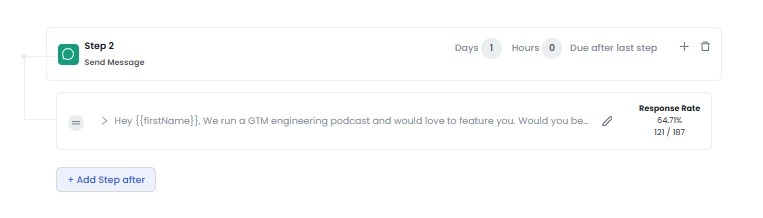
Timing matters: send your value message within 24 to 48 hours of acceptance, while you're still fresh in their mind.
Copy-paste follow-up script:
"Thanks for connecting, [Name]. Quick reason I reached out: we help [their role] with [specific outcome]. Most teams I talk to struggle with [pain]. Worth a 15-min chat to see if it's relevant?"
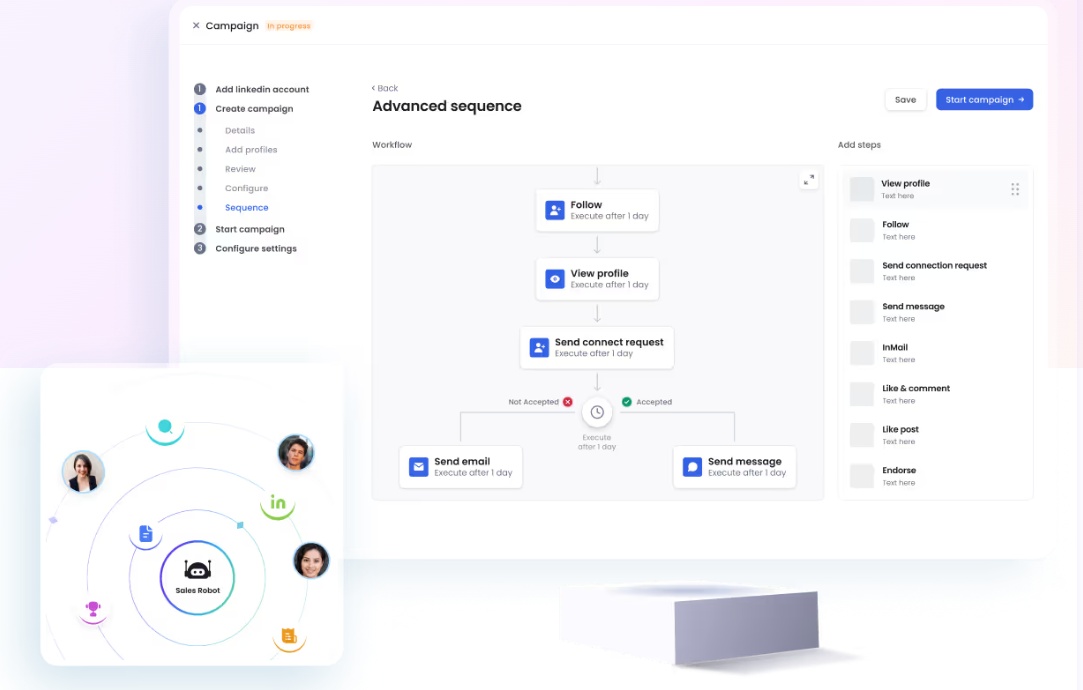
SalesRobot automates the full connection → message → follow-up sequence and runs 24/7 in the cloud, so the 24-hour follow-up window never gets missed because you were in meetings.
5. Nail the Message Length and Structure
Keep every outreach message under 100 words: 3 to 4 sentences, readable in under 30 seconds.
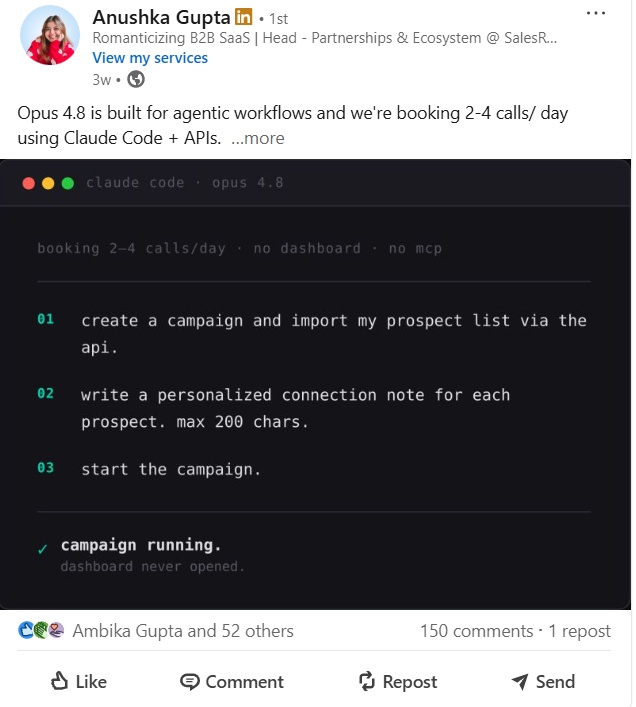
The data is unambiguous: short wins. An InMail under 400 characters gets 22% higher response than a long one. Nobody reads your three-paragraph life story.
Use this structure: one observation about them + one relevant pain or outcome + one clear ask. That's it.
What to cut: your company's founding year, your full feature list, and any sentence starting with "I wanted to reach out because." If a line doesn't earn a reply, delete it.
The discipline of writing short forces you to be relevant, which is the whole point in 2026.
We post tips like this all the time. Follow us on LinkedIn so you don't miss out!
6. Use Signal-Based Triggers to Time Your Outreach
Reach out when the prospect has a reason to care. Signal-based timing is the dominant outreach shift of 2026, and spray-and-pray is officially dead.
The highest-converting outreach lands on a trigger: a job change, fresh funding, engagement on a relevant post, or activity in a shared LinkedIn group or event. These signals lift relevance without extra writing effort.
Specific triggers and a script line for each:
- Job change: "Congrats on the new role at [company]. Usually a busy first 90 days. We help [role] with [outcome] during exactly that window."
- Funding announcement: "Saw the [round] news, congrats. Teams scaling post-raise usually hit [pain]. Worth a chat?"
- Post engagement: "Your take on [topic] resonated. We see the same thing with [their segment]."
SalesRobot imports prospects from LinkedIn Groups and Events directly, and its AI Variables surface recent job changes and company news automatically, so you're acting on signals instead of hunting for them.
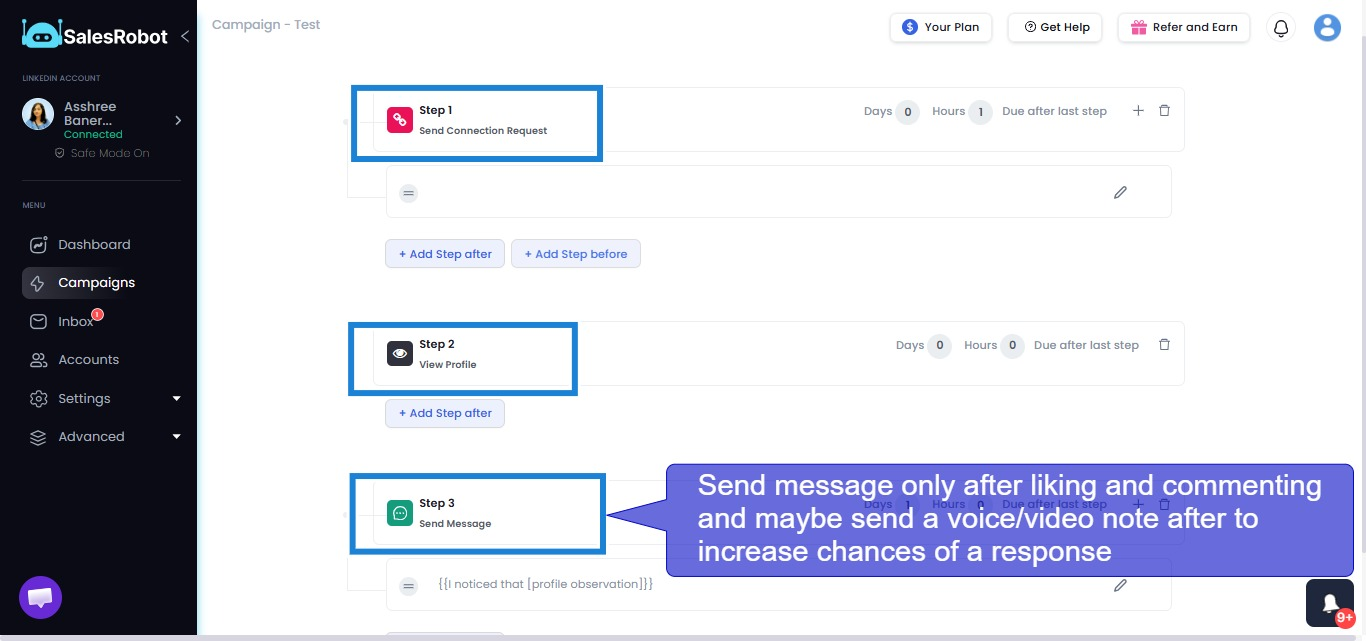
7. Add a Video or Voice Note to Stand Out
Drop a 30 to 60 second video or voice note into your sequence. It creates a human moment text simply can't replicate.
Text messages are increasingly filtered out at a glance. A short video that says the prospect's name and references something specific about them breaks the pattern.
Best use case: send it as the follow-up after acceptance, to introduce yourself before any pitch lands. It earns attention because almost nobody else does it.
SalesRobot lets you record one video or voice note and send it to hundreds of prospects on LinkedIn at scale (up to 50/day), with users reporting 40%+ reply rates on voice- and video-note campaigns.

8. Go Multi-Channel: LinkedIn First, Email Second
Run LinkedIn and email together rather than betting on one. Combined channels beat either alone.
The starting point already favors LinkedIn: its reply rate sits around 10.3% versus cold email's 5.1%, based on Expandi's 2026 analysis of over 70,000 campaigns. But the two channels compound.
The sequence that works: LinkedIn connect → LinkedIn message → email if no reply after 5 to 7 days. You catch people where they actually respond.
After a connection accepts, you can enrich for their work email and continue the thread there if LinkedIn goes quiet.
SalesRobot combines LinkedIn automation with cold email in one platform. Drip campaigns start on LinkedIn and automatically switch to email if the prospect doesn't respond, with email warm-up and deliverability tools included to stay out of spam.
9. Track Acceptance Rate and Reply Rate, Not Just Volume
Watch acceptance rate and reply rate above all else. They're the algorithmic inputs that decide whether LinkedIn widens or tightens your weekly cap.
"Messages sent" is a vanity metric. The two dials that matter: keep acceptance at 40 to 60% and reply rate in the 20 to 40% range.
The penalties are real. Acceptance below 30% triggers tightening. A reply rate stuck below 10 to 15% at scale earns the quiet "Volume Tax," suppressed reach you can't see in your dashboard.
To diagnose a dropping rate: pause sending, tighten your ICP, rewrite your opener, and clear out pending invites before resuming.
For reference, SalesRobot customers average a 51% connection acceptance rate and 55% average reply rate, comfortably above the danger zones.
10. Let AI Handle Replies and Booking, Focus Humans on Closing
Put AI on the conversation layer (qualifying replies, handling objections, and booking meetings) so your humans only show up for the close.
This is the highest-leverage shift of 2026. The data backs it: AI-driven first messages get 61% more responses than non-AI, 4.19% versus 2.60%. AI doesn't just save time; it performs.
Two ways to implement it: a Copilot mode that reviews conversations and suggests replies you approve, or a fully hands-off Autopilot mode.

SalesRobot's AI Appointment Setter does both. Copilot reviews each conversation and suggests personalized replies you approve with one click.
Autopilot manages entire conversations end to end, handles objections, and books qualified meetings into your calendar 24/7, with no human in the loop until the demo.
What Not to Do: 7 LinkedIn Outreach Mistakes Killing Your Results
The strategy is half the battle. Here's what tanks accounts and reply rates in 2026, with the fix for each.
⚠️ Pitching in the connection note. A sales pitch in 300 characters reads as spam and crushes acceptance.
✅ Use the note only to earn the connection; save the pitch for after they accept.
⚠️ Letting pending invites pile up. Hundreds of unanswered requests drag your Trust Score down.
✅ Withdraw invites older than 2 to 3 weeks before sending new ones.
⚠️ Sending blank requests to total strangers. No note plus no context equals low acceptance.
✅ Always add a short, relevant note when reaching out cold.
⚠️ Using desktop automation that mimics browser clicks. Browser-based tools are the easiest for LinkedIn to detect and flag.
✅ Use mobile-API automation like SalesRobot, which mimics human behavior with randomized delays and reports zero account bans under Safe Mode.
⚠️ Blasting 50+ requests/day from a new account. New accounts (<30 days) cap at ~50 to 80/week, and burst sending gets you restricted fast.
✅ Ramp gradually from 10 to 15/day.
⚠️ Ignoring a sub-30% acceptance rate. Pushing volume while acceptance craters compounds the throttle.
✅ Pause, fix targeting and copy, then resume.
⚠️ Using templates with zero personalization. 17% of sellers still send no personalization at all, and it shows in their reply rates.
✅ Reference something specific to every prospect.
How SalesRobot Runs Safe, Scalable LinkedIn Outreach in 2026
If the running theme above is "stay safe while scaling personalization," that's the exact problem SalesRobot is built for. Here's how it maps to the strategies.
Safe automation that doesn't get you banned. SalesRobot uses mobile API technology that mimics human behavior patterns: randomized delays, human-like daily limits (up to 75 connection requests/day, fully compliant with LinkedIn limits), and dedicated residential IP rotation per account.
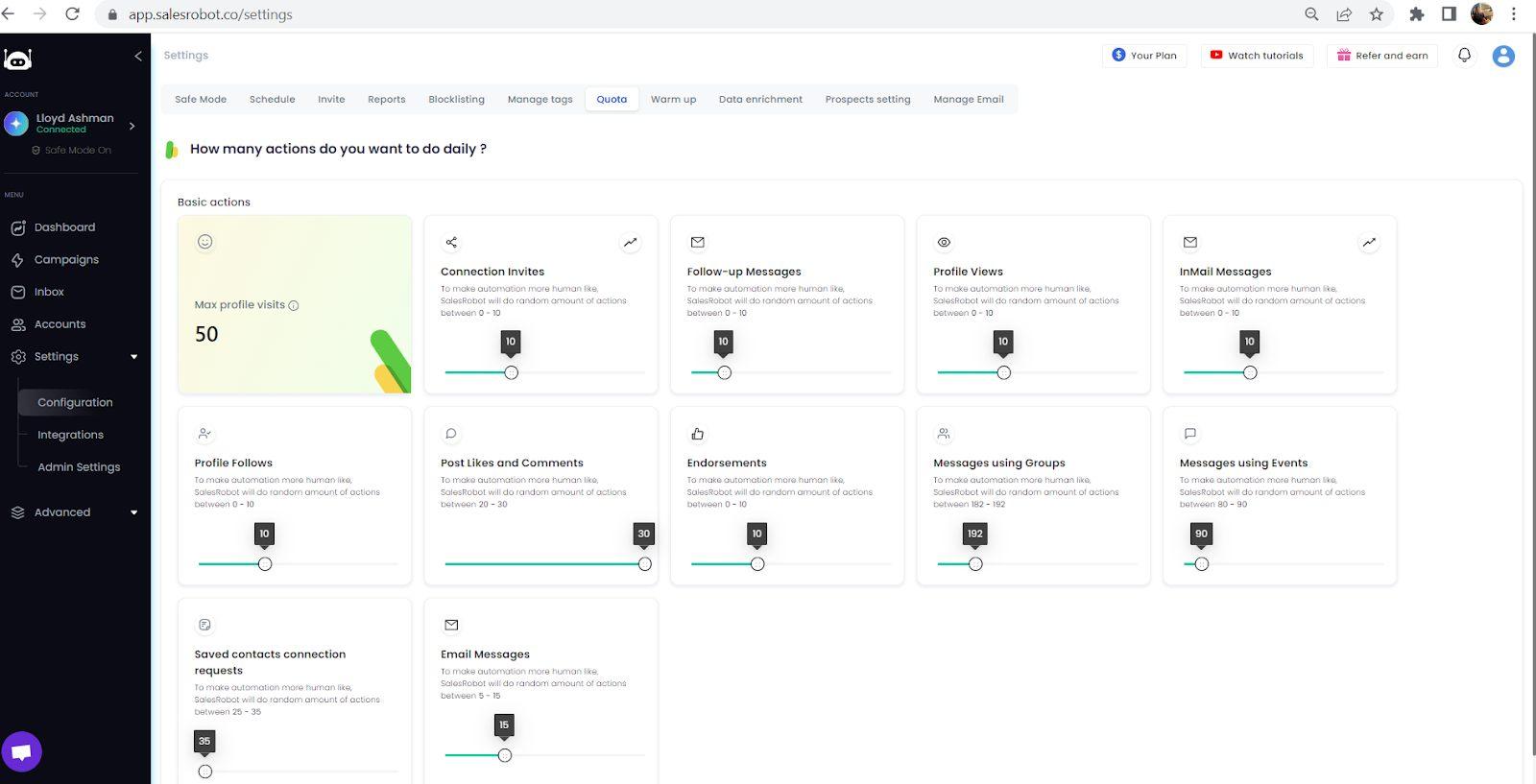
Customers report zero account bans when following Safe Mode guidelines, and it runs cloud-based 24/7 without keeping your browser open.
Personalization at scale. AI Variables pull recent job changes, company news, and shared connections from each prospect's LinkedIn profile to craft hyper-personalized messages automatically.
The AI Appointment Setter then works the replies in Copilot or Autopilot mode, handling objections and booking meetings for you.
Multi-channel plus video. Run LinkedIn and cold email sequences in one place, and send one recorded video or voice note to hundreds of prospects — users report 40%+ reply rates on voice-note campaigns.
The results: a 55% average reply rate across customers, a 51% acceptance rate, and a 66% reply rate in The Growth Agency case study. SalesRobot is trusted by 4,100+ B2B sales teams and rated 4.8 on G2 from 57+ reviews.
Pricing starts at $39/month for Basic (billed annually), with Advanced at $59 and Professional at $79; monthly plans run $59/$79/$99. Annual billing saves up to 35%. There's a 14-day free trial with no credit card required.
Frequently Asked Questions
How do you write an effective LinkedIn outreach message?
Lead with relevance, not yourself.
Reference something specific about the prospect, name one pain or outcome they care about, and end with one low-friction ask.
Keep it under 100 words.
Here's the format that works:
- Mention something specific about them. A recent post, a job change, a company win.
- Connect it to one pain or outcome they care about.
- Give them a reason your message matters before you ask for anything.
- End with one easy ask. A simple yes-or-no question, not a 30-minute call.
We break each of these down with real examples in 12 LinkedIn outreach templates that get 60%+ reply rates.
What is the ideal length of a LinkedIn outreach message?
Under 100 words, but about 50 words on average, in about 3 to 4 sentences, readable in under 30 seconds. Connection notes are capped at 200 characters (free) or 300 (Premium). For InMail, staying under 400 characters earns 22% higher response rates. Short messages force relevance, and relevance is what gets replies in 2026.
How many LinkedIn connection requests can I send per week in 2026?
Standard accounts get about 100 requests per week. High-trust accounts can reach 150 to 200, while flagged accounts drop to roughly 50. New accounts under 30 days old start capped at 50 to 80. The limit is dynamic, governed by your Trust Score, and resets on a rolling 7-day window, not a calendar week.
What is a good response rate for LinkedIn outreach?
A healthy reply rate falls between 20% and 40%. Below 10 to 15% at scale, LinkedIn may quietly suppress your reach. Aim for 40 to 60% connection acceptance alongside it. For comparison, SalesRobot customers average a 51% acceptance rate and 55% reply rate, both well above the warning thresholds.
Should I include a sales pitch in my LinkedIn outreach message?
No, not in the connection request. The note's only job is to get accepted, so keep it to a relevant observation and a soft ask. Save the pitch for after they accept and you've opened a conversation. Pitching too early reads as spam and tanks your acceptance rate.
Is it better to connect first and then message, or send a message with the connection request?
Send a short, personalized note with the connection request. Blank requests to strangers have noticeably lower acceptance. Then follow up with your value message within 24 to 48 hours of acceptance. This connect → message → follow-up sequence outperforms one-and-done outreach and keeps you in the 20 to 40% reply range.
Are LinkedIn voice notes and video messages worth it for outreach in 2026?
Yes. As text messages get filtered out at a glance, a short personalized voice or video note breaks the pattern and earns attention. SalesRobot users report 40%+ reply rates on voice-note campaigns, since almost nobody else sends them, making it a strong differentiator on the follow-up after acceptance.
Wrapping Up: Relevance Wins in 2026
LinkedIn outreach in 2026 rewards the same thing buyers always wanted: relevant, well-timed, human messages at whatever scale you can sustain without wrecking your acceptance rate.
The honest reality check: no tool fixes a bad ICP or a lazy template. If you target the wrong people and pitch in the connection note, automation just helps you fail faster. Get the strategy right first, then scale it.
When you're ready to scale safely, SalesRobot handles the parts that break manual outreach: mobile-API automation with zero bans, AI Variables for real personalization, video and voice notes, multi-channel LinkedIn-plus-email sequences, and an AI Appointment Setter that books meetings while you sleep. Customers average a 55% reply rate, and pricing starts at $39/month (Basic, billed annually).
And if you want to move beyond simply giving sales teams another database or another outreach dashboard and have AI help with the broader go-to-market process:
Kuron is an AI-powered GTM platform from the very team behind SalesRobot, built around a slightly different idea: instead of giving sales teams another tool to operate, why not have AI actually run the outbound process?
See it work on your own pipeline. Try SalesRobot free for 14 days, no credit card required.

Wow your leads by cloning yourself and sending personalized videos and voice notes to each lead on LinkedIn.
If you don't reply to leads within 5 mins, your chances of converting them fall by 50%. Our AI replies on your behalf instantly! (and yes, you can train it)

Don't shoot in the dark. Get detailed analytics on what's working

SalesRobot allows you to invite other team members, so that they can add their LinkedIn Account, run outreach campaigns and get amazing results just like you.
.avif)


Trusted by 4100+ innovative B2B sales teams and lead gen agencies

.avif)

.avif)




.avif)


Heading 1
Heading 2
Heading 3
Heading 4
Heading 5
Heading 6
Lorem ipsum dolor sit amet, consectetur adipiscing elit, sed do eiusmod tempor incididunt ut labore et dolore magna aliqua. Ut enim ad minim veniam, quis nostrud exercitation ullamco laboris nisi ut aliquip ex ea commodo consequat. Duis aute irure dolor in reprehenderit in voluptate velit esse cillum dolore eu fugiat nulla pariatur.
Block quote
Ordered list
- Item 1
- Item 2
- Item 3
Unordered list
- Item A
- Item B
- Item C
Bold text
Emphasis

Superscript
Subscript