.avif)
TL;DR:
LinkedIn Sponsored Messages deliver personalized ads directly to users' inboxes with a 3% average CTR and costs ranging from $0.26-$0.50 per message sent.
They outperform traditional ads by feeling personal and targeting decision-makers, with Lead Gen Forms converting at 13% compared to 2.35% for external landing pages.
LinkedIn is the go-to platform for professionals, but standing out in a crowded feed can be tough. That's where LinkedIn Sponsored Messages come in.
These ads let businesses send personalized messages directly to a user's inbox, making them one of the most powerful ways to grab attention.
But how do they work? And more importantly, how can you use them to boost your sales and engagement in 2025?
In this blog we're about to find out :
- What are LinkedIn Sponsored Messages
- Why you should use LinkedIn Sponsored Messages
- How to set up a LinkedIn Sponsored Message
- Best Practices When Developing LinkedIn Sponsored Messages
- How you can use SalesRobot to set up LinkedIn Sponsored Messages
So grab a cup of coffee… things are about to get super interesting.
What Are LinkedIn Sponsored Messages?
LinkedIn Sponsored Messages (also called Message Ads) are paid advertisements that land directly in a user's LinkedIn inbox.

Instead of seeing an ad in their feed, the user gets a message just like they would from a real person.
Here's why this is a brilliant way for businesses to increase their reach:
✅ Direct Communication – Instead of hoping someone sees your post, you send a message straight to them.
✅ Highly Targeted – You can choose exactly who gets your message based on job title, industry, location, and more.
✅ Higher Engagement – With an average CTR of 3%, people are more likely to open and read a message than click on a random ad.
These messages typically include a call-to-action (CTA), such as a link to a website, webinar sign-up, or lead form.
Example: If you're promoting a marketing webinar, you could send a Sponsored Message saying:
"Hey [First Name], I saw you're in digital marketing! We're hosting a free webinar on AI-powered ads next week. Want to join? Click here to register!"
It feels personal and relevant, which is why LinkedIn Sponsored Messages work so well.
Are LinkedIn Sponsored Messages Real?

Yes, LinkedIn Sponsored Messages are 100% real and effective. They are a legitimate advertising tool that businesses use to engage their target audience.
And most of the time, they are simply not spam.
Some people obviously mistake them for spam, but LinkedIn has strict rules to ensure Sponsored Messages remain professional and relevant.
Here's how LinkedIn controls them:
🔹 Users only receive one Sponsored Message every 30 days to avoid spam.
🔹 Messages are clearly marked as "Sponsored" so people know it's a paid ad.
🔹 You can't send random messages—advertisers must target specific audiences.
So if you get a Sponsored Message, it's because you match the advertiser's criteria, not because they messaged everyone randomly.
How Can I Tell the Difference Between a Message Ad and a Regular LinkedIn Message?
At first glance, Sponsored Messages look like any other LinkedIn message, but there are a few key differences:
💡 Regular LinkedIn Message:
- Sent by a real person in your network.
- It can be replied to freely and as part of an ongoing chat.
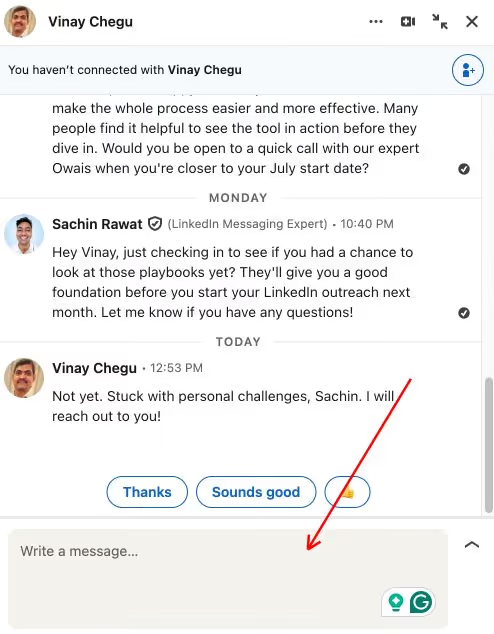
💡 LinkedIn Sponsored Message:
- Marked as "Sponsored" to show it's an ad.
- Often includes a Call-to-Action (CTA) button.
- You can't reply unless the sender allows it.

What's the Difference Between Message Ads and Conversation Ads?
LinkedIn offers two types of Sponsored Messages:
📌 Message Ads:
- One single message with a clear CTA.
- Best for quick offers, event invites, or lead generation.
- Cost ranges from $0.26 - $0.50 per message sent.
📌 Conversation Ads:
- Interactive messages with multiple response options.
- Users can choose their own path (e.g., "Tell me more" or "Sign me up!").
- Great for engagement-driven campaigns.
- Cost ranges from $0.50 to $3.00 per send but often yields lower cost-per-qualified-lead.
Are There Any Restrictions on Message Ads That I Should Be Aware Of?
Yes! LinkedIn has some essential rules for Sponsored Messages:
Why Should I Use LinkedIn Sponsored Messages?
If you're wondering whether LinkedIn Sponsored Messages are worth it, here's why they work better than regular ads:
🎯 Direct & Personal: Feels like a real message, not an ad.
📈 Higher Open Rates: People check their LinkedIn messages more than they click on feed ads.
💰 Better ROI: You only pay for messages that get delivered (not wasted impressions).
📊 Superior Conversion Rates: LinkedIn Lead Gen Forms convert at 13% compared to 2.35% for external landing pages, making LinkedIn 277% more effective than Facebook for B2B lead generation.
🔥 Industry Insights Work Best: Content that focuses on industry insights and data points garners 22% higher engagement than product-focused messaging.
So, sponsored Messages are a must-have in your LinkedIn marketing strategy if you want real engagement.
How to Set Up a LinkedIn Sponsored Message
Setting up a Sponsored Message is easy! Follow these steps:
1️⃣ Go to LinkedIn Campaign Manager.
2️⃣ Click Create Campaign and select Message Ads.

3️⃣ Choose your objective (e.g., lead generation, event registration).

4️⃣ Define your target audience (job titles, industries, locations). For bottom-of-funnel campaigns, target high-intent audiences showing specific behaviors, use contact list targeting for warm leads, and focus on decision-makers within target accounts.

5️⃣ Write your message and CTA button.

6️⃣ Set your budget and launch your campaign!
Once it's live, LinkedIn will deliver your message to your selected audience, and you can track how well it performs.
Best Practices When Developing LinkedIn Sponsored Messages
It can be demotivating if your LinkedIn Sponsored Messages are not getting much of a response. 😔
However, that's easily fixed. Want your Sponsored Messages to get more clicks and responses? Follow these tips:
✅ Choose a Trusted Sender – People respond more when they see a real name and photo.
✅ Write a Strong LinkedIn Message Subject Line – Keep it short, engaging, and relevant.
✅ Keep the Message Short (Under 500 Characters) – Nobody likes reading a long sales pitch.
✅ Make It Personal – Use the recipient's name and job title for a personal touch.
✅ Test Different CTAs – Try multiple call-to-action buttons to see what works best.
✅ Focus on Industry Insights – Content with industry insights and data performs 22% better than product-focused messaging.
How to Use SalesRobot for Personalized LinkedIn Sponsored Messages
Before I tell you how, I have some bad news for you:
LinkedIn has heavily restricted sponsored messages via Campaign Manager in the European Union. You can still send them, but only for audiences who have opted to see them.
Bad news if you are prospecting in Europe.

But all hope is not lost yet, so keep reading, and let me tell you how you can use SalesRobot to create an equally effective (and possibly better) campaign 😇
If you want to automate and personalize your LinkedIn outreach, SalesRobot is the perfect tool.
With SalesRobot, you can:
🤖 Send hyper-personalized LinkedIn messages at scale, including voice and video notes.
📊 Track open and response rates to optimize performance.
📅 Schedule follow-ups automatically to keep leads engaged.
🔗 Combine LinkedIn messages and cold emails for multichannel campaigns.
Instead of managing messages manually, let SalesRobot handle everything while you focus on closing deals!
Creating a hyper-personalized campaign has never been easier.
Let me show you how! 🚀
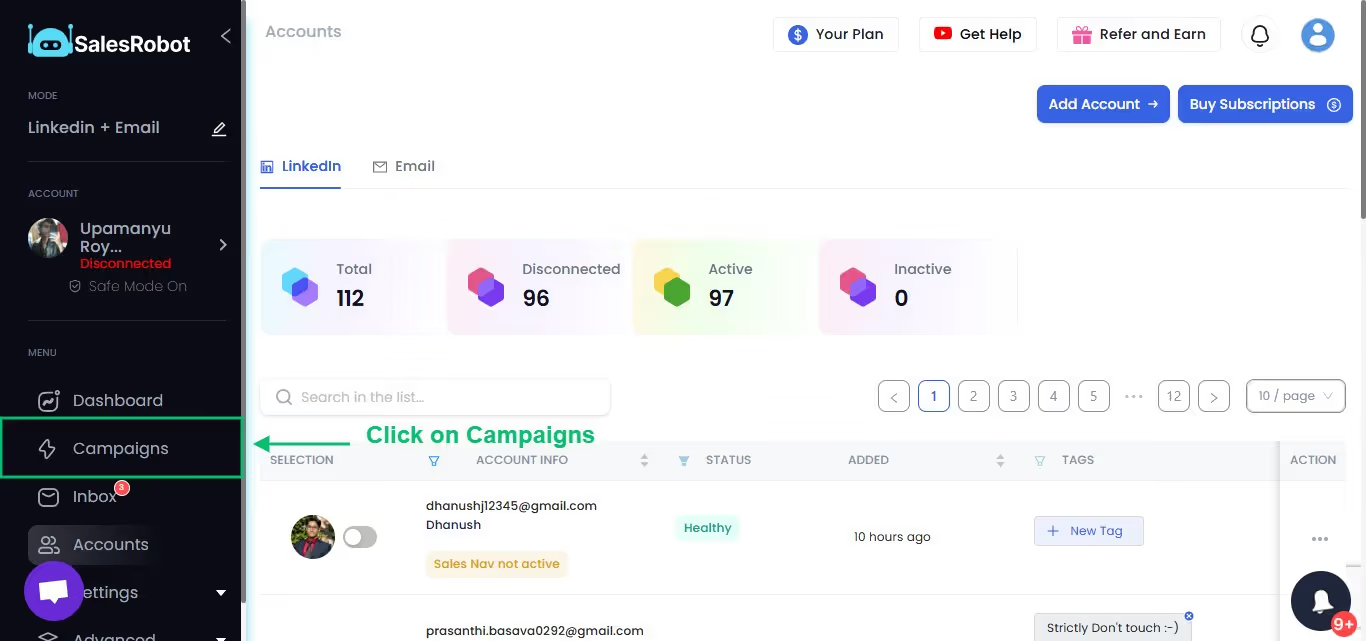
- Log in to your SalesRobot account and click on "Campaigns."
- Select "Create Campaign"

- Select "I'm an advanced user."

- Name your campaign

- Add profiles to your campaign from Sales Navigator/ LinkedIn Search.
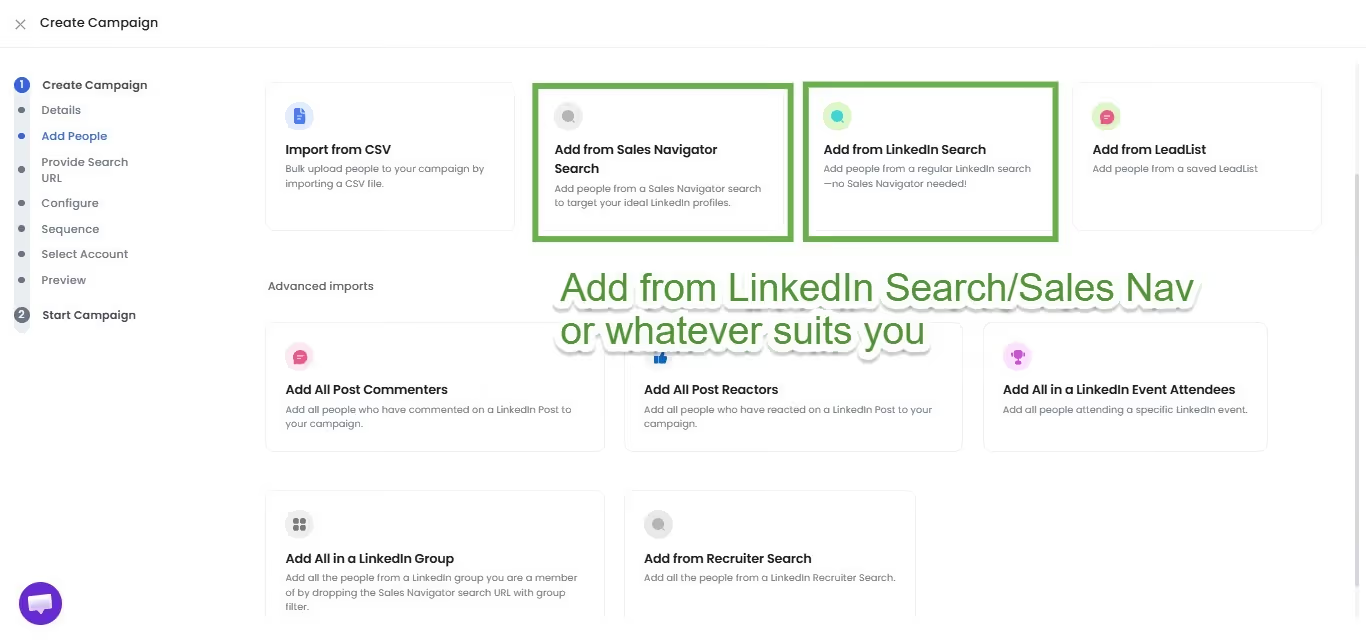
- Import prospects from Sales Navigator/LinkedIn Search

- Select one of our high-performing templates or create one of your own from scratch.

- Add the required steps to your sequence.

- Next, you can set up follow-up messages to keep in touch with your customers and create a sales campaign.

So that's it! Now, you're all set to send out hundreds of personalized connection requests that will take your LinkedIn messaging to a whole new level. 😃
And if you don't have enough time to follow up, our AI Appointment Setter will do the job for you!
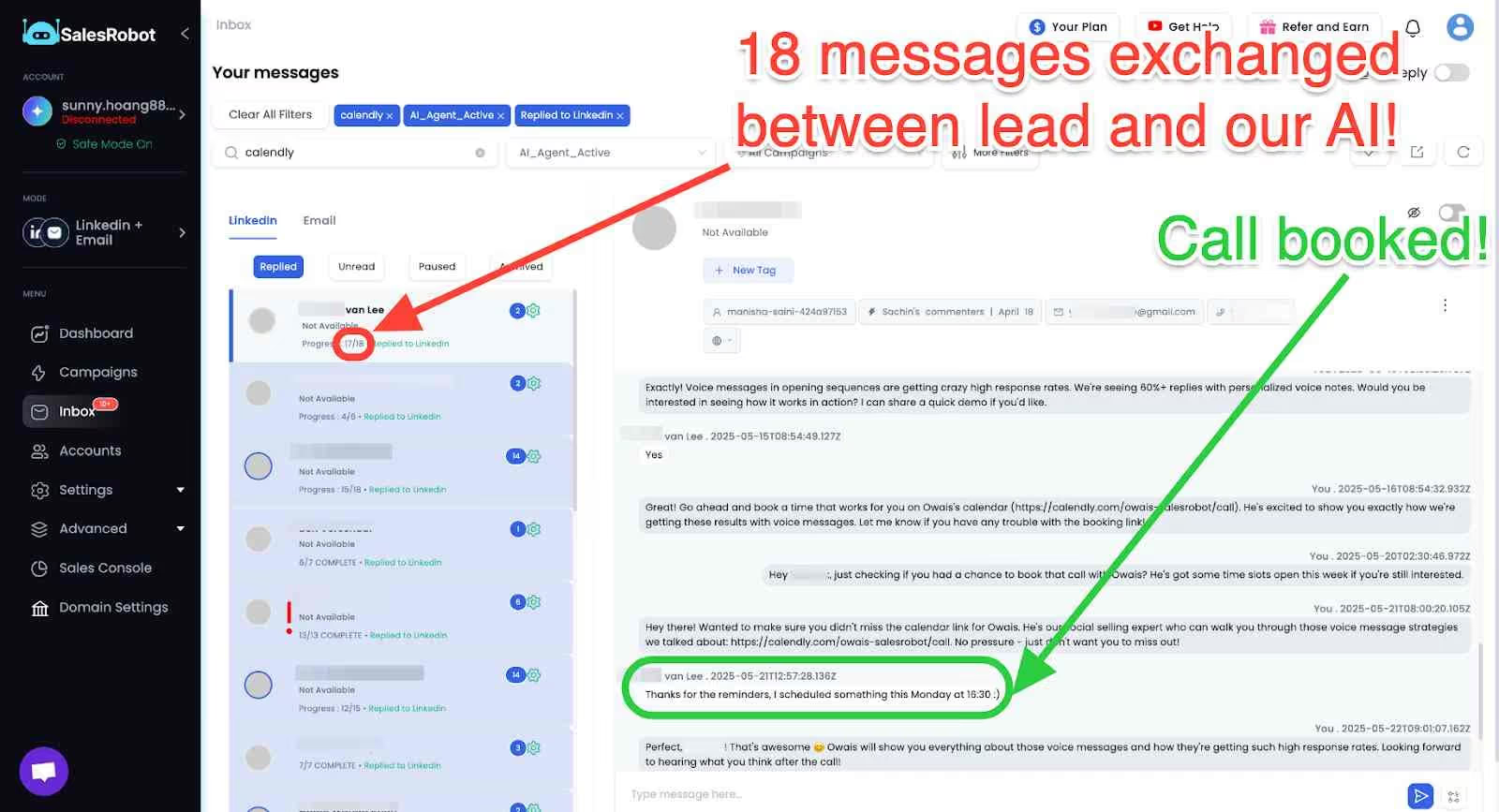
If I've got you interested at all, check out our 14-day free trial. I promise it's worth it!
Conclusion: How LinkedIn Sponsored Messages Can Directly Impact Your Sales
You must be wondering if all this work just to send sponsored messages is worth it. Well, it is, and let me tell you why.
A well-written LinkedIn Sponsored Message can get you :
🔹 More Leads: Reach decision-makers directly in their inbox.
🔹Higher Engagement: Personalized messages = higher open rates.
🔹Faster Conversions: Get responses faster than traditional ads.
Whether selling software, hosting a webinar, or generating leads, Sponsored Messages help you connect with the right people faster.
So we really recommend giving it a try!
Frequently Asked Questions About LinkedIn Messaging
Are LinkedIn Messages Private?
Yes, LinkedIn messages are private conversations between you and the recipient. Only you and the person you're messaging can see the content of your direct messages. LinkedIn doesn't publicly display these conversations anywhere on the platform.
Is It Unprofessional to Message on LinkedIn at Night?
No, it's not unprofessional to send LinkedIn messages at night. Since LinkedIn is a global platform, people are active at different times across time zones. Recipients will see your message when they next check LinkedIn, regardless of when you sent it. However, for automated campaigns, consider scheduling messages during business hours in the recipient's time zone for optimal response rates.
When You Delete a Message on LinkedIn Does the Other Person Know?
No, when you delete a message on LinkedIn, the other person doesn't receive any notification about the deletion. However, if they had already seen or read the message before you deleted it, they would notice it's no longer there if they return to the conversation thread.
What Does the LinkedIn Message Read Symbol Look Like?
LinkedIn shows a small profile picture of the recipient next to your message when they've read it. If the message hasn't been read yet, you'll see a delivered checkmark instead of the profile picture. This read receipt feature helps you track engagement with your messages.

Wow your leads by cloning yourself and sending personalized videos and voice notes to each lead on LinkedIn.
If you don't reply to leads within 5 mins, your chances of converting them fall by 50%. Our AI replies on your behalf instantly! (and yes, you can train it)

Don't shoot in the dark. Get detailed analytics on what's working

SalesRobot allows you to invite other team members, so that they can add their LinkedIn Account, run outreach campaigns and get amazing results just like you.
.avif)


Trusted by 4100+ innovative B2B sales teams and lead gen agencies

.avif)

.avif)




.avif)


Heading 1
Heading 2
Heading 3
Heading 4
Heading 5
Heading 6
Lorem ipsum dolor sit amet, consectetur adipiscing elit, sed do eiusmod tempor incididunt ut labore et dolore magna aliqua. Ut enim ad minim veniam, quis nostrud exercitation ullamco laboris nisi ut aliquip ex ea commodo consequat. Duis aute irure dolor in reprehenderit in voluptate velit esse cillum dolore eu fugiat nulla pariatur.
Block quote
Ordered list
- Item 1
- Item 2
- Item 3
Unordered list
- Item A
- Item B
- Item C
Bold text
Emphasis

Superscript
Subscript