.avif)
TL;DR
- People Data Labs (PDL) is a B2B data enrichment API platform with a database of over 3 billion person profiles and millions of company records, used primarily by technical teams and enterprise companies
- PDL offers three pricing tiers: a Free Plan (100 lookups/month), a Pro Plan starting at $98/month for person data or $100/month for company data, and an Enterprise Plan with custom pricing starting around $2,500/month
- The Pro Plan's per-record cost works out to roughly $0.28 per enrichment, which is significantly higher than many competitors
- PDL has no built-in outreach or automation features; it is a pure data provider, so you will need separate tools for actual prospecting and messaging
- The platform requires API knowledge to use effectively, making it a poor fit for non-technical sales teams
- SalesRobot is a LinkedIn-first automation alternative with plans starting at $39/month (annual) that handles outreach, follow-ups, AI messaging, and lead management in one place
- PDL suits engineering teams building data pipelines; SalesRobot suits sales teams trying to book meetings
What is People Data Labs?
People Data Labs is a B2B data API platform built for developers and data teams. 🤓

At its core, it lets you query a massive database of person and company records via API. You send in an identifier like an email address or a LinkedIn URL, and PDL sends back a profile with job title, employment history, education, contact info, and more.
It sounds simple, but the execution is very technical. This is not a tool you log into and start clicking around. You or your engineering team need to write code, make API calls, handle responses, and integrate everything into your existing systems.
That's the tradeoff with PDL: powerful data, but only if you have the resources to actually use it.
Who actually uses People Data Labs?
PDL's typical customer is not a salesperson. It's a data engineer or product team that needs structured contact data baked into a product or internal pipeline.
Think recruiting platforms, martech tools, CRM vendors, and data science teams. Companies like Zoho, Workable, and eBay are listed among their customers.
If you're a sales rep or a small agency trying to find leads and start conversations, PDL is probably not built for you. 😅
People Data Labs: What You Need to Know
Person Enrichment API
This is PDL's flagship feature. You pass in an identifier, and the API returns a detailed profile pulled from PDL's person database. The profile can include job title, company, work history, education, email addresses, phone numbers, and social profiles.
It's genuinely useful for filling in gaps in your CRM or qualifying inbound leads at scale. The accuracy is generally solid, though some users report data that is weeks or months out of date for job changes.
Company Enrichment API
Similar to the person API, but for organizations. You pass in a domain or company name, and PDL returns firmographic data including employee count, estimated revenue, industry classification, technology stack, and funding information.
This is useful for account-based sales teams that need to research companies before outreach, or for segmenting your CRM by company size and type.
Search and Match APIs
Instead of enriching existing records, these endpoints let you search PDL's database directly. You can filter by job title, location, company size, industry, skills, and more.
So if you want a list of "Head of Marketing at SaaS companies with 200-500 employees in the US," you can query for exactly that. The results can be quite targeted, though the quality of those results depends a lot on how clean and current that segment of PDL's database is.
Job Posting Data API
PDL tracks job postings across the web in real time, which gives you a signal for when companies are growing or hiring in specific areas.
Sales teams can use this to time their outreach when a company is actively expanding. Recruiters can spot demand for specific skills. It's a useful intent signal, especially for top-of-funnel prospecting.
Bulk Processing
PDL supports batch API calls that can process up to 100 records per request. For enterprise teams doing large-scale enrichment or CRM migrations, this matters a lot.
Running enrichment on hundreds of thousands of records one by one would be painfully slow. Bulk endpoints make that kind of operation actually feasible.
Data Cleansing and Standardization
PDL can also clean up messy existing datasets by standardizing formats, flagging duplicates, and filling in missing fields. This is especially helpful when you're merging data from multiple sources that were all formatted differently.
People Data Labs Pricing: How Much Will It Cost?
PDL's pricing has three tiers, and it's worth reading carefully before assuming the per-record cost is manageable. 💸
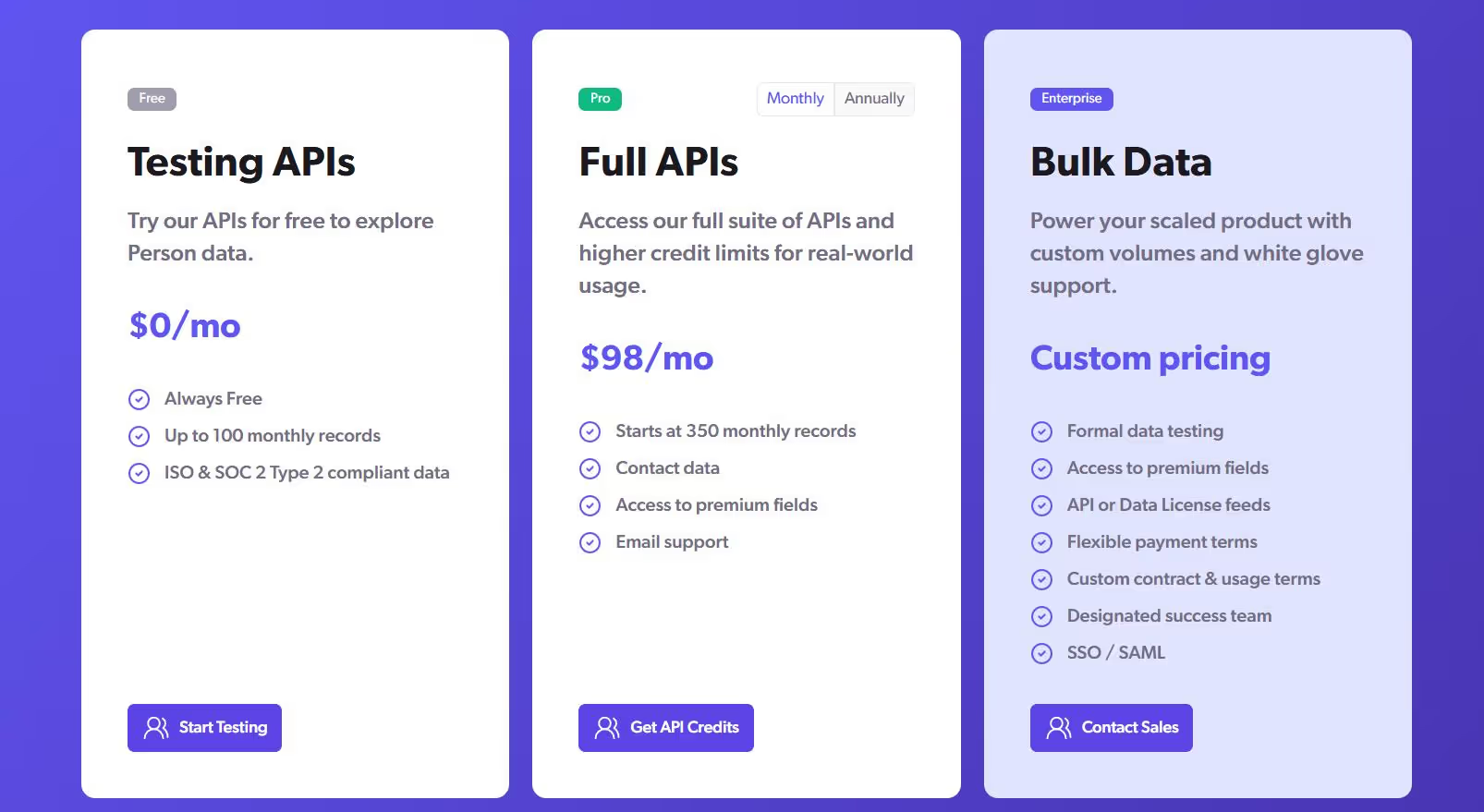
Free Plan ($0/month)
You get 100 person or company lookups per month, plus 25 IP lookups. Access to sensitive fields like emails and phone numbers is restricted on this tier.
That means you can test the API mechanics, but you can't evaluate the most valuable data without upgrading first.
Pro Plan (from $98/month for person data, $100/month for company data)
The Pro Plan gives you 350 enrichment credits per month. That works out to roughly $0.28 per record, which is on the expensive end compared to most data providers.
Field bundles like phone numbers and emails are add-ons priced separately, which can push real costs higher than the base rate suggests. Annual billing gives you around a 20% discount.
Enterprise Plan (custom pricing, typically from ~$2,500/month)
For teams needing over 100,000 credits per month, PDL moves you to a custom contract. Estimates from users and analysts put these deals in the $20,000 to $100,000+ per year range depending on volume, fields, and support tier.
Worth noting: the free tier restricts emails and phone numbers entirely, so you're essentially evaluating PDL without seeing its most useful data until you're already paying. 😬
People Data Labs vs SalesRobot: How Do They Compare?
Choose People Data Labs when you need to enrich existing customer data with additional contact information and company details.
Pick SalesRobot when you want to automate LinkedIn prospecting and run multi-channel outbound campaigns.
SalesRobot: The LinkedIn-First Alternative
SalesRobot is a LinkedIn automation and outreach platform built for B2B sales teams and agencies. 🤖

It handles the outreach side of the equation from connection requests to multi-step follow-up sequences, all from one dashboard.
Here's a closer look at what it actually does.
Multi-Step LinkedIn and Email Sequences
SalesRobot lets you build campaigns that alternate between LinkedIn messages and cold emails. You can set time delays between steps and add conditions based on whether someone accepted your connection request.
Each message is personalized using AI variables pulled from the prospect's LinkedIn profile. The whole sequence runs automatically, so you're not manually chasing every single person on your list.
AI Voice and Video Messages
This is one of SalesRobot's more distinctive features. You can send personalized voice notes and video messages at scale using AI cloning technology.

Users report significantly higher reply rates with these formats compared to standard text messages. They stand out in a way that a templated LinkedIn message simply doesn't.
Smart Daily Quotas and Account Safety
SalesRobot operates within LinkedIn's daily activity limits and uses residential IPs and mobile API behavior to make your activity look natural.
The platform caps connection requests and messages at 75 per day on paid plans. Many LinkedIn automation tools get accounts flagged or restricted.

SalesRobot has been specifically designed to avoid that, and users consistently report no bans when following the platform's recommended limits.
AI Appointment Setter
This is an AI agent that monitors your inbox, responds to leads, and books meetings on your behalf. It can handle initial replies, answer common questions, and keep conversations moving when you're not available.
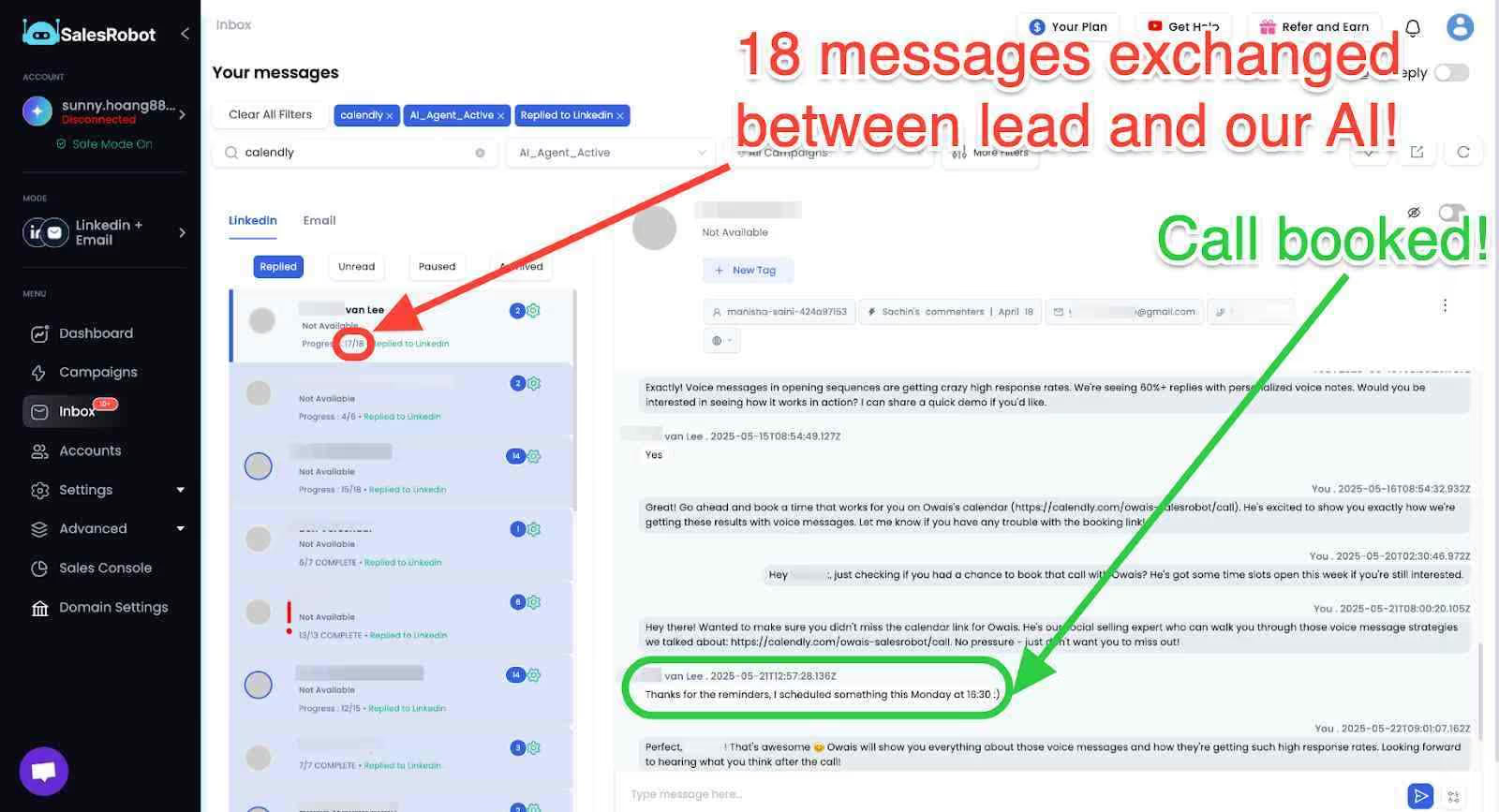
For solo founders or small teams that can't babysit every conversation, this feature does a lot of the heavy lifting.
Unified Inbox
All your LinkedIn and email conversations are pulled into one dashboard. Smart reply detection automatically pauses automation the moment a prospect responds.
That means you never send a robotic follow-up to someone who has already replied. It's a detail a lot of tools get wrong. SalesRobot handles it correctly.
Advanced Lead Targeting
You can import prospects from LinkedIn Search, Sales Navigator, or a CSV file. You can also target people who commented on a specific LinkedIn post or attended a LinkedIn event.
That opens up some creative targeting options that most other automation tools simply don't support.
SalesRobot Pricing
SalesRobot charges per LinkedIn account with significant discounts for annual billing.
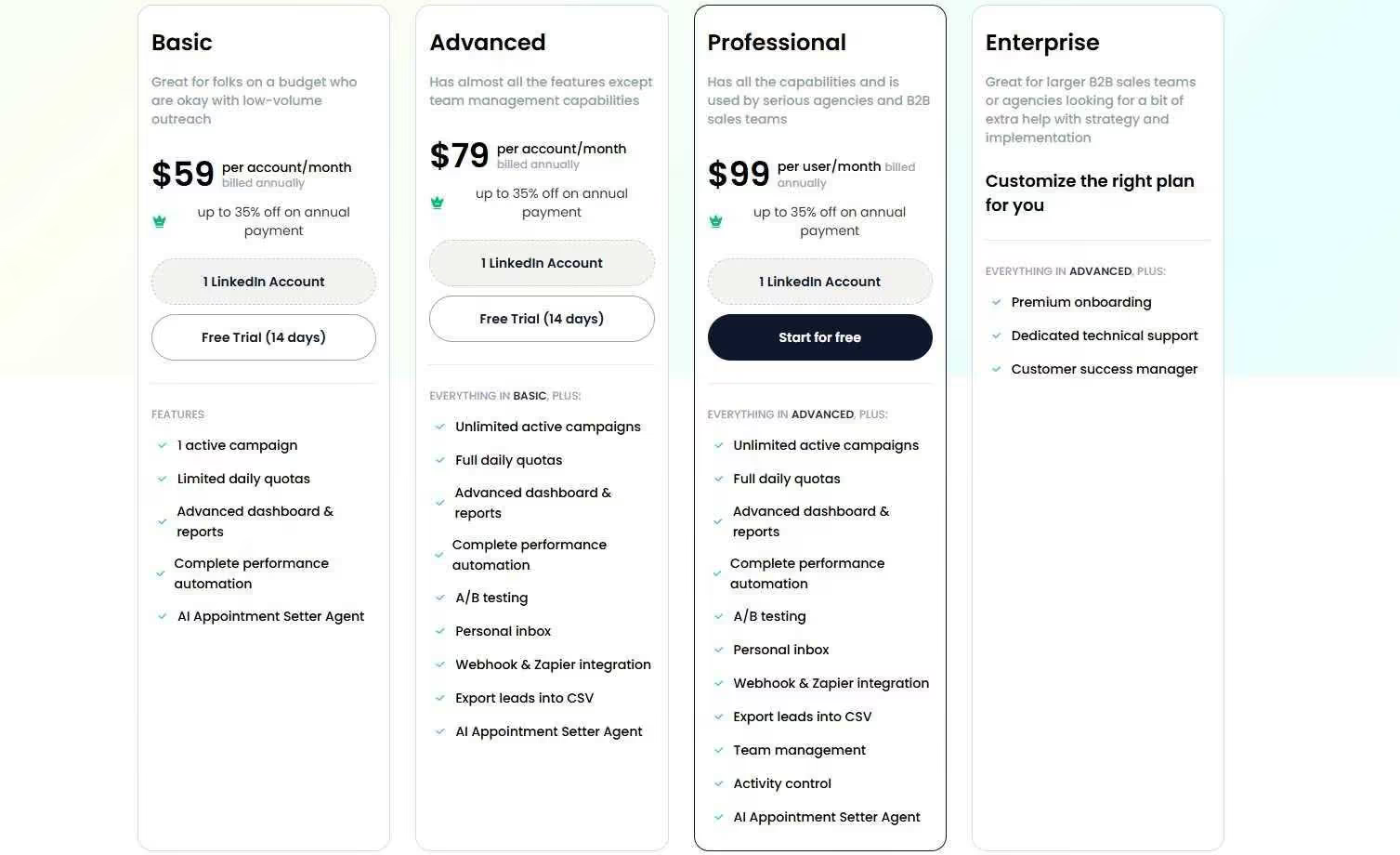
Basic: $39/month (annual) or $59/month
- 1 active campaign with limited daily quotas
- Basic dashboard and automation features
- AI Appointment Setter included
Perfect for solopreneurs testing LinkedIn automation on a budget.
Advanced: $59/month (annual) or $79/month
- Unlimited active campaigns with full daily quotas
- A/B testing, personal inbox, and Zapier integration
- CSV export and advanced analytics
The sweet spot for most sales professionals who need full automation features.
Professional: $79/month (annual) or $99/month
- Everything in Advanced plus team management
- Activity control and multi-user workspace
- Role assignments and duplicate prevention
Built for agencies and B2B sales teams managing multiple accounts.
Enterprise: Custom Pricing
- All Professional features plus dedicated support
- Premium onboarding and customer success manager
- Custom implementation and strategy help
For larger teams needing hands-on support and custom workflows.
SalesRobot offers a 14-day free trial with no credit card required, so you can test their LinkedIn automation and AI features risk-free before committing to a paid plan.
The Verdict
People Data Labs is a solid choice if you're building data-heavy applications or need massive contact databases for enterprise-level operations. The API is reliable, and the data quality is generally good.
But here's the thing: it's overkill for most sales teams. The technical complexity and high costs make it a tough sell unless you have serious developer resources and a hefty budget.
Most sales professionals just want to find prospects and start conversations, not build custom data pipelines.
Bottom Line
Buy People Data Labs if you're an enterprise with developer resources building custom solutions. Skip it if you're a sales team looking to generate leads and run outreach campaigns.
If LinkedIn prospecting is your main focus, SalesRobot offers a more straightforward path. You get lead generation and automated outreach in one platform, without the technical headaches or enterprise pricing.

Wow your leads by cloning yourself and sending personalized videos and voice notes to each lead on LinkedIn.
If you don't reply to leads within 5 mins, your chances of converting them fall by 50%. Our AI replies on your behalf instantly! (and yes, you can train it)

Don't shoot in the dark. Get detailed analytics on what's working

SalesRobot allows you to invite other team members, so that they can add their LinkedIn Account, run outreach campaigns and get amazing results just like you.
.avif)


Trusted by 4100+ innovative B2B sales teams and lead gen agencies

.avif)

.avif)




.avif)


Heading 1
Heading 2
Heading 3
Heading 4
Heading 5
Heading 6
Lorem ipsum dolor sit amet, consectetur adipiscing elit, sed do eiusmod tempor incididunt ut labore et dolore magna aliqua. Ut enim ad minim veniam, quis nostrud exercitation ullamco laboris nisi ut aliquip ex ea commodo consequat. Duis aute irure dolor in reprehenderit in voluptate velit esse cillum dolore eu fugiat nulla pariatur.
Block quote
Ordered list
- Item 1
- Item 2
- Item 3
Unordered list
- Item A
- Item B
- Item C
Bold text
Emphasis

Superscript
Subscript