.avif)
TL;DR:
- Pipedrive is a visual pipeline CRM built for small sales teams who want something simple that actually works
- Plans start at $19/month (Lite), $34/month (Growth), $64/month (Premium), $89/month (Ultimate)
- Strong for traditional B2B sales, but light on LinkedIn prospecting and advanced reporting
- SalesRobot is worth a look if LinkedIn outreach is a big part of how you generate leads - plans start at $59/month
Picture this: your sales team of five just lost another deal because someone forgot to follow up with a hot lead from three weeks ago.
Sound familiar?
If you're running a small sales team, you know the struggle. Keeping track of every prospect, deal, and follow-up without drowning in spreadsheets — or overpaying for enterprise software built for teams ten times your size — is genuinely hard.
Enter Pipedrive, the CRM that promises to be the sweet spot for small sales teams. With its visual pipeline approach and focus on simplicity, it's caught the attention of over 1 million businesses that were tired of wrestling with clunky alternatives.
But does it actually deliver on that promise in 2026? And more importantly, is it the right fit for your team and budget?
In this review, we'll dig into Pipedrive's features, pricing, pros and cons, and real-world performance for small sales teams. We'll also look at SalesRobot as an alternative that picks up where Pipedrive's lead generation capabilities leave off.

What You Need to Know About Pipedrive
Before we get into the details, here's the honest breakdown:

✅ Incredibly intuitive pipeline management — Pipedrive's visual pipeline makes it dead simple to track deals from first contact to close. Drag and drop deals between stages, and it actually feels natural rather than clunky like most CRMs.
✅ Solid automation without the overwhelm — The workflow automation works without requiring a computer science degree to set up. You can automate follow-ups, lead assignments, and deal updates with straightforward if-then logic that most team members can handle.
✅ Great email integration and tracking — Email sync works smoothly with Gmail and Outlook, and you can see when prospects open your messages. The AI email writer helps with follow-ups, though it won't replace a skilled salesperson's personal touch.
✅ Actually affordable for growing teams — Unlike CRMs that nickel and dime you for every feature, Pipedrive's pricing stays reasonable as you add users. Small teams can get solid functionality without blowing the budget.
⚠️ Limited for complex sales processes — If your sales process involves multiple products, complex approval workflows, or non-linear deal progression, Pipedrive can feel restrictive. The simplicity that makes it great for straightforward sales becomes a limitation when things get complicated.
⚠️ Reporting can feel basic — Pipedrive offers sales insights and forecasting, but the reporting tools feel limited compared to tools like Salesforce. If you need deep analytics or complex custom reports, you'll hit walls pretty quickly.
⚠️ Mobile app has frustrating gaps — The mobile app doesn't have full feature parity with the desktop version. Tasks that seem simple on your computer can become surprisingly difficult when you're trying to update deals on the go.
Pipedrive's Key Features, Broken Down
Visual Pipeline Management
Pipedrive's signature drag-and-drop pipeline lets you track every deal from initial contact to closed sale. You can customize stages to match your exact sales process — whether that's "Demo Scheduled," "Proposal Sent," or "Contract Out."
Sales reps can instantly see which deals need attention and where bottlenecks are forming. It's like having a bird's-eye view of your entire sales operation on one screen, without needing to pull a report.
Sales Automation and Workflows
Automated follow-ups make sure no lead falls through the cracks. Set up workflows that automatically send emails, create tasks, or move deals forward based on specific triggers.
For example, when a prospect opens your proposal email three times, Pipedrive can automatically remind you to make a follow-up call. No more guessing when to reach out — the system tells you.
AI-Powered Sales Assistant
Pipedrive's AI analyzes your sales patterns and suggests which deals to prioritize each day. It can even write personalized emails based on your conversation history and deal context.
Think of it as having a data analyst on your team who's always watching the pipeline. It learns from your successful deals to recommend similar prospects and optimal outreach timing — the kind of insight that usually takes months to develop manually.
Real-Time Sales Reporting and Forecasting
Visual dashboards show your sales performance in real-time, from individual rep metrics to team-wide conversion rates. Revenue forecasting helps you predict monthly and quarterly results based on current pipeline health.
Managers can quickly identify which team members need coaching and which sales strategies are working. The reports are designed for quick decisions, not endless data analysis.
Lead Management and Qualification
Capture leads from multiple sources and automatically distribute them based on territory, deal size, or rep availability. Built-in lead scoring helps you prioritize prospects most likely to convert.
Web forms, email integration, and marketplace apps funnel leads directly into your pipeline. That means less manual data entry and faster response times to new prospects.
Email Integration and Communication Tracking
Two-way email sync keeps all prospect communications linked to the right deals. You can see when prospects open your messages, click links, or download attachments — which tells you a lot about where their head is at.
You can send emails directly from Pipedrive using templates that automatically personalize with contact and company details. Everything stays organized in one place instead of constantly switching between your CRM and inbox.
Pipedrive Pricing: What Will It Cost?
Pipedrive's pricing is refreshingly straightforward. Four tiers, clearly listed, no demos required. All prices below are billed annually — monthly billing runs about 26% more across the board.
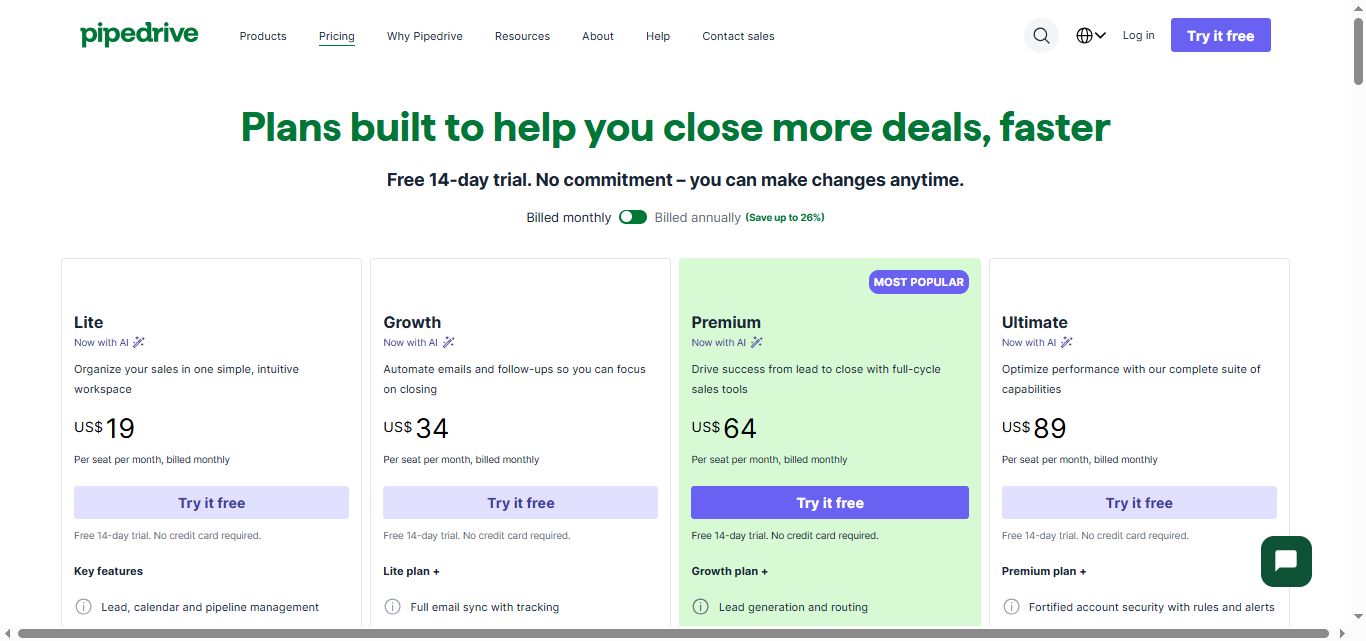
Lite — $19/month per user
- Up to 3,000 contacts and 30 custom fields
- Pipeline management with deal tracking
- Email integration and sync
- Activity reminders and calendar sync
- Mobile app access
Good for solopreneurs and very small teams just getting started. Covers the basics without overwhelming you with features you don't need yet.
Growth — $34/month per user
- Everything in Lite, plus:
- Email templates and group emailing
- Advanced reporting and insights
- Meeting scheduler
- Workflow automation
- Multiple deal pipelines
This is the sweet spot for most small to medium businesses. You get automation and better reporting without paying for features only enterprise teams need.
Premium — $64/month per user
- Everything in Growth, plus:
- Revenue forecasting
- Team management tools
- Advanced permissions and security
- Project management features
- Phone integration
A solid step up for established teams with multiple sales reps and more complex processes. The forecasting alone is worth it if you're doing regular pipeline reviews with stakeholders.
Ultimate — $89/month per user
- Everything in Premium, plus:
- Revenue goal setting and tracking
- Advanced customization options
- Campaigns and bulk email marketing
- Advanced reporting with custom dashboards
Worth it if you're currently juggling multiple tools and want to consolidate. The marketing features start to show up here, which reduces the need for separate email marketing software.
Built for larger organizations with strict security requirements and complex processes. If you need white-glove onboarding and a dedicated point of contact, this is the plan for you.
Pipedrive offers a 14-day free trial with no credit card required, which gives you full access to test the platform before committing to anything.
Pipedrive vs SalesRobot: How Do They Compare?
The short version: choose Pipedrive if you need a complete sales management system with CRM features, deal tracking, and broad integrations. Choose SalesRobot if your primary goal is automating LinkedIn outreach at scale.
SalesRobot: The LinkedIn-First Alternative
Pipedrive is great at managing your pipeline — but it wasn't built for LinkedIn prospecting. SalesRobot takes the opposite approach. It's designed specifically for LinkedIn lead generation, where decision-makers are actually spending their time.
What SalesRobot Does
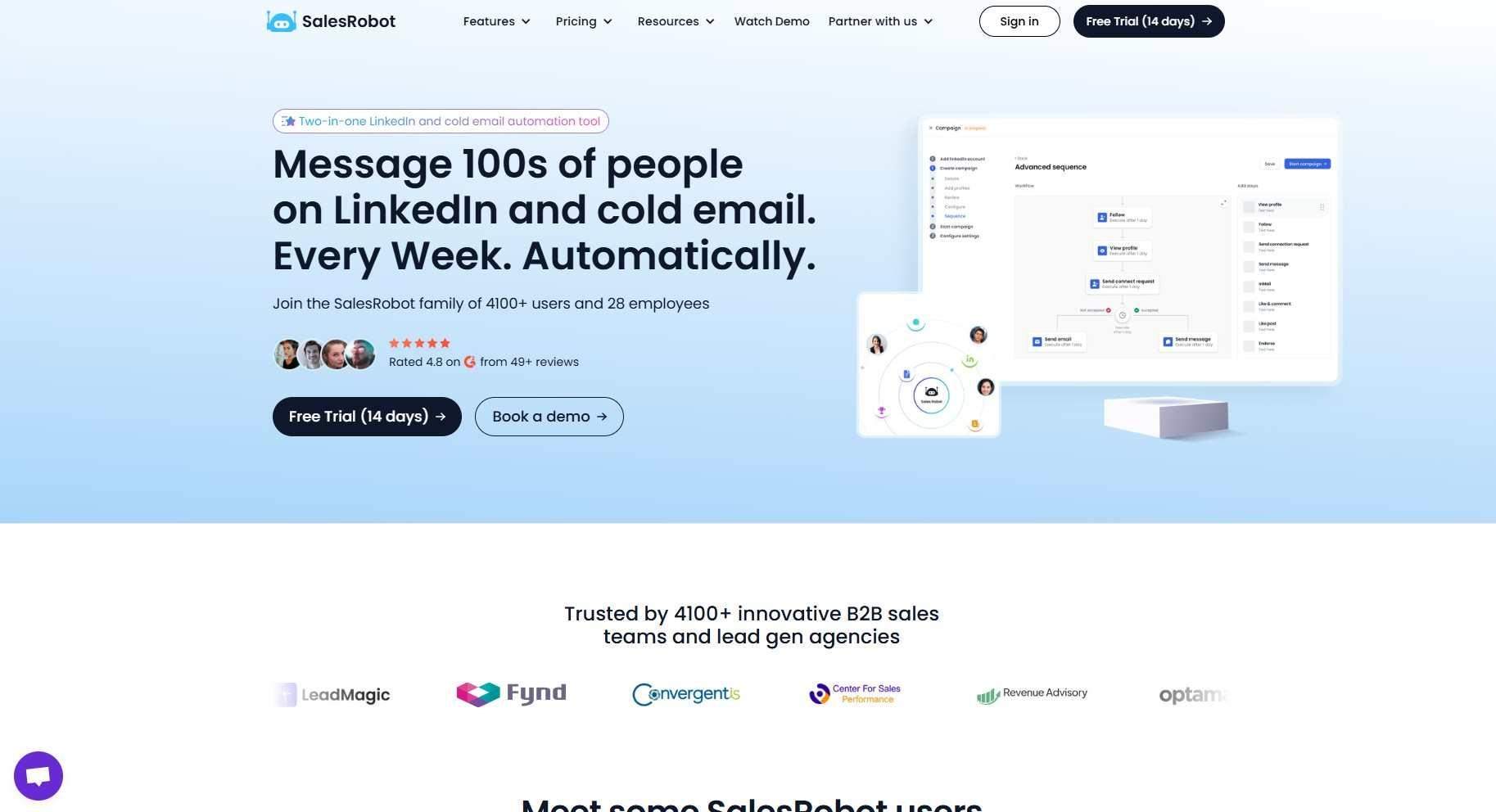
SalesRobot is a LinkedIn automation platform that handles connection requests, message sequences, and follow-ups at scale. It's built for B2B sales teams and agencies who need to reach prospects where they're most active professionally.
SalesRobot is trusted by 4,100+ users, who average a 55% reply rate, and 76% of free trials land their first lead within two days.
Key Features
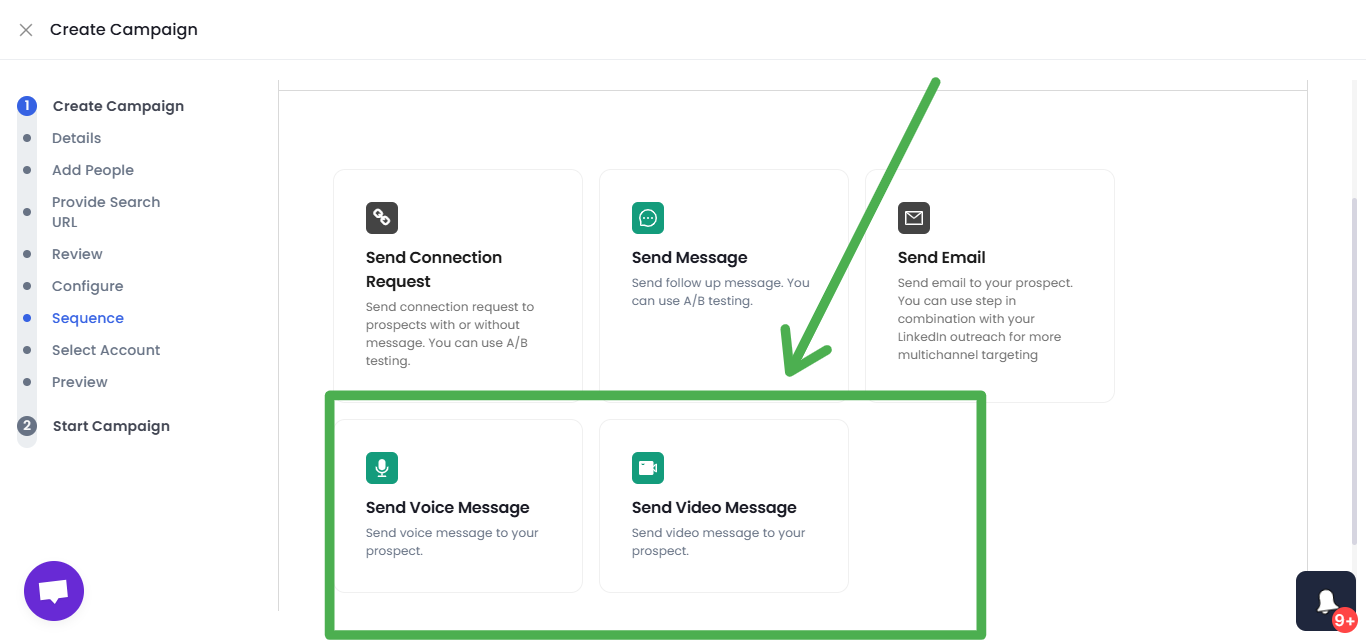
- AI Voice and Video Messages — Clone your voice and appearance to send personalized video and voice notes directly on LinkedIn. Users report 40%+ higher reply rates compared to text-only outreach.
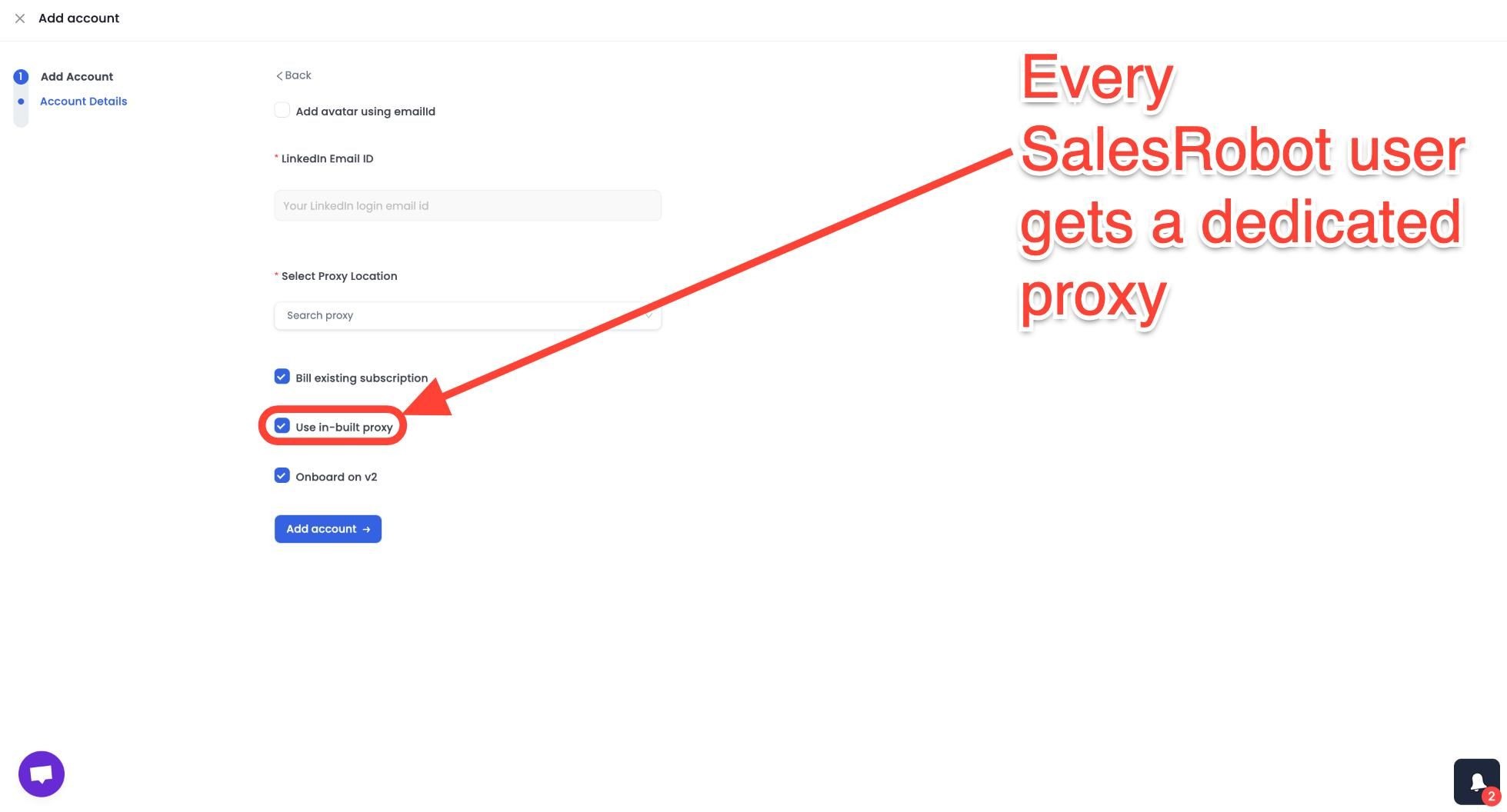
- Mobile API Safety — Runs cloud-based on LinkedIn's mobile app APIs (no Chrome extension, works 24/7 even with your laptop closed) with dedicated residential IP rotation, reducing ban risk to ~0.00001%. Significantly safer than browser-extension tools like Expandi, Waalaxy, Dux-Soup, or LinkedHelper.
- Smart Reply Detection — Automatically pauses message sequences when a prospect responds, so you're never sending a follow-up to someone who already replied. Keeps conversations feeling natural.
- AI Appointment Setter — An AI agent that manages your LinkedIn inbox, responds to leads, and books meetings directly onto your calendar. You can train it to match your communication style.

- Multi-Channel Sequences — Combines LinkedIn outreach with email campaigns in unified sequences. Import leads from Sales Navigator, regular LinkedIn search, or CSV uploads.
- Advanced Targeting — Import prospects from LinkedIn group members, event attendees, or people who commented on specific posts — well beyond basic search filters.
SalesRobot Pricing
SalesRobot charges per LinkedIn account, with annual discounts of up to 35%.
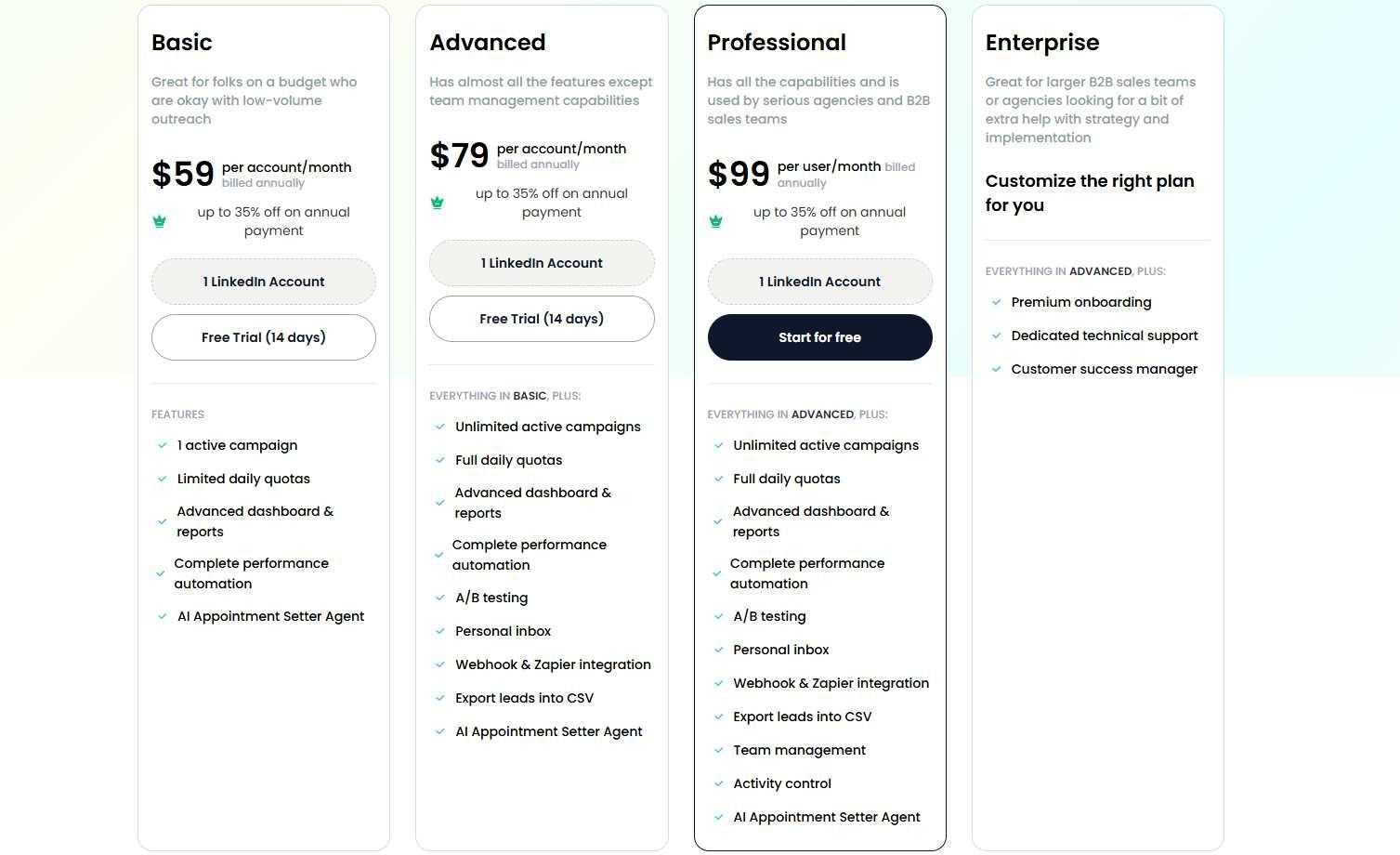
Basic — $59/month (billed annually; $59/month on monthly billing)
- 1 active campaign
- 20 actions/day per action type (limited daily quotas)
- AI Appointment Setter included
- Good for solo users testing LinkedIn outreach on a budget
Advanced — $79/month (billed annually; $79/month on monthly billing)
- Unlimited active campaigns
- Full daily quotas (75 connection requests, 75 messages)
- A/B testing and webhook integrations
- Best for individual reps running multiple outreach campaigns
Professional — $99/month (billed annually; $99/month on monthly billing)
- Everything in Advanced
- Team management and activity controls
- Multi-user workspace with role permissions
- Ideal for sales teams and agencies managing multiple LinkedIn accounts
SalesRobot offers a 14-day free trial with no credit card required.
The Verdict
Pipedrive is a solid, no-nonsense CRM that gets the basics right. It's genuinely user-friendly, reasonably priced, and won't overwhelm your team with unnecessary complexity.
The Growth plan at $39/month covers what most small teams actually need — automation, multiple pipelines, and decent reporting. And the free trial makes it easy to test before you commit.
That said, Pipedrive is built for traditional sales processes. If your revenue depends heavily on LinkedIn prospecting or social selling, you'll find yourself cobbling together workarounds and third-party integrations pretty quickly. It's a CRM, not a prospecting tool — and that distinction matters.
Bottom Line
Buy Pipedrive if you're a small team doing traditional B2B sales, you want something simple that works out of the box, and LinkedIn isn't your primary prospecting channel.
Skip it if LinkedIn prospecting drives your pipeline, you need advanced social selling features, or you're tired of juggling multiple tools just to run a modern outreach workflow.
Start with SalesRobot if LinkedIn is where your leads come from. It's purpose-built for social selling, starts at just $59/month, and comes with a 14-day free trial so you can see how it fits before spending anything.


Wow your leads by cloning yourself and sending personalized videos and voice notes to each lead on LinkedIn.
If you don't reply to leads within 5 mins, your chances of converting them fall by 50%. Our AI replies on your behalf instantly! (and yes, you can train it)

Don't shoot in the dark. Get detailed analytics on what's working

SalesRobot allows you to invite other team members, so that they can add their LinkedIn Account, run outreach campaigns and get amazing results just like you.
.avif)


Trusted by 4100+ innovative B2B sales teams and lead gen agencies

.avif)

.avif)




.avif)