.avif)
TL;DR
- useArtemis is a B2B lead enrichment tool that finds verified emails and phone numbers using a waterfall approach across 15+ premium data vendors, claiming an 85% email discovery rate.
- Pricing starts at $69/month for 500 verified emails and goes up to $399/month for 10,000 verified emails. A free trial with 50 credits is available, no credit card required.
- The credit-based model can feel restrictive fast. 500 emails a month on the Starter plan runs out quickly for anyone doing serious outreach.
- G2 reviews are a mixed bag. Many users praise the data quality and ease of use, but there's a recurring pattern of billing complaints, removed features, and unresponsive support that's worth knowing about before you pay.
- Phone number accuracy lags behind email discovery. Several users report phone numbers being less reliable than the email data.
- SalesRobot is the stronger pick if your focus is LinkedIn outreach automation rather than contact enrichment. It's a different tool built for a different job.
useArtemis: What It Is and What It's Trying to Solve
You've built a solid prospect list. Job titles, company names, LinkedIn URLs. Everything looks good on paper.
Then you realize you're missing verified contact details for nearly half of them. 📋
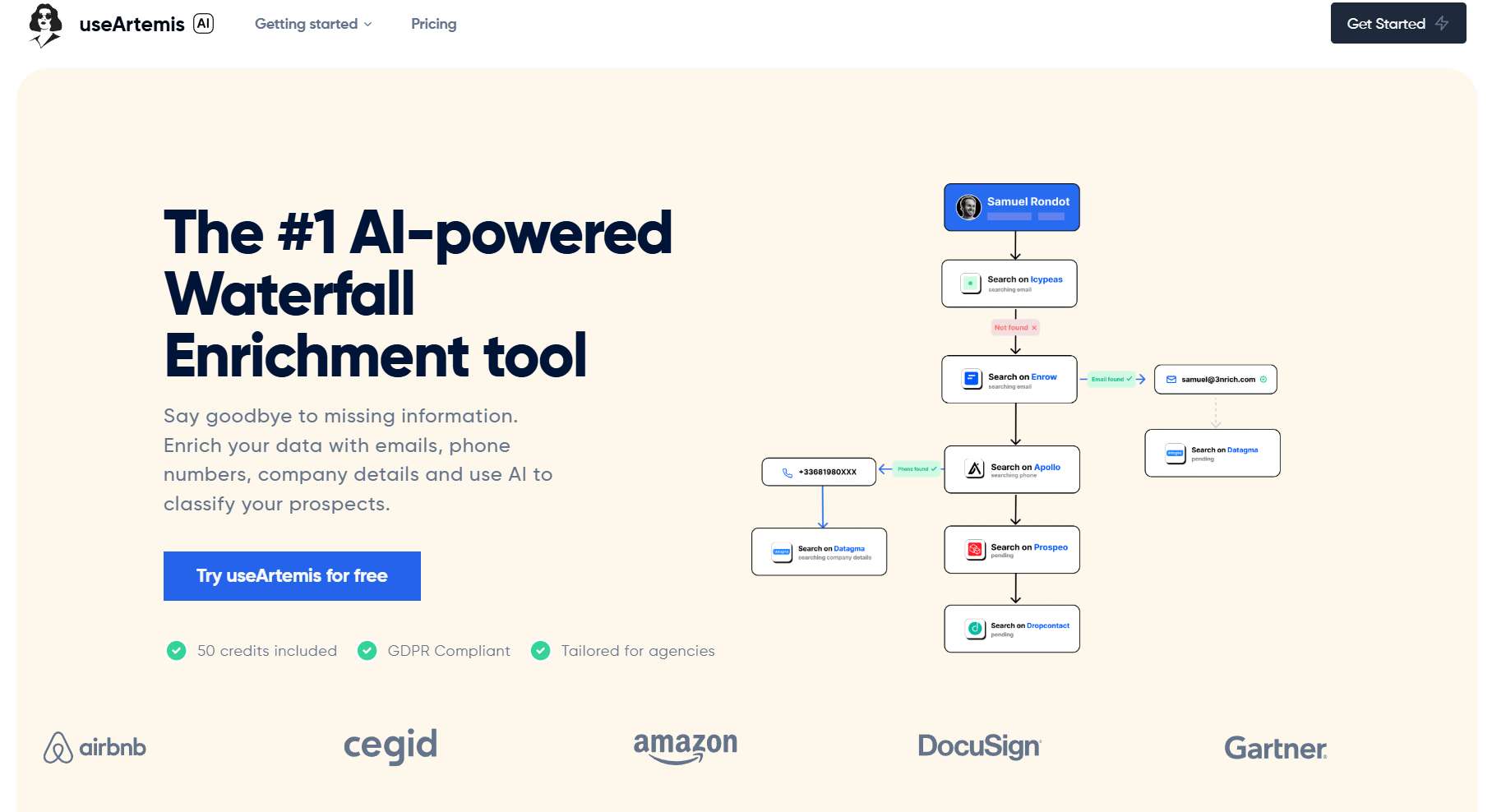
That's the problem useArtemis is designed to fix. Rather than pulling from a single database and hoping for the best, it queries 15+ premium data vendors in sequence until it finds a verified email or phone number for each prospect.
If one source comes up empty, the next one gets checked automatically.
It's called waterfall enrichment, and the approach is genuinely useful for hard-to-reach contacts that slip through single-source tools.
This review covers what useArtemis actually does well, where it falls short, what it costs, and who it makes the most sense for.
We'll also look at SalesRobot as an alternative for teams more focused on LinkedIn automation than data enrichment.
useArtemis: Quick Pros and Cons
✅ Waterfall enrichment across 15+ vendors gives you a better shot at finding contacts that other tools miss completely.
✅ 85% claimed email discovery rate, which is significantly higher than most standalone finders.
✅ Bulk processing lets you upload large CSV files and enrich entire lists overnight without babysitting the tool.
✅ AI-powered lead classification helps you qualify prospects automatically without manually reviewing each one.
⚠️ The credit limits hit faster than expected. 500 verified emails a month on Starter is a real ceiling for active outbound teams.
⚠️ Phone number accuracy is noticeably weaker than email discovery. Multiple users flag this across review platforms.
⚠️ Billing complaints are a recurring theme on G2. Several users report being charged after cancellation, with support difficult or impossible to reach. Worth using a virtual card when trialing.
⚠️ Some features that existed previously, including the native LinkedIn scraping function, have been removed or moved behind higher-cost tiers. Users who bought lifetime deals have been particularly vocal about this.
useArtemis's Key Features, Broken Down
Waterfall Email and Phone Discovery
This is the core of what useArtemis does and where it genuinely earns its place.
Instead of checking one database and stopping, it cascades your search across 15+ providers, including Hunter, Apollo, Dropcontact, and Snovio. Each contact that can't be found by one vendor gets passed automatically to the next.
The result is a claimed 85% email discovery rate. For context, tools relying on a single source tend to land somewhere between 35% and 60%.
That gap matters when you're prospecting in niche industries or targeting senior executives with sparse public footprints.
That said, the quality depends on how fresh each vendor's data is. Some users report occasional outdated contacts slipping through despite the multi-vendor approach. 🔍
AI-Powered Lead Classification
Rather than manually reviewing each prospect, you can ask useArtemis a question about your list and let the AI sort it for you.
Ask something like "Which of these prospects are likely running outdated CRM software?" and the AI will analyze company data, tech stacks, and other signals to classify each lead accordingly.
It's a time-saver for teams dealing with large, unfiltered prospect lists. Not perfect, but useful for narrowing focus before outreach begins.
Comprehensive Data Enrichment
useArtemis goes beyond just emails and phone numbers.
Each prospect gets enriched with company details, social profiles, technology stack data, SEO metrics, and employee count. You're going into outreach conversations with real context rather than just a name and title.
For teams who personalize their outreach at scale, that extra layer of data makes a meaningful difference in relevance and reply rates. 📊
LinkedIn Profile and Company Scraping
Paste a LinkedIn profile URL and useArtemis will pull the prospect's background, current role, company info, and verified contact details in one go.
It cuts out the manual research step between finding someone on LinkedIn and actually being able to reach them. The Chrome extension makes this even faster directly in your browser.
Worth noting: the native scraping function that older users relied on has been reduced in scope on lower-tier plans. If this is a key part of your workflow, check current feature availability before committing.
Bulk Processing
Upload a CSV of LinkedIn URLs or prospect data and let the platform enrich the entire list while you focus on other things.
For agencies managing multiple clients or teams running high-volume outbound, this is one of the more practical features. You're not manually processing contacts one at a time.
Integrations and API
useArtemis connects to 1,000+ apps via Zapier and offers API access on the Agency plan.
You can set up workflows where enriched leads feed directly into your CRM or outreach tools without any manual data transfer. A straightforward setup for teams that already have their stack in place.
useArtemis Pricing
All plans are billed monthly. Unused credits roll over to the following month, which is a genuinely helpful feature for teams with variable prospecting volume.
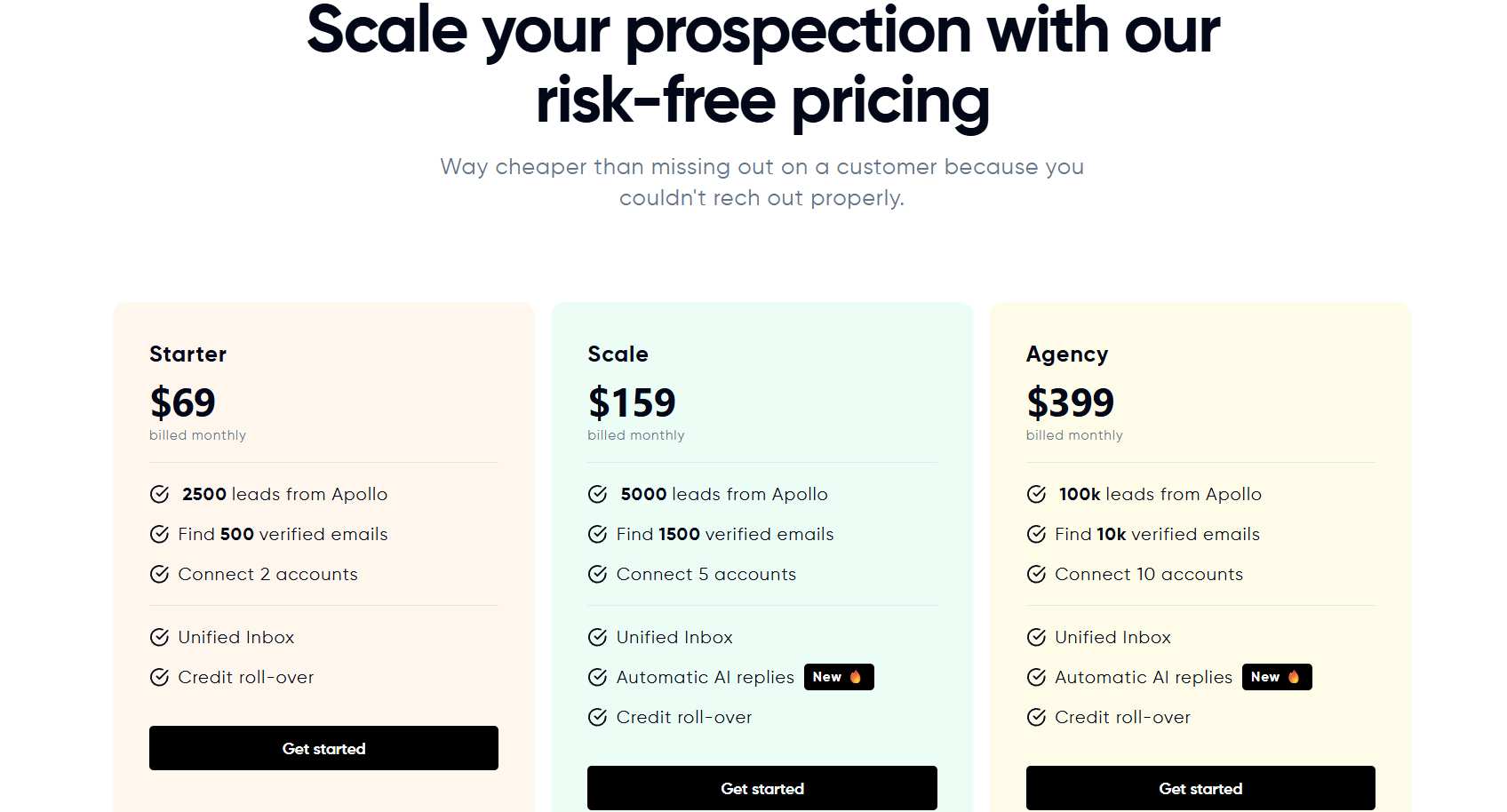
Starter: $69/month 2,500 leads from Apollo, 500 verified emails, 2 connected accounts, unified inbox, credit roll-over. A reasonable entry point for small teams or solo users testing the platform. The 500 email cap is the main constraint at this tier.
Scale: $159/month 5,000 leads from Apollo, 1,500 verified emails, 5 connected accounts, unified inbox, automatic AI replies, credit roll-over. This is where the platform starts making practical sense for an individual SDR or small team running consistent outbound.
Agency: $399/month 100,000 leads from Apollo, 10,000 verified emails, 10 connected accounts, unified inbox, automatic AI replies, credit roll-over, API access, Zapier integration. Built for agencies managing multiple clients or teams running high-volume campaigns.
A free trial is available with 50 credits. No credit card required to start.
One thing worth flagging: several G2 reviewers report being charged before their trial ended, with limited support response. Using a virtual card during the trial is a sensible precaution based on what's been reported.
useArtemis vs SalesRobot: How Do They Compare?
| Feature | useArtemis | SalesRobot |
|---|---|---|
| Primary Function | Contact enrichment and data discovery | LinkedIn outreach automation |
| Data Sources | 15+ premium vendors via waterfall enrichment | LinkedIn profiles and built-in database |
| Automation | Basic outreach with unified inbox | Multi-step LinkedIn and email sequences |
| AI Features | Lead classification and prospect analysis | Message personalization, voice and video |
| Pricing | $69 to $399/month (credit-based) | $39 to $99/month per LinkedIn account |
| Best For | Teams that need verified contact data at scale | B2B teams focused on LinkedIn outreach |
These tools solve different problems. useArtemis finds the contact information. SalesRobot helps you act on it through LinkedIn at scale.
SalesRobot: Built for LinkedIn Outreach
If your pipeline depends on LinkedIn and your main need is getting into conversations with decision-makers, rather than just finding their contact details, SalesRobot is built for that specific job.
What It Does
SalesRobot automates LinkedIn connection requests, message sequences, follow-ups, and more, all from the cloud. No browser extension left open, no computer running in the background.

It simulates natural human behavior to stay within LinkedIn's activity limits and keep your account safe.
It's aimed at B2B sales teams and agencies who want a systematic way to generate pipeline through LinkedIn without doing everything manually. Users average a 55% reply rate, and 76% of free trials land their first lead within two days.
LinkedIn Mobile API Integration
SalesRobot connects through LinkedIn's mobile app API layer rather than browser automation.
Your activity looks like it's coming from the LinkedIn mobile app, which is a meaningful distinction for account safety.
By running on LinkedIn's mobile app APIs, the platform reduces ban risk to roughly 0.00001% across its 4,100+ users, though using any automation tool carries some inherent risk and LinkedIn ToS compliance is your responsibility.
AI Personalized Voice and Video Messages
Record yourself once and SalesRobot personalizes your voice or video for each recipient at scale, inserting their name and company automatically. 🎙️
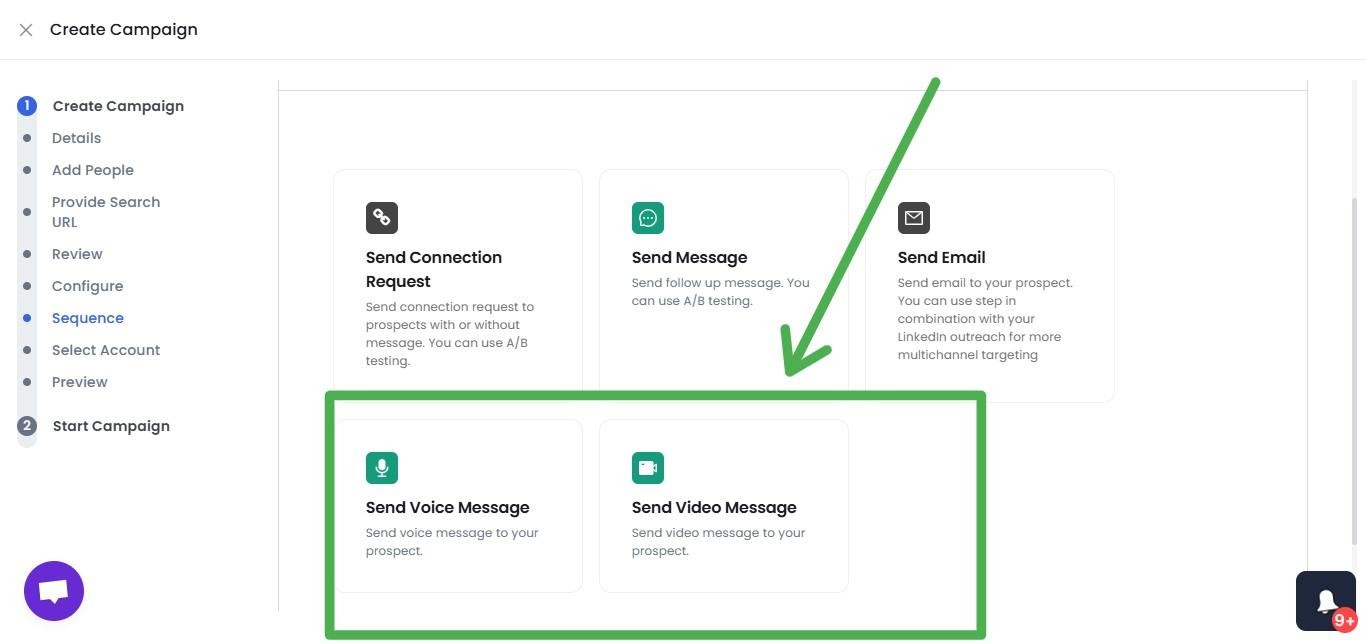
Users report reply rates exceeding 40% from this feature. Given how saturated standard LinkedIn messages have become, showing up in someone's inbox with a personalized voice note is a different experience entirely.
Smart Reply Detection
When a prospect responds, the automated sequence stops immediately. No awkward follow-up messages going out after someone has already replied and started a real conversation.
Unified LinkedIn and Email Campaigns
Run coordinated sequences that combine LinkedIn touchpoints, connection requests, messages, voice notes, and InMails, alongside email follow-ups, all from one dashboard.
You're reaching the same prospect across multiple channels without managing separate tools for each one.
Advanced Targeting
Import from LinkedIn Search, Sales Navigator, or CSV. You can also pull lists of people who commented on a specific post or attended a LinkedIn event, which is particularly useful for reaching warm audiences already engaged in your space.
AI Appointment Setter
An optional add-on that monitors your inbox, responds to leads in your brand voice, handles objections, and books meetings directly into your calendar.

It responds within minutes, keeping momentum with warm leads while you're focused elsewhere.
SalesRobot Pricing
Pricing is per LinkedIn account, with annual billing saving up to 35%.
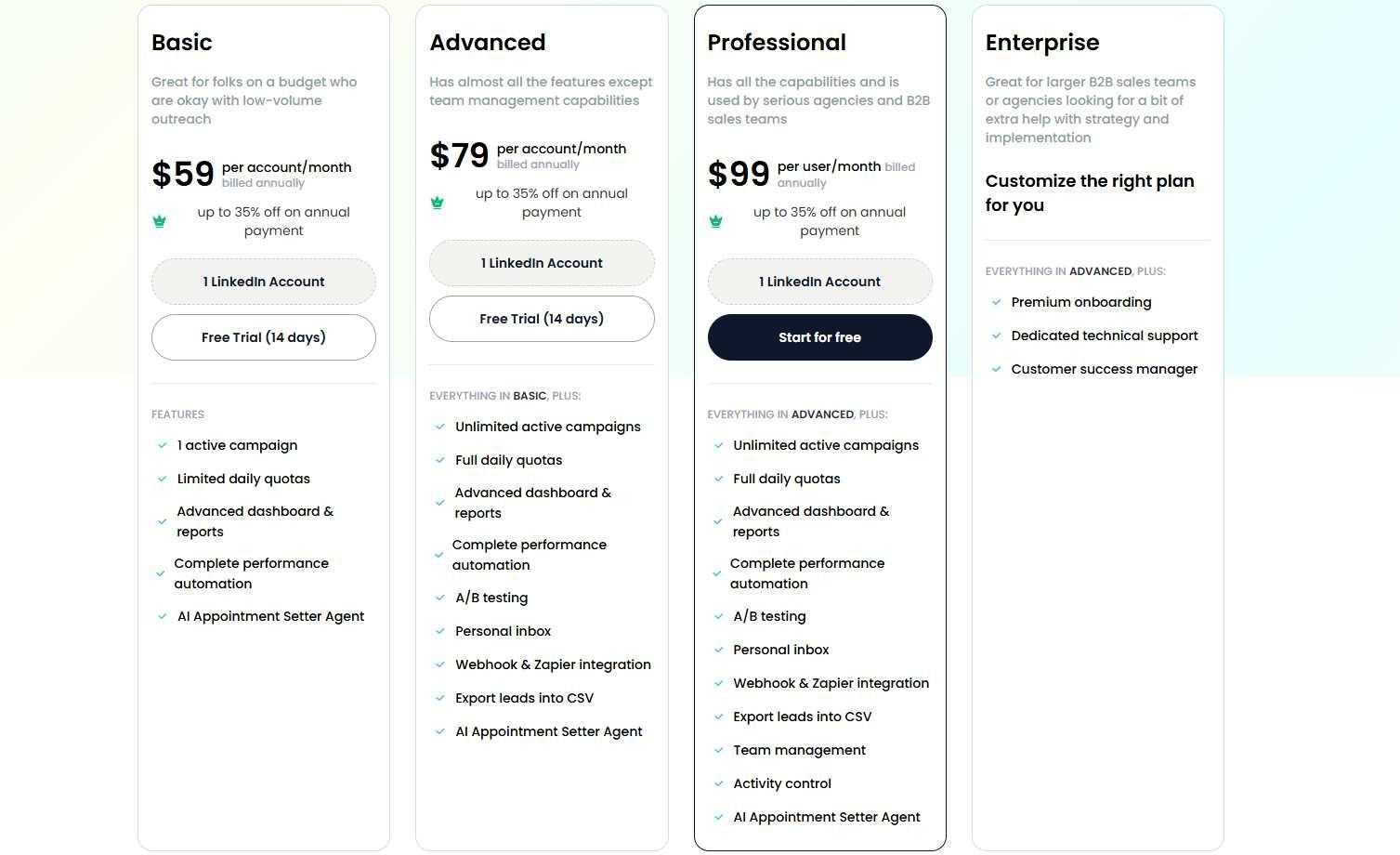
Basic: $39/month (annual) / $59/month (monthly) One active campaign, limited daily quotas: 20 connection requests and 20 messages per day. A low-commitment starting point for testing LinkedIn automation.
Advanced: $59/month (annual) / $79/month (monthly) Unlimited campaigns, full daily quotas, A/B testing, unified inbox, Zapier and webhook integrations, plus native HubSpot, Pipedrive, and Salesforce sync. The practical choice for most individual sales professionals.
Professional: $79/month (annual) / $99/month (monthly) Everything in Advanced plus team management, role-based permissions, activity controls, and duplicate prevention across your team. The standard option for agencies and larger sales teams.
Enterprise: Custom pricing Includes premium onboarding, dedicated technical support, and a customer success manager.
Email automation is available as a separate add-on at $15/month per email account.
SalesRobot offers a 14-day free trial with no credit card required. 🙌
The Verdict
useArtemis does its core job reasonably well. If you're struggling to find verified contact details for a prospect list, the waterfall enrichment approach genuinely improves your chances compared to single-source tools.
The concerns are real though. The credit caps on lower plans are tight for serious outbound, phone number accuracy is inconsistent, and the billing and support complaints on G2 are frequent enough to take seriously before committing to a paid plan.
If data enrichment is what you need and you go in with eyes open about the limitations, it's worth testing with the free trial first.
SalesRobot addresses a different part of the problem entirely. It's not an enrichment tool. It's for teams who already have a sense of who they want to reach and need a systematic, safe way to initiate those conversations on LinkedIn at scale.
The two tools can actually complement each other. Use useArtemis to find and verify contact data, then bring those enriched leads into SalesRobot for LinkedIn outreach. That combination covers the full workflow from discovery to conversation without either tool having to do something it wasn't designed for.
Frequently Asked Questions
Does useArtemis offer a free trial?
Yes. useArtemis offers a free trial with 50 credits and no credit card required, letting you test waterfall enrichment before paying. Given recurring billing complaints reported by users, it's wise to trial with a virtual card if you do add payment details later.
How accurate is useArtemis email data?
useArtemis claims an 85% email discovery rate via waterfall enrichment across 15+ vendors, but that figure hasn't been independently benchmarked. Reviews are mixed, some praise hit rates while others report elevated bounce rates on exported lists. Test a small batch and track bounce rate before scaling any campaign.
Is useArtemis legit or a scam?
useArtemis is a legitimate SaaS product, rated around 4.4–4.7 across G2, Capterra, and AppSumo. It isn't a scam, but multiple users report billing charges after cancellation and unfulfilled lifetime-deal promises, so use a virtual card and test with the free trial before committing to a paid plan.

Wow your leads by cloning yourself and sending personalized videos and voice notes to each lead on LinkedIn.
If you don't reply to leads within 5 mins, your chances of converting them fall by 50%. Our AI replies on your behalf instantly! (and yes, you can train it)

Don't shoot in the dark. Get detailed analytics on what's working

SalesRobot allows you to invite other team members, so that they can add their LinkedIn Account, run outreach campaigns and get amazing results just like you.
.avif)


Trusted by 4100+ innovative B2B sales teams and lead gen agencies

.avif)

.avif)




.avif)


Heading 1
Heading 2
Heading 3
Heading 4
Heading 5
Heading 6
Lorem ipsum dolor sit amet, consectetur adipiscing elit, sed do eiusmod tempor incididunt ut labore et dolore magna aliqua. Ut enim ad minim veniam, quis nostrud exercitation ullamco laboris nisi ut aliquip ex ea commodo consequat. Duis aute irure dolor in reprehenderit in voluptate velit esse cillum dolore eu fugiat nulla pariatur.
Block quote
Ordered list
- Item 1
- Item 2
- Item 3
Unordered list
- Item A
- Item B
- Item C
Bold text
Emphasis

Superscript
Subscript