.avif)
TL;DR
- Bitscale is an AI-powered GTM platform that combines a 300M-plus contact database with multi-source enrichment, intent signals, and AI-generated outreach copy in a spreadsheet-like interface.
- It is positioned as a more accessible alternative to Clay. Its GEO Framework (Generate, Enrich, Outreach) covers finding leads, enriching them across 100-plus data sources, and pushing personalized copy into tools like Instantly, Smartlead, and Heyreach.
- Pricing starts at $349/month on the Growth plan (billed annually) after a free tier with only 200 lifetime credits. HubSpot integration requires Growth. Salesforce requires the Booster plan at $799/month.
- Independent reviews are scarce, credit burn is difficult to predict, and the platform does not send emails or automate LinkedIn outreach directly. If LinkedIn outreach automation is the gap in your stack, SalesRobot covers that execution layer naturally alongside Bitscale.
If you have spent any time in RevOps or outbound sales circles in 2026, you have probably seen Bitscale described as the Clay alternative that does not require a computer science degree to configure.

That framing is accurate enough to be useful.
Bitscale takes the smart spreadsheet concept, pull data from multiple sources, enrich it, push it downstream, and packages it with a built-in contact database, intent signals, an AI research agent, and outreach personalization in a single platform.
The pitch is compelling: one tool that generates a lead list, enriches every contact across 100-plus providers, scores intent signals, writes personalized first lines for each prospect, and then pushes the whole thing into your email sequencer or CRM.
No five-tab workflow. No stitching together Apollo, Clay, ChatGPT, and a custom webhook.

Whether that pitch holds up in practice depends on your team size, your prospecting volume, and your tolerance for a credit system that can bite unexpectedly.
This review covers what Bitscale actually delivers, what each plan costs, where the platform earns its place, and where its limitations consistently frustrate users.
One distinction worth establishing upfront: Bitscale is a data and enrichment platform. It does not send emails, automate LinkedIn connection requests, or run outreach sequences natively.
If your outbound motion includes LinkedIn, SalesRobot covers that execution layer directly, and we address how the two tools sit alongside each other toward the end.
Bitscale: What You Need to Know
✅ The enrichment breadth at this price point is genuinely strong: Bitscale pulls from 100-plus data providers and applies a waterfall approach to contact verification, keeping only the first valid result for emails and phone numbers rather than returning everything it finds. Users report claimed email coverage of 94 percent and phone match rates of 89 percent across North American and European mid-market contacts.

⚠️ The free plan has 200 lifetime credits monthly: The free tier is a recurring trial. It is an allocation of 200 credits that are consumed across whatever enrichment or research tasks you run. For most teams, this is exhausted in a single test session. The Growth plan at $349/month annually is the realistic entry point for any serious use.

✅ The GEO Framework keeps the workflow structured and logical: Generate, Enrich, Outreach. Bitscale is built around this three-stage flow, and the interface reflects it. Leads come in from the built-in database, a LinkedIn import, CSV, HubSpot, Salesforce, or Google Maps.
They get enriched and researched. Personalized copy gets written. Output goes to your sequencer or CRM. The structure reduces the configuration complexity that makes tools like Clay intimidating to new users.

⚠️ HubSpot and Salesforce integrations are locked behind expensive tiers: Two-way HubSpot integration is only available on the Growth plan at $349/month annually. Salesforce integration requires the Booster plan at $799/month. For teams that need their CRM connected from day one, these are meaningful barriers that significantly change the real entry cost.
✅ The AI research agent removes manual account research at scale: Bitscale's BitAgent automatically visits company websites, runs Google searches, and pulls public data to fill in missing information: decision makers, tech stack, case studies, recent news, hiring patterns, and funding activity. This replaces the manual research step that typically takes BDRs significant time per account and which is necessary for personalization that goes beyond generic templates.

⚠️ Very limited independent review coverage: As of 2026, Bitscale has only 35 published reviews on G2, both positive, and minimal coverage on Reddit and other independent forums. The vendor-claimed data accuracy and ROI figures have not been independently verified at scale. Teams making a significant commitment based on those numbers are doing so with limited third-party validation available.
Bitscale: Key Features
300M-Plus Contact Database and Lead Generation
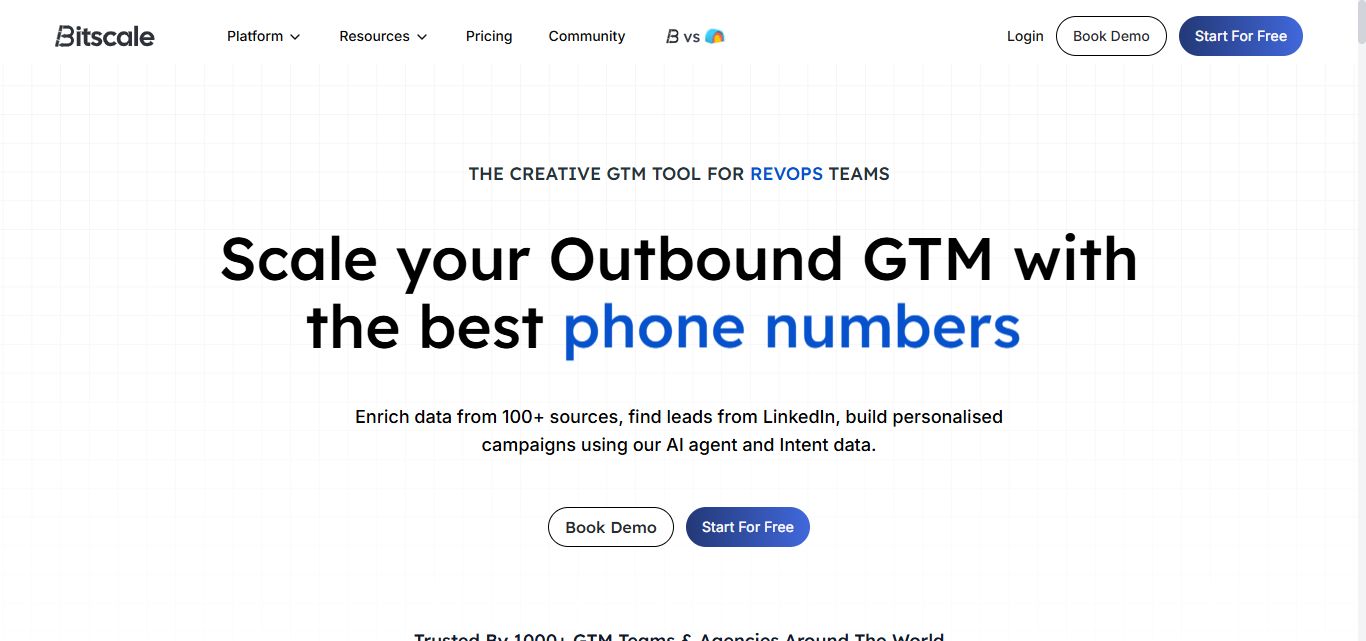
Bitscale maintains a database of over 300 million contacts and 40 million companies with real-time updates.
You can search directly within the platform using filters for job title, seniority, company size, industry, revenue, geography, and technology stack to build a prospect list without importing from an external source.
Lead imports are also supported from LinkedIn via CSV export, HubSpot, Salesforce, Google Maps, Apify, webhooks, and direct CSV upload.
The monthly company and people search limits are 200 on the free plan, 240,000 on Growth, and 780,000 on Booster.
Multi-Source Waterfall Enrichment

Bitscale's enrichment engine is its primary technical differentiator.
Rather than querying a single data provider and accepting whatever it returns, Bitscale cascades across 100-plus sources, checking each until it finds a verified result for each contact field.
Email addresses and phone numbers are validated across 18-plus providers, and Bitscale retains only the first valid result to avoid returning unverified alternatives.

This approach mirrors waterfall enrichment logic used by tools like Surfe and Baseloop but applies it across a broader provider set and within a single platform rather than requiring a separate enrichment subscription.
BitAgent AI Research Agent

BitAgent is Bitscale's autonomous web research tool.
Point it at a company, and it will visit the website, run Google searches, scrape public records, and pull facts across pre-defined research tasks: finding decision makers, identifying the tech stack, surfacing case studies, reading recent news, and collecting any other public information you define.
This replaces the manual research step that makes per-account personalization unsustainable at volume. The agent only runs on leads that match your defined target profile, avoiding credit consumption on prospects outside your ICP.
Intent Signals
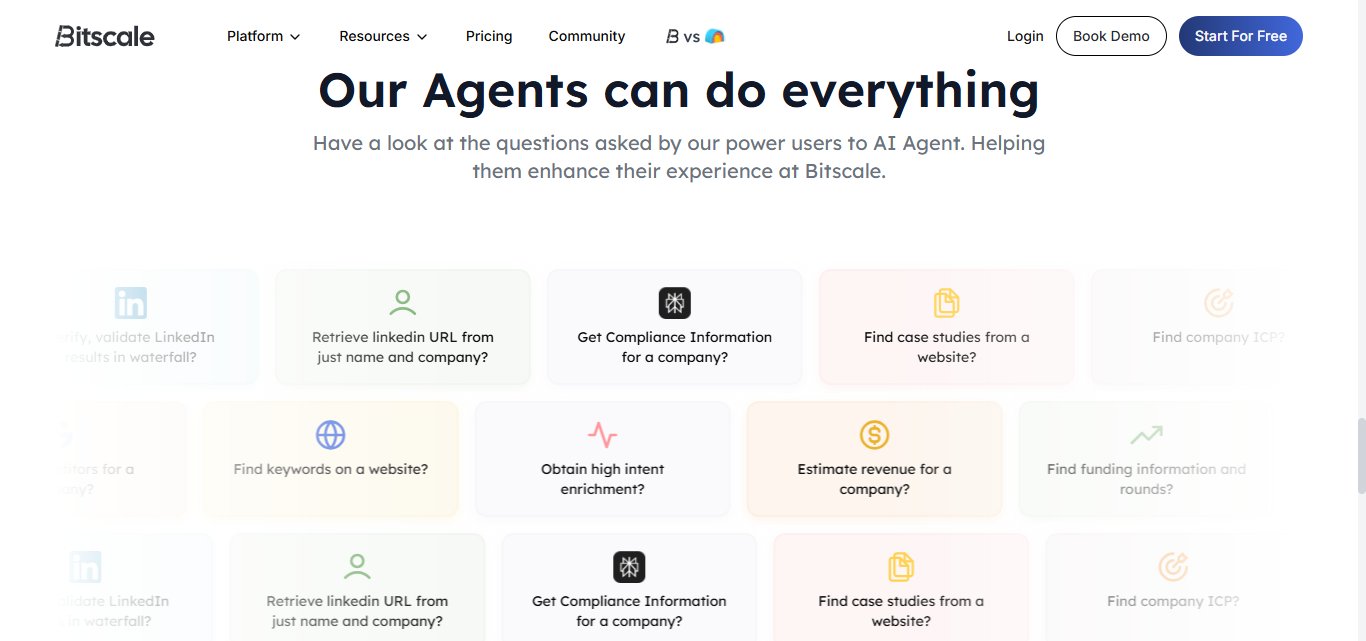
Bitscale surfaces buying intent signals including hiring surges, funding rounds, website technology changes, and job movements. These signals help sales teams identify which accounts are currently in a buying cycle rather than prospecting into cold lists without timing context.
Intent enrichment covers 50-plus signal types on the free plan and expands significantly on paid plans with access to the full 100-plus provider network.
AI-Powered Personalization

Once a lead is enriched and researched, Bitscale's AI writes personalized email first lines, LinkedIn openers, and outreach copy based on the data it has collected about each prospect.
The AI draws on company news, funding events, tech stack, job history, and website content to produce copy that references something real and current rather than filling in a generic template.
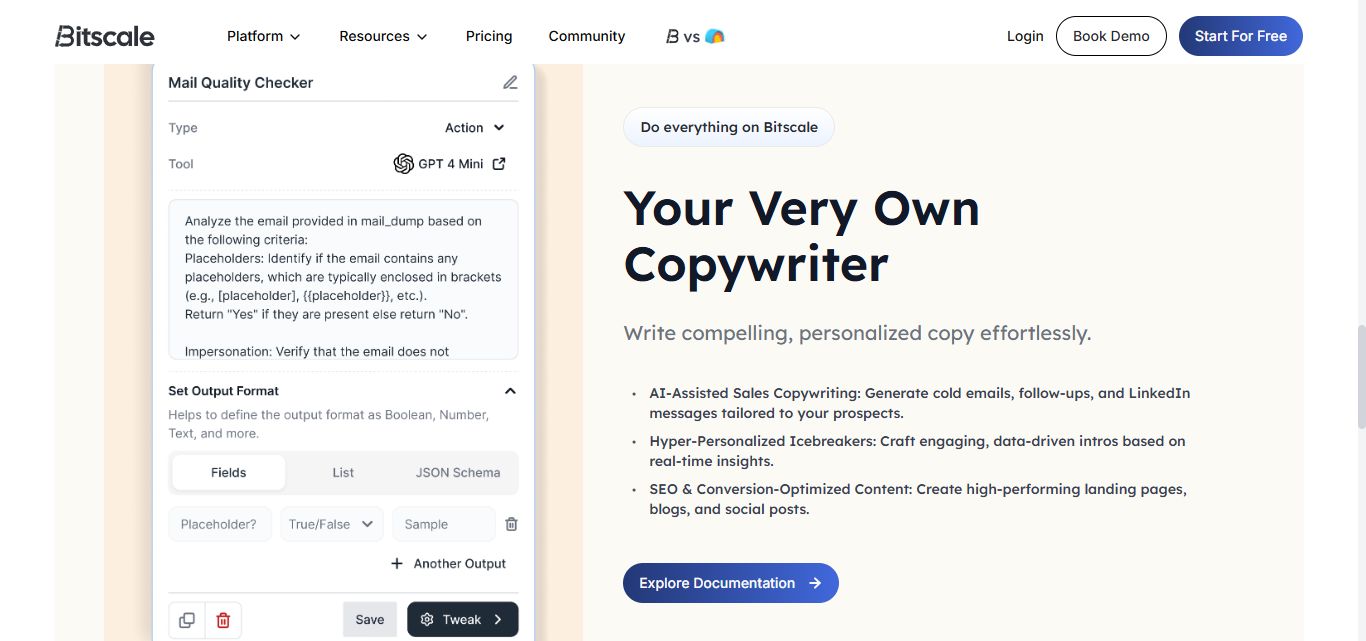
The AI output quality is above average for the price point, useful as a first draft that requires editing rather than being copy-ready to send as-is.
Experienced SDRs typically rewrite 30 to 50 percent of the generated content. It is a time-saver rather than a replacement for human judgment.
Outbound Integration Layer

Bitscale does not send emails or LinkedIn messages natively.
It connects enriched, personalized leads to external tools: Instantly, Smartlead, and Heyreach for email and LinkedIn outreach, HubSpot via two-way sync (Growth and above), Salesforce (Booster and above), webhook and HTTP API (Growth and above), and inbound enrichment tools like RB2B, Factors, and Vector.
This integration layer means Bitscale is a data and preparation platform rather than an outreach platform. Your sending happens in whichever sequencing tool you already use.
75-Plus Playbooks
Bitscale provides over 75 pre-built campaign playbooks covering common outbound use cases: cold outreach to funded companies, prospecting into hiring accounts, re-engagement of dormant CRM contacts, and more. Playbooks reduce the configuration time for new workflows and give teams a starting point rather than building from scratch.

Credit System

Everything in Bitscale consumes credits.
Enriching a contact, running AI research, validating an email, scraping a website, and generating personalization copy all draw from the same credit pool.
Credit costs vary by action type: basic enrichment costs fewer credits than deep AI research. Teams with high-volume or research-heavy workflows can burn through credits faster than the plan headline numbers suggest.
Monthly plan credits roll over up to 3x the plan limit on Growth and 4x on Booster. Annual plans grant all credits upfront for use anytime during the year.
Bitscale Pricing
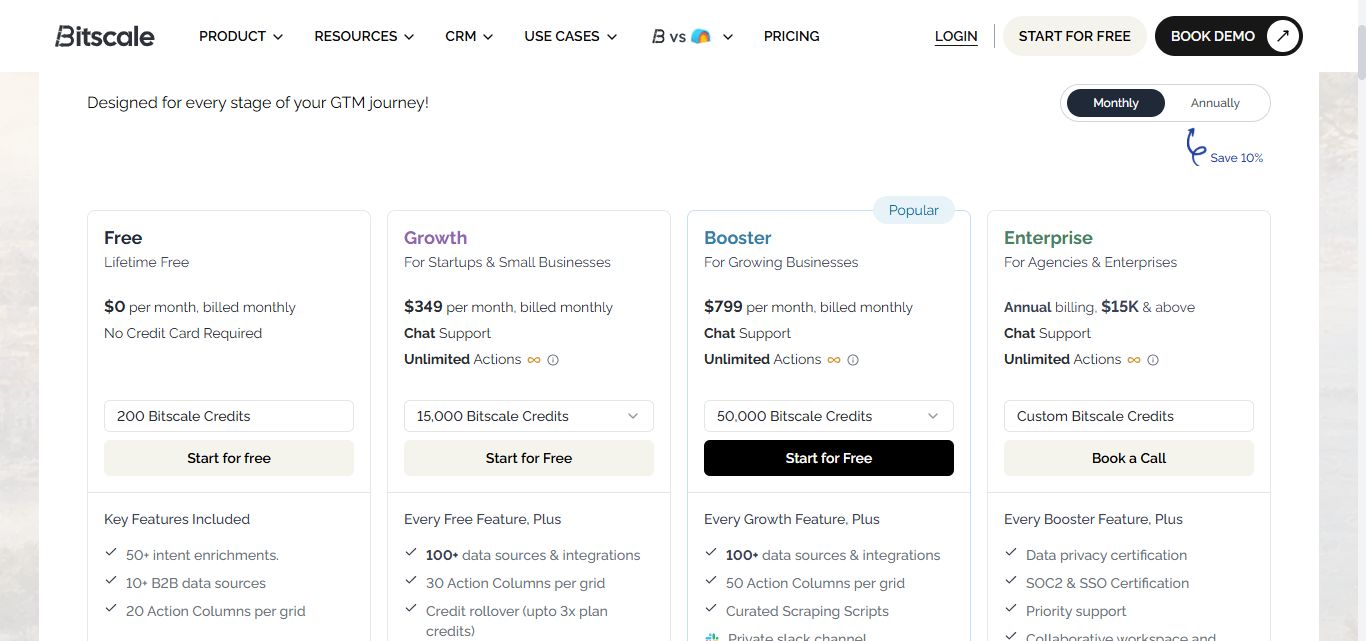
All prices below are monthly billing rates. Monthly and annual billing are available, and annual billing saves 10 percent compared to monthly.
A free plan is available with no credit card required.

Free: $0/month
- 200 Bitscale credits (lifetime, not monthly)
- 2,000 monthly company and people search
- 50,000 rows per grid
- 20 action columns per grid
- 50-plus intent enrichments
- 10-plus B2B data sources
- No credit rollover
- No CRM integrations
- Best for exploring the interface before committing
Growth: $314/month (billed annually), $349/month (billed monthly)
- 240,000 Bitscale credits per year
- 20,000 monthly company and people search
- 100,000 rows per grid
- 30 action columns per grid
- Credit rollover up to 3x plan limit
- 100-plus providers and integrations
- 2-way HubSpot integration
- Webhook and HTTP API access
- Inbound integrations: RB2B, Factors, Vector
- GPT-5 and LinkedIn source scheduling
- 20-plus outbound email templates
- 3 hours GTM engineer support
- Best for startups and small sales teams running structured outbound
Booster: $719/month (billed annually), $799/month (billed monthly)
- 780,000 Bitscale credits per year
- Credit rollover up to 4x plan limit - 65,000 monthly company and people search
- 100,000 rows per grid
- 50 action columns per grid
- Credit rollover up to 4x plan limit
- Everything in Growth plus:
- Salesforce integration
- Curated scraping scripts
- Private Slack channel
- Support with custom API integration
- Advanced AI models including Claude Sonnet
- Credit reporting and analytics
- AI prompting support
- 8 hours GTM engineer support
- Best for growing sales teams and agencies running high-volume multichannel outbound
Enterprise: Custom (from $15,000/year)
- Custom credit allocation
- Unlimited rows per grid
- Everything in Booster plus:
- SOC2 and SSO certification
- Data privacy certification
- Collaborative workspaces and private playbooks
- Custom CRM two-way sync
- Curated enrichment and scraping scripts
- Custom Slack alerts
- Role-based team access
- Snowflake pipeline support
- 12-plus hours GTM engineer support
- Contact sales for a quote
What Works Well
✅The Clay comparison holds up on price and usability. The most consistent praise from early Bitscale users is that it delivers the core enrichment workflow of Clay at a meaningfully lower starting price, with an interface that does not require a dedicated ops hire to configure. For teams that want spreadsheet-style enrichment without Clay's complexity or credit costs, Bitscale delivers on that comparison.
✅Multi-source enrichment across 100-plus providers is genuinely comprehensive. The waterfall approach with 18-plus validation providers for email and phone means Bitscale is not simply returning whatever a single database has. The claimed 94 percent email coverage is in line with what enterprise enrichment tools deliver, and the validation logic reduces the bad data that makes cold email campaigns fail on deliverability.
✅The BitAgent removes a real per-account research bottleneck. For teams that want outreach personalization beyond first-name and company-name merge fields, the ability to automatically research websites, news, tech stack, and company context at scale compresses the time between identifying a prospect and having enough context to write a relevant message.
✅Slack-based support from the founding team is a genuine differentiator at this stage. Early users specifically highlight the responsiveness and quality of Bitscale's support, particularly through the private Slack channel on the Booster plan. For a newer platform where configuration questions are common, direct founder-level support reduces the cost of errors.
✅Credit rollover on monthly plans adds real flexibility. Unused monthly credits rolling over up to 3x the plan limit on Growth and 4x on Booster means teams with uneven monthly prospecting volumes are not penalized for lighter months. This is meaningfully better than tools that expire credits at the end of each billing cycle.
Potential Drawbacks
⚠️HubSpot integration is locked behind the $349/month Growth plan. Teams that want enriched Bitscale data flowing into HubSpot automatically cannot do so on the free plan. Two-way HubSpot sync only activates at Growth and above. For any team using HubSpot as their primary CRM, this makes the real entry price $349/month rather than $0.
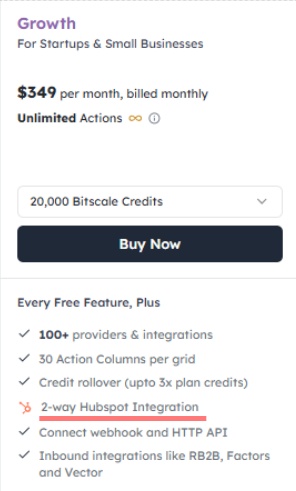
⚠️Salesforce integration requires the $799/month Booster plan. Salesforce users face an even steeper entry point. Native Salesforce integration is only available on Booster, which doubles the cost compared to Growth. Teams evaluating Bitscale for a Salesforce-based RevOps workflow need to factor $799/month annually into the true cost of ownership from day one.

⚠️Credit burn is unpredictable and spikes with research-heavy workflows. The credit cost varies significantly depending on what each workflow does. Basic email enrichment costs fewer credits than deep AI website research on the same lead. Teams running high-volume campaigns with full BitAgent research on every contact can burn through their Growth plan's 240,000 annual credits faster than expected. There is no built-in cost estimator before running a workflow.

⚠️The BitAgent models and database filters require significant manual effort. While the platform offers AI research capabilities, the BitAgent models lack the deep customizability found in competitors like Clay. Users may find the AI's flexibility limiting when trying to build highly specific research workflows. The lack of "clean" or intuitive role filters often forces users into a tedious process, sometimes requiring the input of up to 30 different keywords just to isolate a single job function.

⚠️Independent review coverage is minimal. Bitscale has only 13 published reviews on G2 as of 2026. Vendor-claimed accuracy rates of 94 percent email coverage and 89 percent phone match have not been independently validated at scale. Teams making a multi-thousand-dollar annual commitment have very limited third-party validation to draw on before signing up.

⚠️Bitscale does not send emails or automate LinkedIn outreach. This is the most structurally important limitation. Bitscale prepares your data and generates your copy. The sending, sequencing, and follow-up happen in connected tools: Instantly or Smartlead for email, Heyreach or similar for LinkedIn. Teams looking for a platform that handles the full workflow from enrichment to booked meeting need to budget for additional tools.
Who Should Use Bitscale
Bitscale is well-suited to RevOps teams, GTM engineers, and growth agencies that need to generate and enrich large prospect lists, apply AI-driven research and personalization at scale, and push clean, qualified data into their existing email and CRM infrastructure. T
eams migrating from Clay who want a simpler interface and lower credit costs will find the comparison favorable on both dimensions.
It is a harder sell for teams that need HubSpot or Salesforce integration from day one without committing to $349 to $799 per month, teams with very small prospecting volumes where the credit system does not justify the entry cost, organizations that need a single platform to handle enrichment and outreach execution without connecting additional tools, or teams that want extensive third-party validation before committing budget to a newer platform.
Bitscale vs SalesRobot: A Direct Comparison
SalesRobot: The Natural Complement for LinkedIn Outreach Execution
Bitscale builds the list and prepares the data. SalesRobot runs the LinkedIn outreach from it.
The workflow is clean and logical.
Bitscale generates a prospect list from its 300M-plus database or your LinkedIn import, enriches every contact across 100-plus sources, runs AI research on each account, and writes personalized first lines.
At that point, you have a verified, researched, personalized lead list ready to activate.
What Bitscale does not do is put that list in motion on LinkedIn.

SalesRobot is a cloud-based LinkedIn and email automation platform built specifically for B2B outreach. You can import your Bitscale-enriched contact lists via CSV and run them through automated connection request sequences with the personalized copy Bitscale has already generated.
Mobile API Safety: Because SalesRobot connects through LinkedIn's mobile APIs, your outreach activity mimics natural human behavior.
Users consistently report running sustained, high-volume campaigns without account flags or restrictions, which is the single biggest operational concern with any LinkedIn automation tool.

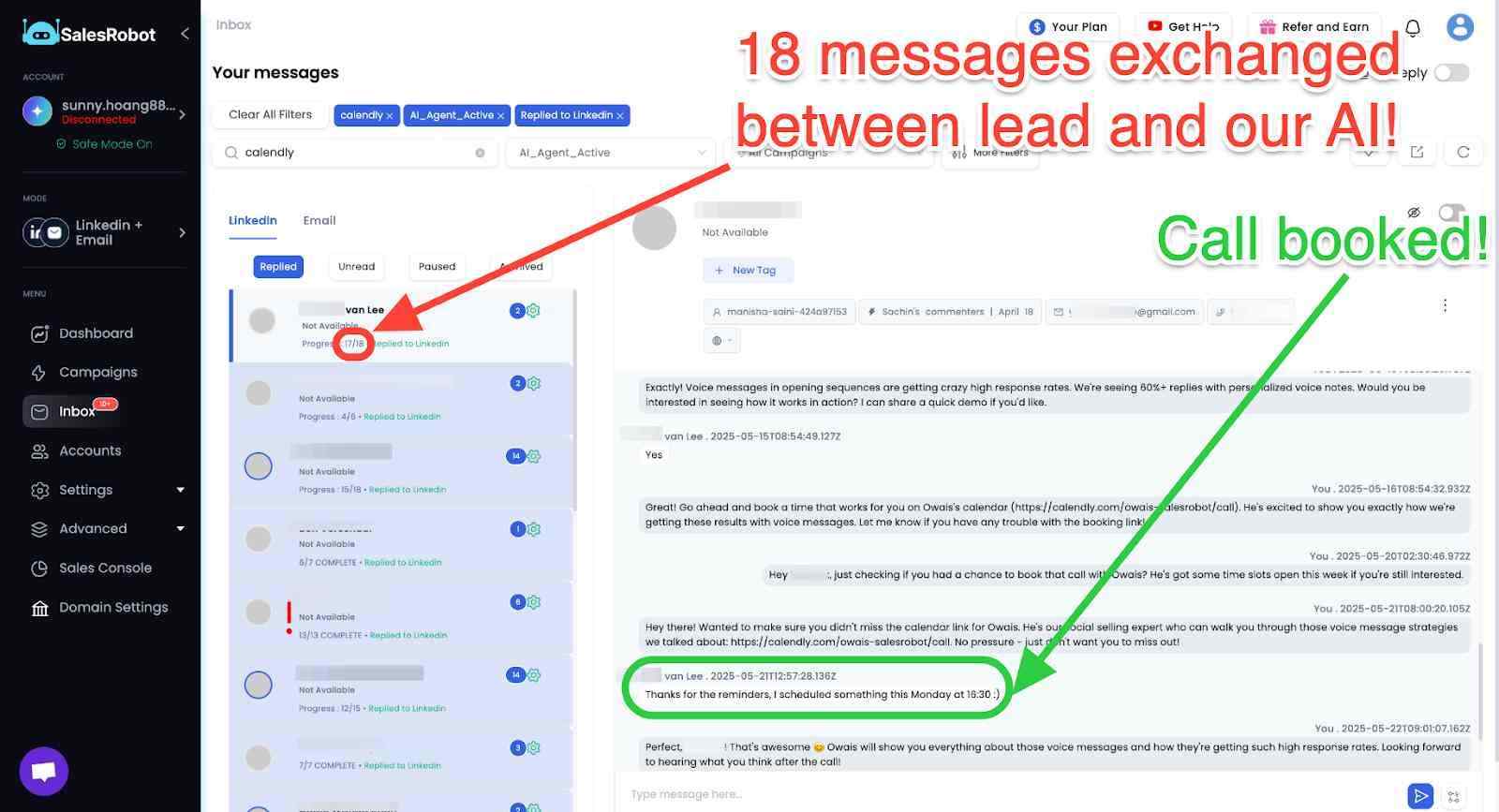
AI Appointment Setter: After a prospect replies, SalesRobot's AI takes over the conversation, handles qualification questions, and books meetings automatically.
You can train it on your specific criteria and ideal responses, which means the early-stage pipeline management largely runs without manual involvement. For smaller teams without a dedicated SDR, this is a meaningful capability.
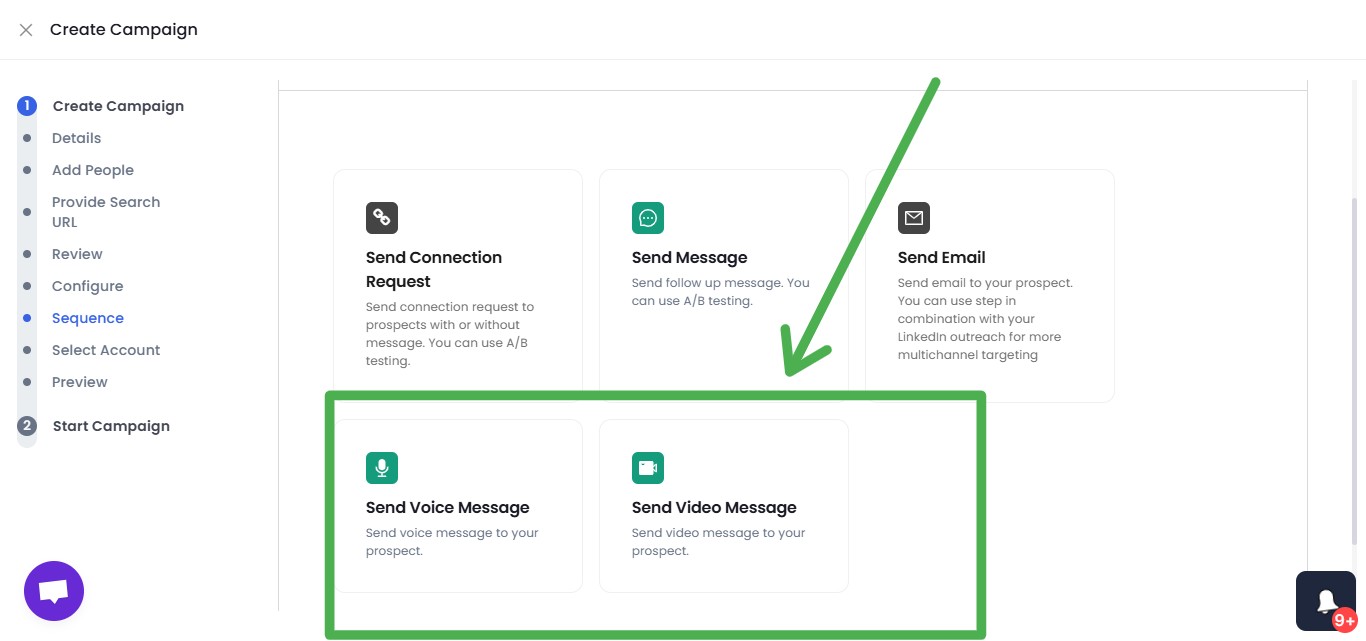
AI Voice Clone and Video Messages: SalesRobot lets you send personalized voice notes and video messages through LinkedIn as part of automated sequences.
The AI Voice Clone feature lets you record a short voice sample once, then generates individualized voice notes for each prospect that sound like you, without recording each one manually.
In sectors where relationships and trust matter, this kind of personal touch at scale tends to drive significantly higher reply rates than text-only outreach.
AI Variables and Hyper-Personalization: SalesRobot pulls data directly from a prospect's LinkedIn profile to write personalized message sequences automatically. You are not working from a static template that gets blasted to everyone.
Each message is adapted to the individual, which matters when you are reaching decision makers who see generic outreach constantly.

Multi-Step Sequences: You can build complex LinkedIn and email campaigns with smart delays and behavioral conditions. Leads can be imported from Sales Navigator, standard LinkedIn search, LinkedIn groups, event attendees, or CSV uploads, giving you flexibility in how you build and target your prospect lists.

Unified Inbox and Mini CRM: All LinkedIn and email conversations consolidate in one place with automatic reply detection. SalesRobot stops messaging automatically when a prospect responds, preventing the over-automation feel that kills conversations. You can tag leads, filter by interest level, and track where every prospect sits without switching between platforms.
Team Management and Analytics: For agencies or sales teams managing multiple LinkedIn accounts, SalesRobot tracks performance across accounts, prevents duplicate outreach between team members, and surfaces detailed analytics on what sequences and approaches are actually working.
SalesRobot pricing (per LinkedIn account, 14-day free trial, no credit card required):
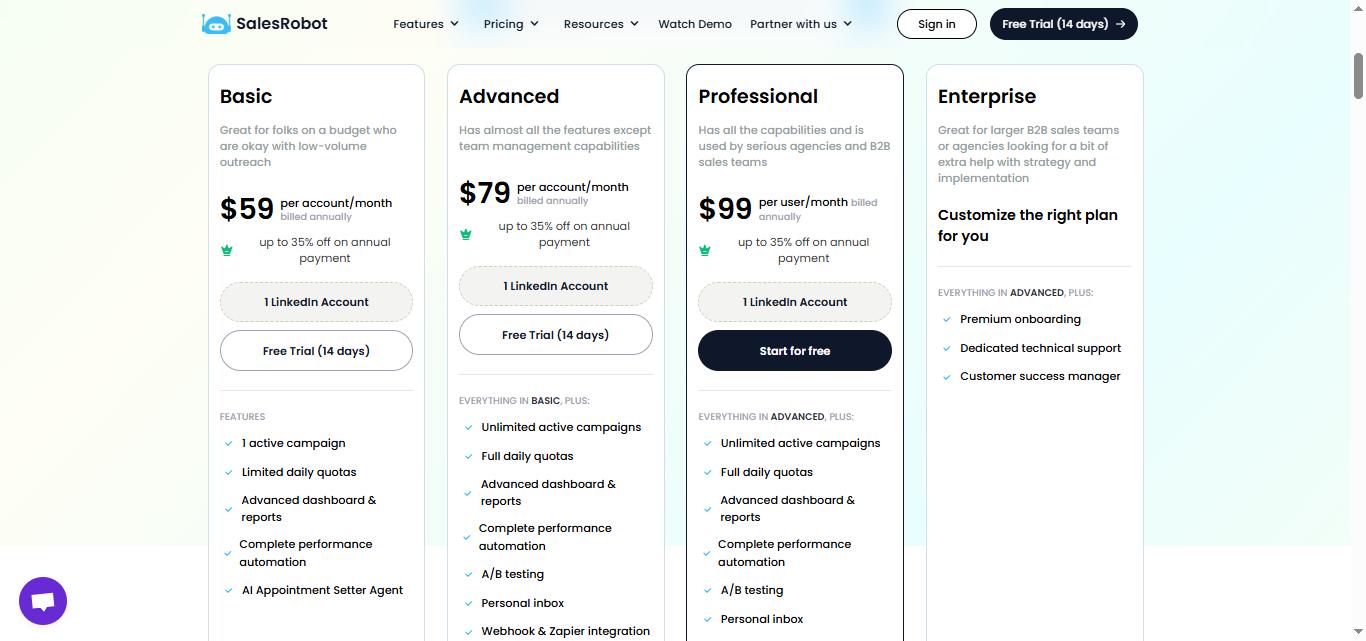
- Basic: $59/month ($39/month billed annually) — includes the AI Appointment Setter, like every SalesRobot plan
- Advanced: $79/month ($59/month billed annually)
- Professional: $99/month ($79/month billed annually)
- Enterprise: Custom
- Email outreach add-on: $15/month per account
SalesRobot holds a 4.8 rating on G2, based on 50+ independent user reviews.
The Bottom Line
Bitscale delivers on its core promise for the right team.
The enrichment breadth, AI research agent, and outreach personalization capabilities are genuinely strong for a platform at this price point, and the Clay comparison holds up for teams that want structured enrichment workflows without Clay's configuration complexity.
For RevOps teams and GTM engineers who need to process large prospect lists with multi-source enrichment and AI-generated copy, Bitscale addresses that workflow directly.
The limitations are real and worth stating plainly.
❌The free plan's 200 credits is not a real trial.
❌CRM integrations are gated behind expensive tiers that significantly raise the true entry cost.
❌Credit burn is harder to predict than the headline plan numbers suggest.
❌Independent reviews are scarce enough that buyers are making a significant financial commitment with limited external validation.
❌And Bitscale does not execute outreach, which means it works best as one part of a wider stack rather than a standalone solution.
If LinkedIn outreach automation is part of how your team generates pipeline, SalesRobot fills the execution layer that Bitscale leaves unaddressed.
Bitscale handles the data and preparation. SalesRobot handles the LinkedIn outreach and meeting booking.

Both are independently testable before committing to a significant contract, so give them both a try!.
Frequently Asked Questions
Can Bitscale send emails or run LinkedIn outreach itself?
No. Bitscale is a data and enrichment platform that builds lists, enriches contacts, and generates personalized copy, but it does not send emails or automate LinkedIn outreach natively. You push enriched leads into external tools like Instantly, Smartlead, or Heyreach, or a LinkedIn automation platform like SalesRobot, for actual sending.
Does Bitscale offer a cheaper plan than Growth?
Yes. Bitscale now has a Starter plan at $89/month billed annually, sitting between the free tier and Growth. It includes unlimited actions, 30 action columns, 3,000 monthly searches, and credit rollover, but does not include two-way HubSpot or Salesforce integration, which remain gated to Growth and Booster.

Wow your leads by cloning yourself and sending personalized videos and voice notes to each lead on LinkedIn.
If you don't reply to leads within 5 mins, your chances of converting them fall by 50%. Our AI replies on your behalf instantly! (and yes, you can train it)

Don't shoot in the dark. Get detailed analytics on what's working

SalesRobot allows you to invite other team members, so that they can add their LinkedIn Account, run outreach campaigns and get amazing results just like you.
.avif)


Trusted by 4100+ innovative B2B sales teams and lead gen agencies

.avif)

.avif)




.avif)