.avif)
Okay, let's be real. Your Gmail inbox probably looks like a digital tornado hit a stationery store. At least, I know mine does.
It's a cluster of a thousand emails looking me in the eye and making me feel as guilty as my unfinished task list.
That's where Gmelius struts in, confidently promising to make your email life easier. So we dove headfirst into Gmelius to find out if it actually delivers everything it promises to.
We have also compared it to similar tools like Hiver and Mailsuite so you can find the right fit and decide if Gmelius is worth your while. 😎
Busy? Think patience is overrated? ,
I do not judge.
Here's a quick TL;DR! You're welcome😉
🔍 TL;DR – Which Tool Is Best for You?
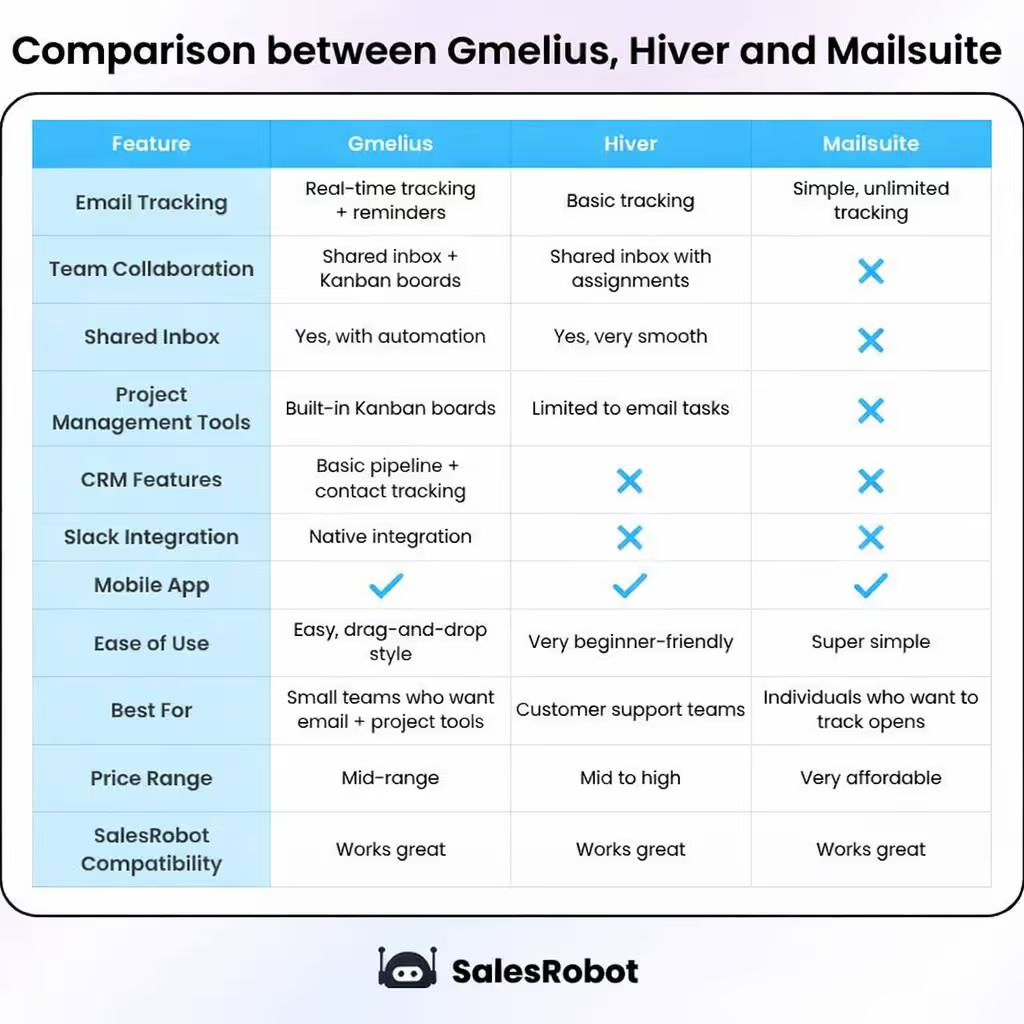
Got a minute? Awesome! Stick around because we're going to discuss the table in detail and also find out the:
👉 Top Features Of Gmelius. Next, we'll discuss
👉 Gmelius Pros along with its cons
👉 Then we'll see Gmelius vs. Hiver and Mailsuite and decide who's the winner, and finally, we'll figure out
Sounds good?
So grab a cup of coffee, and let's begin with
What is Gmelius, and Why Are People Talking About It?

Imagine your Gmail could archive those 75 promotional emails from that one store you bought something from in 2018 and also bump up any important messages you need to reply to.
Gmelius is like that one guy who can fix just about anything.
It's a set of tools that bolts onto your existing Gmail (or Google Workspace) and adds many features you never knew you needed but now can't live without.
Speaking of, let's find out the
Top Features of Gmelius (a.k.a. What Makes It Cool)
So, what exactly does Gmelius do? Here are some of the highlights that made us go, "Hmm, that's actually kinda neat."
Shared Inboxes Without Losing Your Mind
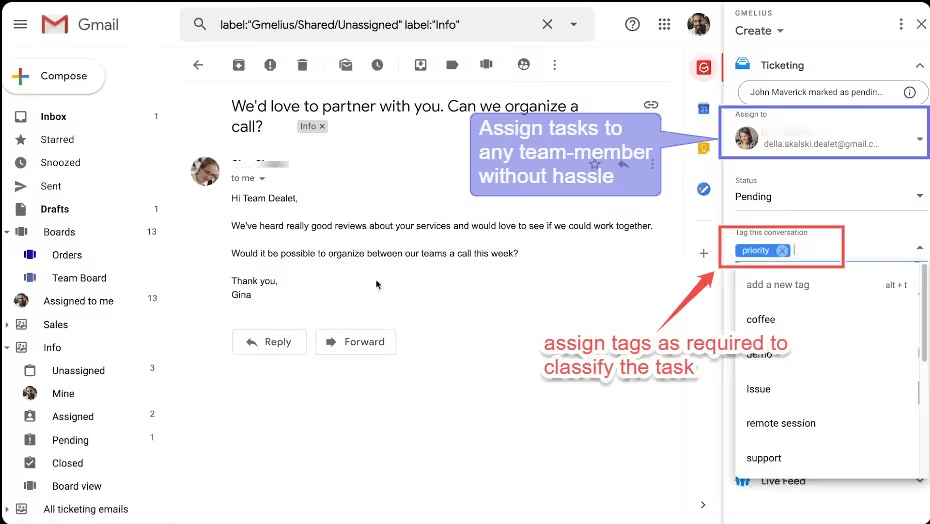
Have you ever tried managing a team inbox with just regular Gmail? It's like herding cats. Who replied? Who's on it? Did someone accidentally delete that crucial client email again?
Gmelius offers shared inboxes that actually make sense. You can assign emails to team members, track their status, and see who's doing what.
It's like having a mini project management system right inside your email.
No more "reply all" nightmares or wondering if anyone actually followed up.
Email Templates That Save You From Typing the Same Thing 42 Times
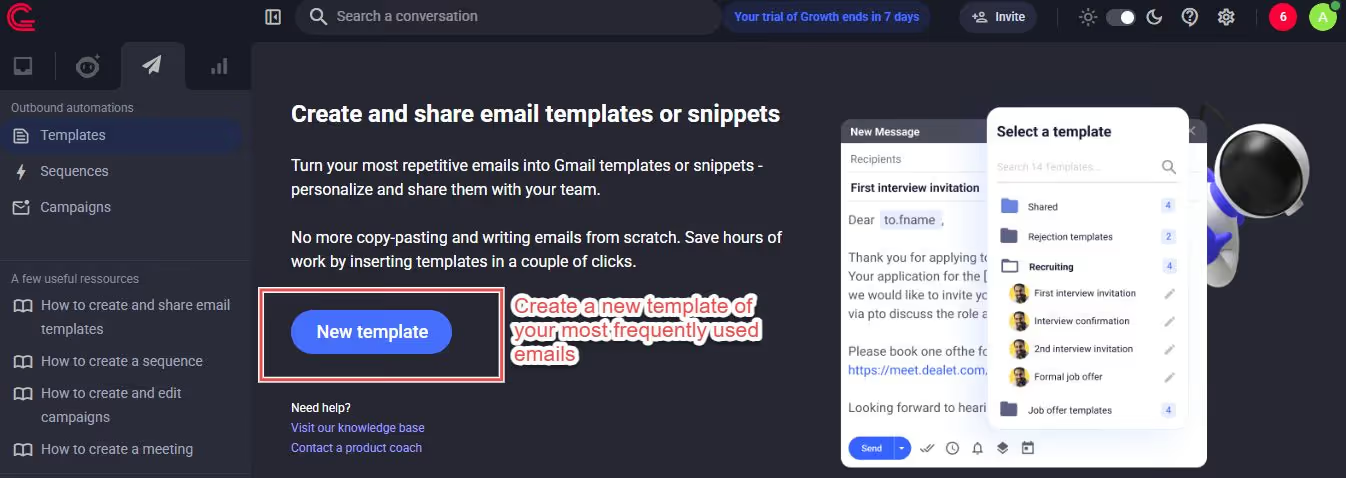
How many times a day do you type the same basic email? "Thanks for your inquiry," "Following up on our meeting," "Here's that attachment I promised"?
It's mind-numbing.

You could be using that time to close deals, reach out to leads, nap, or do just about anything else.
Gmelius lets you create email templates. Boom. With one click, your perfectly crafted response is ready to go. You can even use variables to personalize them.

Kanban Boards Inside Gmail? Yes, It's Real
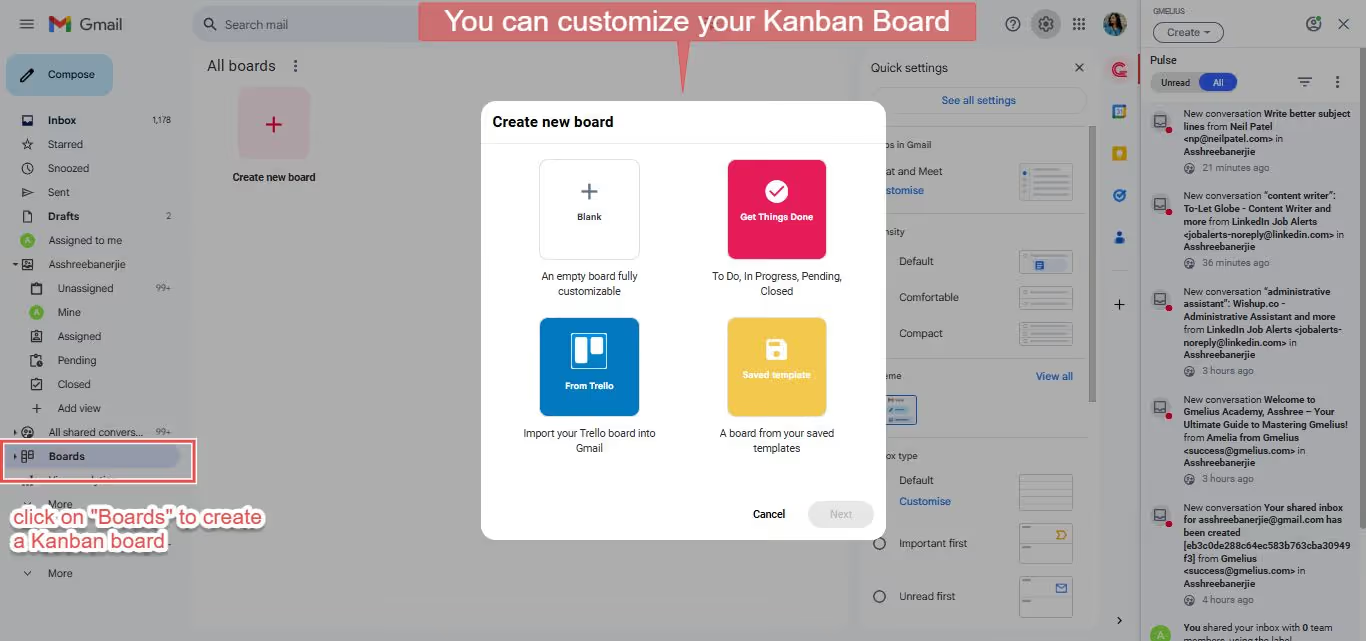
Gmelius lets you turn your emails into tasks on a visual board. You can organize them by status (To Do, In Progress, Done, etc).
It's a surprisingly intuitive way to manage projects, track leads, or keep tabs on important emails needing action.
Drag and drop those emails like you're playing a very productive (and slightly addictive) video game.

AI-Powered Email Assistants: Let Gmail Get Smarter
In 2025, Gmelius has stepped up its game with AI assistants that actually make your inbox work for you. These AI tools can sort your emails automatically, draft replies, and help you stay on top of important conversations.
The AI integration has a low learning curve and offers context-aware suggestions that evolve as your email threads develop. It's like having a smart assistant that learns your email patterns and helps you respond faster.
Email Tracking & Scheduling: Read Receipts, But Make It Work-Friendly
Remember those read receipts in your messages that always feel a bit stalker-ish? (Which is why mine are turned off.)
Gmelius offers email tracking that's actually helpful without being creepy.
Find out which of your emails are still unread with one click 😀
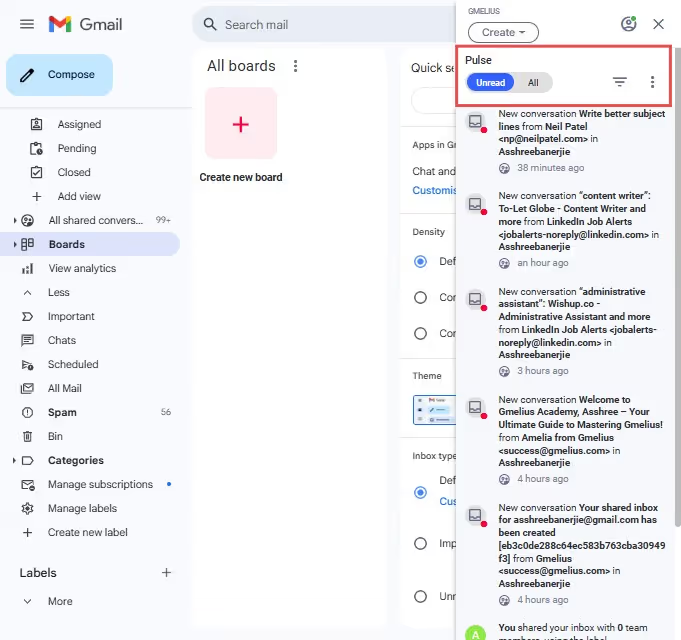
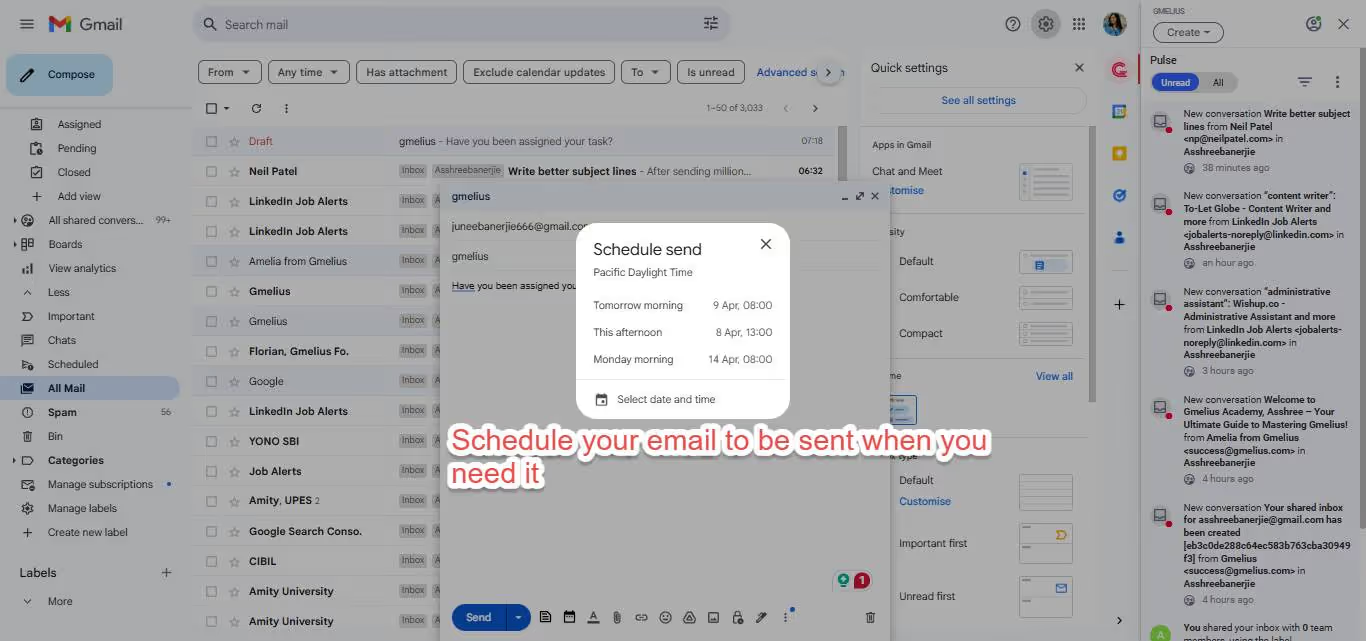
And the scheduling feature? A lifesaver. Write your emails when you have the time and brainpower, and schedule them to send at the perfect moment.
Even if that's 3 AM because that's when your international client is awake (the joys of global business!)
Just click the taskbar on the left to keep track of your scheduled emails.
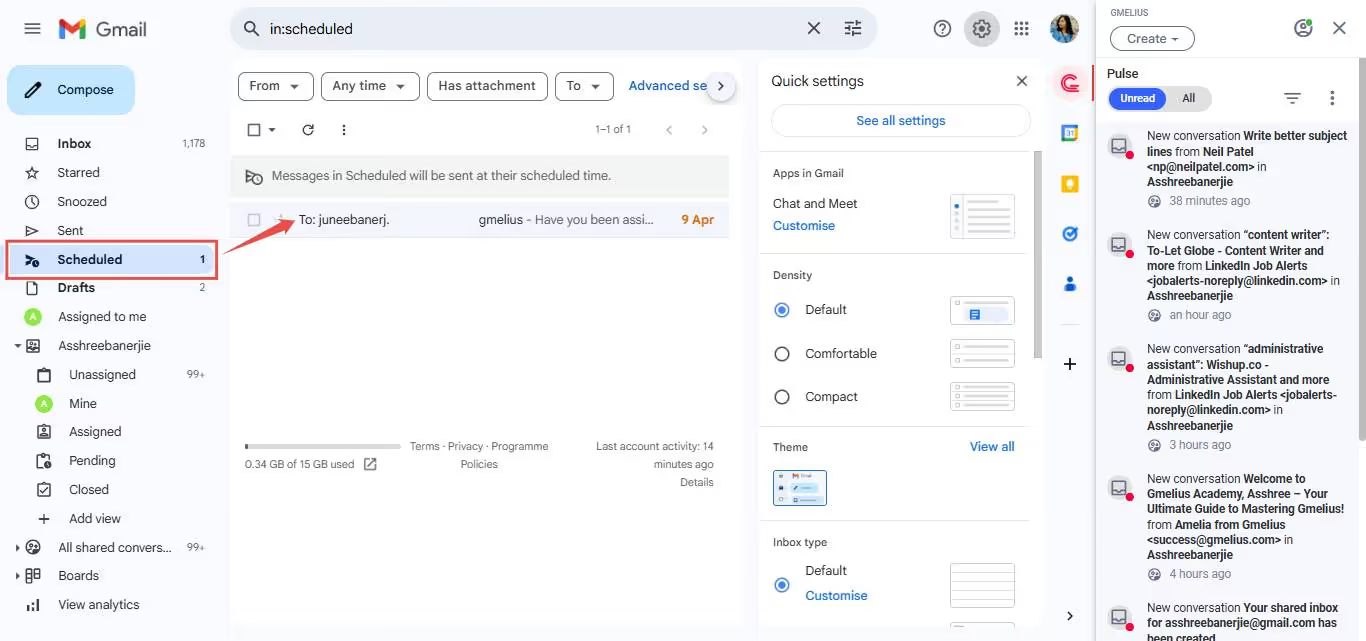
Great! Now you won't forget what you sent or when. 😎
Mobile App: Does It Keep Up When You're On The Go?
In 2025, if an app doesn't work on your phone, it basically doesn't exist. Gmelius has a mobile app, and it's not just a shrunken-down version of the desktop interface.
This screenshot was taken from my phone 👇 (yes, it works EXACTLY the same)
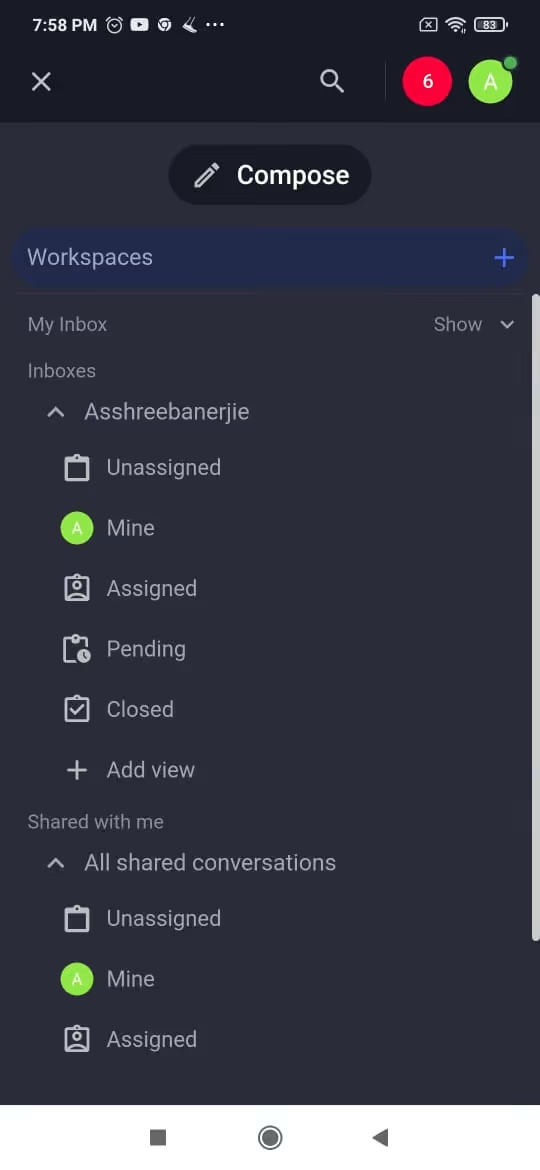
It's designed for on-the-go productivity, letting you access your shared inboxes, Kanban boards, and tracked emails from your phone. So, yes, it keeps up.
You can even manage your email chaos while waiting in line for your oat milk latte. #Priorities
Things We Liked About Gmelius
After spending some quality time with Gmelius, here's what genuinely impressed us:
✅Seamless Integration: It feels like it's actually part of Gmail, not just some clunky add-on. Users consistently praise the seamless team collaboration and how it streamlines email management.
✅Boosted Productivity: Seriously, those templates and shared inboxes are game-changers for efficiency. The email automation capabilities help streamline email tasks and manage incoming emails more efficiently.
✅Visual Organization: The Kanban boards are surprisingly effective for managing email flow. They also look very chic.
✅Team Collaboration: Makes working together on email much, much smoother. Users love how it enhances project tracking from Gmail and improves team productivity.
✅Mobile Convenience: The app is actually just as useful on your phone, which is more than we can say for some productivity apps.
What Could Be Better (Sorry, Gmelius)
❌Learning Curve: While generally intuitive for basic features, the learning curve for all the key features is pretty steep. It can take a while to learn how to share and delegate emails, manage shared inboxes and more. Gmelius doesn't really have an effective training path.
❌Pricing: Depending on your team size and needs, the cost can add up. It's not the cheapest option out there, though they do offer a 7-day free trial to test things out.
❌Occasional Glitches: We did experience a few minor hiccups here and there. Nothing major, but enough to make us go, "Hmm, that was weird."
Gmelius vs. Hiver vs. Mailsuite: How Does It Stack Up?
So, expanding on the chart you saw at the top. Let's find out how Gmelius fares against the other productivity tools vying for your attention (and your wallet).
Compared to basic Gmail, it's like upgrading from a flip phone to a smartphone. It adds a layer of functionality that Gmail simply doesn't offer.
Gmelius is super helpful if your team spends a lot of time working from Gmail. It lets you manage emails, tasks, and teamwork all in one place—no jumping between tools.
But if your projects involve timelines or big teams, you might still need a more advanced project management tool to keep everything on track.
Anyway, here's a quick comparison between Gmelius, Hiver, and Mailtsuite to help you decide faster!
✅ Gmelius – Best for Teams Who Want Email + Collaboration in One Place
If your team lives in Gmail and you're tired of switching tabs for tasks, tracking, and teamwork, Gmelius is your productivity upgrade.
- Built-in shared inbox, Kanban boards, and email automation.
- Great for sales, marketing, and operations teams
- Seamlessly turns Gmail into a collaborative workspace.
- Bonus: Real-time tracking, templates, AI assistants, and integration capabilities
💬 Hiver – Great for Gmail-Based Customer Support Teams
Hiver turns Gmail into a simple but powerful helpdesk system for support teams.
- Clean and intuitive shared inbox interface
- Assign, track, and manage emails like support tickets
- Ideal for support, service, and success teams
- Less focused on automation, more on clarity and ownership
🧑💻 Mailsuite – Perfect for Solo Pros Who Just Want to Track Emails
Mailsuite is all about simplicity. No fluff, just solid email tracking.
- Real-time read receipts and open notifications
- Works great for freelancers, consultants, and solo sales pros
- Easy to use, offers a lifetime free version, and integrates well with Gmail
- Not built for teams, but perfect if you fly solo
So as you can see
Gmelius stands out with its comprehensive suite of features, particularly the shared inboxes and Kanban boards.
Some extensions might focus on templates or tracking, but Gmelius aims to be a more all-in-one solution.
Now, let's talk about something a little different.
Can You Automate a Campaign Sequence With Gmelius?
If your inbox is typically this cluttered, I bet you are also trying to reach out to new leads but finding it incredibly hard to stay organized.
Gmelius is great for managing your existing email flow and team collaboration.
But can it also help you find new leads and automate a campaign sequence? Turns out it can!
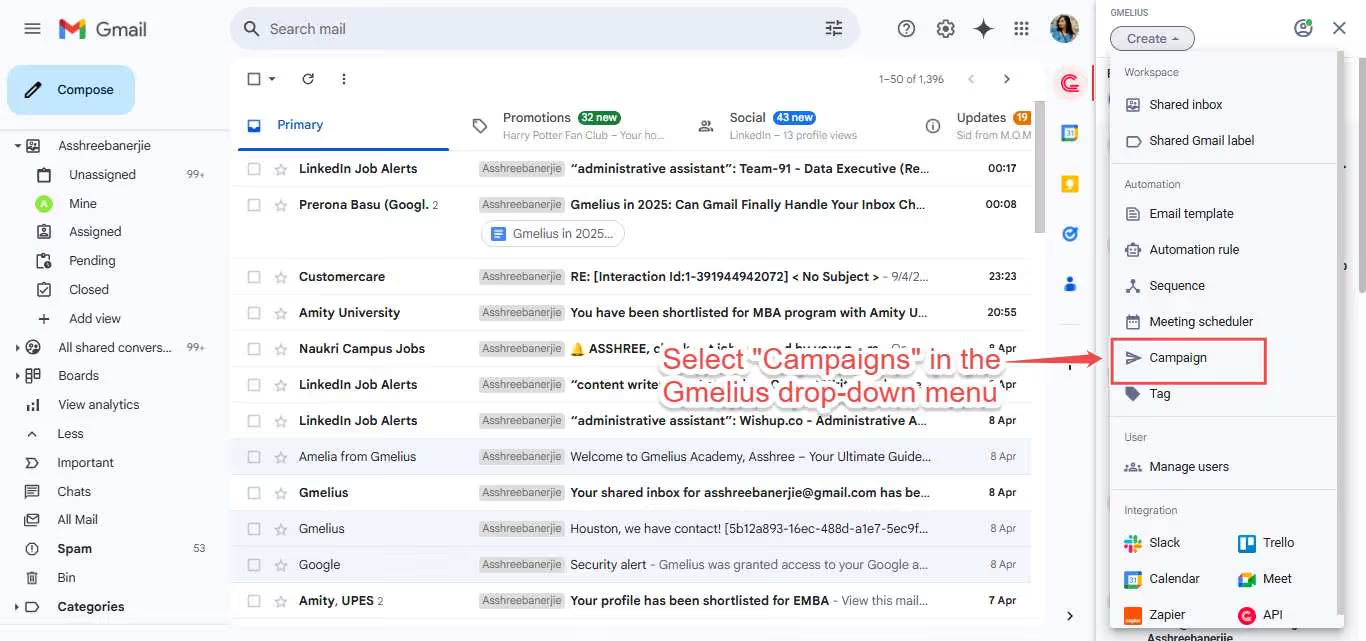
- Click on your Gmelius extension on your homepage and select "Campaigns" in the drop-down menu.
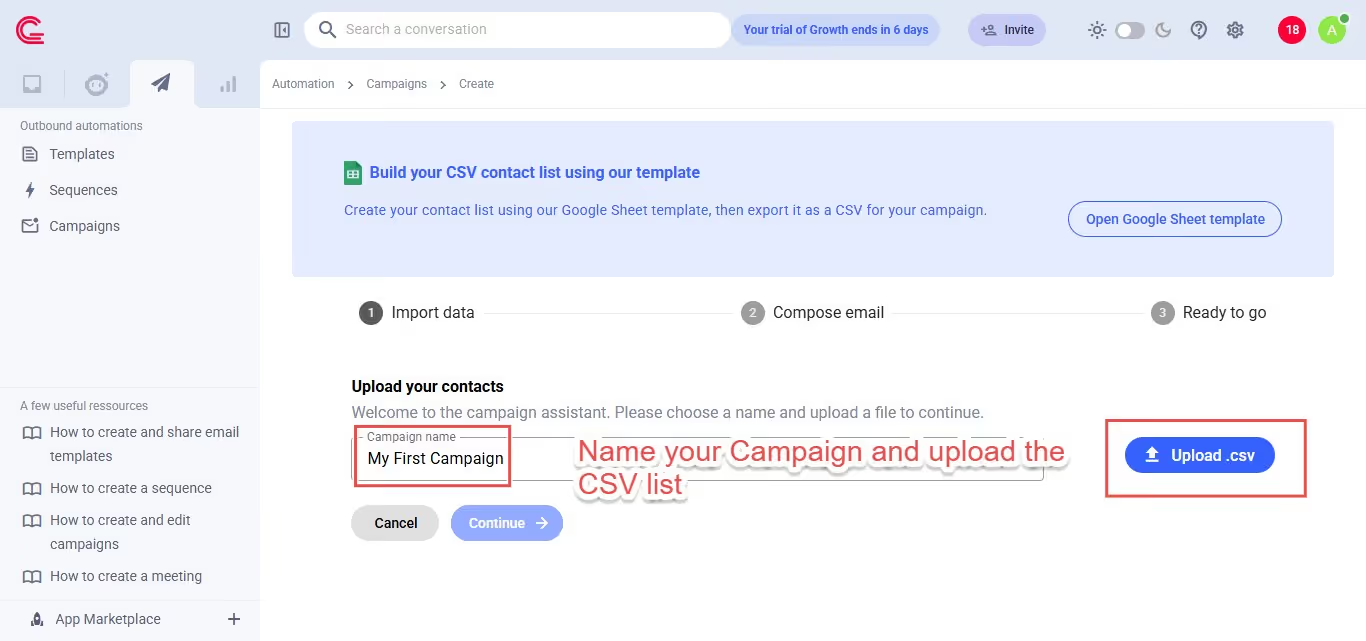
- Name your campaign and upload the CSV list of contacts you want to send it to.
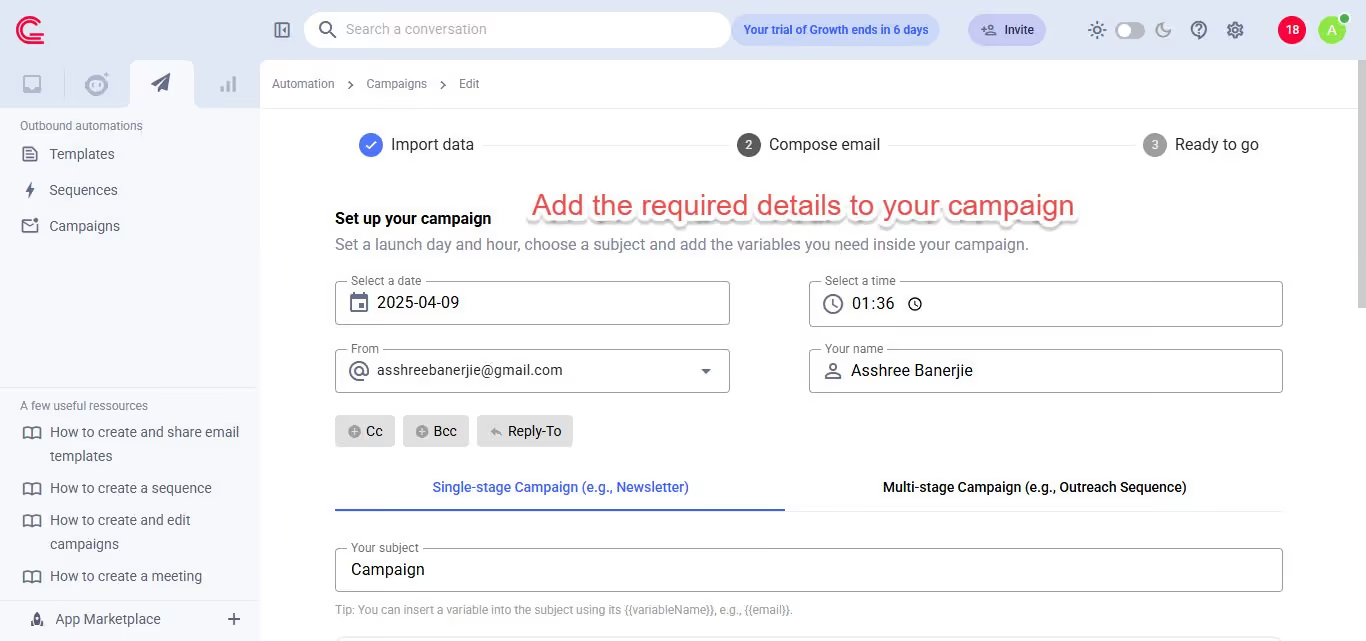
- Add the required details to your campaign.
- Compose your email and send it off 📩
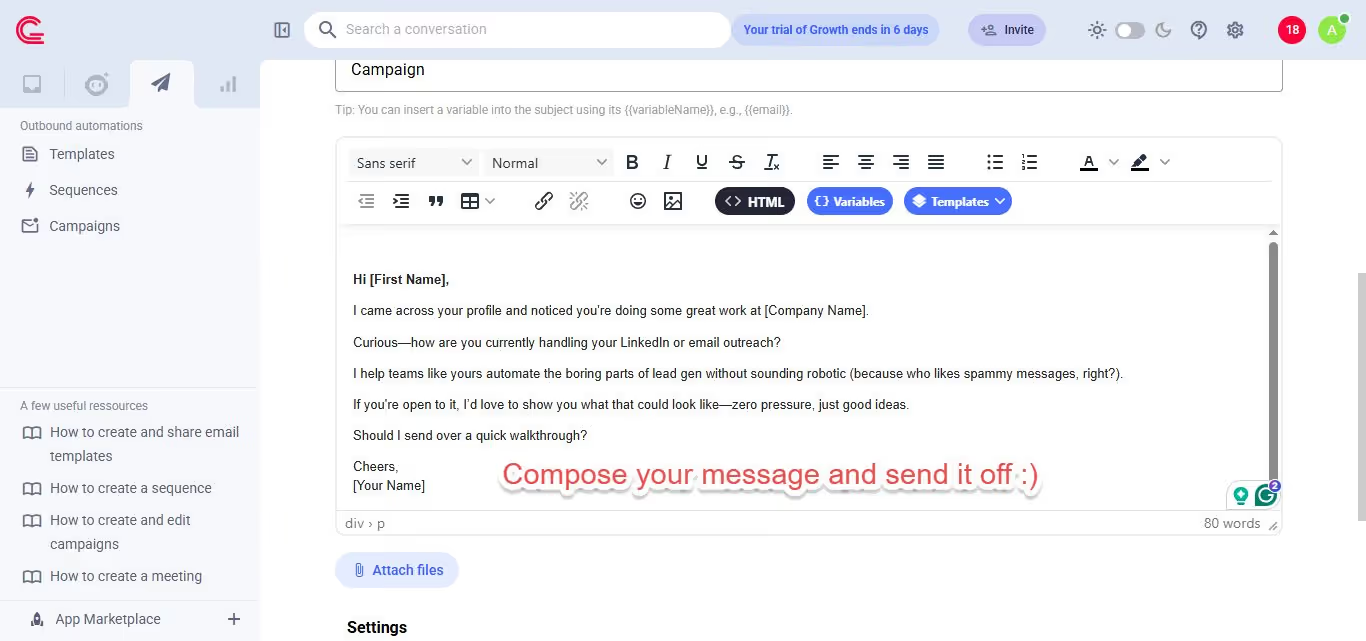
It's pretty great for an email extension, right? Simple and straightforward enough.
But it has some limitations 😔
⛔ You can only create an Email Campaign
⛔ You need to have a CSV file already downloaded
⛔ You cannot modify a campaign that has already been launched
While it works perfectly well, we know that LinkedIn DMs have a 10x reply rate compared to emails. What if you could create a campaign on LinkedIn and Email at the same time?
Hooked? Let me tell you more 😀
Automate LinkedIn + Email Campaigns
So, do you want to launch a campaign on LinkedIn and email at the same time? Here's how to launch one that is not generic, spammy, or impersonal.
Reaching out to potential leads can be thankless, time-consuming grunt work most of the time.

But here's where SalesRobot can swoop in and solve ALL your problems!
Launch Campaigns That Actually Get Replies
Let me tell you how you can use SalesRobot to make your life easier and why you should use it.

With SalesRobot, you can:
🤖 Send hyper-personalized LinkedIn messages at scale.
📊 Track open and response rates to optimize performance.
📅 Schedule follow-ups automatically to keep leads engaged.
So, instead of managing messages manually, let SalesRobot handle everything while you focus on closing deals!
Read on and find out how (it's ridiculously easy). 😎
- Log in to your SalesRobot account and click on "Campaigns."
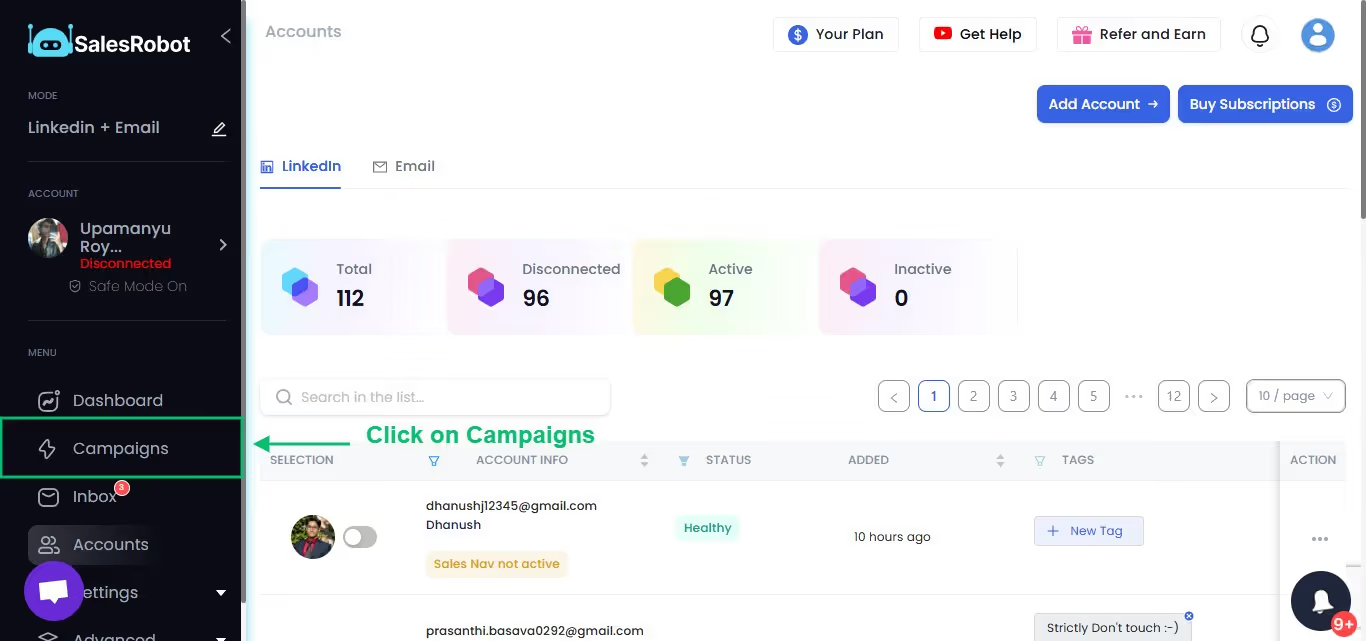
- Select "Create Campaign"

- Select "I'm an advanced user."

- Name your campaign

- Add profiles to your campaign from Sales Navigator/ LinkedIn Search.
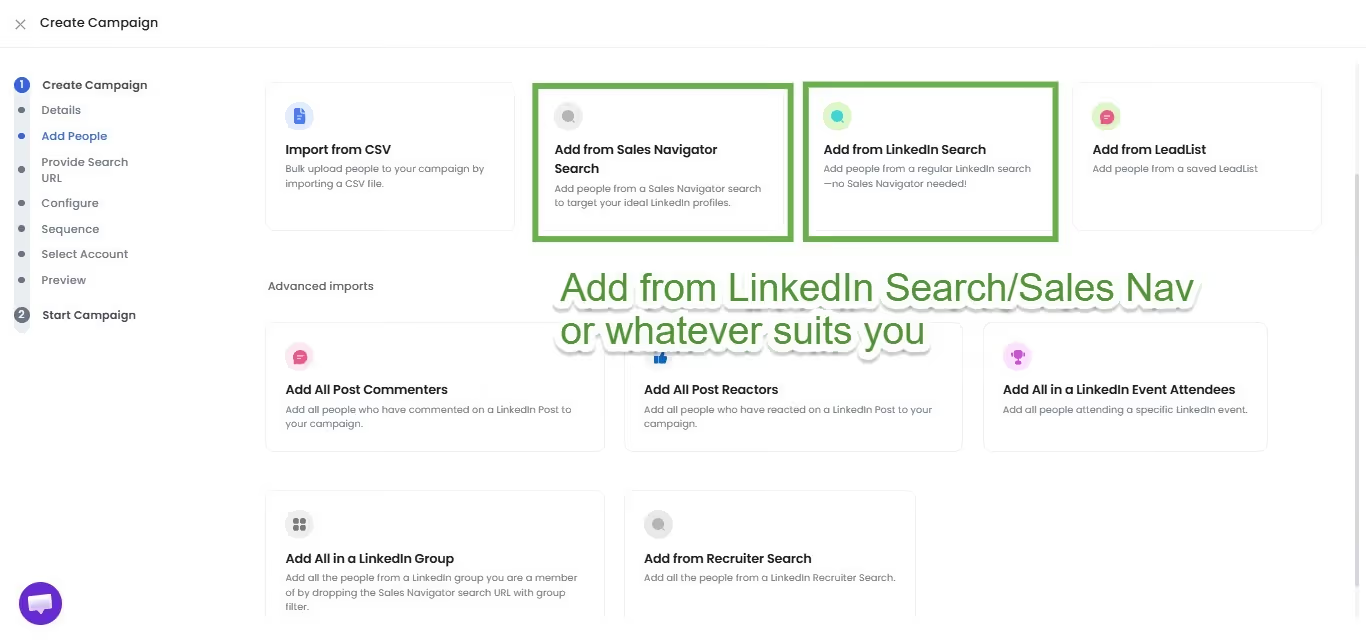
- Import prospects from Sales Navigator/LinkedIn Search

- Select one of our high-performing templates or create one of your own from scratch.

- Add the required steps to your sequence.

- Next, you can set up follow-up messages to keep in touch with your customers and create a sales campaign. In fact, you can add AI Variables for greater personalization, or even send voice and video messages.

AI Appointment Setter - Conversations Don't Stop at "Reply"
Most automation tools stop working once you get a reply.
But what happens next? You still need to respond, qualify leads, and book meetings.
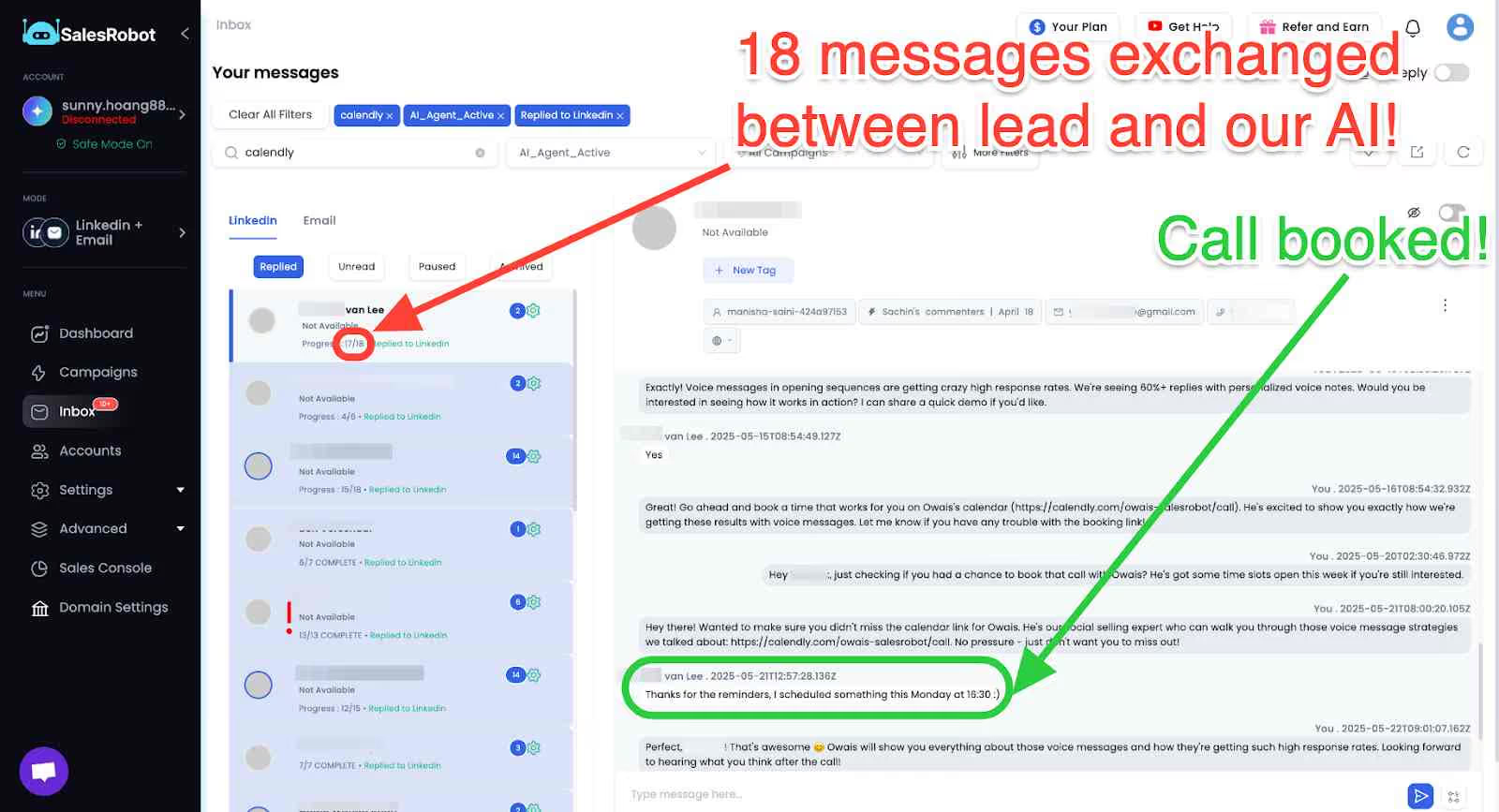
That's where the AI Appointment Setter comes in. When you turn this on, the automation doesn't end when you get a reply.
It has two modes:
- CoPilot Mode:
- Autopilot Mode:
You can set specific goals (like booking a meeting, getting more information, or nurturing the lead), and the AI thinks based on those parameters.
Some other highlights of using SalesRobot are:
💡 You can directly import prospects from LinkedIn and Sales Nav
💡 SalesRobot will create a CSV file from your prospect list if you want it
💡 You can freely modify the campaign even after it has been launched
So that's it! Now, you're all set to send hundreds of personalized connection requests that will take your LinkedIn campaigns to a new level. 😃
If I've got you interested, check out our 14-day free trial. I promise it's worth it!
Now, finally coming to the section you were scrolling all this time for:
Is Gmelius Worth It in 2026?
If you and your team are struggling to keep up with your emails, having a hard time working together, and looking to increase productivity without your inbox giving you a massive headache, then the answer is "Absolutely!" 🎉

However, if your primary need is automating cold email campaigns, while Gmelius does offer some helpful features, a dedicated tool like SalesRobot is a much better fit.
Conclusion: Use Gmelius for Email Peace, SalesRobot for Campaign Power
So, in conclusion:
Gmelius is your go-to for turning Gmail into a neat, team-friendly workspace—think shared inboxes, Kanban boards, AI assistants, and email automation all in one tab. It is absolutely worth it!
But if you want something you can you can rely on to help you write personalized messages, automate LinkedIn and Email Campaigns, help you find leads, and follow up like a pro? SalesRobot is your best bet 😀
Need better email management? Go to Gmelius.
Need better lead generation? Call in SalesRobot.
Have both? Now you're unstoppable. 💥
Alright, go clean that inbox and book that next demo. You've got this. 😎

Wow your leads by cloning yourself and sending personalized videos and voice notes to each lead on LinkedIn.
If you don't reply to leads within 5 mins, your chances of converting them fall by 50%. Our AI replies on your behalf instantly! (and yes, you can train it)

Don't shoot in the dark. Get detailed analytics on what's working

SalesRobot allows you to invite other team members, so that they can add their LinkedIn Account, run outreach campaigns and get amazing results just like you.
.avif)


Trusted by 4100+ innovative B2B sales teams and lead gen agencies

.avif)

.avif)




.avif)


Heading 1
Heading 2
Heading 3
Heading 4
Heading 5
Heading 6
Lorem ipsum dolor sit amet, consectetur adipiscing elit, sed do eiusmod tempor incididunt ut labore et dolore magna aliqua. Ut enim ad minim veniam, quis nostrud exercitation ullamco laboris nisi ut aliquip ex ea commodo consequat. Duis aute irure dolor in reprehenderit in voluptate velit esse cillum dolore eu fugiat nulla pariatur.
Block quote
Ordered list
- Item 1
- Item 2
- Item 3
Unordered list
- Item A
- Item B
- Item C
Bold text
Emphasis

Superscript
Subscript