.avif)
TL;DR
- LeadDelta is a LinkedIn-specific CRM that organizes your connections into a searchable, taggable database. It is not an outreach automation tool.
- The tagging, notes, filtering, and pipeline features are genuinely strong. If your LinkedIn network is a mess, this fixes that.
- Pricing starts at $17.50/user/month (annual) or $25/month (monthly) on the Starter plan, $38.50/$55 on Pro, and $69.30/$99 on Business. A 7-day free trial is available with no credit card required.
- The Business plan adds AI-powered network search, access to a 500M-person lead database, message visibility across your team, and daily contact enrichment.
- LeadDelta does not do automated outreach or messaging sequences. If that's what you need, it's the wrong tool.
- SalesRobot is the stronger pick for teams that want LinkedIn automation alongside relationship management. Plans start at $39/month (annual).
LeadDelta Review: LinkedIn Relationship Management
Ever scroll through your LinkedIn connections and realize you have absolutely no idea who half these people are or how you met them? 😅
You're staring at "Sarah from Marketing" wondering if she's the Sarah from that conference last year or the one who messaged you about a collaboration three months ago.
Meanwhile, somewhere in that list of 2,000 connections is a warm intro to your next client, and you have no way of finding it.
LinkedIn was built to collect relationships, not manage them. There are no tags, no notes, no pipeline views, no way to filter your network by industry or relationship stage. It's a Rolodex that got out of hand.
LeadDelta is built to fix exactly that. It pulls your LinkedIn connections into a proper CRM-style interface where you can organize, filter, tag, and follow up with people in a way that LinkedIn's native tools simply don't allow.
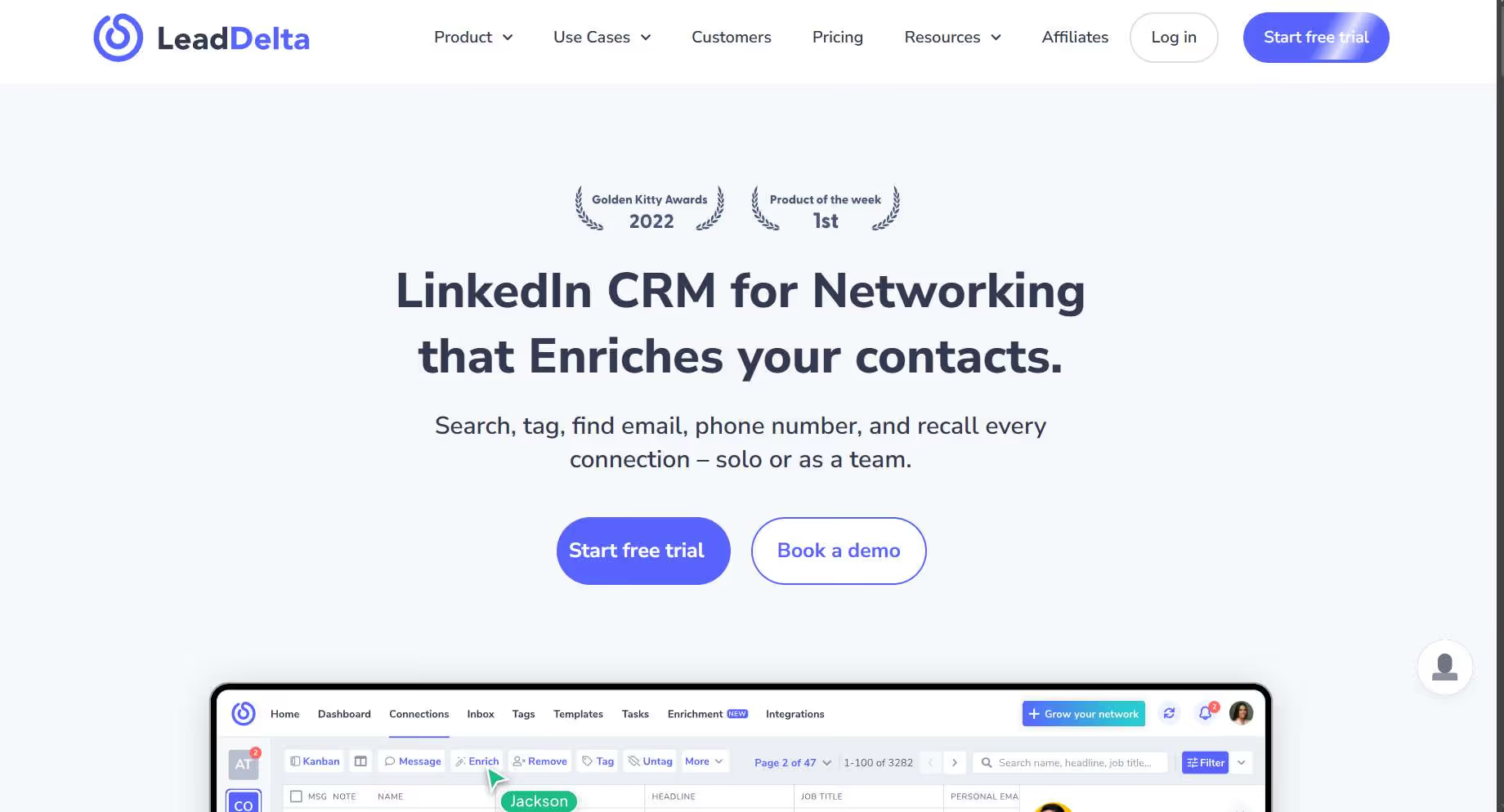
We put it through its paces over several months to see how well it actually holds up in practice.
LeadDelta: What You Need to Know
✅ Strong contact organization. The tagging and filtering system is genuinely useful. You can create custom categories and find the right people in seconds instead of scrolling endlessly.
✅ Relationship context that sticks. Notes, tasks, reminders, and conversation history all live on each contact's profile. You never have to start a follow-up from scratch.
✅ Team collaboration built in. On Pro and Business plans, your whole team shares a network. You can see who's connected to whom, avoid duplicate outreach, and spot warm intro paths you'd otherwise miss.
✅ Contact enrichment included. LeadDelta finds verified business emails, personal emails, and phone numbers for your connections without requiring a separate data tool.
✅ Clean integration story. CSV import/export, Zapier, and HubSpot/Salesforce sync (coming to Business plan) mean LeadDelta fits into an existing stack rather than replacing it.
⚠️ LinkedIn only. If your networking happens anywhere else, LeadDelta won't help you there.
⚠️ No automated outreach. LeadDelta lets you send bulk messages in batches of 25 on the Pro plan, but there are no automated sequences or drip campaigns. This is a relationship management tool, not an outreach engine.
⚠️ Pricing adds up for teams. The per-user model means costs climb quickly as your team grows, especially at the Business tier.
LeadDelta's Key Features, Broken Down
LinkedIn Contact Management
LeadDelta syncs your LinkedIn connections and displays them in a clean CRM-style table view. You can sort, filter, and search across your entire network in ways LinkedIn itself never lets you.
On the Starter plan, connections sync once per day. Pro bumps that to three times daily, and Business does it continuously every 15 minutes. For active networkers, that gap in sync frequency actually matters.
Smart Tagging and Segmentation
You can build as many custom tags as you want and apply them in bulk. Tag people as warm prospects, conference contacts, investors, potential partners, or whatever categories make sense for your workflow.
The filtering then lets you pull up any segment instantly. If you're launching a campaign for SaaS founders in a specific region, you can surface exactly those people from your existing network without any manual searching.
Notes, Tasks, and Reminders
Every contact has a dedicated space for notes, tasks, and follow-up reminders. You can log what was discussed, what you agreed to, and when to check back in.
This is one of those features that sounds small but changes how you use LinkedIn entirely. When you're hopping on a call with someone you last spoke to six months ago, having that context at hand makes a real difference. 📋
Smart Inbox
The Pro plan and above include an inbox layer that sits on top of LinkedIn messages. It lets you see contact details, tags, and notes right alongside your conversations, so you always know who you're talking to and where that relationship stands.
You can also use message templates and send personalized messages to batches of 25 connections at a time. Again, this is not automation. These are manual sends with context baked in.
Contact Enrichment
LeadDelta finds verified emails and phone numbers for your connections using a credit-based system. Ten credits gets you 10 business emails, 3 personal emails, or 1 phone number.
Starter includes 600 credits per year (annual) or 50 per month. Pro gives 2,400 per year or 200 per month. Business goes up to 6,000 per year or 500 per month.
Credits only get charged when a result is actually found, which is a fair way to handle it. 💡
Network Intelligence AI (Business Plan)
This is one of the newer additions and genuinely interesting. The AI lets you search across your entire team's network using plain language queries. "Find a warm path to a VP of Sales at a Series B SaaS company" becomes an actual search rather than a guessing game.
It pulls from connections, past roles, notes, tags, and teammates' data all at once. For teams doing account-based outreach, this alone could justify the Business tier.
LeadSearch (Business Plan)
Business plan users also get access to a database of 500 million people to find and add new decision-makers beyond their existing network.
You can build lists, enrich them, and find contact info, all without leaving LeadDelta.
LeadDelta Pricing
Pricing is per user per month, with a 30% discount on annual billing.
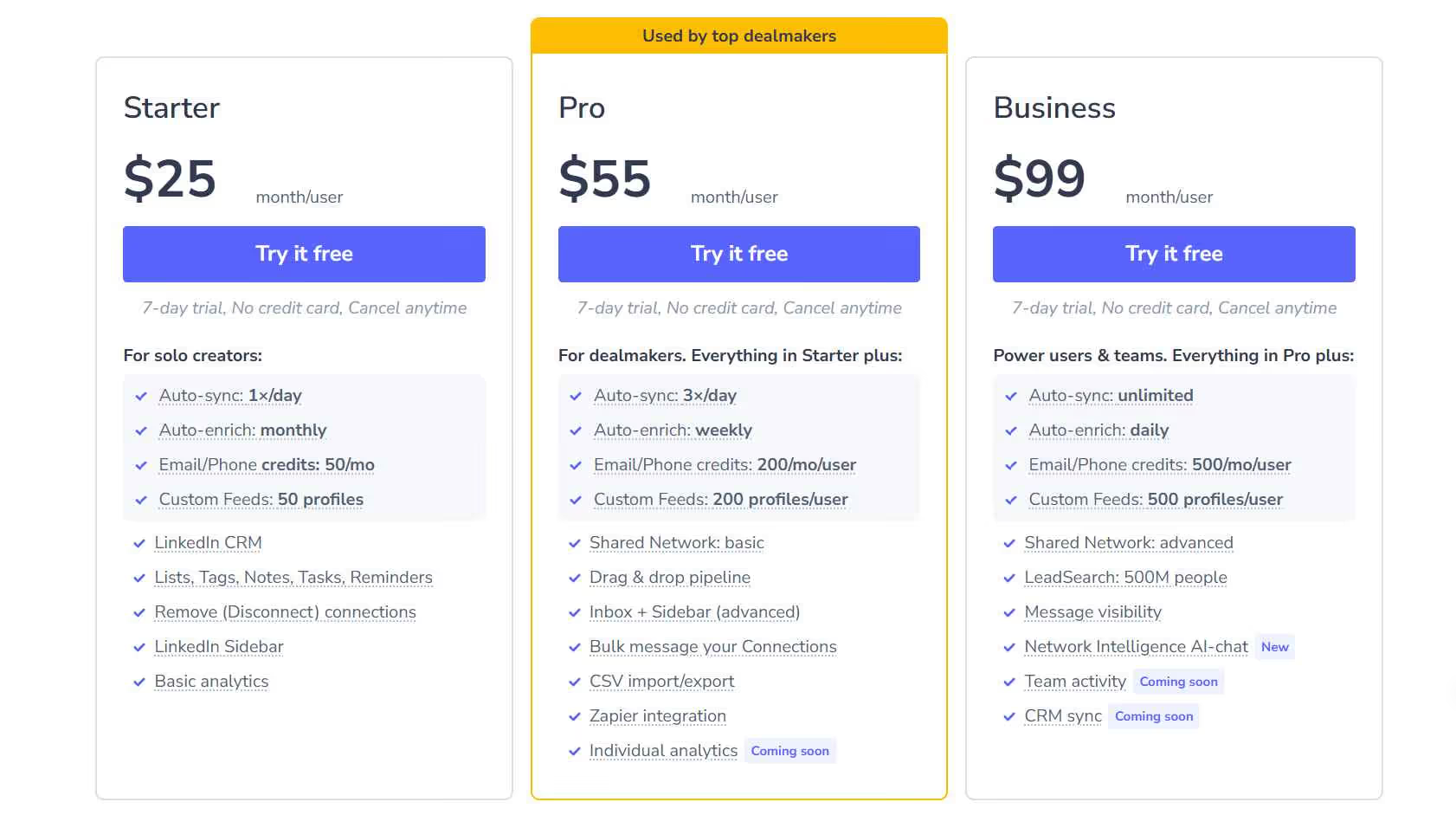
The Starter plan is $17.50/user/month (annual) or $25/month.
It covers the core LinkedIn CRM, basic analytics, tagging, notes, tasks, reminders, and 600 enrichment credits per year. Syncs once per day. Good for solo users who just want their network organized.
The Pro plan is $38.50/user/month (annual) or $55/month. This is where the platform opens up meaningfully.
You get three daily syncs, the Smart Inbox, bulk messaging in batches of 25, Zapier integration, CSV import/export, a drag-and-drop pipeline, and basic shared network access for teams. Enrichment credits jump to 2,400/year or 200/month.
The Business plan is $69.30/user/month (annual) or $99/month.
Continuous syncing every 15 minutes, daily enrichment, 6,000 credits/year or 500/month, the Network Intelligence AI chat, LeadSearch (500M people database), message visibility across your team, and advanced shared network features including warm intro paths and collision prevention.
Enterprise is custom pricing for organizations of 100 to 10,000 people and includes custom onboarding, a dedicated customer success manager, SSO, and custom CRM integrations.
All plans come with a 7-day free trial and no credit card required.
What Works Well
The contact organization is the obvious standout. ✅ LeadDelta genuinely turns a chaotic LinkedIn network into something you can actually use strategically.
The tags, filters, and notes aren't just nice to have. They change how you approach your network day to day.
The team collaboration features on Pro and Business are underrated. Seeing who on your team is already connected to a prospect before you reach out is the kind of thing that prevents awkward collisions and surfaces warm intro paths that would otherwise go unnoticed.
The enrichment credit system is also handled well. You only pay when data is actually found, and the credits roll into annual buckets rather than expiring every month on the lower plans.
Where It Falls Short
No automation. If you're expecting LeadDelta to send sequences or run connection campaigns, that's not what it does.
The bulk messaging in batches of 25 is manual, and there are no drip features anywhere on the roadmap that are publicly visible.
The per-user pricing stings at the Business tier for larger teams. At $99/user/month or even $69.30 on annual, a team of five is paying $350-500/month for what is ultimately a relationship management layer on top of LinkedIn. That's a real budget conversation.
Some users also flag customer support response times as slower than expected, which is worth knowing if your team relies on fast troubleshooting.
LeadDelta vs SalesRobot: How Do They Compare?
SalesRobot: The LinkedIn-First Alternative
If you came to LeadDelta looking for outreach automation and realized it doesn't do that, SalesRobot is worth a look.

It approaches LinkedIn from the opposite direction: less about organizing who you know, more about systematically reaching people you don't know yet. 🤖
Multi-Step LinkedIn Sequences
SalesRobot lets you build automated connection and follow-up campaigns with smart delays, conditional logic, and reply detection.
When a prospect responds, the sequence pauses so you can take over the conversation. No awkward automated messages landing after someone's already replied.
AI Voice and Video Messages
SalesRobot can send personalized voice notes and video messages at scale through LinkedIn. Users consistently report significantly higher reply rates with this format compared to standard text messages.
People still aren't used to receiving voice messages in their LinkedIn inbox, which means they still stop and listen.
Mobile API Safety
SalesRobot runs in the cloud using mobile API behavior and dedicated IPs rather than browser automation.
This keeps your LinkedIn activity looking natural and dramatically reduces the risk of account restrictions. It's a meaningful technical difference compared to extension-based tools.
Smart Reply Detection
When a prospect responds to any part of your sequence, SalesRobot automatically pauses the campaign for that contact.
This sounds obvious, but a lot of automation tools get it wrong and end up sending follow-ups to people who've already replied, which kills credibility fast.
Advanced Targeting
You can pull prospects from LinkedIn search, Sales Navigator, CSV uploads, LinkedIn group members, event attendees, or even people who commented on a specific post.
The targeting options are more flexible than most tools in this space.
Unified Inbox
LinkedIn conversations and email threads land in one dashboard. The AI surfaces reply suggestions based on context, which cuts down the time spent figuring out what to say next when you're managing a high volume of active conversations.
SalesRobot Pricing
SalesRobot prices per LinkedIn account with up to 35% off on annual billing.
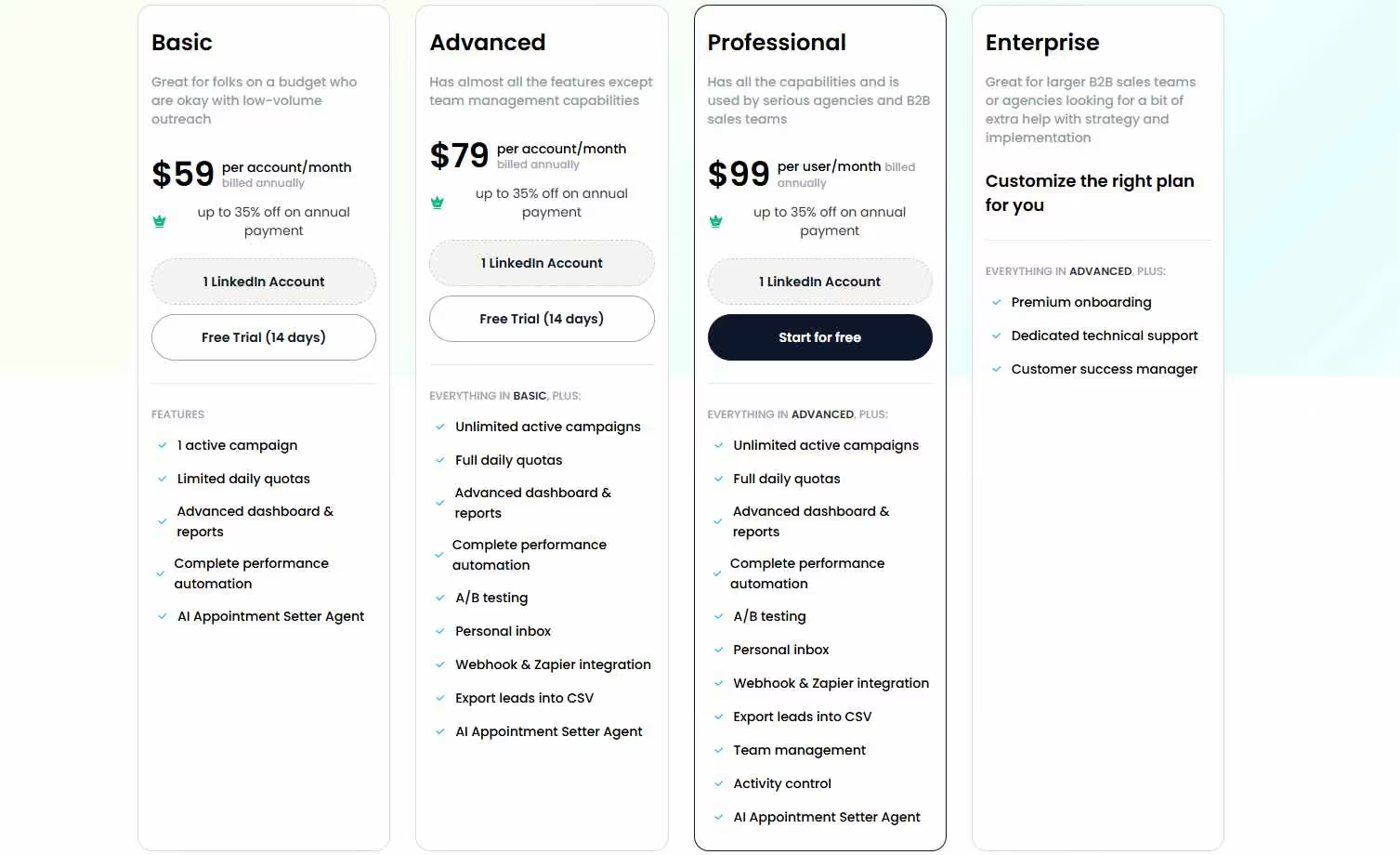
The Basic plan is $39/month (annual) or $59/month. One active campaign, limited daily quotas of 20 connections and 20 messages per day. Good for testing the platform on a budget.
The Advanced plan is $59/month (annual) or $79/month. Unlimited active campaigns, full daily quotas of 75 connections and 75 messages, A/B testing, webhooks and Zapier, personal inbox management, and the AI Appointment Setter. This is the right plan for most individual sales reps.
The Professional plan is $79/month (annual) or $99/month. Everything in Advanced plus team management, activity controls, duplicate outreach prevention, role assignments, and team analytics. Built for agencies running multiple accounts.
Enterprise is custom pricing with premium onboarding, a dedicated customer success manager, and custom integrations.
SalesRobot offers a 14-day free trial with no credit card required.
The Verdict
LeadDelta is a genuinely solid tool for what it does. If you have a large LinkedIn network that has become impossible to manage and you want to actually use those relationships strategically, it delivers.
The tagging, filtering, notes, and team collaboration features are well-built and meaningfully better than anything LinkedIn provides natively.
It is not a lead generation tool. It will not grow your network or book you meetings on its own.
If you're a relationship-driven seller, recruiter, or founder who wants to extract more value from connections you've already made, LeadDelta is a good fit. If you need outreach automation or want to scale prospecting, SalesRobot is the better call. 🎯
Want proof? Try the 14-day-free trial to learn more. No credit card required!

Wow your leads by cloning yourself and sending personalized videos and voice notes to each lead on LinkedIn.
If you don't reply to leads within 5 mins, your chances of converting them fall by 50%. Our AI replies on your behalf instantly! (and yes, you can train it)

Don't shoot in the dark. Get detailed analytics on what's working

SalesRobot allows you to invite other team members, so that they can add their LinkedIn Account, run outreach campaigns and get amazing results just like you.
.avif)


Trusted by 4100+ innovative B2B sales teams and lead gen agencies

.avif)

.avif)




.avif)


Heading 1
Heading 2
Heading 3
Heading 4
Heading 5
Heading 6
Lorem ipsum dolor sit amet, consectetur adipiscing elit, sed do eiusmod tempor incididunt ut labore et dolore magna aliqua. Ut enim ad minim veniam, quis nostrud exercitation ullamco laboris nisi ut aliquip ex ea commodo consequat. Duis aute irure dolor in reprehenderit in voluptate velit esse cillum dolore eu fugiat nulla pariatur.
Block quote
Ordered list
- Item 1
- Item 2
- Item 3
Unordered list
- Item A
- Item B
- Item C
Bold text
Emphasis

Superscript
Subscript