.avif)
TL;DR
- LinkedIn social selling in 2026 runs on a 5-step system: measure your SSI, build a converting profile, warm prospects first, run safe outreach, then close and measure, rather than random posting and cold pitching.
- The Social Selling Index (SSI) scores you 0–100 across 4 pillars; the industry average sits at 35, and 75+ puts you in thought-leader territory. High-SSI reps generate 45% more opportunities.
- Post 3–5 times per week (Tuesday–Thursday, 8–10 AM works best). Consistency beats volume: a steady 3 posts/week outperforms sporadic bursts.
- Stay safe at 60–100 connection requests per week (about 20–30/day) and keep acceptance above 30%. Sales Navigator improves targeting but does not raise this limit.
- SalesRobot automates warm-ups, personalized requests, and follow-ups via a mobile API: customers achieve an average reply rate of 55% and an acceptance rate of 51% with zero account bans in Safe Mode.
- Choose manual daily engagement if you're a solo rep just starting out; choose SalesRobot if you're a B2B team that needs the full system running without burning your LinkedIn account.
👉 Skip the manual work: SalesRobot automates the outreach, warm-ups, and follow-ups without putting your account at risk — try free for 14 days.
In this blog, I’ll tell you how to:
- Measure Your LinkedIn SSI Baseline
- Optimize Your Profile for Conversions
- And Run Safe Outreach at Scale.
Your LinkedIn Pipeline Is Probably Leaking — and You Don't Know Where
You post when you remember to. You fire off connection requests in batches. Once in a while someone replies, and you call it a win.

Meanwhile bookings stay flat, and you can't explain why.
Here's the uncomfortable part: 78% of social sellers outsell peers who don't use social media in their sales process.
The activity works. Most teams just don't run it as a system; they run it as a vibe.

The old advice ("connect, then pitch") is dead.
It tanks your acceptance rate and gets your account flagged faster than ever in 2026.

This playbook fixes that.
Five repeatable steps —
- measure,
- optimize,
- warm,
- outreach,
- convert
that turns LinkedIn from a content hobby into a predictable pipeline engine. That's exactly what the rest of this guide is built to do.
Step 1: Measure Your Baseline with the LinkedIn Social Selling Index (SSI)
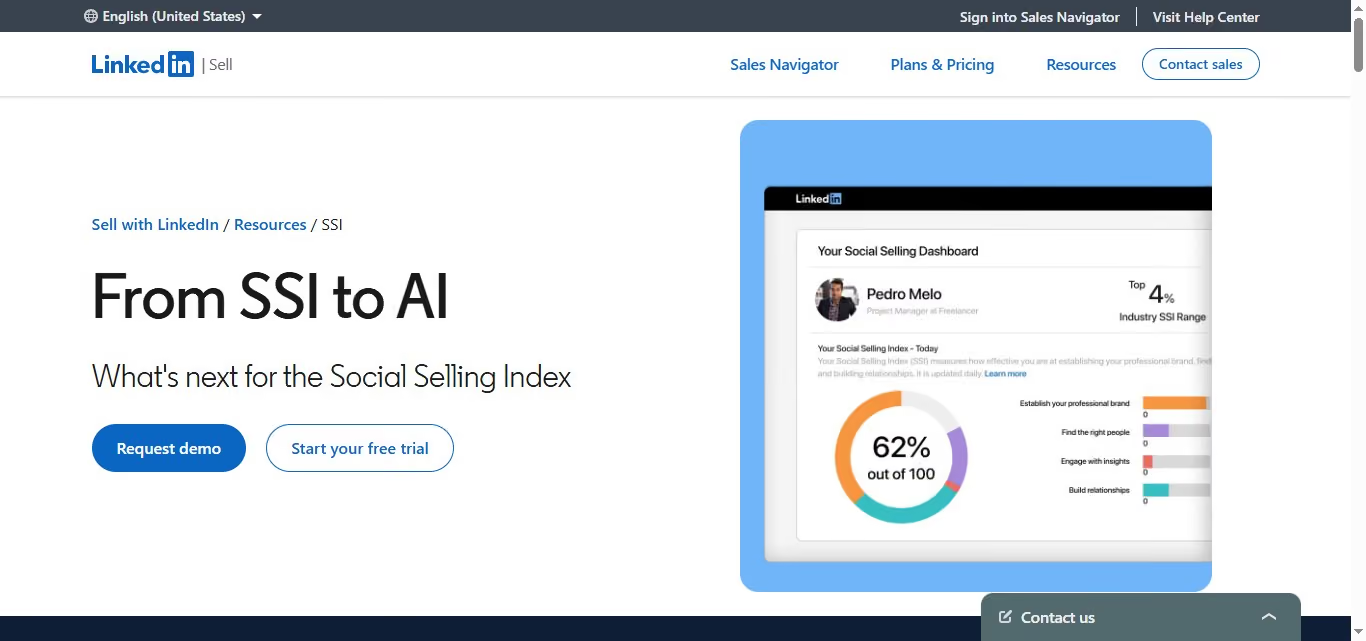
Before you build a system, find out where you actually stand.
Your Social Selling Index is the fastest diagnostic LinkedIn gives you for free.
SSI scores you 0–100 across 4 pillars: establishing your professional brand, finding the right people, engaging with insights, and building relationships.
It updates daily and reflects your last 90 days of activity.
Why it matters: reps with high SSI scores generate 45% more opportunities and are 51% more likely to hit quota.
The industry average sits around 35: a score of 75+ puts you in thought-leader territory.
Yes, LinkedIn is officially de-emphasizing SSI in favor of newer AI tools. But it's still the clearest activity diagnostic available, and the four pillars map cleanly onto the rest of this playbook.
For example, if your "Build Relationships" pillar reads 12/25, that's your leak — not your content, not your offer.
Do this now: Go to linkedin.com/sales/ssi and write down your score in each pillar. Your lowest pillar is your Week 1 priority.
Step 2: Build a Profile That Converts Visitors Into Warm Prospects
Your profile is your landing page. Every comment, request, and post sends people here first, so if it reads like a résumé, the whole system breaks.
This step operationalizes SSI Pillar 1 (Professional Brand). It matters because 80% of B2B social media leads originate on LinkedIn, and decision-makers spend roughly six hours per week consuming LinkedIn content.
They're scanning profiles constantly, yours included.
Fix four things, in order:
- Headline — lead with the outcome you deliver and who you help, not your job title.
- Banner — use it for proof (a result, a logo wall, a one-line promise).
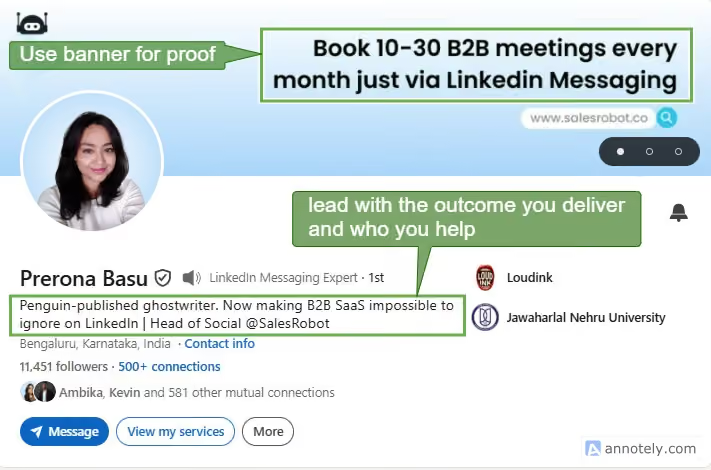
- About section — open with a value statement, not your career history.
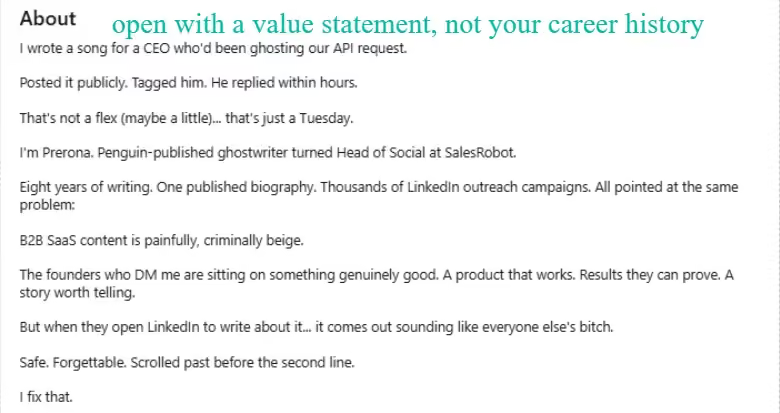
- Featured section — pin social proof: a case study, a testimonial, a popular post.
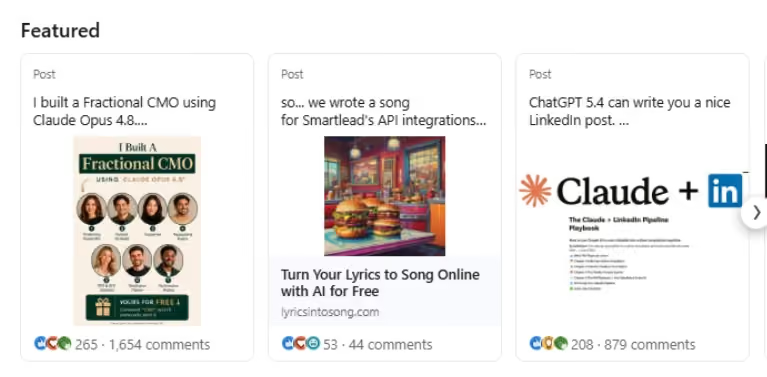
For example, swap "Account Executive at X" for "I help SaaS founders close enterprise deals without an SDR team."
Do this now: Rewrite your headline and About section before you run a single outreach campaign. Every automated touchpoint downstream depends on this page doing its job.
Also, if you want to level up your professional branding, EinsteIn AI by SalesRobot is fantastic for optimizing your LinkedIn presence.
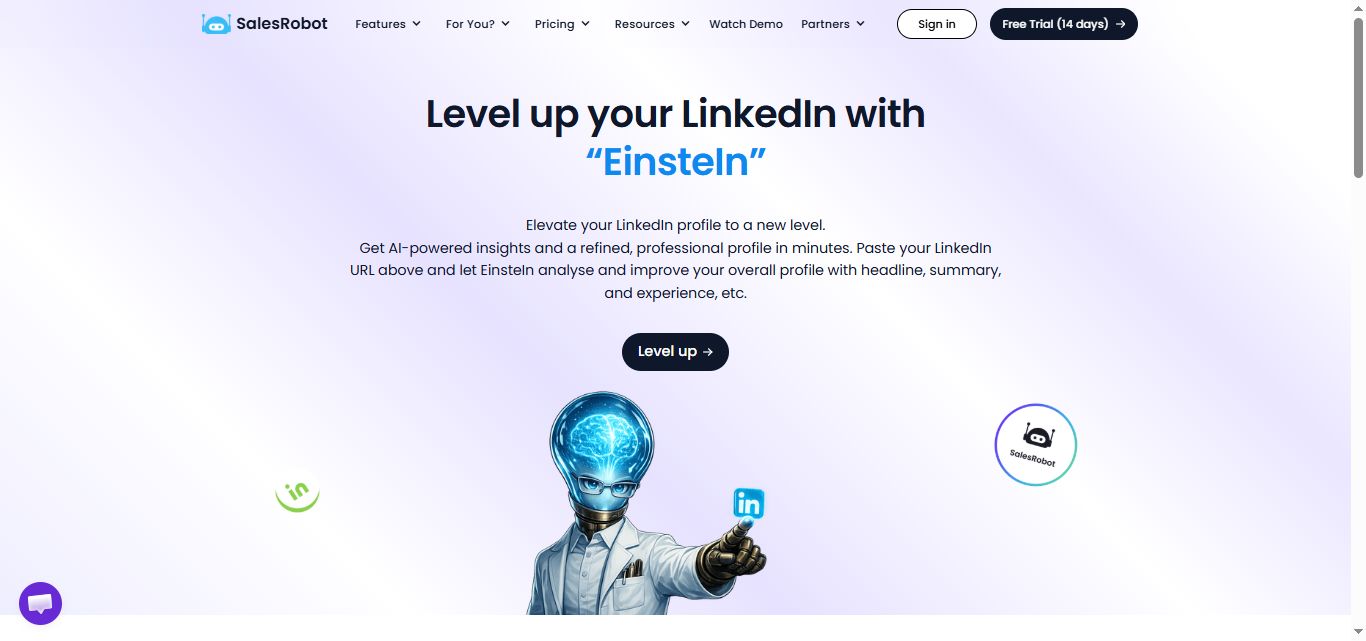
This smart, AI-powered tool analyzes your profile URL and delivers tailored, actionable insights to instantly refine your headline, summary, and work experience.
Whether you are actively job hunting or trying to scale your automated B2B outreach, it takes the guesswork out of profile optimization and helps you transform your personal page into a high-converting professional landing page in just a few minutes.
Step 3: Warm Prospects Before You Ever Send a Connection Request
This is the most-skipped step and your single biggest conversion lever. Cold connection requests get ignored; warm ones get accepted.
The reason is simple math. An account sending 25 requests/day at a 55% acceptance rate looks completely different to LinkedIn than one sending 80 at 9% acceptance — even if the second is technically "within limits." Warm prospects accept, and high acceptance keeps your account healthy.
The proven low-risk sequence runs over four days:
- Day 1: View their profile.
- Day 2: Like a recent post.
- Day 3: Leave a thoughtful comment.
- Day 4: Send the connection request with a personal reference.
Posting 3–5 times per week yourself feeds this — your content is a warm signal that makes prospects recognize your name when the request lands.
The manual way: You do the Day 1–4 dance by hand, for every single prospect. It works, but it doesn't scale past a few dozen people.
The SalesRobot way: SalesRobot's Smart Comments automatically leaves AI-generated comments on prospect LinkedIn posts before outreach begins — warming up prospects and increasing connection acceptance rates without you touching the keyboard.
For example, you could comment: "The point about outbound sequencing here is exactly what we're seeing in enterprise deals — the timing gap kills more pipelines than the messaging does." That comment does more work than any cold InMail ever will.
Step 4: Run Safe, Personalized Outreach at Scale (Without Burning Your Account)
This is the operational heart of the playbook, and the part that gets accounts restricted when done carelessly.
Stay safe at 60–100 connection requests per week, spread across roughly 20–30 per day rather than dumped all at once.
These are risk-aware ranges, not official platform numbers. If your acceptance rate drops below 30%, cut your volume by 25–50% until it recovers.
A few realities for 2026:
- Sales Navigator does not raise your limit. It gives you better search and InMail, which is useful for targeting, but the weekly invitation cap stays the same.
- Cloud beats browser. Genuinely safe tools in 2026 work at the API level on the cloud, so request patterns look like API access rather than scripted browser behavior.
- Personalization is a safety lever, not just a conversion one. Generic blasts get reported; relevant messages get accepted.
The manual way: You manually research each prospect's recent job change, funding news, or shared connection, then write each request by hand while watching your daily count.
The SalesRobot way: SalesRobot runs on mobile API technology that mimics human behavior: randomized delays, human-like daily limits, and residential IP rotation.
Customers report zero account bans when following Safe Mode guidelines, and it's cloud-based, so it runs 24/7 without your browser open.
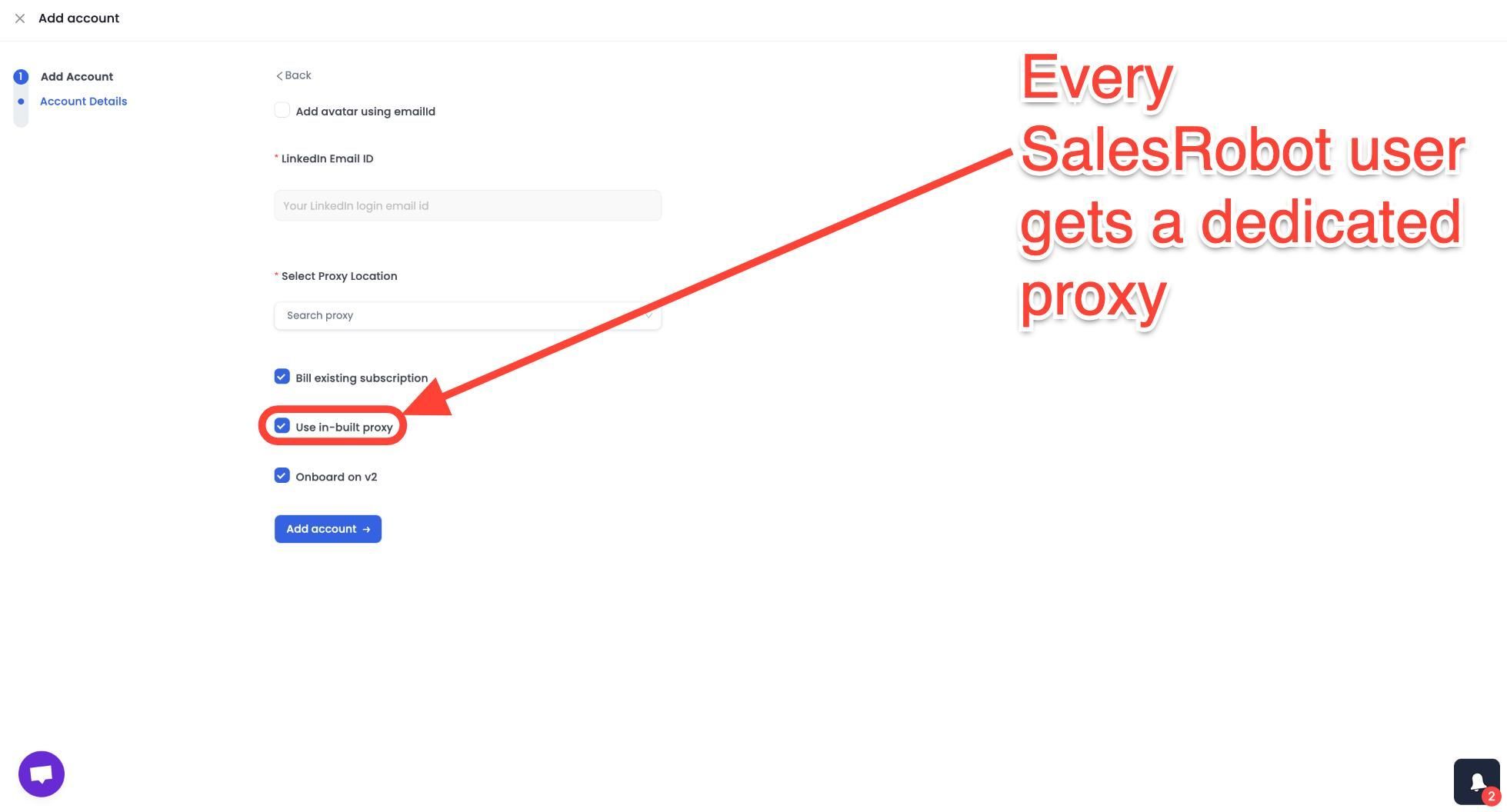
Its AI Variables feature personalizes each connection request using the prospect's LinkedIn data, such as recent job changes, company news, and shared connections.
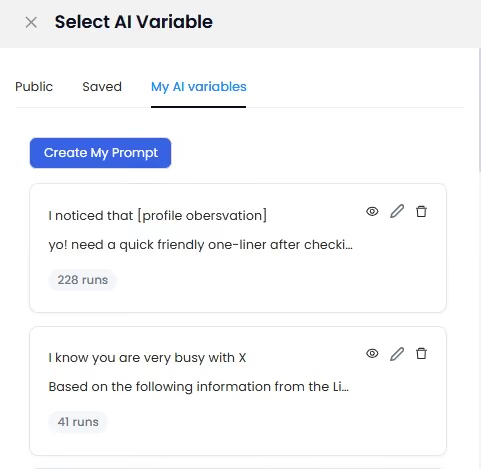
And if someone doesn't reply on LinkedIn, SalesRobot can automatically switch the sequence to email.
For example, you could set SalesRobot to view a prospect's profile on Day 1, send a personalized request on Day 4 referencing their recent funding round, and follow up via email on Day 8 if they go quiet, all without opening LinkedIn.
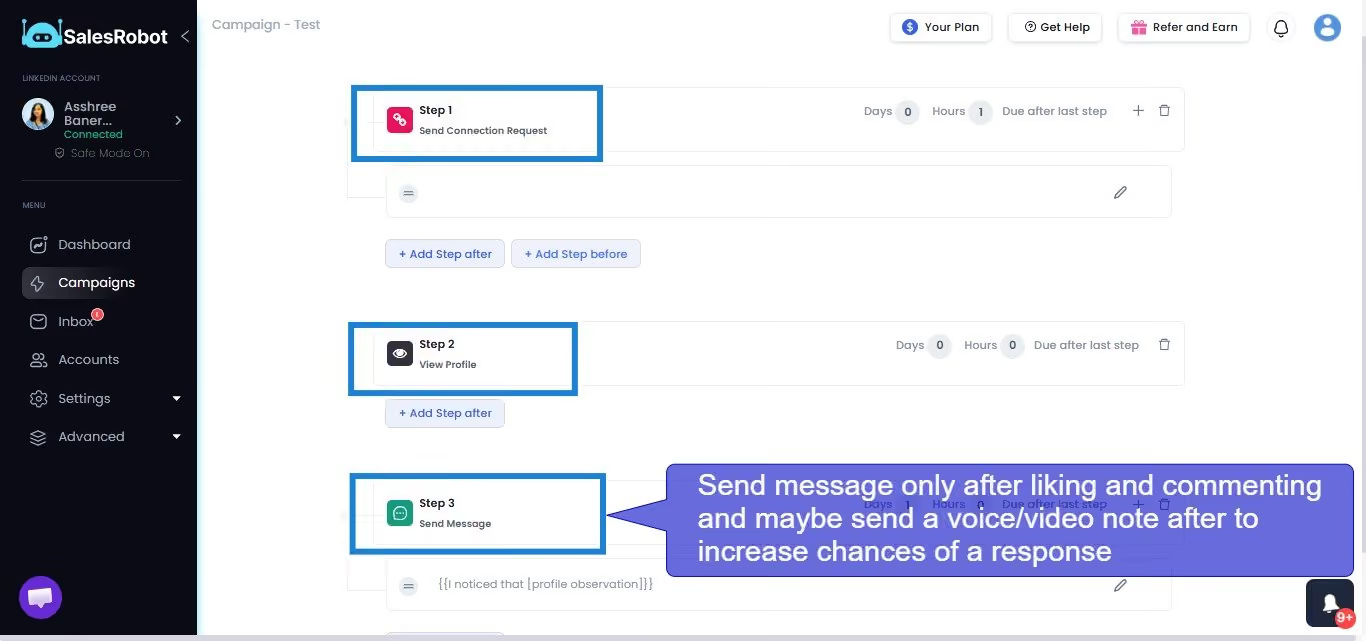
Step 5: Convert Warm Connections Into Booked Meetings (and Measure Everything)
A connection isn't a customer. This is where most teams fumble: the warm DM dies, and the pipeline dies with it.
It's worth getting right because inbound leads from authority-based social selling close at 14.6%, versus 1.7% for cold outbound prospecting.
Warm conversations are nearly 9x more valuable if you actually move them forward.
Use a simple 3-message DM structure once someone accepts:
- Value — share a relevant insight or resource, no ask.
- Relevance — tie it to their specific situation or recent activity.
- Ask — propose a low-friction next step (a quick call, a calendar link).
Then measure weekly: SSI score, acceptance rate, reply rate, and meetings booked. If a number stalls, you know which step to fix.
The manual way: You babysit your inbox, reply to every "what does your tool do?" message, handle objections, and chase the calendar link yourself, usually at the worst times.
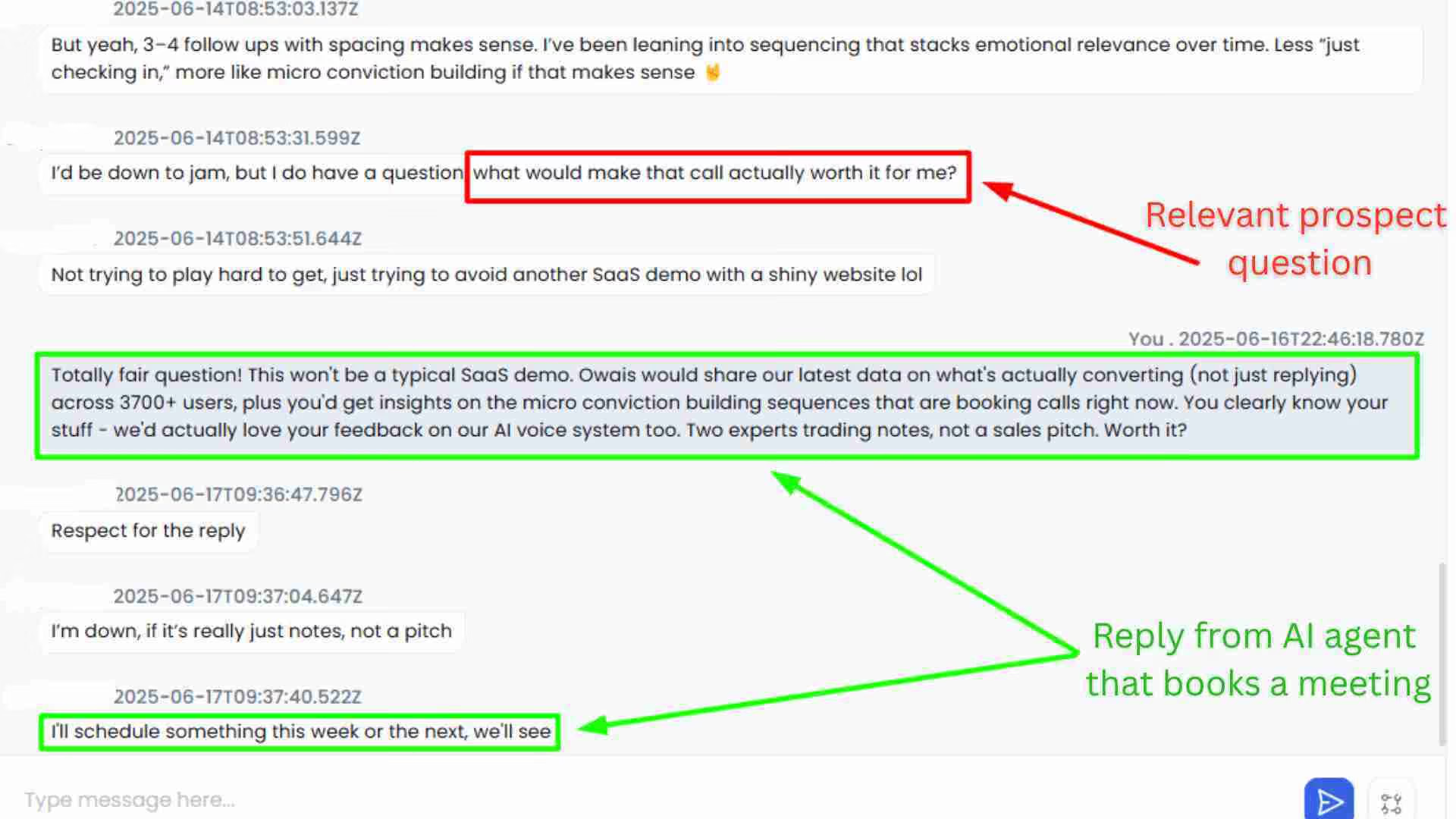
The SalesRobot way: SalesRobot's AI Appointment Setter runs in two modes. Copilot reviews conversations and suggests personalized replies you approve with one click.
Autopilot is fully hands-off — the AI manages entire conversations, handles objections, and books qualified meetings 24/7.
You can also send video and voice notes at scale — record one and send it to hundreds of prospects, where customers report 3x higher response rates than standard text requests.
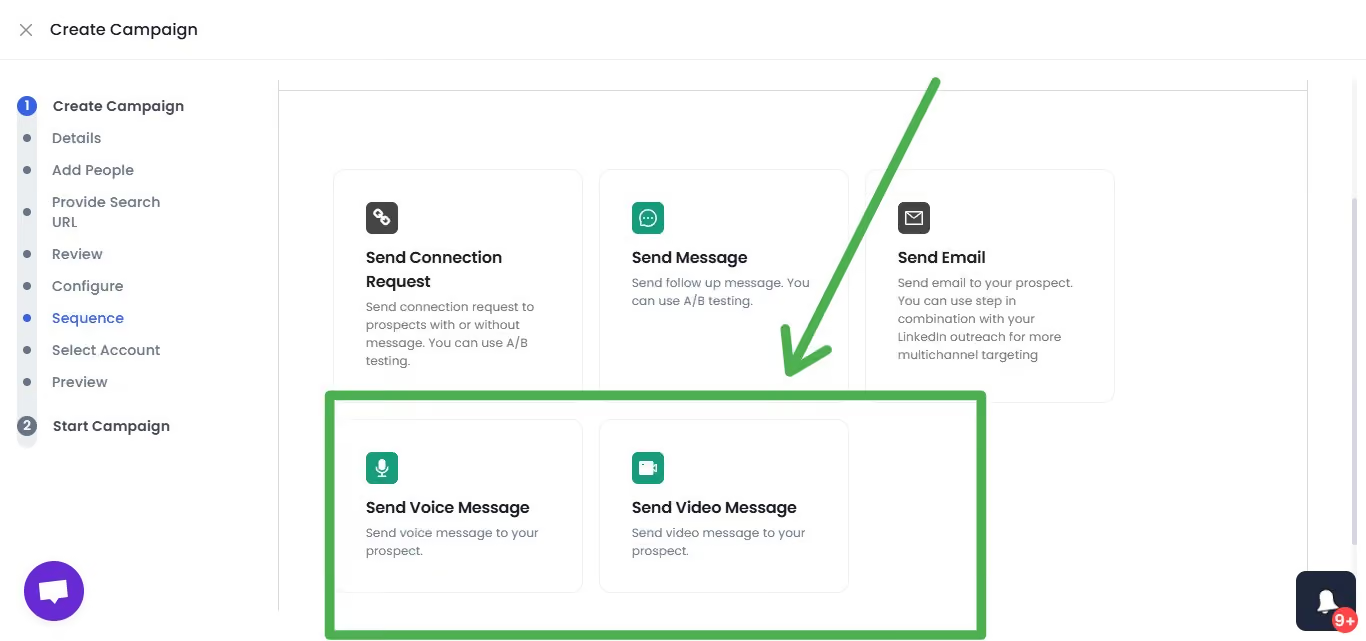
SalesRobot users see a 55% average reply rate, and agencies like The Growth Agency have hit 66%.
For example, in Autopilot mode, SalesRobot handles the "what does your tool do?" reply at 11 PM on a Tuesday, qualifies the lead, drops a calendar link, and you wake up to a booked call.
3 Common Mistakes That Kill LinkedIn Social Selling Programs
Even teams that know the steps trip over the same three things. Here's what actually breaks programs:
⚠️ Pitching in the connection request. This tanks your acceptance rate and drags down your SSI "Build Relationships" pillar. Warm first (Step 3), ask later — the request is a handshake, not a sales pitch.
⚠️ Ignoring the acceptance-rate floor. Sending 80 requests/week at 9% acceptance is far more dangerous than 30 at 55%. Most teams never track this number. SalesRobot users average 51% acceptance precisely because they warm and personalize — treat 30% as your hard floor.
⚠️ Treating social selling as a campaign, not a system. "I posted for three weeks, saw nothing, and stopped" is the most common failure mode. A steady rhythm of 3 posts per week compounding over 90 days is the real unit of measurement — not a two-week sprint.
How SalesRobot Makes LinkedIn Social Selling a System, Not a Grind
The playbook works manually. It just doesn't scale past a handful of prospects before the warm-ups, personalization, and follow-ups eat your week. That's the exact gap SalesRobot fills.
Here's how SalesRobot maps to the steps you just read:
- Warm-up (Step 3): Smart Comments automatically leaves AI-generated comments on prospect posts before outreach, lifting acceptance rates without manual effort.
- Safe outreach (Step 4): Mobile API technology with randomized delays and residential IP rotation keeps accounts safe — customers report zero bans on Safe Mode — while AI Variables personalizes every request from LinkedIn profile data, and unanswered LinkedIn messages roll over to email automatically.
- Conversion (Step 5): The AI Appointment Setter (Copilot and Autopilot) qualifies leads and books meetings 24/7, and video/voice notes drive 3x higher response rates.
The proof: 5,000+ B2B sales teams use SalesRobot, it holds a 4.8 rating on G2 from 57+ reviews, and customers average a 55% reply rate with 51% acceptance.
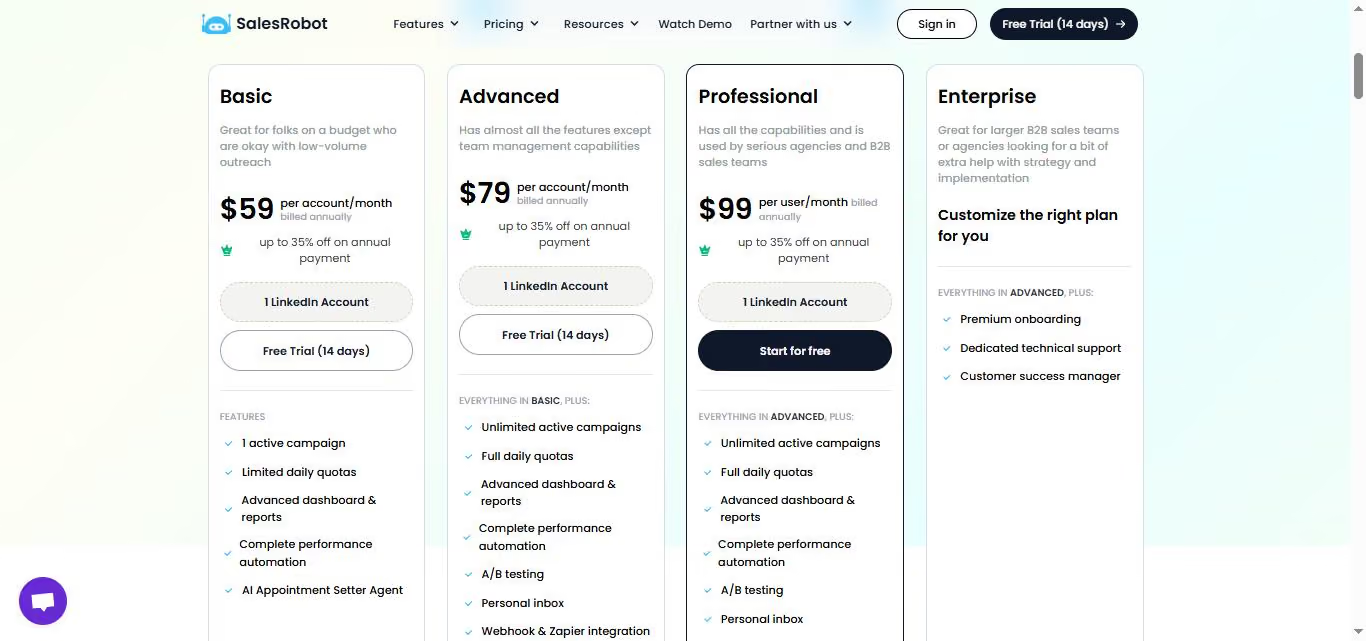
Plans start at $59/month (annual billing saves 35%), and there's a 14-day free trial with no credit card required.
Frequently Asked Questions
Does the Social Selling Index (SSI) still matter in 2026?
Yes. While LinkedIn is officially de-emphasizing SSI in favor of newer AI tools, it remains the clearest free diagnostic of your social selling activity.
It scores you 0–100 across four pillars and updates daily. Reps with high SSI generate 45% more opportunities and are 51% more likely to hit quota.
How often should I post on LinkedIn for social selling?
Post 3 to 5 times per week. Consistency matters more than volume — a steady rhythm of three posts weekly outperforms sporadic bursts followed by silence.
For B2B audiences, Tuesday through Thursday between 8:00 and 10:00 AM tends to perform best. Regular posting also warms prospects before you reach out.
Do I need LinkedIn Sales Navigator for social selling?
Not strictly. Sales Navigator improves your targeting with advanced search and gives you InMail credits, which help with prospecting.
But it does not raise your weekly connection request limit, and that cap stays the same.
You can run a complete social selling system on a standard account if your engagement and personalization are strong.
How many LinkedIn connection requests can I safely send per day in 2026?
Most professionals stay safe at 60–100 requests per week, or roughly 20–30 per day spread out rather than sent all at once.
These are risk-aware ranges, not official limits. Keep your acceptance rate above 30%; if it drops below, cut your volume by 25–50% until it recovers.
How will AI and automation change LinkedIn selling strategies?
AI now handles the repetitive parts of social selling — warming prospects, personalizing requests, and qualifying replies.
Tools like SalesRobot use AI Variables to personalize outreach from profile data and an AI Appointment Setter to handle conversations and book meetings 24/7, letting reps focus on relationships instead of admin.
Run the Playbook, Not Just the Tactics
LinkedIn social selling in 2026 isn't a list of tricks — it's a system: measure your SSI, build a converting profile, warm prospects, run safe outreach, and convert with a clear process behind it.
Honest reality check: this compounds over 90 days, not two weeks. Inbound social selling closes at 14.6% versus 1.7% for cold outbound — but only if you run the rhythm consistently instead of quitting after a slow fortnight.
If the manual version of this playbook is eating your week, SalesRobot runs the warm-ups, safe personalized outreach, and meeting-booking for you — the same system 5,000+ B2B teams already use to hit a 55% average reply rate.
Start your 14-day free trial at SalesRobot — no credit card required.

Wow your leads by cloning yourself and sending personalized videos and voice notes to each lead on LinkedIn.
If you don't reply to leads within 5 mins, your chances of converting them fall by 50%. Our AI replies on your behalf instantly! (and yes, you can train it)

Don't shoot in the dark. Get detailed analytics on what's working

SalesRobot allows you to invite other team members, so that they can add their LinkedIn Account, run outreach campaigns and get amazing results just like you.
.avif)


Trusted by 4100+ innovative B2B sales teams and lead gen agencies

.avif)

.avif)




.avif)


Heading 1
Heading 2
Heading 3
Heading 4
Heading 5
Heading 6
Lorem ipsum dolor sit amet, consectetur adipiscing elit, sed do eiusmod tempor incididunt ut labore et dolore magna aliqua. Ut enim ad minim veniam, quis nostrud exercitation ullamco laboris nisi ut aliquip ex ea commodo consequat. Duis aute irure dolor in reprehenderit in voluptate velit esse cillum dolore eu fugiat nulla pariatur.
Block quote
Ordered list
- Item 1
- Item 2
- Item 3
Unordered list
- Item A
- Item B
- Item C
Bold text
Emphasis

Superscript
Subscript