.avif)
TL;DR
- Text DMs still work, and pretty good, but they're the easiest format to get ignored. Everyone's inbox is full of the same templated lines.
- Voice notes and video messages both perform better than plain text on replies. Same reason for both: they're harder to fake and take actual effort to send.
- You don't have to pick one. Use a voice note as your opener, save video for the touchpoint where you actually have something to show.
- SalesRobot lets you clone your voice and create your video avatar once, then send a unique note to every prospect without recording each one by hand.
Someone on your team probably said this in a meeting last month: "should we try voice notes, or is that just a trend."
Fair question.
Half of LinkedIn is doing weird stuff to get noticed right now, and it's easy to lump voice notes and video messages into the same bucket as growth hacks that stop working the second everyone catches on.
Here's the actual answer.
It's not about voice VS video.
It's about media versus text, and text is losing a little.
Why Text DMs Are the Easiest Thing to Get Right and Still Fail
A text message costs nothing to send.
That's the problem.
You can write "Hi {{firstName}}, saw your profile and loved your background in {{industry}}" in about four seconds.
Look at this dude for example…

(the correct name is Ambika btw)
Your prospect also might have read some version of that sentence a hundred times this month, and they know exactly how it was made.
Personalizing the first name doesn't read as personal anymore.
None of this means text is dead.
A well written, specific text still gets GOOD replies.
But it's the format with the lowest floor and the lowest ceiling at the same time. Anyone can send one, so almost nobody stands out sending one.
What Voice and Video Messages Both Do That Text Can't
Play a voice note or a video for someone and you're asking for ten to thirty seconds of their attention. That's a bigger ask than a glance at a text bubble.
Prospects say yes to that ask a lot more than you'd expect, for a simple reason: recording something takes effort, and effort reads as sincerity.
A prospect can't tell if a text took you four seconds or four minutes to write. They can absolutely tell that a voice note or video wasn't copy pasted, because your actual voice or face is sitting right there.
There's a curiosity tax too. A play button in an inbox full of text bubbles gets clicked out of instinct, before the prospect has even decided if they care. You don't get that with another paragraph.
Personalized voice notes built on a real voice clone with the prospect's actual details filled in have been shown to push reply rates past 40%.
SalesRobot customers running sequences that mix voice, video, and text report response rates in the 40 to 65% range, well above what text-only outreach tends to pull.
Video adds one thing voice can't: a face. If you're showing a product, a dashboard, a proposal, or anything visual, video does work no audio clip can do on its own.
Using Both in the Same Sequence
You don't need to rank these two against each other. Use them for different jobs.
A voice note works well early, as your first or second touch, while the prospect is still deciding if you're worth their time. It's quick to record, quick to listen to, and low commitment for both sides.
A video message earns its spot a step or two later, especially once there's something concrete to show.
A quick screen share of a dashboard, a proposal walkthrough, a "here's exactly what I meant" clip after a prospect asks a follow up question. Video also works well as a re-engagement touch when someone's gone silent after replying once.
Neither format should show up five messages deep after a string of ignored texts. At that point any format reads like a last resort.
Manual Works Small, Breaks at Scale
Recording one voice note takes two to five minutes once you count retakes. A video takes longer.
That's completely fine if you're prospecting fifteen accounts a week. It stops being fine the moment your list grows past what you can personally record in an afternoon.
Most people who try voice and video outreach start manually, like they should.
The problem shows up a few weeks in, when the list is bigger and the calendar isn't.
You end up defaulting back to text, not because text works better, but because it's the only thing that scales without eating your whole day.
How to Send Personalized Voice Notes and Video Messages at Scale ;)

Here's what setting this up actually looks like inside SalesRobot, a cloud-based LinkedIn outreach platform that runs your connection requests, follow-ups, and reply management.
Create your Voice Clone and Video Avatar
Before adding personalized voice or video messages, create your Voice Clone and Video Avatar from Settings → Configuration → AI Personalization.
For Voice Clone:
- Click Create Voice Clone and record a short 20 to 30 second voice sample.
- Give it a name and save it.
For Video Avatar:
- Click Create Video Avatar, enter a name, and record a short video.
- Make sure your face is clearly visible and properly positioned.
- Submit the recording and wait around 5 to 10 minutes for it to process.
Once they're ready, you can use them in your campaigns.
Create a new campaign
- Log in to SalesRobot and go to Campaigns → Create Campaign.
- Select Create Campaign with LinkedIn → Advanced user flow, name your campaign, and click Save.
- Add your prospects using LinkedIn Search, Sales Navigator, or CSV upload, then click Save and Continue.
Add a personalized video
- Open your sequence and click Add Step → Send Video Message → Use Video Avatar.
- Select your avatar, write your script, and add variables such as {{firstName}}, {{company}}, or {{jobTitle}}.
- Click Done.
SalesRobot generates a personalized video for each prospect using the details available in their profile.
Note: If you choose Record or Upload instead of Video Avatar, the same video is sent to every prospect.
Add a personalized voice note
- Click Add Step → Send Voice Note → Use Voice Clone.
- Select your voice clone, write your script, and add personalization variables such as {{firstName}}, {{company}}, or {{jobTitle}}.
- You can also add a text message to accompany the voice note.
Finish your sequence
Preview the messages for individual prospects to check the personalization, add your remaining steps and delays, then launch your campaign.
Step 1: Create your voice clone and your video clone
Go to Settings, then Configuration, then AI Personalization.

Record a short voice sample in your normal tone, twenty to thirty seconds is enough.
Do the same for video, a short clip of you talking to camera. Save both as your clones.

This is what the AI uses to generate every future note, in your actual voice and on your actual face.
Step 2: Create a campaign
Click Create Campaign, choose LinkedIn, and select the Advanced flow.

Step 3: Add your prospects
Import them by CSV, LinkedIn Search, or a Sales Navigator URL, then configure your campaign settings.

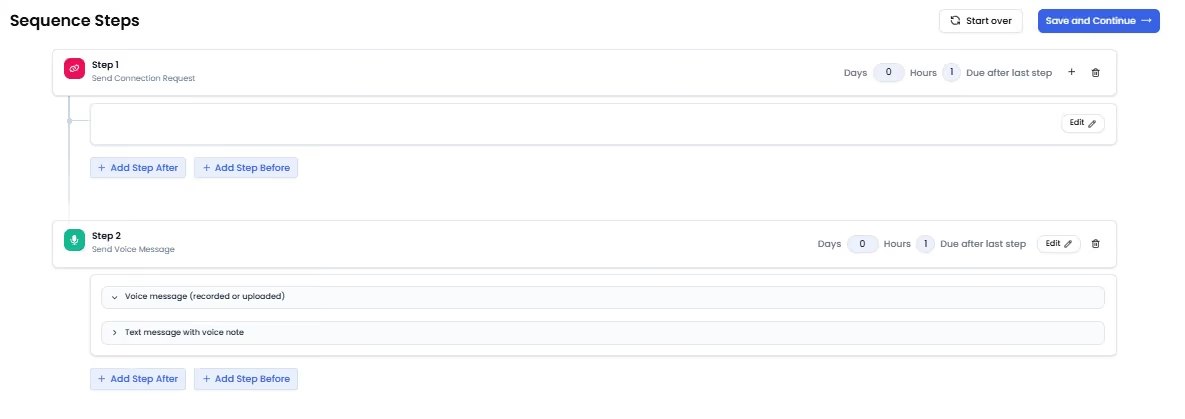
Step 4: Build your sequence
Start with a Connection Request.
Add a Send Voice Note step as your first or second touch.
Add a Send Video Message step a step or two later, once there's something worth showing or a lead's gone quiet.
Step 5: Add the voice and video message steps
For each step, you'll see the same three options: record a new message, upload an existing file, or use your AI clone.
If you go with the clone, write the script you want it to read and drop in variables like {{firstName}}, {{company}}, and {{jobTitle}}. Do this for both the voice note step and the video step.
Attach a short line of text alongside each one too. It tells the prospect what they're about to press play on before they commit to it.
Step 6: Add follow-ups, set delays, and launch
Add more steps after your voice and video touches if your sequence needs them, another text, a second voice note, whatever fits your list.
Leave a day or two between steps so the sequence doesn't fire everything at once.
Click Save and Start Campaign, and you're live.
When Text Still Wins
There are situations where a voice note or video is the wrong call.
Very formal industries, prospects who've explicitly said they prefer written communication, or a message where the whole point is sharing a link or a document. In those cases, a clean, specific text beats making someone press play for no reason.
Media works because it's used deliberately, not because it's used everywhere.
FAQ
Do voice notes and video messages actually get more replies than text?
Generally yes. Both stand out in an inbox full of templated text, and personalized versions built on a real voice or video clone have been shown to push reply rates well past what text-only outreach gets.
Should I use voice notes or video messages, or both?
Both, at different points in your sequence. Voice notes work well as an early, low commitment opener. Video earns its spot once there's something to show or a lead's gone quiet.
Will this feel gimmicky to prospects?
Not if the message sounds like something you'd actually say out loud to a stranger's face. What feels gimmicky is a stiff script read word for word, not the format itself.
Can I send both without recording every single one myself?
Yes. Record your voice and video sample once, and an AI clone generates a unique, personalized note for every prospect from a saved script.
Does this work outside of sales and recruiting?
Yes. Anyone reaching out cold on LinkedIn, whether it's partnerships, hiring, or fundraising, deals with the same wall of templated text everyone else does.
Try SalesRobot free for 14 days and send personalized voice notes and video messages to your whole list without recording each one by hand.

Wow your leads by cloning yourself and sending personalized videos and voice notes to each lead on LinkedIn.
If you don't reply to leads within 5 mins, your chances of converting them fall by 50%. Our AI replies on your behalf instantly! (and yes, you can train it)

Don't shoot in the dark. Get detailed analytics on what's working

SalesRobot allows you to invite other team members, so that they can add their LinkedIn Account, run outreach campaigns and get amazing results just like you.
.avif)


Trusted by 4100+ innovative B2B sales teams and lead gen agencies

.avif)

.avif)




.avif)


Heading 1
Heading 2
Heading 3
Heading 4
Heading 5
Heading 6
Lorem ipsum dolor sit amet, consectetur adipiscing elit, sed do eiusmod tempor incididunt ut labore et dolore magna aliqua. Ut enim ad minim veniam, quis nostrud exercitation ullamco laboris nisi ut aliquip ex ea commodo consequat. Duis aute irure dolor in reprehenderit in voluptate velit esse cillum dolore eu fugiat nulla pariatur.
Block quote
Ordered list
- Item 1
- Item 2
- Item 3
Unordered list
- Item A
- Item B
- Item C
Bold text
Emphasis

Superscript
Subscript