.avif)
TL;DR
- Predictable pipeline comes from a 5-step system: define your ICP, reverse-engineer your weekly send number, build a converting sequence, keep the account safe, and sync everything to your CRM.
- The Predictable Pipeline Engine tracks four stages: acceptance (28-51%), reply (10-55%), meeting conversion (10-20% of replies), and deal rate (1-3% of total requests).
- LinkedIn allows 100-200 connection requests per week per account in 2026, and one account realistically books 10-12 meetings/month. Five accounts push that to 50-60.
- SalesRobot users hit 51% acceptance and 55% reply rates, well above the 2026 platform averages of 28.5% and 10.4% (Expandi, 13.2M attempts).
- A personalized note lifts reply rate to 9.36% vs 5.44% without one , and 88% of acceptances land within 7 days.
- Keep doing ad-hoc outreach if you have unlimited time. Build this system if you need deals in the calendar every single week.
👉 Skip the manual work: SalesRobot runs this entire engine 24/7 with safe LinkedIn automation and built-in CRM sync. Try free for 14 days.

Your LinkedIn Outreach Is Working, So Why Does Pipeline Still Feel Like a Coin Flip?
You send connection requests. Some get accepted. A few people even reply. And yet your pipeline still looks like a heart-rate monitor: good months, dead months, and no way to explain the difference to your boss.
Here's the uncomfortable truth: activity isn't the problem. Randomness is.
Most LinkedIn outreach is an event, not a system. You get busy, you stop. You get a slow week, you binge-send 300 requests. Two months later the pipeline dries up and nobody knows why.
It gets harder every year, too. B2B buying committees now average 8.2 stakeholders (Sopro) and decision timelines have stretched by roughly 54 days (Dentsu B2B Superpowers Index). Sprint-and-pause outreach can't survive that kind of lag.
The fix isn't working harder. It's turning outreach into an engine: inputs you control, outputs you can forecast. This post walks you through the exact 5-step system, with the real funnel math behind each number.
The Predictable Pipeline Engine: A Quick Map Before We Dive In
Predictability isn't magic. It's arithmetic. You get a predictable pipeline by controlling your inputs, not by chasing your outputs.
Think of it as one machine with four connected stages: Inputs, Conversations, Meetings, Deals. Each stage converts to the next at a knowable rate, so once you know your rates, revenue stops being a mystery.
Here's the worked funnel for a single month of outreach in 2026:
The low end of those ranges reflects the platform-wide averages: 28.5% acceptance and 10.4% message reply across 13.2M attempts (Expandi, May 2025 to April 2026). The high end reflects what tightly-run campaigns hit: SalesRobot users average 51% acceptance and 55% reply rates.
The gap between those two columns is the entire game. The rest of this post is how you move toward the right-hand side, and keep sending consistently enough that the math holds.
Step 1: Define Your Ideal Connection Profile (Before You Send a Single Request)
A predictable pipeline starts with a painfully specific ICP, not just a job title, but a person with a reason to talk right now.
Vague targeting is why so many pipelines stall on qualification. When you fire requests at loosely-relevant people, acceptance rates drop, and acceptance is the exact metric LinkedIn's adaptive restriction algorithm watches. Sustained drops below 25-30% trigger automatic throttling, which quietly strangles your volume.
So build your ICP on three layers:
- Role + seniority: the person who owns the problem and can spend money on it.
- Company signals: size, recent funding, hiring surges, growth stage.
- Trigger event: a new role, a relevant LinkedIn post, a conference, a job ad.
For example, instead of "VP Sales at SaaS companies," target "VP Sales at Series A-B SaaS companies that posted a sales-hiring ad in the last 30 days." That second list accepts and replies at a completely different rate.
The manual way: you dig through Sales Navigator filters, copy names into a sheet, and re-check them one by one.
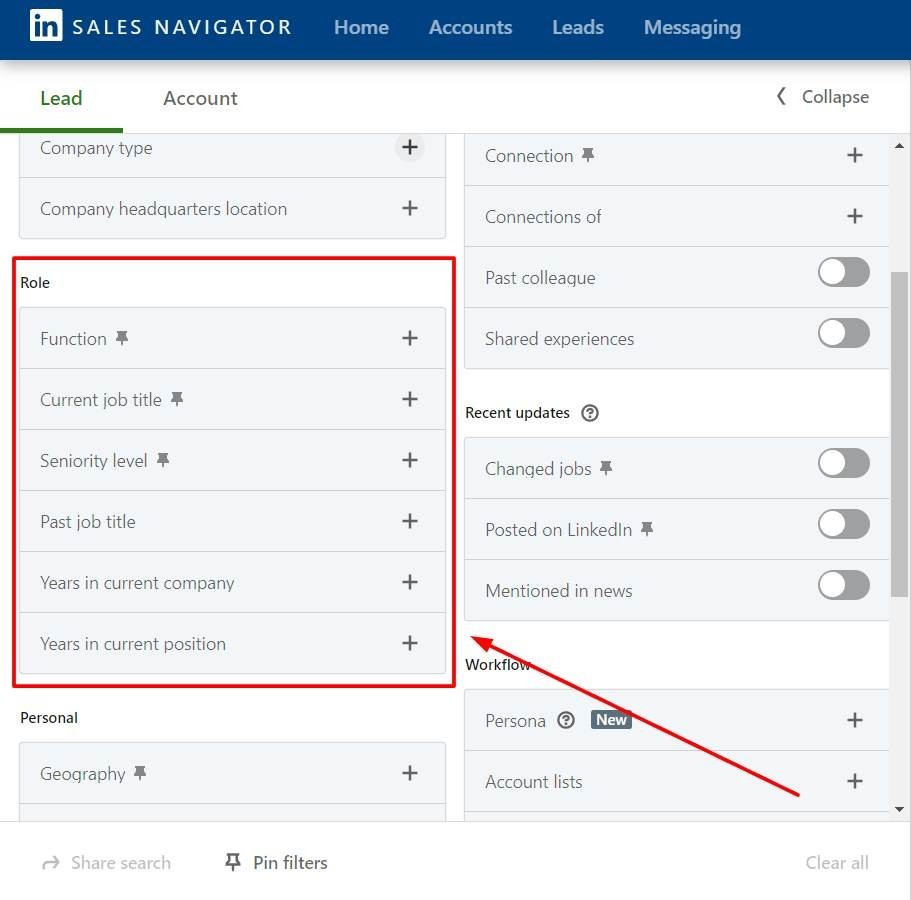
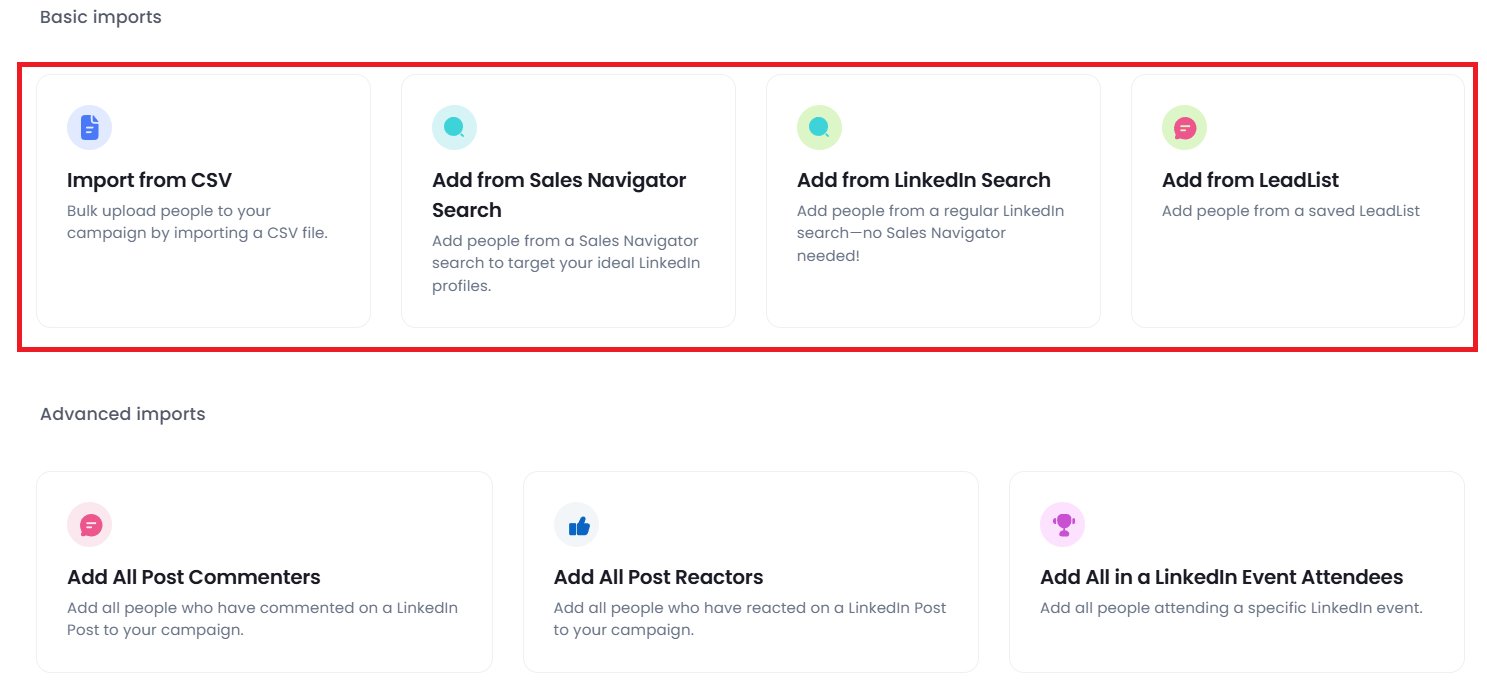
With SalesRobot, you import prospects directly from LinkedIn Search, Sales Navigator searches, LinkedIn Groups, and LinkedIn Events, no CSV gymnastics, so the tight ICP you defined actually becomes your live campaign list.
Step 2: Reverse-Engineer Your Weekly Input Number From the Revenue Goal
Don't guess your send volume. Calculate it backwards from the money you need.
The formula runs top-down:
- Monthly revenue goal ÷ average deal size = deals needed.
- Deals needed ÷ meeting-to-close rate = meetings needed.
- Meetings needed ÷ meeting-conversion rate = conversations needed.
- Conversations needed ÷ reply rate = connections needed.
- Connections needed ÷ acceptance rate = requests to send.
Now check that final number against reality. LinkedIn typically allows 100-200 connection requests per week per account in 2026 (roughly 15-30 per day). That's your ceiling, and it matters, because the math has limits.
Run the numbers on a single account: at 20 connections/day, 25% acceptance, and a 2% meeting rate, you land around 10-12 meetings per month. That's it. One account, one ceiling.
Need more? The only clean way past it is more accounts, not more sends per account. Five senders at that same rate produce 50-60 meetings monthly. For example, an agency running client accounts can stack this math predictably. With SalesRobot, you run campaigns across 50-100+ LinkedIn accounts from one login, each with its own sending limits, starting at $59/month per account.
Step 3: Build the Message Sequence That Converts Without Burning Relationships
A predictable pipeline needs a sequence, not a single message.
And personalization is the difference between a 5% and a 9% reply rate, so build the sequence around it.
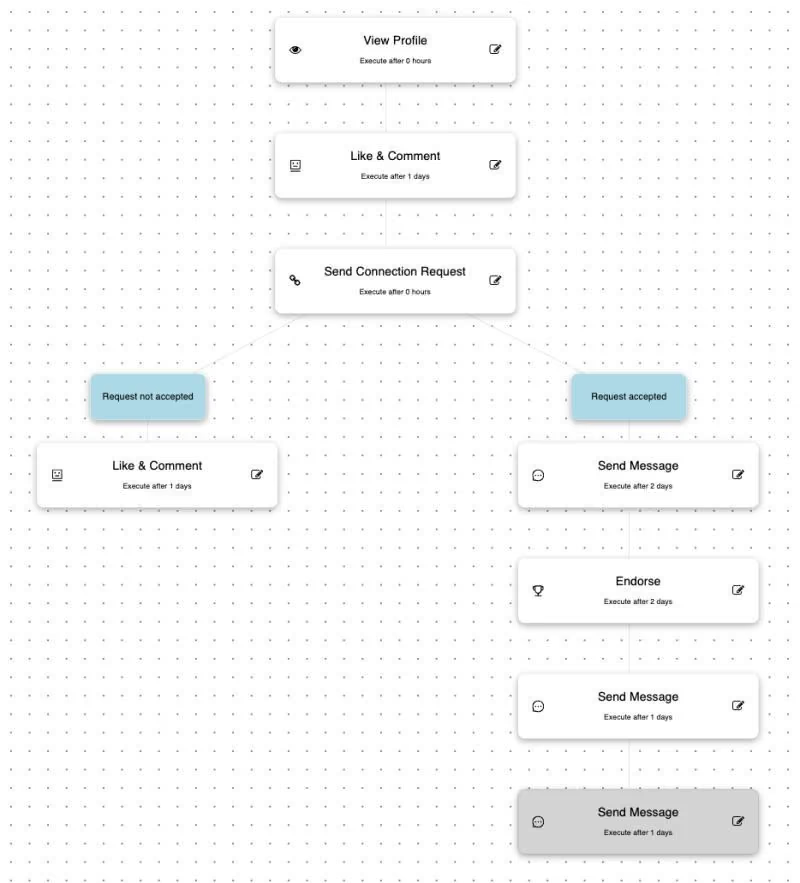
Structure it as three touches:
- Connection request: one relevant personalization hook, zero pitch.
- Value-first follow-up: within 48 hours of acceptance, lead with something useful.
- Soft CTA: around day 7, a low-friction ask (not "book a demo," more "worth a quick chat?").
So why the obsession with personalization?
Because template fatigue is measurable. Platform-wide, connection-note reply rates fell from 3.5% in May 2025 to 2.2% in April 2026 (Expandi).
That's a 37% drop in a year, almost entirely from copy-paste outreach.
Personalizing reverses it. A brief personalized note lifts response to 9.36%, versus 5.44% without one (Belkins, 20M+ attempts).
AI-assisted personalization helps too: 4.19% initial reply versus 2.60% without it.
Here's the catch, though.
Doing this manually means researching every profile, spotting a recent job change or post, and hand-writing each message. Nobody sustains that past 40 leads.
The SalesRobot way: AI Variables pull job changes, company news, shared connections, and volunteer work straight from each profile. Messages stay specific even at volume.
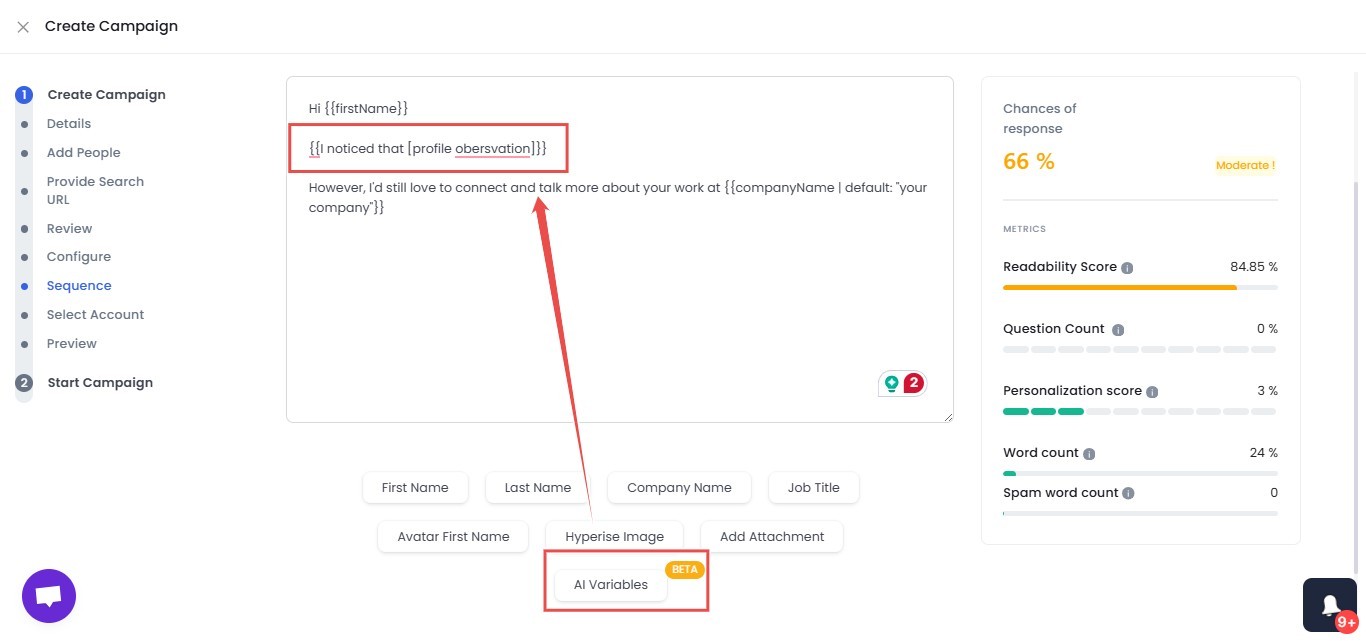
And because it runs in the cloud, your 48-hour and day-7 follow-ups fire on time. No babysitting a browser tab.
Step 4: Keep Your LinkedIn Account Safe While Running at Volume
This is the most-skipped step.
It shouldn't be. A restricted account produces exactly zero pipeline, no matter how good your sequence is.
There are three throttling triggers to respect:
- Acceptance dropping below 25-30%: the algorithm reads low acceptance as spam and quietly throttles you.
- Sudden volume spikes: going from 10 to 100 requests overnight is a red flag.
- Browser-based automation fingerprinting: desktop plugins are the easiest to detect.
You avoid all three with three habits:
- A 2-4 week warm-up ramp.
- Steady daily volume. Never batch-blast.
- Mobile API automation instead of a browser extension.
Patience pays here. 88% of acceptances happen within 7 days of sending (Botdog, 16,492 invitations).
Which means consistent volume beats sprint-and-pause every time.
This is also where your tooling genuinely matters.
SalesRobot runs on mobile API technology that mimics human behavior: randomized delays, human-like daily limits (up to 200 connection requests/week), and residential IP rotation.
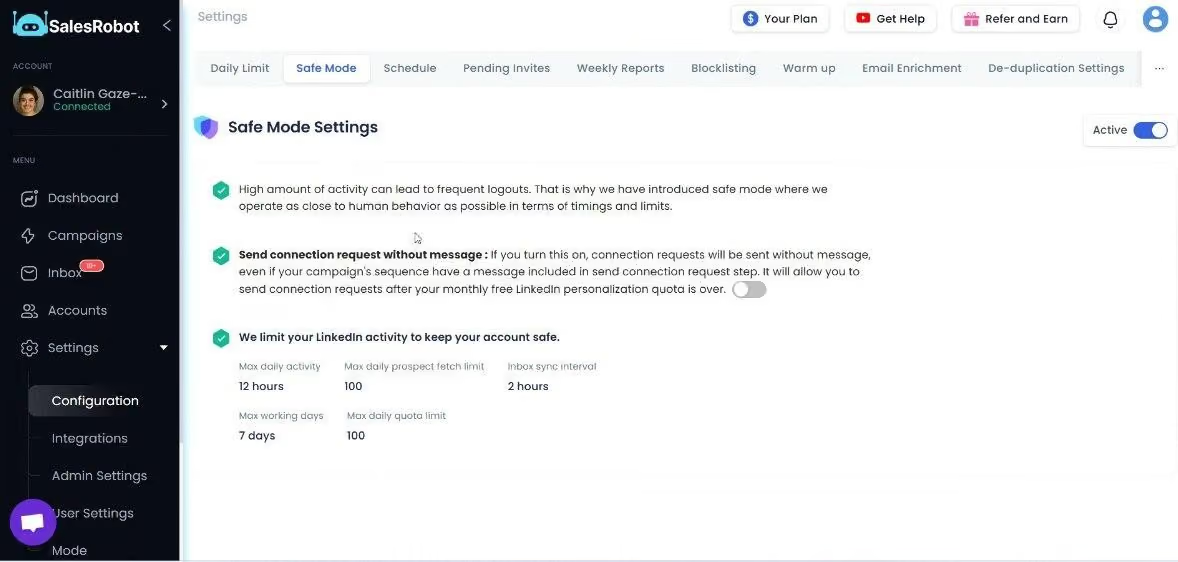
Customers report zero account bans when following Safe Mode guidelines. And since it's cloud-based, it runs 24/7 without your browser open.
Step 5: Wire Conversations Into Your CRM So Pipeline Becomes Forecastable
Outreach only becomes predictable when every stage is tracked automatically.
Untracked outreach is just activity.
Without CRM sync, your funnel is invisible. Every rep tracks differently. Hot conversations get buried in LinkedIn inboxes.
And no manager can forecast off a spreadsheet nobody updates.
Sync these four events at minimum:
- Connection accepted (top of funnel).
- First reply (conversation started).
- Positive-intent signal (qualified lead).
- Meeting booked (pipeline created).
Once these flow automatically, the funnel table from earlier stops being theory. It becomes your live dashboard.
Then you can see exactly which stage is leaking, and fix it.
The thing that kills forecasting accuracy? Manual CSV-export logging. Reps abandon it by week two.
With SalesRobot, when a prospect accepts or replies, their data syncs automatically to HubSpot, Salesforce, Pipedrive, and hundreds of other CRMs.
That includes contact details, conversation history, and campaign activity. No manual logging, no duplicate records.
The API and webhooks support 20+ events for custom automation, so your forecast updates itself.
Common Mistakes That Keep LinkedIn Pipelines Unpredictable (Even When You're Doing Everything Right)
Four mistakes quietly wreck otherwise solid systems.
1. Pitching in the connection request.
It tanks acceptance and drags you under the 25-30% throttling line. Save the ask for later.
2. Sending one message and giving up.
88% of acceptances happen within 7 days. Most reps quit at day 3, right before the conversation would have started.
3. Scaling volume before the sequence converts.
More requests at a 10% reply rate isn't pipeline, it's noise. Fix conversion first, then scale. Garbage in, garbage out.
4. Running outreach in a browser tab.
One sick day, one closed laptop, and your sequence stalls. You'll feel that gap in pipeline two weeks later.

A cloud-based tool like SalesRobot runs 24/7 without your browser open, so consistency never depends on your bandwidth.
How SalesRobot Runs This Entire Engine for You
You just read a five-step system. SalesRobot is the execution layer that runs all five.
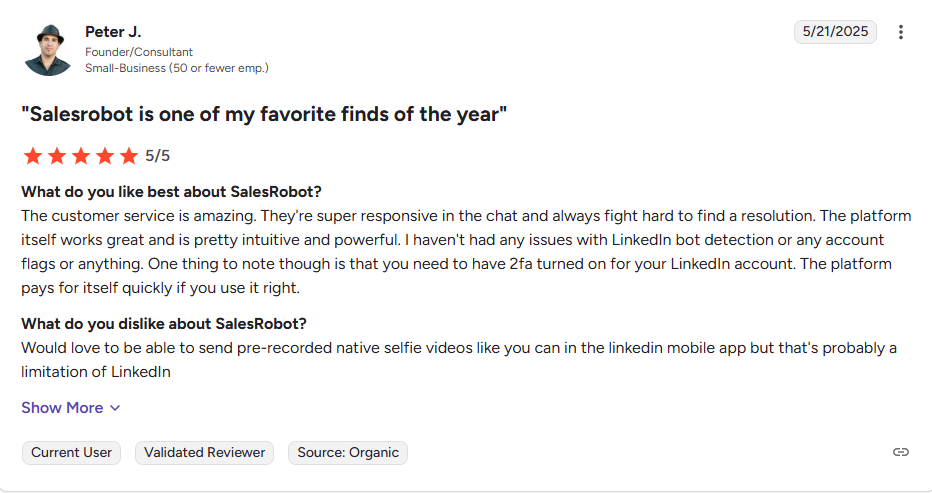
It's trusted by 4,100+ B2B sales teams and rated 4.8 on G2 from 57+ reviews.
Here's how it maps.
1. Safe volume at scale.
Mobile API, Safe Mode, and residential IP rotation let you run up to 200 connection requests per week per account, with zero reported bans.
You can also manage 50-100+ accounts from one dashboard. That's how you hit the 50-60 meetings/month math from Step 2 without cutting safety corners.
2. AI personalization that beats the averages.
AI Variables auto-personalize every message using profile data.
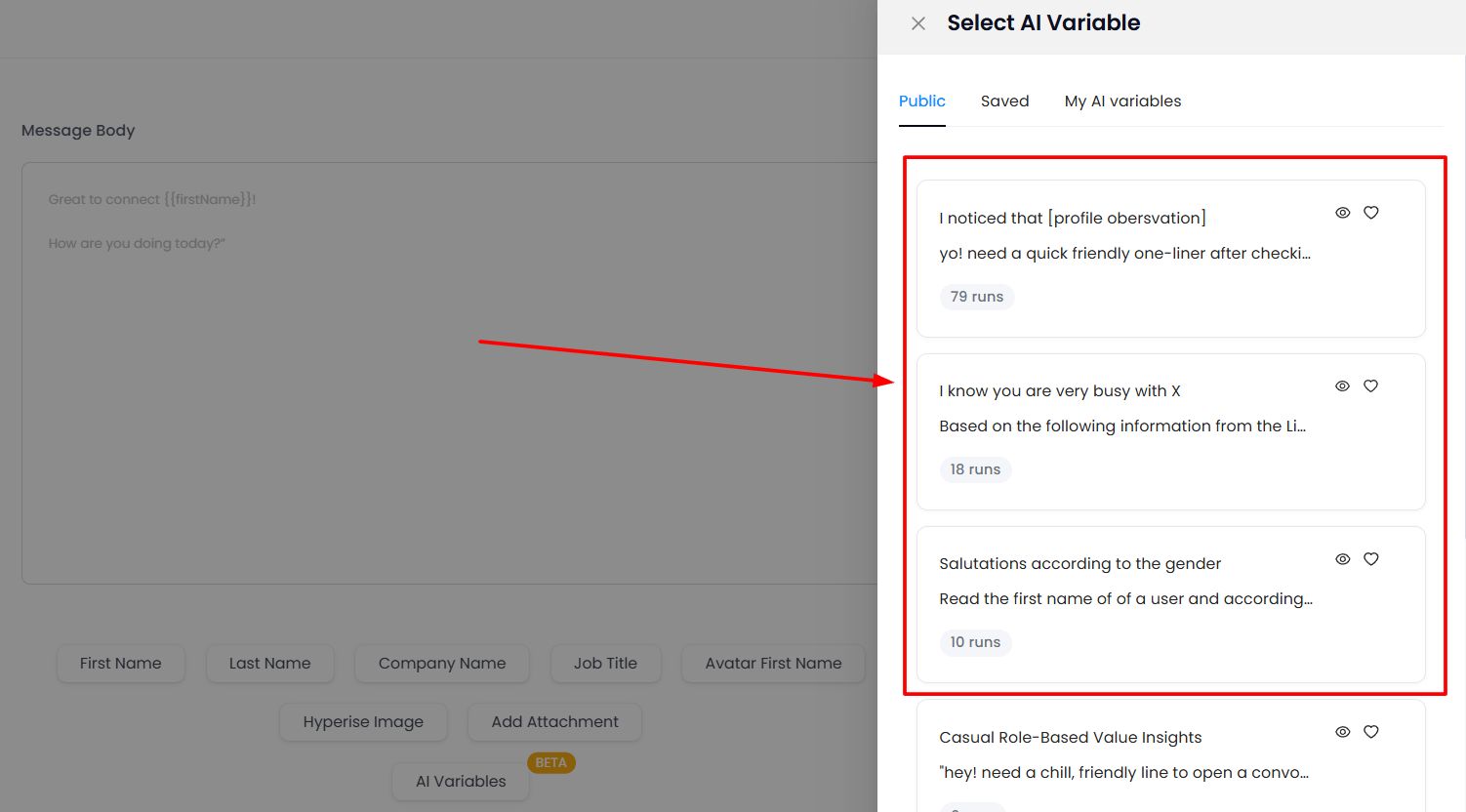
Then the AI Appointment Setter keeps the funnel moving. Copilot suggests replies you approve with one click. Autopilot handles conversations and books meetings 24/7.

The result: 51% acceptance and 55% reply rates, versus platform averages of 28.5% and 10.4%. The Growth Agency hit a 66% reply rate.
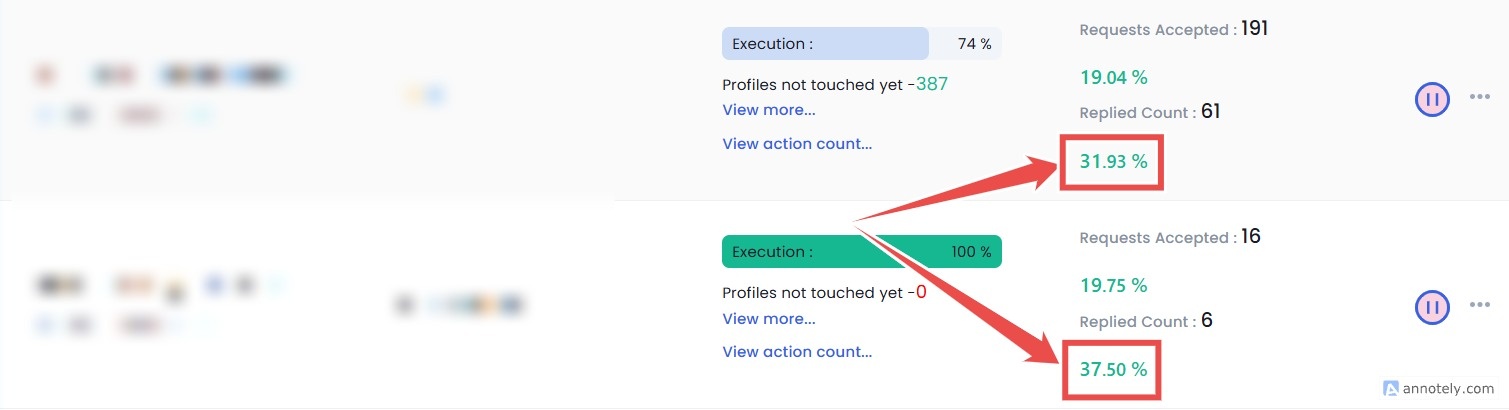
3. Automatic CRM sync means automatic forecasting.
Native HubSpot, Salesforce, and Pipedrive integrations, plus 20+ webhook events, mean every funnel stage logs itself.
No spreadsheets, no guesswork.
Pricing is refreshingly simple: Starter $59/month, Advanced $79/month, Professional $99/month.
Annual billing saves 35%, and there's a 14-day free trial with no credit card required.
Frequently Asked Questions
What is a good LinkedIn connection acceptance rate in 2026?
A healthy B2B acceptance rate sits between 30% and 37% (Leadriver). The platform-wide average is around 28.5% (Expandi, 13.2M attempts).
Tightly-targeted campaigns run higher, with SalesRobot users averaging 51%.
Anything sustained below 25-30% risks triggering LinkedIn's throttling. So treat acceptance as a health metric, not a vanity number.
How many connection requests can I send per week on LinkedIn?
As of 2026, LinkedIn typically allows 100-200 per account, or roughly 15-30 per day.
Exceeding that, or spiking volume suddenly, invites automatic restrictions.
The safest approach is a steady daily cadence with a 2-4 week warm-up ramp. Scale total volume by adding accounts rather than overloading one.
How many meetings can one LinkedIn account realistically book per month?
Roughly 10-12 from a single well-run account.
The math: about 20 connection requests per day, 25% acceptance, and a 2% meeting-conversion rate.
To book more, add senders rather than pushing one account harder. Five accounts at the same rates produce 50-60 meetings monthly.
Why does my LinkedIn pipeline stall after a few good months?
Usually three culprits.
Template fatigue (platform connection-note reply rates fell from 3.5% to 2.2% in a year), acceptance dropping below the throttling threshold, and no CRM tracking, so reps keep chasing new connections instead of nurturing existing conversations.
Fix personalization, protect acceptance, and sync every stage to your CRM.
Is LinkedIn outreach better than cold email for B2B pipeline?
They work best together, but LinkedIn messenger sequences pull strong numbers on their own. Expandi found users saw 101% more replies in messenger sequences compared to cold email.
The predictable move is multi-channel: start on LinkedIn, then switch to email if a prospect goes quiet.
SalesRobot runs both in one platform.
Can SalesRobot manage outreach across several LinkedIn accounts at once?
Yes, and this is how agencies and larger teams get past a single account's ceiling.
You run and monitor campaigns across 50-100+ LinkedIn accounts from one dashboard, each with its own safe sending limits, warm-up, and Safe Mode pacing.
So five or ten senders can hit the 50-60 meetings/month math without any one account tripping LinkedIn's restrictions. Billing is per account, starting at $59/month.
How long does it take to see results from a LinkedIn outreach system?
Expect first acceptances within days, since 88% land within 7 days of sending.
Real conversations build over the first 2-4 weeks as your sequence runs. First closed deals typically land 6-8 weeks out, longer if your deal cycle is complex.
Anyone promising overnight pipeline is selling hype.
Start With the Math, Stay Consistent, and Pipeline Becomes Boring (That's the Goal)
Predictable pipeline isn't about a clever message or a hack.
It's about controlling your inputs so the outputs stop surprising you: define the ICP, calculate the send volume, build a converting sequence, protect the account, and track every stage.
The honest reality check: this takes 2-4 weeks to ramp properly.
There's no button that fills your calendar tomorrow, and buying timelines have stretched 54 days longer. Patience is part of the system.
If you'd rather not run all five steps by hand, SalesRobot does it for you. Safe LinkedIn automation up to 200 requests/week, AI Variables for personalization, and automatic CRM sync so your forecast updates itself.
Customers average 55% reply rates and 51% acceptance, starting at $59/month.
Build the machine once, keep feeding it, and watch pipeline become the most boring part of your week. Try SalesRobot free for 14 days, no credit card required.

Wow your leads by cloning yourself and sending personalized videos and voice notes to each lead on LinkedIn.
If you don't reply to leads within 5 mins, your chances of converting them fall by 50%. Our AI replies on your behalf instantly! (and yes, you can train it)

Don't shoot in the dark. Get detailed analytics on what's working

SalesRobot allows you to invite other team members, so that they can add their LinkedIn Account, run outreach campaigns and get amazing results just like you.
.avif)


Trusted by 4100+ innovative B2B sales teams and lead gen agencies

.avif)

.avif)




.avif)


Heading 1
Heading 2
Heading 3
Heading 4
Heading 5
Heading 6
Lorem ipsum dolor sit amet, consectetur adipiscing elit, sed do eiusmod tempor incididunt ut labore et dolore magna aliqua. Ut enim ad minim veniam, quis nostrud exercitation ullamco laboris nisi ut aliquip ex ea commodo consequat. Duis aute irure dolor in reprehenderit in voluptate velit esse cillum dolore eu fugiat nulla pariatur.
Block quote
Ordered list
- Item 1
- Item 2
- Item 3
Unordered list
- Item A
- Item B
- Item C
Bold text
Emphasis

Superscript
Subscript