.avif)
TL;DR
- Salee is a LinkedIn-specific AI outreach tool, not a broad business automation platform. It focuses on personalizing connection requests, follow-ups, and replies using GPT-4.
- Pricing starts with a free plan (100 messages/month), then goes to $25/month (Networker), $50/month (Outreacher), and $100/month (Team, which adds CRM integration and custom reports).
- The AI personalization is genuinely strong. It pulls from a prospect's LinkedIn profile to write messages that reference something real about them, not just their first name.
- It does not offer multichannel outreach. If you need email sequences, SMS, or anything outside LinkedIn, Salee isn't built for that.
- Salee works best for solo sales reps and small teams doing targeted outreach. High-volume, multi-account users will feel limited.
- SalesRobot is the stronger pick for LinkedIn-first teams that need more automation, voice/video messaging, and account safety features. Plans start at $39/month (annual) or $59/month (monthly).
Ever spent 20 minutes writing a LinkedIn message you were actually proud of, hit send... and heard nothing back? 🫠
Yeah. That's most of LinkedIn outreach right now.
The problem isn't effort, it's scale. You can't write a genuinely thoughtful message to 50 people a day without burning out. And copy-pasting the same template with a different name doesn't fool anyone. Prospects spot it immediately and delete it just as fast.
That's the gap Salee is trying to fill. The idea is simple: use AI to analyze a prospect's LinkedIn profile and generate a personalized message that actually sounds like you did your homework.
Less spray-and-pray, more "hey, I actually noticed something about you."
We spent 30 days with the platform to see if it delivers on that promise or just adds a layer of AI polish to the same tired outreach playbook.
What Salee Actually Is (And What It's Not)
Let's clear something up right away, because there's some confusion out there about this. 🙃
Salee is a LinkedIn AI messaging tool. It is not a CRM, not a funnel builder, not an email platform, and not an all-in-one business automation suite.
If you've seen it described that way elsewhere, that information is either outdated or flat-out wrong.
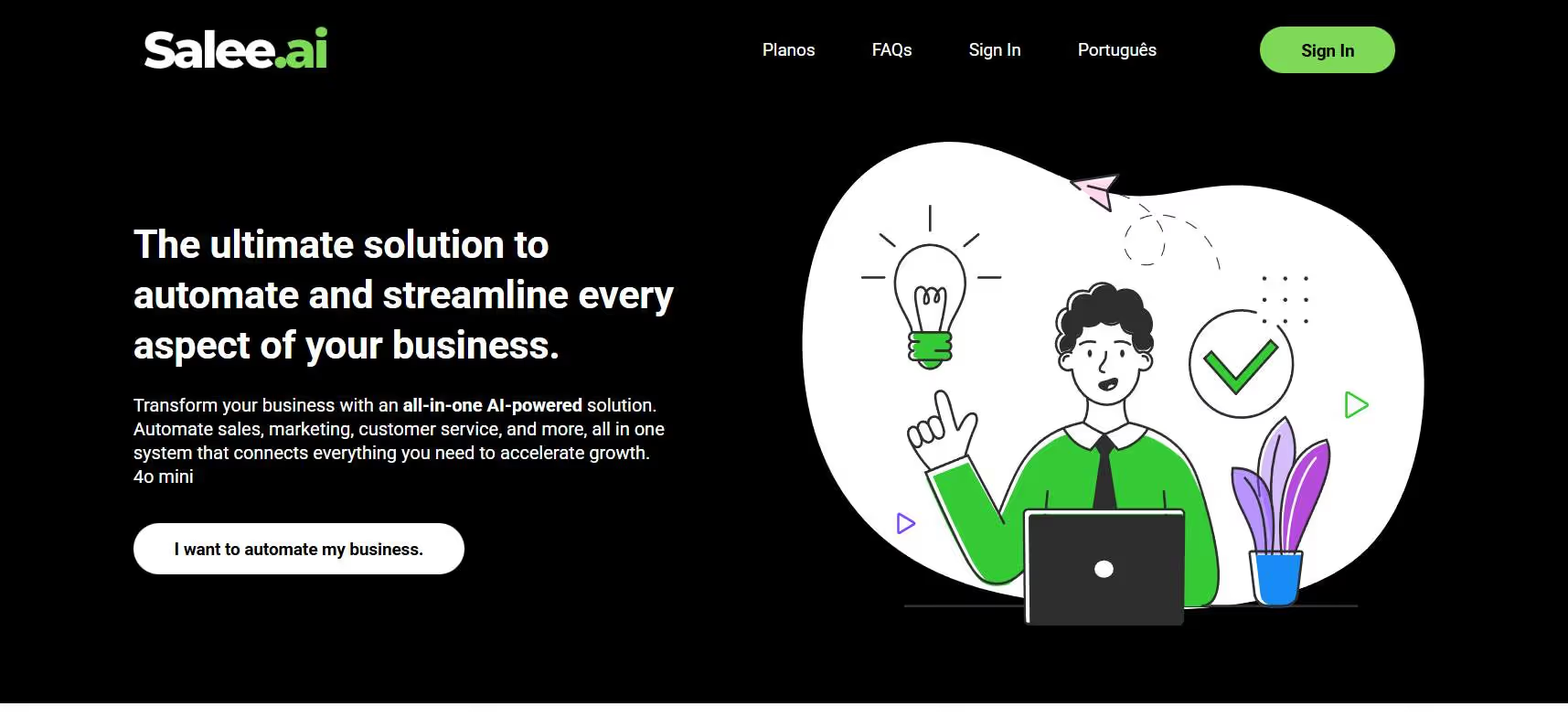
What it actually does: you connect it to your LinkedIn account, point it at a prospect's profile, and it generates personalized connection requests, opening messages, follow-ups, and objection responses. It works as a browser extension that sits on top of LinkedIn itself.
The AI uses GPT-4 under the hood. It reads things like a prospect's job title, recent posts, company info, and career history, then uses those details to write something specific.
The output quality is noticeably better than anything you'd get from a generic template tool.
Salee's Key Features, Broken Down
AI-Personalized Messaging
This is the core of what Salee does, and it's where it genuinely holds up. When you open a LinkedIn profile, Salee generates a suggested connection note or first message that references something concrete from that person's background.
It might pull from a recent post they wrote, a career transition, or a shared industry angle. The goal is for your message to feel like it came from someone who actually looked at their profile for five minutes, not someone who ran a mail merge.
Objection Handling
When a prospect pushes back in conversation, Salee reads the thread and suggests a response based on the specific objection they raised. This is more useful than it sounds, especially for newer reps who tend to freeze or over-explain when a prospect says "not interested" or "we already have something."
The suggestions aren't always perfect, but they give you a solid starting point. Most reps edit them before sending, which is the right call.
Text Humanizer
One-click feature that takes any AI-generated text and rewrites it to sound less robotic. 🤖 It's a nice safety net for when a generated message is accurate but sounds a bit stiff.
If you're going to be using AI to draft outreach at any volume, having a quick way to smooth out the copy before it goes out matters more than people expect.
Follow-Up Sequences
Salee can suggest contextual follow-ups based on where the conversation left off. It's not a full drip campaign system, but for one-to-one outreach it works well. You still control the timing and decide whether to send.
CRM Integration
Available on the Team plan ($100/month). Salee connects with tools like Salesforce, Pipedrive, Apollo.io, and others. Lead statuses update automatically as conversations progress, which saves a fair amount of manual data entry.
For solo users or small teams, the lower-tier plans are fine without it. But if you're working in a team environment and need your pipeline data to stay in sync, the CRM connection is worth the jump.
Salee Pricing
Salee has a free plan that gives you 100 messages per month with basic features. It's enough to test the product, but not enough to run any real outreach at scale.
From there, paid plans are priced per LinkedIn account per month:

The Basic plan is $195.90/month and gives you unlimited messages. Good for solo reps doing consistent outreach who want to get past the free plan cap.
The Business PRO plan is $349.90/month and adds additional templates and strategy presets. Worth it if you want more control over how your campaigns are structured.
No steep learning curve on setup, no complex onboarding. You install the extension, connect your LinkedIn, and you're running within a few minutes. That simplicity is one of the things Salee gets genuinely right.
What Works Well
The personalization quality is the obvious highlight. ✅ Salee's messages don't read like they came out of a template library. When it works well, the output references something real and the prospect actually feels like you paid attention.
Setup speed is another plus. There's no lengthy configuration process. You install, connect, and start generating messages almost immediately.
The objection handling feature is underrated. For anyone doing outbound sales, having an AI read the conversation and suggest a relevant response in real time is legitimately useful, not just a gimmick.
What Falls Short
Salee is only LinkedIn. If your outreach strategy involves email sequences or any other channel, you'll need a separate tool for that. There's no multi-channel capability here.
For high-volume users managing multiple LinkedIn accounts or running campaigns across large prospect lists, Salee can feel slow. It's built for thoughtful one-to-one outreach, not blasting hundreds of people per day.
The free plan is also quite limited. 100 messages a month is enough to get a feel for the product, but anyone serious about outreach will need a paid plan from day one.
SalesRobot: The LinkedIn-First Alternative
If Salee's limitations are already giving you pause, it's worth knowing what a more specialized LinkedIn automation platform looks like in practice. SalesRobot is one of the more capable options in this space right now.

It's cloud-based, which means it runs without keeping your browser open. That alone solves one of the more annoying problems with extension-based tools.
It also uses mobile API behavior and dedicated IPs, which keeps your LinkedIn account activity looking natural and significantly reduces the risk of restrictions. 🛡️
Multi-Step LinkedIn Sequences
SalesRobot lets you build automated connection and messaging campaigns with smart delays and conditional logic.
If a prospect doesn't respond to your connection request, the sequence adjusts. If they do respond, it pauses so you can take over the conversation.
It's a meaningful step up from manually tracking who you've followed up with and who you haven't.
AI Voice and Video Messages
This is one of the features that sets SalesRobot apart from most LinkedIn tools. You can send personalized voice notes and video messages at scale through LinkedIn.
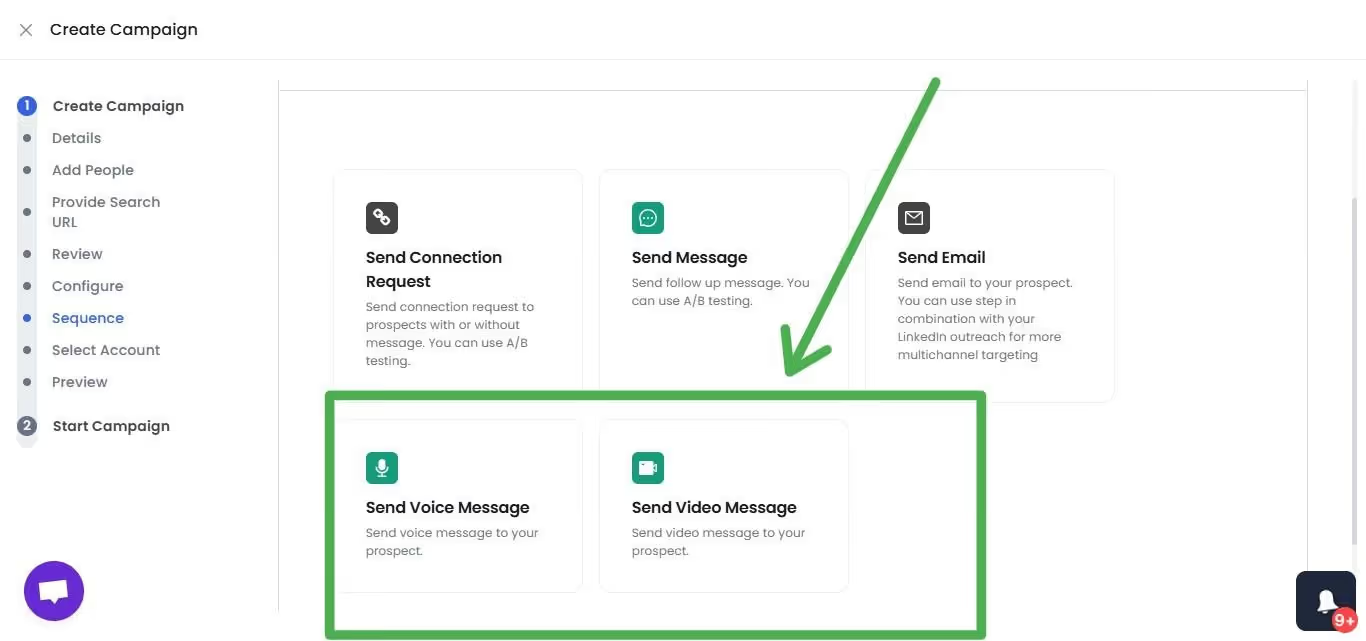
Users on the platform report reply rates north of 40% with this format. People still aren't used to receiving voice messages from strangers on LinkedIn, which means they still stop and listen.
Smart Reply Detection
When a prospect responds, SalesRobot automatically pauses the outreach sequence for that contact.
No awkward follow-up messages landing after someone's already replied to you. It sounds basic, but a lot of automation tools get this wrong and it kills your credibility fast.
Advanced Targeting Options
You can pull prospects directly from LinkedIn search results, Sales Navigator lists, or upload via CSV.
SalesRobot also lets you target people who commented on a specific LinkedIn post or who are members of a LinkedIn group, which opens up some genuinely useful prospecting angles that most tools don't support.
Unified Inbox
All your LinkedIn conversations and email threads land in one dashboard. The AI surfaces reply suggestions so you don't have to think too hard about what to say next.
For anyone managing a high volume of conversations, this feature alone saves a lot of context-switching.
SalesRobot Pricing
SalesRobot prices by LinkedIn account. Annual billing gets you up to 35% off.
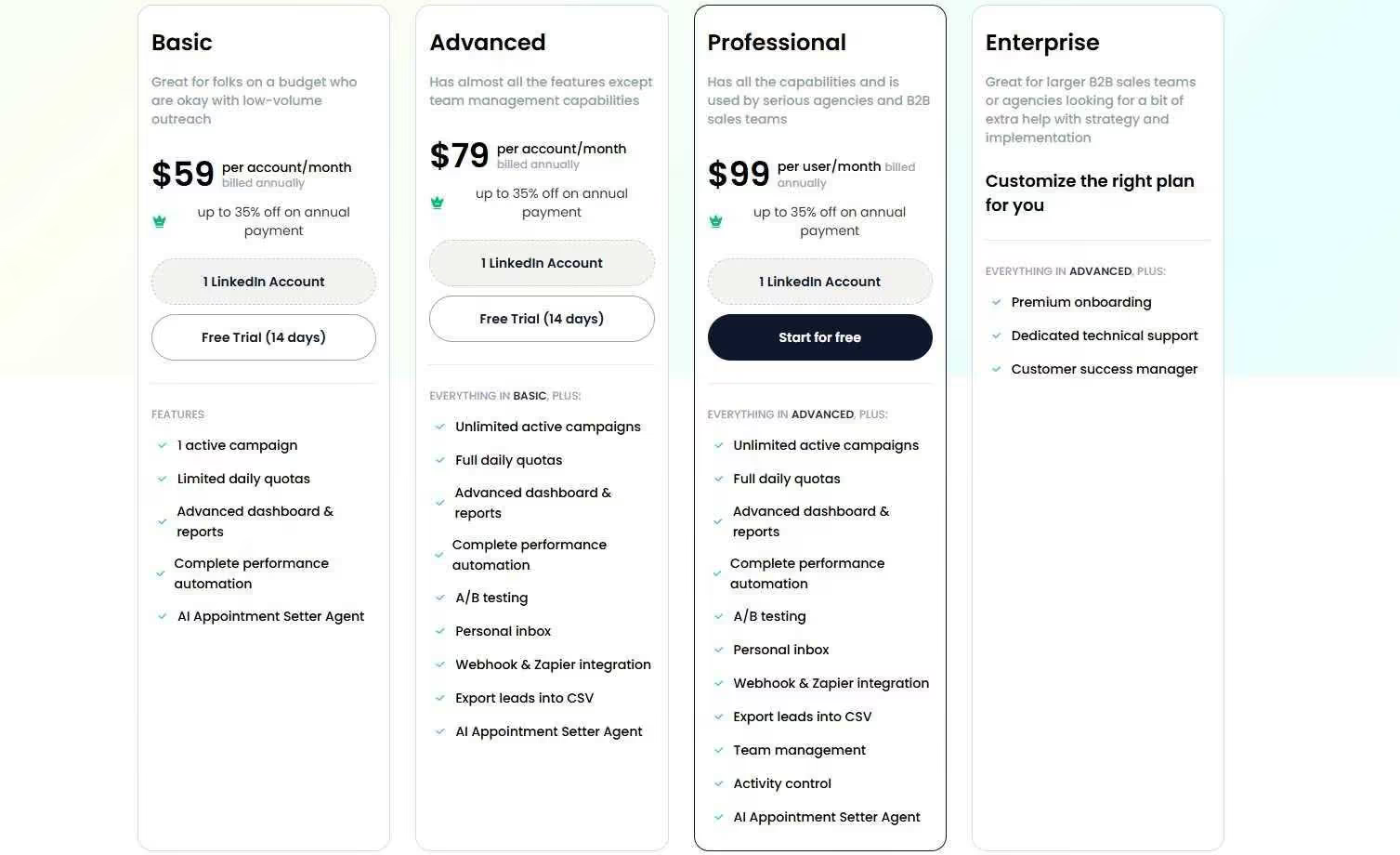
The Basic plan is $39/month (annual) or $59/month (monthly). You get one active campaign and limited daily quotas of 20 connections and 20 messages per day. It's a reasonable entry point if you're testing the platform on a budget.
The Advanced plan is $59/month (annual) or $79/month (monthly). This is where the platform opens up. Unlimited active campaigns, full daily quotas of 75 connections and 75 messages per day, A/B testing, a personal inbox, webhook and Zapier integration, and the AI Appointment Setter agent.
The Professional plan is $79/month (annual) or $99/month (monthly). Adds team management, activity controls, role assignments, duplicate outreach prevention, and team analytics. Built for agencies and sales teams running multiple accounts.
Enterprise is custom pricing and includes premium onboarding, a dedicated customer success manager, and technical support.
SalesRobot offers a 14-day free trial with no credit card required. 76% of users who start a trial reportedly get their first lead within two days, which is a decent signal that the setup process isn't fighting you.
Salee vs SalesRobot: How Do They Compare?
The Verdict
Salee is a focused, genuinely useful tool for what it does. If you want to send better LinkedIn messages without writing every single one from scratch, it helps. The personalization is real, the setup is fast, and the pricing is reasonable.
But it's a narrow tool. It doesn't automate sequences, it doesn't touch email, and it doesn't scale well for teams running multi-account campaigns.
If LinkedIn is a core part of your outreach and you need more than just message generation, SalesRobot gives you a more complete setup.
The automation is stronger, the safety features are more thoughtful, and the voice/video messaging capability is the kind of thing that actually moves reply rate numbers.
Pick Salee if you're a solo rep or small team doing careful, targeted outreach and want AI to sharpen your messages. Pick SalesRobot if you're ready to run automated sequences at scale and want a platform that can grow with your team. 🎯
If you want to be sure about which to pick, try SalesRobot’s 14-day-free trial. No credit card needed!

Wow your leads by cloning yourself and sending personalized videos and voice notes to each lead on LinkedIn.
If you don't reply to leads within 5 mins, your chances of converting them fall by 50%. Our AI replies on your behalf instantly! (and yes, you can train it)

Don't shoot in the dark. Get detailed analytics on what's working

SalesRobot allows you to invite other team members, so that they can add their LinkedIn Account, run outreach campaigns and get amazing results just like you.
.avif)


Trusted by 4100+ innovative B2B sales teams and lead gen agencies

.avif)

.avif)




.avif)


Heading 1
Heading 2
Heading 3
Heading 4
Heading 5
Heading 6
Lorem ipsum dolor sit amet, consectetur adipiscing elit, sed do eiusmod tempor incididunt ut labore et dolore magna aliqua. Ut enim ad minim veniam, quis nostrud exercitation ullamco laboris nisi ut aliquip ex ea commodo consequat. Duis aute irure dolor in reprehenderit in voluptate velit esse cillum dolore eu fugiat nulla pariatur.
Block quote
Ordered list
- Item 1
- Item 2
- Item 3
Unordered list
- Item A
- Item B
- Item C
Bold text
Emphasis

Superscript
Subscript