.avif)
TL;DR:
- Sybill is an AI sales assistant that automates call summaries, CRM updates, and follow-up emails after every sales call
- It claims to save account executives 14 hours per week on post-call admin work
- Key features include deal inspection, buyer intent analysis, pre-meeting briefings, and support for 100+ languages
- Pricing starts at $0/month (Free), $36/month (Pro), $108/month (Business), and Custom (Enterprise) — all per user
- The Business plan is the most popular and includes full CRM integration and unlimited credits
- SalesRobot is worth considering if LinkedIn outreach is your main focus — plans start at just $39/month
Sybill Review: AI For Sales Calls & Emails
Ever finish a sales call and immediately forget half of what your prospect said?
You know the drill. You're frantically scribbling notes while trying to sound natural on the call. Then you spend 20 minutes afterward trying to decode your own handwriting.
Meanwhile, your CRM is gathering digital dust because updating it feels like doing taxes. And those follow-up emails? Somehow they take forever to write, even though you're basically saying the same thing every time.
This is exactly the chaos Sybill promises to clean up.
It's an AI assistant that sits in on your sales calls, automatically updates your CRM, and handles routine follow-ups — so you can focus on actually selling.
In this review, we'll dig into how well Sybill delivers on these promises, what it costs, and whether it's worth adding to your sales stack. We'll also look at SalesRobot as an alternative that takes a completely different approach to automating your sales process.

Sybill: What You Need to Know
Before getting into the features, here's a quick honest breakdown:
✅ Massive time savings — Sybill cuts post-call admin from an hour down to about 15 minutes per call. It handles email follow-ups, CRM updates, and meeting scheduling automatically.
✅ Smart deal intelligence — The AI learns from your calls, emails, Slack messages, and CRM data. You can ask it questions like "Why do we lose deals?" and actually get useful answers, not just a data dump.
✅ Works across your tech stack — Sybill integrates with your existing CRM, email, Slack, and other sales tools. It also supports 100+ languages, so global teams aren't left out.
✅ Built for sellers, not managers — Unlike most CRM dashboards that feel designed for boardroom reviews, Sybill's workspace is built from a seller's perspective. Your pipeline and deal management actually make sense day-to-day.
✅ Pre-meeting prep, handled — Sybill sends you automated briefings before calls, pulling context from previous conversations so you show up ready.
⚠️ Learning curve — Sybill works like a ChatGPT-style assistant, which means you need to learn how to ask the right questions. Sales reps who aren't comfortable with AI tools might take a few weeks to get full value out of it.
⚠️ Over-reliance risk — With Sybill handling so much of your admin, there's a real risk reps lose touch with their deals. Sometimes, manually updating your CRM is how you actually process and remember key information.
Sybill's Key Features, Broken Down
AI Sales Assistant with Natural Language Queries
Ask Sybill questions about your deals the same way you'd ask ChatGPT — things like "Which prospects are most likely to close this quarter?" or "Why do we keep losing to Competitor X?"
Instead of digging through call transcripts and CRM filters, you get direct answers. Sybill learns from all your sales conversations, emails, and CRM data over time, so its insights get sharper the more you use it.
Automated CRM Updates and Data Entry
After every meeting, Sybill automatically fills your CRM with call notes, deal updates, and contact information. No more manual data entry or forgotten updates that mess up your pipeline accuracy.
Picture this: you wrap up a discovery call, jump straight into your next meeting, and Sybill has already logged the prospect's budget, key pain points, and decision-makers into Salesforce — without you typing a single word.
Personalized Email Follow-ups
Sybill generates follow-up emails in your voice immediately after calls end. It references specific things discussed on the call and includes the next steps you mentioned.
So while you're jumping into your next call, Sybill is already sending a personalized recap to your previous prospect — with relevant case studies attached.
Call Recording and Smart Summaries
Sybill joins your sales calls to record and transcribe the conversation, then generates intelligent summaries highlighting what actually matters — budget concerns, technical requirements, buying timeline, and key objections.
You focus entirely on building rapport. Sybill handles the note-taking.
The summaries are also easy to share with teammates who missed the call, which cuts down on those "can you give me a quick recap?" Slack messages.
Deal Intelligence and Risk Detection
Sybill analyzes patterns across your entire pipeline to flag deals at risk and predict outcomes.
For example, it might notice that deals tend to stall when you haven't connected with the economic buyer by week three — and prompt you to request that introduction sooner rather than waiting until it's too late.
Pre-Meeting Briefings and Deal Prep
Before every call, Sybill sends you a quick brief covering what was discussed last time, outstanding questions, and recommended topics based on similar deals that closed successfully.
No more last-minute scrambling through old emails right before a call.
Sybill Pricing: What Will It Cost?
Good news — unlike a lot of AI sales tools, Sybill's pricing is completely public. Here's how the plans break down:
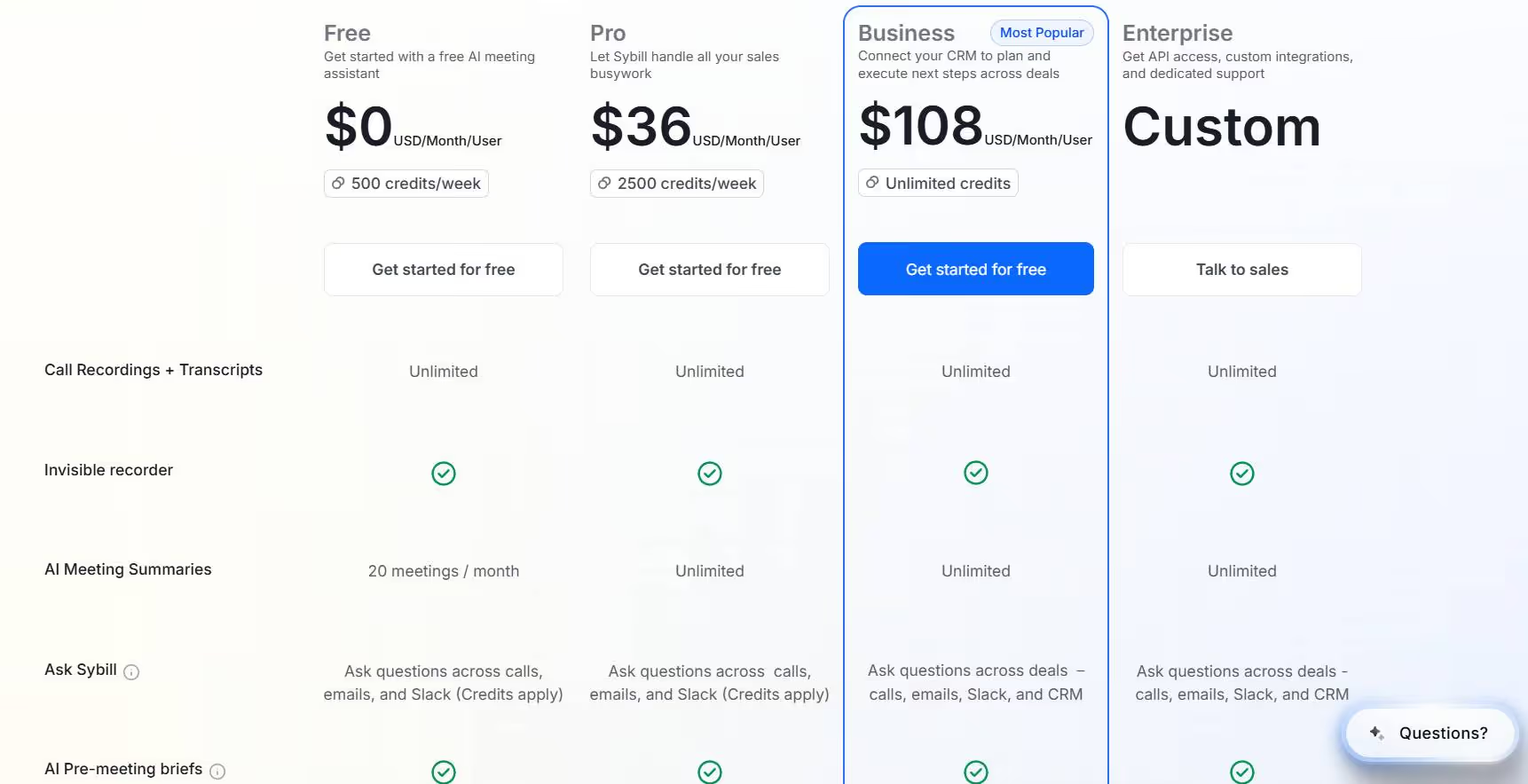
Free — $0/month per user
- 500 credits/week
- Unlimited call recordings and transcripts
- Invisible recorder
- 20 AI meeting summaries per month
- Ask Sybill across calls, emails, and Slack (credits apply)
- AI pre-meeting briefs
A solid starting point if you want to test the basics before spending anything.
Pro — $36/month per user
- 2,500 credits/week
- Unlimited call recordings and transcripts
- Invisible recorder
- Unlimited AI meeting summaries
- Ask Sybill across calls, emails, and Slack (credits apply)
- AI pre-meeting briefs
Good for individual reps who want the full Sybill experience without the enterprise price tag.
Business — $108/month per user (Most Popular)
- Unlimited credits
- Everything in Pro, plus:
- Full CRM integration — plan and execute next steps across deals
- Ask Sybill across deals, calls, emails, Slack, and CRM
- Best for teams that need Sybill to actually connect with and update their CRM automatically
Enterprise — Custom pricing
- API access and custom integrations
- Dedicated support
- Built for larger organizations with complex needs — contact their sales team for a quote
The jump from Pro to Business is significant in price, but the CRM integration is really where Sybill earns its value. If your team lives inside Salesforce or HubSpot, the Business plan is likely the one that actually delivers on the "14 hours saved per week" claim.
Sybill vs SalesRobot: How Do They Compare?
The short version: choose Sybill if you're managing existing deals and need AI to analyze conversations and automate follow-ups. Choose SalesRobot if you're focused on prospecting and need to automate LinkedIn outreach at scale.
SalesRobot: The LinkedIn-First Alternative
If you've been looking at Sybill for lead generation, it's worth asking: where are your best prospects actually spending time?
For most B2B sales teams, the answer is LinkedIn. And SalesRobot is built specifically for that.
What SalesRobot Does
SalesRobot is a LinkedIn automation platform that handles connection requests, message sequences, and follow-ups at scale. It's designed for B2B sales teams and agencies who need to reach decision-makers where they're most active.

Key Features
- LinkedIn Connection Sequences — Automates multi-step outreach campaigns with connection requests, follow-ups, and InMails. You can send up to 75 connection requests daily while staying within LinkedIn's safety limits.
- AI Voice and Video Messages — Clone yourself to send personalized video and voice notes through LinkedIn. Users report 40%+ higher reply rates compared to text-only messages.
- Smart Reply Detection — Automatically stops messaging when a prospect responds, so you're never that person who keeps sending follow-ups after they've already replied.
- Mobile API Safety — Uses LinkedIn's mobile app APIs instead of browser automation, which significantly lowers the risk of account bans. You don't need LinkedIn Premium or Sales Navigator to get started.
- Unified Inbox — Combines LinkedIn and email conversations in one dashboard. The AI can even manage responses and book meetings on your behalf with the appointment setter add-on.
- Advanced Targeting — Import prospects from LinkedIn searches, Sales Navigator, CSV files, or even scrape attendees from LinkedIn events and group members.
SalesRobot Pricing
SalesRobot charges per LinkedIn account, with discounts for annual billing.
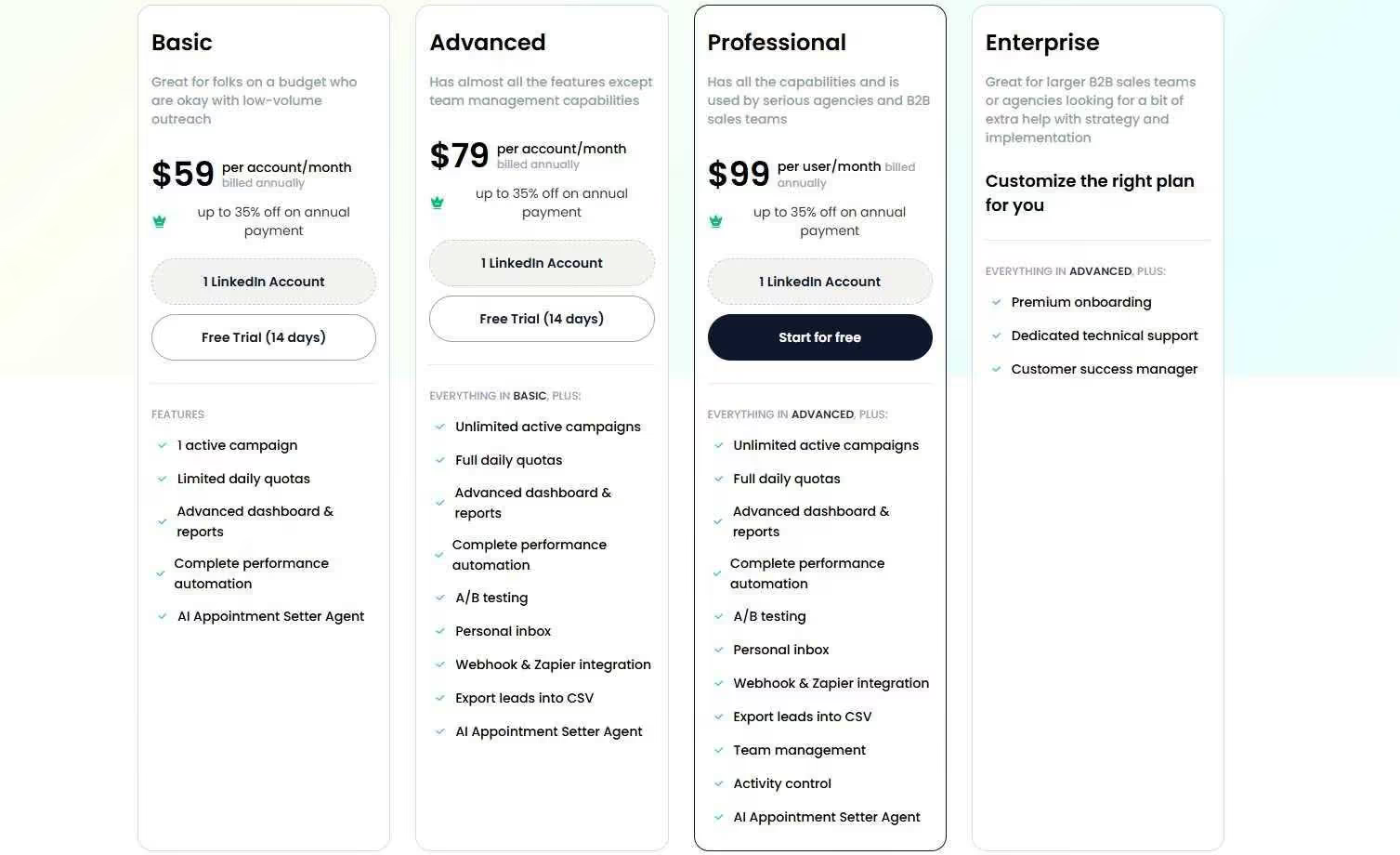
Basic — $59/month
- 1 active campaign
- 20 connection requests/day, 20 messages/day
- Basic reporting and automation
- Good for solo users testing LinkedIn outreach on a budget
Advanced — $79/month
- Unlimited campaigns
- Full daily quotas (75 connection requests, 75 messages)
- A/B testing and webhook integrations
- Personal inbox management
- Best for individual sales reps running serious LinkedIn campaigns
Professional — $99/month
- Everything in Advanced
- Team management and user permissions
- Advanced analytics dashboard
- Great for sales teams and agencies managing multiple accounts
Enterprise — Custom pricing
- Premium onboarding and a dedicated customer success manager
- Custom integrations and training
- Built for larger organizations with complex needs
SalesRobot also offers a 14-day free trial with no credit card required.
The Verdict
Sybill is a solid pick for sales teams drowning in post-call admin work. The AI genuinely saves hours every week, and the deal insights can be eye-opening — especially for reps who struggle to read buyer signals or spot patterns across a large pipeline.
The Free plan is a low-risk way to test it, and the Pro plan at $36/month is reasonable for individual reps. But if you want the full CRM automation that makes Sybill worth it, you're looking at the Business plan at $108/month per user — which adds up fast for larger teams.
The biggest limitation? Sybill is reactive. It helps you understand what happened after meetings — but it doesn't help you book those meetings in the first place.
Bottom Line
Buy Sybill if you're an established B2B team with consistent call volume and need to cut down on post-call admin. The Business plan is where the real value is.
Skip it if you're bootstrapping, doing mostly cold outreach, or still figuring out your sales process.
Start with SalesRobot if LinkedIn prospecting is your main challenge. It's purpose-built for LinkedIn automation, starts at just $59/month, and comes with a 14-day free trial so you can see if it fits before committing.


Wow your leads by cloning yourself and sending personalized videos and voice notes to each lead on LinkedIn.
If you don't reply to leads within 5 mins, your chances of converting them fall by 50%. Our AI replies on your behalf instantly! (and yes, you can train it)

Don't shoot in the dark. Get detailed analytics on what's working

SalesRobot allows you to invite other team members, so that they can add their LinkedIn Account, run outreach campaigns and get amazing results just like you.
.avif)


Trusted by 4100+ innovative B2B sales teams and lead gen agencies

.avif)

.avif)




.avif)