.avif)
TL;DR
- Synthesia creates professional AI avatar videos using 240+ avatars and 1,000+ voices across 160+ languages, with no camera or production crew needed.
- Teams report producing videos up to 90% faster than traditional methods, making it genuinely useful for sales training, onboarding, and product demos at scale.
- Pricing starts free, then jumps to $19/month (Starter) or $89/month (Creator) when billed monthly. Annual billing drops those to $18/month and $64/month respectively. Enterprise is custom.
- Key features like 1-click translation, SCORM export, and unlimited video minutes are locked behind the Enterprise plan, which can push mid-sized teams into pricing they weren't expecting.
- Synthesia is strong for internal sales enablement content but limited for direct prospecting or personalized outreach workflows.
- SalesRobot is worth considering if your goal is LinkedIn-first lead generation rather than video content production. Plans start at $59/month per LinkedIn account (or $39/month billed annually).
The Problem with Sales Video Production
Picture this: your sales team needs 20 personalized video pitches by Friday, but your video budget ran dry three months ago. 😬
Sound familiar? Traditional video production is expensive, slow, and genuinely painful when you need content fast. Meanwhile, your competitors are somehow producing polished sales videos like they have a studio on speed dial.
That's the gap Synthesia is trying to fill. No cameras, no actors, no editing marathons.
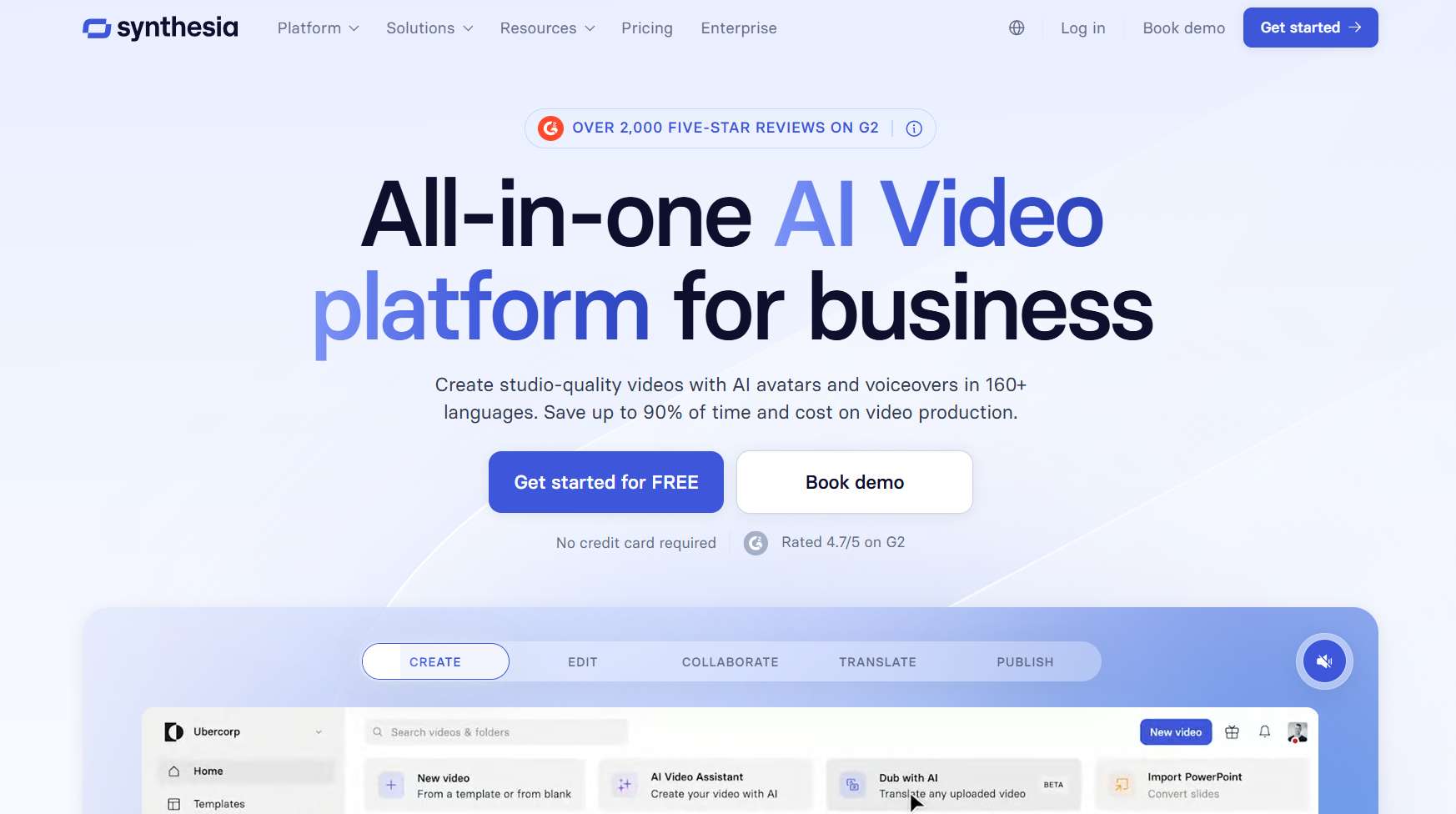
In this review, we'll dig into whether Synthesia actually delivers on that promise for sales teams, covering ease of use, features, pricing, and where it falls short. We'll also touch on SalesRobot as an alternative for teams focused specifically on outreach and lead generation.
Synthesia: What You Need to Know
✅ Genuinely easy to use
You can produce a professional-looking video without any editing experience whatsoever. Users consistently report never needing a tutorial to get started, which says a lot for busy sales teams who don't have time to sit through onboarding videos about how to make onboarding videos.
⚠️ Avatar customization has a ceiling
Synthesia offers 240+ AI avatars, but you can't fully customize their appearance or mannerisms to fit your brand exactly. Some avatars edge into uncanny valley territory, which matters more for customer-facing content than internal training material.
✅ Speed and cost savings are real
Companies report creating videos 90% faster than traditional production. What used to take weeks now takes an afternoon. For teams producing regular training or enablement content, that time difference compounds fast.
✅ Multilingual support is genuinely impressive
160+ languages, 1,000+ AI voices, and automatic lip-sync dubbing. If you're a global sales org that needs the same product demo in eight different languages, this feature alone could justify the price.
⚠️ The pricing has hidden layers
The free and Starter plans look accessible on paper, but features most sales teams actually need, like 1-click translation and SCORM export for LMS integration, are locked behind Enterprise pricing. That's a real cost trap for mid-market teams.
✅ Security compliance is enterprise-grade
SOC 2 Type II, ISO 42001, and GDPR compliant. If your company has strict data governance requirements, Synthesia clears the bar most others don't.
⚠️ AI quality still has limits
Complex gestures and certain lighting conditions can make avatars look noticeably artificial. For high-stakes external presentations, you may want to mix in some real footage.
Synthesia's Key Features, Broken Down
AI Avatar Creation
Synthesia gives you access to 125+ avatars on the Starter plan, 180+ on Creator, and the full 240+ on Enterprise. You can also create a Personal Avatar, which is essentially a digital version of yourself or a brand spokesperson.
On Starter, you get one Personal Avatar included. Creator bumps that to five. If you want a high-fidelity Studio Avatar, that's an add-on at $1,000/year on top of your plan.
For sales teams, this is most useful for creating a consistent "face" for training content without booking a spokesperson every time something needs updating.
Multilingual Voice Generation
Over 1,000 AI voices across 160+ languages, with automatic lip-sync when you switch languages. The platform handles dubbing natively, so you're not piecing together audio in post-production.
A sales team can record one product demo and push it out in ten languages without hiring a single translator or voice actor. That's not a small thing if you're selling across regions. 🌍
AI Screen Recorder
A Chrome extension that captures your screen while an AI avatar provides narration. Useful for software walkthroughs, product demos, and internal process documentation.
It removes the need for a separate screen recording tool, which is one fewer subscription to justify to your finance team.
Video Translation and Localization
Existing videos can be converted into multiple languages while keeping the same avatar and visual layout intact. The AI dubbing replaces the original voice while everything else stays consistent.
Worth noting: 1-click translation into 80+ languages is an Enterprise-only feature. On Starter and Creator, you'll have access to AI Dubbing, but it draws from your monthly video credit pool.
Brand Kit and Templates
Consistent branding across all your videos: logos, colors, fonts, templates. Teams can lock down approved assets so every video that goes out looks like it came from the same place.
This is particularly useful for sales enablement teams that need reps to produce videos independently without going off-brand.
Live Collaboration and Analytics
Multiple team members can edit simultaneously, leave comments, and track versions in real time. Analytics cover viewer engagement, completion rates, and drop-off points.
Live collaboration is an Enterprise feature. On Starter and Creator, you get one editor with a limited number of guest seats (3 on Starter, 5 on Creator).
Synthesia Pricing: What You'll Actually Pay
Synthesia recently updated its pricing, so here's what's accurate as of 2026:
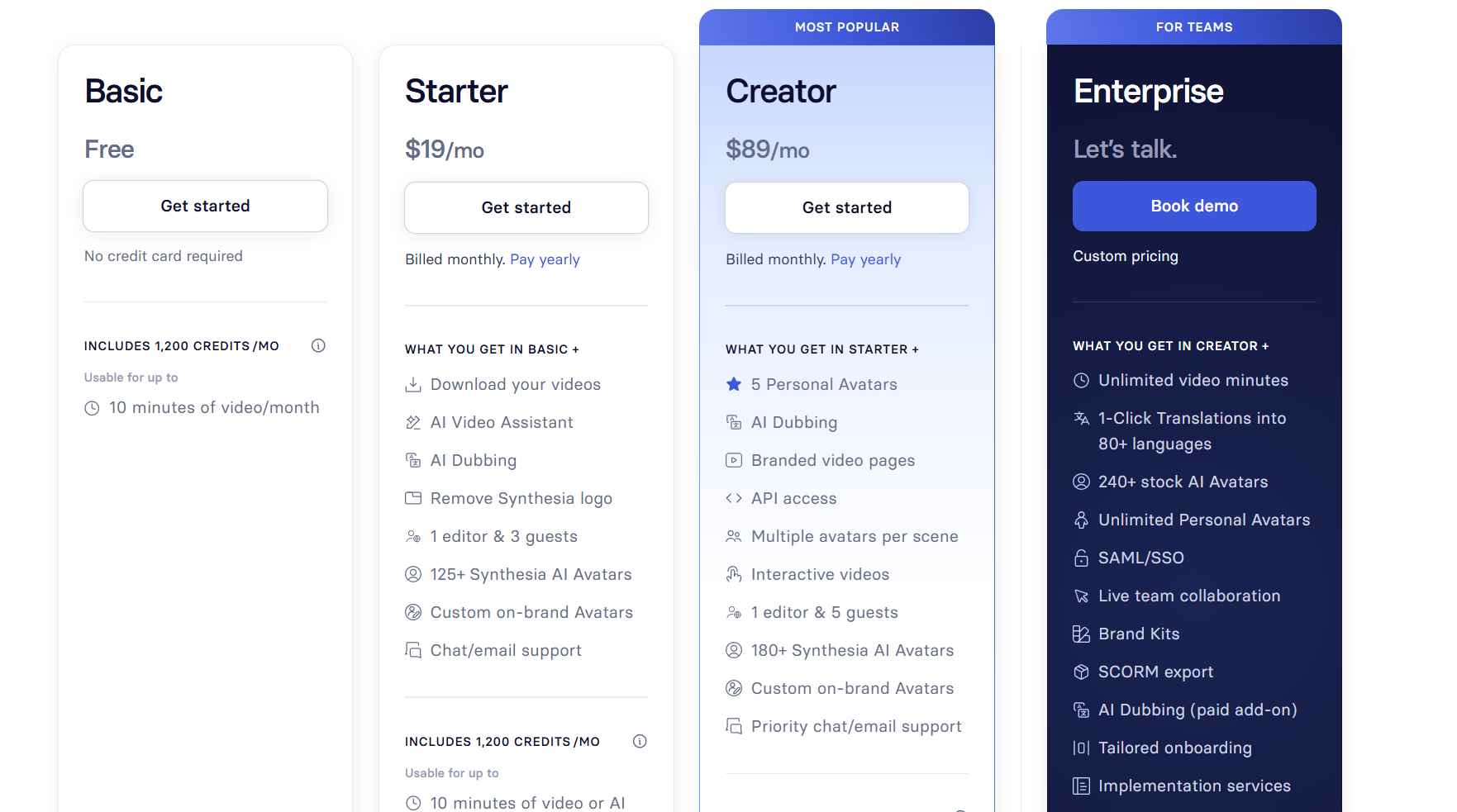
Basic: Free
Up to 10 minutes of video per month, 9 AI avatars, watermarked videos. Good for testing the platform before spending anything.
Starter: $29/month (or $18/month billed annually)
Removes the Synthesia watermark, gives you 125+ avatars, 1 Personal Avatar, AI Dubbing, and access to the AI Video Assistant. You're capped at 10 minutes of video per month (120 minutes/year on the annual plan). One Personal Avatar is included on the annual plan. Supports 1 editor and 3 guests.
Creator: $89/month (or $64/month billed annually)
Jumps to 30 minutes of video per month (360 minutes/year), 180+ avatars, 5 Personal Avatars, API access, interactive video, and branded video pages. Supports 1 editor and 5 guests.
Enterprise: Custom pricing
This is where you get unlimited video minutes, 240+ avatars, unlimited Personal Avatars, 1-click translation, SCORM export, SAML/SSO, Brand Kits, live collaboration, a dedicated CSM, and tailored onboarding. You'll need to book a demo for pricing.
One thing to flag: Annual plans are billed upfront as a lump sum. Some users have reported being caught off guard by that. Read the billing terms before you commit.
Synthesia vs SalesRobot: How Do They Compare?
Pick Synthesia if you need scalable video content for training, marketing, or internal communications. Pick SalesRobot if you're trying to automate LinkedIn outreach and generate pipeline.
SalesRobot: The LinkedIn-First Alternative
Here's the honest reality: your prospects aren't sitting around watching training videos. They're scrolling LinkedIn, checking their DMs, and deciding in three seconds whether to respond to your message.
SalesRobot is built for exactly that environment. 🎯
What SalesRobot Actually Does
SalesRobot is a LinkedIn automation platform built specifically for B2B sales teams and agencies. It handles connection requests, follow-up messages, and multi-channel sequences at scale, all running in the cloud with no browser extension required.

The core pitch: reach the right people on LinkedIn without doing it manually, and do it in a way that keeps your account safe.
LinkedIn Connection Sequences
SalesRobot automates connection requests and follow-up messages with smart timing built in. It uses LinkedIn's mobile APIs rather than browser-based automation, which significantly reduces the risk of your account getting flagged or restricted.
You can like posts, comment, follow, send connection requests, endorse skills, and run full follow-up sequences, all on autopilot with human-like activity patterns.
AI-Powered Voice and Video Notes
This is where SalesRobot gets genuinely interesting for sales teams. You can send AI-personalized voice notes and video messages directly through LinkedIn at scale, not just text — you can even clone yourself so each lead receives a personalized video. It's available on all paid plans (up to 50/day) and is a feature most competitors like Expandi, Waalaxy, and Dripify don't offer.
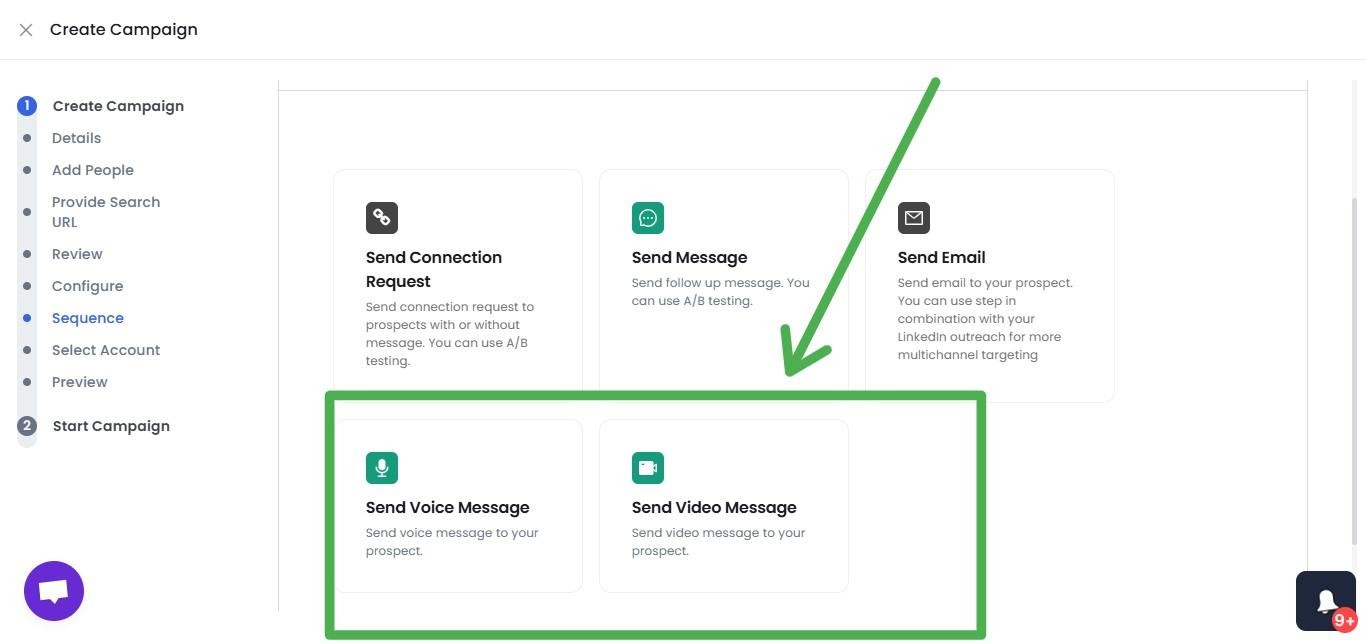
Users report 40%+ reply rates with this feature because it cuts through the noise of standard cold outreach. A voice note from a real person (or a convincingly personalized one) hits differently than a copy-pasted connection message.
Smart Reply Detection
When a prospect responds, SalesRobot pauses the sequence automatically. No more awkward double-messages landing in someone's inbox after they've already replied to you.
It detects engagement and stops the automation at the right moment so your human follow-up can take over cleanly.
Sales Navigator Integration
You can import leads directly from Sales Navigator searches without maintaining an active subscription. Build targeted prospect lists based on job title, industry, company size, or any other filter and push them straight into a campaign.
AI Appointment Setter
SalesRobot's AI Appointment Setter handles LinkedIn DMs automatically. It responds to prospects, nurtures conversations, and books meetings when someone shows interest. It's designed to learn your communication style and step in when the timing is right.

For solo founders or small teams without a dedicated SDR, this does a lot of heavy lifting.
Safety Controls
Cloud-based execution, dedicated residential IPs, and real-time activity throttling keep your outreach within LinkedIn's acceptable behavior patterns. SalesRobot caps activity at up to 75 connection requests, 75 messages, and 50 InMails to open profiles per day on paid plans, which aligns with safe usage limits.
SalesRobot Pricing
Plans are priced per LinkedIn account, with annual billing offering roughly 34-39% savings depending on your plan.
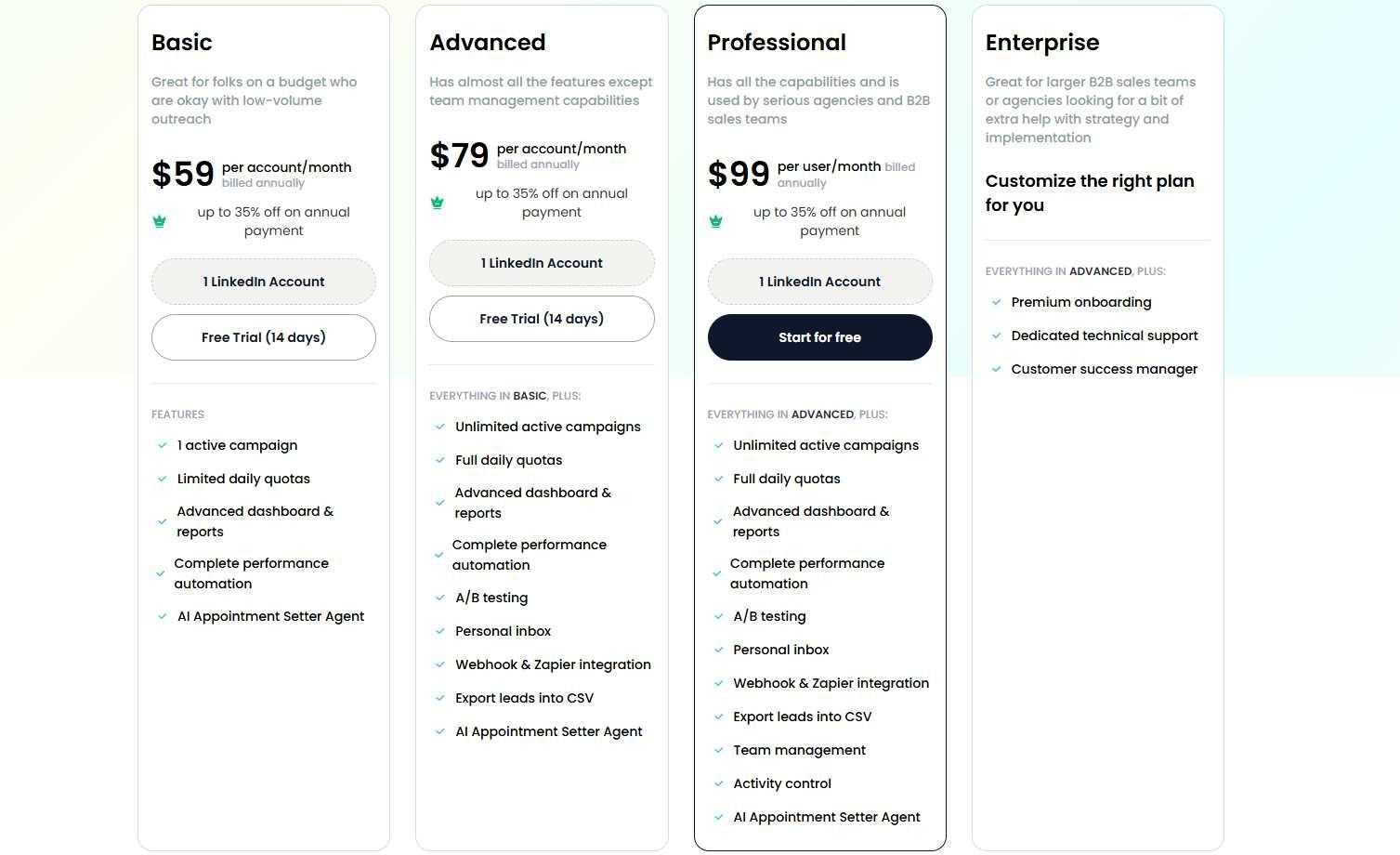
Basic: $59/month per account (or $39/month billed annually)
One active campaign, limited daily quotas (20 connections and 20 messages per day), basic analytics. Good for testing the platform.
Advanced: $79/month per account (or $59/month billed annually)
Unlimited campaigns, full daily quotas (75 connections, 75 messages per day), A/B testing, webhook integrations, and personal inbox management.
Professional: $99/month per account (or $79/month billed annually)
Everything in Advanced plus team management, activity control across multiple accounts, and an advanced reporting dashboard.
Enterprise: Custom pricing
Premium onboarding, a dedicated customer success manager, and custom integrations for larger organizations.
SalesRobot offers a 14-day free trial with no credit card required. Worth testing before committing to an annual plan, since refund policies for annual plans are not publicly documented.
One thing to factor in: email automation is a separate add-on at $15/month per email account. Once added, you get unlimited cold email automation with unlimited email warmup, working across Gmail, Outlook, and custom SMTP, so you can run true multi-channel LinkedIn + email sequences in a single campaign.
The Verdict
Synthesia delivers on its core promise. You can produce professional-looking AI videos without cameras, actors, or an editing budget. For sales training, product onboarding, and internal comms at scale, it genuinely works.
The caveats are real though. The avatars can feel slightly artificial, meaningful features like SCORM export and 1-click translation are behind the Enterprise wall, and the per-minute credit system catches people off guard when they scale up. If you're a smaller team expecting the Starter plan to cover everything, you'll likely find the limits frustrating.
The sweet spot for Synthesia is companies that need to produce a lot of video content consistently, think onboarding programs, product demo libraries, compliance training, or multilingual campaigns, and have the budget for a tier that actually covers their volume.
Bottom Line
Buy Synthesia if you're producing educational or enablement content at scale, need multilingual output, and value speed over creative control. Skip it if you need highly personalized outreach videos, work with tight budgets, or need features like translation and SCORM without paying Enterprise rates.
If your sales team's priority is generating pipeline rather than producing training content, SalesRobot is built for that job. It lives where your prospects actually are, and it's designed specifically for the outreach workflows Synthesia doesn't cover.
Frequently Asked Questions
Is SCORM export available on Synthesia's cheaper plans?
No. SCORM export for LMS integration, along with 1-click translation into 80+ languages and unlimited video minutes, is locked behind Synthesia's custom-priced Enterprise plan. Starter and Creator include AI Dubbing, but it draws from your monthly credit pool rather than offering full one-click translation.
How much does Synthesia cost in 2026?
Synthesia has a free Basic plan, then Starter at $29/month ($18/month billed annually), Creator at $89/month ($64/month billed annually), and custom Enterprise pricing. Starter caps you at 10 video minutes per month and Creator at 30, with unlimited minutes only on Enterprise.
Can you create a custom digital avatar of yourself in Synthesia?
Yes. Synthesia allows you to create a Personal Avatar using a brief webcam or camera recording. On the Starter plan (annual), one Personal Avatar is included, while the Creator plan includes up to 5. For maximum visual fidelity, Synthesia offers Studio Avatars recorded in a professional studio setting as a $1,000/year add-on.

Wow your leads by cloning yourself and sending personalized videos and voice notes to each lead on LinkedIn.
If you don't reply to leads within 5 mins, your chances of converting them fall by 50%. Our AI replies on your behalf instantly! (and yes, you can train it)

Don't shoot in the dark. Get detailed analytics on what's working

SalesRobot allows you to invite other team members, so that they can add their LinkedIn Account, run outreach campaigns and get amazing results just like you.
.avif)


Trusted by 4100+ innovative B2B sales teams and lead gen agencies

.avif)

.avif)




.avif)