.avif)
TL;DR
- Vidyard is a solid video sales platform with strong AI features, deep CRM integrations, and proven engagement results including 8x better click-through rates and 4x improvement in reply rates from real customer campaigns.
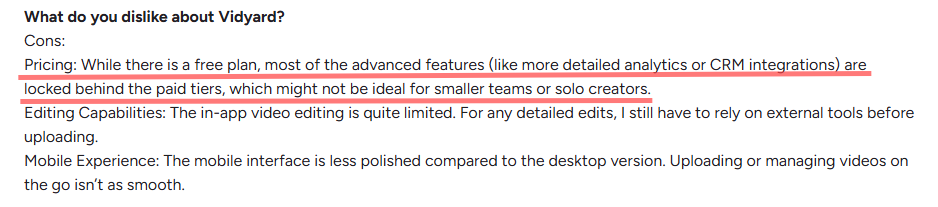
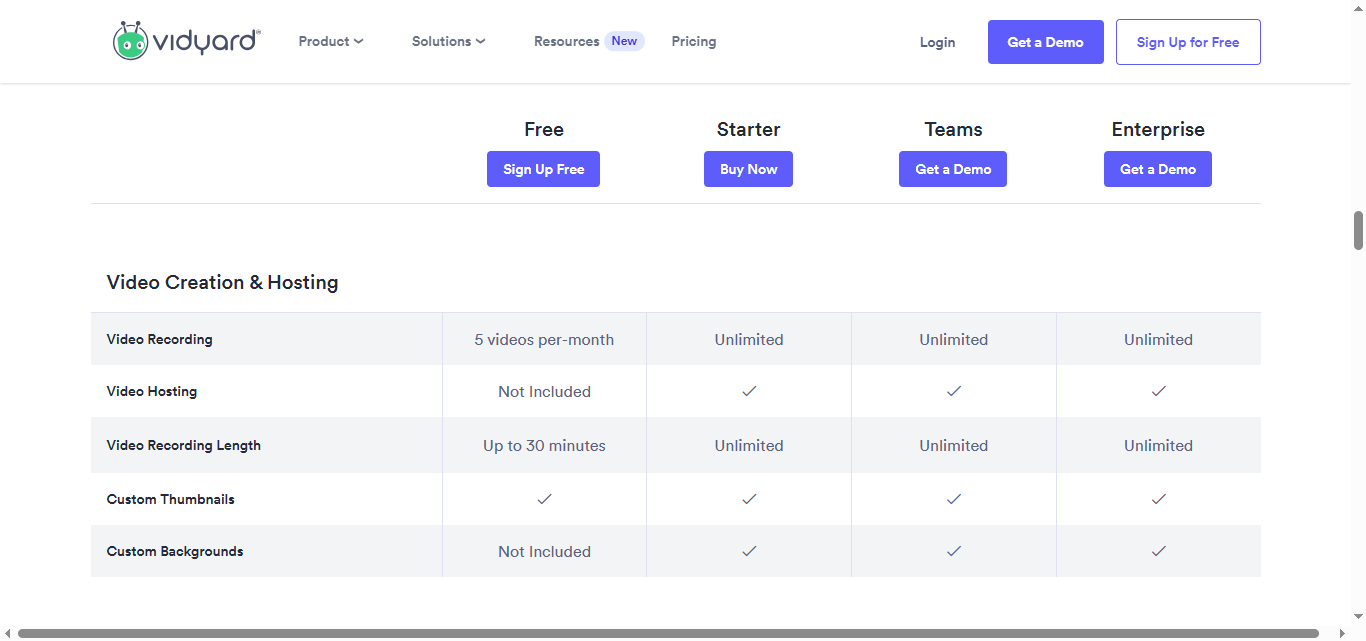
- The free plan is genuinely limited. You only get 5 videos per month and no analytics, which isn't enough for any serious sales outreach. It's more of a test drive than a real plan.
- The Starter plan has publicly listed pricing but Vidyard doesn't display the exact number on the page anymore. Teams and Enterprise are both custom-quoted, so you'll need to talk to sales for a real number.
- CRM integrations with Salesforce, HubSpot, Marketo, and Salesloft are available, but only from the Teams plan upward. Starter gets basic analytics and branded sharing, but no data sync.
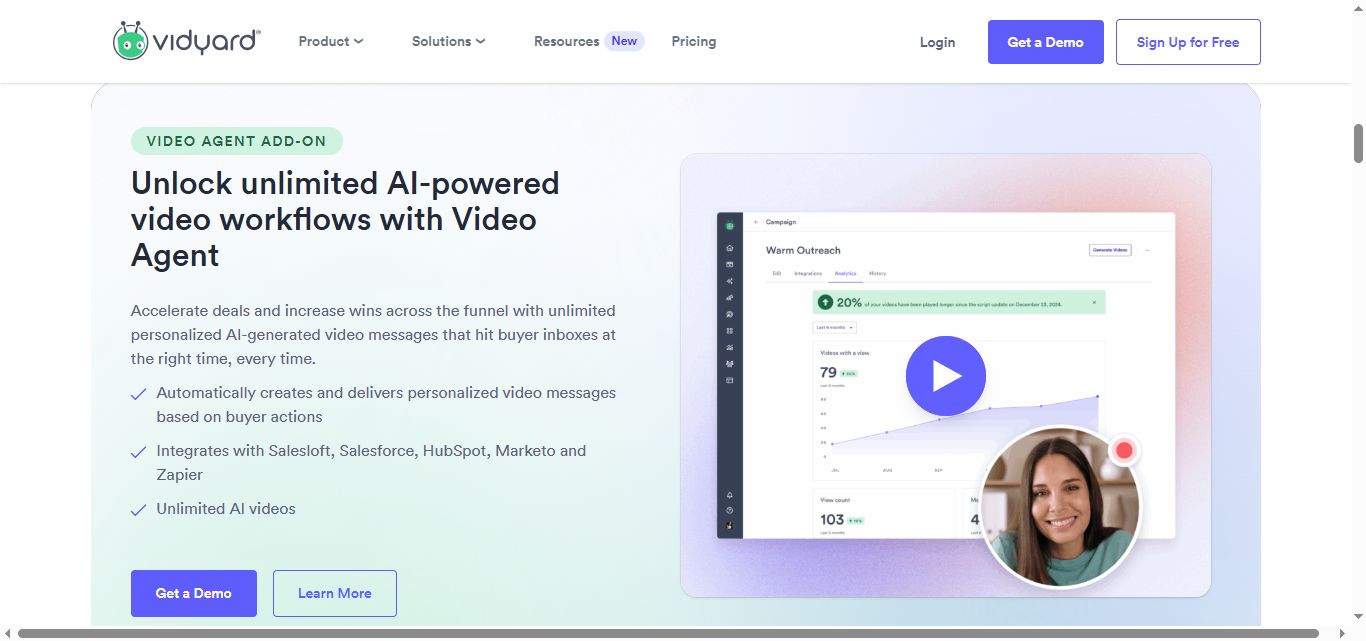
- The Video Agent (AI-powered automated video delivery) is an add-on on Starter and Teams, and only included natively at Enterprise level.
- AI avatars are available on all plans but limited to 15 AI videos on the free tier. Unlimited AI video creation requires the Video Agent add-on.
- SalesRobot is worth a look if LinkedIn is your primary channel. We're built specifically for LinkedIn and email outreach, with native voice and video messaging, AI-powered follow-ups, and a 14-day free trial with no credit card required.
What Problem Is Vidyard Trying to Solve?
Cold emails are getting ignored at record rates. 😬
Most prospects receive dozens of generic outreach messages a week, and a wall of text doesn't exactly scream "I know who you are and why this matters to you."
Vidyard's answer is video. Record a quick personalized clip, drop it into your outreach, and give your prospect something worth actually opening.
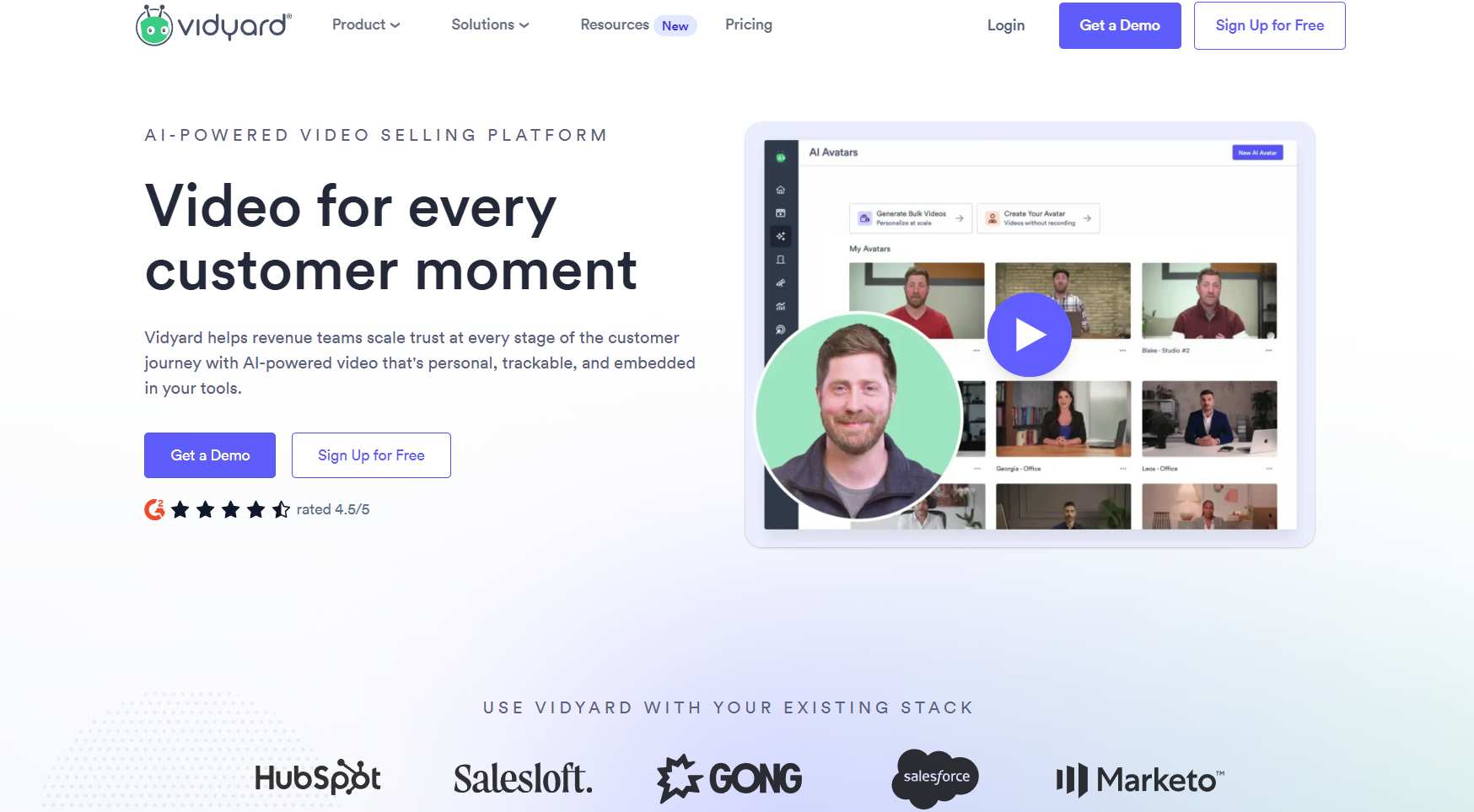
The idea is that seeing a real face and hearing a real voice cuts through the noise in a way that text simply can't.
It's a compelling pitch. But does the platform back it up? Let's dig in.
Vidyard: What You Need to Know
✅ Personalized video that gets real results. Vidyard's own case study data shows an 8x improvement in click-through rates and a 4x improvement in reply rates from personalized video messages. Those aren't made-up numbers, they come from named customers like Superside.
⚠️ The free plan won't take you far. Five videos per month and only basic analytics means you'll hit the ceiling fast if you're doing any real outreach volume. Think of it as a preview, not a working plan.
✅ Strong integration ecosystem. Vidyard connects with Salesforce, HubSpot, Marketo, Salesloft, Gong, and more. Video engagement data syncs back into your CRM automatically, so your team knows exactly when a prospect watched and for how long.
⚠️ The learning curve is real. Between video hosting, AI avatars, the Video Agent, and integration setup, there's a lot to get comfortable with. Teams that aren't already video-savvy tend to take a few weeks before they're running efficiently.

✅ AI avatars on every plan. All plans include stock AI avatars and the ability to create up to 3 custom avatars. The free plan gets 15 AI videos total (a lifetime cap, not monthly), and unlimited creation is available as an add-on.
⚠️ Pricing visibility is limited. Starter plan pricing isn't displayed on the pricing page anymore. Teams and Enterprise are both custom-quoted. You'll need to contact sales to get an actual number for anything beyond the free tier.
✅ Video analytics that connect to revenue. Vidyard goes beyond view counts. You can track engagement, drop-off points, and how video performance connects to pipeline and closed deals. That's the kind of data that actually matters to a sales leader.
Vidyard's Key Features, Broken Down
Video Messages for Personal Outreach
This is the foundation of what Vidyard does. Sales reps record quick personalized videos and drop them into emails, LinkedIn messages, or wherever they're reaching out.
The platform shows you exactly who watched, how much they watched, and when. That kind of insight lets you time follow-ups based on actual engagement rather than guessing.
It works particularly well for intro videos, post-call recaps, and product walkthroughs where seeing the product in action beats reading a description.
Vidyard Hosting for Centralized Video Management
Vidyard doubles as a video library for your whole organization. Product demos, training content, sales decks, and customer testimonials, all stored and organized in one place with folder management and team permissions.
Marketing teams can maintain brand control while giving sales easy access to the right content. The analytics here go deep, too, tracking how hosted content drives lead generation and pipeline over time.
AI Avatars for Scalable Video Creation
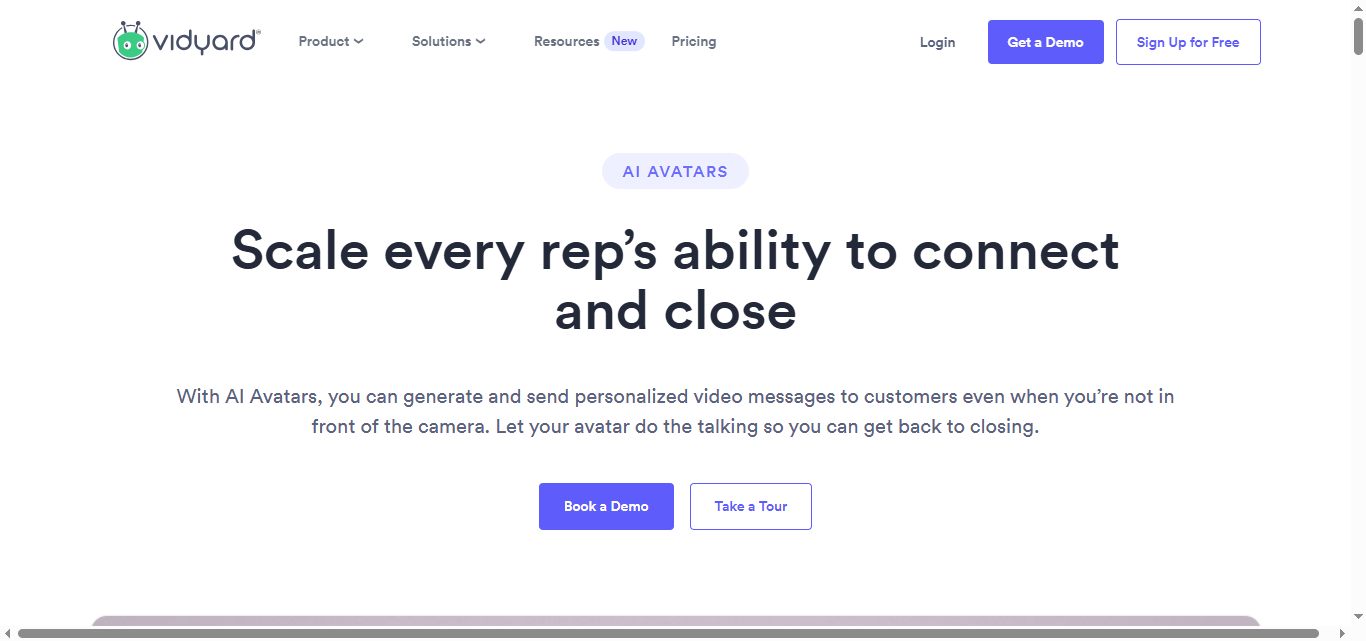
Instead of recording every video yourself, you can create an AI avatar that looks and sounds like you and scale it across your outreach. 🤖
All plans include stock avatars and up to 3 custom avatars. The custom avatar is trained on a video you provide, and the result is a hyper-realistic version of you that can deliver personalized messages at scale.
The free plan caps AI video creation at 15 total (a lifetime limit, not monthly). Unlimited creation requires the Video Agent add-on.
Video Agent for Automated Engagement
Video Agent is Vidyard's most powerful and most expensive feature. It automatically creates and delivers personalized video messages based on buyer actions, like downloading a whitepaper, visiting your pricing page, or booking a demo.
It integrates with HubSpot, Salesforce, Marketo, Salesloft, and Zapier to trigger videos from events in your existing workflow. No manual work required once it's set up.
Video Agent is an add-on on Starter and Teams plans, and only included natively at the Enterprise level.
Deep Integration with Sales Tools
Vidyard's integration list is genuinely impressive. Salesforce, HubSpot, Marketo, Outreach, Salesloft, Gong, Apollo, Zapier, Gmail, Outlook, LinkedIn, Slack, all supported depending on your plan.
CRM integrations that sync engagement data back into your pipeline are available from the Teams plan upward. The Starter plan gets partner app integrations but not full data sync.
Comprehensive Video Analytics
Every paid plan gets some level of analytics, but the depth scales with your tier.
Starter gets full video analytics and team performance reporting. Teams adds advanced branded sharing pages and more detailed CRM-connected reporting. Enterprise unlocks API access and custom metadata for large-scale content management. 📊
Vidyard Pricing: What Does It Actually Cost?
Here's where it gets a little murky. Vidyard used to display more transparent pricing, but as of now their pricing page shows the plan structure without specific dollar amounts for most tiers.
Here's what we know:
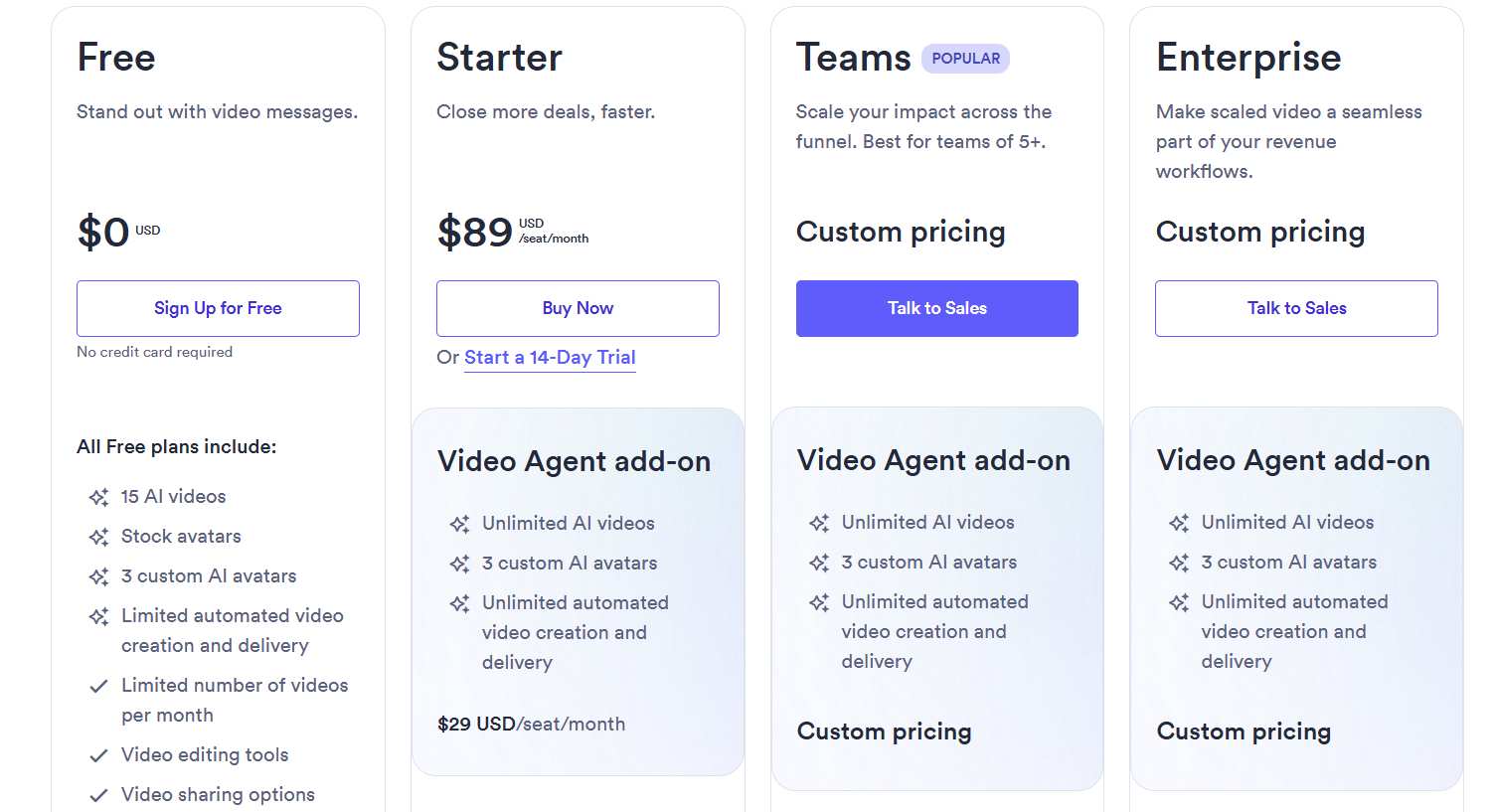
Free: $0, no credit card required.
5 videos per month, up to 30 minutes each. Stock AI avatars, up to 15 AI videos, 3 custom avatar slots, basic sharing options, and limited integrations. Good for testing the platform, not for real outreach volume.
Starter: $59/user/month billed annually (or $89/user/month billed monthly).
Unlimited video recording, full analytics, team performance reporting, branded sharing page, CTA templates, password-protected videos, folder management, and custom backgrounds. A 14-day free trial is available. CRM data sync is not included at this tier.
Teams: Custom pricing, contact sales.
Everything in Starter, plus CRM and MAP integrations, advanced branded sharing, fully customizable CTAs, and video captions. Designed for teams of 5 or more. Video Agent is available as an add-on.
Enterprise: Custom pricing, contact sales.
Everything in Teams, plus unlimited integrations, SSO user management, secure playback, custom permissions, API access, and ingestion-based integrations. Video Agent is included natively at this level.
The Video Agent add-on (unlimited AI-powered video workflows) is available across all plans for an additional custom-quoted fee.
If budget transparency matters to you upfront, this structure will be frustrating. You'll need to get on a call with their team to get real numbers for anything beyond free.
Vidyard vs SalesRobot: How Do They Compare?
Go with Vidyard if video is central to how your team sells and you need enterprise-level hosting, analytics, and CRM-connected delivery.
Go with SalesRobot if LinkedIn is where your prospects live and you want to run personalized outreach at scale without building a video production workflow first.
SalesRobot: The LinkedIn-First Alternative
Vidyard is built for teams where video is the strategy. But plenty of sales teams don't need a full video platform. They just need to consistently reach the right people on the right channel and get replies.

That's exactly what we built SalesRobot to do. 🤝
LinkedIn and Email Automation
We automate connection requests, LinkedIn messages, InMails, and multi-step follow-up sequences. You define your audience, set up your campaign, and we handle the outreach while you focus on the conversations that matter.
Our smart reply detection pauses sequences the moment a prospect responds. No awkward follow-ups sent into active conversations, which is a surprisingly common problem with cheaper tools.
We stay within LinkedIn's safe daily limits across every action type, so your account stays healthy even at high volume.
Voice and Video Notes
One of our most-used features. SalesRobot lets you send personalized voice notes and video messages directly inside the LinkedIn inbox, not as an external link prospects have to click.
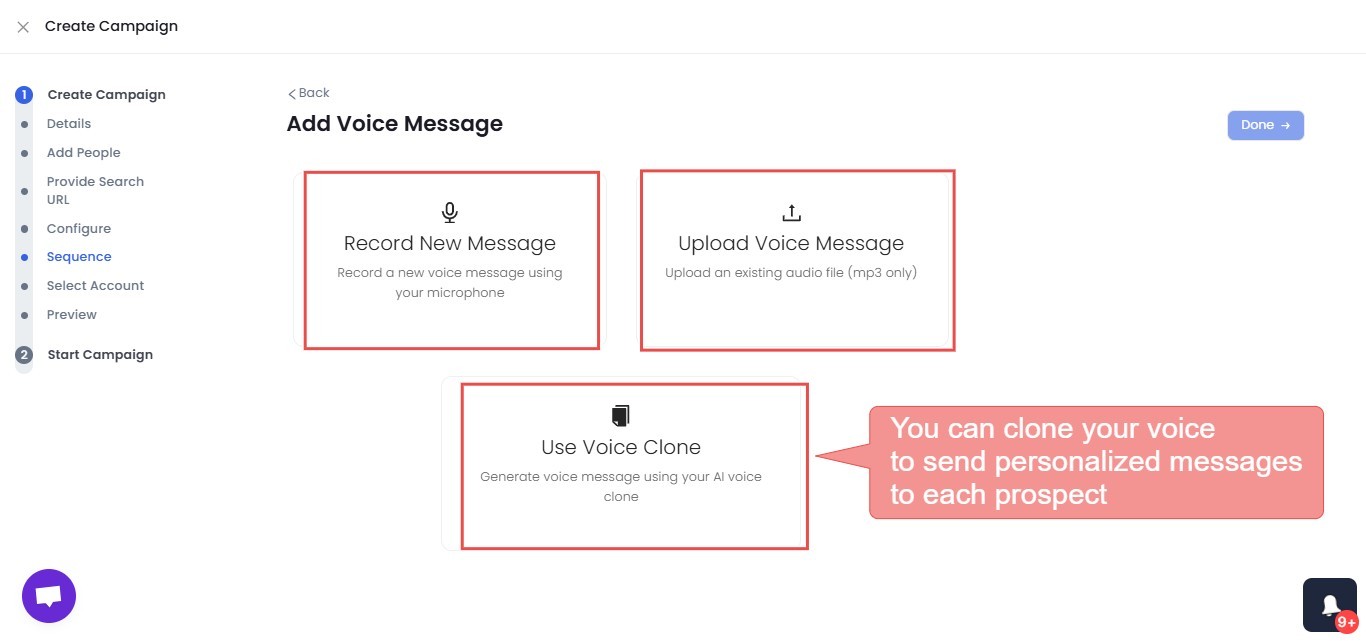
They feel native to the platform. Our users consistently see 40%+ reply rates with voice and video outreach because it stands out immediately against a wall of plain text messages. 🎙️
Up to 50 voice or video messages per day, with all scheduling and throttling handled automatically.
AI Appointment Setter
Our AI Appointment Setter watches your inbox and steps in when prospects show interest.
It manages the back-and-forth, keeps the conversation moving, and books a meeting on your calendar when the time is right.

You only step in when there's a real sales conversation waiting. Some of our users book 25+ calls a month with it running quietly in the background.
Available on Advanced and Professional plans.
Account Safety
We run entirely in the cloud using mobile API behavior and dedicated IP rotation.
This makes your activity look completely natural to LinkedIn's detection systems, even at scale.

We've built SalesRobot specifically to avoid the account safety issues that come with browser-based tools, and we've maintained zero reported bans across our user base. 🔒
Analytics and Reporting
Every plan includes real-time campaign stats, daily and weekly performance breakdowns, and account-level analytics.
Advanced and Professional plans add a unified LinkedIn and email inbox, team dashboards, CSV lead exports, and native integrations with HubSpot, Pipedrive, and Salesforce.
SalesRobot Pricing
Our pricing is per LinkedIn account with up to 35% off on annual billing. Every plan includes a 14-day free trial with no credit card required. 👌
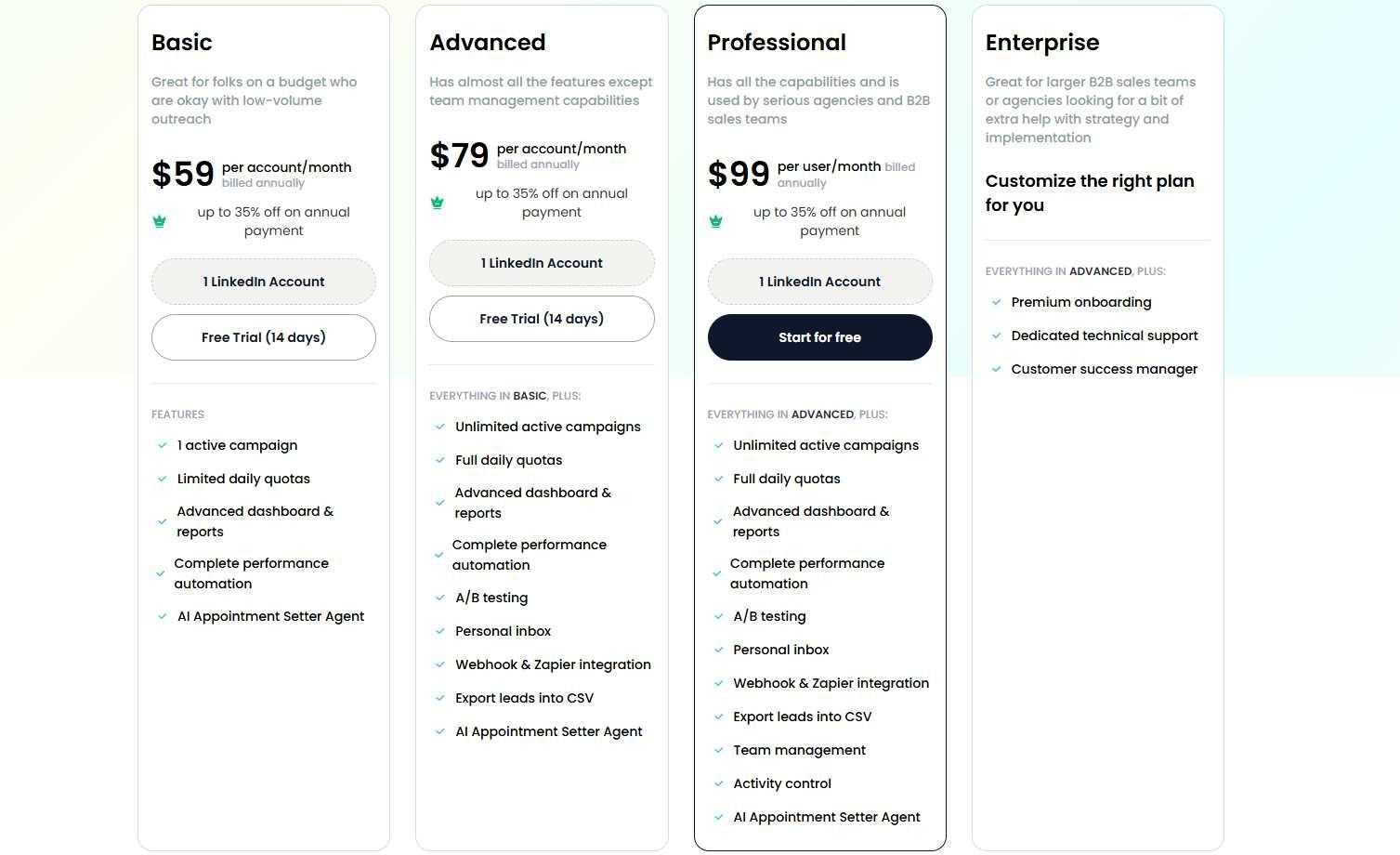
Basic: $59/month per account (or $39/month billed annually) One active campaign, limited daily quotas of 20 connections and messages per day. Good for getting started on a tight budget.
Advanced: $79/month per account (or $59/month billed annually) Unlimited campaigns, full daily quotas of 75 connections and messages per day, A/B testing, unified inbox, Zapier and Webhook integration, CRM sync, and the AI Appointment Setter. The sweet spot for most individual reps and small agencies.
Professional: $99/month per account (or $79/month billed annually) Everything in Advanced, plus team management, role-based permissions, activity controls, duplicate prevention, and priority support SLA. Built for agencies managing multiple LinkedIn accounts.
Enterprise: Custom pricing. Everything in Professional, plus premium onboarding, a dedicated support rep, and a customer success manager. For larger organizations that want hands-on strategy support from day one.
Email automation is available as a separate add-on at $15/month per email account.
The Verdict
Vidyard is a genuinely powerful platform for sales teams that have committed to video as a core part of how they sell. The AI avatar tech is solid, the integrations are deep, and the engagement results from real customers are hard to argue with.
That said, it's not a casual investment. Most of the features that make Vidyard truly useful sit behind custom-quoted pricing, and getting full value out of the platform requires a real learning commitment from your team.
If you're not ready to make video a central pillar of your outreach strategy, you may find yourself paying for capabilities you rarely use.
For teams focused on LinkedIn prospecting who want to get up and running fast, SalesRobot is the more practical starting point. We offer a 14-day free trial with no credit card required, so you can run a real campaign and see results before spending a dollar.
Buy Vidyard if you're a mid-to-large sales or marketing team with a real video strategy, existing CRM infrastructure, and the budget to match the ambition.
Try SalesRobot first if LinkedIn is your primary channel, you want to start generating pipeline quickly, or you're not ready to build a full video production workflow from scratch.
Frequently Asked Questions
Does Vidyard's free plan include CRM integrations?
No. Vidyard's Free and Starter plans do not include CRM data sync. CRM and marketing automation integrations with Salesforce, HubSpot, Marketo, and Salesloft only begin at the Teams tier and above, which is custom-quoted.
How much does Vidyard cost per month?
Vidyard's Free plan is $0. The Starter plan is $59 per user/month billed annually (or $89 billed monthly). Teams (around $99 per user/month) and Enterprise are custom-quoted, so you'll need to contact sales for exact figures on those higher tiers.

Wow your leads by cloning yourself and sending personalized videos and voice notes to each lead on LinkedIn.
If you don't reply to leads within 5 mins, your chances of converting them fall by 50%. Our AI replies on your behalf instantly! (and yes, you can train it)

Don't shoot in the dark. Get detailed analytics on what's working

SalesRobot allows you to invite other team members, so that they can add their LinkedIn Account, run outreach campaigns and get amazing results just like you.
.avif)


Trusted by 4100+ innovative B2B sales teams and lead gen agencies

.avif)

.avif)




.avif)