.avif)
TL;DR
- ActiveCampaign's automation builder is one of the strongest on the market, with 135+ triggers and actions that let you build multi-step workflows based on real customer behavior.
- The built-in CRM covers pipeline management, deal tracking, lead scoring, and contact history, but starts to show its limits with larger teams or complex sales processes
- Pricing starts at $15/month (Starter) and scales to $49/month (Plus) and $79/month (Pro) for 1,000 contacts costs climb as your list grows, and some CRM features require paid add-ons
- The platform supports email, SMS, WhatsApp, and landing pages from one dashboard, making it genuinely useful for teams that run multi-channel outreach
- If LinkedIn prospecting is a big part of your pipeline, ActiveCampaign doesn't cover it. is worth looking at as a dedicated tool that starts at $59/month
ActiveCampaign For Sales Teams: Complete Review
Picture this: your sales team is drowning in follow-ups, leads are slipping through the cracks, and someone is manually sending the same email sequence for the hundredth time this month. 😅
Sound familiar? Most sales teams are juggling too many tabs, too many spreadsheets, and a CRM that someone picked two years ago and nobody actually likes.
ActiveCampaign positions itself as the fix for all of that. It combines email automation, a built-in CRM, and multi-channel messaging under one roof — and for a lot of teams, it genuinely delivers. But it's not the right fit for everyone, and the learning curve is real.
In this review, we're going through everything: what ActiveCampaign actually does well, where it falls short for sales teams specifically, how the pricing really works, and when you might want to look at something like SalesRobot instead.
ActiveCampaign: What You Need to Know
ActiveCampaign started as an email marketing tool and has grown into a full marketing and sales automation platform.

At its core, it lets you build automated workflows that respond to how people actually behave — what emails they open, what pages they visit, what they buy, and where they drop off.
The platform also includes a CRM, so your marketing and sales data live together on one contact record.
That means a sales rep can jump into a call already knowing which emails a prospect opened, which pages they visited, and whether they've engaged with previous campaigns. That kind of visibility makes a real difference in how conversations go.
It's worth knowing upfront: ActiveCampaign is primarily an email marketing and automation platform that also happens to have solid CRM functionality. It's not a dedicated sales CRM in the way Salesforce or HubSpot is. If you go in with that understanding, you'll get a lot more out of it.
ActiveCampaign's Key Features, Broken Down
Active Intelligence (AI Agents)
ActiveCampaign's AI layer — called Active Intelligence — acts as an autonomous assistant that can build campaigns, adjust messaging, and optimize sequences based on your goals and your audience's behavior.
Instead of manually mapping out every email in a nurture sequence, you can tell the system what you're trying to achieve and have it generate the flow.
It also helps with content generation, send-time optimization, segmentation suggestions, and reporting. For teams that don't have a dedicated marketing ops person, this kind of AI-assisted setup can significantly cut down the time it takes to get campaigns running.
Marketing Automation
This is genuinely where ActiveCampaign earns its reputation. The automation builder gives you 135+ triggers and actions to work with, letting you build sequences that respond to real-world signals, not just time-based drip emails.
When someone downloads a lead magnet, visits your pricing page three times, or abandons a cart, automation can fire the right follow-up without anyone lifting a finger.
You can set up branching logic so that different actions lead to different paths, making your outreach feel much more personal even when it's running at scale.
It's one of the most powerful automation builders available at this price point. Competing tools like HubSpot offer similar features, but usually at significantly higher price tiers.
Cross-Channel Messaging
ActiveCampaign supports email, SMS, WhatsApp, and even direct mail from a single platform. That matters for sales teams because different prospects respond to different channels, and being able to coordinate across all of them from one place keeps your messaging consistent.
A practical example: a prospect gets an email introducing your product, an SMS reminder two days later about a limited-time offer, and a WhatsApp message about a relevant case study. All of it can be automated, and all of it stays on one contact timeline.
Built-in CRM
The CRM is organized around a visual deal pipeline. When you open a deal, you see the contact's full history: every email they've received, every page they've visited, every interaction logged.
Lead scoring is also available, which helps your team prioritize the contacts most likely to convert without spending hours manually ranking them.
For small teams with a relatively straightforward sales process, the CRM works very well. Where it starts to strain is with larger teams managing hundreds of active deals or complex multi-stage pipelines.
At that point, many businesses integrate ActiveCampaign with Salesforce and use it primarily for the automation side of things.
It's also worth knowing that deeper CRM functionality, like advanced pipeline management and sales engagement features, now requires add-ons depending on your plan. The base CRM is included, but the enhanced version costs extra. 👀
Advanced Personalization
ActiveCampaign goes well beyond basic name personalization. You can serve completely different content based on a contact's purchase history, behavior patterns, lifecycle stage, or any custom field you've set up.
For sales teams, this means prospects at the top of the funnel get education-focused emails, while warm leads who've visited your pricing page get more direct outreach. All of it can be automated and run in the background once it's set up.
Comprehensive Analytics
The reporting connects what your campaigns are doing to what's actually happening in your pipeline. You can track which automations drive the most revenue, monitor how different segments are converting, and see attribution across channels.
It's more useful than the typical "opens and clicks" dashboard you get from simpler email tools. That said, users on G2 note that multi-touch attribution and cohort-level reporting can feel limited on lower-tier plans; so if deep analytics is a core requirement, the Pro plan is worth considering.
ActiveCampaign Pricing: What You'll Actually Pay
ActiveCampaign's pricing is contact-based, meaning the monthly rate you see is for a specific number of contacts. All prices below are based on 1,000 contacts, billed annually.
Email Plans:
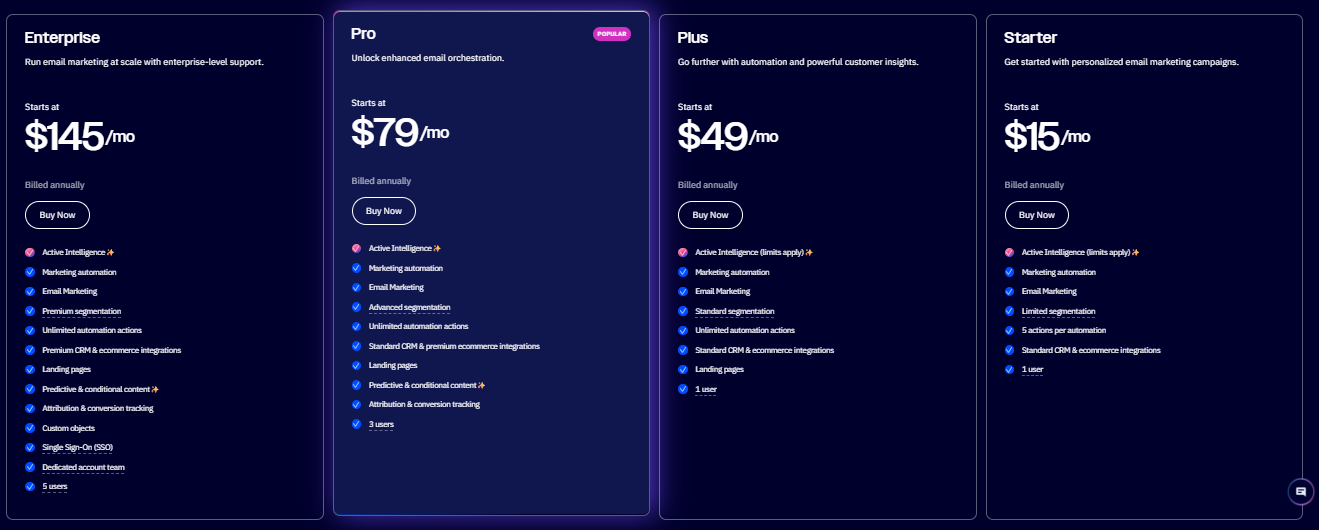
Starter — $15/month The entry point. You get email marketing with foundational automation (including branching logic and multiple triggers), a basic CRM, and access to AI features.
It's a solid starting point for small businesses that want to go beyond simple newsletters, but advanced sales features aren't here yet.
Plus — $49/month This is where ActiveCampaign becomes genuinely useful for sales teams. You get unlimited automation actions, landing pages, site messaging, AI-powered content, and sales automation features.
The CRM pipeline add-on becomes available here if you need it.
Pro — $79/month The full package for teams that want to run serious, data-driven marketing and sales automation.
Predictive sending, conditional content, attribution tracking, and more granular reporting are all unlocked here. Most established teams land on this tier.
Enterprise — from $145/month Built for large organizations that need advanced customization, custom reporting, dedicated support, and enterprise-level security. Pricing starts at $145/month for 1,000 contacts (billed annually) and scales up based on contact volume and enterprise requirements — a custom quote is available for larger lists.
WhatsApp Plans:
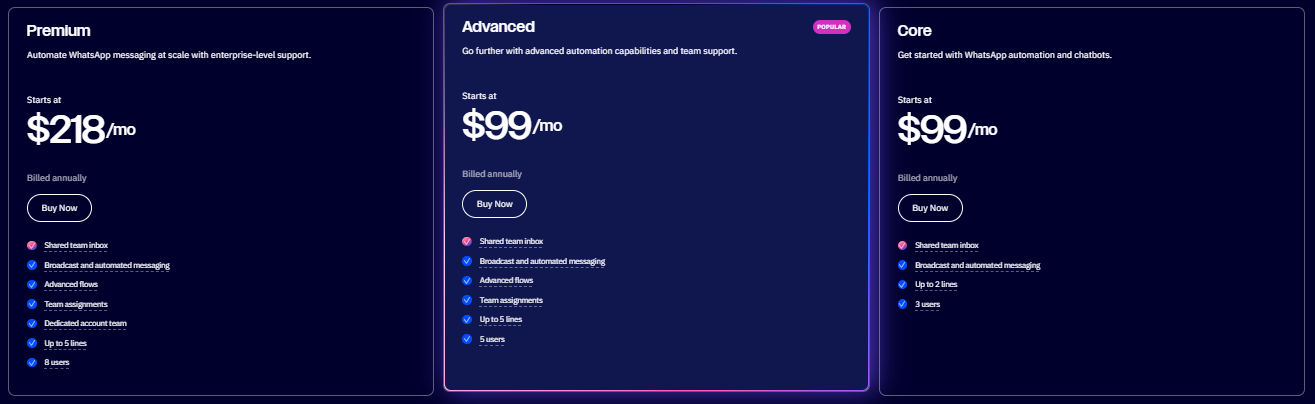
Premium Plan: Built for small teams getting started with WhatsApp automation. Includes essential messaging, chatbot capabilities, a shared team inbox, and support for up to 2 WhatsApp numbers.
Advanced Plan: Designed for growing businesses that need more control over WhatsApp marketing. Adds advanced automation, team assignments, and support for larger teams and multiple WhatsApp lines.
Core Plan: Built for businesses running WhatsApp campaigns at scale. Includes advanced workflows, dedicated account support, expanded team access, and support for up to 5 WhatsApp lines.
Email + WhatsApp Plans:
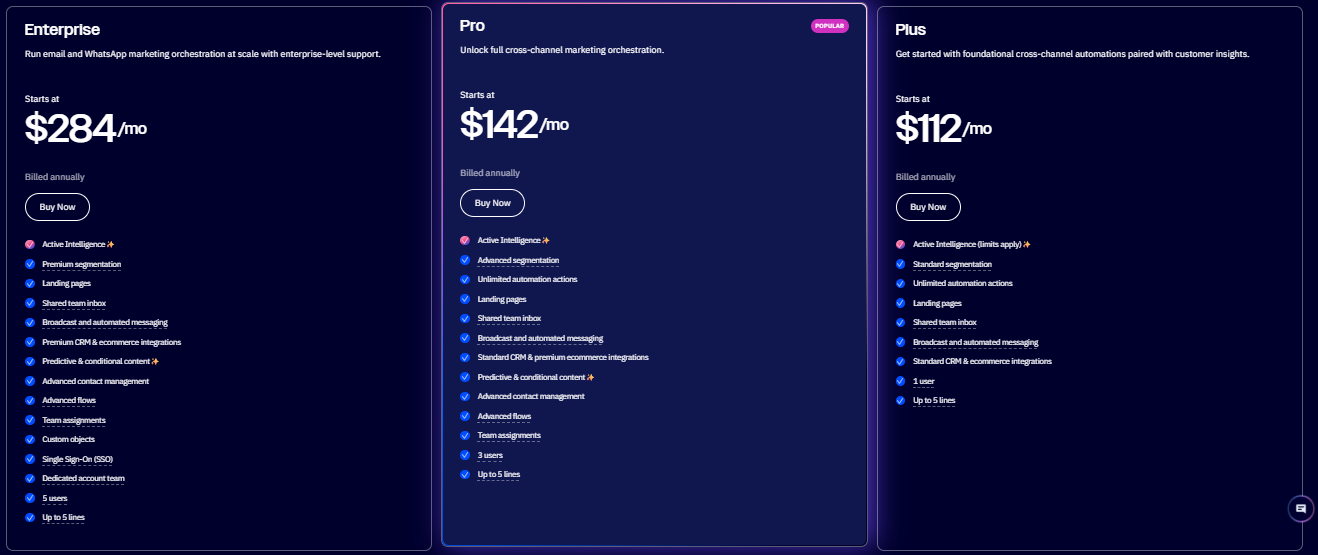
Enterprise Plan: A solid starting point for businesses combining email and WhatsApp marketing. Includes cross channel automation, segmentation, landing pages, a shared inbox, and standard CRM integrations.
Pro Plan: Built for teams running advanced cross channel campaigns. Includes unlimited automation, advanced segmentation, predictive content, premium CRM integrations, and support for up to 5 WhatsApp lines.
Plus Plan: Designed for organizations with complex marketing operations. Includes enterprise security, advanced contact management, premium integrations, predictive content, dedicated account support, and large scale email and WhatsApp automation.
One important thing to flag: pricing scales with your contact list. So if you're on the Plus plan with 10,000 contacts instead of 1,000, you're paying considerably more. Plan ahead based on where your list is going, not just where it is today. 📈
ActiveCampaign vs SalesRobot: How Do They Compare?
The two tools aren't really competing for the same job. ActiveCampaign is built for teams that want to run sophisticated email-driven marketing and sales workflows. SalesRobot is built for teams whose primary prospecting channel is LinkedIn.
If both matter to your pipeline, some teams run them side by side.
SalesRobot: The LinkedIn-First Alternative
Most decision-makers are on LinkedIn. They're not always in their cold email inbox — but they're checking LinkedIn notifications, engaging with posts, and responding to connection requests. SalesRobot is built around that reality.

It's a cloud-based LinkedIn automation platform designed for B2B sales teams and agencies who want to run outreach at scale on LinkedIn, without the risk of getting their accounts flagged or banned. And it's not LinkedIn-only under the hood — SalesRobot also includes unlimited cold email automation (works with Gmail, Outlook, or custom SMTP) plus unlimited email warmup, so you can run true multichannel LinkedIn + email sequences in a single campaign.
Multi-Step LinkedIn Sequences
SalesRobot lets you build automated sequences that go well beyond just sending a connection request and following up.
You can automatically like a prospect's recent post, comment on it, follow them, endorse skills, send event invites, send a connection request, and then follow up with personalized messages — and you can even send InMails to open profiles (up to 50/day, with no InMail credits consumed).
SalesRobot also lets you import leads from LinkedIn or Sales Navigator search, LinkedIn Recruiter, CSV, Google Sheets, a specific group or event, or everyone who commented on a given post. It all runs in a coordinated sequence with smart time delays between each action.
This kind of warm-up approach builds rapport before the pitch ever lands, which is a big reason why users see significantly higher reply rates compared to cold outreach alone.
AI-Powered Voice and Video Messages
This is one of SalesRobot's more distinctive features. Using AI voice cloning and video personalization, you can send voice notes and video messages to prospects at scale — without recording each one manually.
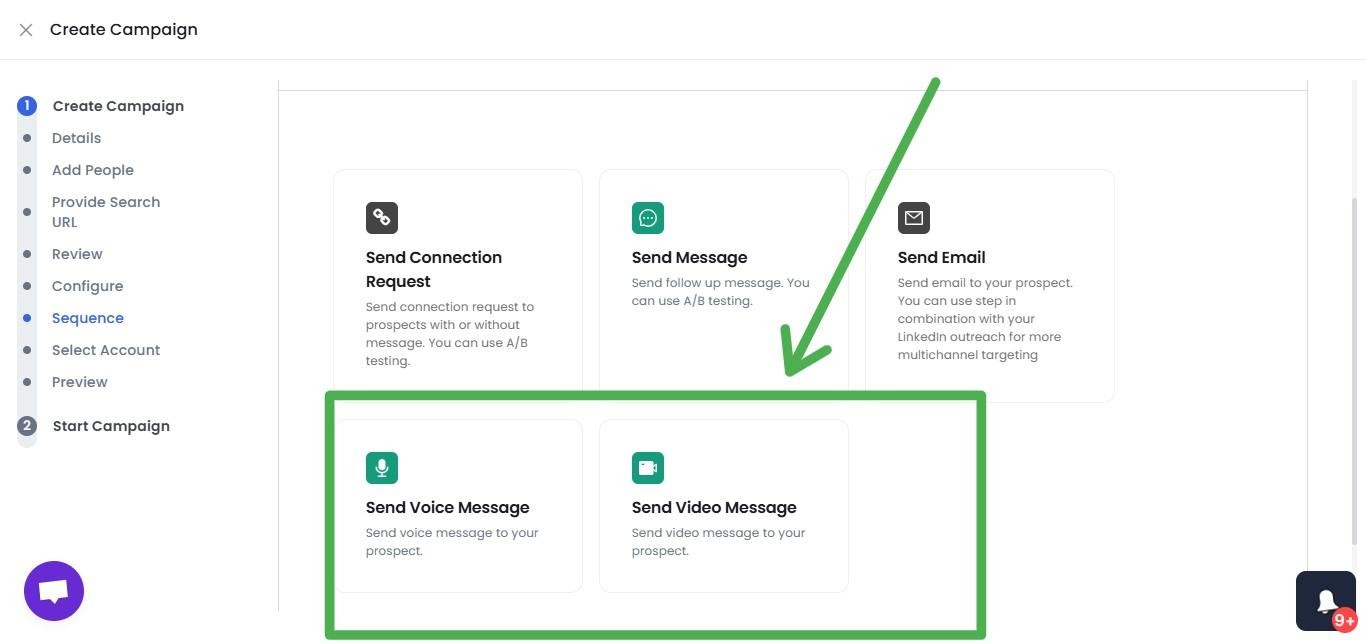
Users report meaningfully higher reply rates with this format — voice note campaigns see 40%+ reply rates — which makes sense: a voice note or video message in a LinkedIn inbox stands out in a way that a text message simply doesn't.
Voice and video personalization is available on all paid plans (up to 50/day), and it's a feature virtually no other tool — Expandi, Waalaxy, Dripify, or HeyReach — offers.
Smart Reply Detection
When a prospect responds, SalesRobot automatically stops the sequence and surfaces the conversation in the unified inbox. No awkward automated follow-up going out after someone's already replied.
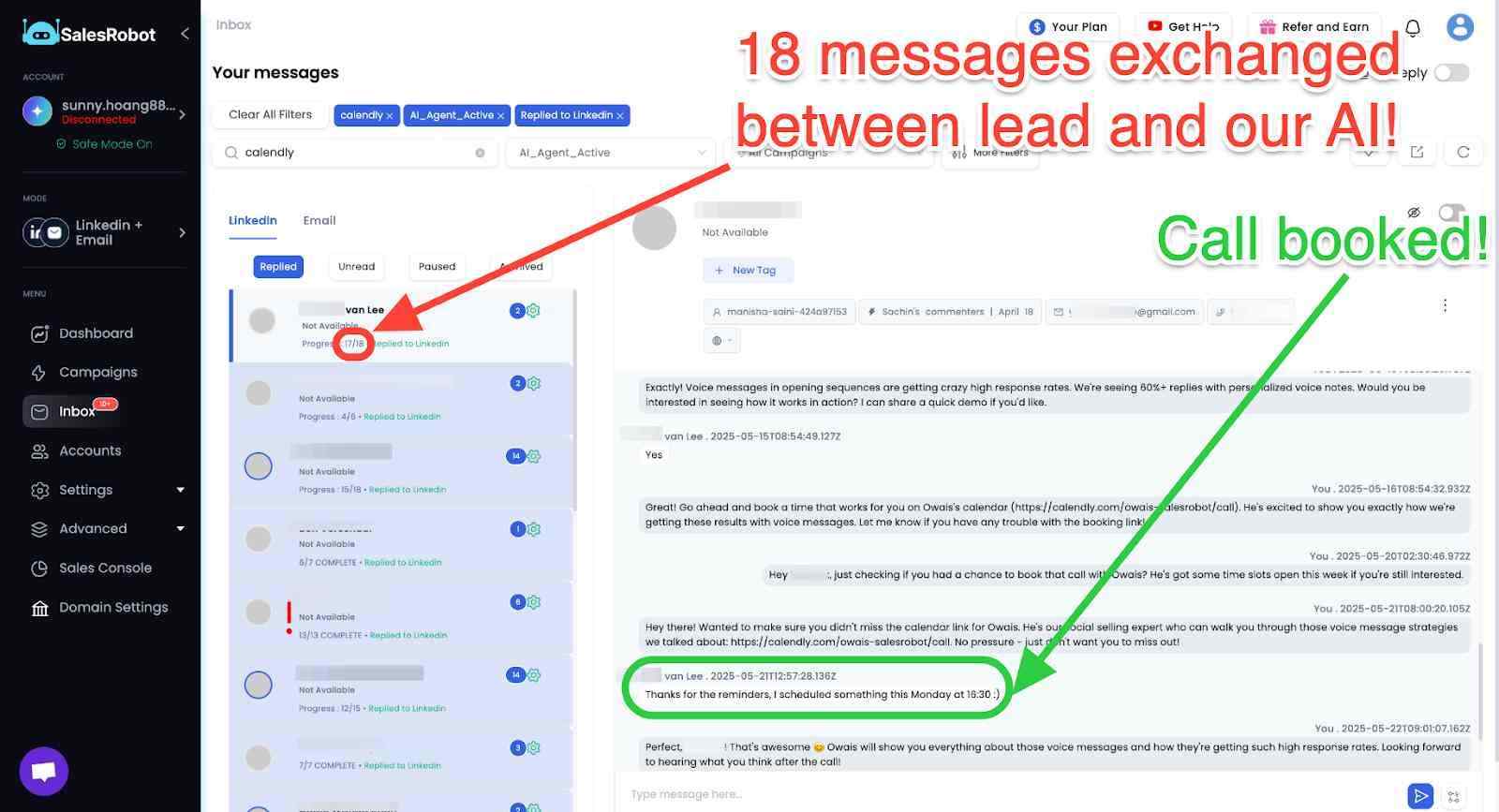
This sounds like a small thing, but it's genuinely important for maintaining professionalism when you're running outreach at volume.
Safety-First Infrastructure
SalesRobot runs entirely in the cloud (no Chrome extension required) and uses LinkedIn's mobile API combined with residential IP rotation to make its activity look natural.
Actions are throttled to stay within LinkedIn's daily limits, randomized to avoid detection patterns, and paused on weekends and holidays by default.

This is a meaningful advantage over browser-based tools like Waalaxy or Dripify, which carry more account risk.
Unified Inbox
All your LinkedIn messages and email responses come into one place, with AI-suggested replies and an optional AI Appointment Setter that can handle early-stage conversations and book meetings on your behalf.
For agencies managing multiple client LinkedIn accounts, this is particularly useful, everything is accessible from one dashboard.
SalesRobot Pricing
SalesRobot is priced per LinkedIn account, billed annually. You can save up to 35% by choosing annual billing. A 14-day .free trial is available with no credit card required.

Basic — $39/month (annual) / $59/month (monthly) One active campaign, limited daily quotas (20 connections/messages per day), core automation features, and the AI Appointment Setter.
Good for budget-conscious solo users who want to test LinkedIn outreach without high volume.
Advanced — $59/month (annual) / $79/month (monthly) Unlimited active campaigns, full daily quotas (75 connections and messages per day), A/B testing, a personal inbox, Zapier and webhook integrations, CRM lead transfer, and the AI Appointment Setter.
This is where most individual sales reps and small teams land.
Professional — $79/month (annual) / $99/month (monthly) Everything in Advanced plus team management, activity control to prevent duplicate outreach across reps, team analytics, role assignments, shared sequences, and priority support.
Built for agencies and sales teams managing multiple LinkedIn accounts.
Enterprise — Custom pricing Dedicated customer success manager, premium onboarding, and hands-on technical support for larger organizations.
The Verdict
ActiveCampaign is a strong platform for teams that are serious about email-driven marketing and sales automation. The automation builder is genuinely best-in-class at this price point, the CRM covers what most small-to-mid-size teams need, and the multi-channel support is a nice bonus.
That said, it's not a plug-and-play tool. Budget for a few weeks of setup and learning time, especially if your team is newer to automation. And as your contact list grows, keep a close eye on the pricing — it scales faster than people expect. 💸
If LinkedIn is where your prospects actually spend their time, ActiveCampaign won't help you there. SalesRobot fills that gap specifically, and the two can run alongside each other without much overlap.
Buy ActiveCampaign if you're an established business with an email list and want sophisticated automation, multi-channel messaging, and a CRM that connects to your marketing data.
Consider SalesRobot if LinkedIn prospecting is central to how you generate pipeline, you want outreach that feels personal at scale, and you need a tool purpose-built for that channel.

Wow your leads by cloning yourself and sending personalized videos and voice notes to each lead on LinkedIn.
If you don't reply to leads within 5 mins, your chances of converting them fall by 50%. Our AI replies on your behalf instantly! (and yes, you can train it)

Don't shoot in the dark. Get detailed analytics on what's working

SalesRobot allows you to invite other team members, so that they can add their LinkedIn Account, run outreach campaigns and get amazing results just like you.
.avif)


Trusted by 4100+ innovative B2B sales teams and lead gen agencies

.avif)

.avif)




.avif)


Heading 1
Heading 2
Heading 3
Heading 4
Heading 5
Heading 6
Lorem ipsum dolor sit amet, consectetur adipiscing elit, sed do eiusmod tempor incididunt ut labore et dolore magna aliqua. Ut enim ad minim veniam, quis nostrud exercitation ullamco laboris nisi ut aliquip ex ea commodo consequat. Duis aute irure dolor in reprehenderit in voluptate velit esse cillum dolore eu fugiat nulla pariatur.
Block quote
Ordered list
- Item 1
- Item 2
- Item 3
Unordered list
- Item A
- Item B
- Item C
Bold text
Emphasis

Superscript
Subscript