.avif)
TL;DR
- LinkedRadar is a cloud-based LinkedIn automation tool with paid plans starting at $19.9/month. It offers a free tier to start, with paid plans on top.
- It covers connection requests, InMails, automated messaging, AI-generated icebreakers, a built-in CRM, and a multi-channel email finder.
- The human-simulation safety features are a genuine selling point. Country-based IPs, random delays, and gradual limit increases reduce the risk of LinkedIn flagging your account.
- Plans cap at 800 invitations and 800 InMails per month on most tiers, with the Team plan offering unlimited invitations and InMails across 5 LinkedIn accounts.
- SalesRobot is the stronger pick for teams that need advanced sequences, voice and video messaging, and more robust . Plans start at $59/month.
LinkedRadar Review: LinkedIn Automation Tool
Ever spent three hours writing personalized connection requests, only to land a 12% acceptance rate? 😩
Manual LinkedIn outreach is a grind. You're copy-pasting messages, updating spreadsheets, and watching your inbox stay quiet while your targets keep scrolling past your profile.
LinkedIn automation tools promise to fix that. LinkedRadar is one of them, positioning itself as a free-to-start Chrome extension with AI-powered messaging and built-in safety features to keep your account in good standing.

This review covers what LinkedRadar actually does, where it holds up, where it doesn't, and how it compares to SalesRobot if you need something more capable.

LinkedRadar: What You Need to Know
⚠️ Extension-based, not fully cloud. LinkedRadar is distributed as a Chrome extension that runs inside your LinkedIn browser session, and it assigns a country-based IP to each account to reduce detection risk. Because it operates at the browser level, it carries higher detection risk than genuinely cloud-based tools.
✅ AI-generated personalization. ChatGPT integration means connection requests and icebreakers are generated from the prospect's actual profile data, not a generic template with a first name dropped in.
✅ Built-in CRM and email finder. You get contact organization, tagging, and a multi-channel email finder alongside the automation. For a tool in this price range, that's a solid feature set.
✅ Team support on the top plan. The Team plan covers up to 5 LinkedIn accounts with unlimited invitations and InMails, which is useful for small agencies or sales teams running outreach across multiple profiles.
⚠️ Free tier is limited. LinkedRadar has a free tier, but its exact limits aren't clearly documented and heavier use quickly pushes you onto a paid plan.
⚠️ Invitation and InMail caps on most plans. The Start plan gives you 400 invitations and 400 InMails per month. That works out to roughly 13 per day, which is modest even for light prospecting.
⚠️ Template dependency is a real risk. The pre-built templates are convenient, but over-relying on them makes your outreach feel formulaic. You'll still need to customize for your specific audience.
⚠️ Learning curve on advanced features. The automation sequences, CRM workflows, and email campaign setup take time to get comfortable with. New users may feel like they're guessing for the first week or two.
LinkedRadar's Key Features, Broken Down
AI-Powered Auto Connect
LinkedRadar uses ChatGPT to generate personalized connection requests based on a prospect's profile. Instead of firing off a generic "I'd like to connect," the AI pulls from their role, company, and recent activity.
The system runs with random delays between actions and stays within LinkedIn's activity limits to avoid triggering spam detection.
Automated Messaging with Templates
Once a prospect accepts your connection request, LinkedRadar sends follow-up messages automatically using professionally designed templates. The timing is handled for you. 📬
You can set up a basic sequence, for example a welcome message on day one and a value pitch a few days later, without doing any manual work after the initial setup.
Multi-Channel Email Finder
LinkedRadar cross-references multiple databases to find verified email addresses for your LinkedIn prospects. This gives you an outreach option outside of LinkedIn if someone doesn't respond.
The tool also includes 60+ AI-powered business email templates so you can move from finding an email to sending a message quickly.
LinkedIn CRM
The built-in CRM lets you group and tag contacts, track conversation history, and segment prospects by deal stage or interest level.
It's not a replacement for HubSpot or Salesforce, but for keeping your LinkedIn outreach organized it does the job without needing a separate tool.
Human-Simulation Safety
LinkedRadar assigns a dedicated country-based IP to each account, adds random delays between actions, and gradually ramps up activity limits rather than hitting full speed from day one. 🛡️
The goal is for your automated activity to look indistinguishable from natural human behavior. It doesn't eliminate risk entirely, but it's a more considered approach than most budget tools take.
AI Icebreakers
The icebreaker feature analyzes a prospect's recent posts, job changes, or company news and generates a personalized opening line based on what it finds.
If someone just got promoted or published a post that got traction, the AI can reference it in your opening message. Output quality varies, but it's usually a better starting point than a blank message box.
LinkedRadar Pricing
LinkedRadar has four monthly plans, all requiring a paid subscription from day one.
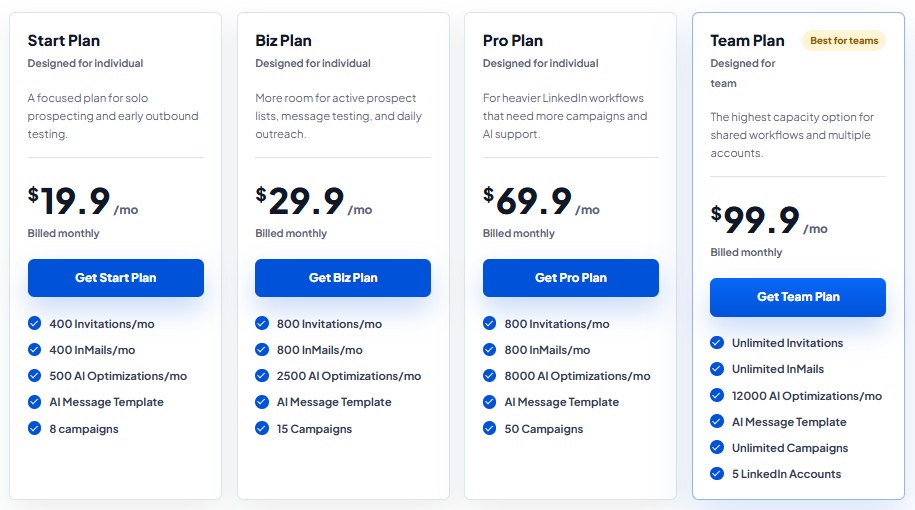
The Start plan is $19.9/month. You get 400 invitations, 400 InMails, 500 AI optimizations, AI message templates, and up to 8 campaigns. Designed for individual users doing light outreach.
The Biz plan is $29.9/month. This bumps you to 800 invitations, 800 InMails, 2,500 AI optimizations, and up to 15 campaigns. A solid middle ground for individuals who need more volume.
The Pro plan is $69.9/month. You get 800 invitations, 800 InMails, 8,000 AI optimizations, and up to 50 campaigns. The significant jump in AI optimizations makes this the right tier for users running multiple targeted campaigns simultaneously.
The Team plan is $99.9/month and is the only tier built for multiple users. It includes unlimited invitations, unlimited InMails, 12,000 AI optimizations, unlimited campaigns, and support for up to 5 LinkedIn accounts.
A yearly billing option is available at 20-30% off across all plans.
What Works Well
The AI personalization and built-in CRM are genuine advantages at this price point. ✅
Your outreach keeps running whether your computer is on or not.
The dedicated IP per account is a smarter safety approach than most tools at this price point. It's one of the things that sets LinkedRadar apart from cheaper alternatives.
The AI personalization is a step above generic template tools. When the icebreaker feature works, it saves real time and produces messages that don't read like they came from a mail merge.
The Team plan is also well-structured for small agencies. Unlimited invitations, InMails, and campaigns across 5 LinkedIn accounts at $99.9/month is genuinely competitive.
Where It Falls Short
The reliance on a browser extension is a real friction point. 🚩
You can start on LinkedRadar's free tier, but its undocumented limits make it hard to gauge real performance before you upgrade, and heavier testing pushes you onto a paid plan fast.
The invitation caps on the lower plans add up quickly. 400 invitations per month on the Start plan is roughly 13 per day.
That's modest even for solo reps. Anyone doing serious prospecting will feel that ceiling sooner than expected.
The jump from $29.9/month on Biz to $69.9/month on Pro is also steep. The main difference is more AI optimizations and campaign slots, which may not justify more than doubling your monthly spend.
LinkedRadar vs SalesRobot: How Do They Compare?
SalesRobot: The LinkedIn-First Alternative
If LinkedRadar's caps or feature gaps are already giving you pause, SalesRobot is worth a closer look. It's built specifically for LinkedIn outreach at scale. 🤖

Multi-Step LinkedIn Sequences
SalesRobot lets you build multi-step campaigns with smart time delays and conditional logic.
If a prospect doesn't respond, the sequence adapts. If they do respond, it pauses automatically so you can take over. LinkedRadar's sequencing doesn't offer this level of control.
AI Voice and Video Messages
SalesRobot can send personalized voice notes and video messages through LinkedIn at scale. 🎙️
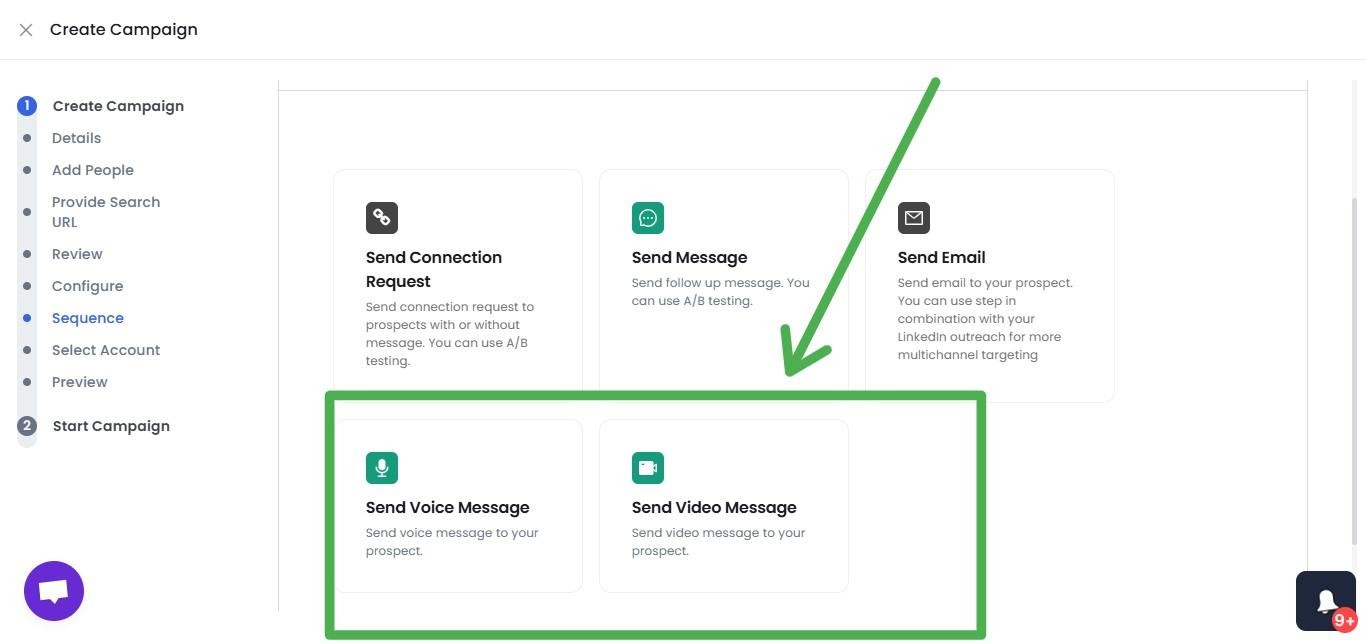
People aren't used to receiving voice messages in their LinkedIn inbox, so they tend to actually listen. Users consistently report significantly higher reply rates with this format compared to text-only outreach.
Mobile API Safety
SalesRobot runs in the cloud using LinkedIn's mobile API behavior with dedicated IPs per account.
The activity is practically indistinguishable from someone using LinkedIn on their phone, which makes account restrictions rare among SalesRobot users.
Smart Reply Detection
When any prospect responds to a message in your sequence, SalesRobot automatically pauses the campaign for that contact.
No awkward automated follow-ups arriving after someone has already replied and started a real conversation with you.
Advanced Targeting
You can pull prospects from LinkedIn search, Sales Navigator, CSV uploads, LinkedIn group members, event attendees, or people who commented on a specific post.
The targeting flexibility goes well beyond what LinkedRadar offers.
Unified Inbox
LinkedIn conversations and email threads land in one dashboard, with AI-suggested replies based on the context of each conversation.
For anyone juggling a high volume of active outreach threads, this saves a lot of context-switching.
SalesRobot Pricing
SalesRobot prices per LinkedIn account on a monthly basis.
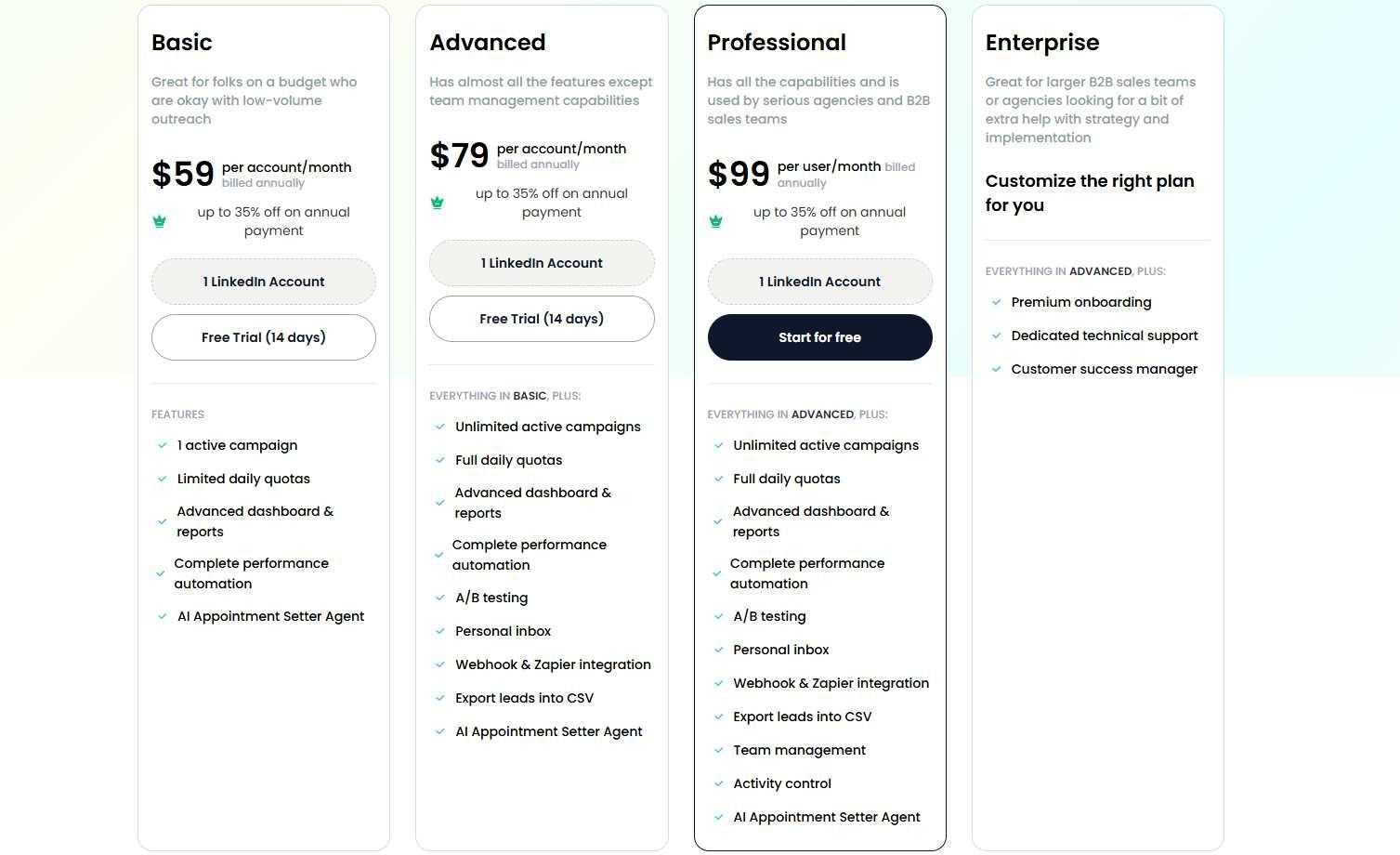
The Basic plan is $59/month. One active campaign, daily quotas of 20 connections and 20 messages. Good for testing before scaling up.
The Advanced plan is $79/month. Unlimited active campaigns, full daily quotas of 75 connections and 75 messages, A/B testing, Zapier and webhook integration, personal inbox management, and the AI Appointment Setter agent.
The Professional plan is $99/month. Everything in Advanced plus team management, activity controls, role assignments, duplicate outreach prevention, and team analytics. Built for agencies running multiple LinkedIn accounts.
Enterprise is custom pricing with premium onboarding, a dedicated customer success manager, and custom integrations.
SalesRobot offers a 14-day free trial with no credit card required.
The Verdict
LinkedRadar is a capable cloud-based automation tool that punches above its price point on features.
The AI personalization, human-simulation safety, and Team plan value are all genuine strengths. For solo users and small teams doing consistent outreach, it's a reasonable option.
The lack of a free trial is a real drawback. The invitation caps on lower plans will frustrate anyone doing serious volume, and the pricing gap between Biz and Pro is hard to justify for most users.
If you need deeper sequencing, voice and video messaging, and a platform that scales with your team, SalesRobot is the more capable choice. 🎯
Frequently Asked Questions
Is LinkedRadar safe for your LinkedIn account?
LinkedRadar uses human-simulation features such as randomized delays, country-based IPs, and gradual limit increases to lower risk. That said, all third-party automation runs against LinkedIn's Terms of Service, so using conservative daily limits (around 10-15 invites/day) is recommended.
Is LinkedRadar a Chrome extension or cloud-based?
LinkedRadar is distributed as a Chrome extension that runs inside your LinkedIn browser session. Because it operates at the browser level using your session, some reviewers note it can carry higher detection risk than genuinely cloud-based automation tools that run from dedicated servers.
Is LinkedRadar free to use?
Yes, LinkedRadar offers a free tier so you can test core features like AI icebreakers and the email finder at no cost. However, the free tier's limits aren't clearly documented, and heavier prospecting quickly requires upgrading to a paid plan starting around $19.9/month.

Wow your leads by cloning yourself and sending personalized videos and voice notes to each lead on LinkedIn.
If you don't reply to leads within 5 mins, your chances of converting them fall by 50%. Our AI replies on your behalf instantly! (and yes, you can train it)

Don't shoot in the dark. Get detailed analytics on what's working

SalesRobot allows you to invite other team members, so that they can add their LinkedIn Account, run outreach campaigns and get amazing results just like you.
.avif)


Trusted by 4100+ innovative B2B sales teams and lead gen agencies

.avif)

.avif)




.avif)


Heading 1
Heading 2
Heading 3
Heading 4
Heading 5
Heading 6
Lorem ipsum dolor sit amet, consectetur adipiscing elit, sed do eiusmod tempor incididunt ut labore et dolore magna aliqua. Ut enim ad minim veniam, quis nostrud exercitation ullamco laboris nisi ut aliquip ex ea commodo consequat. Duis aute irure dolor in reprehenderit in voluptate velit esse cillum dolore eu fugiat nulla pariatur.
Block quote
Ordered list
- Item 1
- Item 2
- Item 3
Unordered list
- Item A
- Item B
- Item C
Bold text
Emphasis

Superscript
Subscript