.avif)
TL;DR
- QuickMail's inbox rotation feature automatically spreads sending across multiple email addresses, which keeps deliverability healthy and reduces the risk of getting flagged
- Pricing starts at $49/month (Starter) with no per-seat fees, meaning you can add your whole team, contractors included, without paying extra per person
- The entry Starter plan ($49/month) covers 5,000 emails/month, 1,000 active prospects, and 1 sending inbox. The Growth plan ($99/month) scales that to 100,000 emails, 30,000 prospects, and unlimited inboxes. The Agency plan ($299/month) goes up to 500,000 emails, 50,000 prospects, and 2 workspaces
- LinkedIn automation is now included across all plans (even the $9 Starter includes 1 LinkedIn account), though inbox and sender limits scale with the tier
- SalesRobot is worth considering if LinkedIn is your primary prospecting channel, with plans starting at $39/month per LinkedIn account (annually)
In-Depth QuickMail Review: Great for Agencies, But Is It Worth the Switch?
Ever feel like you're shouting into the void with your cold outreach? 📭
You write the perfect email, hit send, and then... nothing. Open rates are embarrassing, replies are non-existent, and you're pretty sure your emails are living rent-free in everyone's spam folder.
Most sales teams have been there. And a lot of them end up here, looking for something better.
QuickMail has been around for nearly a decade and has built a solid reputation, especially among agencies and growth teams doing high-volume email outreach. But is it actually the right fit for you in 2026?
This review covers everything: the features, the real pricing, where it shines, and where it falls short. We'll also look at SalesRobot as an alternative if LinkedIn is a bigger part of your pipeline than email.
QuickMail: What You Need to Know
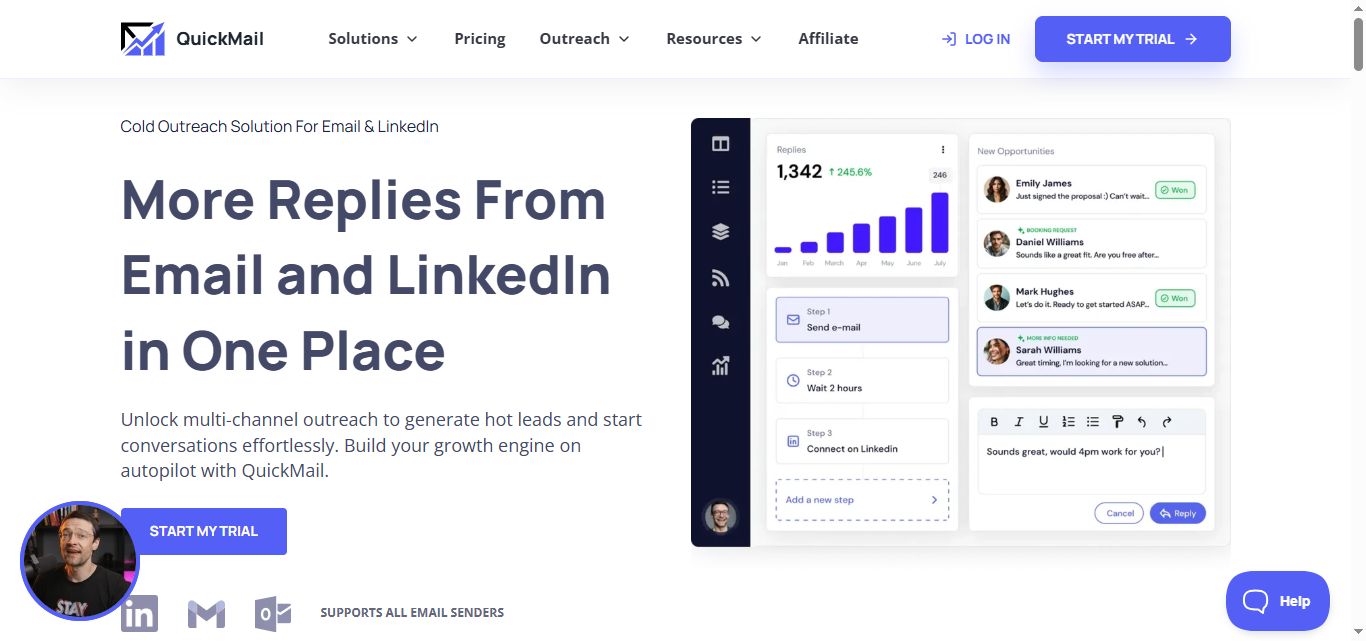
✅ Multi-channel outreach powerhouse: QuickMail lets you run email and LinkedIn campaigns from one dashboard, with unlimited sender accounts that automatically rotate. This makes scaling your outreach incredibly smooth without juggling multiple tools.
⚠️ Learning curve can be steep: With all these advanced features like AI rewording and deliverability insights, new users often feel overwhelmed at first. You'll need to invest time upfront to really understand how everything works together.
✅ Deliverability AI is a game-changer: The platform automatically monitors your email performance and swaps out underperforming accounts before they hurt your campaigns. No more manual checking or worrying about landing in spam folders.
✅ Team collaboration without extra costs: You can add unlimited team members, contractors, and VAs without per-seat pricing. Everyone gets personalized access levels, and all actions are logged for easy auditing.
⚠️ Pricing can add up for smaller teams: While there are no per-seat fees, the base subscription plus email sender purchases can get expensive quickly. Budget-conscious startups might find the total cost higher than expected.
✅ Advanced analytics that actually help: The time-based attribution and week-by-week comparisons give you clear insights into what's working. A/B testing doesn't require restarting campaigns, so you can optimize on the fly.
⚠️ Heavy focus on high-volume sending: If you're doing smaller, more personalized outreach campaigns, many of QuickMail's features feel like overkill. It's really built for agencies and teams sending thousands of emails monthly.
QuickMail's Key Features, Broken Down
Multi-Channel Outreach
QuickMail lets you run email and LinkedIn campaigns from one place, building sequences that touch prospects across both channels in a coordinated way. 📬
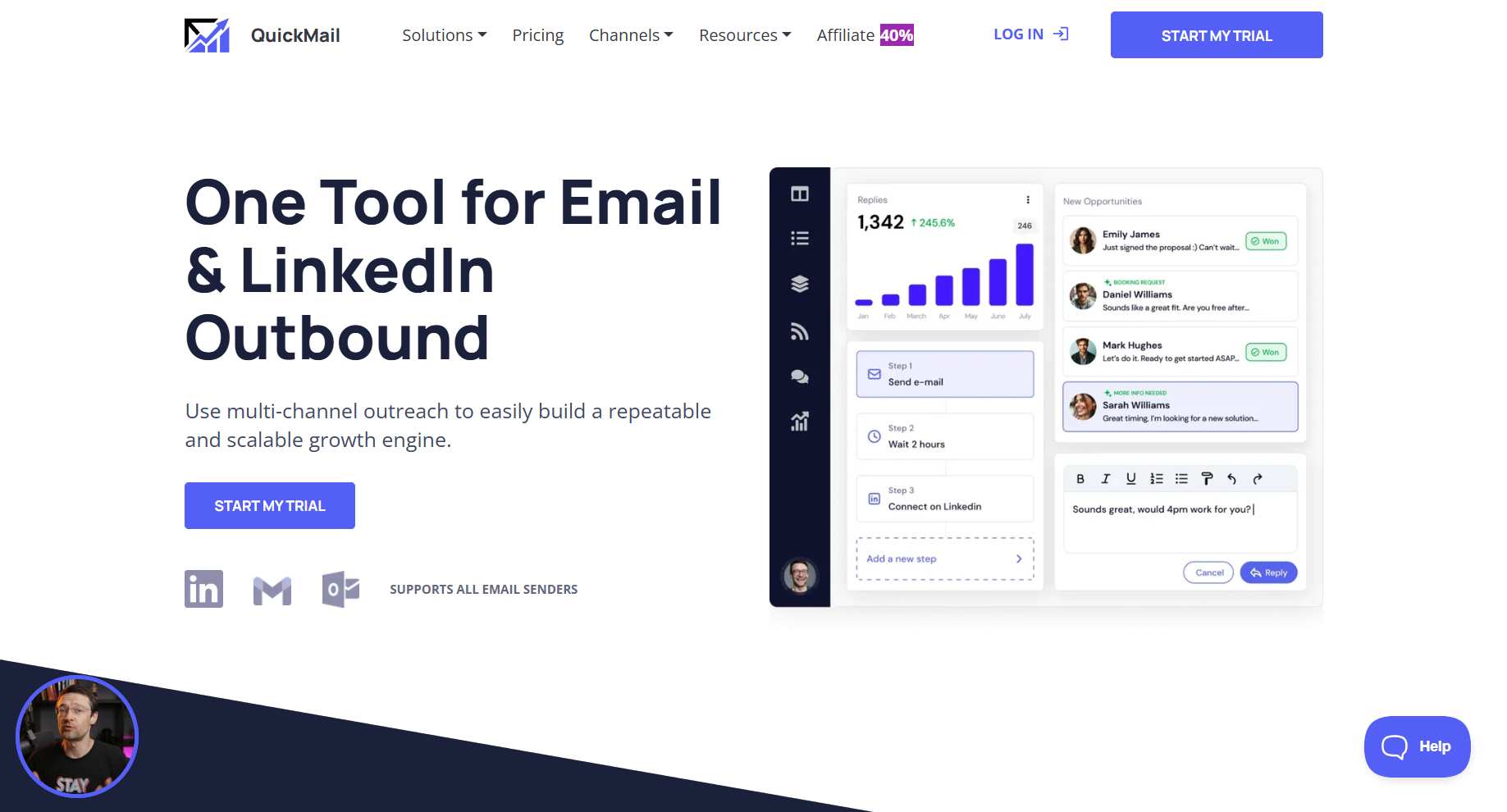
Instead of sending an email and hoping for the best, you can follow up on LinkedIn a few days later, then loop back with another email.
That kind of multi-touch approach keeps you in front of prospects without being overbearing. And LinkedIn steps aren't locked behind a top tier anymore — every plan, including the $9 Starter, includes LinkedIn access, with limits scaling as you move up.
Unlimited Inbox Rotation
This is QuickMail's flagship feature, and it's genuinely impressive. You connect multiple email addresses, and QuickMail automatically rotates sending across them.
No single inbox gets hammered with hundreds of emails a day, which is one of the fastest ways to end up in spam. 🚫
You can even buy pre-configured, pre-warmed email senders directly inside QuickMail, saving you the headache of setting up new domains from scratch.
Deliverability AI
QuickMail's AI keeps a close eye on sender performance and automatically pulls out any inboxes that are underperforming before they damage your campaigns.
It also includes a "Reword with AI" feature that varies your message content automatically to avoid spam triggers and keep things feeling fresh. 🤖
For teams running campaigns at scale, this kind of automated deliverability management saves a lot of time and headaches.
Unified Inbox Management
All replies from all your inboxes, plus LinkedIn messages, land in one central place. No logging into five different email accounts, no missed replies slipping through the cracks.
You can assign conversations to specific team members, let a VA respond without sharing login credentials, and manage client accounts from the same dashboard.
For agencies juggling multiple clients and campaigns, this alone is worth a lot. 🙌
Advanced Analytics and A/B Testing
QuickMail gives you week-by-week campaign comparisons, time-based attribution, and A/B/Z testing you can run without pausing or restarting a live campaign.
That last part matters more than it sounds. Most tools make you stop everything to run a test.
With QuickMail, you can test subject lines, message variations, and send times while your campaign keeps running in the background. 📊
Team Collaboration Without Per-Seat Fees
Every QuickMail plan includes unlimited team members at no extra cost. Everyone gets their own login, their own access level, and all actions are automatically logged in an audit trail.
This is especially useful for agencies that need to show clients exactly what was done and when. 📋
It's also just a sane way to handle team access, compared to tools that charge you per person.
QuickMail Pricing: What You'll Actually Pay
QuickMail has three main plans, and none of them require a minimum-term contract. All prices are monthly.
Starter— $9/month Up to 3,000 emails per month, 5 sending inboxes, 10,000 active prospects, and unlimited team members. A solid starting point for small teams doing consistent outreach.
Growth— $99/month Up to 100,000 emails per month, 20 inboxes, and 50,000 active prospects. Everything in Basic, plus advanced analytics and native integrations with HubSpot and Pipedrive. This is where most growing teams land. 📈
Agency— $299/month Up to 300,000 emails per month, 50 inboxes, and 100,000 active prospects. LinkedIn automation, API access, and AI-assisted follow-up based on how prospects reply all unlock here.
No contracts, no seat fees, and no surprises at billing. QuickMail is pretty transparent about what you get at each tier.
QuickMail vs SalesRobot: How Do They Compare?
The two tools solve different problems. QuickMail is built for teams whose primary channel is email. SalesRobot is built for teams whose primary channel is LinkedIn.
If your prospects live in their inboxes, QuickMail is the stronger pick. If they're on LinkedIn all day, SalesRobot probably makes more sense. 👇
SalesRobot: The LinkedIn-First Alternative
A lot of B2B decision-makers aren't sitting around waiting for cold emails. They're on LinkedIn, checking notifications, engaging with posts, and responding to connection requests. 💼

SalesRobot is built around that reality. It's a cloud-based LinkedIn automation platform for B2B sales teams and agencies who want to run personalized outreach at scale, without putting their accounts at risk.
Multi-Step LinkedIn Sequences
SalesRobot lets you build sequences that warm prospects up before any pitch lands. Think liking a post, following a profile, sending a connection request, and then following up with personalized messages on a smart schedule.
This approach builds familiarity first, and that's a big reason why reply rates tend to be significantly higher compared to cold outreach alone. 📊
AI-Powered Voice and Video Messages
Using AI voice cloning and video personalization, SalesRobot lets you send voice notes and video messages at scale, without recording each one manually.
A voice note or short video in a LinkedIn inbox stands out in a way that plain text simply doesn't. 🎙️
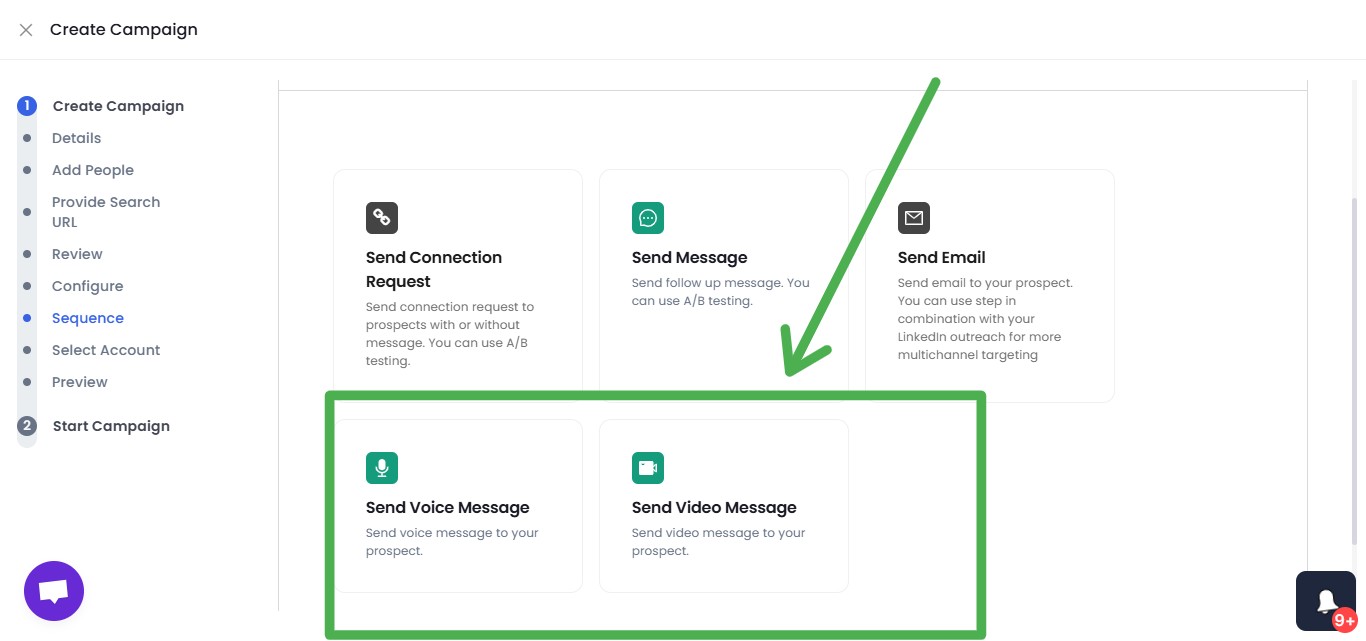
Users consistently report higher reply rates with this format, which makes a lot of sense when you think about how crowded most LinkedIn inboxes are.
Smart Reply Detection
The moment a prospect replies, SalesRobot automatically stops the sequence and surfaces the conversation in the unified inbox.
No awkward automated follow-up going out after someone's already written back. 😅
It's a small thing, but it matters a lot when you're running outreach across hundreds of contacts at once.
Safety-First Infrastructure
SalesRobot runs fully in the cloud with no Chrome extension needed, working 24/7 even when your laptop is closed. It uses LinkedIn's mobile app APIs on the backend alongside dedicated, local residential IP rotation per account — which drops ban risk to roughly 0.00001%, making it far safer than browser-extension tools like Expandi, Waalaxy, Dux-Soup, or LinkedHelper.

Actions are throttled to stay within LinkedIn's daily limits, randomized to avoid detection, and paused on weekends by default. 🛡️
It's considerably safer than browser-based tools like Waalaxy or Dripify, which carry meaningfully more account risk.
Unified Inbox
All your LinkedIn messages and email replies come into one dashboard, with AI-suggested responses and the AI Appointment Setter — a trainable AI agent that replies to leads within minutes on your behalf, nurtures them, and keeps them engaged until they're ready to book.
Since your odds of converting a lead drop by 50% if you don't reply within 5 minutes, this is a genuine edge, and no other LinkedIn automation tool offers it natively.
For agencies managing multiple client LinkedIn accounts, this is particularly useful. No more jumping between accounts constantly. 👏
SalesRobot Pricing
SalesRobot charges per LinkedIn account. Annual billing saves up to 35%, and a 14-day free trial is available with no credit card required.
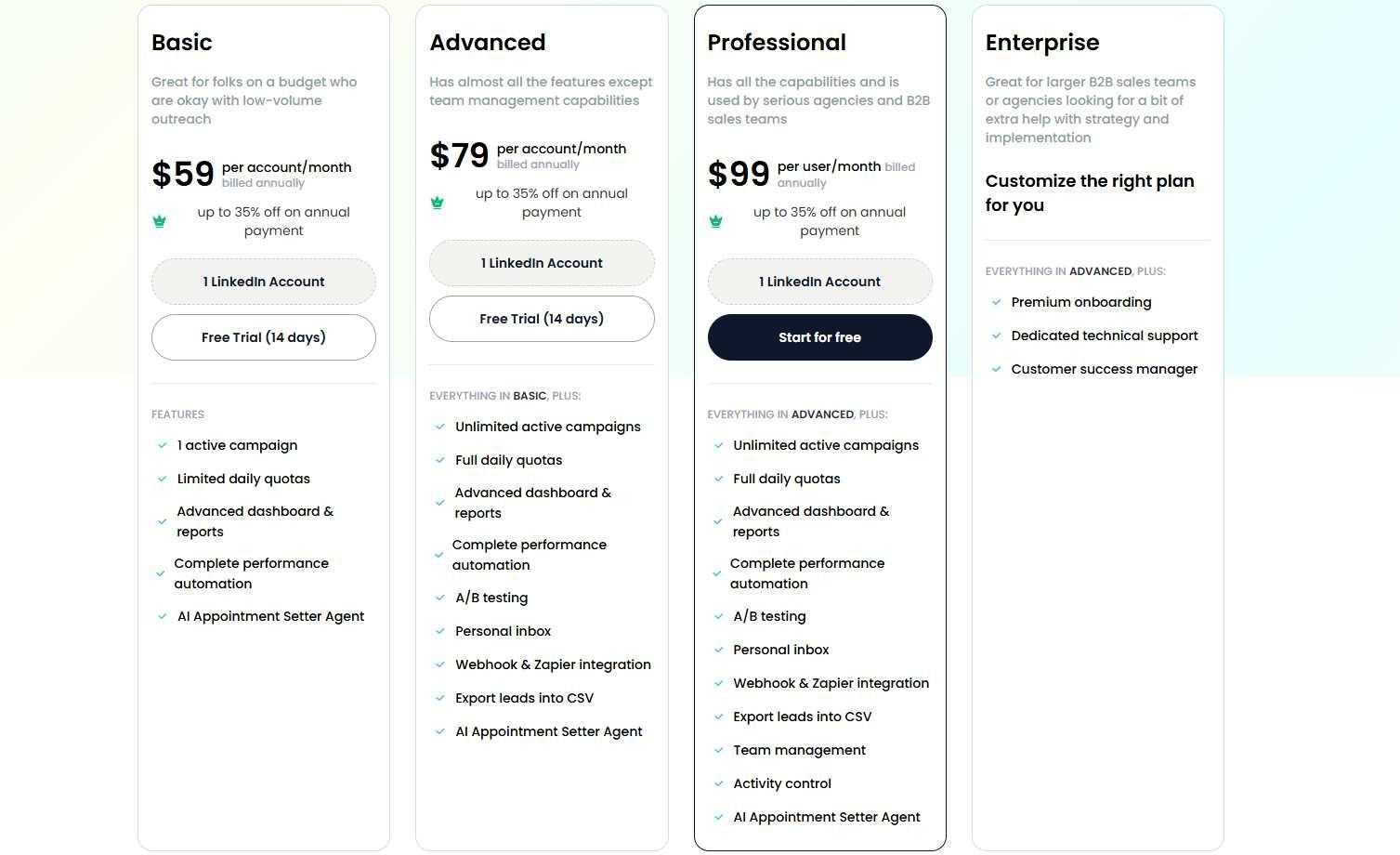
Basic — $39/month (annual) / $59/month (monthly) One active campaign with limited daily quotas of 20 connections and messages per day. Good for solo users who want to test LinkedIn outreach before committing to higher volume.
Advanced — $59/month (annual) / $79/month (monthly) Unlimited campaigns, full daily quotas, A/B testing, personal inbox, and CRM syncing. The sweet spot for most individual reps and small teams. 🎯
Professional — $79/month (annual) / $99/month (monthly) Everything in Advanced, plus team management, activity controls, and shared sequences. Built for agencies running multiple LinkedIn accounts.
Enterprise — Custom pricing Dedicated support, premium onboarding, and a customer success manager for larger organizations that need hands-on help.
The Verdict
QuickMail is a genuinely strong platform for teams that take email outreach seriously. The inbox rotation, deliverability AI, and no-seat-fee pricing model are all real advantages, especially for agencies running high-volume campaigns. 👍
The learning curve is real, so plan for some setup time upfront.
And the good news on LinkedIn: it's no longer gated behind a pricey top tier — every plan, right down to the $9 Starter, includes LinkedIn access.
If cold email is your main channel and you're sending at volume, QuickMail is a very solid choice.
If LinkedIn is where your best prospects actually spend their time, SalesRobot is purpose-built for that and starts at a much lower price point.
Buy QuickMail if you're running serious email outreach at scale, need agency-friendly team features, and want best-in-class deliverability tooling.
Consider SalesRobot if LinkedIn prospecting drives most of your pipeline and you want a tool built specifically around that channel, with email as a supporting layer.
SalesRobot even has a 14-day free trial if you wanna test it out. No credit card required :)

Wow your leads by cloning yourself and sending personalized videos and voice notes to each lead on LinkedIn.
If you don't reply to leads within 5 mins, your chances of converting them fall by 50%. Our AI replies on your behalf instantly! (and yes, you can train it)

Don't shoot in the dark. Get detailed analytics on what's working

SalesRobot allows you to invite other team members, so that they can add their LinkedIn Account, run outreach campaigns and get amazing results just like you.
.avif)


Trusted by 4100+ innovative B2B sales teams and lead gen agencies

.avif)

.avif)




.avif)


Heading 1
Heading 2
Heading 3
Heading 4
Heading 5
Heading 6
Lorem ipsum dolor sit amet, consectetur adipiscing elit, sed do eiusmod tempor incididunt ut labore et dolore magna aliqua. Ut enim ad minim veniam, quis nostrud exercitation ullamco laboris nisi ut aliquip ex ea commodo consequat. Duis aute irure dolor in reprehenderit in voluptate velit esse cillum dolore eu fugiat nulla pariatur.
Block quote
Ordered list
- Item 1
- Item 2
- Item 3
Unordered list
- Item A
- Item B
- Item C
Bold text
Emphasis

Superscript
Subscript