.avif)
TL;DR
- A LinkedIn verified profile is a free identity, workplace, education, or phone confirmation done through partners like CLEAR (US/CA/MX) and Persona (60+ countries). Badge acquisition is mobile-app only.
- LinkedIn officially claims verified members get 60% more profile views and 50% more engagement, but it does not claim any connection-acceptance-rate lift.
- Vendor pages love citing "35% higher acceptance" and "up to 30% more inbound messages." These are unverified marketing claims with no traceable source.
- Actual testing (LinkedSDR, Jan 2026) found acceptance correlates far more with profile image, headline, connection count, and message quality than the badge itself, and clicking the badge reveals your ID-issuing country, which can hurt cross-border outreach.
- What actually moves acceptance in 2026: profile fundamentals, prior engagement, and personalization, the levers behind SalesRobot's 51% acceptance rate and 55% reply rate across 4,100+ teams.
- Get verified for profile credibility; rely on targeting, personalization, and prior engagement to actually move your acceptance rate.
👉 Skip the manual work: SalesRobot warms up prospects with Smart Comments and personalizes every request with AI Variables. Try free for 14 days.

Wait, Does a Badge Actually Help You Get More Connections?
You've seen it: the little grey checkmark next to someone's name on LinkedIn.
Maybe a vendor slid into your inbox promising "35% higher acceptance rates" if you just get verified. Maybe a LinkedIn thought-leader swore it doubled their inbound.
So you want a straight answer before you spend a Tuesday afternoon uploading your passport to an app.
Here's the problem: the internet can't agree. LinkedIn's own numbers say one thing, vendors selling verified accounts say another, and the people who actually tested it say something else entirely.
Most guides on page one treat the badge as an obvious win and move on. That's the lazy answer.
This guide reconciles all three data sources and tells you what the badge actually does for outreach, including one real downside almost nobody mentions.
What Is a LinkedIn Verified Profile, Exactly?
A LinkedIn verified profile is an account that has confirmed at least one piece of real-world identity, such as government ID, a work email, or an education record, through a LinkedIn verification partner, earning a badge that signals to other members the information is authentic rather than self-reported.

There are four verification types, and they are not equal.
- Identity verification: the strongest. Done through CLEAR (available in the US, Canada, and Mexico) or Persona (available in 60+ countries), using government ID.
- Workplace verification: confirms your current employer, done via a company work email or through Microsoft Entra Verified ID.
- Education verification: confirms a school or degree.
- Phone verification: the weakest form, confirming only a phone number.
Two facts matter most for outreach teams.
First, verification is completely free. LinkedIn does not charge for any badge type.
Second, identity verification is mobile-app only (iOS and Android). You cannot complete it from a web browser as of 2026.
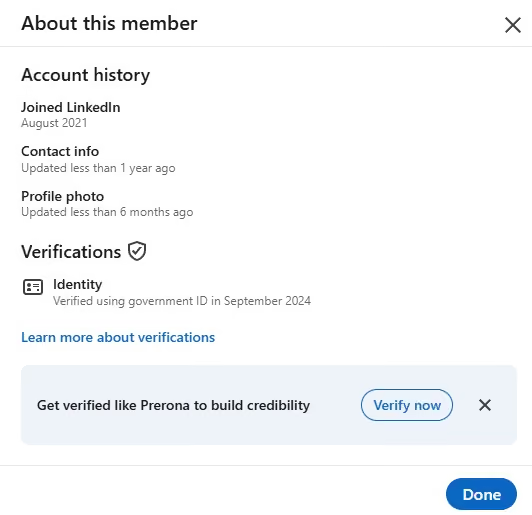
And here's the detail that becomes important later: when someone clicks your badge, LinkedIn shows the entity that verified you, including the country that issued your identity. Hold that thought.
LinkedIn's Official Numbers vs. What Vendors Claim vs. What Testing Shows
This is where the topic falls apart online. Three sources, three very different stories. Let's line them up.
What LinkedIn actually says (the official stat)
LinkedIn's own help documentation states verified members receive 60% more profile views and 50% more engagement.
That's the only primary-sourced statistic in this entire topic.
But read it carefully: LinkedIn claims views and engagement, not connection acceptance. Getting seen more is not the same as getting accepted more. LinkedIn conspicuously does not promise an acceptance-rate lift.
What vendors claim (and why to read it skeptically)
Search "does LinkedIn verification help acceptance" and you'll hit page after page citing "35% higher acceptance" and "up to 30% more inbound messages."
Follow those numbers back to a source. You can't. There isn't one.
These are unverified vendor marketing claims, often from companies selling pre-verified accounts or verification services. Treat them as advertising, not data, before you rebuild your outreach strategy around a checkmark.
What actual testing shows (the contrarian data)
LinkedSDR ran real testing in January 2026 on what drives connection acceptance.
Their finding: acceptance rate correlated far more strongly with profile image, headline, connection count, name recognition, geographic consistency, and message quality than with badge presence.
The verdict from people who actually measured it: the badge's impact on acceptance is marginal at best.
One Edge Case Worth Knowing: Geographic ID Disclosure
Here's a nuance most cheerleader posts skip, though it's more edge case than dealbreaker.
For identity verification specifically, LinkedIn may display the country that issued your ID in the badge's "Verifications" panel. The key word is "may."
In practice, many identity-verified profiles show only the method and date (for example, "Verified using government ID in September 2024") with no country listed at all. When it does appear, it looks like "used an ID issued by [country]."
So this isn't a guaranteed disclosure, and it never applies to workplace, education, or phone badges. But it's worth knowing about, because in the cases where the country is shown, it can quietly work against cross-border outreach.
If you're running US-targeted outreach and your badge surfaces an ID issued in another country, a prospect who assumed you were a local, relevant connection now has a reason to read your message as offshore cold outreach. LinkedSDR's January 2026 testing flagged this as a real, if situational, downside.
It hits agencies hardest. If you run outreach from an offshore team or on behalf of US clients, an identity badge that surfaces a non-US country can work against that specific campaign. The simplest workaround: for cross-border outbound, a workplace badge (which shows no country) is the safer credibility signal.
LinkedIn Verified Profile Facts at a Glance (2026)
Here's every confirmed fact in one place, so you don't have to trust a vendor's math.
Notice the last row. That's the whole story compressed into one line.
What Actually Moves LinkedIn Connection Acceptance Rates in 2026
If the badge is marginal, what actually moves the number? Let's start with what "good" even looks like.
Platform-average acceptance sits around 29-30% (LinkedSDR). A 16,492-request study put the average at 37%, with 30-45% as the healthy 2026 range (Cleverly). Anything in that band means you're doing fine.
Here are the levers that actually get you there.
1. Profile fundamentals come first. LinkedSDR's testing named these as the biggest drivers: a real profile photo, a benefit-driven headline, and a healthy connection count. A badge on a weak profile changes nothing.
2. Warm prospects up before you ask. Engaging with a prospect's content before sending a request makes you a familiar name, not a cold stranger. This is exactly what SalesRobot's Smart Comments automates. It leaves AI-generated comments on a prospect's LinkedIn posts before your connection request lands, raising the odds they accept.

3. Personalize the request itself. A note referencing something real (a recent job change, company news, a shared connection) beats a generic "I'd love to connect" every time. SalesRobot's AI Variables pull that data straight from each prospect's LinkedIn profile and write it into the request automatically, so personalization scales past the first ten prospects.

4. Target the right ICP. Sending to the wrong audience suppresses acceptance no matter how shiny your profile is. Precision beats volume.
5. Stay inside safe sending limits. LinkedIn's weekly connection cap is reputation-based, up to roughly 200 requests/week for strong accounts, as low as 50 for weak ones. SalesRobot uses mobile API technology with randomized delays and residential IP rotation to mimic human behavior, and customers following its Safe Mode guidelines report zero account bans.
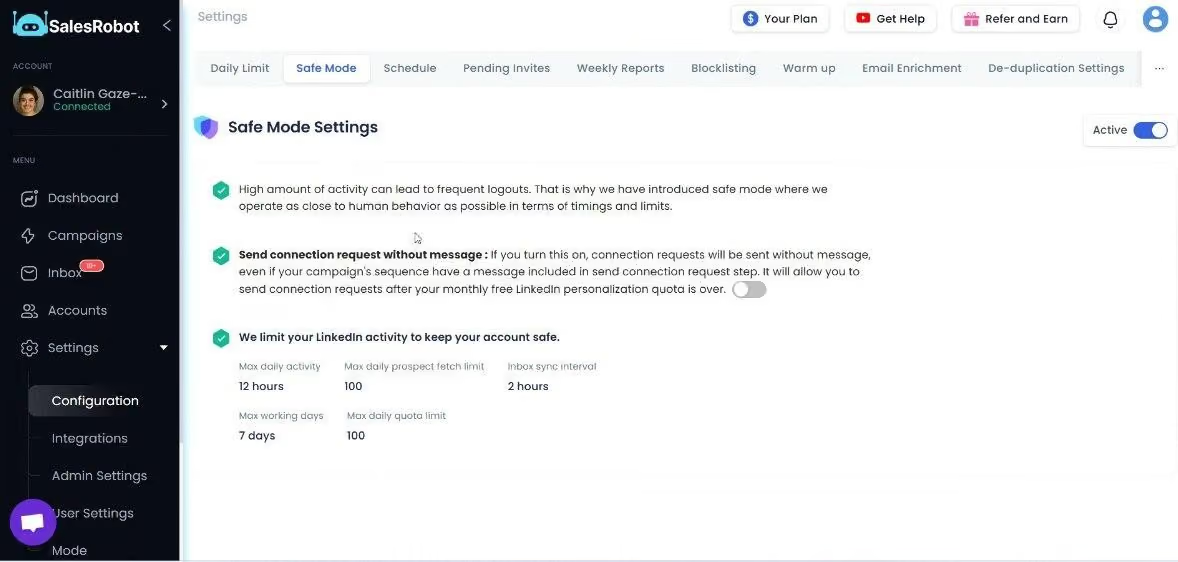
Do these five and you land in that healthy 30-45% range. This is how SalesRobot users hit a 51% connection acceptance rate and 55% average reply rate across 4,100+ B2B sales teams, none of which depends on a badge.
Frequently Asked Questions
What does the LinkedIn verified badge mean?
The badge means LinkedIn confirmed at least one piece of real-world information about you (identity, workplace, education, or phone) through a verification partner like CLEAR, Persona, or Microsoft Entra Verified ID. It signals the detail is authentic rather than self-reported, and it's free to obtain through the LinkedIn mobile app.
Does LinkedIn verification increase connection acceptance rate?
Not directly. LinkedIn officially claims verified members get 60% more profile views and 50% more engagement, but it makes no acceptance-rate promise. Vendor claims of "35% higher acceptance" are unverified. LinkedSDR's January 2026 testing found the badge's impact on acceptance is marginal compared to profile quality and messaging.
Is LinkedIn verification worth it for outreach?
Yes, with realistic expectations. It's free, takes about 15 minutes, and LinkedIn's own data shows a 60% lift in profile views, so it's a low-effort credibility nudge. Just don't treat it as an acceptance-rate strategy. Profile fundamentals, targeting, and personalization drive far more results than the badge alone.
Is LinkedIn verification free?
Yes, completely free. LinkedIn does not charge for any verification type: identity, workplace, education, or phone. Identity verification runs through free partners like CLEAR (US, Canada, Mexico) or Persona (60+ countries). Beware any vendor charging a fee to "get you verified" or selling pre-verified accounts, which violates LinkedIn's User Agreement.
Can the verification badge reveal my location or country?
Only for identity verification, and only sometimes. When someone clicks into your identity badge (the CLEAR or Persona type), LinkedIn may display the country that issued your ID. Its own help docs word this as "may," not "will," and it doesn't apply to workplace, education, or phone badges. For cross-border outreach, for example running US-targeted campaigns while identity-verified in another country, that geographic mismatch can be visible and can lower acceptance, as LinkedSDR's January 2026 testing found.
What actually improves LinkedIn connection acceptance rates?
Profile fundamentals lead: a real photo, a strong headline, and a healthy connection count (per LinkedSDR testing). Then personalized messages, prior engagement before the request, and tight ICP targeting. These push you toward the healthy 30-45% acceptance range for 2026 (Cleverly), far more than a verification badge ever will.
Can I automate the fundamentals that actually move acceptance?
Yes, and that's the practical takeaway. The badge you get once and forget; the real levers (warming prospects, personalizing each request, staying inside safe limits) are ongoing work that automation handles. SalesRobot runs Smart Comments to warm accounts, AI Variables to personalize every request, and Safe Mode pacing to protect the account, which is how its users reach a 51% acceptance rate. Plans start at $59/month with a 14-day free trial.
Putting It Together: Verified Is a Nice-to-Have, Not a Strategy
Get verified. It's free, it takes 15 minutes, and LinkedIn's own data says it lifts profile views by 60%.
Just don't confuse a badge with a plan.
The honest reality: verification is a small trust nudge, and in the specific case of a cross-border identity badge it can occasionally work against you. What actually moves your acceptance rate is profile quality, precise targeting, prior engagement, and personalized messages.
That's exactly where SalesRobot does the heavy lifting: warming up prospects with Smart Comments, personalizing every request with AI Variables, and running it all through safe mobile-API automation that keeps accounts ban-free. It's how customers reach a 51% acceptance rate and 55% reply rate, with plans starting at $59/month.
👉 Stop banking on a checkmark and build the fundamentals that actually convert. Try SalesRobot free for 14 days, no credit card required.

Wow your leads by cloning yourself and sending personalized videos and voice notes to each lead on LinkedIn.
If you don't reply to leads within 5 mins, your chances of converting them fall by 50%. Our AI replies on your behalf instantly! (and yes, you can train it)

Don't shoot in the dark. Get detailed analytics on what's working

SalesRobot allows you to invite other team members, so that they can add their LinkedIn Account, run outreach campaigns and get amazing results just like you.
.avif)


Trusted by 4100+ innovative B2B sales teams and lead gen agencies

.avif)

.avif)




.avif)


Heading 1
Heading 2
Heading 3
Heading 4
Heading 5
Heading 6
Lorem ipsum dolor sit amet, consectetur adipiscing elit, sed do eiusmod tempor incididunt ut labore et dolore magna aliqua. Ut enim ad minim veniam, quis nostrud exercitation ullamco laboris nisi ut aliquip ex ea commodo consequat. Duis aute irure dolor in reprehenderit in voluptate velit esse cillum dolore eu fugiat nulla pariatur.
Block quote
Ordered list
- Item 1
- Item 2
- Item 3
Unordered list
- Item A
- Item B
- Item C
Bold text
Emphasis

Superscript
Subscript