.avif)
TL;DR
- Source from a warm signal, like everyone who commented on a relevant post, not a static job-title list
- Personalize from the prospect's actual LinkedIn profile, not a first-name merge field
- Send from the cloud with a dedicated IP per account, browser extensions get flagged, cloud-based sending with rotation keeps ban rates under 0.5%
- Automate the first reply so a lead who responds at 11pm doesn't wait until Monday
- One tool can cover all four stages, you don't need Clay plus a separate AI layer plus a sender until you're running at real scale
What Is an AI Outbound Workflow, Actually?
Strip away the buzzword and it's simple.
An AI outbound workflow is a repeatable process that finds the right people, writes something worth reading, sends it without you clicking "send" each time, and does something useful when someone replies.
It has four stages: Source, personalize, send, respond.
If any one of those steps still needs you to manually copy-paste into a spreadsheet, it's not a workflow yet.
The confusion usually comes from how people build these things.
A lot of outbound stacks glue together an enrichment tool, a separate AI layer for writing messages, and a third tool for sending.
Each piece works fine on its own.
You can build the same four stages inside a single system and skip that failure point entirely.
How to Build the Workflow, Step by Step
1. Source leads from a signal, not a static list
The weakest version of outbound starts with "everyone who has the job title VP of Sales." That list is huge, mostly wrong, and completely cold.
A better starting point is a warm signal, something that tells you this person is already paying attention.
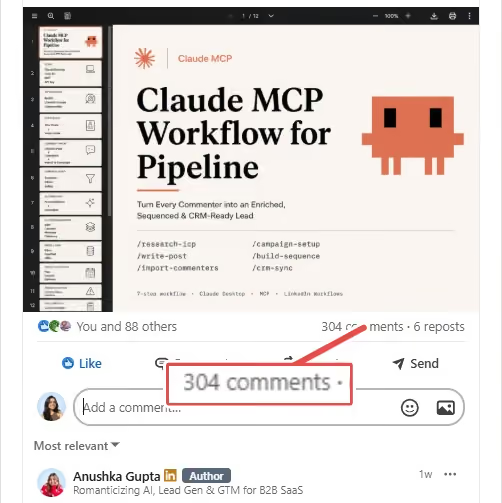
One example: pull everyone who commented on a relevant LinkedIn post.
They've already shown interest in the topic, which makes the opener a lot easier to write and a lot easier to read.
This is the step most people skip because scraping a static list feels faster. It isn't, once you count the replies you don't get.
2. Personalize without bolting on a separate enrichment layer
First-name personalization stopped working around the time everyone started using it.
The bar now is a message that references something true and specific about the person, not a mail-merge field.
The way to do this without adding a whole enrichment tool to your stack is to let the AI read the prospect's actual profile and write a first line from it.
Fewer moving parts means fewer places for personalization to quietly break.
3. Send in a way that doesn't put the account at risk
This part gets skipped in a lot of "how to automate LinkedIn" content, which is strange, because getting your account restricted ends the workflow faster than any bad message ever could.
Two things matter here. First, run outreach from the cloud instead of a browser extension, so it isn't tied to your laptop being open.
Tools without that architecture tend not to publish a number at all.
4. Handle replies automatically, or at least the first response
A workflow that stops at "message sent" isn't finished.
The reply is where the actual conversation starts, and it's also where most manual outbound processes fall apart, because nobody's watching the inbox at 11pm when a prospect finally responds.
An AI inbox layer that can handle a "not now, check back in Q2" or answer a basic pricing question keeps the conversation moving without you babysitting every thread.
5. Track the numbers that actually tell you it's working
Two or three metrics are enough. Acceptance rate tells you if the targeting and the ask are landing. Reply rate tells you if the message itself is worth responding to.
If acceptance looks fine but replies are flat, the message is the problem, not the list.
Rough benchmarks worth knowing: healthy campaigns land somewhere in the 30 to 50% acceptance range, with reply rates between 20 and 35% depending on how targeted the list is.
If you're well under either number, something upstream needs attention before you touch anything else.
Workflow vs Just Automating Things
Not everything that sends LinkedIn messages on a schedule counts as a workflow. Here's the actual difference:
If your current setup lives in the left column, that's fine, plenty of people start there. It's just not what "AI outbound workflow" actually means.
What to Check Before You Pick a Tool
A short list, since most tool comparisons make this more complicated than it needs to be.
Does it source leads from something more specific than a job title filter?
Does personalization go past swapping in a name?
Can it run without your laptop staying open all day?
Does it do anything with a reply besides notify you?
And how many separate logins does it take to get all four of those things working together?
If the honest answer to that last question is "three or four," that's not automatically wrong, but it's worth knowing going in.
Every seam between tools is a place something can quietly stop working without an alert going off.
When You Actually Need More Than One Tool
None of this means a single-tool setup is always the right call.
If you're already deep into a Clay-based enrichment process, or your CRM needs data flowing through several systems before a lead counts as qualified, you've probably outgrown what any single outreach platform can do on its own.
The mistake is if you’re actually starting there.
Because a lot of teams don't need an enrichment tool, a separate AI layer, and a sending tool to run outbound on LinkedIn.
They need those three things once they've already proven the workflow works and are scaling it across a much bigger list or team.
Build the simple version first. Add complexity when the simple version is actually the bottleneck, not before.
Where SalesRobot Fits Here:

Here's how SalesRobot covers each stage.
- Sourcing:
Instead of a job-title list from Sales Navigator, you build your list from people who are already paying attention, like everyone who commented on a post or joined a relevant group.
[Image: Screenshot of the SalesRobot campaign creation page, showing options to add people to a campaign. — upload failed]
- Personalization:
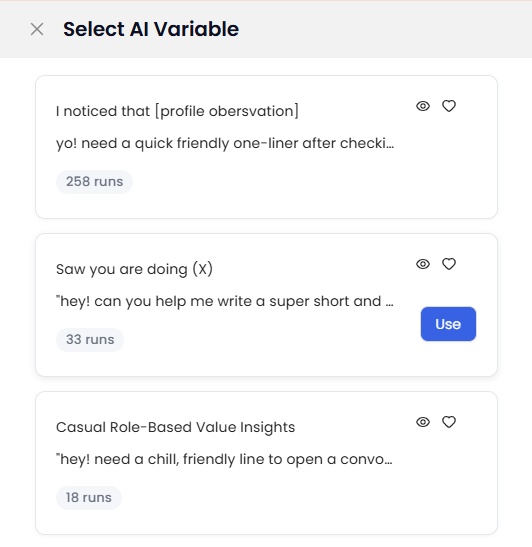
SalesRobot's AI variables read each person's LinkedIn profile, their headline, recent posts, and current role, and write a unique opening line for every prospect.
- Sending:
It runs from the cloud, so outreach keeps going even with your laptop closed.
Each account gets its own dedicated IP, and activity is spread out through the day instead of doing it in one go within a span of 1-2 hours.
The average ban rate for SalesRobot’s accounts is at 0.004%, one of the lowest in this category.
- Replies:
The AI Appointment Setter handles all prospect replies coming in, it has two modes: the Autopilot mode responds to objections and books meetings on your calendar directly and the Copilot mode drafts a reply and waits for your approval first.
- For agencies: Multi-account management and white-label come built in, so clients see their own campaigns and never see SalesRobot itself.
[Try SalesRobot Free for 14 Days→]
Which Setup Fits Where You're At
If you're a solo founder or a small sales team, a single tool that covers sourcing, personalization, sending, and replies gets you moving faster than assembling a stack, and it's a lot less to maintain.
If you're an agency running outbound for multiple clients, the same four-stage workflow still applies, you're just running it across more accounts. Look for multi-account management and white-label options before you look at anything else.
If you're already running a Clay-heavy stack with a CRM that touches several other tools, a hybrid approach makes sense. Keep the enrichment layer you've built, and use a dedicated LinkedIn platform for the sending and account-safety piece specifically, since that's usually the part general-purpose stacks handle the worst.
FAQ
How long before an AI outbound workflow starts producing meetings?
Most accounts need 2–3 weeks to build up enough sent volume for acceptance and reply rate to be statistically meaningful. If a campaign is under 100 sends, the numbers aren't telling you anything yet — don't touch the message or the list until you're past that.
What's the minimum list size worth automating?
Under 200 prospects, manual outreach is usually faster than setting up a workflow. The automation pays off once you're running the same four stages across 500+ leads a month or across multiple accounts.
What tools do I need for AI LinkedIn outreach?
Fewer than most people assume. A single platform that handles sourcing, personalization, sending, and replies covers most use cases. You only need to add enrichment or orchestration tools separately once you're operating at a scale or complexity a single tool can't handle.
Why do outbound workflows stop working over time?
Usually because something upstream quietly broke. A targeting filter drifts, a personalization input goes stale, or the message stops matching what the list actually looks like now versus when you built it. Check acceptance rate first, then reply rate, before you touch the copy.
Is LinkedIn automation safe in 2026?
Yes, if it's built correctly. Cloud-based execution with a dedicated IP per account and randomized activity patterns keeps ban risk low. Browser-extension tools that log in from your laptop are the ones that tend to get flagged.

Wow your leads by cloning yourself and sending personalized videos and voice notes to each lead on LinkedIn.
If you don't reply to leads within 5 mins, your chances of converting them fall by 50%. Our AI replies on your behalf instantly! (and yes, you can train it)

Don't shoot in the dark. Get detailed analytics on what's working

SalesRobot allows you to invite other team members, so that they can add their LinkedIn Account, run outreach campaigns and get amazing results just like you.
.avif)


Trusted by 4100+ innovative B2B sales teams and lead gen agencies

.avif)

.avif)




.avif)


Heading 1
Heading 2
Heading 3
Heading 4
Heading 5
Heading 6
Lorem ipsum dolor sit amet, consectetur adipiscing elit, sed do eiusmod tempor incididunt ut labore et dolore magna aliqua. Ut enim ad minim veniam, quis nostrud exercitation ullamco laboris nisi ut aliquip ex ea commodo consequat. Duis aute irure dolor in reprehenderit in voluptate velit esse cillum dolore eu fugiat nulla pariatur.
Block quote
Ordered list
- Item 1
- Item 2
- Item 3
Unordered list
- Item A
- Item B
- Item C
Bold text
Emphasis

Superscript
Subscript