.avif)
TL;DR:
Zapier connects apps and automates workflows (no coding). Zapier + LinkedIn automates: Lead Gen form responses to CRM, LinkedIn Ads tracking, team notifications, email marketing, and retargeting via Matched Audiences.
Limitation: Can't handle personalized LinkedIn outreach to cold prospects.
SalesRobot Solution: Automates LinkedIn outreach + email sequences with AI personalization, auto-follows up until meetings booked, integrates with Zapier via webhooks + direct CRM connections (HubSpot, Salesforce, Pipedrive, Zoho).
In short: Zapier captures leads → SalesRobot nurtures them with personalized outreach (14-day free trial)
This blog is for you if…
You're in B2B sales and still not using LinkedIn for prospecting?
Can we talk for a sec?
You're making life way harder for yourself, and giving your competitors a head start.

Hey, I don't wanna come off as dramatic.
But building your brand and finding new prospects on LinkedIn has become a must for any company aiming to grow. In fact, 89% of B2B marketers use LinkedIn for lead generation, it's 277% more effective than Facebook and Twitter for lead generation (HubSpot).
And trying to keep up with everything on LinkedIn manually?
That's just exhausting.
Which is why tools like Zapier exist.
And with the Zapier LinkedIn integration, you can create smart, automated workflows so you can get more done with less effort.
Oh, and just between us?
There's an even better way to handle leads and outreach without lifting a finger.
Stick around, and I'll spill all the deets. 😉
Zapier LinkedIn Integration In a Nutshell
Too busy for the Zapier deep-dive? Here's a snack-sized version:
💥Zapier is an automation platform that connects multiple apps, letting you create workflows, so your tools work together without manual effort.
💥Zapier + LinkedIn = amazing automation. You can create workflows (called Zaps) to move leads, trigger emails, and a lot more, without clicking around all day.
💥Integration of Zapier and LinkedIn will allow you to send the leads generated via LinkedIn Lead Gen forms directly to your CRM. Automatically.
💥Zapier automation has its limits, though; it can't handle personalized outreach. That's where SalesRobot comes in!
💥Adding a Zapier integration on SalesRobot allows you to do all of the above, and also helps you nurture your leads, book meetings, and send personalized messages.
What is Zapier?

Imagine if you had to work with a bunch of apps every day.
Like Gmail, Slack, or Google Sheets, and you had to keep doing the same tasks over and over.
Copying this from here, pasting it there, and doing it repeatedly.
Nobody loves it, unless..

Now, what if someone behind the scenes connected these apps and did the work for you automatically?
In Zapier, a workflow is created by creating "Zaps."
A Zap is a set of instructions: When this happens in one app, do that in another.
For example:
- When I get a new email with an attachment (Gmail), I save it to Google Drive.
- When someone fills out my form (Typeform), send me a message in Slack.
It's super simple because you don't need to know any coding to be able to do this.
You just pick the apps, tell Zapier what you want to happen, and it takes care of the rest.
How does it work?
Zapier works by connecting your apps and automating tasks between them, so you don't have to do things manually.
Here's how this process works step-by-step:
- Create a new zap: Head to your Zapier dashboard and click "Make a Zap."
- Pick a trigger app: Choose the app that you want your workflow to start with. For example, if you want your CRM to kick things off, select that as your trigger.
- Pick a trigger event: This is the event that starts everything. For example, "A new contact gets added to my CRM."
- Pick an action app: Now, choose the app where the action will take place. For instance, if you want to log the contact details in a spreadsheet, go for Google Sheets.
- Set the action event: Tell Zapier what you want to happen in the action app. Maybe it's creating a new row in your Google Sheet with all the contact info.
But remember to give it a test run to make sure everything's working right.
Zapier will simulate the trigger and action to make sure it all flows smoothly.
And if the test goes well, turn on your Zap; it'll run automatically, doing the work for you every time the trigger happens.
See how simple that was?
What is Zapier LinkedIn integration?
LinkedIn doesn't offer built-in automation for its tasks.
Zapier is a no-code tool that lets you automate tasks across multiple apps and services, without needing any coding skills.

Setting up a Zap requires picking a trigger that sets off an action, transferring data between apps directly.
Let's take Lead Gen forms as an example.
In this Zap, the trigger would be when someone fills out your Lead Gen form, and the action would be automatically adding that lead to your CRM.
Zapier acts as the connector, moving prospect information between your LinkedIn ads and CRM, sending thank you emails, and more.
All automatically.
When integrated with LinkedIn, it also helps with:
- Conversion Tracking.
- LinkedIn Ads.
- Lead Gen Forms.
- Matched Audiences.
- Pages.
- Webhooks (for custom use cases).
By now, you should have a good understanding of how Zapier works. Let's take a look at what you can use it for:
LinkedIn automation
Even though LinkedIn Ads automation is one of the main features of the Zapier LinkedIn integration, it's not the only thing that you can do.
You can also automate sharing RSS items as company updates on LinkedIn.

And it doesn't stop there;
You can set up similar Zaps to share posts from other social platforms, like:

On the topic of keeping your LinkedIn profile fresh, you can even automate posting new job openings to attract top talent.
Here are a couple of Zaps to help you out: 😉:

Zapier also helps you automate your email marketing campaigns, blog posts, and even posts on X (formerly Twitter).
Basically, putting your social sharing and marketing on autopilot.
LinkedIn Conversions automation
If you're a sales professional using LinkedIn as a lead gen channel in your cold outreach strategy, LinkedIn Conversions is a must-have tool.
If you're wondering why,
Because it helps you track how well your LinkedIn is working to attract potential long-term customers.
You can also do that if you want to have records of your prospect's behavior patterns.
For example, new product signups from your website, CRM, or database, can be sent directly to LinkedIn.
Here are a couple of Zaps you'll need to connect form submissions from your CRM to LinkedIn Conversions:
And when it comes to LinkedIn Ads, you can set up a Zap to send a conversion event whenever someone interacts with your personalized ad.
This way, you can track the impact of your ad campaigns easily.
LinkedIn Ads automation
If you have the right workflow, LinkedIn Ads can generate high-quality leads for you.
On autopilot.
But you need to set up your LinkedIn Lead Gen forms first. 😄.

We've got a lot of area to cover here, so let's take this step-by-step:
- Notify your sales team:
You can set up a Zap that notifies your team every time a new lead gets captured. It sends notifications directly to your preferred team chat app.
Here are some options:
- Automate prospect data transfer to your CRM:
Keeping your prospect data in one place is crucial. Your CRM becomes your single source of truth.
Here are some Zaps to transfer your prospect data from LinkedIn Lead Gen Forms to your CRM:
- Connect LinkedIn Ads to webhooks:
While Zapier integrates with thousands of popular apps, you might still face issues. Sometimes you can't find what you're looking for.
This is where webhooks by Zapier come in handy.
Webhooks let you integrate LinkedIn Lead Gen form responses with apps that Zapier doesn't support by default.
You can:
- Send Lead Gen form responses to webhooks.
- Make custom webhooks requests for new Lead Gen form responses.
- Add leads to marketing campaigns:
If you've been nurturing leads for a while, you know this truth. Engaging them through multiple channels is essential.
When you're running LinkedIn ads and want to follow up with leads through cold email campaigns, you don't want to add them manually.
Use these Zaps to automate the process:
- Send emails with Gmail.
- Add new leads as subscribers on MailChimp.
- Add new leads as subscribers on AWeber.
- Automate prospect retargeting with Matched Audiences:
LinkedIn Matched Audiences work well when you depend on LinkedIn ads. They help you retarget leads who visit your website.
You can also target leads based on their email and account information.
You can use these Zaps to bring leads from your CRMs:
- Salesforce to LinkedIn Matched Audiences segment.
- Pipedrive to LinkedIn Matched Audiences segment.
- Hubspot to LinkedIn Matched Audiences segment.
Let's say a new customer buys something on your eCommerce platform.
Obviously, you're not going to stop there.
You need to retarget them with automated emails. This encourages them to return and buy more.
Retarget customers to incentivize returning to your store with automated emails:
- Add Shopify customers to a LinkedIn Matched Audiences segment.
- Add PayPal customers to a LinkedIn Matched Audiences segment.
- Add Stripe customers to a LinkedIn Matched Audiences segment.
Your event and webinar attendees are already qualified leads. Add them to your LinkedIn Matched Audiences segment with these Zaps:
LinkedIn link preview issues and fixes
When sharing LinkedIn posts through Zapier automation, you might encounter LinkedIn link preview not working issues.
This commonly happens when the shared URL doesn't have proper meta tags or when LinkedIn's cache needs refreshing. To fix LinkedIn link preview problems, use LinkedIn's Post Inspector tool to debug and refresh the preview, or ensure your content has proper Open Graph meta tags before automating the sharing process through Zapier.
These Zap templates are ready for you to use with the Zapier LinkedIn integration.
But there's still one important piece missing from your marketing strategy:
There's no reliable outreach solution with the Zapier LinkedIn integration.
Granted, you can automate thank-you emails to reengage prospects.
But that works only if they first show interest in your product and business solutions.
What about those potential leads who haven't even heard of you yet?
By not reaching out to them first, you're hurting your lead gen significantly.
How do you solve it?
Using an automation tool that:
- Generates leads
- Nurtures them until they convert into paying customers
- Follows up until they do
- Stores prospect data in your CRM.
Of course, on autopilot.
It may sound unreal right now..
But please allow me to introduce you to SalesRobot.
Reach out to your dream leads on LinkedIn + send interested ones to Zapier using 1 tool: SalesRobot

SalesRobot is a tool that helps you engage with potential customers through various channels like LinkedIn and email.
On the LinkedIn side, SalesRobot helps you pull bulk prospects from LinkedIn or Sales Navigator search URLs, customize your outreach messages, and automatically follow up until you get a response. Additionally, the platform offers AI-powered message optimization to ensure higher engagement and response rates.
Here's the step-by-step process on how you can integrate Zapier with LinkedIn using SalesRobot


Let's take the LinkedIn-only campaign for example.

- Choose the "Add from LinkedIn search" option.

- Copy your LinkedIn search URL.

- And paste it here in SalesRobot.

- Now, you just have to configure a few settings and click on "save".

- You'll get multiple options on how to create a sequence. Let's take it "From scratch".
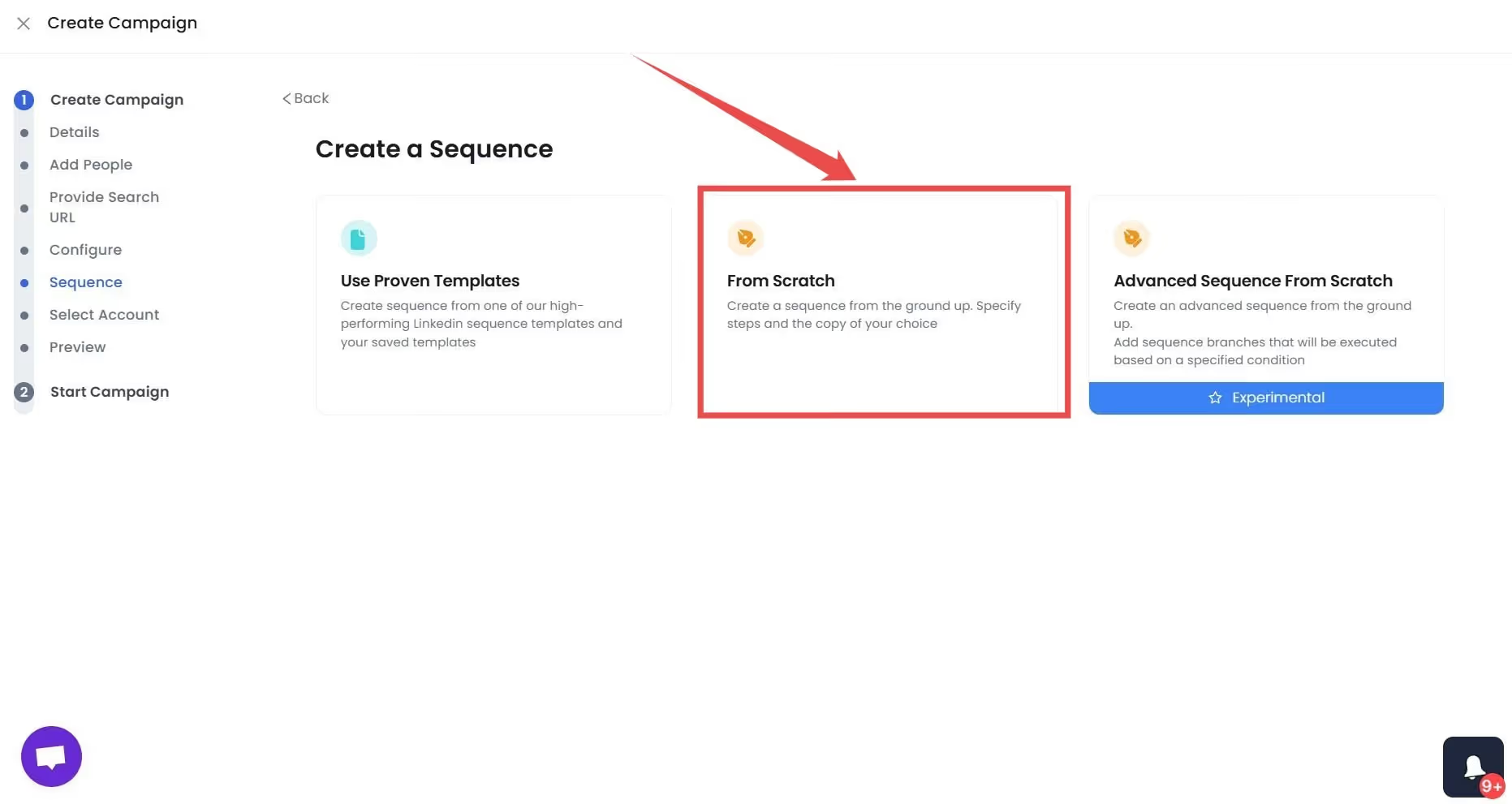
- Add steps to your message sequence, like if you want to send connection requests to your target prospects, select:
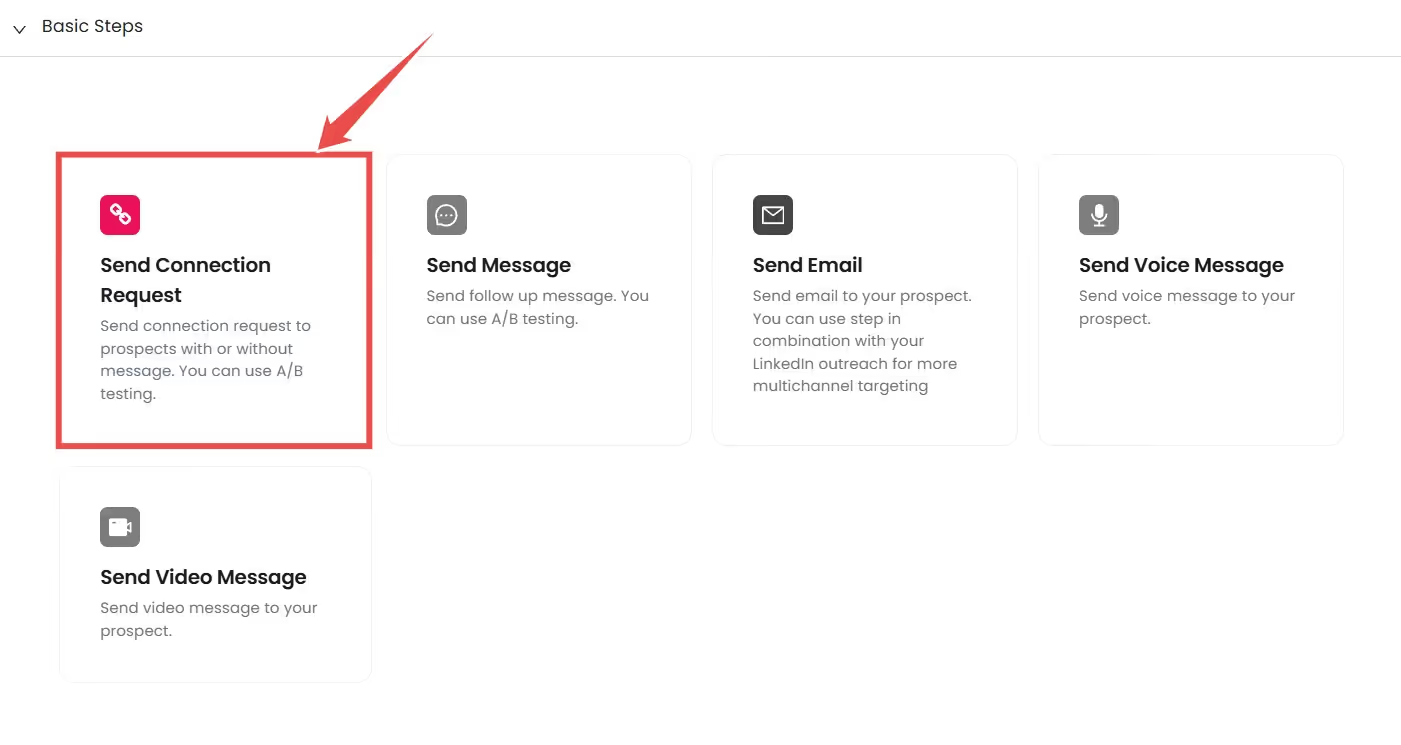
- Then you can write a personalized message tailored for your prospects, or you can steal our pre-written hyper-personalized connection request templates.🤫

Now, here's something I find magical: Right on this page, just click the AI variables button, pick a pre-made message prompt, and you'll save yourself a TON of time.

How, you ask? Because you've just passed the baton to AI. It checks your prospect's profile and sends messages that feel genuinely personal. Moreover, SalesRobot's AI features help you craft high-converting LinkedIn messages and emails automatically.

Then it keeps the conversation going with our AI Inbox Manager until you land that meeting. That's why I call it magic ✨.
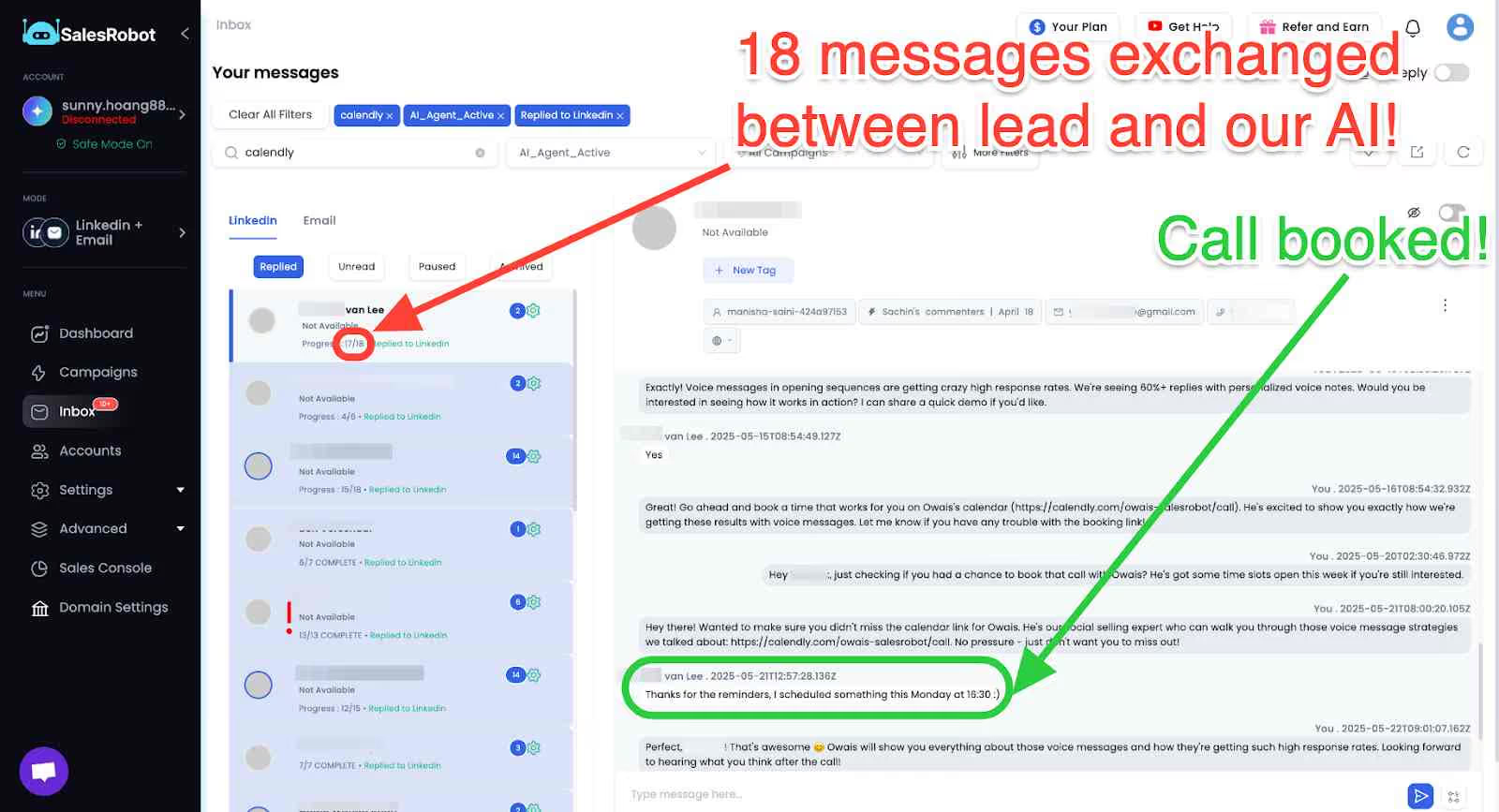
- Now you can select what steps you want to add to your sequence.

This is just a suggestion, but I believe adding a voice or video message to your sequence will boost your chances of getting replies. These personalized messages get significantly higher response rates than text alone.

We're almost there! Don't give up.
- Now, to integrate Zapier with LinkedIn, go to the "Integrations" page and click on "Webhooks".

- Select "Add new Webhook" and select a trigger from the dropdown.

- And just give a name to your Zapier LinkedIn integration, and done!

Phew!
So, that's how you can integrate Zapier with your LinkedIn using SalesRobot. Whenever a contact replies from your campaign, SalesRobot will automatically trigger the Zapier workflow you set up.
Now, let's compare SalesRobot with Zapier.
SalesRobot can work seamlessly with direct integrations to popular CRM platforms like Zoho, HubSpot, Salesforce, and Pipedrive.

If you want to integrate other apps, SalesRobot has you covered with webhooks.
You can connect your preferred applications, including Zapier, to SalesRobot using webhooks for even greater flexibility. Additionally, SalesRobot's AI optimization supports A/B testing to help you determine which messages perform best.

So, this was just a glimpse of what SalesRobot can do.
If you agree, then why don't you go ahead and give SalesRobot a try with our free trial for 14 days?
We only need your email to start!
GoHighLevel LinkedIn Integration
While Zapier offers extensive LinkedIn integration options, GoHighLevel LinkedIn integration provides another pathway for agencies and marketers.
Though GoHighLevel doesn't have direct LinkedIn connectivity like Zapier, you can connect the two platforms using webhook integrations or through Zapier as a middle layer, allowing you to sync LinkedIn leads with GoHighLevel's CRM and marketing automation features.
FAQ
What is LinkedIn link preview and why isn't it working?
LinkedIn link preview is a feature that automatically generates a preview card when you share a URL, showing the page's title, description, and image. When LinkedIn link preview isn't working, it's usually due to missing or incorrect meta tags, caching issues, or LinkedIn's crawler being unable to access your page. Y
ou can fix this using LinkedIn's Post Inspector tool to refresh the cache and ensure your page has proper Open Graph tags.
How does Zapier LinkedIn integration work?
Zapier LinkedIn integration works by connecting LinkedIn with other apps through automated workflows called Zaps. When a trigger event occurs in LinkedIn (like a new Lead Gen form submission), Zapier automatically performs actions in connected apps (like adding the lead to your CRM).
This eliminates manual data entry and ensures seamless lead management across your sales stack.
Can I integrate GoHighLevel with LinkedIn?
While GoHighLevel doesn't have native LinkedIn integration, you can connect the platforms using webhooks or Zapier as an intermediary.
This allows you to sync LinkedIn leads with GoHighLevel's CRM and trigger automated marketing sequences based on LinkedIn activities.
See ya!

Wow your leads by cloning yourself and sending personalized videos and voice notes to each lead on LinkedIn.
If you don't reply to leads within 5 mins, your chances of converting them fall by 50%. Our AI replies on your behalf instantly! (and yes, you can train it)

Don't shoot in the dark. Get detailed analytics on what's working

SalesRobot allows you to invite other team members, so that they can add their LinkedIn Account, run outreach campaigns and get amazing results just like you.
.avif)


Trusted by 4100+ innovative B2B sales teams and lead gen agencies

.avif)

.avif)




.avif)