.avif)
TL;DR:
89% of B2B marketers now use LinkedIn for lead generation, while businesses using all-in-one marketing platforms report 3x higher conversion rates than those juggling multiple tools.
I'm talking about a tool that integrates with LinkedIn (and other platforms) easily.
The one that lets you capture leads, nurture prospects, and more.
Sound like something you'd be interested in?
If so, I'm going to walk you through one of the fastest-growing CRM software out there: GoHighLevel.
Here's what I'll cover:
🤖First, we'll dive into what GoHighLevel is and who it's best suited for.
🤖Then, I'll walk you through some key benefits.
🤖Followed by a breakdown of the pros and cons.
🤖After that, I'll cover the pricing.
🤖How to integrate GoHighLevel with LinkedIn.
🤖And finally, whether GoHighLevel is worth it for you.
That's not all; I've dug deep into 100s of user reviews on G2, Capterra, etc., to see what other customers had to say.
I've also put together a detailed video on how to get the most out of GoHighLevel.
P.S. You'll find that somewhere in the blog, so keep an eye out!
Let's dive in!
And if you're too busy or too impatient to read all this? No worries, I've got a TL;DR for you too.
What Is GoHighLevel?
GoHighLevel, AKA HighLevel, isn't just a marketing tool; it's an all-in-one system for small business owners.
It helps you send emails, schedule appointments, and keep track of your customers all in one place.
There's no need to use a bunch of different tools; GoHighLevel brings everything together.
It lets you focus on growing your business and helping your customers.
Who Should Use GoHighLevel?
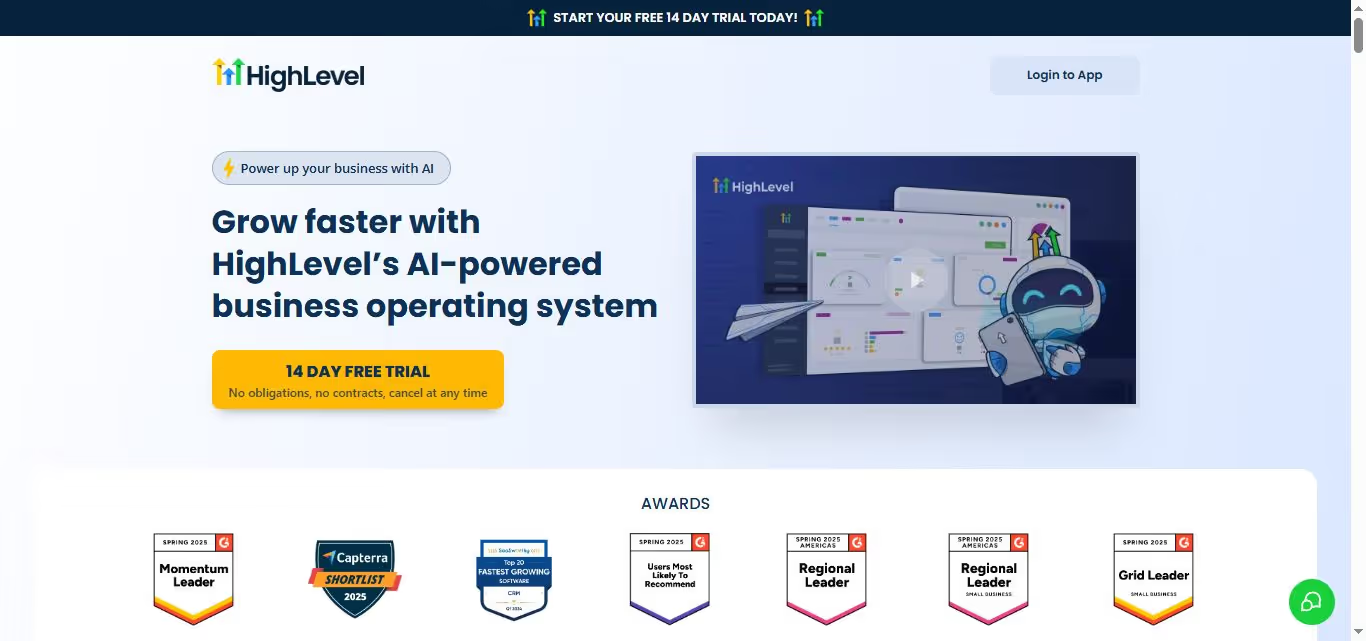
GoHighLevel is perfect for small business owners, entrepreneurs, and marketing agencies that want to simplify their work.
Even if you're not super tech-savvy, GoHighLevel is easy to use and helps you automate routine tasks (according to this user).

What Are The Benefits of GoHighLevel?
I've made a list of 6 valuable benefits that GoHighLevel provides:
🤖 All-in-One Tool
With GoHighLevel, you won't have to anymore. Manage everything from your marketing campaigns to customer tracking all in one platform.
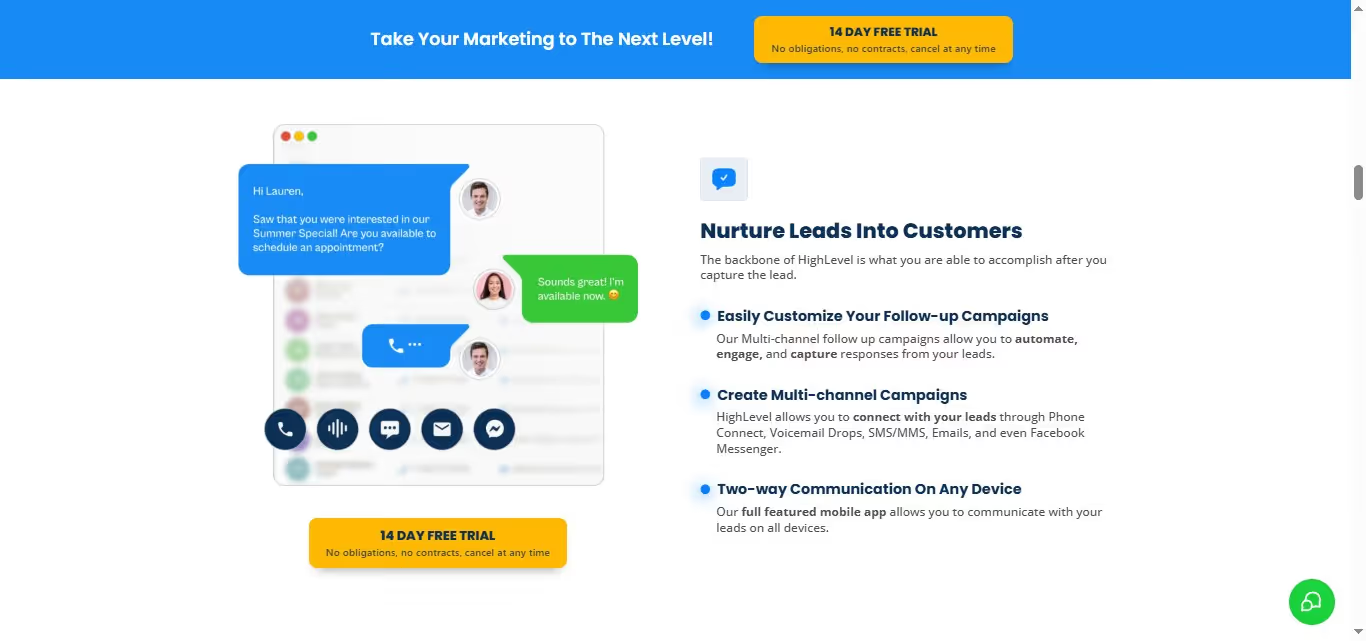
No more distractions, just more time to focus on growing your business.
🤖 Saves Money
With GoHighLevel's single plan, you unlock every feature you need no need for multiple subscriptions. This means you can cut down on costs and redirect those savings to other important areas of your business.

🤖 Easy to Use
You don't need technical skills to use HighLevel. GoHighLevel makes it easy to build funnels, emails, and websites.
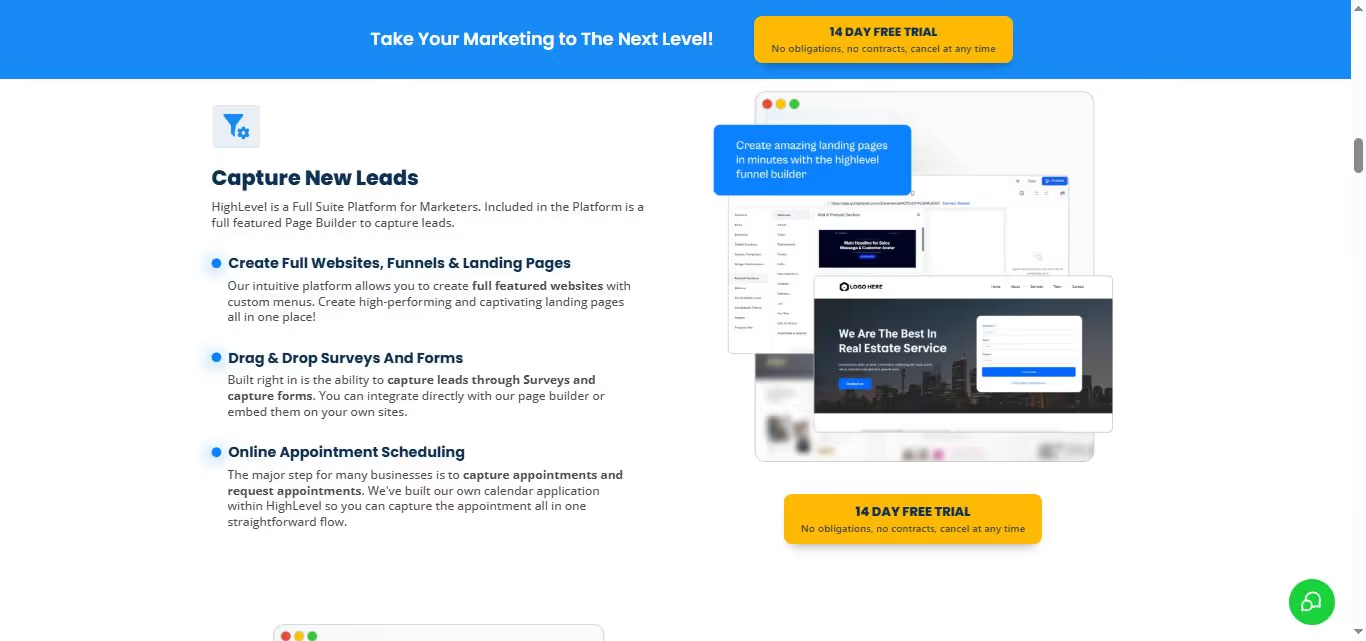
You can get started quickly, with no complicated steps or steep learning curve in your way.
🤖 Automates Tasks
Save time by letting GoHighLevel handle the routine stuff. Automate your daily tasks like follow-up emails and appointment bookings, so they run on their own.
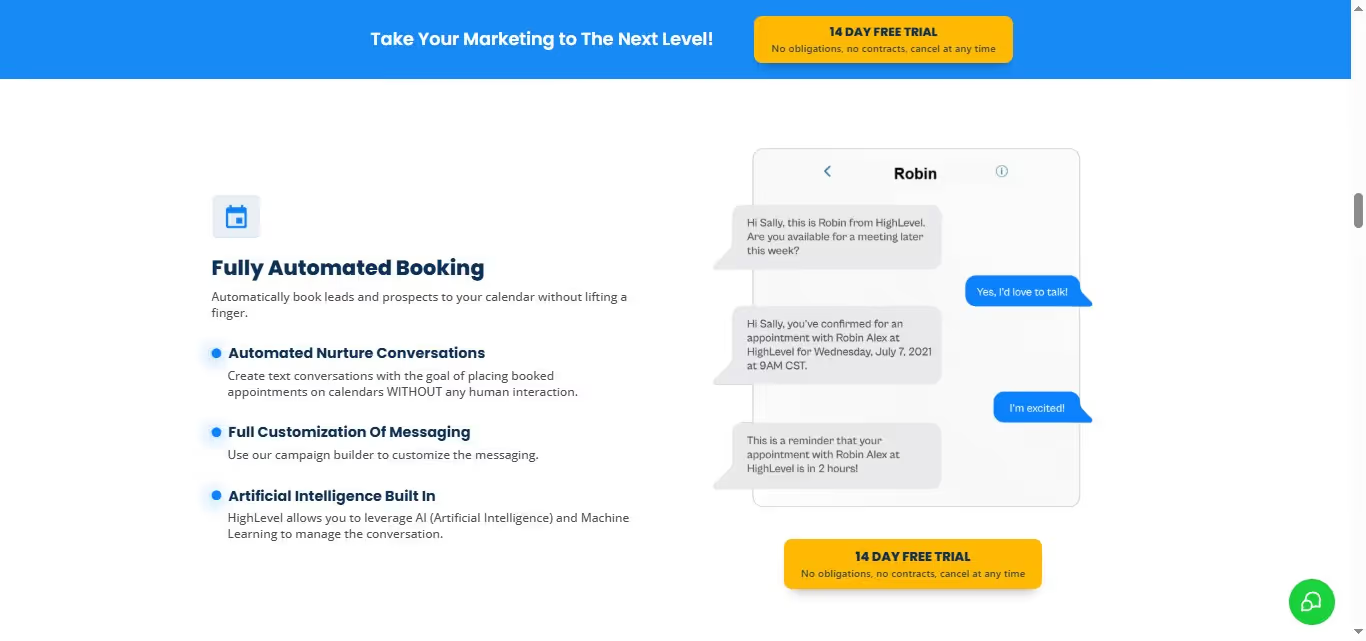
That way, you can focus on connecting with your customers.
🤖 Ready-Made Templates
Launching a campaign is super easy with GoHighLevel. Simply pick from their pre-made templates designed for various businesses, clone it, and you're good to go in just minutes. It's that quick and easy!
🤖 White Label Option
With GoHighLevel's white-label option, you can rebrand the platform and sell it as your own product. The platform lets agencies replace HighLevel branding with their logo, colors, and domain so clients think they're using your software.
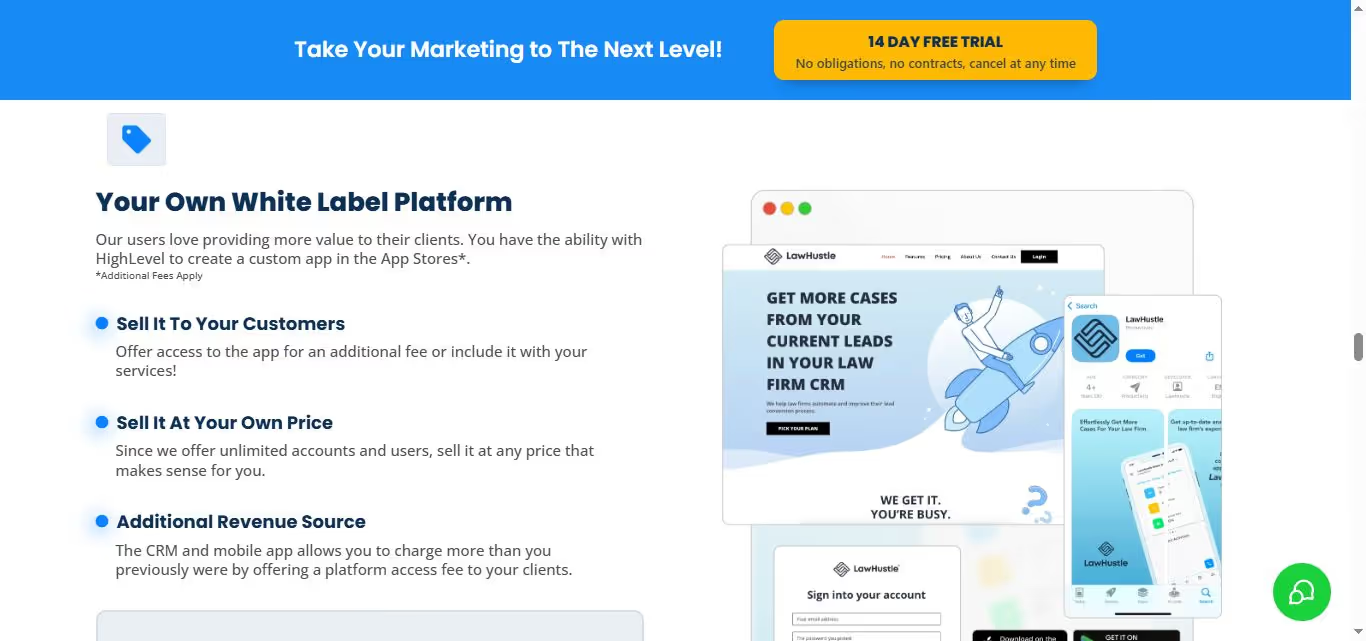
This adds serious value for your clients and helps you stand out from the competition in the market.
These benefits are awesome, but don't just take my word (or anyone else's) for it!
If you're doing outreach, consider using a LinkedIn automation tool.
I recommend SalesRobot because it has helped over 4,100 customers automate their LinkedIn and email sequences. Additionally, SalesRobot uses AI capabilities for message optimization and automated connection management to boost your success in outbound sales.
Try the 14-day trial a shot and see what you can accomplish!
To find out if GoHighLevel is really that great, I dug deep into the reviews by G2, Capterra, etc. And the verdict is out.
What Are The Pros And Cons of GoHighLevel?
Let's start with the good stuff, the pros of GoHighLevel. Then we'll get into the cons.
Here are the pros:
GoHighLevel Pros
1. Effortless Automation Workflows
With GoHighLevel, you can easily set up automated workflows to capture those inbound leads and triggers using webhooks. Get your automation in check and start reaping the rewards!

2. Easy Integrations
You can connect GoHighLevel with various tools like inventory systems, finance software, payroll programs, and more.
It helps you work smarter by bringing everything together, so you can focus on running your business instead of getting lost in a sea of separate apps!

3. Unified Inbox
What makes GoHighLevel stand out from other tools at similar prices is its unified inbox and two-way SMS feature.
Unlike many platforms that only offer one-way SMS or don't include it at all, GoHighLevel lets you actually have real conversations with your customers, making communication so much easier and more effective.

At first glance, the tools look impressive, but once you dig a little deeper, the downsides start to reveal themselves.
GoHighLevel Cons
1. Worst Customer Support in History
Thinking of contacting customer support? Brace yourself for disappointment. Many users, including this one, have faced the same issue: getting the wrong answer when they needed help the most.

It's frustrating when you're trying to resolve a problem and end up feeling even more stuck.
2. Trouble With Billing
The billing customer service is a nightmare. You could end up spending months just trying to cancel a subscription, dealing with endless back-and-forth emails, chats, and calls.

It's maddening to feel trapped in a cycle of frustration when all you want to do is stop the charges.
3. Complex Automation
One of the customers lost a major potential deal because of a bug in the automation system.
The follow-up email never went out, and by the time they caught it, the lead had already moved on.
It's tough when a glitch like that costs you business.

4. Require You To Stay Logged In
One customer found it challenging to be logged in all the time to keep an eye on leads. They were also frustrated that they couldn't use their existing phone number with their HighLevel account.

Now, that you have all the positive and negative, what do you think this should be priced at?
Let's take a guess.
- $47
- $57
- $77
- $97
And the answer is… not so soon, check the next section.
What Is GoHighLevel's Pricing?
GoHighLevel offers 2 pricing plans, making it easy for customers to choose the right option without feeling overwhelmed.
This simplicity helps you focus on what matters most—growing your business!
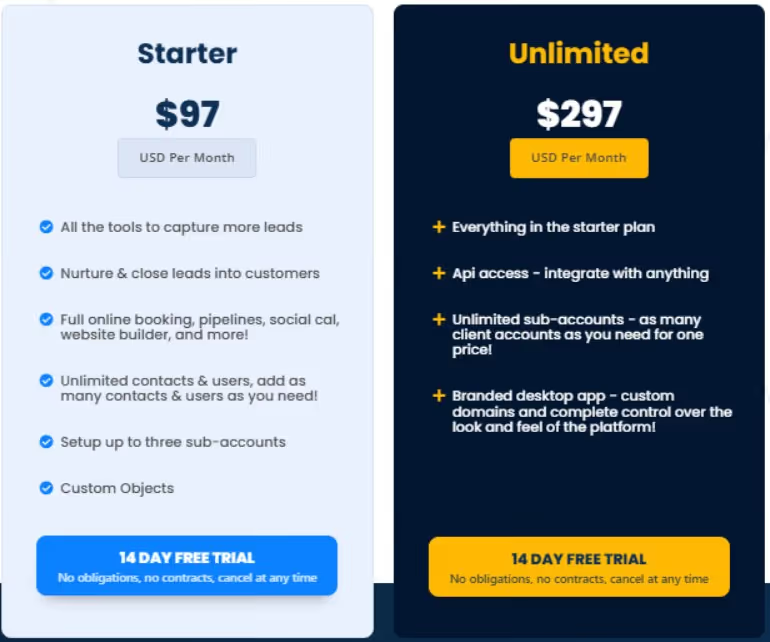
Here are the plans:
- Starter Plan — Starts at $97/mo.
What you get:
- Basic CRM functionality
- Email and SMS marketing
- Pipeline management
- Up to three sub-accounts
- Unlimited Plan — Starts at $297/mo.
What you get:
- Everything in the Starter Plan
- Unlimited sub-accounts for managing multiple clients
- API access for integrations
- Branded desktop app with custom domains
- White-label capabilities that let agencies rebrand the platform as their own
Congrats on making it this far! If you think the tool looks affordable, then there's no shame in diving deeper to see how it really works with LinkedIn.
How To Integrate GoHighLevel With LinkedIn?
Here are 3 easy ways you can integrate GoHighLevel with LinkedIn:
1. Social Planner
Step 1: Log into your sub-account and go to the Marketing section. Click on Social Planner.

Step 2: When you open Social Planner, you'll see a wizard with a connect option. If you're in the overview, look for the Settings icon (it looks like a gear).

Step 3: Click on Add LinkedIn Profile/Page(s) to add them.

Step 4: If this is your first time connecting to Social Planner, you'll need to give it permission.

Step 5: Choose the LinkedIn Profile and Page(s) you want to use in Social Planner.

Step 6: You can manage the accounts using the Settings icon.
But tbh, organic reach is down. Posting content doesn't help much until and unless you are Adam Robinson or Justin Welsh.
So, you switch to…
2. LinkedIn ads
LinkedIn remains one of the most effective channels for B2B lead generation. According to recent data, 40% of B2B marketers rate LinkedIn as the most effective channel for driving high-quality leads, with 89% of B2B marketers using the platform for lead generation and 62% saying it produces leads for them.
Step 1: Log into your GoHighLevel account.
Click on Settings and scroll down to find Integrations.

Step 2: Click on the LinkedIn icon to start connecting your account.
Choose the LinkedIn account you want to link and confirm the connection.

Step 3: Set up field mapping for your LinkedIn lead forms.
Match fields like first name, last name, and email to ensure the data goes into GoHighLevel correctly.

Step 4: Finally, set up automation based on LinkedIn interactions, such as sending SMS notifications or tagging leads when they submit forms.

But who has the money to spend money on a method that doesn't guarantee high ROI or any ROI per se?
In that case, your safest bet is…
3. LinkedIn Outreach
Step 1: Create a SalesRobot Campaign
First things first, you need to create a SalesRobot campaign.

Step 2: Identify Your Ideal Customer
Head over to LinkedIn and start searching for your dream customers.

Step 3: Enroll Leads in an Outreach Sequence
Once you've got your list, copy the LinkedIn search URL and go back to SalesRobot and paste the URL.

Step 4: Build Your Outreach Sequence
Start by sending a connection request with a friendly message like, "Hi [First Name], looking forward to connecting!" Additionally, SalesRobot's AI features help optimize your messaging for better response rates, including AI-powered subject lines and automated personalization.
Especially the AI Variables feature, which prevents you from sounding automated by writing something personalized based on your prospect's profile..
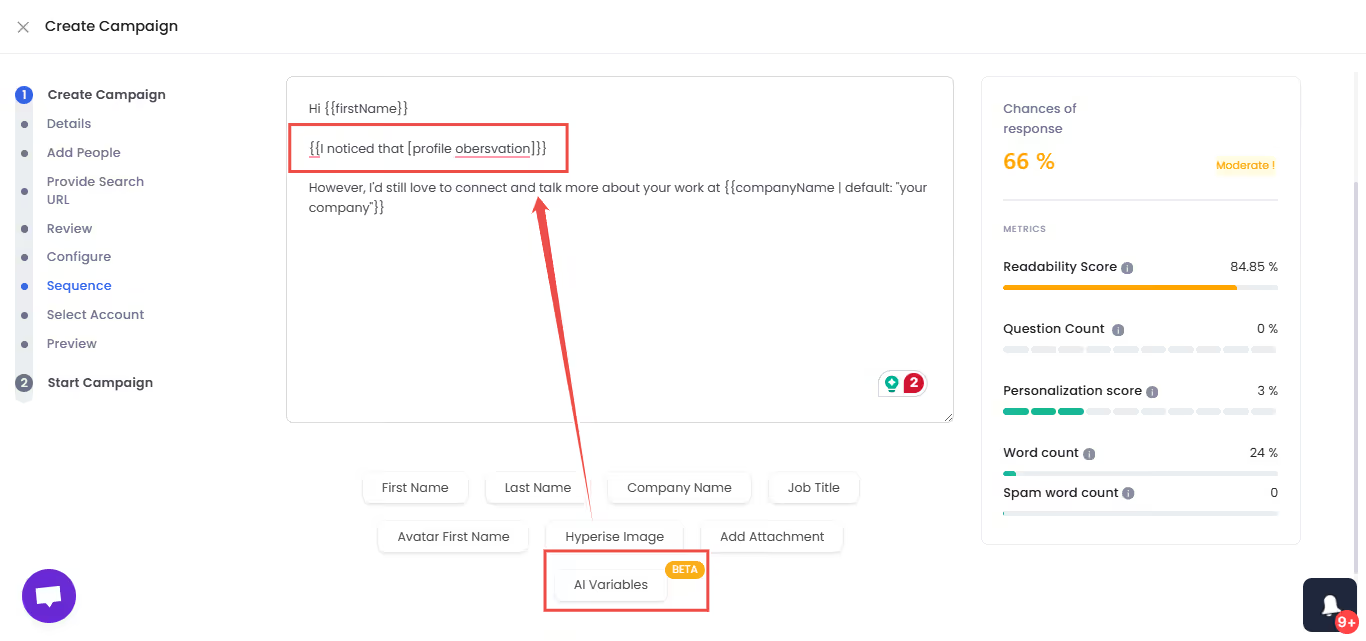
Step 5: Start the Campaign
When you're done setting everything up, save your sequence and hit the start button. Once they reply to your messages, you want to add them as leads in your GoHighLevel account.
Step 6: Set Up Integration
To link everything together, go to Integrations in SalesRobot and select "Integrate Directly"

Step 7: Click Add Integration
In SalesRobot, add a new integration and select when you want a new lead updated in GoHighLevel.
Ex: When a connection request is accepted, for all campaigns.

Step 8: Connect your GoHighLevel Account

Step 9: Select Source
Next, you need to select the source of the lead.
Do that and your CRM will soon start to populate. And that's it! You're all set up!
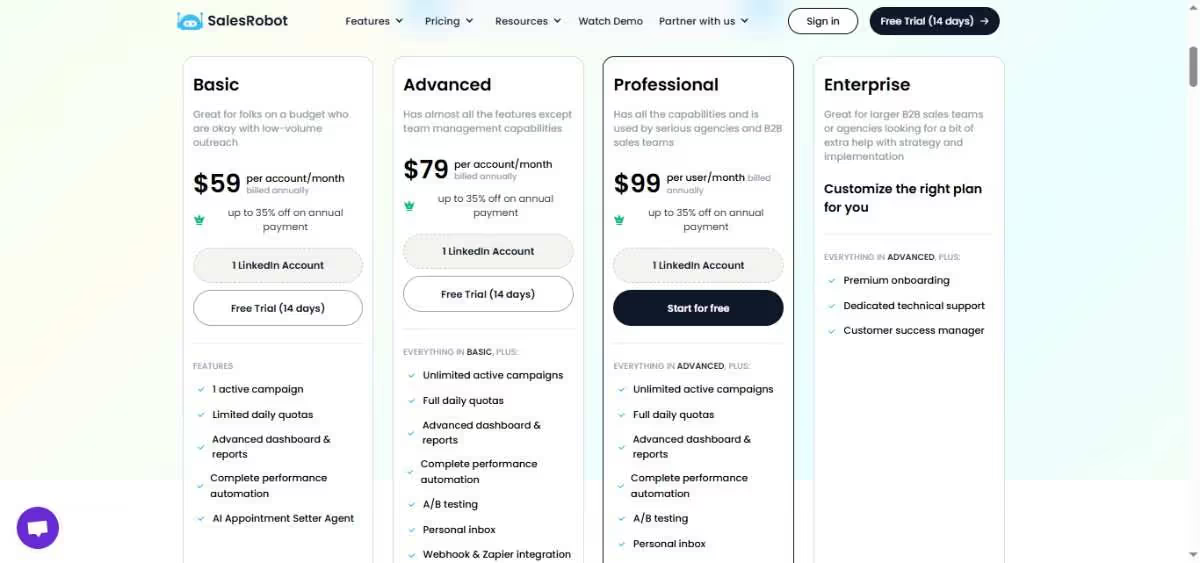
And you get all these features starting at only $59/month, AND a 35% discount if you pay annually.
Is GoHighLevel Worth It?
If you're still thinking about trying GoHighLevel? I totally get it!
It's a tool that claims to make marketing super easy by putting everything you need in one place.
It saves you money, and it's pretty simple to use, right? Moreover, its white-label option lets agencies rebrand the platform as their own, replacing GoHighLevel branding with your logo, colors and domain so clients think they're using your software.
However, dealing with customer support and billing can be a hassle. That's no fun, especially when you need help quickly.
So, is it worth it?
If you want a simple way to manage your marketing without juggling a bunch of different tools, GoHighLevel might be just what you need. Plus, with 89% of B2B marketers using LinkedIn for lead generation and 40% rating it as the most effective channel for driving high-quality leads, combining GoHighLevel with LinkedIn outreach makes strategic sense.
Why not try out the free trial and see if it works for you?
While you're at it, give SalesRobot a try!
They have customer service working 24/7 (although you'll hardly need it). Here's the proof:

Plus it works wonders alongside GoHighLevel and can help you get even more leads. Moreover, SalesRobot's smart automation handles routine sales interactions with minimal human intervention (yes, it actually responds to prospects on your behalf), while AI-powered features like AI Variables, Voice, and Video notes help optimize your LinkedIn and email sequences for better results.
Take 14 day free trial and see how it all works for you.
Disclaimer: The content of this blog post reflects our own opinions and judgements based on our research and experience as of published date. Comparisons made to other software or tools are for informational purposes only and are based on publicly available information and our own analysis. We don't claim absolute accuracy and encourage readers to conduct their own research to form their own opinions. While we may discuss competitor offerings, our primary focus is to showcase the features and benefits of SalesRobot. SalesRobot isn't affiliated with any other software or tool mentioned in this blog post.

Wow your leads by cloning yourself and sending personalized videos and voice notes to each lead on LinkedIn.
If you don't reply to leads within 5 mins, your chances of converting them fall by 50%. Our AI replies on your behalf instantly! (and yes, you can train it)

Don't shoot in the dark. Get detailed analytics on what's working

SalesRobot allows you to invite other team members, so that they can add their LinkedIn Account, run outreach campaigns and get amazing results just like you.
.avif)


Trusted by 4100+ innovative B2B sales teams and lead gen agencies

.avif)

.avif)




.avif)


Heading 1
Heading 2
Heading 3
Heading 4
Heading 5
Heading 6
Lorem ipsum dolor sit amet, consectetur adipiscing elit, sed do eiusmod tempor incididunt ut labore et dolore magna aliqua. Ut enim ad minim veniam, quis nostrud exercitation ullamco laboris nisi ut aliquip ex ea commodo consequat. Duis aute irure dolor in reprehenderit in voluptate velit esse cillum dolore eu fugiat nulla pariatur.
Block quote
Ordered list
- Item 1
- Item 2
- Item 3
Unordered list
- Item A
- Item B
- Item C
Bold text
Emphasis

Superscript
Subscript















.avif)