.avif)

Are you tired of HeyReach? You're not alone!
Many agencies and sales teams are looking for new LinkedIn automation tools.
Most HeyReach alternatives promise amazing results but end up disappointing you.
Lately, HeyReach has been letting its users down with issues like:
- Customer support response times of 1-2 days.
- Trouble connecting LinkedIn accounts.
- Too complex for beginners.
- Buggy overall performance
With all these problems, customers wonder if there's a better option.
There is!
In this blog, I'll share the top 4 HeyReach alternatives that could transform your LinkedIn outreach game:
- SalesRobot
- Dux Soup
- Phantombuster
- Dripify
We compared the tools based on key factors like
- Safety,
- Personalization,
- LinkedIn limit bypass,
- Real-time analytics,
- Ease of use, pricing,
- White-label options,
- and more.
If you're short on time, check out the comparison table.
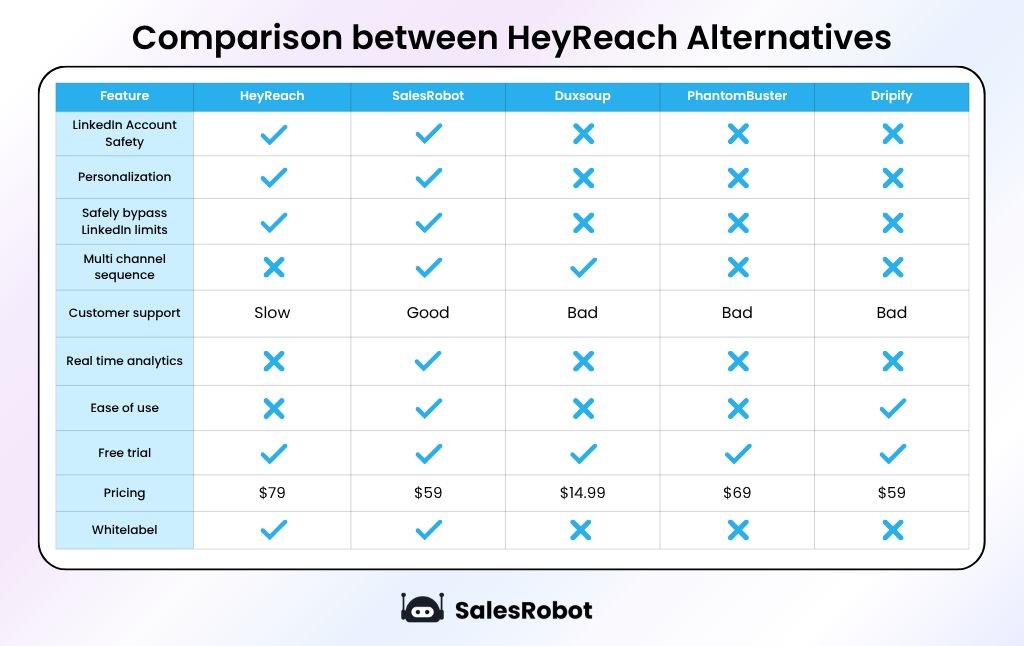
Each tool has its own strengths, which makes it hard to pick the best one.
But don't worry, we'll help you choose the perfect tool for your needs.
Here's what I'll be covering in this blog:
🆕 New to HeyReach? We'll give you the lowdown.
🧐 Wondering if HeyReach is right for you? We'll break it down.
🤔 Curious about HeyReach's features and pricing? We've got you covered.
🚫 Already using HeyReach? Discover the top 6 user issues.
🧰 Thinking of switching from HeyReach? We've rounded up the top 3 alternatives for you to explore.
Missing out on any of these alternatives means missing out on potential growth and efficiency for your business.
Stick with me, and let's find the perfect HeyReach alternatives together.
What is HeyReach?

HeyReach is a LinkedIn automation tool that makes it easy to find and connect with potential clients on LinkedIn.
Here's what HeyReach is best at:
- Helps you connect multiple accounts to the same campaign to scale your outreach.
- Helps users to reach out to decision-makers via LinkedIn on autopilot.
- Helps keep track of your leads by integrating your favorite CRM.
- Helps you create complex outreach sequences.
So far, the tool looks cool, right?
Well, then, let's find out if you should be using HeyReach or not.
Who should use HeyReach?
HeyReach is designed to tackle LinkedIn limits by using multiple accounts in one campaign.
This tool is not meant for individuals but for agencies and bigger sales teams because it requires managing several LinkedIn accounts to be effective.
And if you have a small team of 5 users, you might need to buy fake LinkedIn accounts to scale LinkedIn outreach.
What is HeyReach used for?
HeyReach lets you send unlimited connection requests and messages from multiple synchronized accounts.
Here are its top 4 features:
- Use Multiple Accounts in One Campaign
Connect as many accounts as you want to a single campaign and scale your outreach.
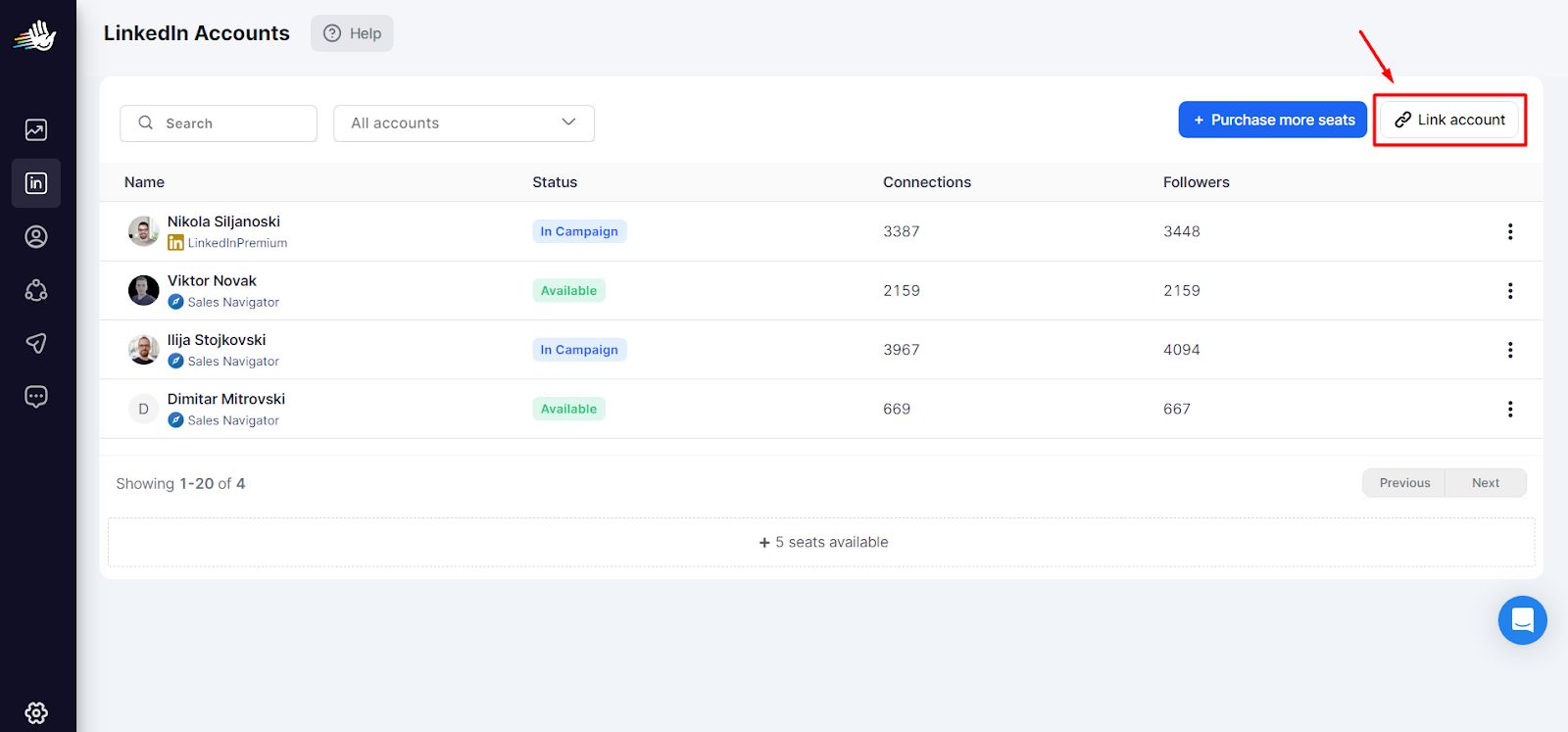
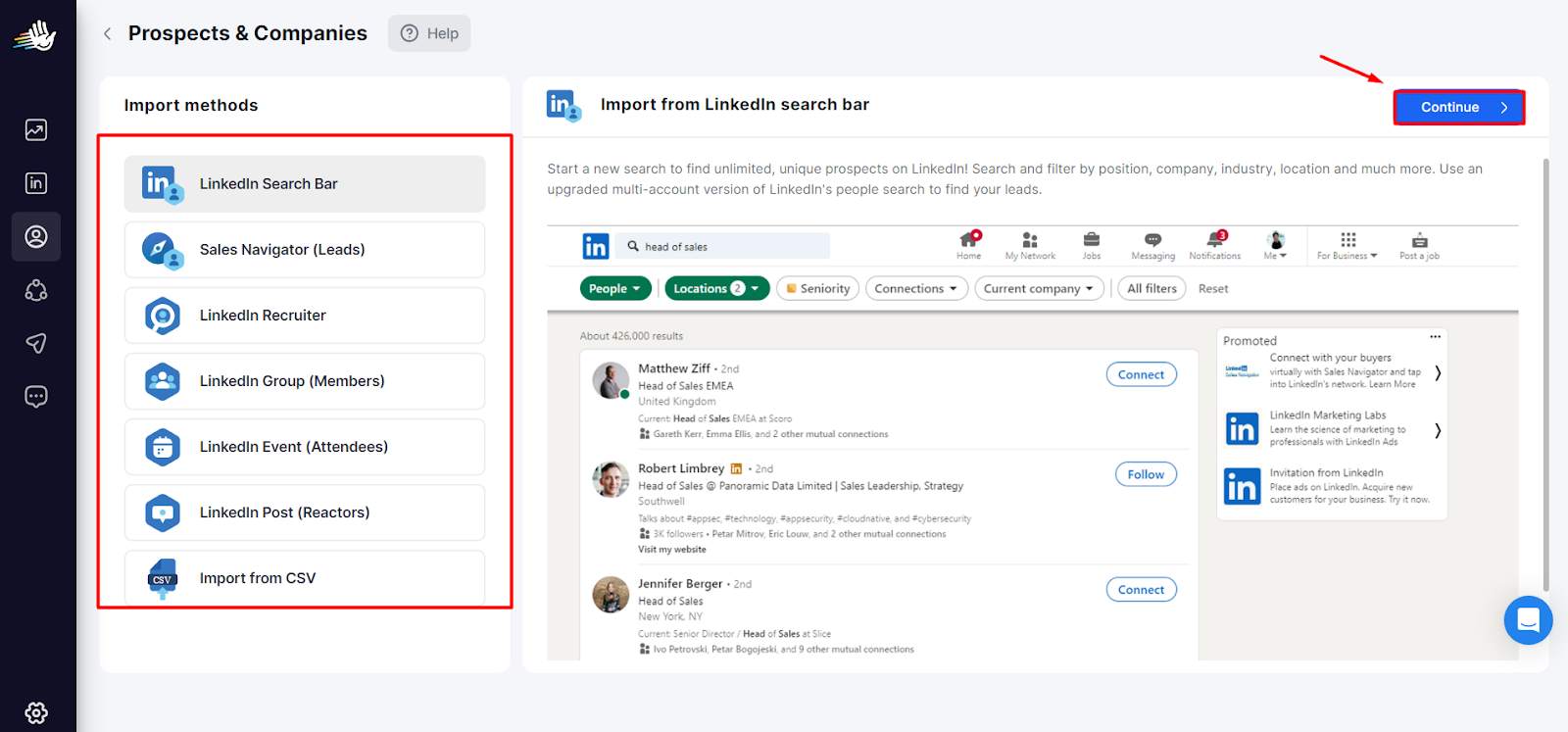
- Find, Extract, and Clean Data
The tool extracts data from LinkedIn URLs and ensures you get only clean and relevant data (not sure if they are enriched with verified email and phone numbers.)
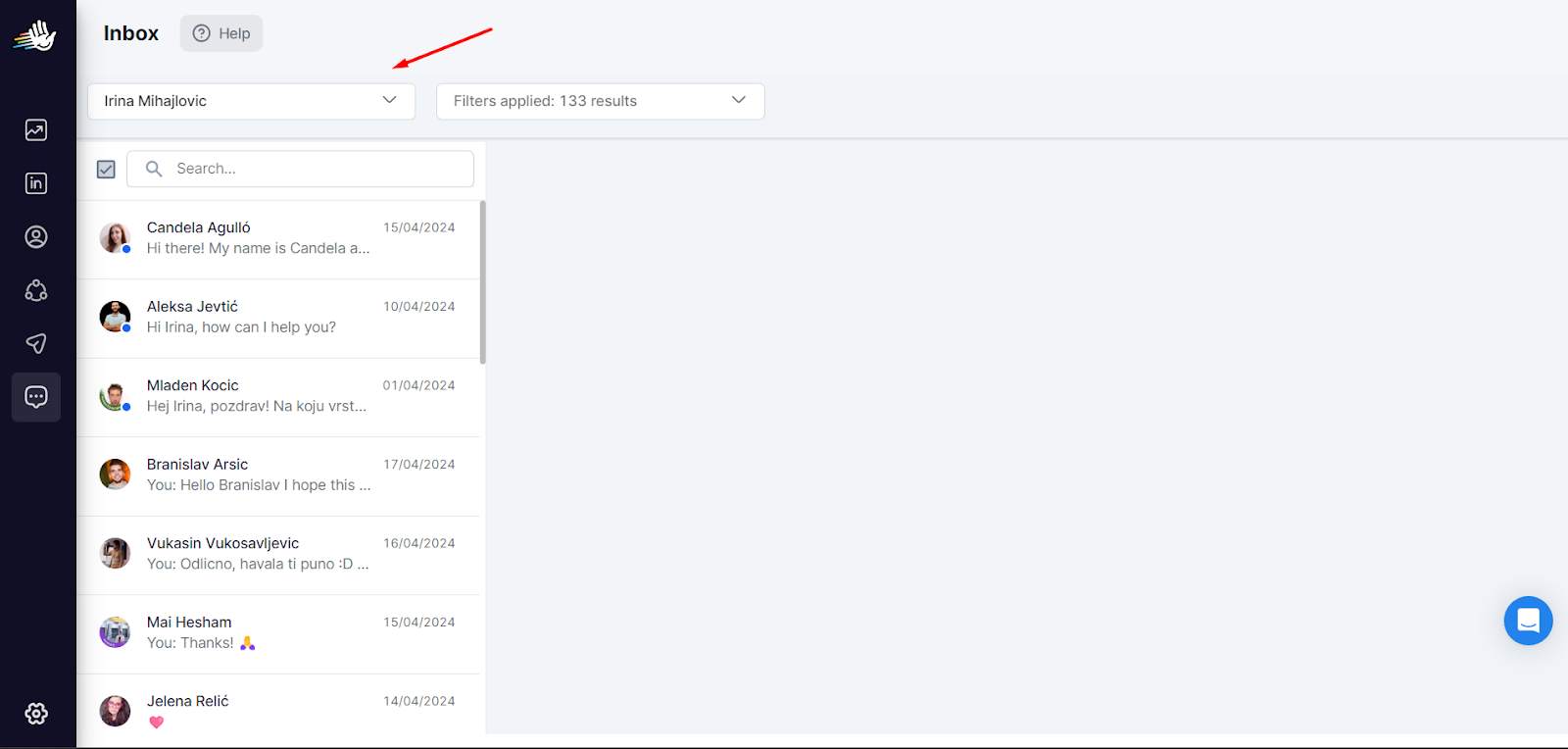
- Unified Inbox
You can manage all conversations for multiple LinkedIn accounts in one inbox. This makes it easier to keep track of potential prospects.
- Native CRM Integrations
You can sync all your prospect data with your CRM in one click. No need to export/import CSVs.

It has tons of other features to use. But the burning question is….
How much does HeyReach cost?
HeyReach has 3 pricing options. Pick what suits you best.
- Starter Plan: $79/month per LinkedIn account.
Ideal for individuals or small sales teams.
Features:
Export leads, Unified inbox, API, and Webhook integration.
And if you have 10+ LinkedIn accounts, you will be charged $59/mo/account.
All features included, and a 14-day free trial.
- Agency Plan: $999/month for up to 50 accounts.
Ideal for agencies with two plans to choose from for business scalability.
It includes everything in the Starter plan, and premium support, as well as bring your proxies.
- Unlimited Plan: $1999/month for unlimited accounts
Everything in the Agency plan. Plus you get extra whitelabel branding and it includes a dedicated account manager.

The tool is priced fairly and has some good features, but it lags behind in the real world.
And it's not me saying this, but HeyReach customers have said so.
Find out what users are saying about it in the next section.
Why should you be looking for a HeyReach alternative?
Here are the top 6 reasons to look for a HeyReach alternative:
1. Slow customer support response times
Customer support takes 1-2 days to respond!
If you have a question, get ready for long waits for answers.
Who knows how many potential customers you'll lose while you're stuck waiting.
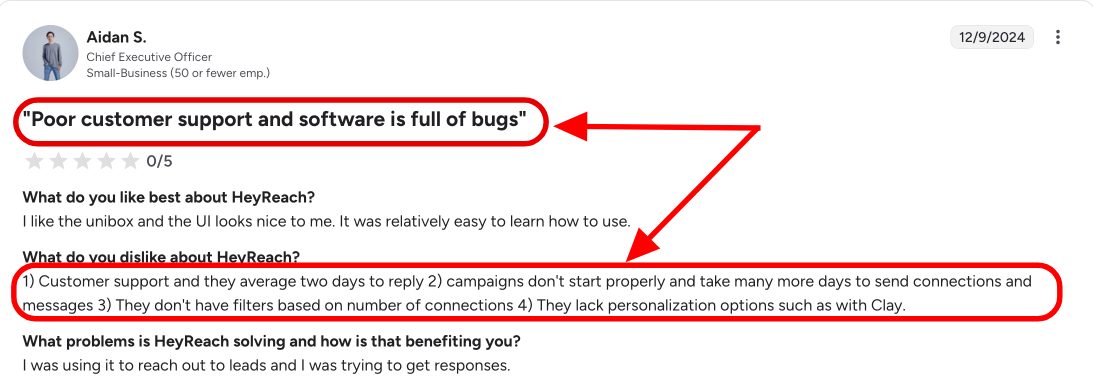
2. Campaign launch delays of 2+ days
Forget quick campaign launches! Campaigns consistently take 2+ days to start running, with some users reporting even longer delays.
In fast-paced business environments, this lag kills momentum and costs you leads.
3. LinkedIn account connection problems
Adding your LinkedIn account has become a nightmare for their users.
Imagine paying $300+, only to be stuck on day one. Frustrating, right?
This happened to this customer.

4. Analytics data is laggy and unreliable
We all know data is king, but what good is it if it's slow and unreliable? Laggy data leaves you paralyzed, unable to make crucial pivots in your LinkedIn strategy, and causes you to miss out on precious leads.
Like HeyReach did to this user.

5. Risk of appearing spammy
Users report that HeyReach's automation can make your outreach look spammy if not used carefully. Common complaints include action limits, lower acceptance rates, and the risk of damaging your professional reputation on LinkedIn.
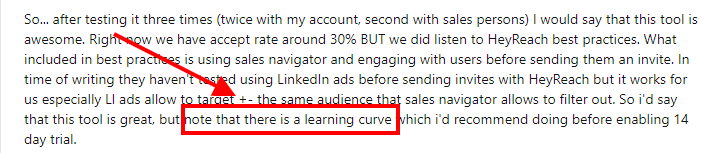
6. Learning curve is steep
This tool isn't exactly "plug and play." Be prepared to invest some serious time getting comfortable with it, or you might end up regretting your purchase just like this HeyReach customer.
5. No multichannel sequence (can't do cold email)
Hate to say this, but you'll have to go back and forth between different platforms to streamline your cold outreach because HeyReach is limited to LinkedIn automation only.
This isn't just a minor issue. It could grind your campaigns to a halt!
Not cool! These could hurt your profits big time.
6. 3rd party tool integration issue
Imagine claiming to allow GTM experts to integrate their GTM stack with ONE CLICK, but it doesn't really work as intended. That's not my opinion; this is straight from a user.

That's why we recommend using one of these HeyReach alternatives.
Here are the top 4 HeyReach alternatives in 2025!
#1 HeyReach Alternative: SalesRobot if you want a cold LinkedIn+ email tool in one platform (+ easy to use + great customer support)
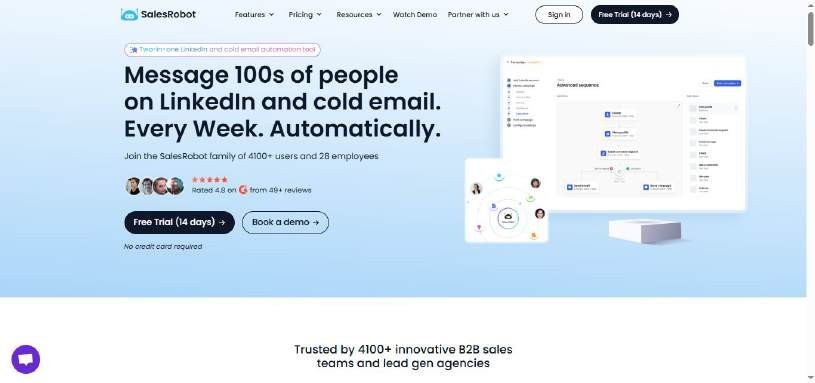
SalesRobot is a LinkedIn and email automation tool that simplifies cold outreach for everyone from startups to small business owners to enterprise sales reps.
You can generate leads on autopilot.
The tool will reach out on your behalf daily without stopping. You need to join the action when there's a reply from an interested potential client.
I know what you're thinking: "How is SalesRobot better than HeyReach?"
Let's find out.
What are the Key features of SalesRobot?
Additionally, SalesRobot includes AI-powered message optimization that ensures higher engagement and response rates. The tool lets you use AI to write or rewrite messages for better personalization, helping you craft more effective outreach sequences.
Although I could go and discuss on why SalesRobot is better than HeyReach in this blog, I'll only discuss the key reasons.
1. Great customer support
Unlike HeyReach, where customer support is slow and can leave you waiting 1-2 days for responses.
SalesRobot offers customer support for 16 hours a day, so you can get help whenever you need it. (even on Saturdays and Sundays)

2. Adding a LinkedIn account is easy
There are no bugs while adding your LinkedIn account. Simply log in using your LinkedIn credentials, and you're ready to run a campaign.
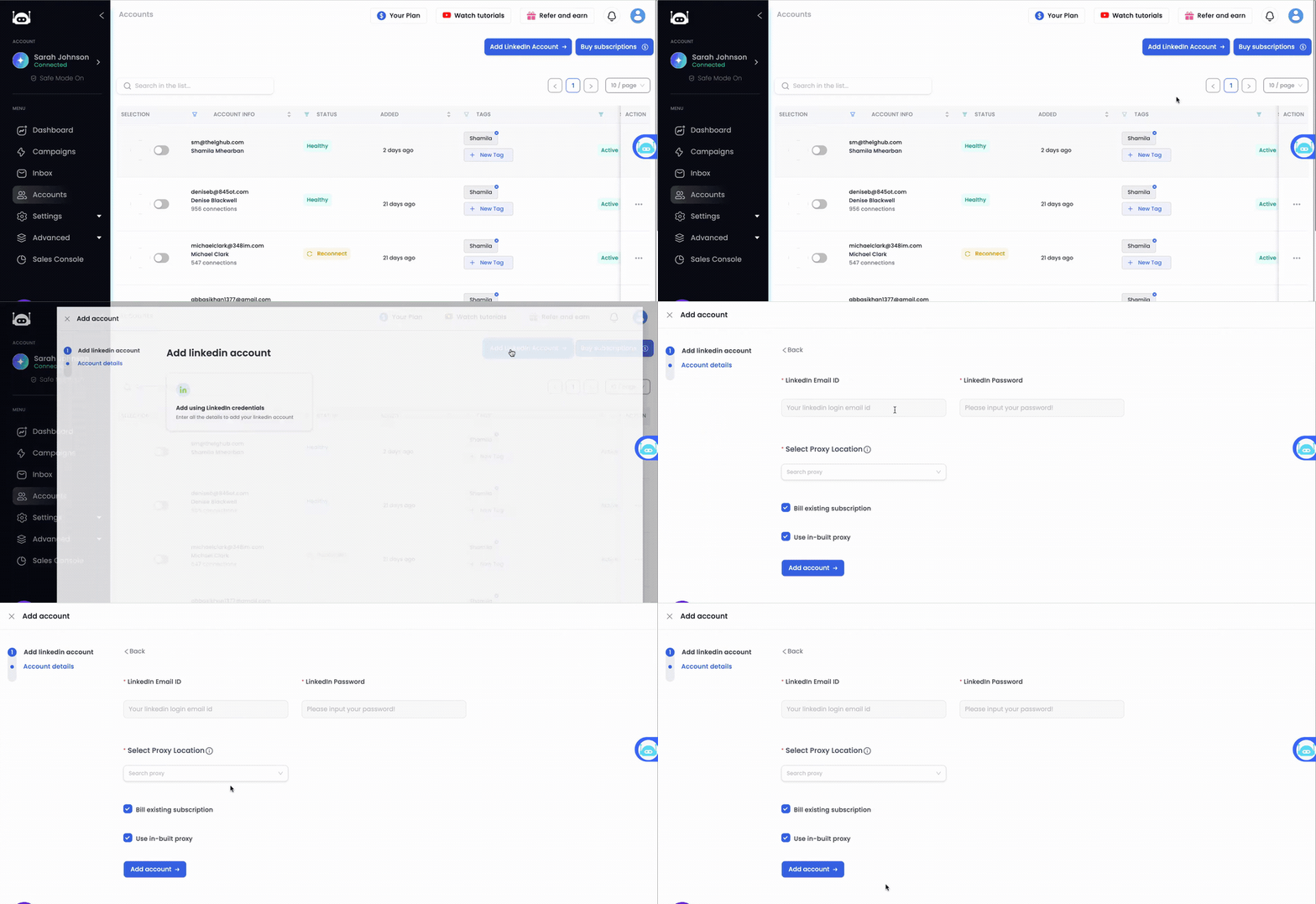
This smooth experience contrasts sharply with HeyReach, where users often struggle with account connection problems and get stuck on day one due to integration issues. Additionally, HeyReach campaigns consistently take 2+ days to start running, with some users reporting even longer delays.
3. Run multichannel sequence
With SalesRobot, you can chat with people on LinkedIn and send emails all in one go in the same campaign. HeyReach is limited to LinkedIn only.

On the other hand, HeyReach is limited to LinkedIn automation only, forcing you to juggle multiple platforms.
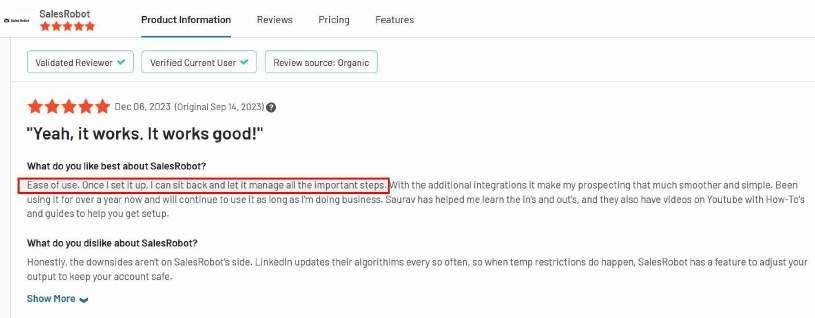
4. Ease of use
SalesRobot is one of the few tools in the market with a simple and easy-to-use UI.
Don't believe me? Read this!

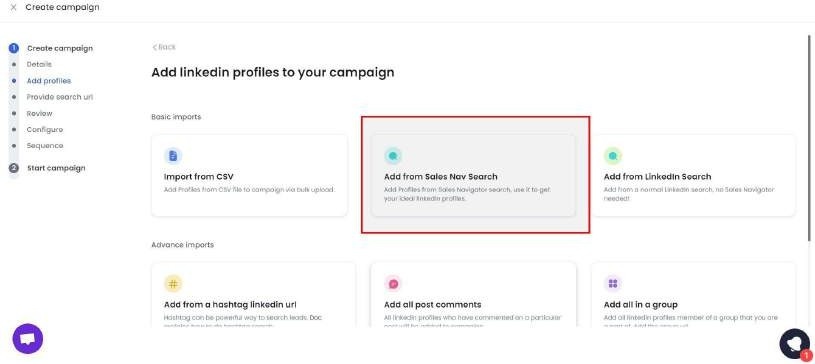
5. Advanced LinkedIn prospecting:
- SalesRobot has advanced targeting techniques to identify and connect with relevant prospects on LinkedIn.
- You can use LinkedIn search, groups, events, Sales Navigator, and more to generate quality leads for your business.
- You can send up to 200 messages and connection requests that bypass LinkedIn limits without banning your account.
6. Create Smart-Campaigns:
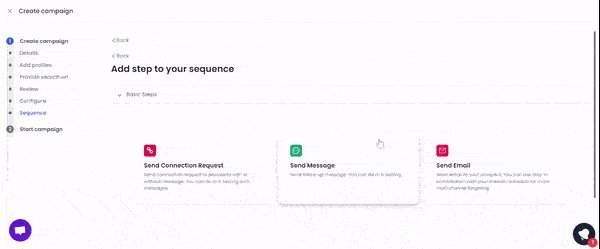
- SalesRobot allows you to build smart campaigns and use customizable ready-made templates.
- With advanced sequential capabilities and multichannel (through email and LinkedIn) approach, you can create smart campaigns.
7. Better User-Experience:
Even inexperienced LinkedIn automation users can use SalesRobot's easy-to-navigate and intuitive interface. This contrasts with HeyReach's steep learning curve that challenges new users.
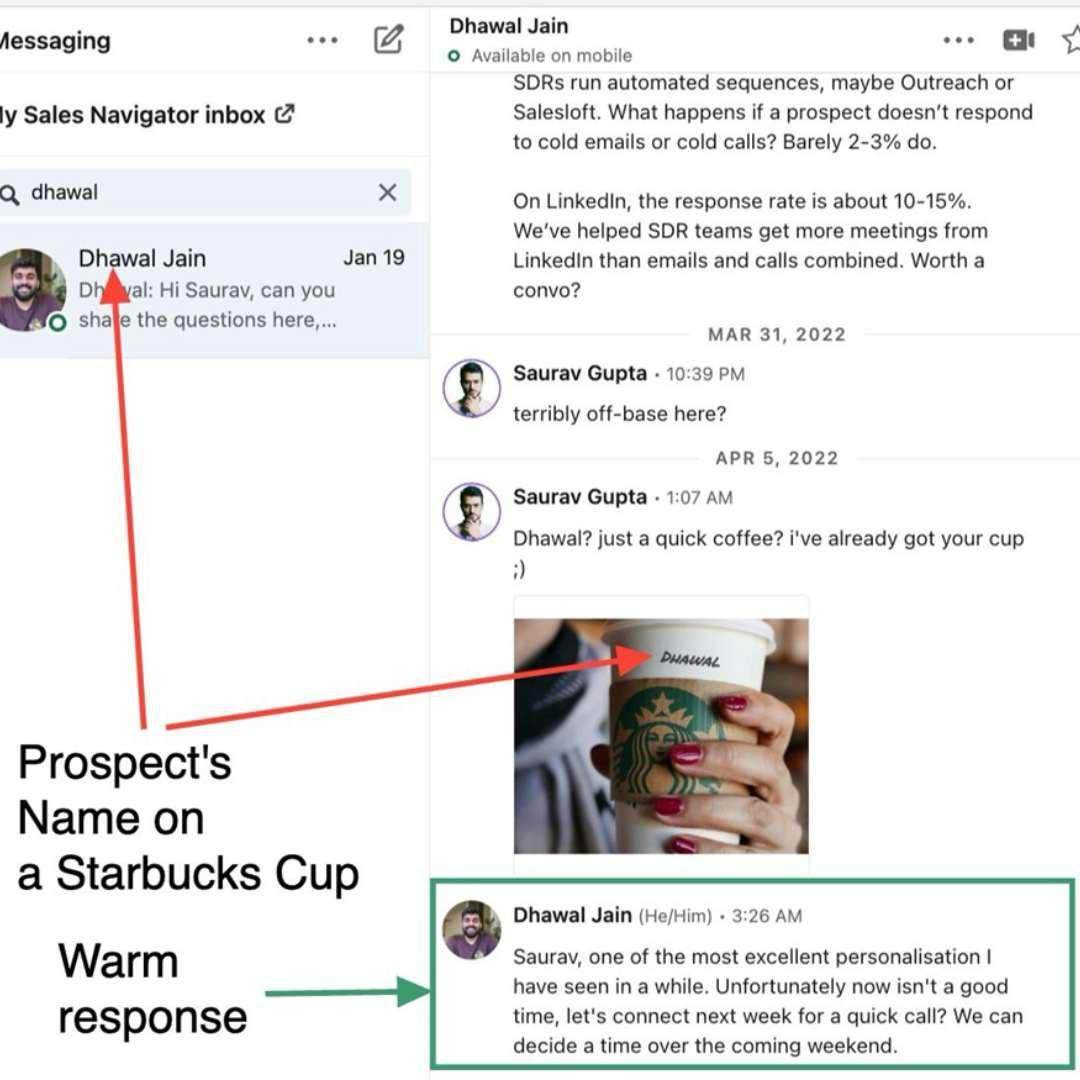
8. Hyper-personalizing messages:
It helps you interact with prospects in a warm, human-like way, SalesRobot so your message doesn't look AI generated. Additionally, SalesRobot offers AI-powered message optimization that ensures higher engagement and response rates compared to standard templates.
9. AI-Powered Voice and Video Messages
SalesRobot has voice and video note capabilities that make prospecting much easier.
Instead of typing the same message to every prospect, you can now record your voice once, and the AI creates personalized voice messages for each lead.
Saves you hours, trust me!
And also adds a human touch to your outreach without eating up most of your day.

You can also create video intros that feel personal so you sound like a real person who cares, not just a bot with an agenda.
Besides, as video messages get significantly higher response rates than text alone, this feature gives you a real edge in your outreach campaigns.

Priyanshu (from Dolta, a B2B lead generation agency) believes that hyper-personalization is the holy grail of marketing, and his use of AI and voice notes got him a 47% reply rate on his campaign.
SalesRobot now does everything on your behalf. It will personalize outreach, follow up, manage replies, and book meetings on autopilot!
The AI Appointment Setter handles full conversations with your prospects, manages objections, answers questions, and books qualified meetings directly into your calendar on autopilot.
You can use it in two modes:
Copilot mode - AI suggests replies for you to review and send.
Autopilot mode - AI manages your entire inbox end-to-end and books meetings automatically.
You won't have to step in each time you get a reply only to find out it was a dead end.
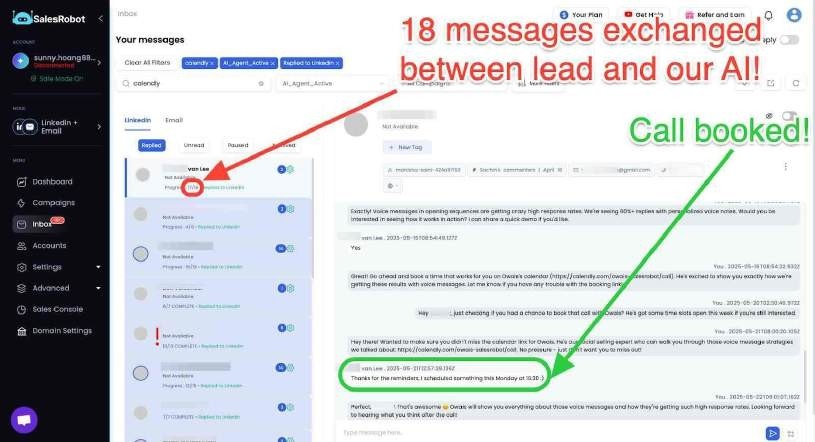
Jason from Nexa Mortgage, basically loved the AI Appointment Setter, saying it stopped him from missing out on leads and follow-ups, making sure that "engagement is happening in real time."
And now the latest update has even added a time awareness feature, meaning the AI can automatically schedule follow-ups based on what was said in the conversations.
So you will never miss out on leads again.
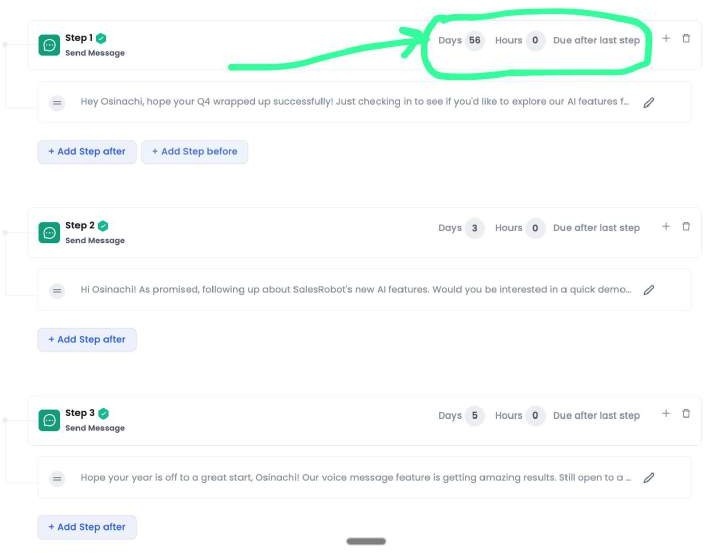
Wanna try it out firsthand? Sign up here!
11. AI personalization options
With SalesRobot, you can effortlessly draft and send highly personalized messages and connection requests in just a few clicks. Moreover, SalesRobot lets you build multi-step email sequences, add personalization, and even use AI to write or rewrite messages for optimal performance.
AI variables help you write icebreakers that get replies. How?
By identifying information that distinguishes a particular profile, such as experience with volunteering or top certifications, among others.
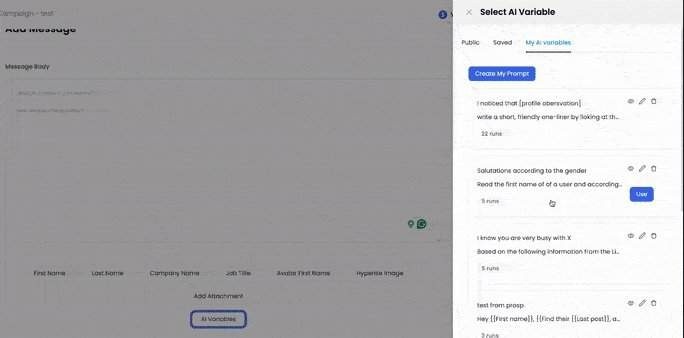
These advanced AI variables go far beyond basic personalization - they analyze prospect data and generate contextual, relevant messaging based on their industry, role, and company specifics.
The tool uses that data for drafting a message so human-like that your leads will feel like they're talking to an actual person rather than a tool
As a result, people will be much more open to accepting your connection requests and answering your messages.
And if you decide to write your messages, rather than use the premade fully customizable templates, it will calculate the probable response rate of those messages.
- Creating smart campaign and message sequences –
You can make campaigns from scratch just by talking to our AI bot - SalesGPT.
SalesGPT will create an ICP (if you don't have one) and a message sequence (if you don't have one).
The sequences are based on your lead's behavior, so there's no chance for embarrassing missteps, such as sending a follow-up even when the lead's already answered your first message.

You can also set up triggers, delete pending invites, blacklist individuals and companies, skip duplicates, etc.
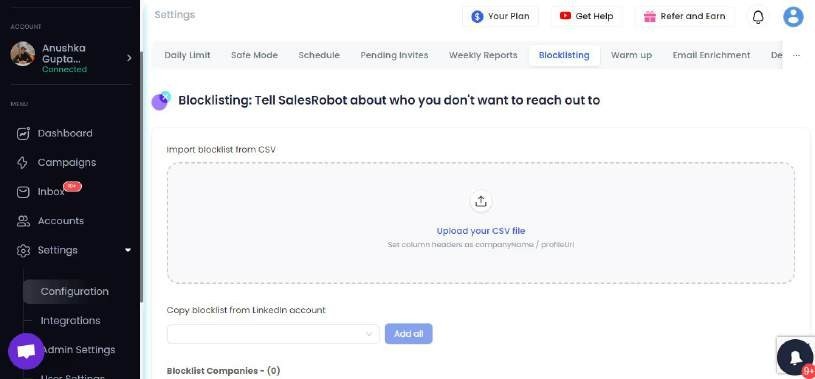
As the interface is very intuitive, you'll have no problem creating your own campaigns in no time.
And as an added help, there are ready-made campaign templates to help you start and learn the ropes on the go.
Smart Commenting -
When prospects post content on LinkedIn, SalesRobot can automatically like and comment with AI-generated responses that feel natural and relevant to the post content.
This helps warm up prospects before sending connection requests.

12. Email enrichment option -
The tool will find and verify your prospects' business email addresses effortlessly.
Since it has integrated data from a verified email address provided, the chances for a mismatch or difficulties in verification are reduced to a minimum.
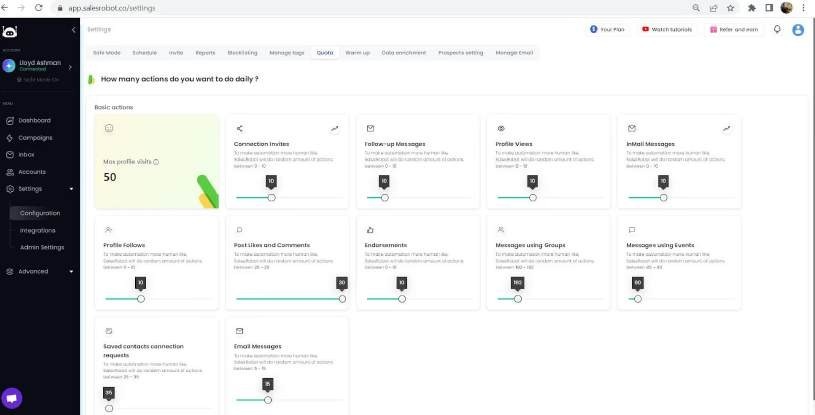
That makes it much easier for you to connect with potential prospects via email, as it'll provide you with all the data you need.
What is the pricing of SalesRobot?
SalesRobot offers 3 pricing plans, each designed to grow your network on LinkedIn and get you more leads (via LinkedIn or cold email):
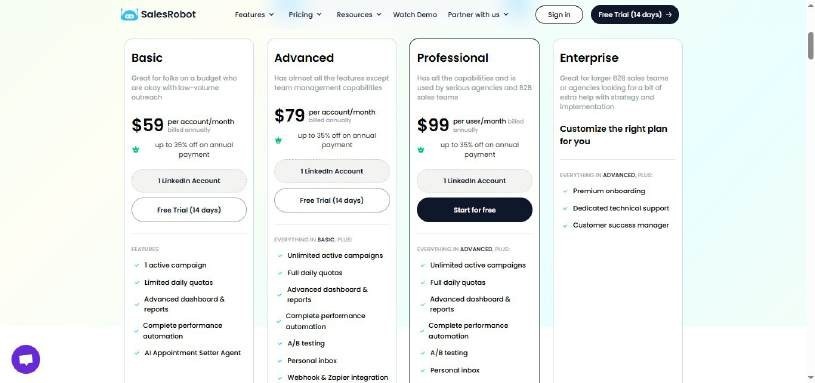
- Basic Plan - $59/month (35% annual payment discount)
- Advanced Plan - $79/month (35% annual payment discount)
- Professional Plan - $99/month (35% annual payment discount)
SalesRobot vs HeyReach: Which tool should you choose?

I created SalesRobot, but I won't be biased and just tell you to buy it.
Instead, let's explore why each tool might be a good fit for you.
HeyReach:
- Good for LinkedIn-only outreach
- Suitable if you're okay using multiple tools for outreach
- Has a steep learning curve and technical issues
- Campaigns consistently take 2+ days to start running
- Customer support response times range 1-2 days
- Often buggy and can make your computer slow
SalesRobot:
- Perfect for multi-channel outreach
- Provides 16 hours of active customer support daily
- Easy-to-use interface you'll master within minutes
- More affordable than HeyReach
- AI-powered message optimization for higher engagement rates
- Additionally, AI features help write and rewrite messages automatically
- Moreover, smart automation ensures messages are sent at optimal times
If I were in your place, I'd choose a tool that lets me do more effectively and for less money.
I won't say who the winner is, because you already know the answer.
And if you still want to explore another alternative, we can consider that as well.
#2 HeyReach Alternative: Dux Soup if you want an affordable LinkedIn automation tool as a single user

Dux-Soup is a LinkedIn automation tool that helps you reach potential clients, employees, partners, or anyone else on LinkedIn.
With Dux-Soup, you can send personalized connection requests and messages, and it also has an auto-reply feature that responds to messages quickly.
But is it really better than HeyReach?
I'll tell you, but before that, we need to know...
What are the key features of Dux Soup?
1. Building a network of potential customers on LinkedIn:
Dux-Soup makes it easy to expand your LinkedIn network by automating the process of making connections and adding prospects to lists.
.jpeg)
2. Multiple campaigns setup:
Dux-Soup lets you run multiple campaigns at once, so you can target different types of prospects with different messages.
.jpeg)
3. Low cost:
Dux-Soup is an affordable solution for LinkedIn automation compared to other tools in the market.
Its pricing plans start at just a few dollars per month, making it accessible to everyone: small businesses, sales teams, and individual users.
.jpeg)

4. Integration with CRM:
Dux-Soup integrates with many CRM products, making it easy to move data between different tools. With this feature, you can:
- Automatically sync your LinkedIn connections with your CRM
- Add tags or notes to your connections based on their behavior or interests
- Use your CRM to manage your follow-up activities, such as sending emails or scheduling meetings
What is the pricing of Dux Soup?
Dux-Soup offers a free 14-day trial for new users with 3 different user packages.
Individual plan:
- The Pro-Dux plan for Individuals is $14.99 per month or $11.25 per month when billed annually.
- The Turbo Dux plan for individuals is $55 per month or $41.25 per month when billed annually.
- The Cloud Dux plan for individuals $99 per month or $74.16 per month when billed annually.
Team Plan (You need more than 1 seat):
- The Pro-Dux plan for Teams is $14.99 per month or $11.25 per month when billed annually.
- The Turbo Dux plan for Teams is $55.00 per month or $41.25 per month when billed annually.
- The Cloud Dux plan for individuals $99 per month or $74.16 per month when billed annually.
.jpeg)
Agency plan:
- The Pro-Dux plan for an agency is $337.50 per month.(Must have 30+ seats)
- The Turbo Dux plan for an agency is $412.50 per month.(Must have 10+ seats)
- The Cloud Dux plan for an agency is $371 per month.(Must have 5+ seats)
.jpeg)
Duxsoup vs HeyReach: Which tool should you choose?

Although Duxsoup is more affordable and supports multi-channel sequences, customers haven't been satisfied with it.
Dux Soup cons:
- Poor customer support, similar to HeyReach
.jpeg)
- Slow and ineffective in getting results
.jpeg)
- Users have reported getting their LinkedIn accounts banned
.jpeg)
If you're okay with these issues, Dux Soup might work for you.
If not, let's look at another HeyReach alternative.
#3 HeyReach Alternative: PhantomBuster if you want to scrape + automate LinkedIn and other platforms like Twitter/Instagram

PhantomBuster is an all-in-one cloud-based automation tool that can help you with various tasks.
It helps you automate various social media platforms like Instagram, Facebook, Twitter, Reddit, Craigslist, Medium, and more.
What are the Key features of Phantombuster?
1. Extract lists of leads
Data extraction that normally takes days will now only take a few minutes!
Source targeted profiles from any major platform or website and add them to a CSV file, Google Sheets document, or spreadsheet.

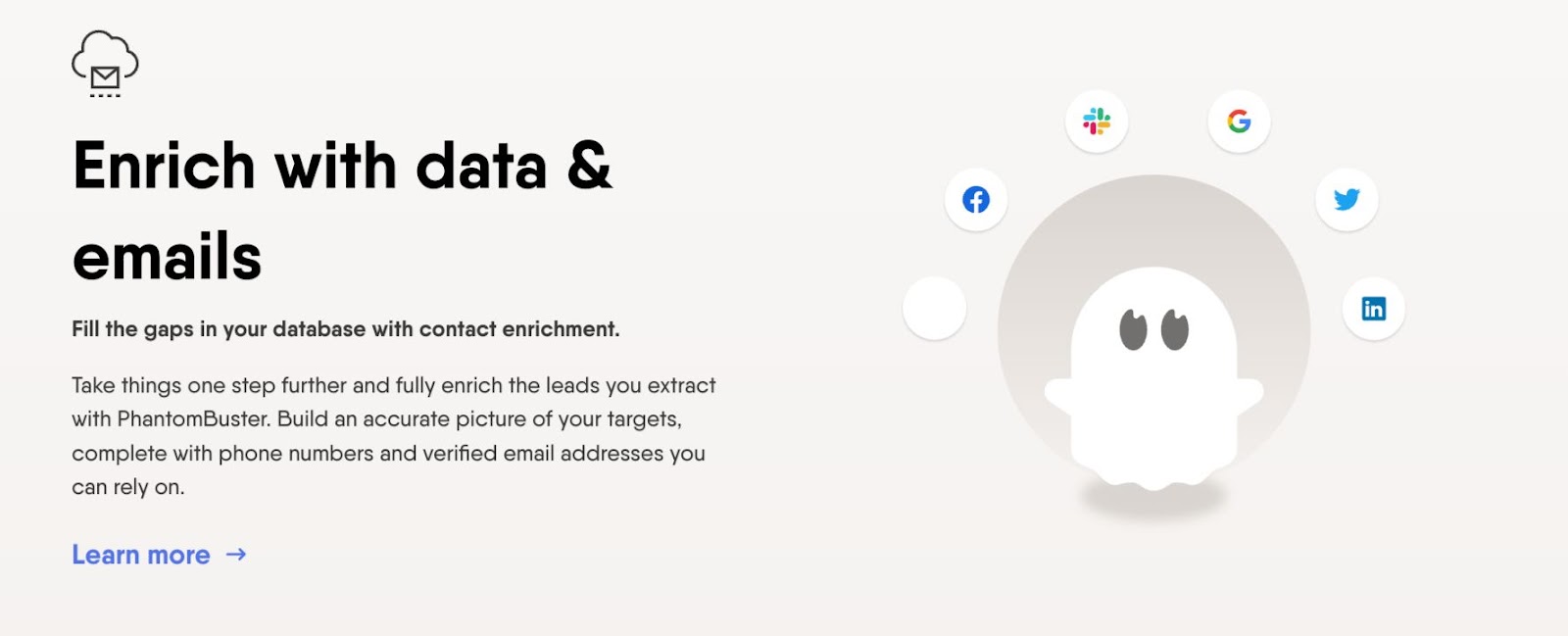
2. Enrich data and emails
You've found the right people. Now how do you get to know them and safely access their contact information?
Phantombuster lets you fill in the gaps with verified email addresses, company details, phone numbers, and more.
3. Send outreach campaigns
It's time to scale up your connections on the web while still keeping it personal and authentic! Send tailored messages to nurture new leads, and track your progress to ensure the best results.
.jpeg)
All that automation looks interesting. And logically, the next question is…
What is the pricing of Phantombuster?
.jpeg)
Here's a breakdown of the pricing for Phantom Buster, along with some additional information:
- Trial: 14-day free trial with 5 slots and 2 hours per day
- Starter: $69/month with 5 slots and 20 hours per month
- Pro: $159/month with 15 slots and 80 hours per month
- Team: $439/month with 50 slots and 300 hours per month
Each plan offers different features and capabilities to suit different business needs.
The Starter plan is a good option for individuals or small businesses who want to try out Phantom Buster's services, with 5 slots and 20 hours per month.
The Pro plan is best for small sales teams and offers more slots and hours for those who need to automate more tasks or require more hours of usage.
The Team plan is ideal for larger organizations or teams that require even more automation capabilities.
You can take a 14-day free trial anytime you want. No credit card required.
Just know that there are limited slots and hours available during the trial.
Phantombuster vs HeyReach: Which tool should you choose?
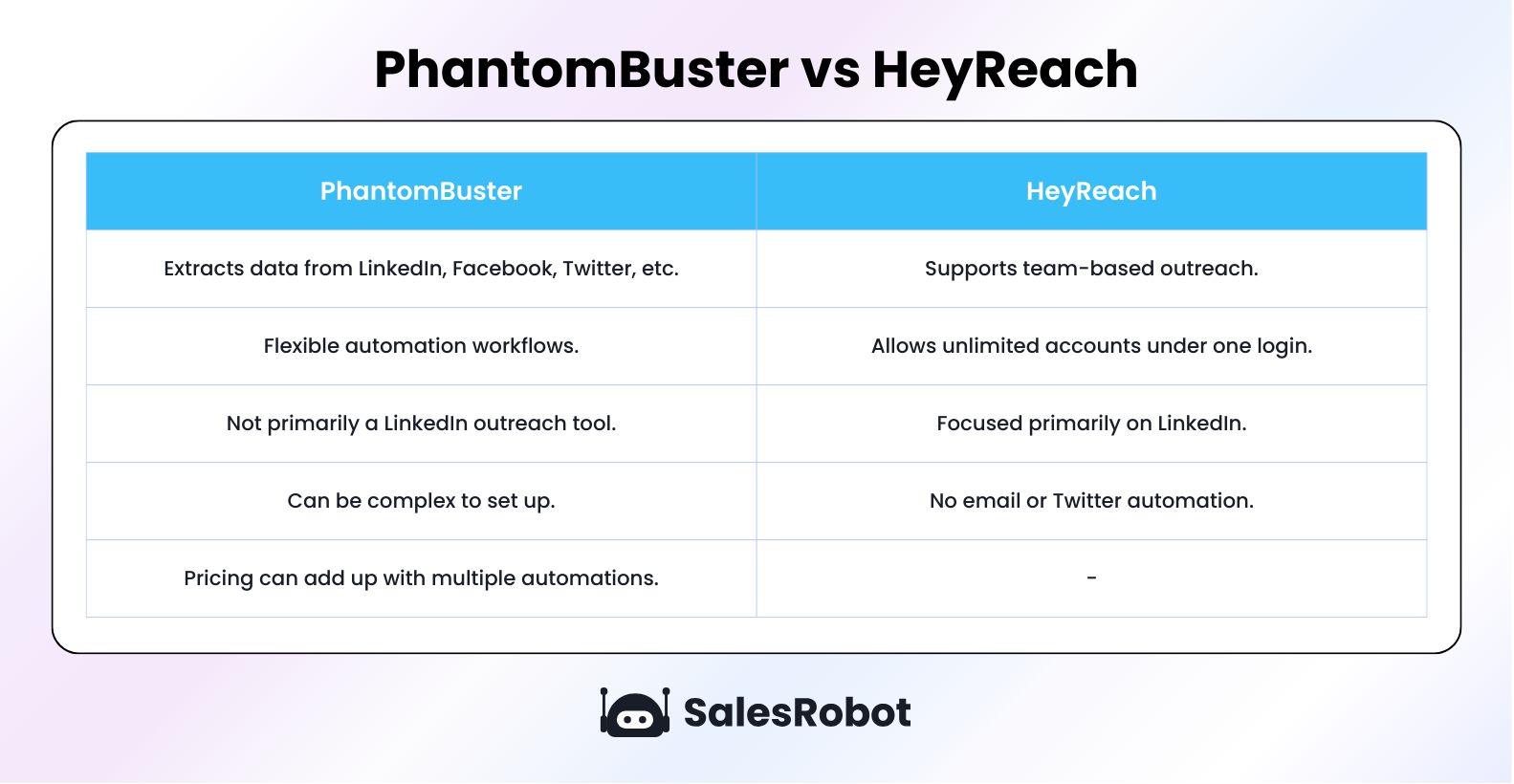
While Phantombuster can streamline tasks and boost productivity, you might want to go through these reviews:
- Terrible customer support.
The customer support seems to say they've resolved the issue but never resolved it.

- Ridiculous refund policy.
They charge you even after you've canceled your subscription.

- Doesn't respect privacy.
Even after unsubscribing from their email address, they kept customers on their email marketing lists.

Keep these limitations in mind if you're choosing between Phantombuster and HeyReach.
However, HeyReach also faces significant challenges that you should consider:
- Campaign delays and slow support response
Users report campaigns consistently taking 2+ days to start running, and customer support response times of 1-2 days can slow down your momentum.
- Technical issues and performance problems
Common complaints include laggy data, account connection problems, and buggy overall performance that can disrupt your workflow.
- Action limits and compliance risks
HeyReach's automated connection requests and bulk messaging violate LinkedIn's Terms of Service, leading to action limits and lower acceptance rates.
It's not over yet! We've got one more alternative to know about.
#4 HeyReach Alternative: Dripify if you want a tool designed specifically for automating LinkedIn networking
Dripify is a LinkedIn automation tool designed to streamline your outreach and grow your professional network on LinkedIn.
With Dripify, you can automate your entire LinkedIn prospecting workflow - from viewing profiles and sending connection requests to following up with personalized messages at the perfect time.
But is it really worth the investment? Time to find out!
What are the Key features of Dripify?
1. Create Targeted LinkedIn Campaigns
Dripify lets you launch and manage multiple outreach campaigns in seconds!
Whether you're targeting CEOs in Silicon Valley or HR managers in London, you can build your prospect list in three powerful ways:
- Advanced LinkedIn Search filters
- Ready-to-go CSV uploads
- Direct profile URL imports

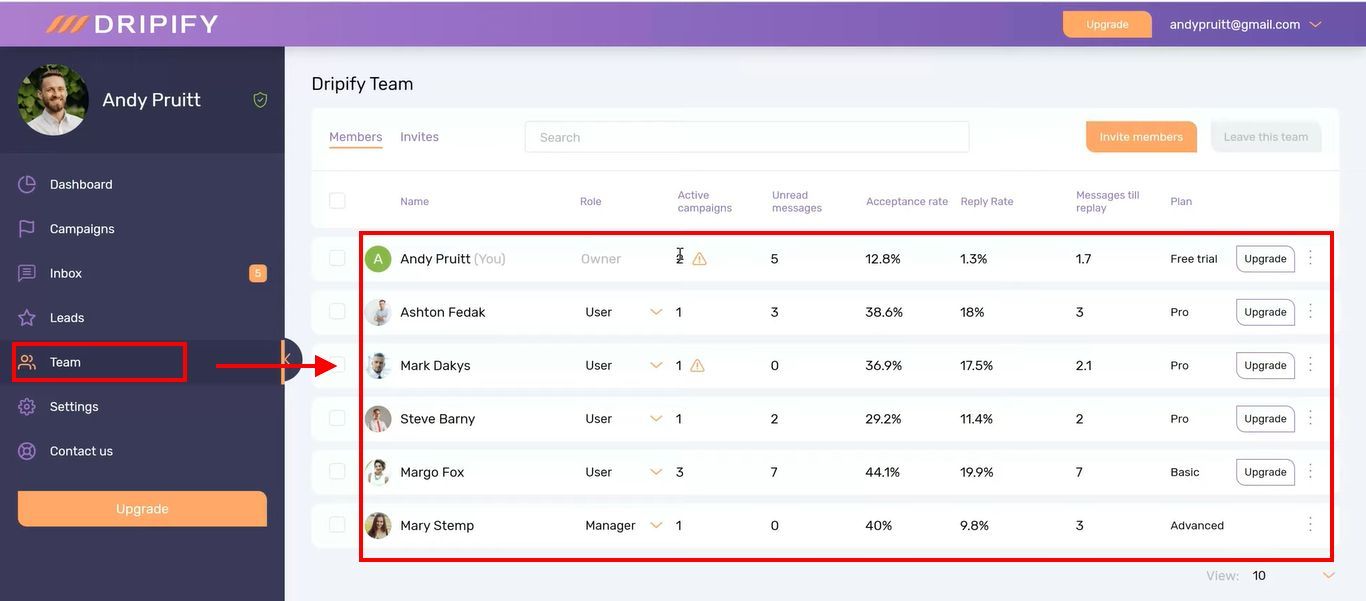
2. Empower Your Sales Squad
Dripify transforms your squad into a well-oiled prospecting machine!
Track performance metrics, assign territories, and watch your team's results, all from one central dashboard.
3. Unlock Your Network's Gold Mine
Dripify helps you export leads into a neat CSV file.
- Full names
- Businesses
- Job titles
- Connection counts
- Email addresses
- Phone numbers
- LinkedIn profile URLs

4. Master Your Metrics
You can see exactly what's working and what isn't. Track everything from post engagement to profile activity, plus get instant alerts for new connections and messages.
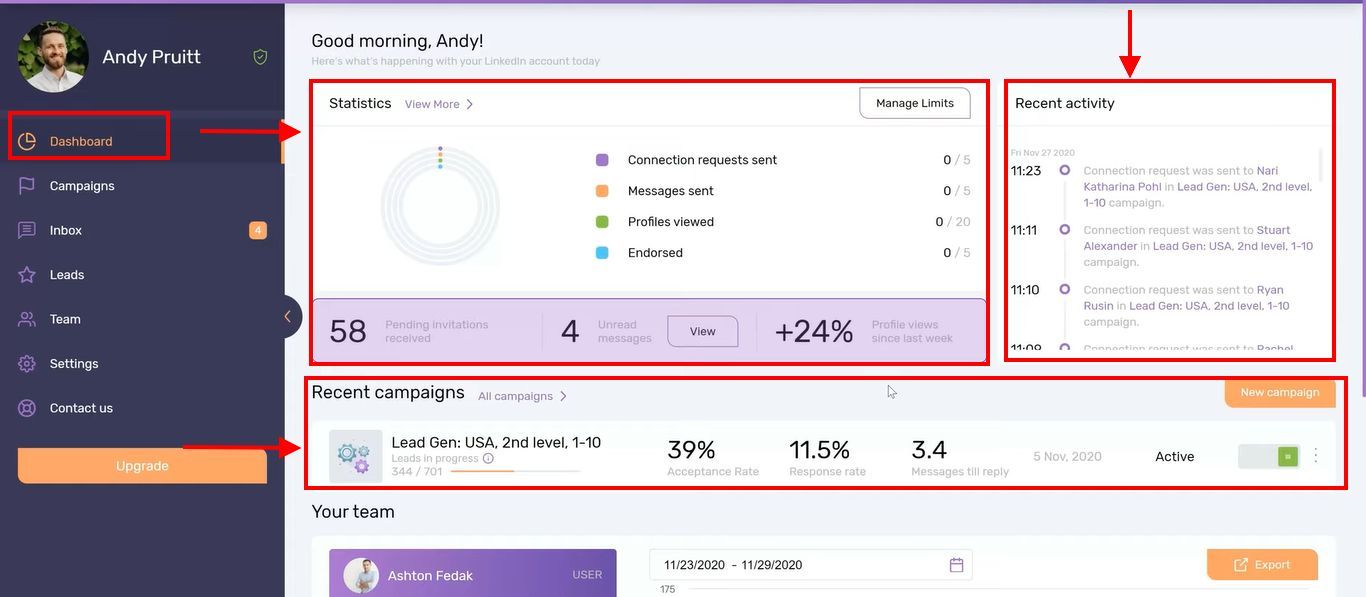
Sound impressive, right?
What is the pricing of Dripify?
Dripify offers 3 plans:

- Starter: $59/mo - 1 campaign, basic limits, 35% off yearly
- Pro: $79/mo - Unlimited campaigns, higher limits, 35% off yearly
- Advanced: $99/mo - Everything in Pro + team features, 35% off yearly
Dripify vs Heyreach: Which tool should you choose?

When deciding between Dripify and Heyreach, you need to weigh the pros and cons
Dripify works well for:
✅ Managing multiple lead generation campaigns efficiently.
✅ Overseeing sales team tasks and performance tracking.
❌ Risk of getting your LinkedIn account banned.
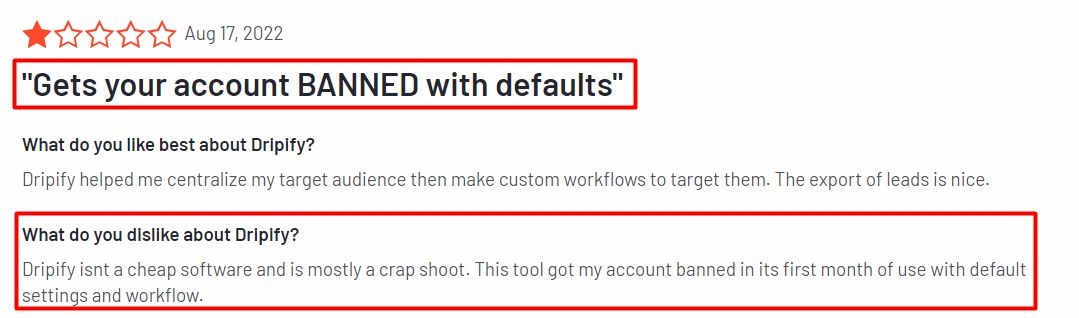
❌ Doesn't support running LinkedIn and email sequences in the same campaign.
❌ Poor customer support and billing issues like Heyreach.

Heyreach's Major Drawbacks:
❌ Slow customer support (1-2 days response)
❌ LinkedIn account connection problems
❌ Steep learning curve and buggy performance
❌ Campaign delays (2+ days to start running)
❌ No multichannel sequences
If you're on a budget, Dripify might be your choice.
However, if Heyreach's issues worry you, consider alternatives that offer better support, seamless LinkedIn integration, and multichannel outreach.
Should you buy HeyReach or one of its alternatives?
In the world of LinkedIn automation tools, choosing between HeyReach and its alternatives depends on your specific needs and preferences.
Here are the key points to help you decide:
HeyReach:
- Great for those focused only on LinkedIn outreach.
- Offers multi-account campaigns for scaling outreach efforts.
- Various pricing plans for different business sizes.
- However, users report slow customer support, LinkedIn account connection issues, steep learning curves, campaign launch delays, and lack of multichannel sequences.
- Offers multichannel outreach capabilities, integrating LinkedIn and email.
- Lookalike search, AI campaign creation, Enrich verified email address, etc.
- Additionally, SalesRobot includes AI message optimization for higher engagement rates, AI-powered personalization, and smart automation features that ensure better response rates.
- Provides extensive customer support, easy LinkedIn account setup, and a user-friendly interface.
- Pricing plans designed for growing LinkedIn networks and generating more leads.
Dux Soup:
- Affordable LinkedIn automation tool with multichannel sequences.
- Reported issues with customer support and effectiveness, similar to HeyReach.
- Various pricing plans for individuals, teams, and agencies.
PhantomBuster:
- Offers automation across various social media platforms, not just LinkedIn.
- Provides data extraction, enrichment, and outreach campaign capabilities.
- Mixed reviews about customer support, refund policies, and privacy concerns.
Dripify:
- LinkedIn automation within budget.
- Team management, analytics, and smart sequences feature.
- Easy to use but some users worry about LinkedIn compliance and pricing.
When making your decision, think about your specific outreach goals, budget constraints, and tolerance for potential issues.
Do thorough research, explore trial options, and gather user feedback to find the best fit for your business.
However, if you want a comprehensive solution with robust multichannel outreach capabilities, exceptional customer support, and user-friendly interface,
SalesRobot stands out as the top choice.
Moreover, SalesRobot offers AI-powered message optimization that helps you build multi-step email sequences, add personalization, and use AI to write or rewrite messages for maximum effectiveness.
With SalesRobot, you can streamline your outreach efforts seamlessly, ensuring optimal results and efficiency for your business just like this customer:

If you're interested, take our 14 day free trial we don't ask for your phone number, email address or credit card info.
Disclaimer: The content of this blog post reflects our own opinions and judgements based on our research and experience as of published date. Comparisons made to other software or tools are for informational purposes only and are based on publicly available information and our own analysis. We don't claim absolute accuracy and encourage readers to conduct their own research to form their own opinions. While we may discuss competitor offerings, our primary focus is to showcase the features and benefits of SalesRobot. SalesRobot isn't affiliated with any other software or tool mentioned in this blog post.

Wow your leads by cloning yourself and sending personalized videos and voice notes to each lead on LinkedIn.
If you don't reply to leads within 5 mins, your chances of converting them fall by 50%. Our AI replies on your behalf instantly! (and yes, you can train it)

Don't shoot in the dark. Get detailed analytics on what's working

SalesRobot allows you to invite other team members, so that they can add their LinkedIn Account, run outreach campaigns and get amazing results just like you.
.avif)


Trusted by 4100+ innovative B2B sales teams and lead gen agencies

.avif)

.avif)




.avif)


Heading 1
Heading 2
Heading 3
Heading 4
Heading 5
Heading 6
Lorem ipsum dolor sit amet, consectetur adipiscing elit, sed do eiusmod tempor incididunt ut labore et dolore magna aliqua. Ut enim ad minim veniam, quis nostrud exercitation ullamco laboris nisi ut aliquip ex ea commodo consequat. Duis aute irure dolor in reprehenderit in voluptate velit esse cillum dolore eu fugiat nulla pariatur.
Block quote
Ordered list
- Item 1
- Item 2
- Item 3
Unordered list
- Item A
- Item B
- Item C
Bold text
Emphasis

Superscript
Subscript