.avif)
TL;DR
- SaaS sales cycles run 30 to 120+ days, and your SDRs can't manually follow up with hundreds of prospects across those timelines. LinkedIn automation tools handle connection requests, follow-ups, and drip campaigns at scale.
- SalesRobot (#1 on our list) uses AI Variables that read each prospect's LinkedIn profile, posts, and company activity to write custom icebreakers. Users regularly see 32%+ positive response rates on cold outreach.
- SalesRobot's AI Appointment Setter manages entire outreach campaigns start-to-finish: builds rapport, handles objections, and books confirmed meetings on your calendar.
- Expandi ($99/mo) and Dripify ($59/mo) are solid mid-range picks. Expandi offers cloud-based safety with A/B testing; Dripify keeps things simple with clean drip campaign workflows.
- Lemlist ($99/mo for LinkedIn access) is the best choice if email is your primary channel and LinkedIn is secondary. It bundles email, LinkedIn, cold calling, and a 450M+ lead database.
- HeyReach is built for multi-account management with sender rotation, making it ideal for SaaS agencies or teams with 5+ SDRs running coordinated campaigns.
- Skylead ($100/mo flat) stands out with if/else Smart Sequences that adapt based on prospect behavior, plus unlimited email accounts and built-in warmup.
- Budget options exist: Octopus CRM starts at $9.99/mo and Linked Helper at $15/mo, but both are desktop/browser-based with higher LinkedIn detection risk.
- Cloud-based tools (SalesRobot, Expandi, Skylead, HeyReach) are generally safer than Chrome extensions (Octopus CRM, PhantomBuster) because LinkedIn has gotten significantly better at detecting browser-based automation in 2025-2026. Note: Waalaxy moved from a Chrome extension to cloud execution in mid-2026.
- SalesRobot offers a 14-day free trial with no credit card required. 76% of free trial users get their first lead within 2 days.
Welcome to our blog, where we break down the latest prospecting tools and strategies. No fluff, no filler, just the stuff that actually works.
This guide is all about LinkedIn automation tools for SaaS sales teams, and I've done the research so you don't have to.
Here's what I'll walk you through:
💣 What LinkedIn automation tools actually are (and why SaaS teams specifically need them)
💣 10 tools worth looking at, with honest pros, cons, and pricing
💣 How to pick the right one for your SaaS sales workflow
💣 Practical tips to squeeze real results out of whichever tool you choose
And if you stick around till the end, I'll also tell you which tool I think takes the crown for SaaS teams (spoiler: you're on its blog right now 😉).
So grab a seat, get comfortable, and let's get into it.

What Are LinkedIn Automation Tools?
Alright, let's start with the basics.
LinkedIn automation tools are exactly what they sound like: software that handles the repetitive LinkedIn tasks eating up your entire day. Think of them as your behind-the-scenes assistant that never takes a lunch break.
We're talking about:
- Sending connection requests to the right people
- Following up with prospects who haven't replied
- Running drip campaigns across LinkedIn and email
- Tracking who's engaging with your outreach and who's ghosting you
- Managing your inbox so hot leads don't slip through the cracks
Instead of manually clicking through profiles, typing out the same message 50 times a day, and maintaining a messy spreadsheet of "who did I message last Tuesday?", an automation tool does all of that for you.
You set up a campaign, define your target audience, write your message sequence, hit go, and let the tool handle the rest.
But here's the important part: the good tools don't just blast messages. They personalize at scale, respect LinkedIn's activity limits, and make your outreach look and feel like a real human sent it. The bad tools? They get your account restricted within a week.
Why SaaS Sales Teams Need Them
Now, you might be thinking, "Every sales team needs automation, what's so special about SaaS?"
Fair question. Here's the thing:
SaaS sales cycles are long. We're not selling a one-time product here. A typical SaaS deal can take 30 to 120+ days from first touch to signed contract. That means you need a tool that can nurture prospects over weeks and months, not just fire off a connection request and pray.
Your buyers are smart. SaaS decision-makers (CTOs, VPs of Engineering, Heads of Product) have seen every generic pitch in the book. "Hey {first_name}, I noticed you're at {company}, and I'd love to connect!" isn't going to cut it. Your outreach needs to reference their actual pain points, their tech stack, or something specific about their company.
You're selling to multiple stakeholders. Most SaaS deals involve 3-5 decision-makers. Your automation tool needs to help you run campaigns targeting different personas at the same company without stepping on each other's toes.
LinkedIn is where your buyers live. 80% of B2B social media leads come from LinkedIn. Your next customer isn't scrolling Instagram for an enterprise solution. They're on LinkedIn, and that's where you need to be too.
Your SDR team's time is expensive. Every hour an SDR spends copy-pasting messages is an hour they're not spending on calls, demos, and closing. Automation gives them back those hours.
And let's be honest: manual outreach at scale is a one-way ticket to burnout. I've been there. You start the week with big plans, and by Wednesday you're three follow-ups behind and you've already forgotten who you messaged on Monday.
LinkedIn automation for SaaS doesn't replace the human touch. It amplifies it. It makes sure you never miss a follow-up, never lose track of a warm lead, and never send the same message to the same person twice.
Now let's look at the tools that actually deliver on this promise.
10 Best LinkedIn Automation Tools for SaaS Sales Teams
1. SalesRobot

Let me introduce you to SalesRobot. And yes, I know we're biased, but hear me out.
SalesRobot is a cloud-based LinkedIn and email automation tool built for B2B sales teams and agencies. It handles connection requests, follow-ups, drip campaigns, and multi-channel sequences, all while keeping your LinkedIn account safe with dedicated IPs and a mobile API-based architecture.
But here's what actually makes SalesRobot different from every other tool on this list: the AI.
Most automation tools let you plug in {first_name} and {company_name} into a template and call it "personalization."
SalesRobot's AI Variables go way deeper. The AI reads each prospect's LinkedIn profile (their recent posts, job title, company news, shared connections, recommendations) and writes a custom icebreaker for each person.
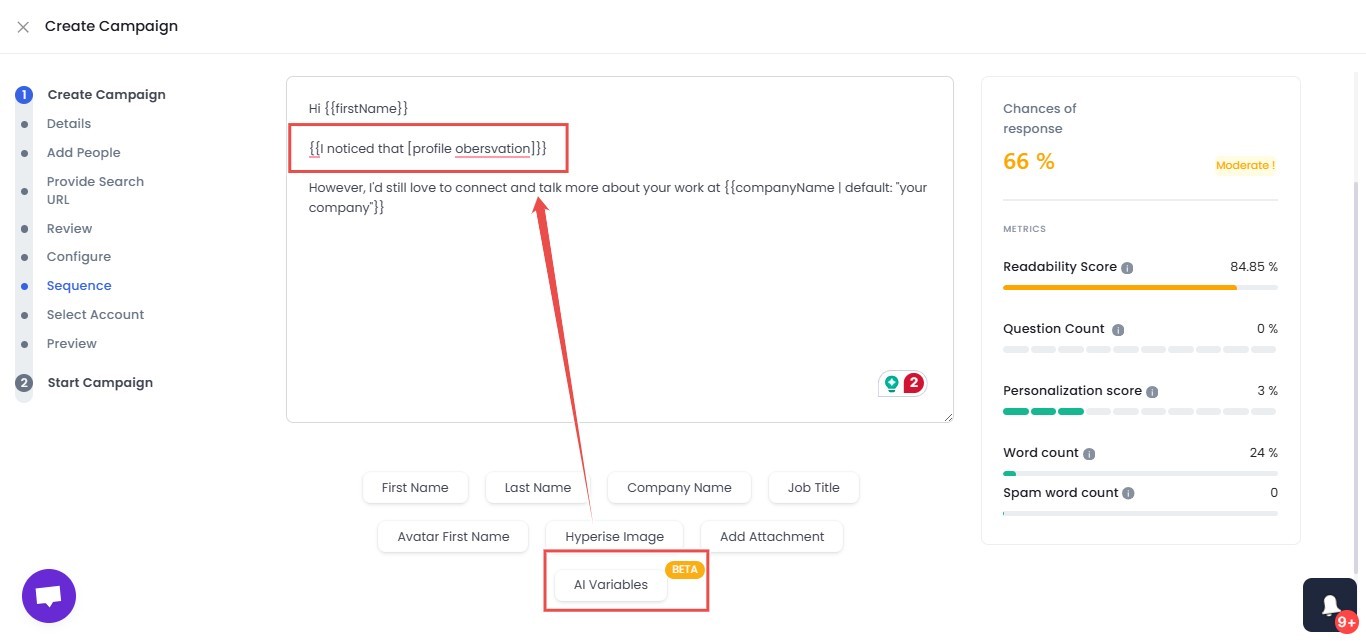
The result? Your messages sound like you actually spent 5 minutes researching the prospect. Except you didn't. The AI did it for you, for hundreds of prospects, while you were sleeping.
And it doesn't stop at writing messages.
SalesRobot's AI Appointment Setter can manage your entire outreach campaign from start to finish. It builds rapport, handles objections, and books meetings on your behalf. You only jump on confirmed calls.
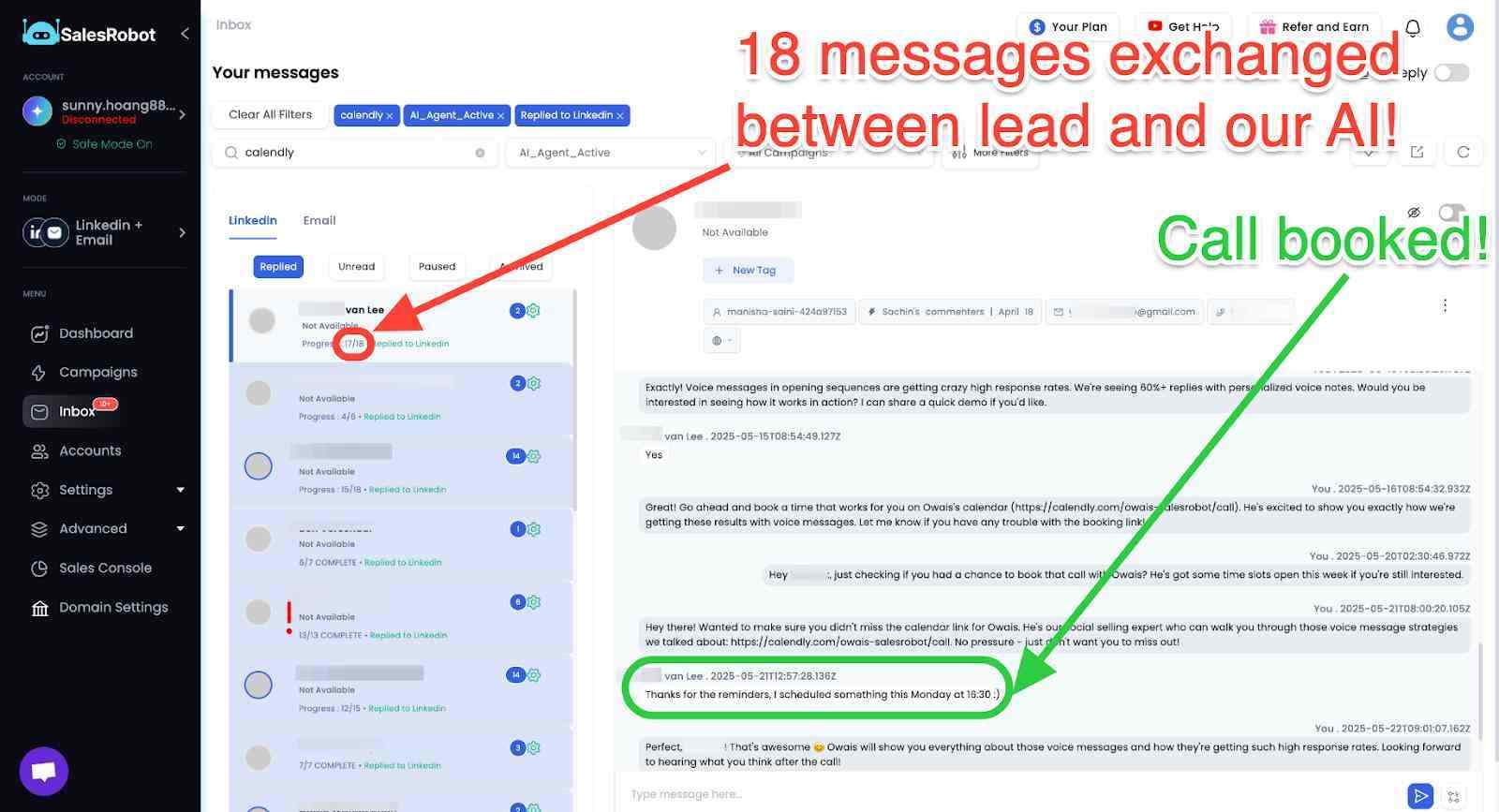
On top of that, the AI Inbox Manager responds to incoming LinkedIn messages instantly, so no hot lead goes cold because you were stuck in a meeting. And yes, you can train the AI on your voice and tone.
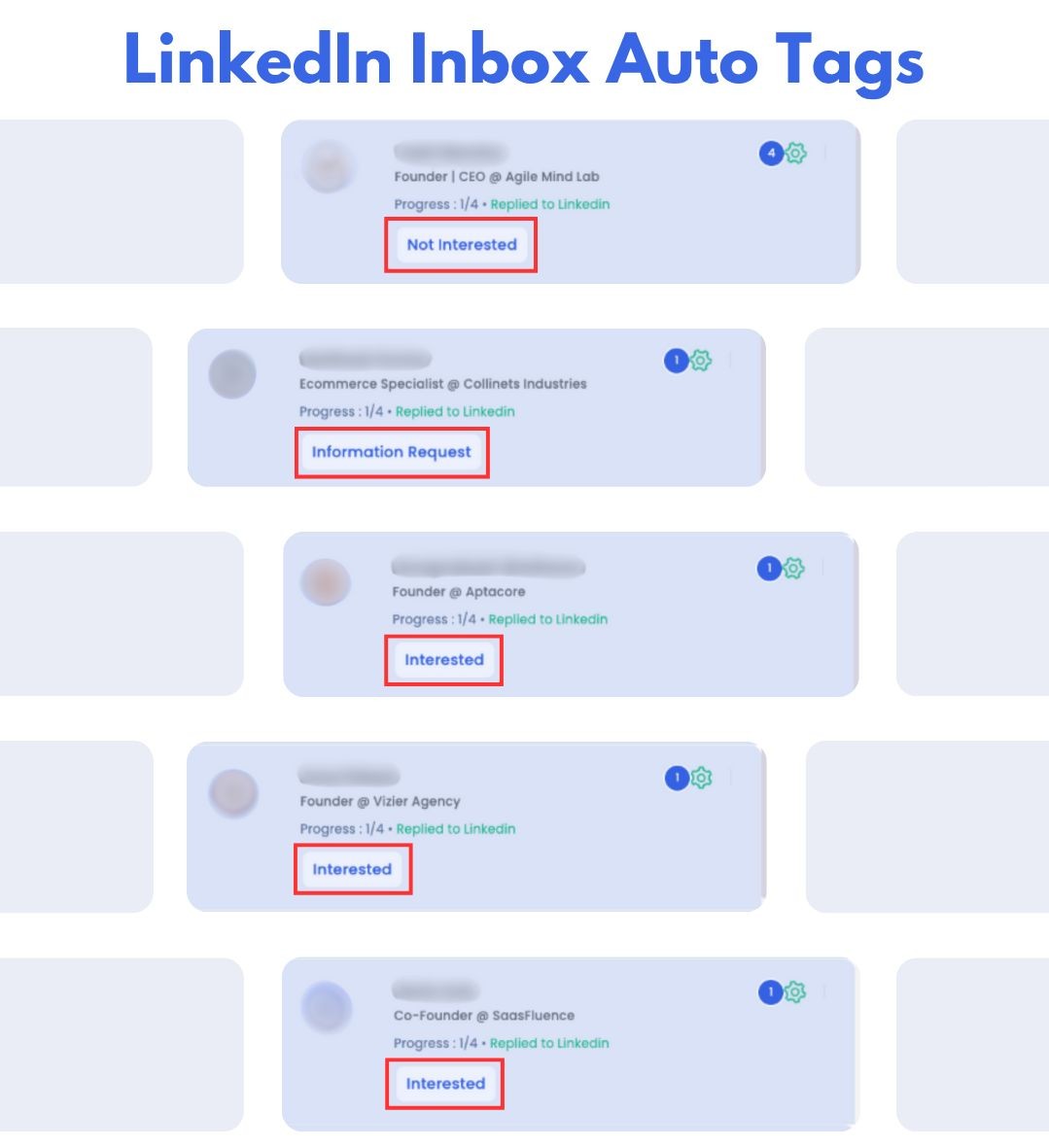
SalesRobot also automatically tags conversations as "interested," "not interested," or "maybe later," so you don't have to read every single thread to figure out where things stand.
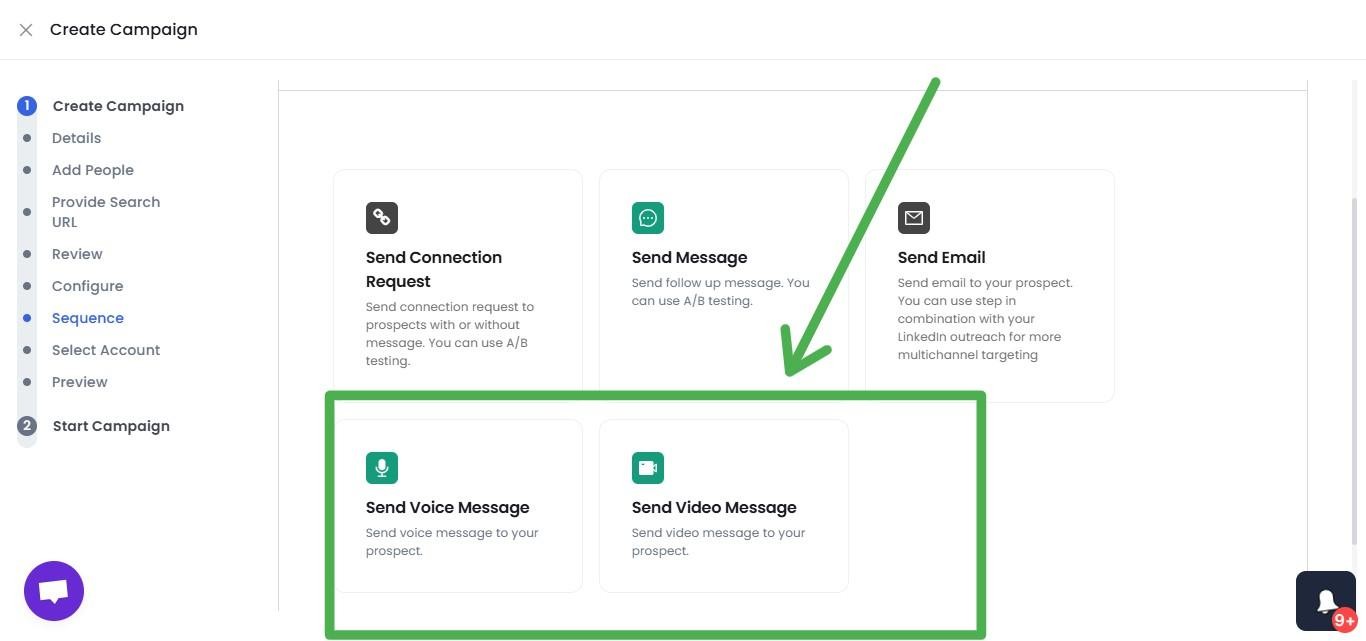
Oh, and if your LinkedIn campaigns aren't performing well? Try sending AI-personalized voice notes or video messages in a SalesRobot campaign (up to 50/day on paid plans).
Prospects stop scrolling when they hear a real voice or see their name on a whiteboard — users report 40%+ reply rates on voice note campaigns. This is a feature almost no other tool on this list offers.
📌 Please Note: SalesRobot uses a mobile API-based approach with built-in proxies and dedicated IPs. This means near-zero risk of LinkedIn restrictions, and you don't even need LinkedIn Premium to use it.
Key Features:
- AI Variables: hyper-personalized messages based on LinkedIn profile data, posts, and company activity
- AI Appointment Setter: manages outreach start-to-finish, builds rapport, books meetings for you
- AI Inbox Manager: instant AI replies to incoming messages (trainable on your tone)
- Auto-tagging: automatically categorizes conversations by interest level
- Voice Notes & Video Messages: send personalized audio and video in LinkedIn campaigns
- Built-in Safe Mode: dedicated IPs, mobile API, smart throttling, adaptive limits
- Multi-channel Drip Campaigns: LinkedIn + unlimited cold email in one automated sequence, with unlimited email warmup included
- A/B Testing: test messages, sequences, and CTAs
- Advanced Analytics: acceptance rates, reply rates, conversion tracking
- Team Management: invite teammates, assign roles, control activity per user
- Integrations: Webhooks, Zapier, HubSpot, Salesforce, Pipedrive, CSV/LinkedIn/Sales Navigator import
Pros:
✅ AI personalization is in a completely different league. Messages sound human because the AI actually studies each prospect.
✅ AI Appointment Setter means your SDRs stop babysitting LinkedIn threads and start closing.
✅ Cloud-based with built-in proxies. No Chrome extension required, no "keep your laptop open" nonsense.
✅ 14-day free trial, no credit card required. No tricky billing contracts either.
✅ Support is available round the clock via chat and email. Real humans, not scripted replies.
✅ Rated 4.8/5 on G2 from 49+ reviews.
Cons:
❌ Not a full CRM. You'll still need HubSpot or Salesforce for pipeline management.
❌ Doesn't include a lead database. You bring your own prospect lists.
Pricing:
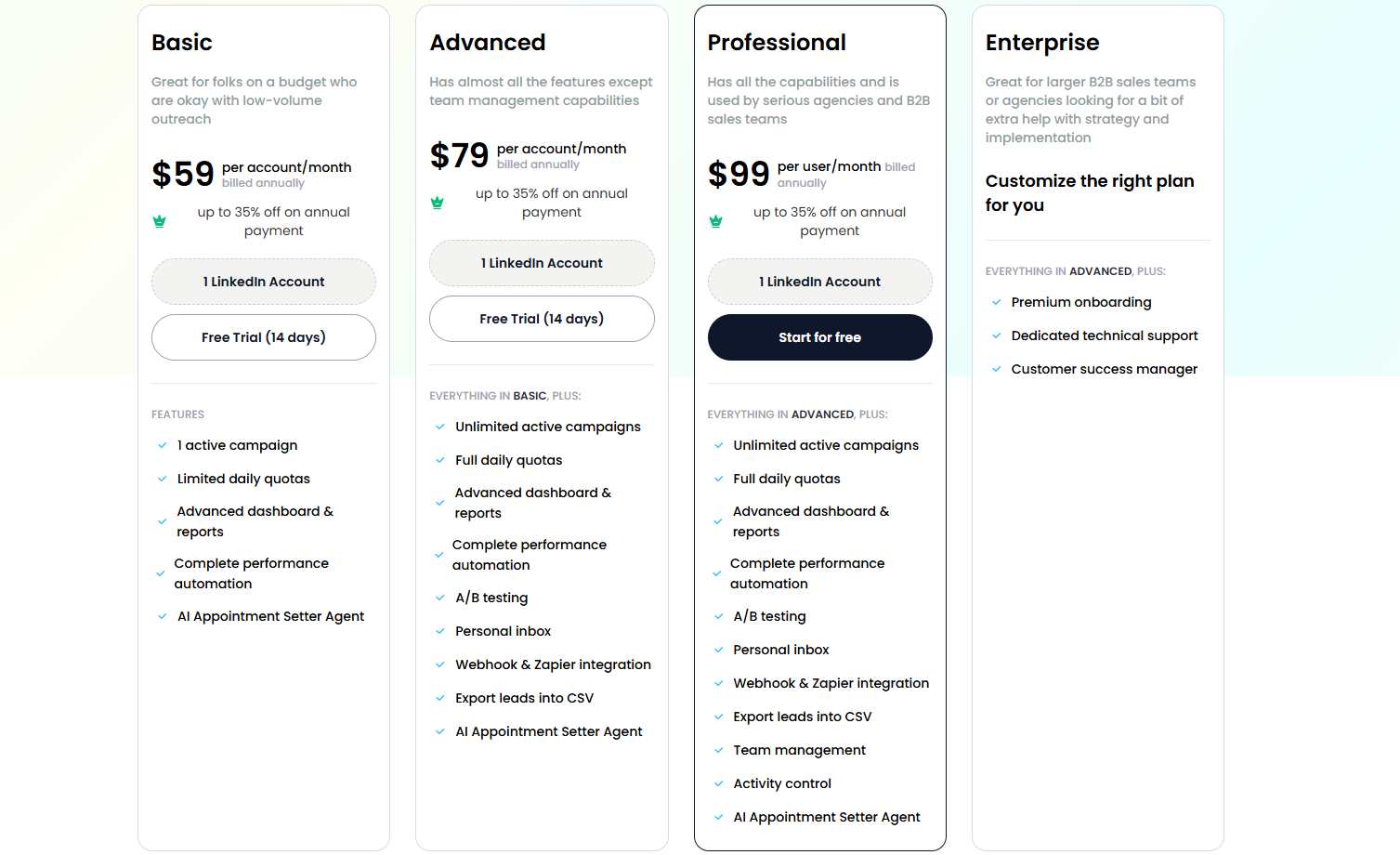
👉 Basic: $59/mo per account ($39/mo annual): 1 LinkedIn + 1 email, 1 campaign, 600 connections/month
👉 Advanced: $79/mo ($59/mo annual): Unlimited campaigns, 75 daily connections, A/B testing, Zapier, personal inbox
👉 Professional: $99/mo ($79/mo annual): Everything in Advanced + team management + activity control
👉 Done-For-You Service: $397/mo. We run your entire lead gen. You just close deals.
📌 Note: Pay annually and save 35%. And remember: 14-day free trial. No credit card. No pressure.
Why SaaS teams love it: For SaaS SDRs who need to reach hundreds of prospects weekly without sounding like a bot, SalesRobot's AI does the heavy lifting. The combination of hyper-personalization, automated appointment setting, and bulletproof account safety is hard to find anywhere else at this price point.
👉 Start your 14-day free trial here
2. Expandi
![[Image: Expandi.io homepage with headline 'Experience the 3X meeting multiplier with LinkedIn + Expandi'. — upload failed]](https://cdn.prod.website-files.com/689b0a925ba9773f34278e0e/6a2277acb835ad0c8cc0eceb_compressed_007.jpg)
Expandi has been around for a while, and there's a reason it keeps showing up on every "best LinkedIn automation tools" list. It's reliable, cloud-based, and does what it promises without a ton of fuss.
For SaaS teams that want solid LinkedIn automation with A/B testing and decent safety features, Expandi is a dependable choice. It runs in the cloud (no Chrome extension), supports dual-channel outreach via LinkedIn and email, and gives you a dedicated country-based IP to keep your account safe.
The campaign setup is straightforward: import your leads from Sales Navigator or CSV, write your message sequence, set your limits, and let it run. Expandi also supports dynamic personalization with images and GIFs, which can help your messages stand out in crowded inboxes.
That said, Expandi's personalization is still template-based. You're working with merge tags ({first_name}, {company}), not AI-generated icebreakers. If your SaaS prospects are senior decision-makers who've seen every template in the book, this might not be enough.
Key Features:
- A/B testing for message optimization
- Dynamic personalization with images and GIFs
- Dual-channel outreach (LinkedIn + email)
- Smart limits and dedicated country-based IP
- Workspaces for managing multiple accounts
Pros:
✅ Cloud-based. Runs 24/7 without keeping your laptop open.
✅ Dedicated IP per account adds a solid layer of safety.
✅ A/B testing is well-implemented and helps SaaS teams optimize fast.
Cons:
❌ Limited native CRM integrations. You'll need Zapier for most connections.
❌ The UI can feel clunky, especially if you're new to automation tools.
❌ No AI-powered personalization. Still relies on basic merge tags.
Pricing: $99/month per seat. 7-day free trial.
3. Dripify

If you want something clean and simple, Dripify is your friend.
Dripify is built around multi-step drip campaigns: automated sequences that mimic real human outreach patterns. For SaaS teams running longer nurture sequences (5-7 touchpoints over a few weeks), the interface makes setting this up almost effortless.
I like Dripify for early-stage SaaS companies that need to get up and running fast without a steep learning curve. The dashboard is clean, the setup flow is intuitive, and even brand-new SDRs can launch their first campaign within minutes.
It integrates with HubSpot, Salesforce, and Zoho through Zapier, and the built-in smart inbox keeps all your LinkedIn conversations in one place.
The trade-off? Dripify doesn't have AI features, and customization options are more limited compared to tools like SalesRobot or Expandi. If you need advanced personalization or multi-channel sequences, you'll eventually outgrow it.
Key Features:
- Multi-step drip campaigns with automated follow-ups
- Smart inbox for managing LinkedIn conversations
- Campaign analytics and performance tracking
- Lead extraction and CSV export
- CRM sync via Zapier (HubSpot, Salesforce, Zoho)
Pros:
✅ Clean, intuitive interface. The lowest learning curve on this list.
✅ Affordable for early-stage SaaS teams.
✅ Solid drip campaign automation that gets the job done.
Cons:
❌ No custom API. You're limited to Zapier for integrations.
❌ Campaign customization is restrictive compared to more advanced tools.
❌ No AI-powered messaging or personalization.
Pricing: Starts at $59/month per user. Advanced plans up to $99/month.
4. Lemlist

Lemlist is interesting because it started as an email-first platform and later added LinkedIn automation. If your SaaS team's outreach leans heavily on email and you want LinkedIn as a secondary channel, Lemlist gives you both in one place.
The multichannel sequences are the main draw: you can combine email steps, LinkedIn actions (profile visits, connection requests, messages), and even cold calls into a single automated workflow.
Lemlist also has some of the best email personalization I've seen: dynamic images, personalized videos, and custom landing pages that you can embed directly in your outreach.
There's also a built-in lead database of 450M+ contacts and an email warmup tool (Lemwarm), which is handy if you're scaling cold email alongside LinkedIn.
But here's the catch: LinkedIn automation is only available on the Multichannel Expert plan ($99/month or higher).
The cheaper Email Pro plan doesn't include it. And honestly? The LinkedIn automation isn't as deep as dedicated LinkedIn tools. Email is clearly where Lemlist focuses most of its energy.
⚠️ Warning: Lemlist uses a credit-based system for its lead database. Multiple users have reported burning through credits faster than expected. Keep an eye on your usage, or costs can sneak up on you.
Key Features:
- Multichannel sequences: email + LinkedIn + cold calls in one workflow
- Dynamic image and video personalization in emails
- Built-in email warmup (Lemwarm)
- 450M+ contact lead database with enrichment credits
- A/B testing and advanced analytics
Pros:
✅ Best-in-class email personalization: custom images, videos, and landing pages.
✅ True all-in-one if you need email + LinkedIn + calling.
✅ Lead database included (saves you an Apollo or ZoomInfo subscription).
Cons:
❌ LinkedIn automation is less advanced than dedicated LinkedIn tools. Email is the main focus.
❌ Per-seat pricing adds up fast for larger teams. Credits expire.
❌ Steeper learning curve for complex multichannel workflows.
Pricing: Email Pro: ~$59-69/mo per user. Multichannel Expert (with LinkedIn): $109/mo monthly, dropping to ~$87/mo on annual billing. Enterprise (Outreach Scale): custom pricing.
5. HeyReach

HeyReach is the tool you want if your SaaS company has multiple SDRs running LinkedIn outreach simultaneously, or if you're an agency managing campaigns for SaaS clients.
The key feature is multi-account rotation. HeyReach distributes your outreach across multiple linked LinkedIn accounts, so no single account gets overloaded. This significantly reduces detection risk and lets you scale volume without burning through accounts.
The unified inbox pulls all LinkedIn conversations from all connected accounts into one place, which is a lifesaver if you're coordinating campaigns across a team. CRM integrations with HubSpot, Pipedrive, and Apollo keep your pipeline data flowing.
The downside? HeyReach is LinkedIn-only. No email automation built in. If you need multi-channel sequences, you'll have to pair it with a separate email tool. And the pricing at the Agency and Unlimited tiers is steep.
Key Features:
- Multi-account management with sender rotation
- Unified inbox for all LinkedIn conversations
- Advanced reporting (CSV, PNG, SVG exports)
- Account safety controls with proxies and action limits
- CRM integrations: HubSpot, Pipedrive, Zapier, Apollo
Pros:
✅ Best option for teams managing multiple LinkedIn accounts.
✅ Sender rotation is genuinely smart for reducing detection risk.
✅ CRM sync keeps your pipeline clean.
Cons:
❌ LinkedIn-only. No built-in email automation. You'll need another tool for that.
❌ No AI features: no lead scoring, no AI personalization, no predictive insights.
❌ Gets expensive at scale, though the flat-rate Agency tier (starting around $799/mo) becomes cost-effective once you're running many accounts.
Pricing: Growth at $79/month per LinkedIn seat, Agency starting at $799/month for unlimited seats, plus a flat-rate Unlimited tier. 14-day free trial.
6. Skylead

Skylead earns its spot on this list because of one feature: Smart Sequences.
Unlike rigid "Step 1 → Step 2 → Step 3" campaigns, Skylead's sequences use if/else logic that adapts based on how each prospect actually behaves.
If someone accepts your connection request, the sequence routes to a personalized message. If they don't accept but you found their email, it pivots to an email follow-up instead. If they reply at any point, the sequence pauses automatically.
For SaaS teams dealing with complex buyer journeys (where prospects behave unpredictably and different stakeholders respond through different channels), this branching logic is genuinely useful.
Skylead also includes unlimited email accounts, up to 100,000 emails per month, and a built-in email warmup system (InboxFlare), all bundled into one flat $100/month price. On pure value, that's hard to beat.
📌 Please Note: Skylead only offers a 7-day free trial. That's not a lot of time to evaluate a tool properly, especially if you're setting up complex smart sequences for the first time.
Key Features:
- Smart Sequences with if/else conditional logic
- Unlimited email accounts + 100K emails/month
- Built-in email warmup (InboxFlare), unlimited accounts
- Email finder and verifier included
- Image and GIF personalization
- Dedicated IP per account
Pros:
✅ Smart Sequences are a real differentiator. Your outreach adapts to each prospect's behavior.
✅ Unlimited email at $100/mo is seriously hard to beat.
✅ Cloud-based with dedicated IP. Safe and always running.
Cons:
❌ The UI has a steeper learning curve. Not the most beginner-friendly setup.
❌ Only a 7-day trial. Tough to fully test before committing.
❌ Some users report occasional bugs and campaign glitches.
Pricing: $100/month per LinkedIn account. Flat rate, all features included. White label available. ~17% savings on annual billing.
7. Waalaxy

Waalaxy is the budget-friendly option that doesn't feel cheap.
It combines LinkedIn and email outreach with a drag-and-drop campaign builder that makes multichannel sequences easy to set up, even if you've never touched an automation tool in your life.
For early-stage SaaS startups or solopreneurs testing LinkedIn prospecting for the first time, Waalaxy's free plan and low-cost Pro option make it a low-risk entry point.
The built-in email finder and GDPR-compliant contact enrichment are nice touches: you can discover prospects' email addresses directly from their LinkedIn profiles without paying for a separate enrichment tool.
One thing to know: as of June 2026, Waalaxy retired its Chrome extension and moved fully to the cloud, so campaigns now keep running even with your laptop closed. The trade-off is that LinkedIn now sees a Waalaxy-assigned IP rather than your own, so warm up new accounts and keep daily volumes sensible.
Key Features:
- Drag-and-drop multichannel campaign builder (LinkedIn + email)
- Built-in email finder and GDPR-compliant enrichment
- Sales Navigator integration and advanced search filters
- Centralized dashboard for multiple campaigns
- Optional LinkedIn inbox management
Pros:
✅ Extremely user-friendly. The drag-and-drop builder is genuinely intuitive.
✅ Free plan available. Paid plans start at just $21/mo.
✅ Email finding and enrichment baked in.
Cons:
❌ Now cloud-based (as of mid-2026), which means LinkedIn sees a shared Waalaxy IP rather than your own residential IP.
❌ Complex multi-step campaigns can get tricky to configure.
❌ Personalization options are basic. No AI.
Pricing: Free trial available. Pro at $21/mo, scaling up to $273/mo for Elite.
8. PhantomBuster

PhantomBuster is a different kind of tool compared to everything else on this list. It's not a pure LinkedIn outreach platform.
It's a no-code automation toolkit with 150+ pre-built "Phantoms" (ready-to-use automations) that scrape data, extract leads, and automate tasks across LinkedIn, Instagram, Twitter, Google Maps, and other platforms.
For SaaS sales teams, the LinkedIn Phantoms are the main draw. You can export entire Sales Navigator search results to a spreadsheet, scrape company pages, auto-connect with prospects, pull contact data from profiles, and enrich lead lists with verified emails. All without writing a single line of code.
Think of PhantomBuster as the tool that sits before your outreach. It builds and enriches your prospect lists, then feeds that data into your CRM or outreach tool (like SalesRobot) for the actual campaign.
If your SaaS team struggles with list building and data quality, PhantomBuster solves that specific problem well.
The trade-off? PhantomBuster uses browser session cookies for LinkedIn access, which carries higher detection risk than cloud-based tools with dedicated IPs.
It's also priced on execution time, not per account, so costs can sneak up on you if you run heavy automations.
⚠️ Warning: PhantomBuster requires your LinkedIn session cookie to operate. This means LinkedIn can detect the automation more easily than tools using mobile API or dedicated IP architecture. Use conservative rate limits and avoid running Phantoms on your primary LinkedIn account.
Key Features:
- 150+ pre-built Phantoms for LinkedIn scraping, data extraction, and automation
- Sales Navigator search export to CSV/JSON
- Email finder and verifier included
- Visual workflow builder for chaining multiple Phantoms together
- Per-workspace pricing (not per user): link up to 100 LinkedIn accounts to one workspace
- Integrations with HubSpot, Salesforce, and Zapier
Pros:
✅ Best tool on this list for lead extraction and data enrichment. If you need clean, verified prospect lists from LinkedIn, PhantomBuster delivers.
✅ No-code setup. Pick a Phantom, configure it, and run. No technical skills required for basic workflows.
✅ Multi-platform support. Works across LinkedIn, Instagram, Twitter, Google Maps, and more.
Cons:
❌ Not built for structured outreach sequences. It scrapes and extracts data but doesn't run drip campaigns or follow-up sequences natively.
❌ Cookie-based LinkedIn access = higher account risk than cloud-based tools.
❌ Steep learning curve for complex workflows. Chaining multiple Phantoms together takes time to figure out.
❌ Execution time limits can be restrictive. Run a scraper on 500 profiles and you might burn through most of your monthly allowance.
Pricing: Starter at $69/mo ($56 annual), Pro at $159/mo ($127 annual), Team at $439/mo ($352 annual). 14-day free trial available.
9. Linked Helper
Linked Helper is the veteran of this list. It's been around longer than most LinkedIn automation tools, and it's stuck to its roots: straightforward, desktop-based LinkedIn automation at a price that won't make your CFO flinch.
For $15 to $45 a month, you get connection requests, follow-ups, InMails, profile visits, a visual campaign builder, and a built-in LinkedIn CRM with tagging and lead history. It also supports all LinkedIn tiers: Basic, Sales Navigator, and Recruiter.
The big trade-off is that Linked Helper runs locally on your computer, not in the cloud. Your laptop needs to be on for automations to work. There's no email automation, no multichannel support, and the UI looks like it was designed in 2018 (because it was).
But if you just need basic LinkedIn automation on a tight budget, Linked Helper does what it does and does it reliably.
Key Features:
- Desktop automation with control over speed, timing, and sequences
- Visual campaign builder with smart reply detection
- Built-in LinkedIn CRM with tagging, notes, and lead history
- Supports Basic, Sales Navigator, and Recruiter
- Data scraping and CSV export
Pros:
✅ Very affordable. Starts at just $15/month.
✅ Full control with desktop-based operation.
✅ Works with all LinkedIn account types.
Cons:
❌ Desktop-only. Your laptop must be running. No cloud or mobile.
❌ No email automation or multichannel support whatsoever.
❌ Outdated UI that can frustrate new users.
Pricing: 14-day free trial. Standard at $15/month, Pro at $45/month.
10. Octopus CRM
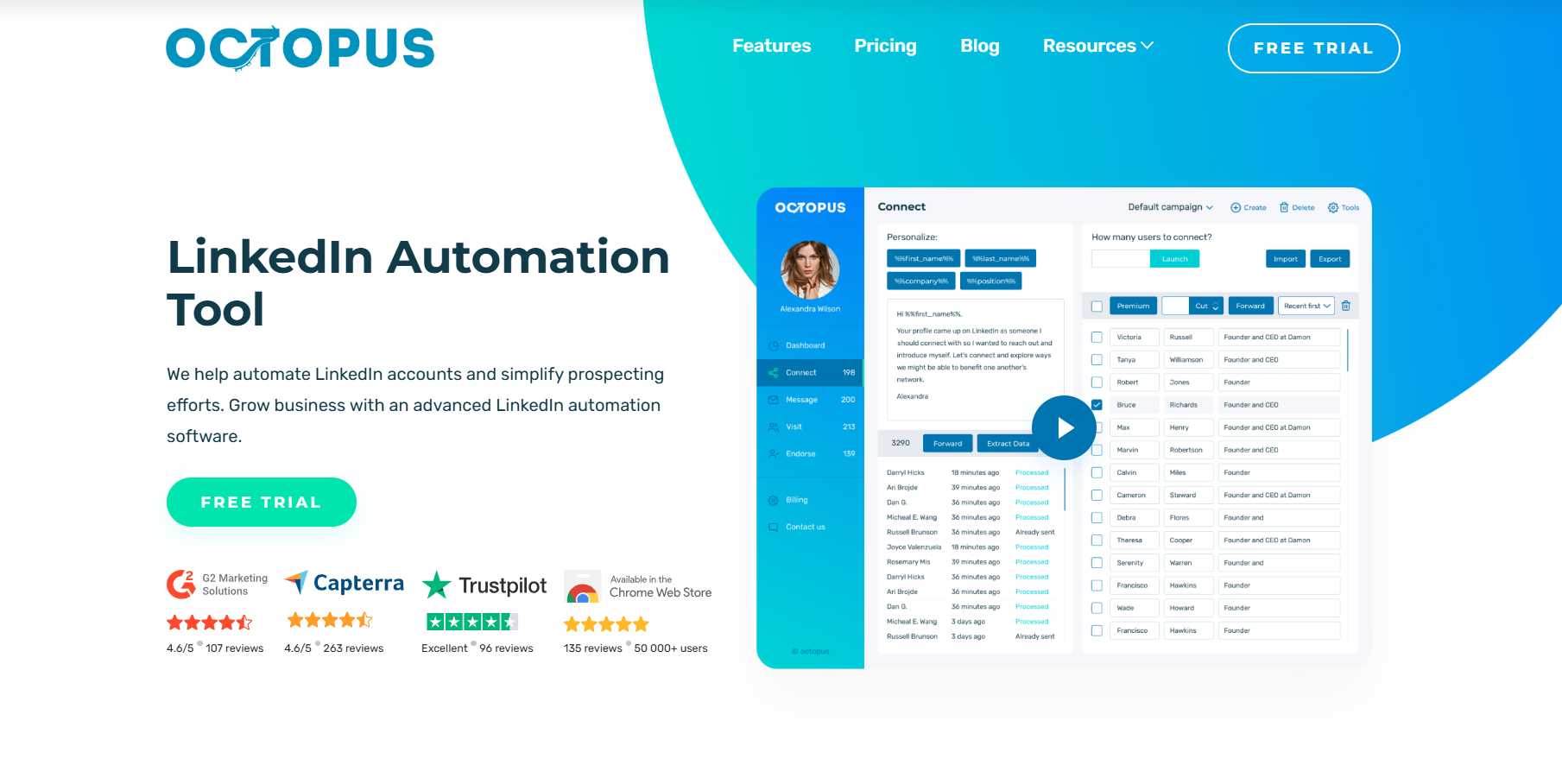
And finally, the budget pick: Octopus CRM.
At $9.99 to $39.99 per month, Octopus CRM is the cheapest LinkedIn automation tool on the market. Period. It runs as a Chrome extension (not cloud-based), which makes setup dead simple: install the extension, connect your LinkedIn, and start automating.
You get the basics: connection requests, bulk messaging to 1st-degree contacts, profile visits, skill endorsements, and a lightweight CRM to track your leads. There's also an Activity Control feature that monitors your usage and alerts you if you're pushing LinkedIn's limits.
But let's be real: "basics" is the operative word here. No AI, no email automation, no multichannel sequences, no advanced analytics. And because it's a Chrome extension, LinkedIn can detect it more easily than cloud-based tools. Some users have reported account restrictions.
For SaaS founders just starting out who want to test whether LinkedIn outreach works for their ICP before investing in a proper tool, Octopus CRM is a fine starting point. Just know you'll outgrow it fast.
⚠️ Warning: Browser-based automation tools (Chrome extensions) carry a higher detection risk than cloud-based tools. LinkedIn has gotten significantly better at identifying extension-based automation. Use with caution and keep your daily activity conservative.
Key Features:
- Automated connection requests, bulk messaging, profile visits, skill endorsements
- Built-in lightweight CRM with lead funnels
- Activity Control to stay within LinkedIn's safety thresholds
- Connect-by-email feature to bypass weekly invite caps
- Zapier integrations (HubSpot, Salesforce, Google Sheets)
Pros:
✅ Cheapest tool on the market. Hard to beat $9.99/mo.
✅ Dead-simple setup. Install and go.
✅ Works with all LinkedIn account types (Free, Premium, Sales Nav, Recruiter).
Cons:
❌ Chrome extension = higher LinkedIn detection risk.
❌ Very basic feature set. No email, no AI, no multichannel.
❌ Laptop and browser must be open for automations to run.
❌ Limited analytics and reporting.
Pricing: Starter at $9.99/mo, Pro at $14.99/mo, Advanced at $21.99/mo, Unlimited at $39.99/mo.
Quick Comparison: All 10 Tools at a Glance
How to Pick the Right LinkedIn Automation Tool for Your SaaS Team
Alright, so you've seen all 10 tools. Now the question is: which one is actually right for your team?
Here's how I'd think about it:
If you're a solo SaaS founder or super early-stage: Start with Waalaxy (free plan) or Octopus CRM ($9.99/mo). Test whether LinkedIn prospecting works for your ICP before committing to a bigger tool. Once you've validated the channel, graduate to something cloud-based with AI features.
If you're a growing SaaS team with 3-10 SDRs: This is where SalesRobot and Expandi compete. SalesRobot pulls ahead if AI personalization and automated appointment setting matter to you, and for SaaS teams targeting educated buyers, they really should. Expandi is a solid pick if you prefer an established tool with simpler automation.
If you're a SaaS agency managing outreach for multiple clients: HeyReach for multi-account rotation, or SalesRobot with its whitelabel option if you want to offer LinkedIn automation under your own brand.
If email is your primary channel and LinkedIn is supplementary: Go with Lemlist. It gives you the most complete email + LinkedIn + calling stack in one subscription. Just know the LinkedIn automation isn't as deep as dedicated platforms.
If you need smart conditional logic for complex SaaS buyer journeys: Skylead's if/else Smart Sequences are built for exactly this.
If budget is the primary concern: Linked Helper ($15/mo) for desktop automation, or Octopus CRM ($9.99/mo) for the absolute minimum viable automation.
Practical Tips for SaaS Sales Outreach on LinkedIn
Having the right tool is half the equation. Here's how to actually make it work:
Segment by pain point, not just job title. A CTO at a 50-person fintech startup has completely different problems than a CTO at a 500-person healthcare enterprise. Build separate campaigns for each segment. One-size-fits-all messaging doesn't work in SaaS.
Lead with value, not a pitch. Your first message should never be a demo request. Share a case study relevant to their industry, a stat that speaks to their role, or a genuine observation about their company. Earn the right to pitch.
Use voice notes and videos. SaaS buyers get dozens of generic LinkedIn messages every week. A 30-second voice note cuts through that noise instantly. Tools like SalesRobot let you embed these directly in your campaign sequences.
Build follow-up sequences with 5-7 touches. Most SaaS deals don't happen on the first message. Space your follow-ups (3 days, 5 days, 7 days), and add new value each time. Don't just "bump" the thread.
Track your numbers. Acceptance rate, reply rate, positive reply rate, meetings booked. If your acceptance rate is below 30%, your targeting needs work. If your reply rate is below 10%, your messaging needs a rewrite.
Combine LinkedIn with email. If a prospect doesn't accept your LinkedIn connection, your tool should automatically pivot to email. Multi-channel sequences consistently outperform single-channel campaigns.
Don't ghost warm leads. This sounds obvious, but it happens all the time. If someone replies with interest and you take 3 days to respond, that lead is cold. SalesRobot's AI Inbox Manager solves this: it replies instantly while you're away.
So, Why SalesRobot?
Look, I know this is our blog. And I know you might be thinking "of course you're going to say SalesRobot is the best."
Fair. But let me give you the actual reasons:
🔥 AI that writes messages worth reading. Not {first_name} templates. Actual personalized icebreakers based on each prospect's profile, posts, and company activity.
🔥 An AI Appointment Setter that books meetings while you focus on closing. Your SDRs shouldn't spend their days managing LinkedIn threads. SalesRobot's AI handles the back-and-forth and puts confirmed meetings on your calendar.
🔥 Safety that's engineered, not improvised. Mobile API architecture. Built-in proxies. Dedicated IPs. Smart throttling. We didn't bolt safety on as an afterthought. It's foundational.
🔥 A support team that shows up. Round the clock, via chat and email. Real people giving real answers, not scripted responses 48 hours later.
🔥 Pricing that doesn't punish you for growing. Starting at $59/mo ($39 annual), with a 14-day free trial. No credit card, no contracts.
76% of our free trial users get their first lead within 2 days.
If that sounds worth testing, here's your invite:
👉 Start your 14-day free trial here
Conclusion
If you're doing saas sales outreach on LinkedIn and you're still doing it manually, you're leaving meetings on the table. Your competitors are using automation to reach more prospects, personalize at scale, and follow up with machine-like consistency.
The 10 tools in this guide each have their strengths. Expandi is reliable. Dripify is clean. Lemlist is great for email-heavy teams. Waalaxy is budget-friendly. Octopus CRM is dirt cheap.
But for SaaS sales teams that need AI-powered personalization, automated appointment setting, multi-channel outreach, and rock-solid account safety, all in one platform, we think SalesRobot is the tool worth trying first.
14 days. No credit card. No risk.
FAQs
1. What is the best LinkedIn automation tool for SaaS sales teams?
SalesRobot is our top pick for SaaS sales teams. The AI-powered personalization, AI Appointment Setter, multi-channel outreach, and built-in safety features make it well-suited for SaaS companies dealing with long sales cycles and demo-heavy funnels. Expandi, Dripify, and Lemlist are also strong options depending on your team size and budget.
2. Is LinkedIn automation safe for SaaS sales teams?
Yes, if you choose the right tool. Cloud-based platforms with dedicated IPs, smart throttling, and mobile API architecture (like SalesRobot) carry significantly less risk than Chrome extension-based tools. The key is staying within LinkedIn's activity limits and using tools that mimic human behavior.
3. How much do LinkedIn automation tools cost?
Prices range from $9.99/month (Octopus CRM) to $159/month (Phantombuster). Most SaaS teams land in the $59 to $99/month range with tools like SalesRobot, Dripify, or Expandi.
4. Can LinkedIn automation replace my SDR team?
No, and it shouldn't try to. Automation handles the repetitive work: connection requests, follow-ups, initial responses. But closing deals, handling complex objections, and building genuine relationships still require a real person. The goal is to give your SDRs more at-bats, not replace them entirely.
5. What features should SaaS sales teams prioritize in a LinkedIn automation tool?
For SaaS specifically: AI-powered personalization (generic templates don't work on educated buyers), multi-channel sequences (LinkedIn + email minimum), CRM integration (data needs to flow into HubSpot/Salesforce), A/B testing (optimize your messaging), and account safety (you can't afford a restricted account mid-pipeline).
6. How does SalesRobot compare to Expandi and Dripify for SaaS outreach?
Expandi is reliable and established but lacks AI personalization. It still uses basic merge tags. Dripify is affordable and simple but limited in features and customization. SalesRobot offers AI Variables, AI Appointment Setter, AI Inbox Manager, multi-channel outreach, and cloud-based safety, making it the most feature-complete option for SaaS teams that need personalization at scale.
7. Do I need LinkedIn Premium or Sales Navigator to use these tools?
It depends on the tool. SalesRobot works without LinkedIn Premium thanks to its mobile API architecture. Others like Octopus CRM (Unlimited tier) and Skylead effectively require Sales Navigator (~$99/mo extra) for advanced filtering, which raises your real monthly cost.
8. Can LinkedIn automation tools send InMails and voice notes automatically?
Some can. SalesRobot automates InMails to open profiles (up to 50/day, with no InMail credits consumed) and can send AI-personalized voice notes and video messages at scale. Most competitors like Expandi, Dripify, and HeyReach don't offer automated voice or video, making this a rare capability.

Wow your leads by cloning yourself and sending personalized videos and voice notes to each lead on LinkedIn.
If you don't reply to leads within 5 mins, your chances of converting them fall by 50%. Our AI replies on your behalf instantly! (and yes, you can train it)

Don't shoot in the dark. Get detailed analytics on what's working

SalesRobot allows you to invite other team members, so that they can add their LinkedIn Account, run outreach campaigns and get amazing results just like you.
.avif)


Trusted by 4100+ innovative B2B sales teams and lead gen agencies

.avif)

.avif)




.avif)


Heading 1
Heading 2
Heading 3
Heading 4
Heading 5
Heading 6
Lorem ipsum dolor sit amet, consectetur adipiscing elit, sed do eiusmod tempor incididunt ut labore et dolore magna aliqua. Ut enim ad minim veniam, quis nostrud exercitation ullamco laboris nisi ut aliquip ex ea commodo consequat. Duis aute irure dolor in reprehenderit in voluptate velit esse cillum dolore eu fugiat nulla pariatur.
Block quote
Ordered list
- Item 1
- Item 2
- Item 3
Unordered list
- Item A
- Item B
- Item C
Bold text
Emphasis

Superscript
Subscript