.avif)
TL;DR
- Reachy is a solid desktop-based LinkedIn automation tool with strong safety features and local operation.
- The platform offers competitive pricing and good customer support, especially for bootstrapped founders.
- Limited to LinkedIn only, with no email outreach capability, and requires your computer to stay on while campaigns run.
- Consider SalesRobot as an alternative if you need cloud-based access, multi-channel outreach, and more advanced automation features.
Remember when LinkedIn outreach meant manually sending 20 connection requests and calling it a day?
Those days are long gone.
Now you're expected to personalize every message, nurture dozens of prospects simultaneously, and somehow scale your outreach without getting your account flagged.
The pressure to automate LinkedIn outreach is real, but so is the fear of picking the wrong tool.
Choose poorly and you might find yourself with a banned account or, worse, a platform that promises the world but delivers bland, robotic messages that scream "automation" to every prospect.
Enter Reachy, a desktop-based LinkedIn automation tool that claims to solve these headaches while keeping your account safe.
It runs locally on your machine, offers AI-powered personalization, and boasts a 4.9-star rating from over 800 users.
This review covers whether Reachy lives up to the hype in 2026, from setup and safety features to pricing and real-world results.
We're also including SalesRobot in this review because they're a natural comparison point: both tools focus on LinkedIn outreach but from different angles.
Reachy is desktop-first and LinkedIn-only. SalesRobot is cloud-based and adds email to the mix. If you're deciding between the two or just figuring out which category of tool fits your workflow, this review covers both.

Reachy: What You Need to Know
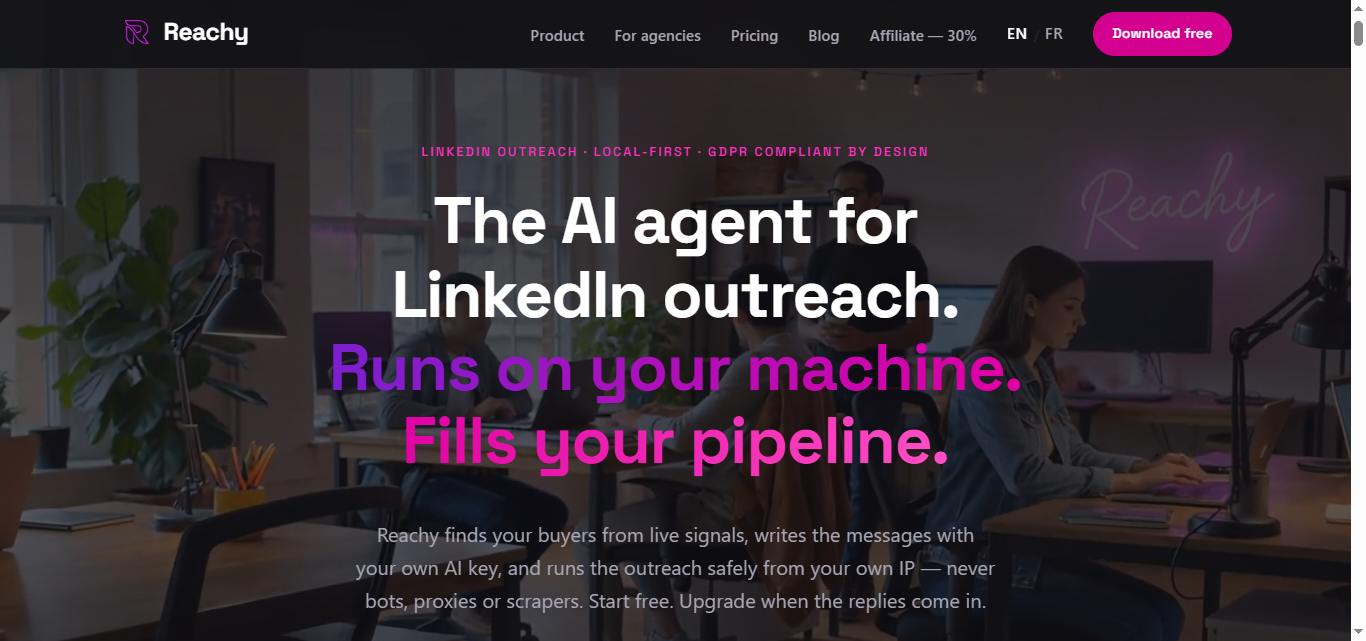
✅ Major strength: Runs as a local desktop app on your computer, which makes it much safer than cloud-based LinkedIn automation tools. This approach significantly reduces the risk of LinkedIn detecting automated activity since everything happens on your machine rather than through external servers.
⚠️ Important limitation: Being desktop-only means you can't run campaigns when your computer is off or access your outreach from mobile devices. If you travel frequently or prefer cloud-based solutions you can access anywhere, this is a real constraint.
✅ Another key benefit: Incredibly quick setup time, with users reporting they can launch new campaigns in just 5 to 10 minutes. The interface is intuitive enough that even first-time LinkedIn automation users can navigate it without getting overwhelmed by complex features.
✅ Third strong point: Handles serious volume with the ability to automate up to 400 connection requests and manage multiple LinkedIn accounts within a single campaign. For agencies or founders doing large-scale outreach, this kind of capacity is genuinely useful.
⚠️ Something to watch out for: Despite claims about being "safe," it's still LinkedIn automation, which always carries some risk of account restrictions. LinkedIn's terms of service don't distinguish between local and cloud-based automation tools.
✅ Great feature: Offers a forever-free plan with no credit card required, making it accessible for bootstrapped founders and small teams who need to test LinkedIn outreach before committing budget. The pricing flexibility is genuinely founder-friendly.
⚠️ A real concern: LinkedIn-only. If you're running outreach campaigns that include email or other platforms, you'll need additional tools to complete your sales stack. There's no built-in email outreach at any pricing tier.
Reachy's Key Features, Broken Down
Safe LinkedIn Automation
Reachy runs as a desktop app locally on your computer, mimicking human behavior to keep your LinkedIn account safe from bans. Unlike cloud-based tools that put your account at risk through shared IPs and external servers, Reachy operates entirely on your machine with built-in safety limits and human-like timing.
For example, instead of blasting connections in one burst, Reachy ships with safe defaults — roughly 100–150 actions per week per account, up to 150–200 connection requests weekly on a fully warmed-up account. This means you can scale your outreach without putting your account at unnecessary risk.
AI-Powered Message Personalization
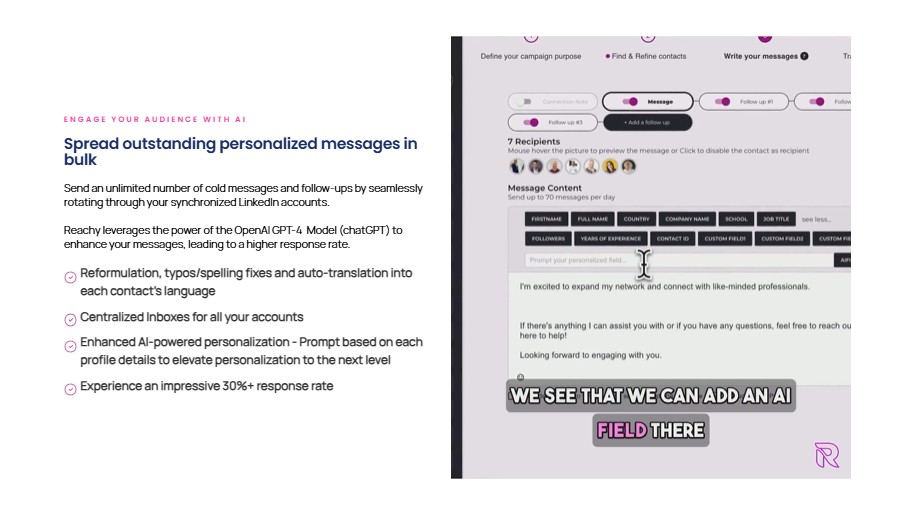
The platform now supports AI-personalized connection requests and follow-ups using your own API key from OpenAI (GPT-5), Anthropic (Claude), or Google (Gemini), with Reachy adding 0% markup on tokens. This personalization can meaningfully increase your response rates compared to generic templates.
Instead of sending "Hi, let's connect," Reachy might write "Hi Sarah, saw your recent post about scaling B2B teams. Would love to connect and share some insights from our experience at similar-stage startups."
Advanced Contact Discovery
Reachy goes beyond basic LinkedIn searches with signals-based prospecting that finds people based on their recent activities. You can target people who attended specific events, reacted to certain posts, joined particular groups, or followed specific companies and influencers.
Imagine launching a campaign targeting everyone who liked your competitor's latest product announcement. That's hyper-targeted outreach that reaches engaged prospects at the right moment.
Multi-Account Management
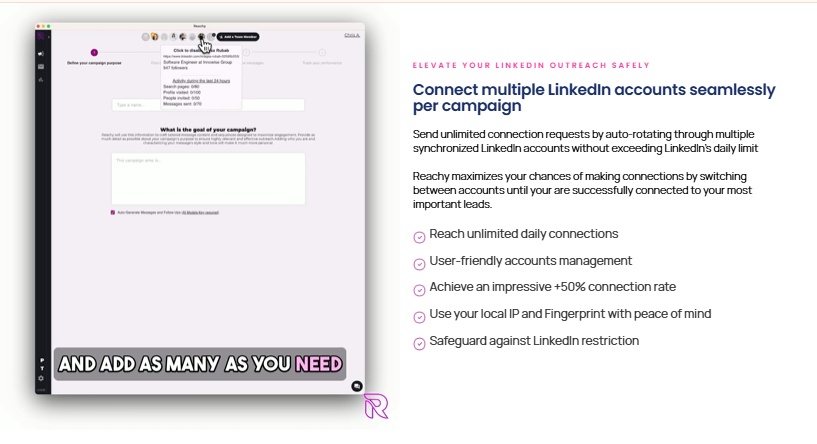
Run outreach campaigns across multiple LinkedIn accounts simultaneously from one dashboard, useful for agencies or teams scaling their operations. Each account operates independently with its own safety settings and campaign sequences.
For agencies managing multiple clients, this means you can segment different audiences across accounts while keeping campaigns cleanly separated.
Automated Sequence Campaigns
Set up multi-step outreach sequences that automatically send connection requests, follow up with messages, and nurture prospects over weeks or months. The system handles timing and tracks responses so you only engage when someone shows interest.
Your sequence might send a connection request on Monday, a follow-up message on Thursday if accepted, then a value-add message the following week, all running in the background while you focus on closing deals.
Built-in CRM and Analytics
Track your campaign performance with analytics showing connection rates, response rates, and conversion metrics. The integrated CRM keeps all your prospect data organized and lets you export contacts to your existing sales tools via CSV, webhooks, or direct integrations with HubSpot, Salesforce, Pipedrive, Zapier, Make, and n8n.
Your data stays entirely on your local machine, which is both a privacy advantage and a limitation if you need cloud-based access across multiple devices.
Reachy Pricing: How Much Will It Cost?
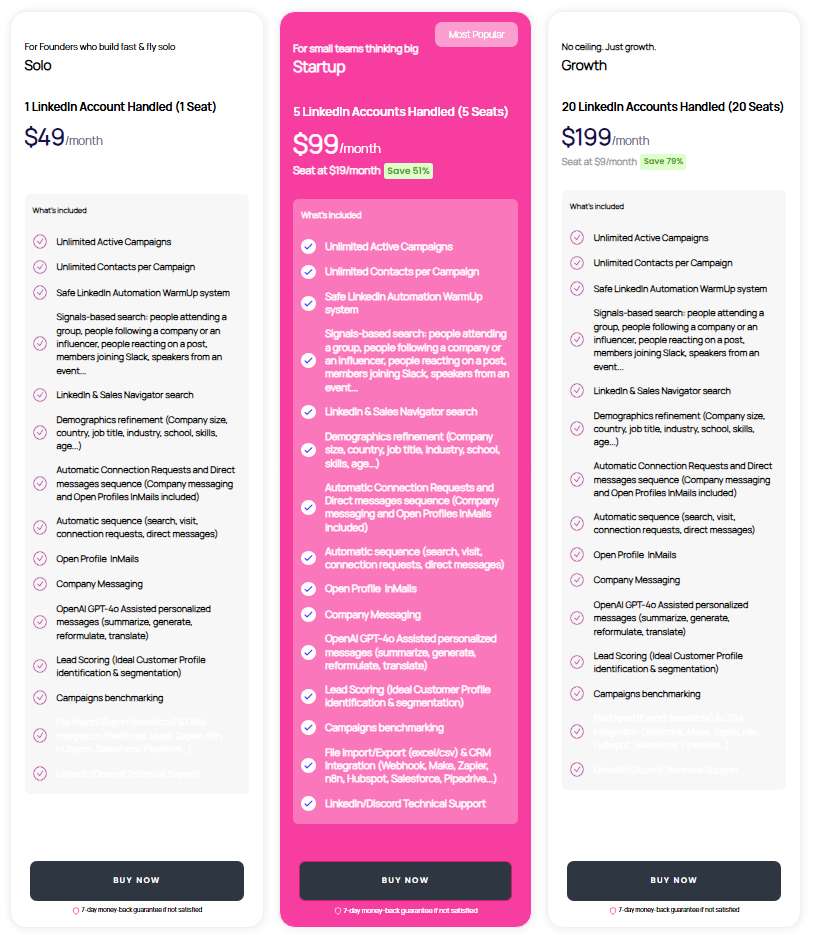
Reachy publishes all pricing on their website. There's a 14-day full-featured trial (no credit card) that switches to free 'monitoring' afterward, plus paid tiers. Prices below are per month on monthly billing.
Free Plan: $0 per month

- 1 LinkedIn account (1 seat)
- 1 active campaign
- 50 contacts
- Desktop app for Windows, Mac, and Linux
- No credit card required
- GDPR compliant
The free plan is genuinely useful for testing whether the tool fits your workflow, though the 50-contact cap means you'll hit the ceiling quickly on any real prospecting effort.
Solo: $39 per month
- 1 LinkedIn account (1 seat)
- Unlimited active campaigns
- Unlimited contacts per campaign
- Safe LinkedIn Automation WarmUp system
- Signals-based search (event attendees, post reactions, Slack group members, company followers)
- LinkedIn and Sales Navigator search
- Demographics refinement (company size, country, job title, industry, skills)
- Automated connection requests and direct message sequences, including Open Profile InMails and company messaging
- GPT-4o assisted message personalization (generate, summarize, translate, reformulate)
- Lead scoring and ICP identification
- Campaign benchmarking and analytics
- CRM integration via HubSpot, Salesforce, Pipedrive, Zapier, Make, n8n, and webhook
- 7-day money-back guarantee
The right entry point for solo founders and individual contributors doing serious LinkedIn prospecting.
Team: $79 per month
- 3 LinkedIn accounts (3 seats), auto-rotating, with 240 connection requests and direct messages per day
- Everything in Solo
- Auto-rotating accounts and phone support included
Built for small teams where multiple people are running outreach simultaneously. The per-seat cost drops significantly compared to paying for five separate Solo plans.
Agency: $179 per month (15 seats) — some Reachy pages list a $249 unlimited-seat tier
- 15 seats (Agency) with auto-rotation and per-client isolation, or unlimited seats on the top tier
- Everything in Startup
- Flat pricing for agencies with per-client campaign isolation and exportable reporting, plus direct founder support
For agencies managing outreach across a large number of client accounts. The per-seat cost at this tier is significantly lower than paying for individual Solo or Startup plans.
Reachy vs SalesRobot: How Do They Compare?
Choose Reachy if you prefer desktop software with local operation, care about keeping your data off the cloud, and are focused purely on LinkedIn outreach.
SalesRobot is the better fit for teams wanting cloud accessibility, built-in email outreach, and more advanced inbox management.
SalesRobot: A Closer Look at the Alternative
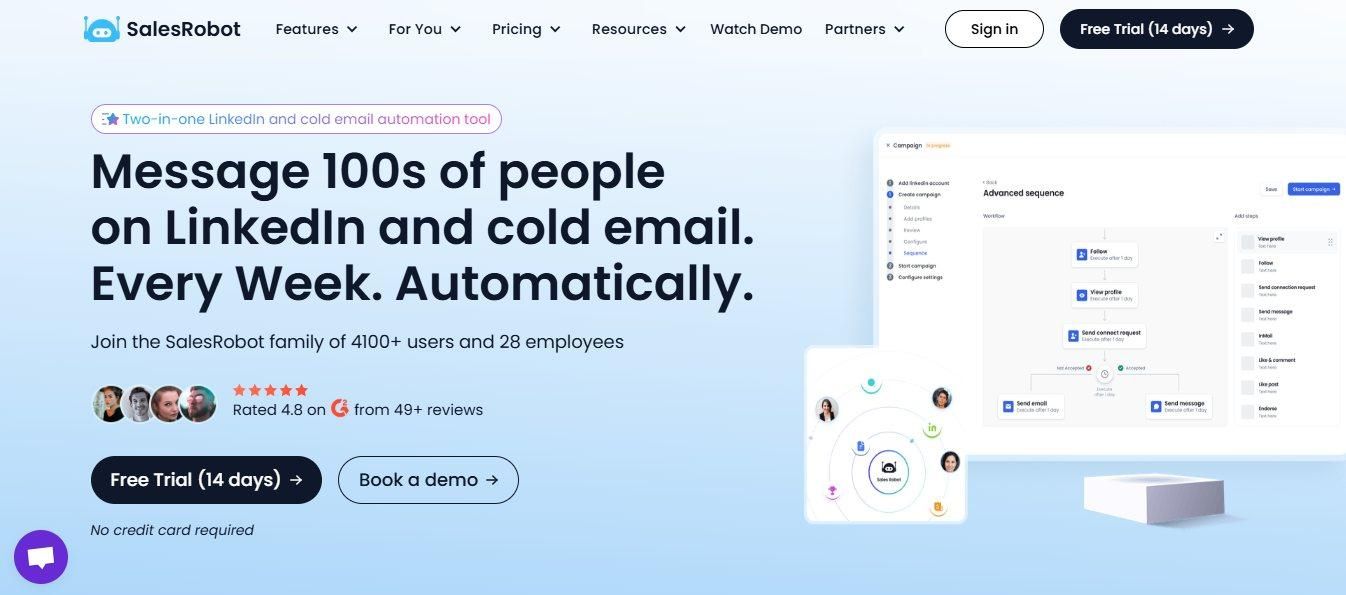
If you're evaluating Reachy but want something that runs in the cloud and covers more than LinkedIn alone, SalesRobot is worth a close look.
What SalesRobot Actually Does
SalesRobot is a cloud-based LinkedIn automation platform designed for sales teams and agencies.
It combines LinkedIn outreach with email campaigns, plus features like AI voice notes and video messages that help you stand out in a crowded inbox. Because it runs in the cloud, your campaigns keep running whether your laptop is open or not.
Key Features
- Multi-step LinkedIn sequences: Automate connection requests, messages, profile visits, and follow-ups with smart time delays. The sequences stop automatically when prospects reply, preventing over-messaging.
- AI voice and video personalization: Send personalized voice notes and video messages at scale using AI cloning technology, adding a personal touch to outreach at volume.
- Mobile API safety: Uses LinkedIn's mobile app APIs instead of browser automation, reducing account ban risk. Each account gets dedicated residential IPs for natural behavior simulation.
- Smart reply detection: AI monitors your inbox and can suggest responses or handle initial conversations automatically using the AI Appointment Setter.
Campaigns stop when prospects engage to avoid spam-like behavior. - Unified LinkedIn and email campaigns: Run coordinated outreach across LinkedIn and email from a single dashboard. Import prospects from Sales Navigator, regular LinkedIn search, or CSV uploads.
- Team collaboration tools: Prevent duplicate outreach across team members, share templates and sequences, and track team performance from a centralized dashboard.
SalesRobot Pricing
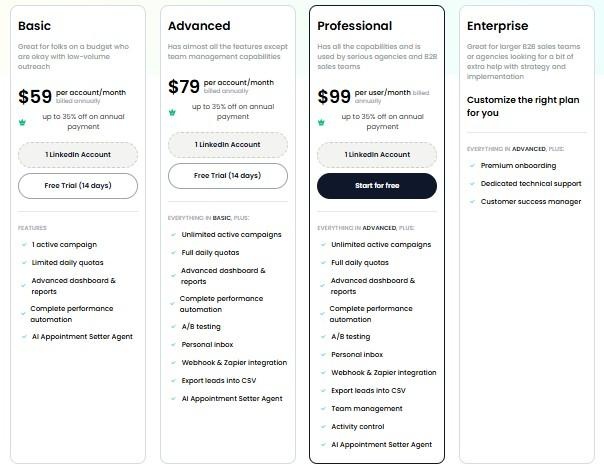
SalesRobot pricing is per LinkedIn account. The figures below reflect monthly billing rates. Annual billing saves up to 35% across all plans.
Basic: $59 per month
- 1 active campaign
- Limited daily quotas (20 connection requests, 20 messages)
- AI appointment setter included
- Basic analytics and reporting
Good for solopreneurs testing LinkedIn automation on a budget.
Advanced: $79 per month
- Unlimited active campaigns
- Full daily quotas (75 connection requests, 75 messages)
- A/B testing, personal inbox, webhook integrations
- CSV export and advanced analytics
The most popular choice for individual contributors doing serious outreach.
Professional: $99 per month
- Everything in Advanced
- Team management and role permissions
- Activity control and duplicate prevention
- Team analytics dashboard
Built for agencies and sales teams managing multiple accounts.
Enterprise: Custom pricing
- Everything in Professional
- Premium onboarding and dedicated support
- Customer success manager
For organizations needing hands-on implementation support.
SalesRobot offers a 14-day free trial with no credit card required.
The Verdict
Reachy is a solid LinkedIn-only outreach tool that gets the job done. The desktop-first approach is a genuine differentiator: your data stays on your machine, there are no shared IP risks, and the safety argument is legitimate.
For bootstrapped founders and small teams who need to run LinkedIn outreach without a cloud subscription, it's a strong option at a fair price.
Where it falls short is scope. Reachy is LinkedIn only, so if email is any part of your outreach mix, you'll need a separate tool.
The desktop requirement also means campaigns stop when your computer is off, which is a real constraint for anyone who travels or manages outreach across a team.
The pricing is genuinely transparent and founder-friendly, but the free plan's 50-contact limit is tight. You'll likely need the Solo plan at $49 per month before you can run anything meaningful.
Bottom Line
Buy Reachy if you're focused purely on LinkedIn, want your data to stay local, and are comfortable with a desktop app. The Solo plan at $49 is reasonably priced for what you get.
Skip Reachy if LinkedIn outreach is one part of a broader multi-channel campaign, or if you need campaigns running around the clock without depending on your own machine being on.
SalesRobot's cloud setup and email integration make it the stronger pick in those cases.

Frequently Asked Questions
Does Reachy run 24/7 like cloud tools?
No. Reachy only works while the desktop app is open and does not run from a cloud server. Reachy frames this as a safety feature, since round-the-clock activity is a bot signature while activity during your working hours looks like a natural human pattern.
Does Reachy include AI, or do I need my own API key?
Reachy's core search, connect, message sequences and lead scoring work without any AI key. For AI-personalized messages, you plug in your own OpenAI (GPT-5), Anthropic (Claude), or Google (Gemini) key and pay the provider directly — Reachy adds 0% markup on tokens.

Wow your leads by cloning yourself and sending personalized videos and voice notes to each lead on LinkedIn.
If you don't reply to leads within 5 mins, your chances of converting them fall by 50%. Our AI replies on your behalf instantly! (and yes, you can train it)

Don't shoot in the dark. Get detailed analytics on what's working

SalesRobot allows you to invite other team members, so that they can add their LinkedIn Account, run outreach campaigns and get amazing results just like you.
.avif)


Trusted by 4100+ innovative B2B sales teams and lead gen agencies

.avif)

.avif)




.avif)


Heading 1
Heading 2
Heading 3
Heading 4
Heading 5
Heading 6
Lorem ipsum dolor sit amet, consectetur adipiscing elit, sed do eiusmod tempor incididunt ut labore et dolore magna aliqua. Ut enim ad minim veniam, quis nostrud exercitation ullamco laboris nisi ut aliquip ex ea commodo consequat. Duis aute irure dolor in reprehenderit in voluptate velit esse cillum dolore eu fugiat nulla pariatur.
Block quote
Ordered list
- Item 1
- Item 2
- Item 3
Unordered list
- Item A
- Item B
- Item C
Bold text
Emphasis

Superscript
Subscript