.avif)
TL;DR
- Surfe is a solid LinkedIn CRM extension with good data enrichment and pipeline building features.
- The Chrome extension integrates well with HubSpot, Salesforce, Pipedrive, and Copper, and automates contact management effectively.
- Pricing is transparent across three tiers but may not justify the cost for small teams or basic users.
- SalesRobot offers stronger outreach automation for LinkedIn campaigns at a lower starting price.
Ever find yourself frantically copying and pasting LinkedIn profiles into your CRM at 2 AM, wondering why there isn't a better way?
You're not alone.
Sales teams everywhere are drowning in manual data entry, jumping between LinkedIn and their CRM like digital acrobats.
Enter Surfe, a Chrome extension that promises to bridge this gap by letting you manage your CRM directly from LinkedIn. Sounds dreamy, right?
But not every shiny new tool delivers on its promises. Some extensions slow down your browser, others give you outdated contact info, and many just add more complexity to your already chaotic workflow.
So does Surfe actually make your life easier, or is it just another digital paperweight? We'll get into the real user experience, pricing, pros and cons, and whether it's worth adding to your sales stack.
We're also including SalesRobot in this review because sales teams often evaluate both tools at the same time.
Surfe handles the data enrichment and CRM sync side of LinkedIn prospecting. SalesRobot handles the outreach automation side.
They solve different problems within the same LinkedIn workflow, and depending on what gap you're trying to close, one may fit better than the other or you might end up using both.
Surfe: What You Need to Know
✅ One-click CRM integration: Surfe lets you add contacts directly from LinkedIn and other business socials straight to your CRM with a single click. You can instantly enrich those contacts with professional email addresses and mobile numbers without switching between multiple tools.
⚠️ Limited transparency on data sources: While Surfe promises waterfall enrichment and high accuracy, they don't clearly explain where their data comes from or how recent it is. This makes it tough to gauge data quality before you commit to their service.
✅ Comprehensive tech stack integration: The platform connects with HubSpot, Salesforce, Pipedrive, and Copper as native CRM integrations, plus sales engagement tools like Salesloft, Outreach, and Lemlist, and offers API access for custom integrations.
This means you can keep using your existing workflow while adding Surfe's data enrichment capabilities.
✅ Scalable prospecting lists: Surfe's Pipeline Builder promises to create ideal prospect lists in minutes rather than hours. You can build targeted lists across different verticals and geographies, then enrich contact data at scale using their waterfall approach.
✅ Transparent pricing with a free plan: Unlike many enrichment tools, Surfe publishes its pricing publicly. The free plan is available with no credit card required, and paid tiers are clearly listed at $49 and $89 per user per month on monthly billing (dropping to an effective $39 and $79 with annual billing).
✅ Market intelligence features: Beyond basic contact data, Surfe offers curated market insights and company lists by industry and region. For example, they provide ready-made lists like "Top Pharmaceutical Companies in Switzerland" that can jumpstart your prospecting efforts.
⚠️ Heavy focus on European markets: Many of their featured prospect lists and case studies center on European companies, particularly Switzerland and Germany. If you're targeting other regions, the data coverage might not be as comprehensive.
Surfe's Key Features, Broken Down
CRM Chrome Extension

This browser extension lets you add prospects to your CRM directly from LinkedIn or other business social platforms with one click. No more switching between tabs or copying data manually.
When you're browsing a potential customer's LinkedIn profile, you can instantly push their information into HubSpot, Salesforce, Pipedrive, or Copper without leaving the page. The extension also overlays your existing CRM data on LinkedIn profiles, so you can see at a glance whether a contact already exists in your system.
Pipeline Builder
Instead of spending hours building prospect lists from scratch, Pipeline Builder helps you create your ideal sales pipeline in minutes. It combines company targeting with contact discovery in one streamlined workflow.
For example, if you're targeting fintech companies in Germany with 50 to 200 employees, you can build and export that entire list with enriched contact data in just a few clicks.
Waterfall Enrichment

This feature automatically searches multiple data sources to fill in missing contact information like email addresses and phone numbers.
Surfe pulls from 15 or more data providers and uses triple verification to reach find rates of up to 93%. If the first source doesn't have someone's work email, it checks the next one, and so on.
Say you have a list of 500 prospects but only company names. Waterfall enrichment will find professional emails, mobile numbers, and other key details for the majority of those contacts automatically.
Job Change Alerts
Get notified when your contacts switch companies, which often creates new sales opportunities. The system tracks your prospects and alerts you when they move to different roles or organizations.
If a former customer who loved your product joins a new company as VP of Sales, you'll get an alert so you can reach out while the timing is right.
Advanced Lead Search and Export
Search for prospects using detailed filters like company size, industry, job title, and location, then export entire lists with enriched contact data. This works for finding both individual contacts and target accounts.
You could search for "Marketing Directors at SaaS companies in California with 10 to 50 employees" and export 1,000 or more qualified prospects with their verified contact information ready for outreach.
Market Signals

Access curated lists and insights about companies in specific industries or regions that might be ready to buy. These signals help you identify prospects who are more likely to convert based on market trends and company changes.
The platform provides ready-made lists like "Top Pharmaceutical Companies in Switzerland" or alerts about companies that just received funding or launched new products.
Surfe Pricing: How Much Will It Cost?
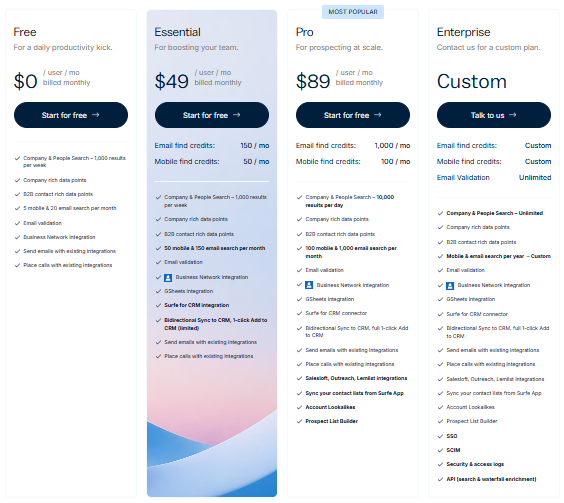
Surfe publishes three plans on their website. All prices below are per user per month.
Free: $0 per user per month
- 20 email finder credits per month
- 5 mobile phone finder credits per month
- Unlimited email validation
- Company and People Search, 100 results per week
- B2B contact details finder
- Business Social and CRM/Google Sheets integration
- 1-click Add to CRM (limited)
- Salesloft, Outreach, Lemlist integrations
- Send emails and place calls
Good for individuals who want to test the core LinkedIn to CRM workflow before committing.
Essential: $49 per user per month
- 150 email finder credits per month
- 50 mobile phone finder credits per month
- Unlimited email validation
- Company and People Search, 100 results per week
- B2B contact details finder
- Business Social and CRM/Google Sheets integration
- 1-click Add to CRM/Google Sheets
- Salesloft, Outreach, Lemlist integrations
- Send emails and place calls
- Sync your contact lists from the Surfe App
A reasonable starting point for sales reps actively prospecting on LinkedIn who need reliable enrichment volume without jumping to the top tier.
Pro: $89 per user per month (Most Popular)
- 1,000 email finder credits per month
- 100 mobile phone finder credits per month
- Unlimited email validation
- Company and People Search, 10,000 results per day
- B2B contact details finder
- Business Social and CRM/Google Sheets integration
- 1-click Add to CRM/Google Sheets
- Salesloft, Outreach, Lemlist integrations
- Send emails and place calls
- Sync your contact lists from the Surfe App
- Account Lookalikes
- Prospect List Builder
Built for sales teams doing prospecting at scale who need both high enrichment volume and the full pipeline building feature set.
Surfe also offers API access for teams that need bulk enrichment at volume, with capacity for up to 500,000 requests per hour. Pricing for API usage is separate and requires contacting their team.
A 14-day free trial is available on paid plans with no credit card required.
Surfe and SalesRobot: How Do They Compare?
SalesRobot:

If you're evaluating Surfe for lead generation, SalesRobot is worth looking at for a different reason.
Where Surfe focuses on getting accurate contact data into your CRM, SalesRobot focuses on what happens after you have that data: running automated outreach sequences directly on LinkedIn and via email from one platform.
What SalesRobot Actually Does
SalesRobot is a LinkedIn automation platform that handles connection requests, messaging sequences, and follow-ups at scale.
It's built specifically for B2B sales teams and agencies who want to turn LinkedIn into their primary outbound channel, combining LinkedIn outreach with email campaigns in one unified system.
Key Features
- Multi-step LinkedIn sequences: Automate connection requests, follow-up messages, and even actions like liking posts or endorsing skills. The sequences stop automatically when prospects reply, keeping conversations natural.
- AI-powered voice and video messages: Send personalized voice notes and video messages directly through LinkedIn at scale.

- Smart daily quotas and safety limits: Built-in compliance with LinkedIn's limits, up to 75 connection requests daily, plus mobile API integration that mimics natural user behavior to minimize account risk.
- Unified inbox management: Handle both LinkedIn and email responses in one place, with AI reply detection that can suggest responses or manage conversations automatically.

- Advanced targeting and import options: Pull prospects from LinkedIn Sales Navigator, regular LinkedIn search, or CSV uploads. You can also target people who commented on specific posts or attended LinkedIn events.
- Team collaboration tools: Manage multiple LinkedIn accounts, prevent duplicate outreach across team members, and share successful sequences and templates across your organization.
SalesRobot Pricing
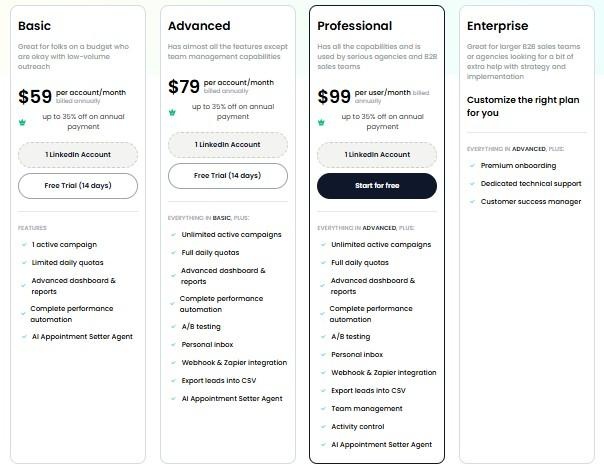
SalesRobot pricing is per LinkedIn account. The figures below reflect monthly billing rates. Annual billing saves up to 35% across all plans.
Basic: $59 per month
- 1 active campaign
- Limited daily quotas (20 connection requests, 20 messages)
- Basic analytics and reporting
Good for individuals testing LinkedIn automation on a budget.
Advanced: $79 per month
- Unlimited active campaigns
- Full daily quotas (75 connection requests, 75 messages)
- A/B testing, personal inbox, webhook integrations
- CSV export and advanced analytics
The most popular choice for individual contributors and small teams running active outreach.
Professional: $99 per month
- Everything in Advanced
- Team management and role permissions
- Activity control and duplicate prevention
- Team analytics dashboard
Built for agencies and larger sales teams managing multiple accounts.
Enterprise: Custom pricing
- Everything in Professional
- Premium onboarding and dedicated support
- Customer success manager
For organizations needing hands-on implementation support.
SalesRobot offers a 14-day free trial with no credit card required, giving you time to set up campaigns and see actual results before committing to a paid plan.
The Verdict
Surfe is a solid choice if your team lives on LinkedIn and needs that activity reflected accurately in your CRM.
It works with HubSpot, Salesforce, Pipedrive, and Copper, and the waterfall enrichment is genuinely strong, pulling from 15 or more providers to get verified emails and phone numbers.
The time savings on manual data entry are real.
That said, if LinkedIn outreach sequences are your main goal, you're paying for enrichment and CRM infrastructure you may not fully use.
The Pro plan at $79 per user per month adds up quickly for small teams, and the free plan's credit limits are low enough that you'll hit the ceiling fast.
Surfe works well, but it is a data tool first and an outreach tool second. Teams that primarily need automated connection campaigns and follow-up sequences will find it short on those features.
Bottom Line
Buy Surfe if your team needs accurate contact enrichment and tight LinkedIn to CRM integration across Salesforce, HubSpot, Pipedrive, or Copper. The Pro plan is priced fairly for the volume it offers.
Skip it if outreach automation is your primary need.
SalesRobot focuses on LinkedIn and email sequences at a lower entry price and is worth evaluating if you're building a prospecting workflow rather than a data pipeline.
Frequently Asked Questions
Which CRMs does Surfe integrate with natively?
Surfe natively syncs with HubSpot, Salesforce, Pipedrive, and Copper, plus Google Sheets. It also connects to sales engagement tools like Salesloft, Outreach, and Lemlist for sequencing handoff, and offers API access for custom integrations.
Does Surfe offer intent data or buying signals?
No. Surfe surfaces contact-level data like emails, phone numbers, job titles, and company names, but it does not track true intent signals, website visitor activity, or account-level buying behavior. Its Market Signals feature provides curated prospect lists with basic growth and hiring indicators, not full intent data.
Does Surfe offer a free trial?
Yes. Surfe has a permanent free plan requiring no credit card, plus a 14-day free trial of the Pro plan on all new accounts. The free plan is limited to 1 contact added to your CRM per day with 20 email and 5 mobile finder credits per year, so it suits light evaluation rather than daily prospecting.
Does Surfe use monthly or annual enrichment credits?
Surfe's finder credits are allocated annually, not monthly. The Essential plan includes 150 email and 50 mobile credits per year, while Pro includes 1,000 email and 100 mobile credits per year. Email validation is unlimited on all tiers, and unused finder credits do not roll over.
Does Surfe automate LinkedIn outreach like connection requests and messages?
No. Surfe is strictly a LinkedIn CRM integration and data enrichment tool. It helps you add contacts to your CRM and find their email/phone numbers, but it does not automate messaging. If you want to automatically send connection requests, follow-ups, or multi-channel sequences, you will need a dedicated automation platform like SalesRobot.
What makes SalesRobot safer for my LinkedIn account than other automation tools?
Unlike traditional browser extensions that run code directly on top of your LinkedIn page and easily trigger detection algorithms, SalesRobot operates via a cloud-based, mobile-API backend. By mimicking natural human behavior, utilizing smart daily limits (up to 75 requests/day), and rotating dedicated residential IPs, it keeps your account safe from restrictions.
Can I use Surfe and SalesRobot together in the same sales stack?
Absolutely. Many growth teams use them as a powerful combination: Surfe acts as the bridge to keep your CRM (HubSpot, Salesforce, etc.) perfectly synced with updated data straight from LinkedIn, while SalesRobot handles the heavy lifting of executing automated outreach and nurturing campaigns to those prospects.
Does SalesRobot help manage replies once a prospect responds?
Yes. SalesRobot features a proprietary AI Appointment Setter agent directly inside its unified inbox. Instead of just sending out messages, the AI can detect prospect intent, automatically nurture the conversation based on your training parameters, and help book meetings on autopilot without manual intervention.
How accurate is Surfe's data enrichment?
Surfe uses a Waterfall Enrichment model that queries over 15 distinct data providers simultaneously. By applying a triple-verification process to every email and phone number it finds, it achieves contact find rates of up to 93%, ensuring you spend less time bounces and more time connecting.

Wow your leads by cloning yourself and sending personalized videos and voice notes to each lead on LinkedIn.
If you don't reply to leads within 5 mins, your chances of converting them fall by 50%. Our AI replies on your behalf instantly! (and yes, you can train it)

Don't shoot in the dark. Get detailed analytics on what's working

SalesRobot allows you to invite other team members, so that they can add their LinkedIn Account, run outreach campaigns and get amazing results just like you.
.avif)


Trusted by 4100+ innovative B2B sales teams and lead gen agencies

.avif)

.avif)




.avif)


Heading 1
Heading 2
Heading 3
Heading 4
Heading 5
Heading 6
Lorem ipsum dolor sit amet, consectetur adipiscing elit, sed do eiusmod tempor incididunt ut labore et dolore magna aliqua. Ut enim ad minim veniam, quis nostrud exercitation ullamco laboris nisi ut aliquip ex ea commodo consequat. Duis aute irure dolor in reprehenderit in voluptate velit esse cillum dolore eu fugiat nulla pariatur.
Block quote
Ordered list
- Item 1
- Item 2
- Item 3
Unordered list
- Item A
- Item B
- Item C
Bold text
Emphasis

Superscript
Subscript