.avif)
TL;DR
- Clay excels as a comprehensive data enrichment platform with 150+ providers and AI-powered research capabilities.
- The platform offers strong workflow automation and native sequencing but comes with a steep learning curve requiring 4-6 weeks to master.
- Pricing can get expensive for smaller teams, especially with heavy data usage across multiple providers, though the new dual-credit system offers more transparency.
- SalesRobot works well alongside Clay as the LinkedIn outreach layer, handling connection requests and messaging once Clay has enriched your leads.
Clay Review 2026: Is This The Ultimate Data Enrichment Tool in 2026?
Picture this: You've got a promising lead list, but half the email addresses are missing, job titles are outdated, and you're not even sure these companies are still in business.
Sound familiar?
If you've ever tried to build a decent prospect database, you know the pain of juggling five different data tools, praying one of them has the info you need.
Enter Clay, the data enrichment platform that promises to end this madness by combining 150+ data providers into one sleek interface.
No more tab-hopping between ZoomInfo, Apollo, and whatever other tools you've been using to piece together basic contact information.
But does Clay actually deliver on this ambitious promise, or is it just another shiny tool that looks great in demos but falls short in real-world use?
In this review, we'll dig into Clay's features, pricing, and whether it's worth the investment for your team in 2026.
We'll also have a look on SalesRobot, a LinkedIn outreach tool that pairs naturally with Clay.
Once Clay has enriched your leads and built your target list, SalesRobot picks up from there - handling connection requests, follow-up sequences, and AI-personalized messaging directly on LinkedIn.
The two tools cover different parts of the same workflow: Clay tells you who to reach and arms you with the data, SalesRobot handles the actual outreach on LinkedIn.

Clay: What You Need to Know
✅ Incredible data coverage: Clay combines 150+ data providers in one platform, so you can find contact info and company details that would normally require juggling multiple tools.
The waterfall feature automatically tries different sources until it finds what you need, giving you way better enrichment rates than single-provider solutions.
⚠️ Steep learning curve: Clay is incredibly powerful, but that power comes with complexity. Most users report needing 4-6 weeks to feel truly comfortable with the platform's capabilities.

You'll need to invest serious time in their University training resources to get up to speed.
✅ AI-powered research capabilities: Claygent can research prospects and companies using AI, pulling insights from websites, social media, and other sources automatically.
This saves hours of manual research time and helps you personalize outreach at scale.
✅ Seamless workflow automation: The platform connects enrichment, intent signals, and outreach in one flow.
You can set up triggers based on job changes or company events, then automatically enrich those leads and add them to sequences.
⚠️ Costs can add up quickly: While Clay offers flexible credit-based pricing with their new dual-credit system, heavy users can rack up significant monthly bills.

Waterfall sequences consume credits faster than most teams expect since each provider lookup costs separately. Monthly credit allocations can vanish within the first week of heavy usage.
✅ Real-time intent and signal tracking: Clay monitors job changes, promotions, funding rounds, and other buying signals across your target accounts.
This lets you reach out at the perfect moment when prospects are most likely to be interested.
⚠️ Can be overkill for simple needs: If you just need basic email finding or CRM enrichment, Clay might be more complex than necessary.
Smaller teams or those with straightforward prospecting needs might find simpler, cheaper alternatives work better.
✅ Strong integration ecosystem: Clay plays nicely with your existing sales stack, syncing with CRMs like Salesforce and HubSpot, plus ad platforms like LinkedIn and Google.
This means your enriched data flows seamlessly into your current workflows.
Clay's Key Features, Broken Down
Claygent AI Research
Clay's AI agent automatically researches target companies and people, gathering insights that would take hours to find manually.
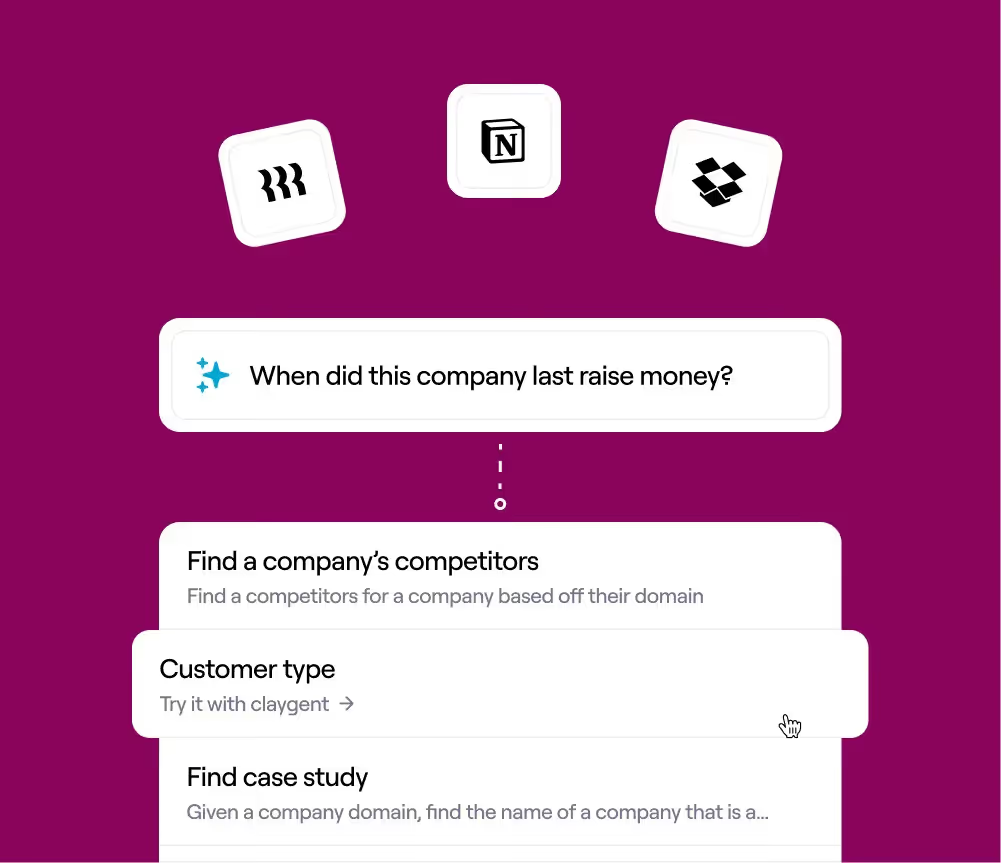
Instead of clicking through LinkedIn profiles and company websites, Claygent can identify decision makers, recent company news, and relevant contact information in minutes.
For example, you could ask Claygent to find all SaaS companies that recently raised Series B funding and have job openings in marketing. The AI will scan the web and return detailed profiles ready for outreach.
Waterfall Data Enrichment
Clay combines data from 150+ providers using a waterfall approach to maximize contact coverage.
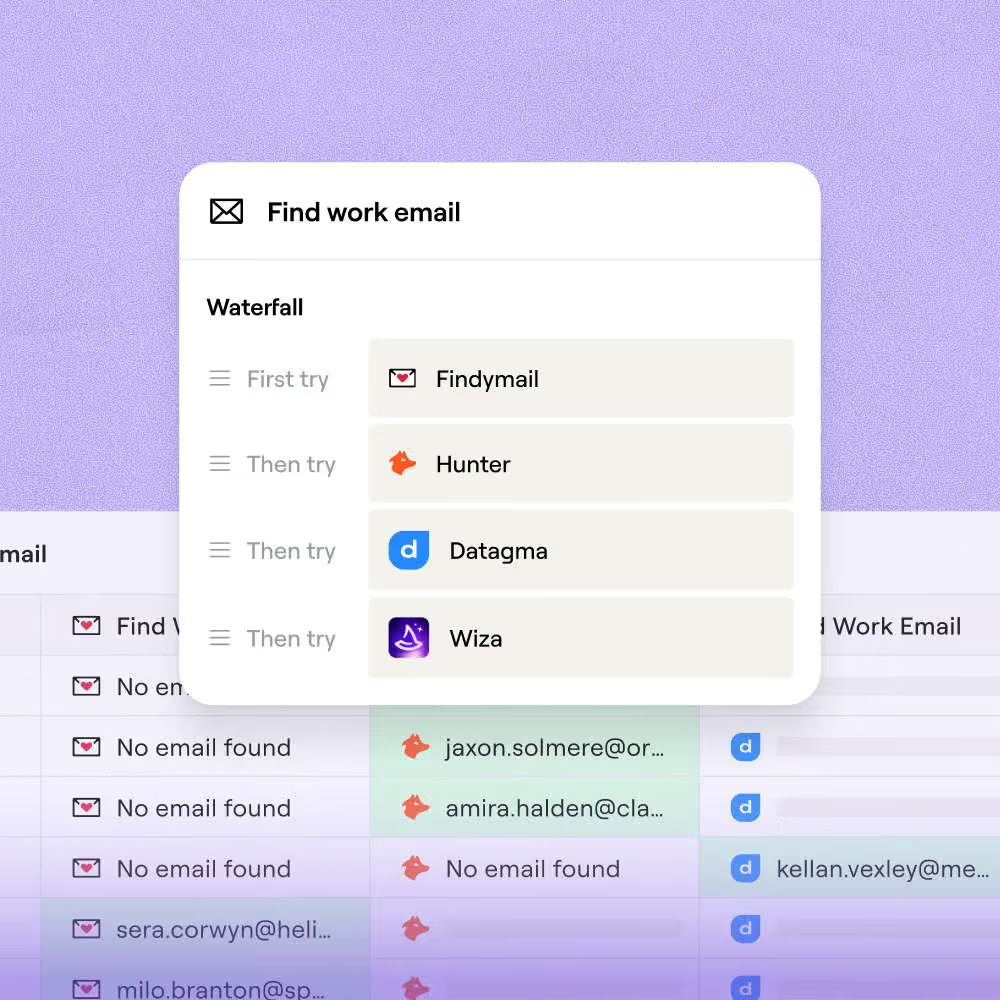
If one data source doesn't have an email address, Clay automatically tries the next provider until it finds the information you need.
This means instead of getting 40% email coverage from a single provider, you might achieve 80%+ coverage by layering multiple sources.
No more manually checking different tools or settling for incomplete data sets.
Signals and Intent Tracking
Clay monitors job changes, promotions, funding rounds, and other buying signals across your target accounts.

You can set up custom triggers to alert you when prospects change roles or when companies hit specific criteria.
Imagine getting notified the moment a former customer becomes VP of Sales at a new company, or when a target account posts a job opening for the exact role your product serves.
That's the kind of timely intelligence Clay delivers.
Native Sequencer and Automation
Clay's built-in sequencer lets you automate personalized outreach campaigns without switching between platforms.
You can combine enriched data with AI-generated copy to create highly relevant messages at scale.

For instance, you could automatically send LinkedIn messages mentioning a prospect's recent promotion, followed by personalized emails referencing their company's latest funding round.
All triggered and personalized based on the data Clay has gathered.
Audience Sync to Ad Platforms
Once you've built targeted lists in Clay, you can sync them directly to LinkedIn, Meta, and Google Ads for coordinated campaigns.
This bridges the gap between your prospecting data and paid advertising efforts.
You might create a list of companies showing buying intent, then push that audience to LinkedIn for targeted ads while simultaneously running email outreach.
This multi-channel approach increases your chances of reaching decision makers.
Sculptor Workflow Builder
Clay's natural language workflow builder lets you create complex GTM processes by simply describing what you want to accomplish.

No coding required to build sophisticated data enrichment and outreach sequences.
You could tell Clay "find companies similar to our best customers who recently hired sales directors, then send personalized LinkedIn messages mentioning their hiring news."
Sculptor translates that request into an automated workflow that runs continuously.
Clay Pricing: How Much Will It Cost?

Clay offers 3 pricing tiers:
Free:
$0/month 500 actions/month and 100 data credits/month. The starting point for individuals who want to test Clay's core capabilities before committing.
Launch:
$185/month 15,000 actions/month and 2,500 data credits/month. Built for small teams running consistent prospecting workflows and beginning to automate enrichment at scale.
Growth:
$495/month 40,000 actions/month and 6,000 data credits/month. Designed for teams that need CRM auto-sync, HTTP API access, webhook automation, and web intent signals. This is where most scaling revenue teams will land.
Enterprise:
Custom pricing Custom actions and dedicated infrastructure for large organizations with high-volume needs, compliance requirements, or complex GTM operations.
Clay offers a 14-day free trial with Pro-level access and 1,000 credits; no credit card required. Phone number enrichments aren't available during the trial.
Worth knowing: Clay uses a dual-credit system.
Data Credits cover the cost of third-party data sourced from Clay's 150+ data partners, while Actions measure platform work like enrichment steps, AI calls, CRM pushes, and exports. Clay negotiates volume discounts directly with data partners and passes those savings on to you, meaning you get comparable data prices to what you'd find going to most providers directly.
Clay & SalesRobot: How Do They Compare?
SalesRobot: The LinkedIn-First Automation Tool

Clay tells you who to reach and fills in everything you need to know about them.
SalesRobot picks up from there, handling the actual LinkedIn outreach. If your ideal customers are active on LinkedIn, the two tools cover the full workflow end to end.
What SalesRobot Actually Does
SalesRobot is a LinkedIn automation platform that handles connection requests, messages, and follow-ups while you focus on closing deals.
It's built specifically for B2B sales teams and agencies who want to turn LinkedIn into a reliable lead generation machine without getting their accounts flagged.
Key Features
- LinkedIn Mobile API Integration: Uses LinkedIn's mobile APIs instead of browser automation, which dramatically reduces the risk of account restrictions. This is crucial for anyone running serious volume.
- AI-Personalized Voice and Video Messages:

Send customized voice notes and videos directly through LinkedIn messages. Users report 40%+ higher reply rates compared to text-only outreach.
- Smart Reply Detection: Automatically stops messaging sequences when prospects respond, preventing awkward follow-ups after someone has already engaged. Keeps your outreach feeling human.
- Multi-Step LinkedIn + Email Sequences: Combine LinkedIn connection requests with email follow-ups in the same campaign. Reach prospects across multiple touchpoints without manual coordination.
- Built-in Safety Limits: Automatically throttles activity to stay within LinkedIn's daily limits (75 connections, 75 messages). No guesswork about what's safe to send.
- Unified Inbox Management: Handle LinkedIn messages and email replies from one dashboard.
Optional AI Appointment Setter assistant can qualify leads and even book meetings automatically.

SalesRobot Pricing
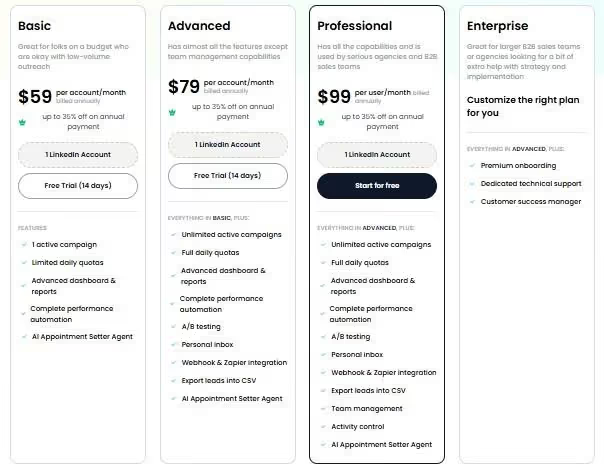
Pricing is per LinkedIn account, with annual plans offering up to 35% savings.
Basic: $59/month
- 1 active campaign
- 20 daily connection requests
- 20 daily messages
- All core automation features
Good for solopreneurs testing LinkedIn outreach on a budget.
Advanced: $79/month
- Unlimited campaigns
- 75 daily connection requests
- 75 daily messages
- A/B testing and webhooks
- AI appointment setter
The sweet spot for most individual sales professionals.
Professional: $99/month
- Everything in Advanced
- Team management features
- Activity controls
- Advanced reporting
Built for agencies and sales teams managing multiple LinkedIn accounts.
Enterprise: Custom pricing
- Premium onboarding
- Dedicated technical support
- Customer success manager
For larger organizations needing hands-on implementation support.
SalesRobot offers a 14-day free trial with no credit card required, so you can test their LinkedIn automation and see if it fits your outreach style before committing.
The Verdict
Clay is a powerhouse tool, but it's not for everyone.
If you're running complex, multi-channel outreach campaigns and have the budget plus technical chops to handle it, Clay delivers serious results.
For teams that primarily need LinkedIn outreach execution rather than deep data enrichment, pairing a lighter enrichment setup with a dedicated tool like SalesRobot for the outreach side may be more practical than relying on Clay for the entire workflow.
The pricing reflects what it is: an enterprise-grade solution.
You're paying for flexibility and power, but that comes with complexity that many teams simply don't need.
Bottom Line
Buy Clay if you're scaling outreach across multiple channels, have dedicated team members to manage it, and need advanced data enrichment.
If LinkedIn outreach is your primary channel, consider running Clay for enrichment and SalesRobot for the outreach execution, the two complement each other well as parts of the same workflow.


Wow your leads by cloning yourself and sending personalized videos and voice notes to each lead on LinkedIn.
If you don't reply to leads within 5 mins, your chances of converting them fall by 50%. Our AI replies on your behalf instantly! (and yes, you can train it)

Don't shoot in the dark. Get detailed analytics on what's working

SalesRobot allows you to invite other team members, so that they can add their LinkedIn Account, run outreach campaigns and get amazing results just like you.
.avif)


Trusted by 4100+ innovative B2B sales teams and lead gen agencies

.avif)

.avif)




.avif)