.avif)
TL;DR
Prospeo is a B2B contact data platform that finds and verifies professional emails and mobile numbers, with strong LinkedIn and Sales Navigator integration.
Data accuracy is genuinely impressive: 98% verified email accuracy with a 7-day refresh cycle puts it ahead of most competitors.
The credit model resets monthly with no rollover, and mobile numbers cost 10x more credits than emails, both worth understanding before you commit.
What Is Prospeo and What Does It Actually Do?
You spent two hours building a prospect list on Sales Navigator. You export it, only to find that a third of the emails bounce and half the phone numbers are disconnected.
Sound familiar?
That's the problem Prospeo was built to fix. It sits at the beginning of your outbound stack, finding, verifying, and enriching contact data so the list you hand off to your outreach tools is actually usable.
Prospeo is a B2B sales intelligence and data enrichment platform. It gives revenue teams access to 300M+ verified profiles, 143M+ verified emails, and 125M+ verified mobile numbers, all searchable through 30+ advanced filters and run through a proprietary 5-step verification process before a credit is charged.
The database refreshes every 7 days, compared to the 6-week industry average, which means fewer bounces and fewer disconnected numbers on every list you build.
The platform serves SDRs, account executives, outbound agencies, founders, and RevOps teams.
The use cases range from building targeted prospect lists from scratch to enriching CRM records in bulk to exporting leads directly from Sales Navigator without leaving the browser.
This review covers:
- What you need to know before buying Prospeo
- What features Prospeo actually offers
- How much Prospeo costs
- What SalesRobot is
- What SalesRobot can do and how much it costs
- How Prospeo and SalesRobot fit together

What Do You Need to Know Before Buying Prospeo?
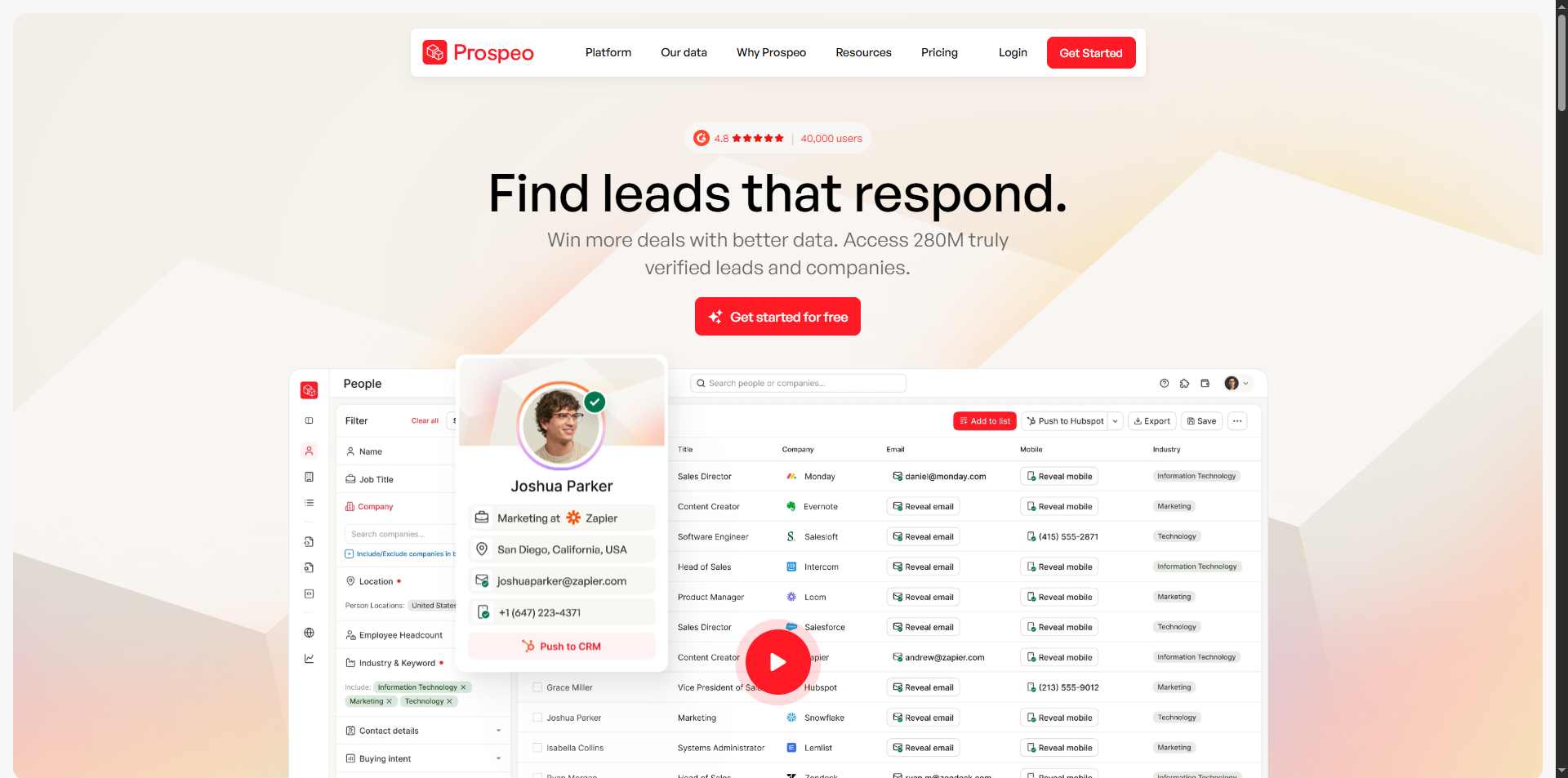
✅ Data accuracy that actually holds up at scale
Prospeo runs a proprietary 5-step verification process covering catch-all handling, spam trap removal, and honeypot filtering. The resulting 98% email accuracy rate isn't a marketing figure pulled from internal testing.
Credits are only charged for verified results, which means you're not burning budget on records Prospeo couldn't confirm.
✅ Data freshness that competitors can't match
The entire database refreshes on a 7-day cycle. The industry average is six weeks. For outbound teams, that gap matters: a contact who changed jobs two months ago won't be caught by a quarterly refresh, but a weekly one will.
On G2, reviewers specifically called this out. The database is frequently updated, and navigating the tool has gotten easier with each iteration.
✅ LinkedIn and Sales Navigator integration that actually works
Prospeo's Chrome extension sits inside Sales Navigator and LinkedIn profiles, no copy-pasting URLs, no switching tabs. Filter by role, seniority, industry, and location, then reveal verified emails and mobile numbers in a single click.
On G2, LinkedIn integration is one of the most consistently praised aspects of the platform, mentioned in 9 separate reviews. The workflow from Sales Navigator export to enriched list is genuinely fast.
✅ Ease of use for solo users and teams alike
The platform is approachable without being shallow. The Chrome extension, bulk CSV enrichment, and domain search all function without needing technical setup.
✅ API and integrations for teams with a real stack
Native integrations with HubSpot and Salesforce, plus connections to Clay, Zapier, and Instantly. The Search and Enrich API returns clean JSON with millisecond latency and 99.99% uptime. Clay users can bring their own Prospeo API key or use Clay's managed account, with auto-update running every 24 hours to keep enriched data current.
⚠️ Mobile numbers cost 10 credits each, and that math adds up fast

Email lookups cost 1 credit each. Mobile numbers cost 10. On the Starter plan (2,000 credits), running 100 mobile lookups consumes half your monthly budget in one pass. Teams doing heavy phone outreach should model this out before choosing a plan.
⚠️ Credits reset monthly with no rollover
Unused credits don't carry over. For teams with variable outbound volume, agencies running burst campaigns, founders who prospect in waves, this creates pressure to use credits before the billing cycle resets whether or not the timing is right.
On G2, limited credits and no rollover are both flagged as recurring frustrations, each mentioned by multiple reviewers.
⚠️ Verification can be overly strict on some lists

In independent testing across 50 emails, Prospeo flagged some deliverable addresses as invalid or risky. A re-verification pass with a separate tool confirmed those emails were actually good. The platform's conservatism protects deliverability, but it means real match rates can land lower than the 98% headline suggests for certain list types.
⚠️ Coverage gaps outside major markets
For outbound targeting in EMEA, APAC, or non-tech verticals, coverage thins out compared to US tech contacts. G2 reviewers noted the need for multiple providers to cover certain regions adequately. Prospeo works best when your ICP is well-represented in English-speaking markets and professional networks.
What Features Does Prospeo Actually Offer?
Email Finder and Domain Search

Enter a name and company domain, and Prospeo returns a verified email address. The domain search function goes broader, pulling all known professional emails associated with a given company domain.
Both run through the same 5-step verification before a credit is charged, which means the output is ready for outreach without an extra validation step.
The domain search is particularly useful for agency teams building lists by company rather than by individual, pulling verified emails from a target account before deciding who to reach.
LinkedIn Sales Navigator Export
This is the feature that separates Prospeo from basic email finders.
The Chrome extension sits directly inside Sales Navigator, letting teams filter and sort leads by role, seniority, industry, and location, then reveal verified emails and mobile numbers without leaving the browser.
Export to CSV or push directly to a CRM. The entire flow from prospect search to enriched, export-ready list can run in minutes on a properly filtered Sales Nav search.
Mobile Finder

Prospeo's database covers 125M+ verified mobile numbers. With a reported 30% pickup rate on mobile outreach, this data is meaningful for teams that use phone as part of a multi-touch sequence.
The credit cost (10 per mobile number) makes selective targeting more economical than bulk mobile enrichment. Reserve mobile lookups for high-value accounts where a direct dial materially changes the outcome.
Email Verification
The built-in email verifier checks deliverability in real time. Each verification costs 0.5 credits, and only valid results are charged when verifying domain search emails.
Teams can upload existing lists via CSV for bulk verification, useful for cleaning inherited databases or refreshing lists built on older tools before running them through a sequence.
Bulk Processing and CSV Enrichment
Upload a contact list and Prospeo enriches it with verified emails, mobile numbers, and 50+ data points per contact. This covers job title, company size, funding stage, technologies used, headcount growth, and more, pulling from 300M+ professional profiles.
For RevOps teams doing CRM hygiene or agencies enriching client-provided lists, this is the most operationally valuable feature on the platform.
Chrome Extension
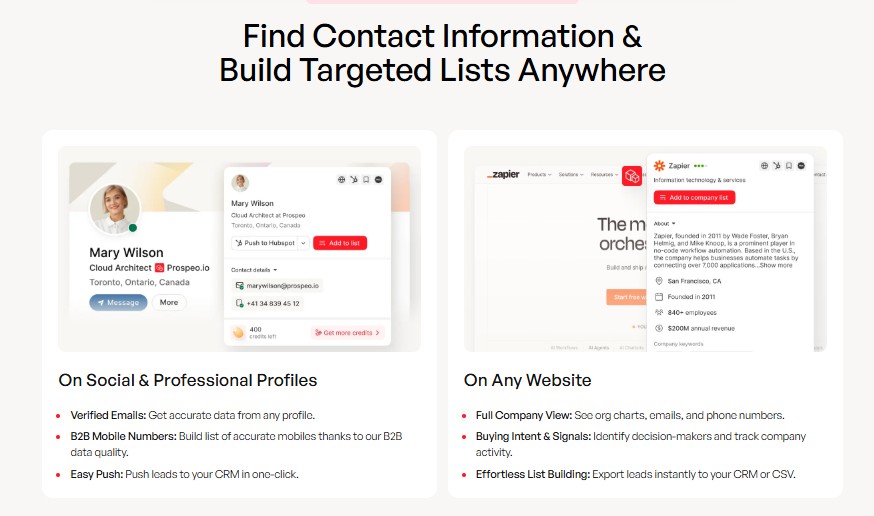
The extension works on LinkedIn profiles, company websites, GitHub, and Twitter, not just Sales Navigator. Filter and sort leads, reveal contact data, save to a list, and push to CRM in one flow.
On G2, the extension was specifically highlighted for making prospecting from Sales Navigator faster without requiring a separate tab or manual data entry.
How Much Does Prospeo Cost?
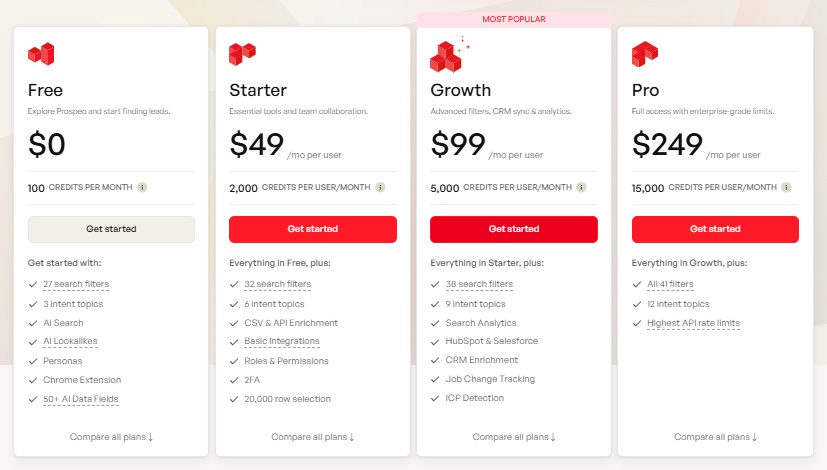
Prospeo uses a credit-based monthly subscription model. Credits reset monthly with no rollover.
Emails cost 1 credit each, mobile numbers cost 10 credits each.
All 30+ filters, 12 intent topics, highest API rate limits
The effective per-email cost on paid plans works out to approximately $0.01 per verified email, one of the lower per-contact rates in the market for a single-source, high-accuracy provider.
Teams using Prospeo as an enrichment layer for a CRM workflow should model Growth as the realistic entry point, not Starter.
You Have the Data. Now Who's Doing the Outreach?
Prospeo solves the data problem.
It finds who to reach, verifies the contact information, and hands you a clean list.
What it doesn't do is send the outreach.
For teams whose primary channel is email, Prospeo connects natively to tools like Instantly and Lemlist to close that gap.
But for teams running LinkedIn outreach, connection requests, DMs, InMails, follow-up sequences, a separate automation layer is needed.
And this is where a lot of outbound stacks have a visible seam.
LinkedIn is where most B2B decision-makers are actually active.
Sales Navigator gives you the filtered search.
Prospeo gives you the verified contact data from that search. But then what?
Manually sending 200 connection requests a week, writing personalized follow-ups for each reply, tracking who's in what stage of a sequence, that's hours of work that breaks down before it scales.
SalesRobot is the tool that closes this gap.
It takes the contact lists Prospeo produces and automates the LinkedIn outreach side of the workflow: connection requests, message sequences, AI-personalizedopeners, and meeting booking, while keeping accounts safe on a cloud-based dedicated IP.
What Is SalesRobot?
SalesRobot is a cloud-based LinkedIn and email outreach automation platform built for B2B sales teams and agencies who want to scale LinkedIn outreach without the manual work or the risk of getting accounts flagged.
LinkedIn Account Restricted? Here's How to Fix It - YouTube
It runs entirely in the cloud, no browser extension, no desktop app, no automation that stops when your laptop closes.
Once you feed it a list, it handles connection requests, follow-up sequences, reply management, and meeting booking while your team focuses on closing.
What Can SalesRobot Actually Do?
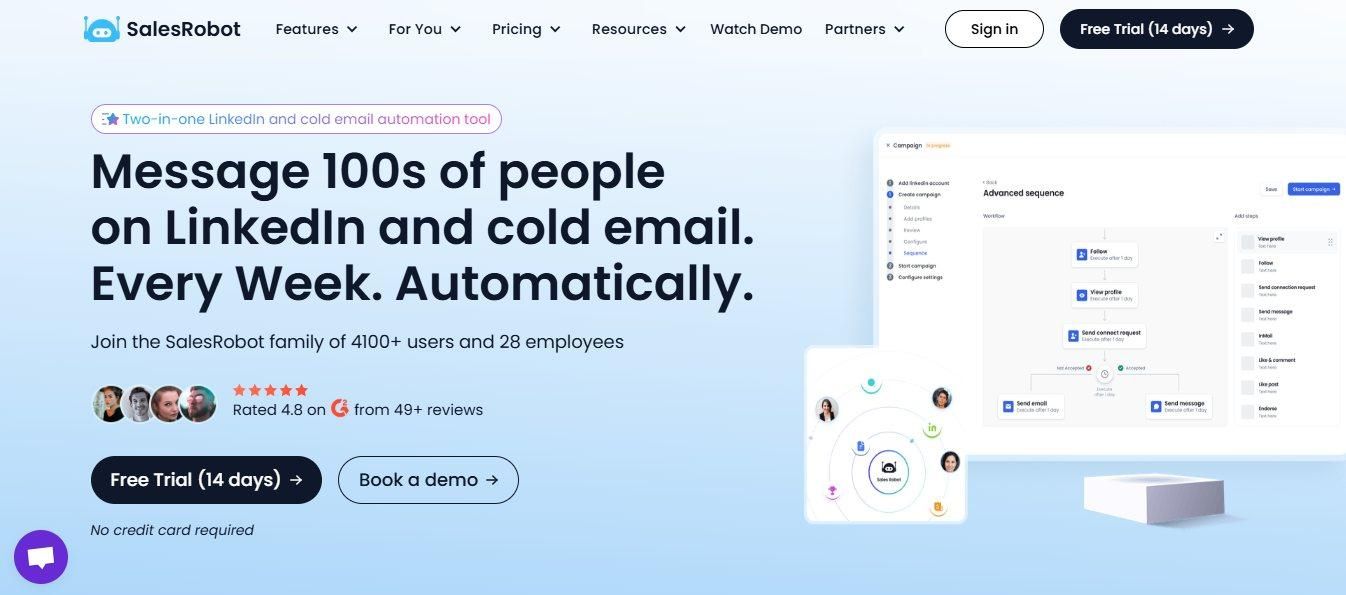
AI-Personalized LinkedIn Outreach
SalesRobot uses AI Variables to write a unique first line for each prospect based on their LinkedIn profile: recent posts, job title changes, company news, shared connections.
Each message reads like it was written individually, because the personalization layer pulls live profile data before sending.
This is the core differentiator from tools like Dripify, which send the same message to everyone. At scale, the difference in reply rates is meaningful.
Cloud-Based, 100% Safe
SalesRobot runs on a dedicated, local residential IP per account and uses LinkedIn's mobile-app APIs on the backend, not a Chrome extension. It runs 24/7 in the cloud even when your laptop is closed, unlike browser-extension tools like Expandi, Waalaxy, Dux-Soup, and LinkedHelper that LinkedIn can more easily detect.
SalesRobot uses LinkedIn's mobile-app APIs on the backend with dedicated, local residential IP rotation per account, reducing ban risk to 0.00001%, so accounts run safely at full daily volume with no need to monitor whether a browser is open.
AI Appointment Setter
When a prospect replies, SalesRobot's AI Appointment Setter takes over.
It handles the conversation automatically, asking discovery questions and booking qualified meetings directly into your calendar once a prospect signals interest.
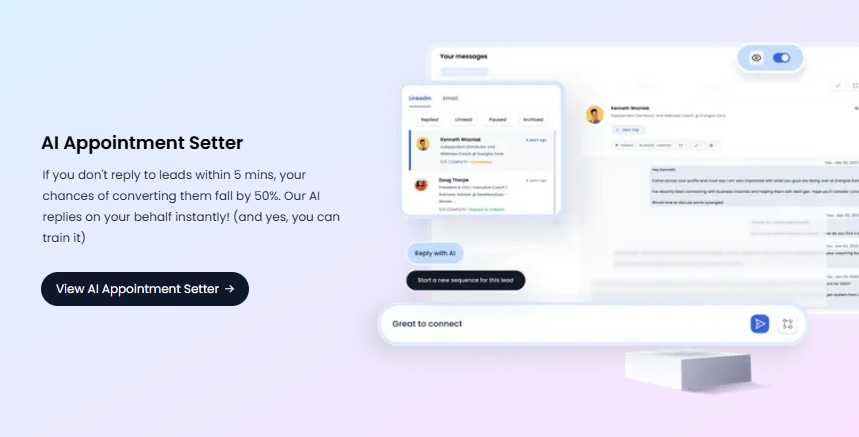
For teams running outreach at volume, this removes the bottleneck that sits between a reply and a booked call.

SalesGPT Campaign Builder
Enter your ICP, product, and goal, and SalesGPT writes the full campaign: connection request, follow-up sequence, and reply handling logic.
No copywriting from scratch. Teams can edit the output or run it as-is.
Multi-Channel Outreach
LinkedIn connection requests, DMs, and InMails all run natively. Email outreach sequences layer in for contacts where LinkedIn isn't the primary channel.
Both channels run from the same campaign view, with unified tracking.
AI Commenting
SalesRobot can comment on a prospect's LinkedIn posts before sending a connection request, warming up the relationship before outreach hits. For ICP-matching prospects who are active on LinkedIn, this significantly improves acceptance rates on the connection request.
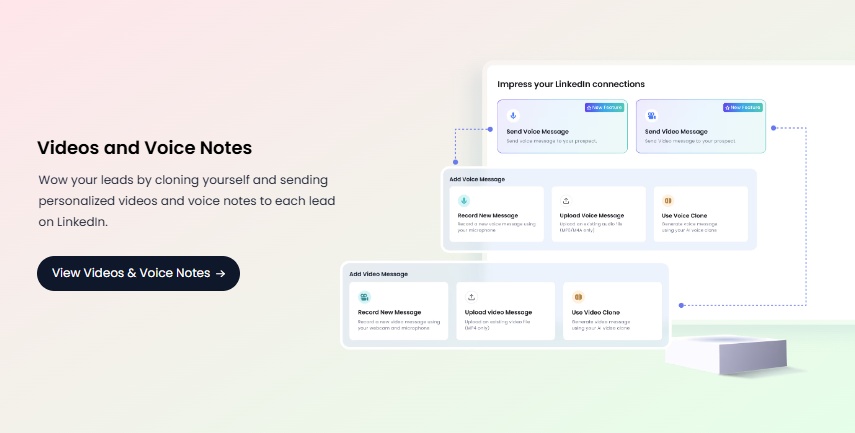
Voice Clone and Video Clone Messaging
At higher message volumes, text-based outreach blends in.
SalesRobot supports personalized voice notes and video messages cloned from a short sample, adding a channel that most sequences don't use and that gets noticed in a crowded inbox.
White-Label for Agencies
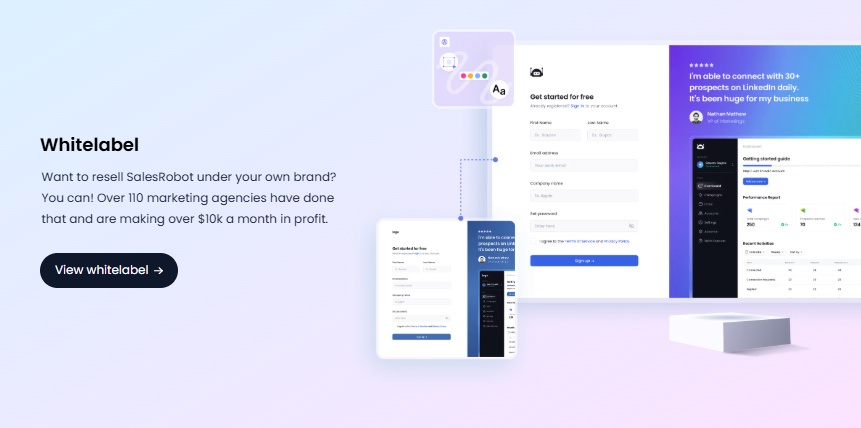
Agencies can run the full platform under their own brand. Clients never see SalesRobot.
The white-label tier is the highest-margin, lowest-churn segment in the product, with 110+ agencies currently running SalesRobot under their own brand and many earning $10k+/month, managing anywhere from 10 to 50+ client accounts simultaneously.
How Much Does SalesRobot Cost?
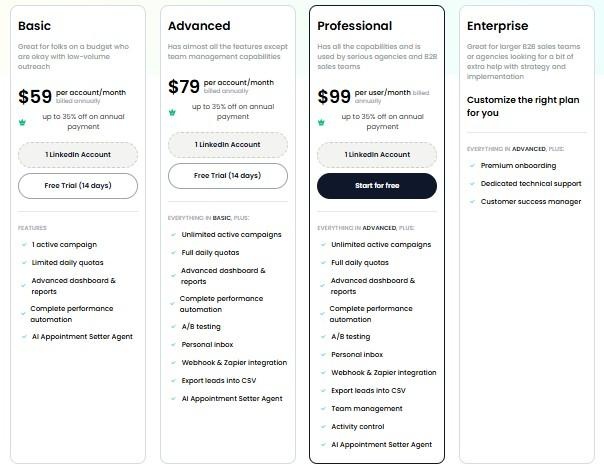
SalesRobot has three self-service tiers, all billed per LinkedIn account per month: Basic ($39/mo), Advanced ($59/mo), and Professional ($79/mo) on annual billing. Every plan includes the AI Appointment Setter, unlimited email warmup, and 24/7 live chat support.
Agency volume discounts apply on all tiers: 33% off for 10+ accounts, 45% off for 20+ accounts. Email outreach is available as an add-on at $15/month per email account.
For teams that want outreach fully handled, the Managed Service starts at $349/month, covering strategy, copywriting, list-building, and campaign management run by the SalesRobot team. Done-for-you competitors in this space charge 4-5x more for comparable fulfillment.
White-label is available at custom pricing for agencies who want to run the full platform under their own brand, with clients never seeing SalesRobot.
There's a 14-day free trial on all self-service plans, no credit card required.
How Do Prospeo and SalesRobot Fit Together?
The workflow is sequential, not competitive. Prospeo populates the list. SalesRobot runs the outreach. Together, they cover the full top-of-funnel from identified prospect to active LinkedIn conversation without manual work at either step.
So, Is Prospeo Worth It?
Prospeo is genuinely one of the better data tools in this space for teams prioritizing email accuracy and data freshness.
The 98% verified accuracy, 7-day refresh cycle, and proprietary infrastructure (not recycled third-party data) are real differentiators, and the per-email cost at $0.01 is hard to beat for single-source accuracy at that level.
The friction points are real too: credits reset monthly, mobile lookups burn through budgets fast if not modeled carefully, and coverage in non-English-speaking markets is uneven.
CRM integration lives on the Growth plan, not Starter, worth knowing before signing up at the lower tier and hitting that wall.
As a standalone tool, Prospeo builds the list.
The missing piece for most outbound teams is what happens with it, and for LinkedIn-first outreach, SalesRobot handles that second half of the workflow without adding complexity to the first.
Try SalesRobot free for 14 days

Frequently Asked Questions
Does Prospeo integrate with Clay?
Yes. Prospeo connects with Clay, and users can either bring their own Prospeo API key or use Clay's managed account. It also offers native HubSpot and Salesforce integrations plus connections to Zapier, Instantly, Smartlead, Salesloft, Outreach, and Lemlist.
Does Prospeo have a free plan?
Yes. Prospeo's free plan includes 100 credits per month with people and company search, limited filters, 3 intent topics, and Chrome extension access. Bulk processing and API access aren't included on the free tier, and no credit card is required to start.
Do Prospeo credits roll over month to month?
No. Prospeo credits reset at the end of each billing cycle and unused credits do not roll over, even on annual plans where the full credit pack is granted upfront. Only successful, verified results are charged — emails cost 1 credit and mobile numbers cost 10 credits each.

Wow your leads by cloning yourself and sending personalized videos and voice notes to each lead on LinkedIn.
If you don't reply to leads within 5 mins, your chances of converting them fall by 50%. Our AI replies on your behalf instantly! (and yes, you can train it)

Don't shoot in the dark. Get detailed analytics on what's working

SalesRobot allows you to invite other team members, so that they can add their LinkedIn Account, run outreach campaigns and get amazing results just like you.
.avif)


Trusted by 4100+ innovative B2B sales teams and lead gen agencies

.avif)

.avif)




.avif)


Heading 1
Heading 2
Heading 3
Heading 4
Heading 5
Heading 6
Lorem ipsum dolor sit amet, consectetur adipiscing elit, sed do eiusmod tempor incididunt ut labore et dolore magna aliqua. Ut enim ad minim veniam, quis nostrud exercitation ullamco laboris nisi ut aliquip ex ea commodo consequat. Duis aute irure dolor in reprehenderit in voluptate velit esse cillum dolore eu fugiat nulla pariatur.
Block quote
Ordered list
- Item 1
- Item 2
- Item 3
Unordered list
- Item A
- Item B
- Item C
Bold text
Emphasis

Superscript
Subscript