.avif)
TL;DR
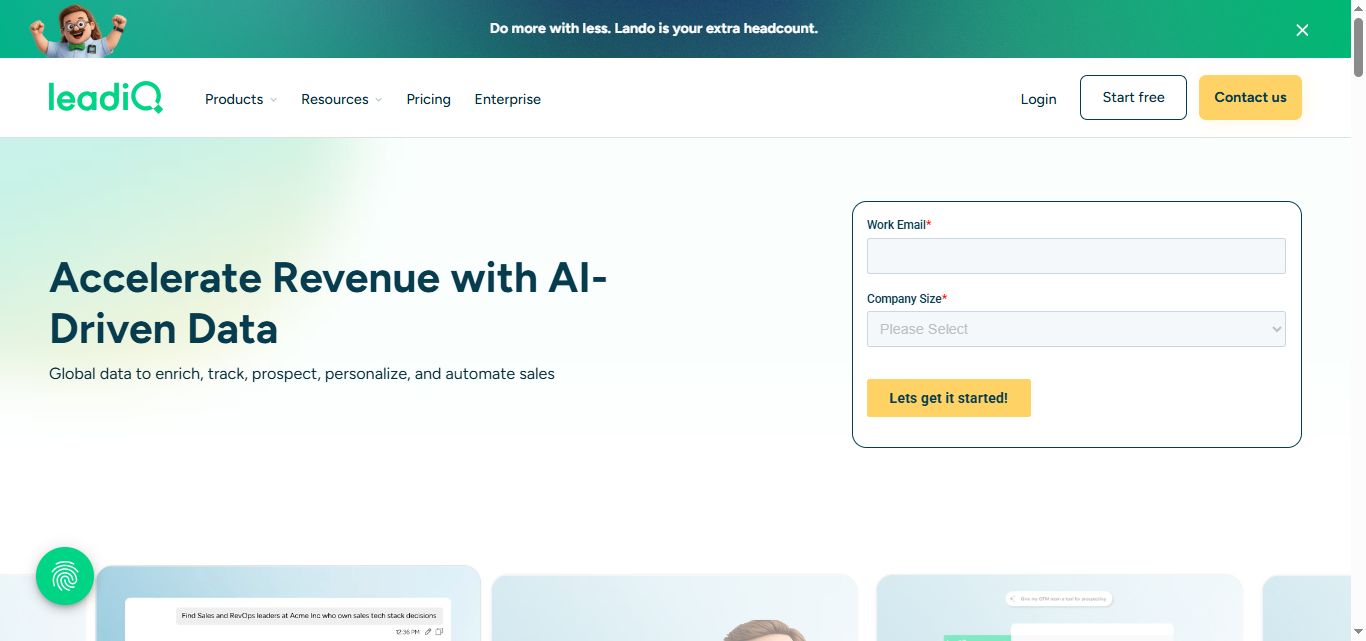
LeadIQ is a B2B contact platform built around a Chrome extension that pulls verified emails and phone numbers from LinkedIn into your CRM in one click.
Email accuracy is strong. Phone number quality is the most consistent complaint across 1,160+ G2 reviews.
Pricing is slider-based starting at $20/month for 200 credits on the Pro plan. Credits do not roll over and phone lookups cost 10x more than email lookups.
LeadIQ does not send outreach. It captures the contact data. You still need a sequencer, a dialer, and ideally a LinkedIn automation tool to do anything with what it finds.
SalesRobot works naturally alongside LeadIQ as the LinkedIn outreach layer, handling connection requests, personalized messages, and reply management via AI Appointment Setter once LeadIQ has captured your leads.
LeadIQ Review 2026: Is This the Best Contact Data Tool for LinkedIn Prospecting?
Picture this: you've spent an hour on LinkedIn Sales Navigator building a targeted list of 50 prospects. You've checked their profiles, confirmed their titles, made sure they fit your ICP.
Now you need their email addresses. And their direct dials. And you need all of it in Salesforce before your next call block.
So you open ZoomInfo. Half the emails aren't there. You try Apollo. Different gaps. You end up manually Googling three of them and calling the company switchboard for two more.
That is the problem LeadIQ was built to solve.
Instead of bouncing between data tools, LeadIQ sits directly on top of LinkedIn as a Chrome extension.
You browse a prospect's profile, click the LeadIQ button, and their verified contact details push straight into Salesforce or Outreach without leaving the page.
In this review we'll dig into what LeadIQ actually does well, where it falls short, and whether it belongs in your stack in 2026. We'll also cover SalesRobot, a LinkedIn outreach tool that pairs naturally with LeadIQ once you've captured your leads and are ready to start the conversation.
LeadIQ: What You Need to Know
LeadIQ is a sales intelligence and prospecting platform focused on one core job: capturing verified contact data from LinkedIn and syncing it to your CRM or sales engagement platform instantly.
It runs on a database of 750M+ professional profiles refreshed every month, with up to 200 million records re-verified as people change companies or roles, and pulls contact data from multiple sources to maximize coverage.
Here is the honest breakdown.
✅ The one-click LinkedIn capture is genuinely fast.
The Chrome extension sits on top of LinkedIn and Sales Navigator. One click pulls a prospect's verified email, phone number, job title, and company details and pushes them directly into Salesforce, HubSpot, Outreach, or Salesloft without switching tabs.

SDRs consistently report saving 10 to 15 hours per month in manual data entry, which translates directly to more time actually prospecting.
✅ Email accuracy is one of the strongest in the category.
LeadIQ queries multiple data sources for each lookup, which produces meaningfully better email coverage and accuracy than single-provider tools.

Teams running high-volume outbound sequences report lower bounce rates and cleaner CRM records compared to alternatives like Apollo at similar price points.
✅ Champion tracking turns cold accounts warm.
When a contact in your CRM changes companies, LeadIQ alerts the rep automatically.
A buyer who already knows your product just landed at a new company that fits your ICP. Multiple G2 reviewers credit this feature directly for closed deals that would otherwise never have been identified.
✅ CRM and sequencer integrations are deep, especially Salesforce and Outreach.
The Salesforce integration includes duplicate detection so contacts do not stack up as messy duplicates. The Outreach integration is tight enough that you can capture a contact on LinkedIn and drop them into an active cadence in a single action. For teams already running on these platforms, LeadIQ slots in without friction.
⚠️ Phone number quality is the single biggest complaint, by a wide margin..

Reviewers describe numbers that connect to the wrong person entirely, personal cell numbers instead of work lines, and direct dials that have been disconnected for months. For call-heavy SDR teams, this is a meaningful operational problem, not a minor annoyance.
⚠️ Credits expire monthly with no rollover.
Unused credits at the end of a billing cycle are simply gone. Combined with the fact that phone lookups cost 10 credits while email lookups cost 1, teams doing any serious cold calling burn through their credit pool much faster than the plan price implies.

A team mixing email and phone outreach effectively pays a much higher per-contact rate than email-only teams on the same plan.
⚠️ LeadIQ only captures data. It does not send outreach. This is the part most teams miss before they buy. LeadIQ finds the contact and syncs it to your CRM.
From there, you still need Outreach or Salesloft for email sequences, a dialer for calls, and a separate LinkedIn automation tool for LinkedIn outreach.
For small teams trying to minimize their stack, this means LeadIQ adds a line item without reducing the tools already in place.
⚠️ The Chrome extension is inconsistent under certain conditions.
The extension can be slow to load, fail on certain browser sessions, or decline to capture contacts that do not meet its quality threshold. When it works, the workflow is excellent. When it misfires mid-prospecting session, it disrupts the exact workflow it was supposed to automate.
LeadIQ's Key Features, Broken Down
Chrome Extension and Contact Capture
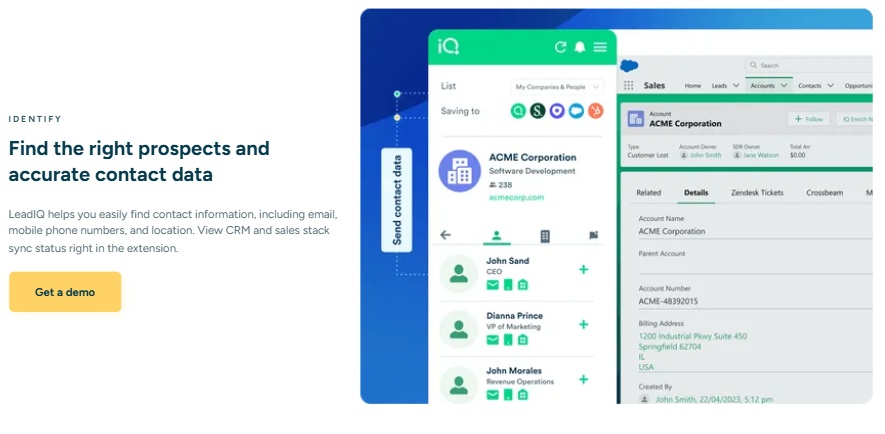
This is LeadIQ's core product. The extension overlays directly on LinkedIn and Sales Navigator.
When you land on a prospect's profile, LeadIQ surfaces their verified email, phone number, job title, and company details alongside the profile.
One click pushes all of it into your CRM or drops the contact into an active Outreach sequence.
You can also bulk-capture: run a Sales Navigator search, select multiple results, and export the entire list to your CRM at once rather than clicking through profiles individually. For SDRs building high-volume lists, this is where the time savings add up fastest.
Champion Tracking
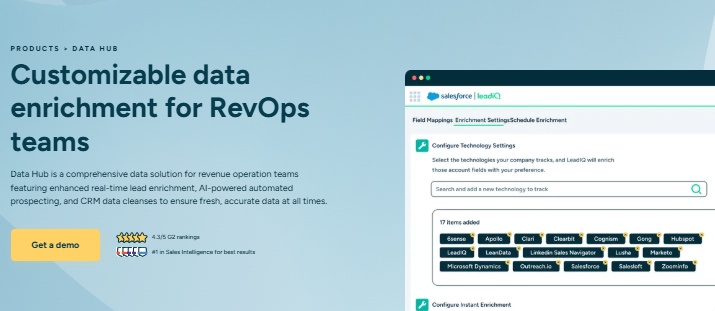
LeadIQ monitors contacts you have saved in the platform and alerts you the moment they change companies.
The logic is straightforward: someone who already bought from you or evaluated your product is a warm lead wherever they land next, especially if their new company fits your ICP.
Example: A champion from a churned account just became Head of Revenue at a Series B company in your target segment. LeadIQ flags the job change the same week it happens. Your rep reaches out before any competitor does, referencing the relationship from before. That conversation starts warmer than any cold outreach.
Scribe AI Email Writer
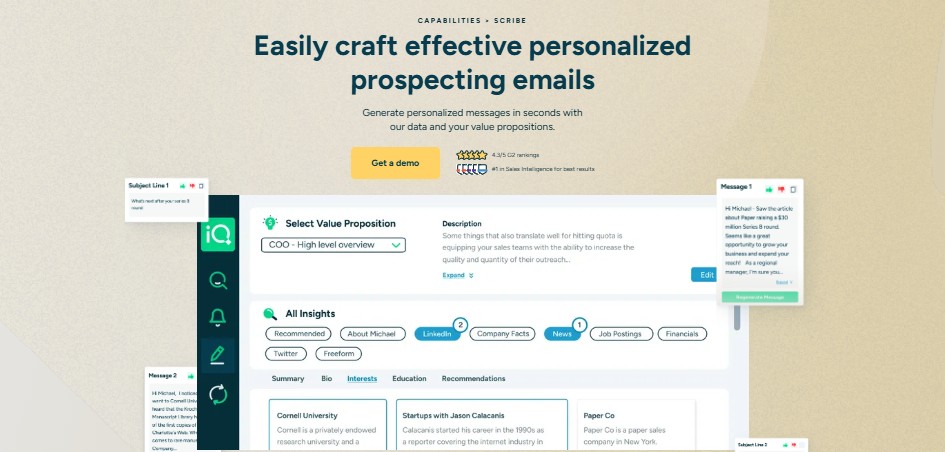
Scribe is LeadIQ's built-in AI writing assistant. It lives inside the Chrome extension and generates a personalized cold email draft based on the prospect's LinkedIn profile without switching tabs.
It works off static profile data: job title, company, recent activity, and tenure.
The output is good enough for a first draft, not good enough to send without editing. It personalizes based on what is visible on a LinkedIn profile, not behavioral signals like website visits or buying intent.
Think of it as a first-draft generator that saves the rep 90 seconds per contact, not a finished message.
Lando Agent
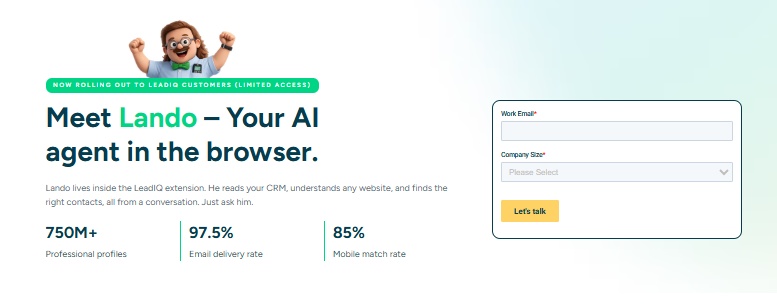
Lando is LeadIQ's newest product: an AI agent that lives inside the Chrome extension and lets you find contacts and enrich records by asking plain-language questions rather than running manual searches. You ask it to find decision-makers at a specific type of company, it reads your CRM context and surfaces results conversationally.
CRM Enrichment and Deduplication
Beyond capturing new contacts, LeadIQ enriches existing CRM records. Connect it to Salesforce or HubSpot and it will fill in missing fields, update outdated job titles, and flag duplicate records.
The Salesforce deduplication is particularly useful for enterprise teams where CRM hygiene tends to degrade over time as different reps add overlapping contacts.
LeadIQ Pricing: How Much Will It Cost?
LeadIQ runs on a Universal Credits system across three tiers.
All credits come from a single shared pool and cover email lookups, phone lookups, enrichment, and other data actions. Credits do not roll over at end of billing cycle.
The most important number before you evaluate: Phone lookups cost 10 credits each. Email lookups cost 1 credit each. A team mixing email and cold calling burns through their credit pool at a very different rate than the plan price implies.
Here’s how their pricing looks like:
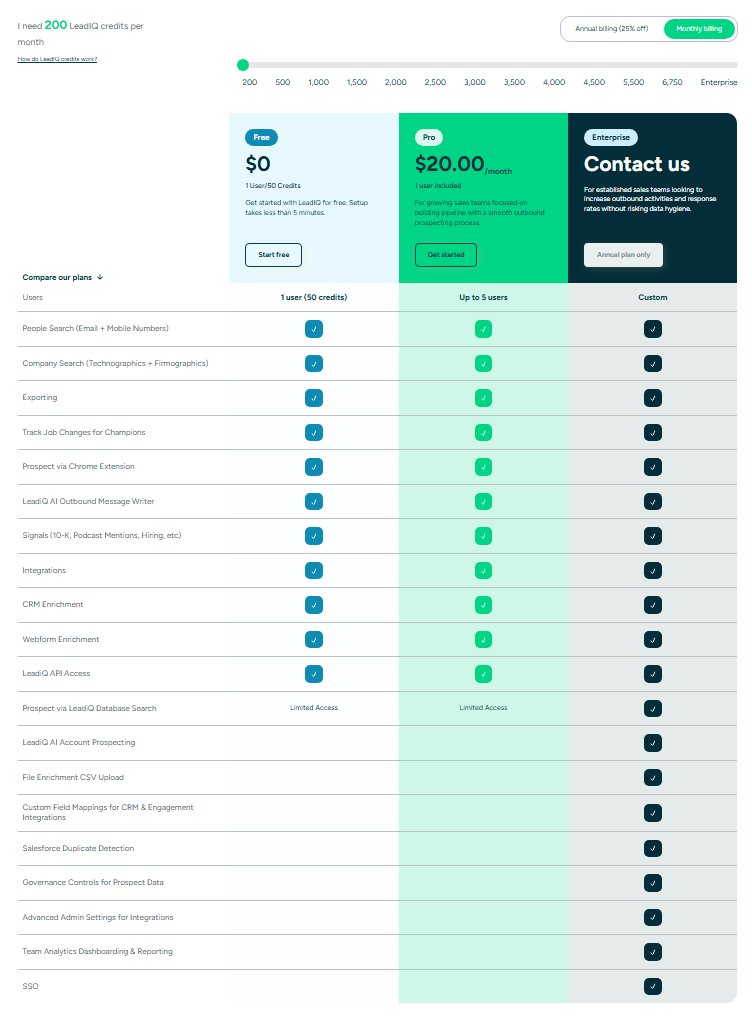
Free: $0/month. 1 user, 50 credits per month. 50 credits covers 50 emails or 5 phone numbers. Enough to test the platform. Not viable for ongoing prospecting.
Pro: Starts at $20/month on monthly billing for 200 credits, up to 5 users sharing the pool. Pricing scales via a slider as credit volume increases, up to 6,750 credits before Enterprise. LeadIQ does not publish the price for each slider position.
Annual billing saves 25%, so the entry tier drops to approximately $15/month. Includes Scribe AI, CRM integrations, champion tracking, and Salesforce deduplication. SSO, API access, advanced analytics, and priority support are locked behind Enterprise. 30-day free trial available on paid plans.
Enterprise: Annual plan only. Custom pricing, no self-serve access. Based on 93 actual purchase contracts tracked by Vendr, the median annual contract lands at $26,400/year. Range spans $6,096 to $58,240. Designed for teams larger than 5 users.
Worth knowing before you budget: LeadIQ does not include a sequencer or dialer.
Teams that add LinkedIn Sales Navigator (~$99.99/month/user), Outreach or Salesloft (~$100 to $150/user/month), and a dialer on top of LeadIQ can reach $2,000 to $5,000/month for a 5-person SDR team before sending a single email.
LeadIQ and SalesRobot: How Do They Fit?
SalesRobot: The LinkedIn Outreach Layer

LeadIQ finds your prospects and captures their verified contact details. SalesRobot picks up from there, handling the actual outreach on LinkedIn.
The two tools cover different parts of the same workflow. LeadIQ tells you who to reach and gets their data into your CRM.
SalesRobot sends the connection request, runs the follow-up sequence, personalizes the message, and books the meeting.
If LinkedIn is a primary channel for your team, the two tools complement each other end to end without overlap.
What SalesRobot Actually Does
SalesRobot is a LinkedIn automation platform built specifically for B2B sales teams and agencies running outbound at scale.
It operates on LinkedIn's mobile APIs with dedicated residential IPs, which mirrors how LinkedIn's own phone app works technically.
This is why its verified ban rate across 4,100+ active accounts sits effectively at zero, compared to Chrome extension-based tools that LinkedIn actively detects and restricts.
Key Features
Mobile API Architecture: SalesRobot runs on LinkedIn's mobile API layer rather than browser automation or a Chrome extension. LinkedIn's detection system sees it as a legitimate mobile user. This is the reason agencies managing 10 to 50 client accounts trust it over tools like Expandi or LinkedHelper.
AI Appointment Setter: Once a prospect replies, SalesRobot's AI takes over the inbox: qualifying the lead, handling objections in your brand voice, and booking meetings directly on your calendar without manual input. Reps only step in once a conversation is already warm.
AI Variables and Voice/Video Personalization: SalesRobot has an AI variables feature, that reads each prospect's recent LinkedIn posts, company news, and job changes to write a unique personalized message per contact, not just merge fields.
For prospects who are not responding to text, users can send AI-cloned voice notes or personalized video messages directly through LinkedIn DMs. Users report 40%+ higher reply rates with voice and video versus text-only outreach.
Multi-Step LinkedIn + Email Sequences: Combine LinkedIn connection requests, follow-up messages, and email outreach in a single coordinated campaign from one dashboard. Smart reply detection pauses the sequence automatically when a prospect responds so no one gets messaged after they have already replied.
SalesRobot Pricing
Pricing is per LinkedIn account. Annual billing saves up to 35%.
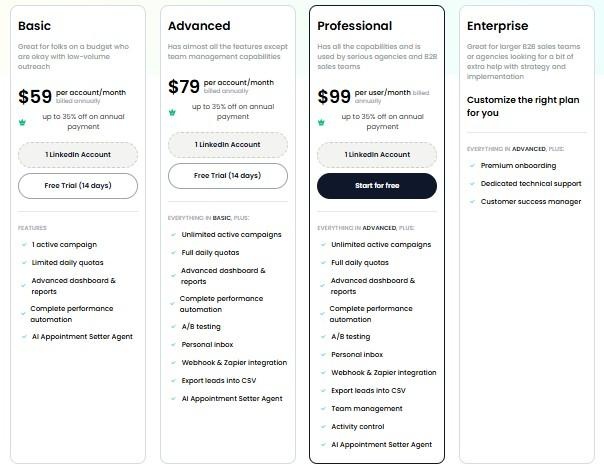
Basic: $59/month (drops to $39/month on annual billing) 1 active campaign, core automation features. Good for solopreneurs testing LinkedIn outreach on a budget.
Advanced: $79/month Unlimited campaigns, full daily quotas, A/B testing, personal inbox, Zapier integration, AI appointment setter. The right plan for most individual sales professionals and small teams.
Professional: $99/month Everything in Advanced plus team management and activity controls. Built for agencies and sales teams managing multiple LinkedIn accounts.
Enterprise: Custom pricing Premium onboarding, dedicated support, and a customer success manager for larger organizations needing hands-on implementation.
SalesRobot offers a 14-day free trial with no credit card required.
The Verdict
LeadIQ is a focused tool that does one thing exceptionally well: getting verified contact data out of LinkedIn and into your CRM without manual effort.
For SDR teams already running Salesforce plus Outreach or Salesloft, it slots cleanly into an existing stack and meaningfully reduces data entry time.
The limitations are real though. Phone data quality is a genuine problem for call-heavy teams, the credit system rewards email-only prospecting and penalizes mixed workflows, and the tool adds a line item without reducing the number of tools you are already managing.
If LinkedIn outreach is part of your motion, pairing LeadIQ with SalesRobot covers the workflow end to end. LeadIQ handles the research and capture side.
SalesRobot handles the conversation side. Neither tool steps on what the other does.
Bottom Line
Buy LeadIQ if your team prospects heavily through LinkedIn, already has Outreach or Salesloft in place, and needs clean verified contact data flowing into your CRM without manual effort.
The email accuracy and CRM integration depth justify the price for teams where data hygiene matters.
Reconsider if cold calling is a major part of your motion, phone number accuracy is non-negotiable, or you are looking to consolidate your stack rather than add to it.
Add SalesRobot if LinkedIn is your primary outreach channel and you want an AI handling the full workflow from connection request to booked meeting, with near-zero account risk.
Frequently Asked Questions
Does LeadIQ send emails or run outreach?
No. LeadIQ only captures and syncs verified contact data to your CRM. To actually run outreach you still need a sequencer like Outreach or Salesloft for email, a dialer for calls, and a separate LinkedIn automation tool such as SalesRobot for LinkedIn.
Do LeadIQ credits roll over to the next month?
No. LeadIQ credits expire at the end of every billing month on every plan, including paid tiers, with no rollover. Unused credits reset to zero. This is the most frequent complaint from teams whose prospecting volume varies month to month.
Is LeadIQ worth it for cold calling teams?
For call-heavy teams, LeadIQ is a weaker fit. Phone number accuracy is its most consistent complaint across G2, and phone lookups cost 10 credits versus 1 for email. Dedicated dialing-data providers like Cognism or Lusha typically deliver better mobile coverage at a lower per-number cost.
How does LeadIQ compare to Apollo or ZoomInfo?
LeadIQ focuses specifically on fast LinkedIn-to-CRM data capture and data hygiene via a browser extension. In contrast, platforms like Apollo and ZoomInfo offer massive standalone databases with native email sequencers, built-in dialers, and intent tracking. Teams choose LeadIQ when they already have a sequencer (like Outreach or Salesloft) and want a streamlined capture tool directly on LinkedIn.
Can LeadIQ be used without Salesforce or HubSpot?
Yes. While native CRM integrations make syncing instant, you can export captured leads and contact details directly as a CSV file to import into any CRM, spreadsheet, or sales engagement tool.
What CRMs and sales engagement tools integrate natively with LeadIQ?
LeadIQ integrates natively with Salesforce, HubSpot, Outreach, Salesloft, and Gong. These integrations allow reps to push contacts, detect duplicates, and drop prospects straight into active cadences without switching browser tabs.
Does LeadIQ offer a free trial or free plan?
LeadIQ offers a permanent Free plan that includes 1 user seat and 50 credits per month. Paid plans also include a 30-day free trial so teams can test full credit pools, team admin features, and CRM deduplication before committing.

Wow your leads by cloning yourself and sending personalized videos and voice notes to each lead on LinkedIn.
If you don't reply to leads within 5 mins, your chances of converting them fall by 50%. Our AI replies on your behalf instantly! (and yes, you can train it)

Don't shoot in the dark. Get detailed analytics on what's working

SalesRobot allows you to invite other team members, so that they can add their LinkedIn Account, run outreach campaigns and get amazing results just like you.
.avif)


Trusted by 4100+ innovative B2B sales teams and lead gen agencies

.avif)

.avif)




.avif)


Heading 1
Heading 2
Heading 3
Heading 4
Heading 5
Heading 6
Lorem ipsum dolor sit amet, consectetur adipiscing elit, sed do eiusmod tempor incididunt ut labore et dolore magna aliqua. Ut enim ad minim veniam, quis nostrud exercitation ullamco laboris nisi ut aliquip ex ea commodo consequat. Duis aute irure dolor in reprehenderit in voluptate velit esse cillum dolore eu fugiat nulla pariatur.
Block quote
Ordered list
- Item 1
- Item 2
- Item 3
Unordered list
- Item A
- Item B
- Item C
Bold text
Emphasis

Superscript
Subscript